A WooCommerce store can add an AI plugin for almost every job now: search, product copy, photos, upsells, cart recovery, fraud checks, returns, reporting. The temptation is to install everything at once. That usually ends badly: overlapping coupon offers, recommendation widgets with no order history to learn from, and a dozen settings screens nobody has time to tune.
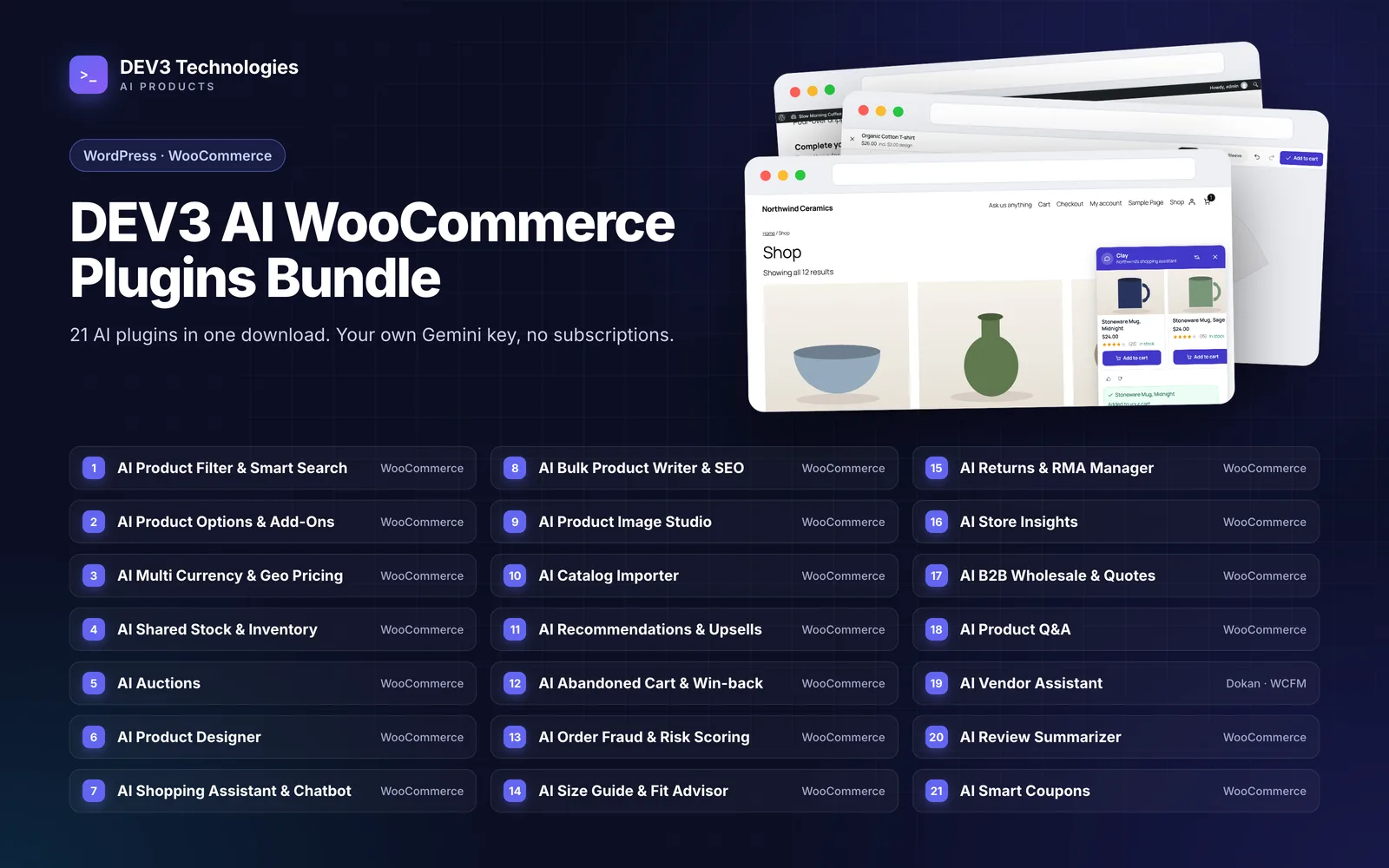
A better approach is to install in the order your store's problems appear. This guide groups the 21 plugins in the DEV3 AI WooCommerce Plugins Bundle by the problem they solve, then suggests a sensible install order for five common store types: a new store, a growing catalogue, a high-volume store, a B2B store and a marketplace. It doesn't re-explain each plugin; where a step-by-step guide exists, it is linked.
The 21 plugins, grouped by problem
Every plugin in the bundle works with WooCommerce 8.0 or newer (classic and block cart and checkout, and HPOS). The Vendor Assistant also needs Dokan or WCFM.
| Problem | Plugins |
|---|---|
| Getting the catalogue right | Catalog Importer, Bulk Product Writer & SEO, Product Image Studio |
| Helping shoppers find and choose | Product Filter & Smart Search, Shopping Assistant & Chatbot, Product Q&A, Review Summarizer & Sentiment Analyzer, Size Guide & Fit Advisor |
| Selling more complex products | Product Options & Add-Ons, Product Designer, Shared Stock & Inventory |
| Raising order value and recovering carts | Recommendations & Upsells, Abandoned Cart & Win-back Emails, Smart Coupons & Dynamic Discounts |
| Protecting and running the store | Order Fraud & Risk Scoring, Returns & RMA Manager, Store Insights |
| Different ways to sell | Multi Currency & Geo Pricing, B2B Wholesale & Quote Requests, Auctions, Vendor Assistant for Dokan & WCFM |
Each plugin's full name follows the pattern "DEV3 AI … for WooCommerce", for example DEV3 AI Catalog Importer for WooCommerce. The exception is DEV3 AI Vendor Assistant for Dokan & WCFM.
What each group does, in one line
- Catalogue: import supplier CSV, Excel and PDF catalogues with review, dry runs and rollback; write titles, descriptions, SEO meta, tags and alt text as reviewable drafts; clean up product photos with background removal, white pack shots and lifestyle scenes, all approved before they reach a product.
- Find and choose: AJAX filters with SEO-friendly URLs and a live search that turns plain-language queries into filters; a chat assistant that recommends real products and tracks orders; answers to product questions drafted from that product's own details; pros and cons summarised from approved reviews; size charts with a "What size am I?" quiz.
- Complex products: extra options with 25 field types, conditional logic and server-side price formulas; a design studio for T-shirts, mugs, posters and phone cases; stock pools shared across products, variations and attribute values.
- Order value: bundles, order bumps and post-purchase offers learned from the store's paid orders; email and SMS cart recovery and win-back sequences; a personal single-use coupon for shoppers about to leave, clamped to your caps, margin floor and daily budget.
- Protect and run: a 0–100 risk score on every order with plain-language reasons, holding risky orders for review; a returns portal and RMA queue; plain-English questions answered with a chart and table from read-only reports.
- Ways to sell: multiple currencies with geo detection and local price points; wholesale roles, tiered pricing and PDF quotes; standard, proxy, sealed and reverse auctions; listing, pricing and reply help for marketplace vendors.
Three rules before you install anything
- Fix the catalogue before the funnel. Upsells, chat answers, Q&A drafts and search all read your product data. Thin descriptions and missing attributes make every later plugin weaker.
- Some plugins need history. Recommendations count co-purchases from paid orders, with a minimum of two orders before a pair counts. Store Insights answers questions about sales, so it also needs orders to report on. Install them when you have data, not on launch day.
- Give each job one owner. Smart Coupons acts while the shopper is still on the site; Abandoned Cart acts after they leave, by email or SMS. Both can issue coupons, so decide your discount limits once and keep the two consistent.
Most plugins also have a working mode without AI. The product filter's search, the shopping assistant's guided mode, the size quiz (which uses measurement maths rather than AI) and rule-based recommendations all work with no AI key. AI then adds drafts and suggestions on top.
Roadmap 1: a new store
You have products to load, little traffic and no order history yet.
- Catalog Importer. Bring in supplier price lists and catalogues as reviewed rows instead of copy-pasting. Dry-run the first import. See how to import supplier products into WooCommerce from CSV, Excel or PDF.
- Bulk Product Writer & SEO. Audit the imported copy, then write descriptions and meta as drafts you approve.
- Product Image Studio. Turn mixed supplier photos into a consistent set of pack shots.
- Order Fraud & Risk Scoring. It scores orders and holds risky ones for review, which is a useful defence against card testing from the first order.
- Product Filter & Smart Search, once you have enough products that browsing by category stops working.
Leave Recommendations, Store Insights and Smart Coupons until orders are coming in.
Roadmap 2: a growing catalogue
Hundreds or thousands of products, and shoppers struggle to find the right one.
- Product Filter & Smart Search first: discovery is now the bottleneck. More in how to add AI product filters and smart search to a WooCommerce store.
- Bulk Product Writer & SEO to bring older products up to the standard of new ones. See how to write SEO product descriptions for a large WooCommerce catalogue.
- Product Q&A and Review Summarizer so shoppers get answers on the product page instead of in your inbox.
- Product Options & Add-Ons or Shared Stock & Inventory if your range has personalisation, kits or one stock item behind several listings.
- Shopping Assistant & Chatbot once the catalogue data is clean enough for it to recommend from.
If you sell clothing or footwear
Add Size Guide & Fit Advisor early, then Returns & RMA Manager. They work well together without any configuration between them: the Size Guide learns from WooCommerce refunds, and refunds issued from the Returns queue are standard WooCommerce refunds, so their reasons can tell the fit quiz when a style runs small.
If you sell personalised or printed products
Product Options & Add-Ons covers personalisation and configurable extras with conditional logic and a live price. Product Designer goes further, with a canvas studio, a print-quality check and print-ready files.
Roadmap 3: a high-volume store
Plenty of orders, so the gains now come from order value, recovered carts and less manual work.
- Order Fraud & Risk Scoring, if it isn't already in place. More orders mean more chargeback exposure. See how to stop fraudulent orders and card testing on WooCommerce.
- Recommendations & Upsells. Now there is real co-purchase data to learn from.
- Abandoned Cart & Win-back Emails, with sends tuned to each shopper's local hour. See the abandoned cart email sequence guide.
- Smart Coupons & Dynamic Discounts for shoppers about to leave, with a margin floor so offers never go below what you set.
- Returns & RMA Manager to move returns out of email and into a queue.
- Store Insights so the team can ask questions such as "best sellers last month" without building reports.
- Multi Currency & Geo Pricing when a meaningful share of traffic comes from abroad.
Roadmap 4: a B2B or wholesale store
Business buyers need accounts, their own prices and quotes rather than a basket.
- B2B Wholesale & Quote Requests. Wholesale roles, tiered pricing, registration and quick order, plus quotes that become pay-later orders. AI drafts quotes from free-text requests using real products and your rule prices. See how to sell wholesale on WooCommerce.
- Catalog Importer for large supplier ranges and regular price-list updates.
- Shared Stock & Inventory if the same stock is sold as single units, packs and cases.
- Product Filter & Smart Search, because trade buyers often search by specification.
- Store Insights for account-level questions about what is selling.
Stores that serve retail and trade buyers can run the retail roadmap alongside this one, since retail customers don't see wholesale pricing unless you want them to.
Roadmap 5: a marketplace
A Dokan or WCFM marketplace has two audiences: shoppers and vendors.
- Vendor Assistant for Dokan & WCFM. Vendors get a listing writer, price suggestions, reply drafts and SEO help, while the owner controls access, monthly credits and moderation. See how to help Dokan and WCFM vendors write listings with AI.
- Product Filter & Smart Search across every vendor's products.
- Order Fraud & Risk Scoring, because a marketplace carries more unknown buyers and sellers.
- Review Summarizer and Product Q&A to build trust in listings from sellers shoppers don't know.
Auctions can turn any product into a standard, proxy, sealed or reverse auction, with live bidding, soft close and deposits, so it suits marketplaces and specialist stores alike.
A quick reference
| Store type | Install first | Add next | Add when you have order data |
|---|---|---|---|
| New store | Catalog Importer, Bulk Product Writer | Image Studio, Fraud & Risk | Recommendations, Store Insights |
| Growing catalogue | Product Filter, Bulk Product Writer | Product Q&A, Review Summarizer | Shopping Assistant, Recommendations |
| High volume | Fraud & Risk, Recommendations | Abandoned Cart, Smart Coupons | Returns, Store Insights |
| B2B | B2B Wholesale | Catalog Importer, Shared Stock | Store Insights |
| Marketplace | Vendor Assistant | Product Filter, Fraud & Risk | Review Summarizer, Product Q&A |
Closing thoughts
The order matters more than the number. A store that gets its catalogue right first and adds funnel tools once it has orders gets more out of each plugin than one that switches everything on at launch. Throughout the bundle, AI output that changes your store, from product copy to quotes and return resolutions, waits as a draft for a person to approve.
All 21 plugins come as installable WordPress plugin zips in the DEV3 AI WooCommerce Plugins Bundle. Since search and filters are where most of the roadmaps start, the Product Filter & Smart Search case study explains how it stays fast on large catalogues.