All case studies

DEV3 Technologies · own product

DEV3 AI Product Filter & Smart Search: indexed WooCommerce filters at 91 ms on 50,000 products

Our own WooCommerce plugin: AJAX filters with SEO URLs, served from an index table and cached postings lists, plus a live search that turns plain-language queries into filters, with or without AI.

Industry
E-commerce (WooCommerce)

Live project preview

Client systems are private — screenshots shown where permitted.

DEV3 Technologies · own product — screenshots
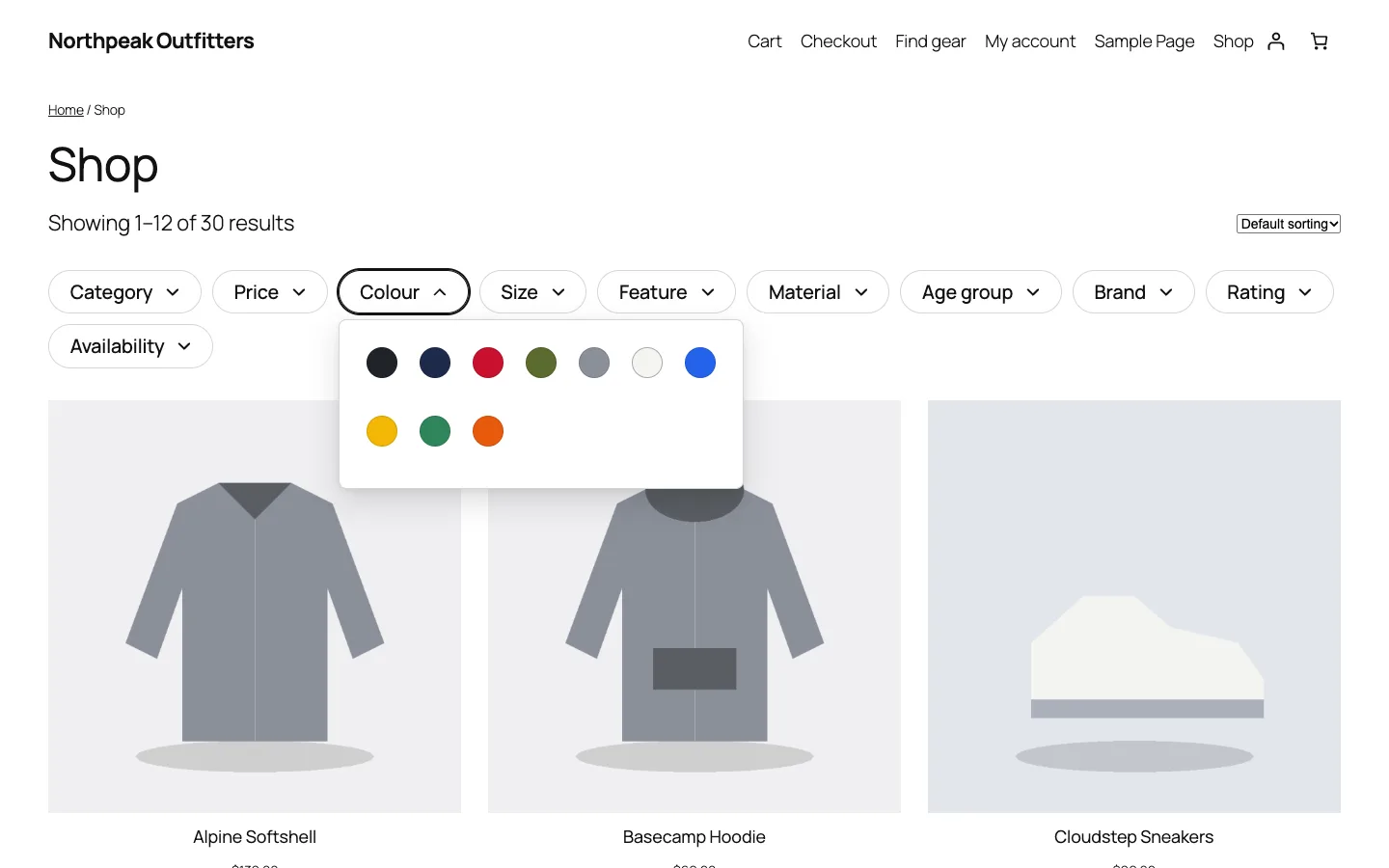
The horizontal filter bar on a block theme, with colour swatches; every count comes from the cached facet index.

The horizontal filter bar on a block theme, with colour swatches; every count comes from the cached facet index.

The challenge

Filter plugins for WooCommerce usually build each response from taxonomy and meta queries against wp_posts and wp_postmeta. That works on a demo shop and stalls on a large catalogue, because every facet count is another expensive query. Shoppers also type the way they talk ("black waterproof jacket under 100 for kids"), and keyword search turns that into zero results. We wanted filters that stay fast on 50,000 products, counts that let shoppers widen a choice, URLs search engines can handle, and a search box that understands plain language without making AI a requirement.

Our solution

We built DEV3 AI Product Filter & Smart Search as a WooCommerce plugin in PHP with a React admin and a small storefront script. The filter engine never queries product meta at request time: it reads precomputed lists and does set maths in memory.

Key design decisions

  • A facet index table. Each product is flattened into rows of (product_id, facet, value, num_value): categories with their ancestors, attributes, every in-stock variation price, rating, stock, sale and chosen meta or ACF fields. Saves, stock changes, reviews and term edits queue a re-index at shutdown, and Action Scheduler rebuilds it nightly.
  • Cached postings lists. For each facet the index is turned into value → packed product IDs and stored once per index version. A filter request decodes those lists and intersects them; no per-request scans of the index table.
  • Disjunctive counts. The count next to each colour ignores the colour selection but respects every other filter, so shoppers can always see how many products a second colour would add.
  • Stock-aware variations. A variable hoodie only appears under the sizes that are in stock, and its price range uses the in-stock variation prices.
  • SEO-safe URLs. Filter states map to pretty paths such as /shop/filter/color/black/ with one canonical URL per state. Combinations are noindex unless the merchant turns one into a landing page with its own title, meta description, H1 and intro, listed in the XML sitemap.
  • Natural language without AI first. A rules parser maps queries to filters using the store's own vocabulary and synonyms. When the Google Gemini API is connected, its interpretation is validated against the catalogue before use, and a failure falls back to the parser.

Architecture

Filters render as a horizontal bar, a sidebar or a mobile drawer, in block themes and classic themes, through a block, widget, shortcode, Elementor widget or WPBakery element. The storefront calls a same-origin, rate-limited REST endpoint that returns results, counts, the price range and rating counts in one response, and the main shop query is narrowed with the same ID set. Optional AI features (semantic search with embeddings stored in the database, "Build my filters", synonym and typo lists, zero-result fixes and landing-page copy) all produce drafts the merchant accepts or rejects. The API client, encrypted key storage, job runner and usage logs come from a shared core used across DEV3's plugins.
Results

The plugin is complete. It ships in the DEV3 AI WooCommerce Plugins Bundle on the DEV3 marketplace, alongside 20 other WooCommerce plugins, and is being prepared for CodeCanyon. What was built and verified:

  • Load test: a synthetic 50,000-product index (650,000 rows), 30 full filter responses (results page, counts for 5 facets, price range, rating counts): 91 ms average, 104 ms p95, against a 300 ms target. Rebuilding the cached lists after an index change took about 1.8 s, done once, right after the change.
  • 73 PHPUnit tests covering the index, OR/AND logic, disjunctive counts, category hierarchy, stock-aware variations, URL state round trips, noindex rules, REST permissions and rate limits
  • 35 Jest tests for the storefront filters, live search and admin screens
  • A 25-query natural-language fixture: the rules parser alone must map at least 20 queries to the exact filter state, and the test enforces it
  • AI paths (natural-language interpretation, embeddings, filter suggestions, zero-result fixes) tested with mocked API responses; a run with a live key is still to come
  • Checked on the Twenty Twenty-Five block theme, desktop and mobile; HPOS and cart/checkout blocks compatibility declared, with a test that asserts it

Setup guide

No licence key or activation is needed: install the zip and every feature works.

Requirements

  • WordPress 6.0 or newer and PHP 7.4 or newer
  • WooCommerce 8.0 or newer, active (block and classic themes, HPOS and the cart/checkout blocks are supported)
  • Optional: a Google Gemini API key for natural-language AI, semantic search and AI suggestions. Filters, live search, typo tolerance, synonyms and the built-in natural-language parser all work without one

1. Install the plugin

  1. The plugin ships inside the DEV3 AI WooCommerce Plugins Bundle download. Unzip the bundle and find dev3-ai-woocommerce-plugins-bundle/dev3-ai-product-filter-for-woocommerce/dev3-ai-product-filter-for-woocommerce.zip.
  2. In WordPress, go to Plugins → Add New → Upload Plugin, choose that zip and click Install Now.
  3. Click Activate. Its menu, DEV3 AI Product Filter & Smart Search for WooCommerce, appears in the admin sidebar. A starter filter set is created and the filter index is built in the background.

2. Connect Google Gemini (optional)

  1. Create a free API key in Google AI Studio (sign in with a Google account, then Create API key).
  2. Go to DEV3 AI Product Filter & Smart Search for WooCommerce → API Config, paste the key and click Validate & save. The key is stored encrypted (AES-256-GCM) and never sent to the browser.
  3. Optional: pick the models (gemini-2.5-flash is the fast default; gemini-embedding-001 is used for semantic search).

Prefer config files? Add define( 'DEV3PF_GEMINI_API_KEY', 'your-key' ); to wp-config.php instead.

3. Set it up

  1. Open the Dashboard and check that the filter index shows Up to date. Use Speed test to time filter queries on your catalogue.
  2. In Filters, edit the starter set or create new ones: choose sources (categories, attributes, price, rating, stock, sale, custom or ACF fields), display types, instant or "Apply" mode, and which pages each set appears on. Build my filters can suggest a set from your catalogue data, with or without AI.
  3. Filters are added above the products on shop and category pages automatically. You can also place them with the Product Filters (DEV3 AI) block, widget, Elementor or WPBakery element, or [dev3pf_filters id="1"].
  4. Add the Smart Product Search block, widget or [dev3pf_search] shortcode to your header or a page.
  5. In Synonyms, add synonym groups and typo fixes (for example "sneakers, trainers, running shoes"), or generate them from your catalogue and search log.
  6. In SEO pages, turn useful filter combinations into indexable landing pages with their own title, meta description, H1 and intro. Other combinations stay noindex.
  7. Watch Insights for searches with no results and, with AI connected, apply the suggested fixes.
  8. If your theme shows product counts outside the product area, add their CSS selectors in Settings → "Extra regions to refresh".

Updating

Download the latest bundle, find the new plugin zip at the same path, then upload it in Plugins → Add New → Upload Plugin and choose Replace current with uploaded. Settings, filter sets and the index are kept.

Uninstalling

Deactivate and delete the plugin from Plugins. Data is removed only if you turned on "delete data on uninstall" in Settings; otherwise your filter sets, synonyms and landing pages are kept for a reinstall.

How to use

Build a filter set for a category

  1. Go to DEV3 AI Product Filter & Smart Search for WooCommerce → Filters.
  2. Under Build my filters, choose the category (or Whole shop) and click Suggest from catalog data, or Generate with DEV3 AI if AI is connected. Review the suggested filters; nothing is saved until you keep it.
  3. Click New filter set (or edit the suggestion): add sources such as Category, Price, Colour, Size or a custom field, pick a display type for each (checkboxes, swatches, labels, range slider, star rating and more), and choose Instant or Apply button mode.
  4. Set where the set is shown (everywhere, or specific categories) and save. The filters appear above the products on those pages.

Place filters and search yourself

  1. In the block editor or Site Editor, add the Product Filters (DEV3 AI) block, or use the widget, the Elementor or WPBakery element, or [dev3pf_filters id="1" layout="horizontal"].
  2. Add [dev3pf_active_filters] where you want the active-filter chips.
  3. Add the Smart Product Search block or [dev3pf_search] to your header for live search with thumbnails, prices and keyboard support.

Fix searches that find nothing

  1. Open Insights and switch to the No results tab to see queries that returned zero products.
  2. Select the queries to fix (or none for the top 15) and click Suggest fixes with DEV3 AI. Each suggestion is a synonym, a typo fix, a missing attribute, or "not sold here".
  3. Click Apply fix on the fixes you agree with. Without AI, add synonym groups and typo corrections by hand in Synonyms.

Create an SEO landing page from a filter combination

  1. Go to SEO pages and pick a base (the shop or a category) and the filter values, for example Jackets + Waterproof.
  2. Write the SEO title, meta description, H1 and intro, or click Write with DEV3 AI for a draft and edit it.
  3. Save. The page gets its own indexable URL and is listed in the XML sitemap; other filter combinations stay noindex.

Keep the index healthy

  1. The Dashboard shows indexed products, index rows, facets and the last full build. The index updates when products change and rebuilds nightly.
  2. After a direct database import, click Rebuild index. Click Speed test to time filter queries on your own catalogue.

Related case studies