All case studies

DEV3 Technologies · own product

DEV3 AI Catalog Importer: supplier spreadsheets, PDFs and pages into WooCommerce, with dry run and rollback

Our own WooCommerce plugin that turns supplier CSV and Excel price lists, PDF catalogs and product pages into clean products and variations. Every row is reviewed before it is written, every import can be dry-run first, and every import can be rolled back afterwards.

Industry
E-commerce (WooCommerce)

Live project preview

Client systems are private — screenshots shown where permitted.

DEV3 Technologies · own product — screenshots
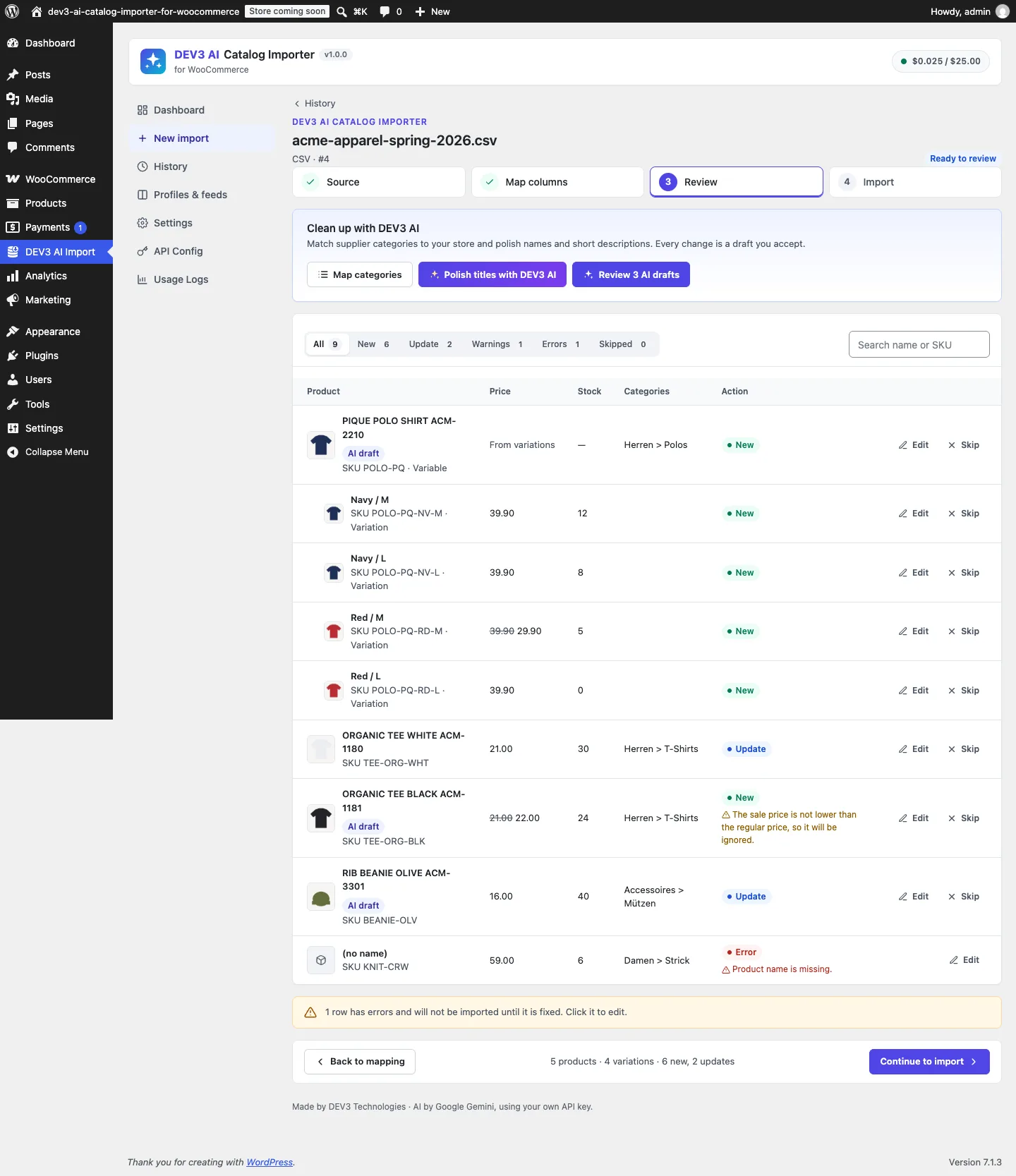
The review grid: a supplier CSV becomes a variable product with four variations, updates matched by SKU, a sale-price warning and a row blocked for a missing name, all before anything is written.

The review grid: a supplier CSV becomes a variable product with four variations, updates matched by SKU, a sale-price warning and a row blocked for a missing name, all before anything is written.

The challenge

Suppliers send whatever they have: a semicolon-separated price list in Windows-1252 with German headers, an Excel sheet with one row per size, a PDF catalog, or a link to their own product pages. Existing importers handle the first case well if the shop owner maps every column by hand and already knows WooCommerce's column names, and none of them can take an import back once it has run. A bad import, such as wrong prices, a parent SKU that turned simple products into variations, or 40 junk categories, is then fixed by hand or from a database backup. We wanted an importer where AI does the tedious reading and mapping, nothing reaches the store before a person has seen it, and the whole import can be undone, including the categories, attributes and images it created along the way.

Our solution

We built DEV3 AI Catalog Importer as a WooCommerce plugin in PHP with a React admin. A four-step wizard (Source → Map → Review → Import) keeps every source in staging tables until the shop owner presses Import.

Key design decisions

  • Parse without AI first. CSV and TSV with delimiter and encoding detection (UTF-8, UTF-16, Windows-1252), BOM handling and multi-line cells; Excel .xlsx through the plugin's own ZipArchive and XML reader, which refuses DOCTYPE entities; supplier pages through schema.org Product and ProductGroup JSON-LD. A heuristic mapper recognises common supplier headers in six languages, so spreadsheets and structured pages import fully with AI switched off.
  • AI as reviewable drafts. Through the Google Gemini API, the plugin suggests column mappings with a confidence score and a reason, reads PDF catalogs sent inline as documents, reads free-form supplier pages, matches supplier categories such as Herren > Polos to the store's existing tree, and polishes titles and short descriptions. Each result is a draft that is applied per column, per category or per row only when accepted.
  • Variations from flat rows. Rows sharing a parent SKU become one variable product, and only the attributes whose values differ across the rows become variation attributes. A simple product that gains variations in a later file is converted to a variable product.
  • Validation before writes. Missing names, invalid prices, a sale price not below the regular price, duplicate SKUs inside the file and SKUs already in the store (update or skip) are flagged per row in a review grid with filters, search and an edit drawer.
  • Dry run and rollback ledger. A dry run runs the same pipeline without writes and records outcomes such as price 5 → 7.25; stock 2 → 40. A real import records every object it creates or changes in a ledger, with a before-snapshot for updates, so rollback can delete what it created and restore what it changed.
  • Guarded fetching. Feed URLs, supplier pages and product images go through an SSRF guard: http/https only, ports 80/443, every resolved address public, redirects re-checked at each hop, and connections pinned to the checked IP.

Architecture

Sessions, rows, the ledger and mapping profiles live in four custom tables. Imports and rollbacks run as chunked background jobs (Action Scheduler when available) with progress, cancel and retry. Saved profiles recognise a supplier's file by a signature of its normalised headers, and a profile with a feed URL can re-import on a daily or weekly schedule. A WP-CLI command covers import, dry run and rollback. The API client, encrypted key storage, budget cap, cache and usage logs come from a shared core used across DEV3's plugins.

Results

The plugin is complete and ships in the DEV3 AI WooCommerce Plugins Bundle on the DEV3 marketplace, alongside 20 other WooCommerce plugins. It is also being prepared for CodeCanyon. What was built and verified:

  • 52 PHPUnit tests with 476 assertions, run in wp-env against real WooCommerce. 30 cover the importer itself and 20 the shared core.
  • 34 Jest tests for the admin screens and UI kit
  • Round-trip test: a semicolon CSV produces a variable product with 3 variations plus a simple product. The dry run leaves the product count unchanged and predicts the same 5 creations the real import then makes. Rollback returns the product count to its starting value and removes the created categories and the created pa_colour attribute.
  • Restore tests: rollback brings back an updated product's old price and description, and turns a simple product that had gained variations back into a simple product
  • The same records come out of a CSV and the equivalent XLSX; the URL guard blocks loopback, private, link-local, metadata and credentialed URLs, and redirects into private ranges
  • AI mapping, PDF extraction, page extraction, category matching and polishing are tested with mocked API responses; a run with a live key is still to be done
  • Known limit: one AI request reads at most 100 products from a PDF or 50 from a web page
  • Build, Jest, PHPCS (0 errors, 0 warnings), PHPUnit, translation template and packaging gates all pass

Setup guide

No licence key or activation is needed: install the zip and every feature works.

Requirements

  • WordPress 6.0 or newer and PHP 7.4 or newer
  • WooCommerce 8.0 or newer, active (HPOS and block checkout compatible; the importer only writes products, variations, terms and media)
  • Optional: a Google Gemini API key. Without one, CSV, Excel, feed URLs and supplier pages with structured product data import fully; PDF catalogs and free-form pages need it

1. Install the plugin

  1. The plugin ships inside the bundle download at dev3-ai-woocommerce-plugins-bundle/dev3-ai-catalog-importer-for-woocommerce/dev3-ai-catalog-importer-for-woocommerce.zip.
  2. In WordPress, go to Plugins → Add New → Upload Plugin, choose that zip and click Install Now.
  3. Click Activate. DEV3 AI Catalog Importer for WooCommerce appears in the plugin list and its menu, DEV3 AI Import, appears in the admin sidebar.

2. Connect Google Gemini (optional)

  1. Create a free API key in Google AI Studio (sign in with a Google account, then Create API key).
  2. Go to DEV3 AI Import → API Config, paste the key and click Validate & save. The key is stored encrypted (AES-256-GCM) and never sent to the browser.
  3. Optional: pick the models (gemini-2.5-flash is the recommended fast model; gemini-2.5-pro for the hardest PDF catalogs) and set a monthly budget cap.

Prefer config files? Add define( 'DEV3CI_GEMINI_API_KEY', 'your-key' ); to wp-config.php instead.

3. Run your first import

  1. Go to DEV3 AI Import → New import and drop a CSV, Excel (.xlsx) or PDF file, or paste a feed URL or a supplier product page.
  2. In Map columns, check the automatic mapping or click Map with DEV3 AI and apply the suggestions you agree with. Set the category separator, the multiple-values separator, what happens when a SKU already exists, and which fields an update may overwrite. Click Save as profile to map the same supplier's files automatically next time.
  3. In Review, fix the rows flagged as errors, skip what you don't want, and optionally use Map categories and Polish titles with DEV3 AI. Every AI change is a draft you accept.
  4. In Import, click Start dry run to see exactly what would be created or updated, then import. If something is wrong, click Roll back import.
  5. Optional: in Profiles & feeds, give a profile a feed URL and a daily or weekly schedule. On the command line, use wp dev3ci import <file|url> [--profile=<id>] [--dry-run] and wp dev3ci rollback <session>.

Updating

Download the new bundle, then upload the plugin zip in Plugins → Add New → Upload Plugin and choose Replace current with uploaded. Settings, profiles and import history are kept.

Uninstalling

Deactivate and delete the plugin from Plugins. Imported products and media always stay. Import history, mapping profiles and settings are kept in the database too, so reinstalling picks up where you left off.
How to use

Import a supplier spreadsheet (CSV or Excel)

  1. Go to DEV3 AI Import → New import and drop the file on Upload a file. Delimiter, encoding and the first worksheet are detected automatically.
  2. In Map columns, check where each column goes. Common supplier headers in English, German, French, Spanish, Dutch and Italian are mapped for you. For anything else, click Map with DEV3 AI, tick the suggestions you agree with and click Apply N selected.
  3. To group sizes and colours into one variable product, map the style or model column to Parent SKU / style (groups variations) and each option column to Attribute.
  4. Click Build products & review.

Import a PDF catalog or a supplier web page

  1. In New import, drop the PDF, or switch to Supplier web page or feed and paste a product or category page URL.
  2. On the Extract step, click Extract products with DEV3 AI. Pages with schema.org product data are read without AI first. One AI request reads up to 100 products from a PDF or 50 from a page.
  3. The extracted products land in the review grid marked as AI extracted. Nothing touches the store until you import.

Review, clean up and dry-run

  1. In Review, use the New, Update, Warnings, Errors and Skipped tabs. Click Edit on a row to fix it in the drawer, or Skip to leave it out. Rows with errors are never imported.
  2. Optional: click Map categories to point supplier categories at your existing tree, and Polish titles with DEV3 AI to get cleaner names and short descriptions. Accept or reject each draft in Review N AI drafts.
  3. Click Continue to import, choose what happens when a SKU already exists and which Fields to overwrite when updating, then click Start dry run. Each row shows what would be created or updated, field by field.
  4. When the dry run looks right, click Import N rows and watch the progress. Download report gives a CSV of every row's outcome.

Undo an import

  1. Open the import from History.
  2. Click Roll back import. Products and variations it created are deleted, products it updated get their previous values back, images it downloaded are deleted, and categories, tags and attributes it created are removed if nothing else uses them.
  3. Rollback is available for as long as the import stays in History (30 days by default, set in Settings).

Re-import a supplier automatically

  1. On the Map columns step, click Save as profile. The next file with the same columns from that supplier is mapped automatically.
  2. In Profiles & feeds, click Edit on the profile, add the supplier's CSV or Excel feed URL and choose a daily or weekly schedule. Run now starts an import straight away.
  3. On the command line, run wp dev3ci import <file|url> --profile=<id> --dry-run, then the same command without --dry-run.

Related case studies