All case studies

DEV3 Technologies · own product

DEV3 AI Product Q&A: WooCommerce product questions answered from the product's own data, with cited sources

Our own WooCommerce plugin for product questions and answers: shoppers ask on the product page, the Google Gemini API drafts answers only from that product's details, reviews and earlier answers, and every draft carries checked sources and a confidence score.

Industry
E-commerce (WooCommerce)

Live project preview

Client systems are private — screenshots shown where permitted.

DEV3 Technologies · own product — screenshots
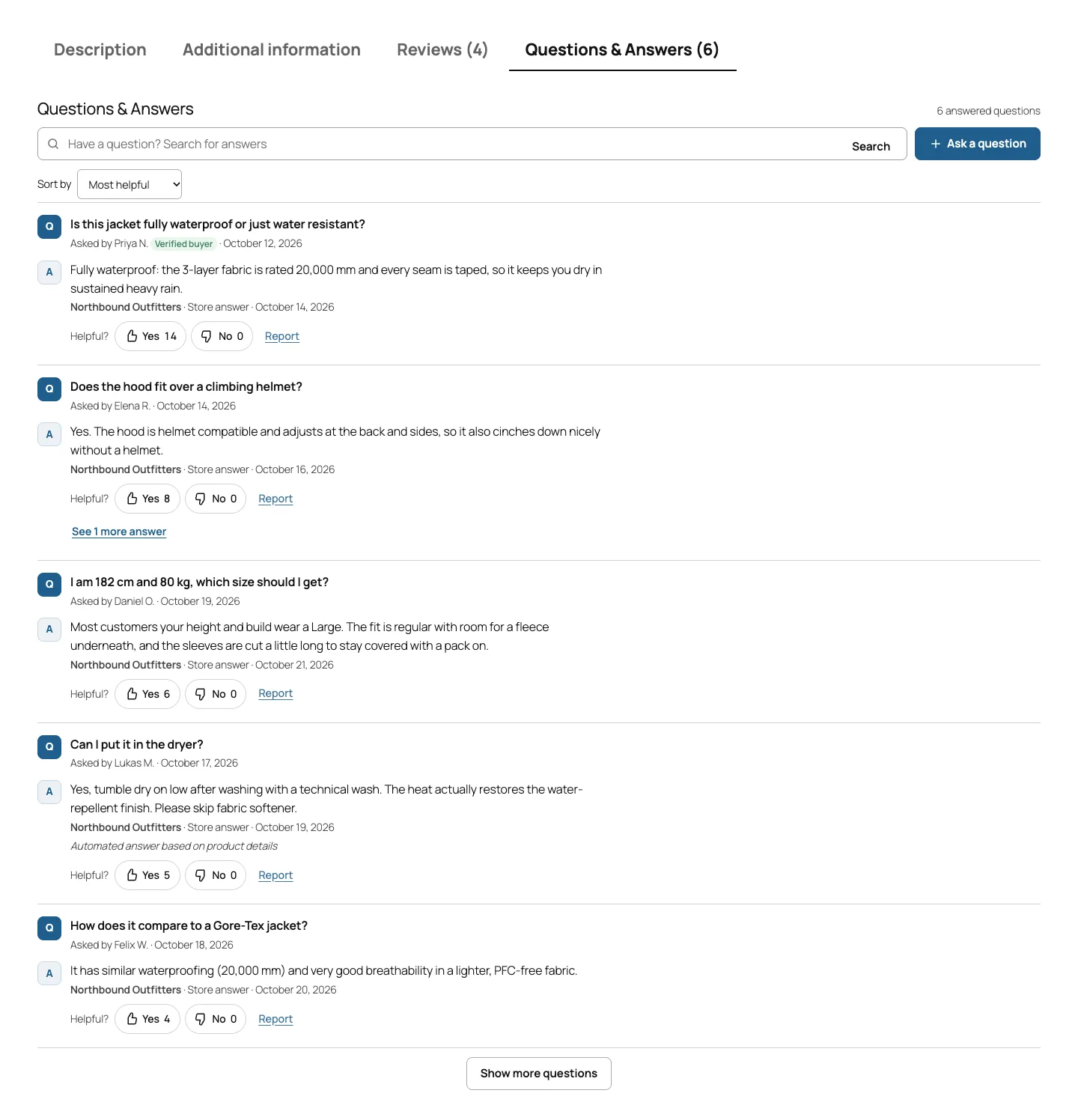
The Questions & Answers tab on a block theme: search, sort by most helpful, verified-buyer badges, helpful votes and a label on answers DEV3 AI published on its own.

The Questions & Answers tab on a block theme: search, sort by most helpful, verified-buyer badges, helpful votes and a label on answers DEV3 AI published on its own.

The challenge

Shoppers ask the same pre-sale questions over and over: does it fit, can it be washed, is it waterproof, how long does shipping take. Classic WooCommerce Q&A plugins make the store type every answer by hand, so questions sit unanswered for days. SaaS widgets add AI suggestions but move the data out of WordPress and add a monthly fee. Letting a language model answer for the store is risky in a different way: it can invent a specification, a delivery time or a guarantee, and once that is on the product page it is a promise. We needed answers grounded in the store's own product data, a measurable reason to trust each one, an explicit opt-in before anything is published without a person, and a Q&A system that still works fully when AI is off.

Our solution

We built DEV3 AI Product Q&A as a WooCommerce plugin in PHP with a React admin and a small vanilla JS storefront script. The product page, inbox, emails, spam protection, search and structured data all work without an API key; DEV3 AI is a layer on top.

Key design decisions

  • Per-product knowledge chunks. Each product is split into chunks: a facts block (price, availability, SKU, weight, dimensions, categories, rating), attributes, the short description, the description in parts of about 700 characters, up to 30 approved reviews and up to 30 published Q&A. Chunks are keyed by kind, reference and content hash, so an unchanged chunk keeps its id and its embedding.
  • Hybrid retrieval scoped to one product. Keyword overlap and embeddings search are fused by reciprocal rank, and the vector search is restricted to the ids of this product's chunks. Facts and attributes always go into the prompt first.
  • Citations are checked, not trusted. The model returns source_ids with its answer. Ids that were not in the retrieved set are dropped, an answer that cites nothing loses 40% of its confidence, and an answer the model marks as not answerable is capped at 0.4.
  • Auto-publish is opt-in and narrow. An AI answer appears instantly only when the merchant turned the switch on, the storefront AI kill switch allows it, and the draft is answerable, not spam, not off-topic, at or above the threshold (85% by default) and cites at least one real source. Everything else waits in the inbox, and auto-published answers are labelled on the page.
  • Spam handled before AI. A honeypot that returns a normal reply to bots, an HMAC-signed timing token, a link limit, an hourly limit per email and IP hash, exact-duplicate detection per product, blocked words and Akismet. DEV3 AI adds spam and off-topic flags on top.
  • Search engines see only published content. JSON-LD as FAQPage or QAPage (with accepted and suggested answers, upvotes and author types), built from published, answered questions only and capped at 20.

Architecture

The first page of questions is rendered on the server, so there is no layout shift and the content is in the HTML for caching and SEO. The storefront script calls same-origin, rate-limited REST routes for search, asking, votes, reports and customer answers. A new question either gets an instant answer attempt (when auto-publish is on) or a background draft job, so the shopper never waits for a draft. The admin has a Dashboard, a Questions inbox with a draft review panel, Add & FAQ with AI FAQ suggestions, Import / Export (questions hidden in reviews, CSV in and out) and Settings with a live preview. The API client, encrypted key storage, monthly AI budget, embeddings store, job runner and usage logs come from a shared core used across DEV3's plugins.
Results

The plugin is complete. It ships in the DEV3 AI WooCommerce Plugins Bundle on the DEV3 marketplace, alongside 20 other WooCommerce plugins, and is being prepared for CodeCanyon. What was built and verified:

  • 79 PHPUnit tests, covering chunking and hash-stable sync, per-product retrieval, the index job, citation filtering, auto-publish and its refusals, the storefront kill switch, spam rules, votes, GDPR export and erase, CSV formula escaping and FAQPage/QAPage markup
  • 38 Jest tests: 18 for the storefront widget and admin, 20 for the shared UI kit
  • Every AI path tested with mocked Google Gemini API responses, including a model reply that cites a source id it was never given; no live-key run has been done yet
  • Build, phpcs (WordPress standards) at 0 errors and 0 warnings, PHPUnit in wp-env, make-pot and packaging all pass
  • Storefront checked at 375 and 1440 px on Twenty Twenty-Five and Twenty Twenty-One; one known layout gap: on phones the AI draft card in the admin sits below the Answers card

Setup guide

No licence key or activation is needed: install the zip and every feature works.

Requirements

  • WordPress 6.0 or newer and PHP 7.4 or newer
  • WooCommerce 8.0 or newer, active (block and classic themes, HPOS and the block checkout are all supported)
  • Optional: a Google Gemini API key. Without one, the full Q&A system works with manual answers and keyword search

1. Install the plugin

  1. The plugin ships inside the DEV3 AI WooCommerce Plugins Bundle download, at dev3-ai-woocommerce-plugins-bundle/dev3-ai-product-qa-for-woocommerce/dev3-ai-product-qa-for-woocommerce.zip.
  2. In WordPress, go to Plugins → Add New → Upload Plugin, choose the zip and click Install Now.
  3. Click Activate. DEV3 AI Product Q&A for WooCommerce appears in the plugin list and its menu, DEV3 AI Q&A, appears in the admin sidebar.

2. Connect Google Gemini (optional)

  1. Create a free API key in Google AI Studio (sign in with a Google account, then Create API key).
  2. Go to DEV3 AI Q&A → API Config, paste the key and click Validate & save. The key is stored encrypted and never sent to the browser.
  3. Optional: pick the model (gemini-2.5-flash is the fast default; gemini-2.5-pro for the highest quality).

Prefer config files? Add define( 'DEV3QA_GEMINI_API_KEY', 'your-key' ); to wp-config.php instead.

3. Set it up

  1. In Settings → Display, choose where Q&A appears: a product tab (recommended), after the product summary, after the tabs, or only where you place the Product Q&A block or the [dev3qa_qa] shortcode. The live preview shows the result in your accent colour.
  2. In Asking & moderation, decide whether guests can ask, which fields are required and whether customers may answer (moderated, with a Verified buyer badge).
  3. In DEV3 AI answers, tick the sources DEV3 AI may use (product details, attributes, descriptions, approved reviews, earlier answers). Leave Publish high-confidence answers instantly off to approve every answer yourself, or turn it on and set the minimum confidence (85% by default).
  4. On the Dashboard, click Build index so smart search and answer drafting can use embeddings. The index also builds itself as questions arrive.
  5. Check Spam protection (honeypot and time check, link limit, hourly limit, blocked words, Akismet) and Emails (staff recipients, shopper notifications).
  6. In Rich results & data, choose FAQPage, QAPage or no structured data.
  7. Answer questions in Questions, add your own in Add & FAQ, and bring in questions hidden in product reviews or a CSV file from Import / Export.

Updating

Download the new bundle version, then upload the plugin zip in Plugins → Add New → Upload Plugin and choose Replace current with uploaded. Settings and data are kept.

Uninstalling

Deactivate and delete the plugin from Plugins. Questions, answers and settings stay in the database unless you turned on Delete all Q&A data when the plugin is deleted under Settings → Rich results & data.

How to use

Answer the questions waiting in the inbox

  1. Go to DEV3 AI Q&A → Questions. The Needs answer view lists new questions, oldest unanswered on the Dashboard under Waiting longest.
  2. Click a question. If DEV3 AI is connected, the DEV3 AI · Suggested answer card shows the draft, its confidence and the sources it was based on. A draft that cites nothing is marked No sources cited: check this answer carefully.
  3. Click Accept & publish, or Edit the draft first, or Regenerate or Reject it. You can also type your own reply under Write your answer and click Publish answer.
  4. The answer appears on the product page, and the shopper gets an email if they ticked "Email me when it is answered". Use Reject or Spam at the top for questions that shouldn't be shown.

Draft many answers at once

  1. On the Dashboard, click Draft n open answers with DEV3 AI, or in Questions tick several questions and choose Draft answers with DEV3 AI from Bulk actions, then Apply.
  2. Drafting runs in the background. When it finishes, open the AI drafts view and review each draft, or select drafts you have checked and use the bulk action Publish (accept AI drafts).

Let confident answers publish themselves (optional)

  1. In Settings → DEV3 AI answers, turn on Publish high-confidence answers instantly and set Minimum confidence to publish (85% is the default).
  2. Untick any source under Sources DEV3 AI may use that you don't want answers based on, such as approved customer reviews.
  3. Keep Label automatic AI answers on so shoppers see "Automated answer based on product details". Auto-published answers are counted on the Dashboard and stay editable in the Published view.

Seed a product FAQ before anyone asks

  1. Go to Add & FAQ. To add a question you were asked by phone or email, pick the product, type the question and answer, and click Save question.
  2. Under DEV3 AI · FAQ suggestions, pick a product, choose How many and click Suggest FAQ with DEV3 AI. Edit or untick suggestions, then click Publish n selected.

Import questions you already have

  1. Go to Import / Export. Under Import questions from reviews, optionally pick a product and click Scan reviews (or Scan reviews with DEV3 AI to detect questions that don't end in a question mark).
  2. Tick the questions found and click Import n selected. Your replies to those reviews become answers; questions with no reply go to the inbox.
  3. To move Q&A from another tool, use Import CSV (product ID or SKU, question, answer, status). Export CSV downloads every question with its top answer.

Related case studies