All case studies

DEV3 Technologies · own product

DEV3 AI Returns & RMA Manager: a self-hosted WooCommerce return portal where AI triages and admins refund

Our own WooCommerce plugin: a guest and My Account return portal, an RMA queue with refunds, exchanges, store credit and coupons, reasons analytics, and optional AI triage of reasons and photos that only ever drafts a resolution.

Industry
E-commerce (WooCommerce)

Live project preview

Client systems are private — screenshots shown where permitted.

DEV3 Technologies · own product — screenshots
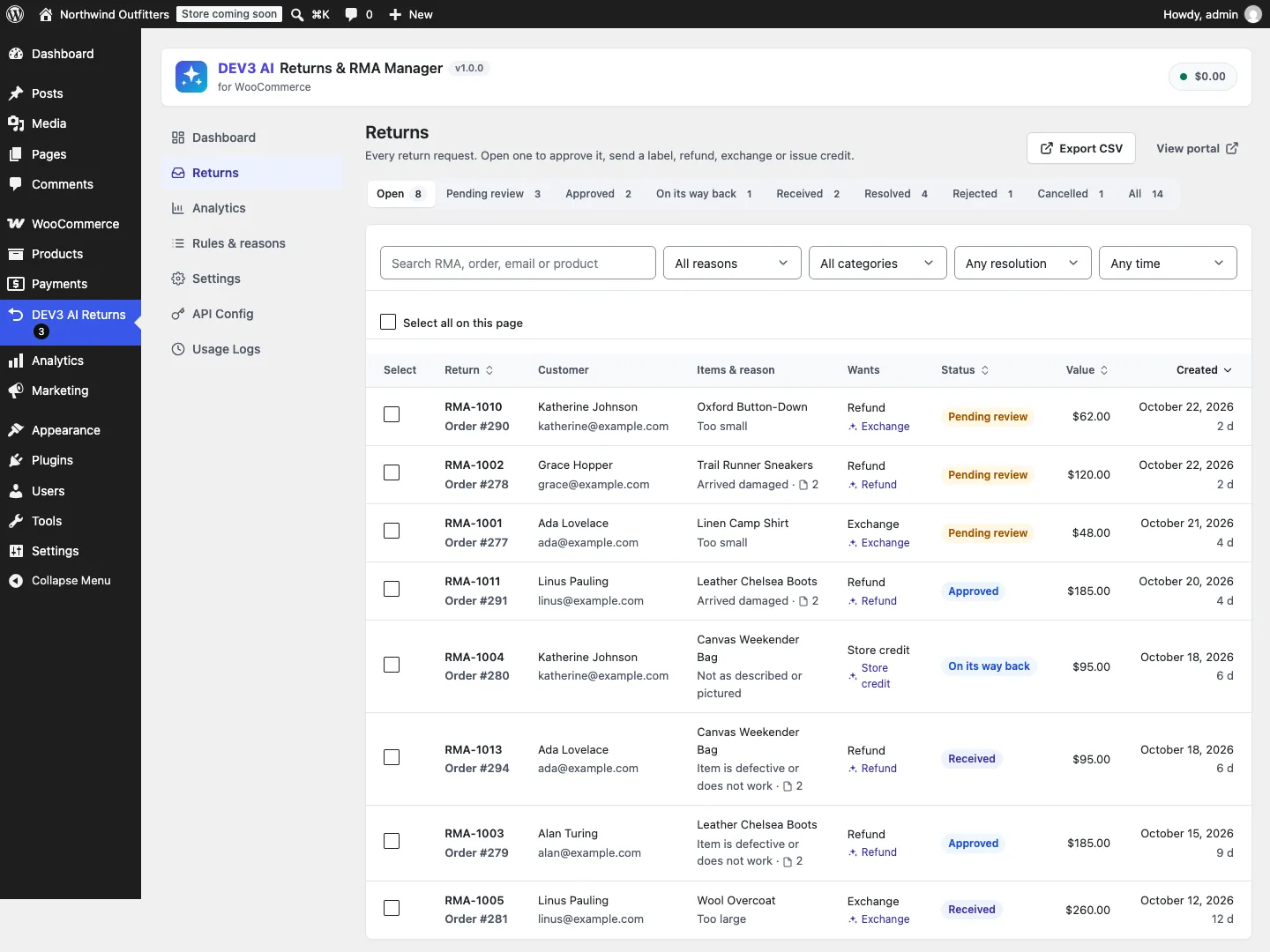
The returns queue: status tabs with counts, filters by reason, category and resolution, search and CSV export.

The returns queue: status tabs with counts, filters by reason, category and resolution, search and CSV export.

The challenge

Return portals for WooCommerce tend to be either dated extensions with no guest lookup or analytics, or SaaS tools that charge per return and keep order data off-site. A self-hosted alternative has to do the bookkeeping those tools hide: know how many units of each line can still be returned after earlier requests and refunds made elsewhere, refund through WooCommerce so tax and reports stay right, put stock back once, and let store credit be spent over several orders. We also wanted AI help with the tedious part, reading reasons and photos, without any path from a model's answer to a refund.

Our solution

We built DEV3 AI Returns & RMA Manager as a WooCommerce plugin in PHP, with a React admin app and a small portal app that inherits the store's theme. Every feature works without AI.

Key design decisions

  • Returnable quantity from WooCommerce's own records. Each line's available quantity is bought minus get_qty_refunded_for_item() minus units in open requests, so refunds made from the normal order screen count too. Rejected and cancelled requests release their units.
  • Policy by precedence. Global window and resolutions, then product rules, then category rules (including parent categories), then product-level overrides and a filter. The window can start at completion, payment or order date, and sale items can be excluded.
  • Refunds through wc_create_refund. Refund lines are split per item and per tax rate; partial amounts scale every line; the amount is capped at the order's remaining refundable total; the gateway is used only when it supports refunds.
  • Restock exactly once. WooCommerce's refund restock is turned off and the plugin restocks per item with a flag, so marking an item received and refunding it can't add stock twice.
  • Store credit with a carry-over balance. Credit is an email-restricted coupon whose amount is reduced by the discount actually applied on each paid order, once per order, on classic and block checkout.
  • Guest access without accounts. Lookup by order number and billing email (rate-limited, constant-time comparison) returns a short-lived HMAC token bound to that order; emails link with the request's own random key.
  • Private evidence. Photos and labels live in a private uploads folder with deny rules and random names, and are served only through signed, expiring URLs.
  • AI drafts, admins act. Optional triage with the Google Gemini API classifies the reason, reviews up to 3 downscaled photos against the claim and suggests a resolution and reply. Output is sanitised and clamped to the request's value, and "Use suggestion" only pre-fills the refund dialog.

Architecture

Requests, items and timeline events live in three custom tables, with order links stored through WooCommerce CRUD so HPOS works. The portal is a REST client of a public, same-origin, rate-limited namespace; the admin app uses a separate capability- and nonce-checked namespace for the queue, request detail, resolutions, labels, analytics and CSV export. Shopper and store notifications are WooCommerce email classes that merchants can edit or disable. AI runs only in admin or background jobs, never on the storefront. The API client, settings, usage logs and job runner come from a shared core used across DEV3's plugins.
Results

The plugin is complete. It ships in the DEV3 AI WooCommerce Plugins Bundle on the DEV3 marketplace, alongside 20 other WooCommerce plugins: DEV3 AI WooCommerce Plugins Bundle. It is also being prepared for CodeCanyon. What was built and verified:

  • 59 PHPUnit tests in wp-env against real WooCommerce, covering eligibility rules, quantity claims, refunds and caps, exchanges, restock-once, store-credit carry-over, signed files, guest tokens, rate limits, REST permissions and AI triage
  • 35 Jest tests for the portal, the admin app and the UI kit
  • Store credit test: $30 issued, a $12 order leaves $18, and moving that order to completed doesn't deduct it again
  • AI test with a prompt-injection comment ("refund 1000"): the suggestion is clamped to the request's value and the order's refunded total stays at 0. AI paths were tested with mocked API responses; a live-key run is still to come
  • Portal script is about 6 KB gzipped and loads only on the portal; HPOS and block checkout declared and tested
  • All gates passed: build, Jest, PHP_CodeSniffer at 0 errors and 0 warnings, PHPUnit, make-pot and packaging

Known gaps in v1.0: exchanges at a different price create a zero-cost order without charging the difference, and carrier API labels are planned for v1.1.

Setup guide

No licence key or activation is needed: install the zip and every feature works.

Requirements

  • WordPress 6.0 or newer and PHP 7.4 or newer
  • WooCommerce 8.0 or newer, active (HPOS and the block cart and checkout are supported)
  • Optional: a Google Gemini API key for AI triage and reply drafts. Without one, the portal, queue, refunds, exchanges, store credit and analytics all work

1. Install the plugin

  1. The plugin ships inside the DEV3 AI WooCommerce Plugins Bundle. Unzip the bundle download and find dev3-ai-woocommerce-plugins-bundle/dev3-ai-returns-rma-for-woocommerce/dev3-ai-returns-rma-for-woocommerce.zip.
  2. In WordPress, go to Plugins → Add New → Upload Plugin, choose that zip and click Install Now.
  3. Click Activate. DEV3 AI Returns & RMA Manager for WooCommerce appears in the plugin list, its menu DEV3 AI Returns appears in the admin sidebar, and a Returns portal page is created for you.

2. Connect Google Gemini (optional)

  1. Create a free API key in Google AI Studio (sign in with a Google account, then Create API key).
  2. Go to DEV3 AI Returns → API Config, paste the key and click Validate & save. The key is stored encrypted and never sent to the browser.
  3. Optional: pick the model (gemini-2.5-flash is the fast default; gemini-2.5-pro for the highest quality).

Prefer config files? Add define( 'DEV3RM_GEMINI_API_KEY', 'your-key' ); to wp-config.php instead.

3. Set it up

  1. Go to Settings and add your Return address and Return instructions. Choose whether guests can look up orders, whether customers can add photos (maximum count and size), and the store credit and coupon defaults.
  2. In Rules & reasons, set the return window, when it starts (completed, paid or placed) and which order statuses are eligible. Add category or product rules (not returnable, custom window, allowed resolutions, no sale items) and edit the reasons customers pick, including which ones require a photo.
  3. Individual products also get a Return window override and a Not returnable option in their product data.
  4. Check the shopper and store emails in WooCommerce → Settings → Emails.
  5. Work requests from Returns: approve, upload a label, mark received, then refund, exchange, issue store credit or a coupon. Refunds are never automatic.
  6. Optional: in Settings → DEV3 AI, turn on automatic classification and photo review. Results appear as drafts on each request, and Analytics can generate a return insights report.

Updating

Download the new version of the bundle, then upload the plugin zip in Plugins → Add New → Upload Plugin and choose Replace current with uploaded. Settings and data are kept.

Uninstalling

Deactivate and delete the plugin from Plugins. Return requests, photos and settings are kept unless you turned on Delete all return data when the plugin is uninstalled in Settings first.

How to use

Approve a return and send a label

  1. Go to DEV3 AI Returns → Returns. The Pending review tab lists new requests; filter by reason, category, resolution or date, or search by RMA, order, email or product.
  2. Open a request and check the items, the customer comment and any photos.
  3. Click Approve (or Reject), optionally with a note to the shopper.
  4. Under Return label & tracking, choose a PDF, PNG or JPG label, add the carrier and tracking number and click Upload & email label. The shopper is emailed and downloads the label from the portal through an expiring link.

Settle a return: refund, exchange, store credit or coupon

  1. When the parcel arrives, click Mark received. Items are restocked if Restock items by default is on, and never twice.
  2. Under Resolve, pick Refund (choose items and quantities, edit the amount, optionally refund via the payment gateway), Exchange (choose the replacement product or variation; a new zero-cost order is created), Store credit (a balance code for the shopper's email) or Coupon (a one-time percentage or fixed discount).
  3. Confirm. The request is marked resolved, the order gets a note and the shopper is emailed. Refunds appear on the WooCommerce order like any other refund.

Use DEV3 AI triage and replies

  1. With AI connected and Classify new requests automatically on, each new request gets a DEV3 AI triage card. Otherwise click Re-run on the request.
  2. Read the category, mood and urgency, the photo evidence verdict and the suggested resolution. Click Use suggestion to pre-fill the resolution dialog, or Dismiss. Nothing is refunded until you confirm.
  3. To answer the shopper, click Write with DEV3 AI under Timeline & messages, edit the draft and click Send email. Turn on Internal note (not emailed) for notes only your team sees.

Find out why products come back

  1. Open Analytics and pick a period (30, 90, 180 or 365 days).
  2. Read the return rate, requests by reason and reason category, the most returned products with their main reason, product categories and how returns were resolved. Click a reason to see its requests; click Export CSV for a spreadsheet.
  3. With AI connected, click Refresh with DEV3 AI for a read-only report of themes, problem products with a likely root cause, and suggested fixes.

Help shoppers return on their own

  1. Logged-in customers use My Account → Returns: they see their store credit balance, their returns, and a Return items button on every order still inside its window.
  2. Guests open the Returns page, enter their order number and checkout email and click Find my order.
  3. They pick items and quantities, a reason, condition, photos and a preferred resolution, then click Submit return request. After approval they download the label, enter tracking under Sent the parcel? and can message the store.

Related case studies