All case studies

DEV3 Technologies · own product

DEV3 AI Order Fraud & Risk Scoring: explainable WooCommerce risk scores that hold orders only after payment

Our own WooCommerce plugin: every order gets a 0–100 risk score where each point has a plain-language reason. Risky orders are held after payment for a person to review, and the Google Gemini API adds an optional second opinion that never changes an order by itself.

Industry
E-commerce (WooCommerce)

Live project preview

Client systems are private — screenshots shown where permitted.

DEV3 Technologies · own product — screenshots
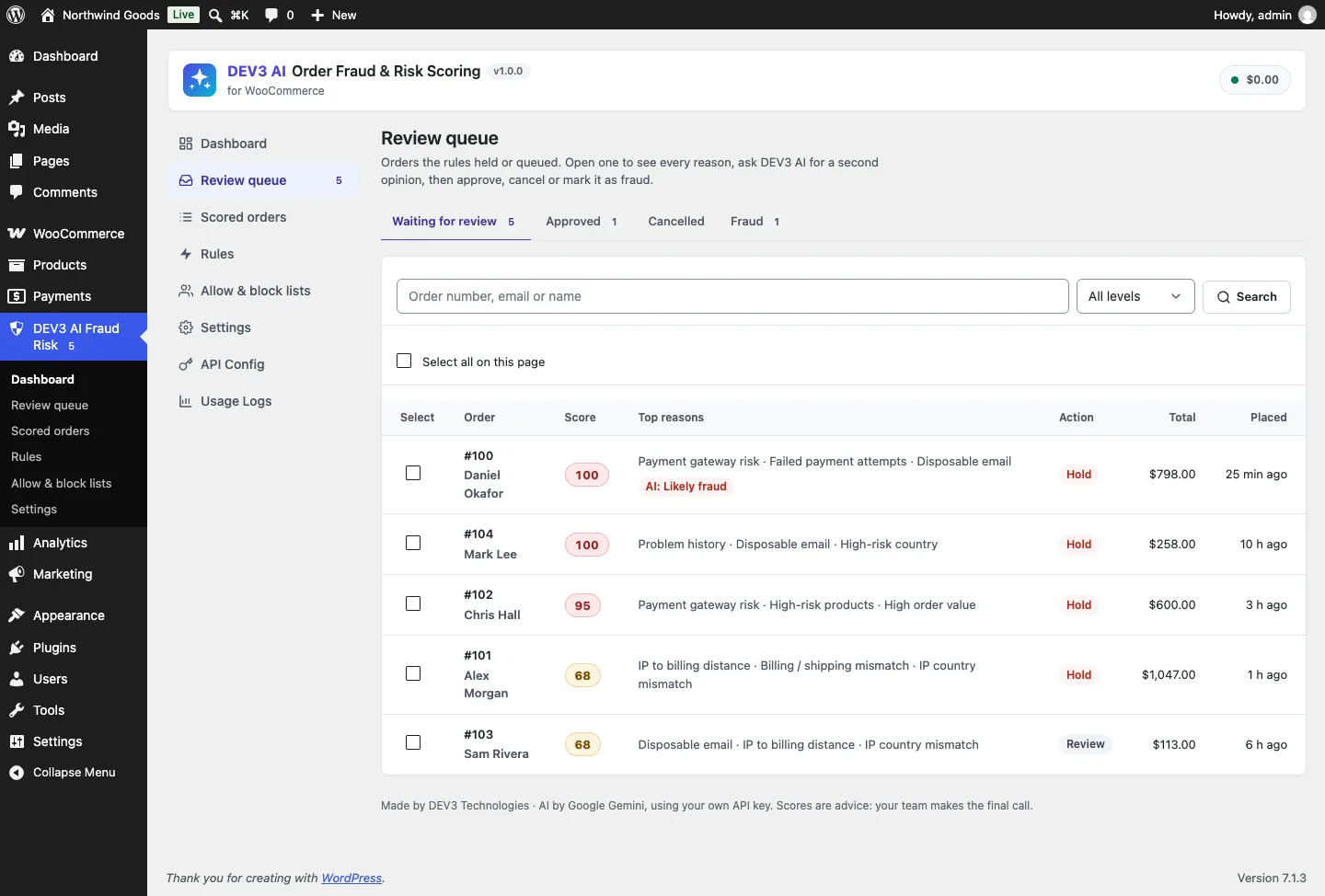
The review queue: orders the rules held or queued, with their score, top reasons, action and age. One already carries a DEV3 AI opinion.

The review queue: orders the rules held or queued, with their score, top reasons, action and age. One already carries a DEV3 AI opinion.

The challenge

Most WooCommerce anti-fraud tools are either a black box that sends order data to a third party, or a set of blunt rules that cancel orders on their own and leave the merchant to explain a refund to a real customer. Timing is the harder problem. The fraud signals arrive at different moments: the address and IP at checkout, the payment result when the gateway answers, Stripe Radar's verdict in its own callback. A plugin that acts too early stops the gateway from completing payment; one that acts twice can put an order the merchant already approved back on hold. We needed scores a shop manager can read and argue with, actions that happen exactly once at the right point in the order lifecycle, and AI that gives advice without ever touching an order.

Our solution

We built DEV3 AI Order Fraud & Risk Scoring as a WooCommerce plugin in PHP with a React admin. The scoring is rule-based and works with no API key; the AI is a reviewer's assistant on top.

Key design decisions

  • Every point has a sentence. 16 built-in signals (IP and email velocity, failed payment attempts, billing/shipping mismatch, IP country, IP-to-billing distance, disposable email, high-risk countries and products, bulk quantity, high value against the store's average order, first order, problem history, trusted customer, gateway risk) each return points and a plain sentence such as "4 failed or declined payment attempts from this email or IP in the last 24 hours". The total is clamped to 0–100.
  • Score at checkout, act when paid. The order is scored as soon as it is created, but holds and cancels are applied only on woocommerce_payment_complete or the first move to Processing or Completed. A pending order is never touched, so the gateway can always finish.
  • Escalate only, once, and humans win. A later signal such as a Stripe Radar outcome can raise the action on a paid order but never lower it. Once a reviewer has approved, cancelled or marked an order as fraud, automation leaves it alone.
  • Cancel is off by default. Cancel-level orders are held instead, and if auto-hold is switched off they are only queued. Orders created by staff or imports are scored but never held automatically.
  • Gateway outcomes surfaced. Stripe Radar risk level, risk score, outcome type and CVC/address checks are read from the WooCommerce Stripe Gateway response; WooPayments fraud outcomes from order meta; any other gateway through a filter.
  • AI as advice, minimised. The second opinion receives countries, totals, product categories, signal counts and the email domain, never the name, street, phone or full email. It returns a verdict, confidence, reasons, checks before shipping and a suggested action; Use suggestion only pre-selects a decision the reviewer still confirms. A tuning advisor proposes new points and thresholds from aggregated review outcomes, shown as a draft.

Architecture

Scores, list entries and events live in three custom tables; orders are read and written only through WooCommerce CRUD, so the plugin is HPOS-compatible and was tested on both order storages. Velocity counts come from the plugin's own score and event tables, with emails stored as keyed HMAC hashes and IP addresses removed after a retention period (default 180 days). Allow and block lists support email, email domain, IP or CIDR range, phone and customer, with CSV import and export. An optional checkout guard stops block-listed customers and per-IP order floods in both the classic and the block checkout. A risk column on the orders list, a "Fraud risk" box on the order screen, email alerts and a neutral thank-you notice for held orders complete the WooCommerce side. A background back-scan scores past orders without changing their status. The API client, settings, jobs and usage logging come from a shared core used across DEV3's plugins.

Results

The plugin is complete. It ships in the DEV3 AI WooCommerce Plugins Bundle on the DEV3 marketplace, alongside 20 other WooCommerce plugins (see the bundle), and is being prepared for CodeCanyon. What was built and verified:

  • 71 PHPUnit tests in wp-env: 51 for the plugin (13 engine, 20 order lifecycle, 8 lists and rules, 10 REST and AI) and 20 for the shared core
  • 30 Jest tests: 10 for the admin screens and 20 for the shared UI kit
  • Lifecycle covered by tests: checkout scores without acting, a high-risk paid order is held rather than cancelled, auto-cancel only when switched on, staff-created orders are never held, approval releases the hold with no re-hold, and a Stripe Radar "highest" outcome escalates a paid order to On hold
  • Both order storages: one test runs the full flow (pay, hold, approve, delete) on HPOS and on legacy post storage
  • AI paths (second opinion, batch opinions, tuning advisor) tested with mocked Google Gemini API responses, including a check that the outgoing request carries no name, street, phone or full email. No live-key run has been done yet.
  • Gates passed: build, Jest, PHPUnit, PHP_CodeSniffer at 0 errors and 0 warnings, make-pot and packaging
  • Known limit: the admin screens need manage_options unless a site changes it with the dev3fr_manage_capability filter

Setup guide

No licence key or activation is needed: install the zip and every feature works.

Requirements

  • WordPress 6.0 or newer and PHP 7.4 or newer
  • WooCommerce 8.0 or newer, active (HPOS and legacy order storage, classic and block checkout are all supported)
  • Optional: a Google Gemini API key for DEV3 AI second opinions and rule tuning. Without one, scoring, holds, the review queue, lists, alerts and the checkout guard all work on rules
  • Optional: the WooCommerce Stripe Gateway or WooPayments, whose fraud results are read automatically

1. Install the plugin

  1. The plugin ships inside the DEV3 AI WooCommerce Plugins Bundle download, at dev3-ai-woocommerce-plugins-bundle/dev3-ai-fraud-risk-for-woocommerce/dev3-ai-fraud-risk-for-woocommerce.zip. Unzip the bundle first; upload the inner zip, not the bundle.
  2. In WordPress, go to Plugins → Add New → Upload Plugin, choose dev3-ai-fraud-risk-for-woocommerce.zip and click Install Now.
  3. Click Activate. DEV3 AI Order Fraud & Risk Scoring for WooCommerce appears in the plugin list and its menu, DEV3 AI Fraud Risk, appears in the admin sidebar. New orders are scored from this moment.

2. Connect Google Gemini (optional)

  1. Create a free API key in Google AI Studio (sign in with a Google account, then Create API key).
  2. Go to DEV3 AI Fraud Risk → API Config, paste the key and click Validate & save. The key is stored encrypted (AES-256-GCM) and never sent to the browser.
  3. Optional: pick the model (gemini-2.5-flash is the fast default; gemini-2.5-pro for the highest quality) and set a monthly usage cap.

Prefer config files? Add define( 'DEV3FR_GEMINI_API_KEY', 'your-key' ); to wp-config.php instead.

3. First-time setup

  1. Open Rules and check Thresholds & actions. The defaults are flag from 40, review from 60, hold from 75 and cancel from 95. Hold high-risk orders automatically is on; Cancel orders automatically is off, so cancel-level orders are held instead.
  2. Still in Rules, add your High-risk lists (countries, products such as gift cards, categories) and any Extra disposable email domains. Each signal can be switched off or given different points.
  3. In Settings, turn on Email me about risky orders and choose when to alert. Decide whether to use the Checkout guard (block-listed customers and a maximum number of orders per IP per hour) and keep or edit the neutral Shopper notice.
  4. On the Dashboard, use Scan past orders to score older orders, so velocity, history and the charts have data from day one. Past orders are never held or cancelled.
  5. Other staff need manage_options to open the screens. To give shop managers access, change the capability with the dev3fr_manage_capability filter.

Updating

Download the new bundle version, then upload the plugin zip in Plugins → Add New → Upload Plugin and choose Replace current with uploaded. Scores, lists and settings are kept.

Uninstalling

Deactivate and delete the plugin from Plugins. By default, scores, lists, events and settings stay in the database, so reinstalling picks up where you left off. To remove everything, first switch on Delete all plugin data when the plugin is deleted in Settings.
How to use

Work through the review queue

  1. Open DEV3 AI Fraud Risk → Review queue. The Waiting for review tab lists every order the rules held or queued, with its score, top reasons, action, total and age. The menu badge shows how many are waiting.
  2. Filter by level or search by order number, email or name, then click an order to open its Order risk page: the score gauge, Why this score with every reason and its points, the payment gateway result, History & velocity and a timeline.
  3. Under Your decision, click Approve (a held order goes back to Processing), Cancel order or Mark as fraud. Tick Also add the email to the allow list or Also block the email and IP address if you want the decision remembered. Every decision is written to the order notes with your name.
  4. For clear-cut cases, tick several orders with Select all on this page and use Bulk actions to approve or cancel them together.

Get a second opinion with DEV3 AI

  1. On an order's Order risk page, click Get a second opinion with DEV3 AI.
  2. Read the verdict (likely legit, uncertain or likely fraud), the confidence, the summary, the reasons and the Checks before you ship. Only countries, totals, product categories and signals are sent, never the customer's name, address, phone or email.
  3. Click Use suggestion to pre-select the suggested decision, then confirm it yourself. Nothing on the order changes until you do. To ask for opinions on the whole queue, use Review the queue with DEV3 AI on the Dashboard.

Check an order from WooCommerce

  1. In WooCommerce → Orders, the Risk column shows each order's score as a coloured pill, with Review on orders waiting for a decision.
  2. Open an order: the Fraud risk box on the right shows the score, level, reasons with points and the latest DEV3 AI opinion. Click Review this order to jump to its risk page.

Tune and test your rules

  1. Open Rules. Change thresholds, signal points or parameters (for example the velocity window in hours or the distance in km), and add products or countries to the high-risk lists.
  2. Under Custom rules, click Add rule, give it a name, choose All conditions or Any condition, add conditions such as Billing country is one of or Order total is at least, and pick the action: flag, review, hold, cancel or Allow (skip holds).
  3. Before saving, use Test on an order: enter an order number and click Run test to compare the saved rules with your changes. Nothing is stored. Then click Save rules.
  4. Once you have reviewed some orders, click Tune my rules with DEV3 AI. The advisor compares how often each signal fired on approved and fraud orders and proposes new points and thresholds as a draft. Choose Accept selected & save or Discard.

Manage allow and block lists

  1. Open Allow & block lists and choose the Block list or Allow list tab.
  2. Pick a type (email, email domain, IP or range in CIDR form, phone or customer), enter the value and an optional note, then click Add. Allow-listed customers skip every rule; block-listed customers score 100 and, with the checkout guard on, cannot check out.
  3. Use Import CSV and Export CSV to move lists between stores. The Matches column counts how often each entry was hit.

Related case studies