All case studies

DEV3 Technologies · own product

DEV3 AI Abandoned Cart & Win-back: recovery emails timed to the shopper's hour, with AI copy held for review

Our own WooCommerce plugin that captures carts on the classic and block checkout with GDPR consent, runs email and SMS recovery and win-back sequences with unique coupons, and tunes each send to the shopper's local hour. Google Gemini API copy waits for human review.

Industry
E-commerce (WooCommerce)

Live project preview

Client systems are private — screenshots shown where permitted.

DEV3 Technologies · own product — screenshots
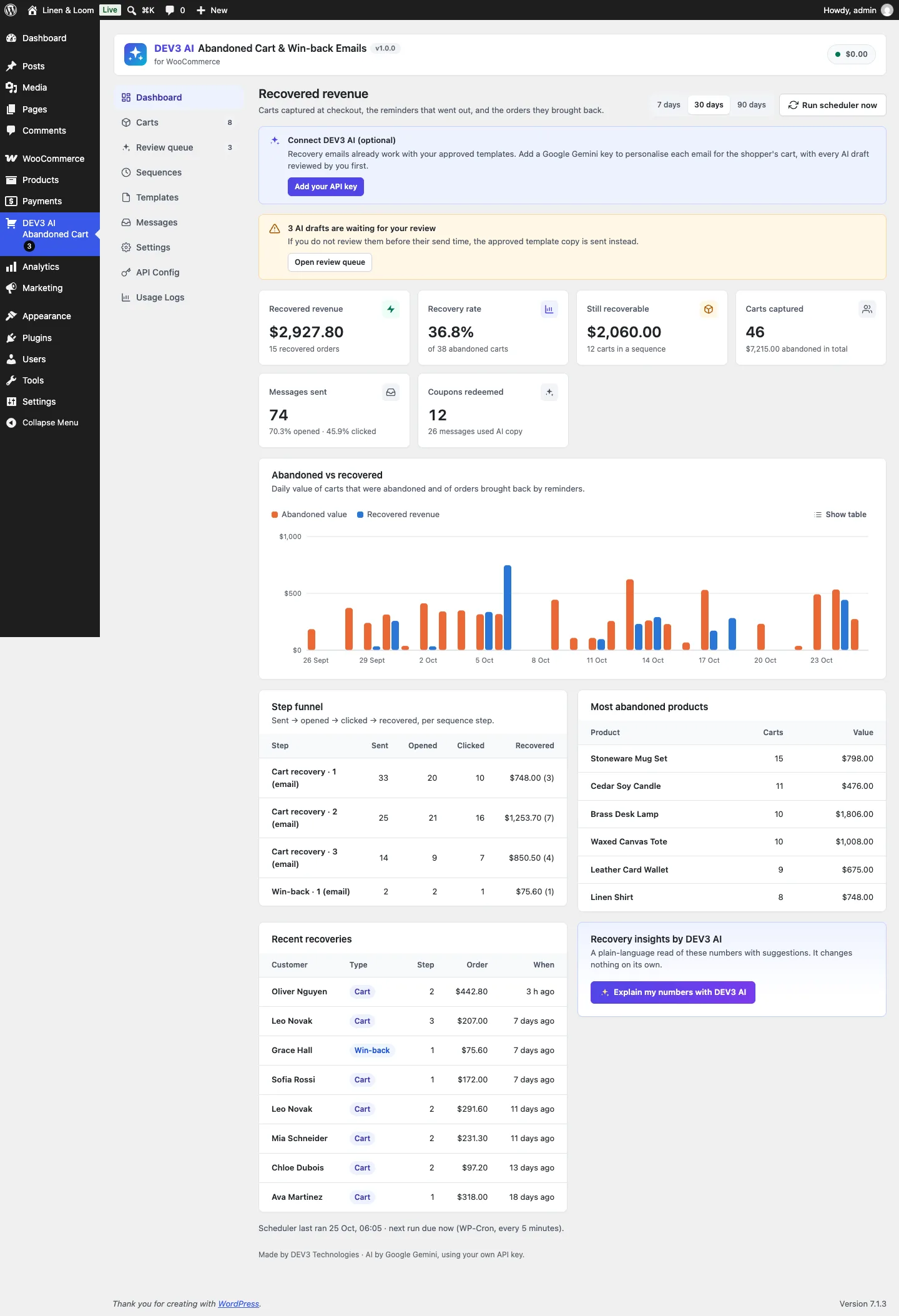
The recovered-revenue dashboard: recovery rate, still-recoverable value, a daily abandoned vs recovered chart, the per-step funnel and recent recoveries.

The recovered-revenue dashboard: recovery rate, still-recoverable value, a daily abandoned vs recovered chart, the per-step funnel and recent recoveries.

The challenge

Cart recovery tools for WooCommerce tend to fall into two camps: free plugins with a fixed three-email sequence, static copy and patchy block checkout support, or workflow suites that are powerful but slow to set up and send data to an outside SaaS. We wanted the complete recovery loop inside WordPress: capture that works on the block checkout without breaking page caching, consent handling that stores nothing personal in opt-in mode, restore links that rebuild the exact cart, honest attribution, and reminders timed for when each shopper actually reads email. AI-personalised copy had to be useful without ever letting an unreviewed model draft reach a customer by accident.

Our solution

We built DEV3 AI Abandoned Cart & Win-back Emails as a WooCommerce plugin in PHP with a React admin and a small dependency-free storefront script. A WP-Cron sweep every five minutes drives everything: it detects abandonment, enrols lapsed customers into win-back, prepares AI drafts ahead of their send time, sends what is due and closes finished carts.

Key design decisions

  • Capture on both checkouts. The classic checkout is captured from debounced field changes; the block checkout is captured server-side from the Store API hook woocommerce_store_api_cart_update_customer_from_request, with the same script adding consent and the browser's timezone offset. The public capture route is same-origin, rate limited and returns no personal data, so full-page caching keeps working.
  • Three consent modes. Notice (default), opt-in (nothing personal is stored until the box is ticked; unticking deletes the stored cart) and none. SMS always needs its own opt-in. Every email carries a signed one-click unsubscribe link and List-Unsubscribe headers; unsubscribed addresses are kept only as hashes.
  • Sequences as a small state machine. A cart records how many steps were sent or skipped; each step is a scheduled message row. Purchases, unsubscribes and the admin's Stop action cancel what is pending, steps that cannot be sent (unapproved template, no SMS consent) are skipped with a logged reason, and an atomic option lock stops two sweeps overlapping.
  • Forward-only send-time tuning. A send can only move later, never earlier, by at most a configurable number of hours, to the hour that scores best for that shopper (their own order hours, then their open and click hours, then store-wide clicks) outside quiet hours in the shopper's own timezone. The first reminder moves at most one hour.
  • AI drafts behind a review gate. The Google Gemini API rewrites a template per cart from the first name and product names only. Drafts wait in a review queue with a word diff against the template. If nobody reviews one before its send time, the approved template copy goes out instead, or the message is held for a set number of hours. Only templates with auto-approve switched on send AI copy without review.
  • Coupons and restore links. Each step can mint a unique WooCommerce coupon (single use, individual use, locked to the shopper's email). The recovery link carries a cart token, the message id and an HMAC, restores items, quantities and variations, applies the coupon and pre-fills the checkout.

Architecture

Carts and messages live in two custom tables; sequences, templates and suppressions in options; order links in HPOS-safe order meta. A cart becomes recovered only when its order reaches processing or completed after a reminder was sent or its link was clicked; otherwise it counts as bought anyway. The dashboard reports recovered revenue, recovery rate, a per-step funnel and top abandoned products. SMS goes through any Twilio-compatible API. Four more AI assistants (template writer, sequence builder, send-time insights, recovery insights) only ever produce drafts or read-only reports. The API client, settings, usage logging and admin kit come from a shared core used across DEV3's plugins.
Results

The plugin is complete. It ships in the DEV3 AI WooCommerce Plugins Bundle on the DEV3 marketplace, alongside 20 other WooCommerce plugins, and is being prepared for CodeCanyon. What was built and verified:

  • 73 PHPUnit tests in wp-env against real WooCommerce, covering capture in every consent mode, the block checkout Store API hook, step order and skips, recovery and attribution, unsubscribes, win-back enrolment, the review gate, privacy export and erase, and REST permissions
  • 7 of them pin down send-time tuning: forward-only moves, quiet hours in the shopper's timezone, ties kept at the earliest time and the fresh first reminder
  • 42 Jest tests for the storefront capture script and the admin screens
  • AI paths tested with mocked Google Gemini API responses, including failures that fall back to template copy; no live-key run has been made yet. SMS was tested against a mocked Twilio-compatible endpoint
  • Build, phpcs (0 errors, 0 warnings), make-pot and packaging gates all pass. Known limit: the dashboard adds totals from carts in other currencies at face value

Setup guide

No licence key or activation is needed: install the zip and every feature works.

Requirements

  • WordPress 6.0 or newer and PHP 7.4 or newer (tested on PHP 8.3)
  • WooCommerce 8.0 or newer, active (classic and block checkout are both supported, HPOS compatible)
  • A site that can send email; an SMTP plugin is recommended
  • Optional: a Google Gemini API key for personalised copy and the AI assistants. Without one, every recovery feature works with your approved templates
  • Optional: a Twilio-compatible SMS account for SMS steps

1. Install the plugin

  1. The plugin ships inside the bundle download at dev3-ai-woocommerce-plugins-bundle/dev3-ai-abandoned-cart-for-woocommerce/dev3-ai-abandoned-cart-for-woocommerce.zip.
  2. In WordPress, go to Plugins → Add New → Upload Plugin, choose that zip and click Install Now.
  3. Click Activate. DEV3 AI Abandoned Cart & Win-back Emails for WooCommerce appears in the plugin list and its menu, DEV3 AI Abandoned Cart, appears in the admin sidebar. A cart recovery sequence, a win-back sequence and six approved templates are ready to go.

2. Connect Google Gemini (optional)

  1. Create a free API key in Google AI Studio (sign in with a Google account, then Create API key).
  2. Go to DEV3 AI Abandoned Cart → API Config, paste the key and click Validate. The key is stored encrypted and never sent to the browser.
  3. Optional: pick the models (gemini-2.5-flash and gemini-2.5-pro are the defaults) and set a monthly budget.

Prefer config files? Add define( 'DEV3AC_GEMINI_API_KEY', 'your-key' ); to wp-config.php instead.

3. Set it up

  1. Go to Settings → Capture & consent and choose the consent mode (notice, opt-in or none), the abandonment cut-off (default 15 minutes), minimum cart value and excluded roles.
  2. In Settings → Sending & timing, set the from name and address, and optionally turn on send-time tuning with your quiet hours and maximum shift.
  3. Review the steps in Sequences: delay, channel, template and an optional unique coupon per step.
  4. Edit and approve your copy in Templates; only approved templates send. Turn on Personalise each message with DEV3 AI per template if you want AI drafts, which then wait in the Review queue.
  5. For SMS steps, add your Twilio-compatible API details in Settings → SMS and send a test.
  6. Optional: add the Save my cart block or the [dev3ac_save_cart] shortcode to your cart page.
  7. The scheduler runs every 5 minutes with WP-Cron. On low-traffic sites, set up a real cron job for wp-cron.php, or press Run scheduler now on the Dashboard.

Updating

Download the new bundle, then upload the plugin zip in Plugins → Add New → Upload Plugin and choose Replace current with uploaded. Settings and data are kept.

Uninstalling

Deactivate and delete the plugin from Plugins. Carts, messages and settings are kept unless you switch on Delete all plugin data on uninstall in Settings first.

How to use

Review AI drafts before they send

  1. In Templates, open a template and switch on Personalise each message with DEV3 AI. Leave Auto-approve AI copy for this template off.
  2. When a cart is abandoned, the scheduler writes a draft for that shopper ahead of the send time. The menu badge on Review queue shows how many are waiting.
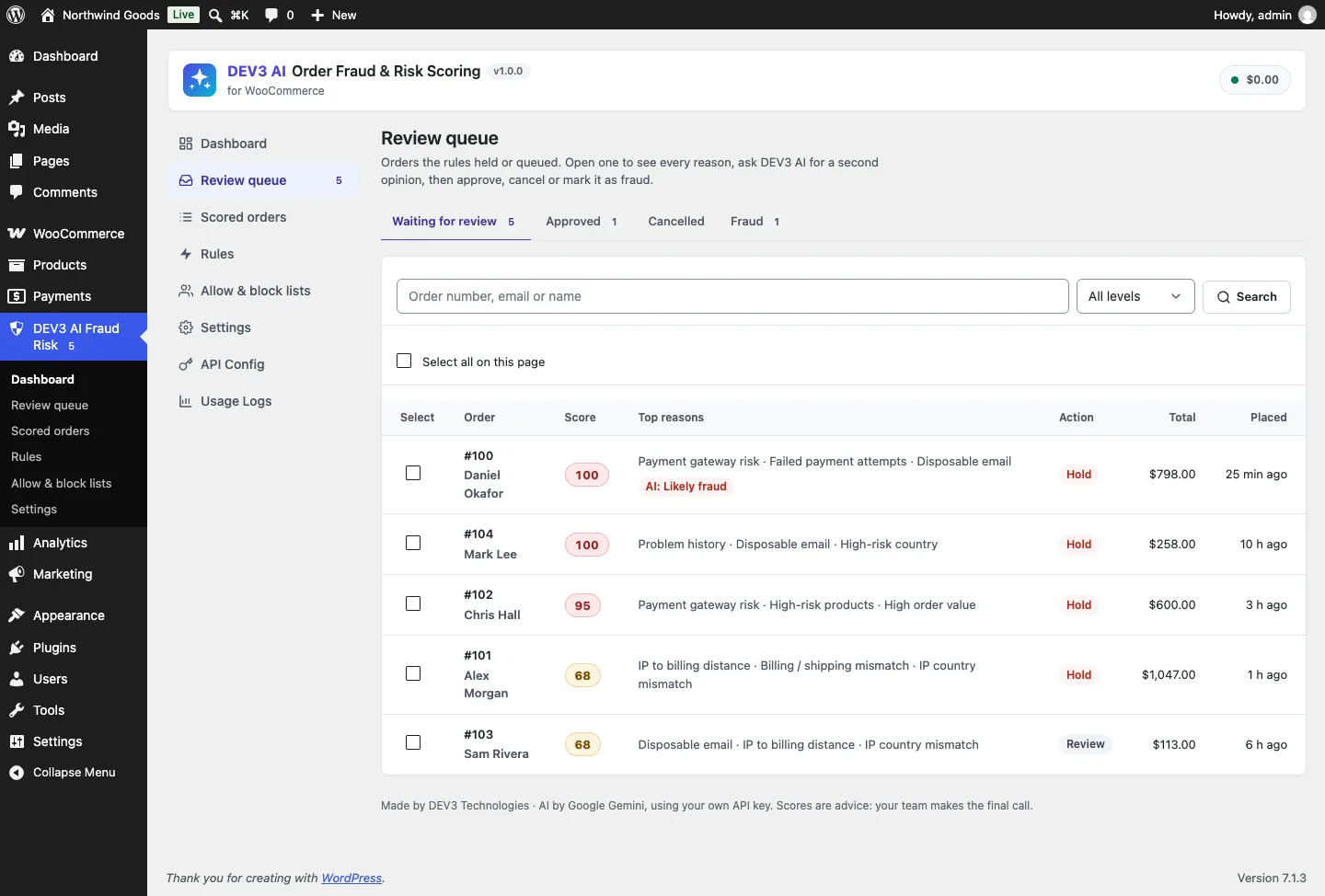
  3. Open Review queue. Each draft is shown against the template copy with a word diff. Click Approve & schedule, Edit it first, Regenerate it, or Reject it to send the template copy.
  4. Drafts you don't review in time are replaced by the approved template copy, or held for a set number of hours if you chose Hold in Settings → Sending & timing.

Change a recovery sequence

  1. Go to Sequences. The cart recovery and win-back sequences each have a list of steps.
  2. Set each step's wait, unit, channel and template, or use Add email step / Add SMS step. Switch on Unique coupon in this step to mint a single-use code locked to the shopper's email, then set the discount, amount, validity and minimum spend.
  3. Optional: click Build with DEV3 AI to get suggested steps with reasons based on your store's numbers. Nothing changes until you apply them.
  4. Click Save sequences.

Write and approve a template

  1. In Templates, edit the subject, preheader, heading, body and button text. Click the merge-tag chips to insert tags such as {first_name}, {cart_items} or {coupon_code}.
  2. Check the live Preview (toggle With coupon) and the Quality checks panel, then use Send test to send yourself a real email.
  3. Optional: describe the message under Write with DEV3 AI and click Generate with DEV3 AI. The draft only fills the editor; you still save it.
  4. Click Save & approve. Only approved templates send, and editing an approved template moves it back to draft.

Follow up on a single cart

  1. Open Carts and filter by status (Active, Abandoned, Clicked, Recovered, Bought anyway, Lost, Unsubscribed) or search by email, name or phone.
  2. Click a cart to see its items, consent record, next message and timeline.
  3. Use Send next step now, Stop sequence, Copy recovery link (to paste into a support reply) or Delete.

Check what came back

  1. Open Dashboard and pick 7, 30 or 90 days.
  2. Read recovered revenue, recovery rate, still-recoverable value, the abandoned vs recovered chart (or Show table), the step funnel and the most abandoned products.
  3. Optional: click Explain my numbers with DEV3 AI for a read-only summary with suggestions. Use Messages to see why any send was skipped or failed.

Related case studies