All case studies

DEV3 Technologies · own product

DEV3 AI Recommendations & Upsells: frequently bought together from a store's own orders, with A/B tests

Our own WooCommerce plugin: it learns co-purchase confidence and lift from the store's paid orders, adds optional embedding similarity, and serves bundles, order bumps and post-purchase offers from precomputed lists, with no AI call on page load.

Industry
E-commerce (WooCommerce)

Live project preview

Client systems are private — screenshots shown where permitted.

DEV3 Technologies · own product — screenshots
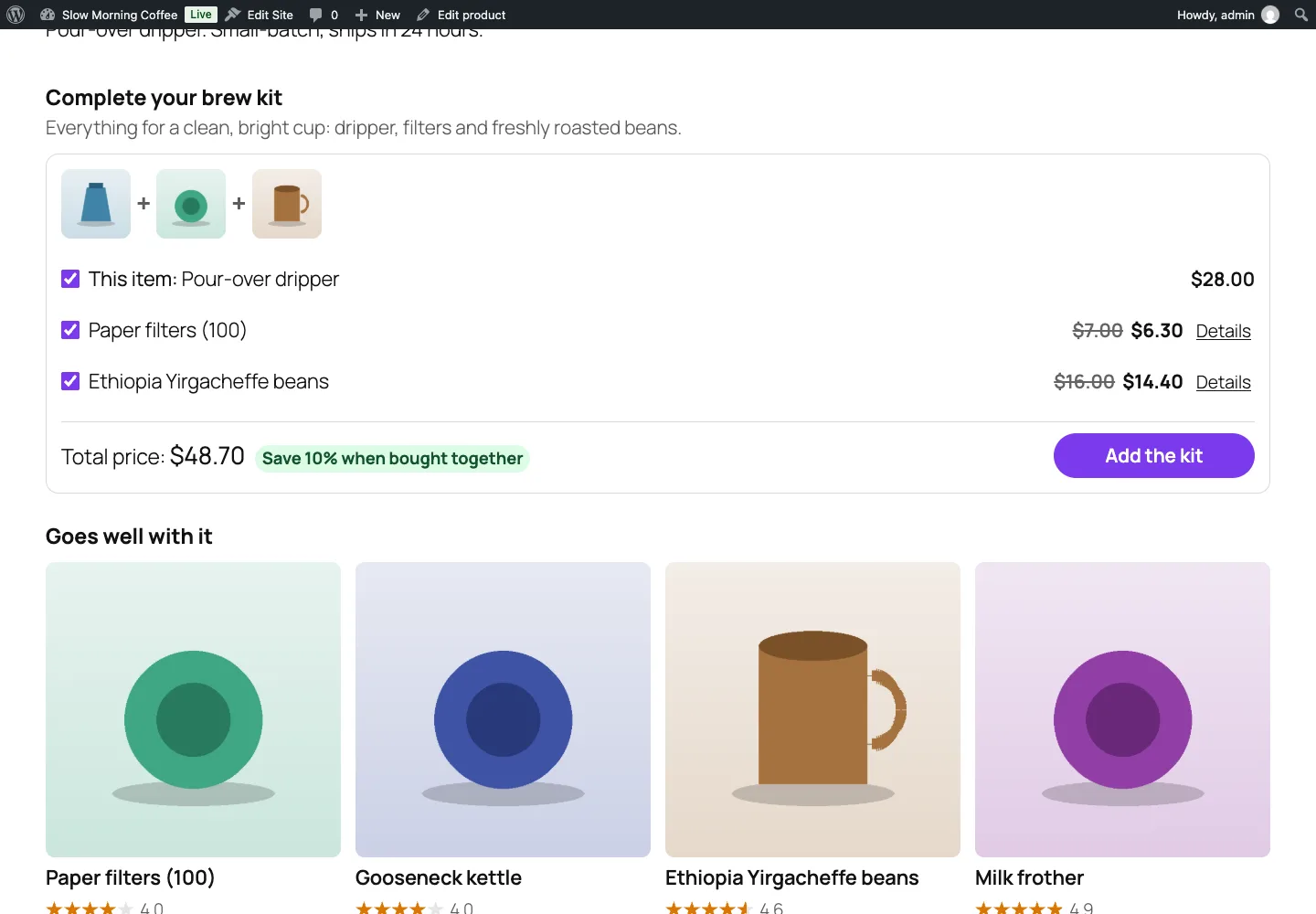
A "Complete your brew kit" bundle box on a product page, built from co-purchase statistics, with a live total and a bundle discount, followed by a "Goes well with it" grid.

A "Complete your brew kit" bundle box on a product page, built from co-purchase statistics, with a live total and a bundle discount, followed by a "Goes well with it" grid.

The challenge

Most WooCommerce recommendation tools either ask the merchant to pick related products by hand or fall back to "same category", which shows four more mugs to someone who just added a mug. Statistics from real orders are better, but they are easy to get wrong: bestsellers end up next to everything, a single odd order creates a "bundle", refunds and cancellations leave ghost pairs behind, and a full scan of order history on every page view would take a busy store down. The plugin also had to work with HPOS order tables, on classic and block checkout, behind full-page caches, and without any API key at all.

Our solution

We built DEV3 AI Recommendations & Upsells for WooCommerce as a PHP plugin with a React admin, a vanilla storefront script and a block-checkout slot component. Recommendations come from the store's own data first; AI is an optional layer that runs only in the admin and in background jobs.

Key design decisions

  • Counters, not scans. Two small tables hold per-product order counts and per-pair co-purchase counts, stored in both directions. A paid order adds +1, a cancelled or refunded one subtracts it, guarded by an order-meta flag so moving between paid statuses never counts twice. Only WooCommerce order CRUD is used, so it works the same with HPOS on or off.
  • Confidence weighted by lift. The "frequently bought together" score is P(B|A) × log(1 + lift), with a minimum support of 2 orders. Confidence alone favours bestsellers; lift alone favours one-off pairs. Variations roll up to their parent product.
  • Precomputed neighbour lists. A background job writes the top 24 neighbours of every product into product meta, and rendered widget HTML is cached per widget, variant, product or cart, currency and locale. One generation counter invalidates every fragment at once on rebuilds, product saves and stock changes.
  • Similarity with a fallback. Optional product embeddings from the Google Gemini API give cosine "similar" and cross-category "goes well with" lists. Without a key, shared categories and tags take their place.
  • Every placement, both checkouts. Product-page bundle boxes, grids and carousels, classic and block cart, checkout order bumps (including the block checkout order-summary slot), thank-you offers with a signed single-use token, and a section in WooCommerce emails. Bundle and bump discounts apply only while the anchor product stays in the cart.
  • Measured, not guessed. Widget adds carry their source into order item meta through classic and Store API checkout; revenue is counted once when the order is paid and reversed on refund. A/B tests split visitors by a first-party random id and report a two-proportion z-test at 95%.

AI where it helps

DEV3 AI writes widget headlines, subtitles and button labels in the store's brand voice, suggests complementary products for items with little order history, writes a one-line bundle pitch, and reads the A/B and widget stats to suggest changes. Every result is a draft the merchant accepts, and AI product picks are intersected with the real candidate set before they can be saved. The API client, settings screens and job runner come from a shared core used across DEV3's plugins.

Results

The plugin is complete. It ships in the DEV3 AI WooCommerce Plugins Bundle on the DEV3 marketplace, alongside 20 other WooCommerce plugins, and is being prepared for CodeCanyon. What was built and verified:

  • 79 PHPUnit tests run in wp-env against real WooCommerce, covering the co-purchase math fixture, refunds and cancellations reversing counts, variation roll-up, minimum support, the rebuild job, HPOS order tables, cart discounts, attribution, offer tokens and rendering
  • 40 Jest tests for the storefront script, the admin screens and the UI kit
  • A rendering test asserts the second render of a widget is a cache hit and that no AI or HTTP request is made on page load
  • Post-purchase offers: wrong order keys, tampered tokens, reuse and expired offers are refused; offline-paid orders get the item added with totals recalculated, online-paid orders go through an express second checkout
  • All AI paths tested with mocked Google Gemini API responses; a run with a live key is the next step
  • Build, Jest, PHP_CodeSniffer at 0 errors and 0 warnings, PHPUnit, translation template and packaging gates all pass

Setup guide

No licence key or activation is needed: install the zip and every feature works.

Requirements

  • WordPress 6.0 or newer and PHP 7.4 or newer
  • WooCommerce 8.0 or newer, active (classic and block cart/checkout and HPOS order storage are all supported)
  • Optional: a Google Gemini API key. Without one, recommendations come from your order history and shared categories and tags, and offer copy is written by hand

1. Install the plugin

  1. The plugin ships inside the bundle download at dev3-ai-woocommerce-plugins-bundle/dev3-ai-recommendations-for-woocommerce/dev3-ai-recommendations-for-woocommerce.zip. Unzip the bundle first; don't upload the bundle zip itself.
  2. In WordPress, go to Plugins → Add New → Upload Plugin, choose dev3-ai-recommendations-for-woocommerce.zip and click Install Now.
  3. Click Activate. Its menu, DEV3 AI Recommendations & Upsells for WooCommerce, appears in the admin sidebar.

2. Connect Google Gemini (optional)

  1. Create a free API key in Google AI Studio (sign in with a Google account, then Create API key).
  2. Go to DEV3 AI Recommendations & Upsells → API Config, paste the key and click Validate & save. The key is stored encrypted (AES-256-GCM) and never sent to the browser.
  3. Optional: pick the model (gemini-2.5-flash is the fast default; gemini-2.5-pro for the highest quality).

Prefer config files? Add define( 'DEV3RU_GEMINI_API_KEY', 'your-key' ); to wp-config.php instead.

3. Set it up

  1. Open Engine and click Rebuild stats to analyse your paid orders (the last 365 days by default). It runs as a background job, then computes each product's neighbour lists. New paid, cancelled and refunded orders update the statistics automatically afterwards.
  2. With an API key, run the embeddings index in Engine to add semantic similarity. Adjust the blend weights (co-purchase, similarity, taxonomy, popularity) and the in-stock and category filters there too.
  3. In Widgets, review the default widgets or create new ones: product page bundle box, grid, list or carousel; cart; checkout order bump; thank-you offer; emails. Pick the strategy, layout, copy and an optional discount, and check the live preview. Write with DEV3 AI drafts the headline, subtitle and button label.
  4. In Product explorer, see each product's picks with scores and reasons, pin or exclude products, and ask DEV3 AI for complementary picks or a bundle pitch.
  5. In Settings, choose how thank-you offers are accepted (add to the order for offline payments, or an express second checkout), the offer expiry, the emails that get a recommendations section, the rendering mode for full-page caches and the click-through attribution window.
  6. Give a widget a variant B and start a test in A/B tests. Follow attributed revenue in Dashboard and ask for suggestions in Insights.

Updating

Download the new bundle, unzip it, then upload dev3-ai-recommendations-for-woocommerce.zip in Plugins → Add New → Upload Plugin and choose Replace current with uploaded. Settings and data are kept.

Uninstalling

Deactivate and delete the plugin from Plugins. Your settings, widgets and statistics are kept in the database, so reinstalling picks up where you left off.
How to use

Add a "frequently bought together" bundle to product pages

  1. Go to DEV3 AI Recommendations & Upsells → Widgets and click New widget, or Edit on the default "Product page · Frequently bought together" widget.
  2. On the Setup tab, choose the Position (for example "After product summary"), set Recommend to "Frequently bought together" and Layout to "Bundle box with checkboxes".
  3. Set Products to show and an optional Bundle discount. The discount applies to the companion items only while the main product stays in the cart.
  4. Check the Live preview with Change to try a few products, then click Save changes.

Write widget copy with DEV3 AI

  1. Open a widget and go to the Copy tab.
  2. Click Write with DEV3 AI. It drafts a headline, subtitle and button label in the brand voice from Settings, plus alternatives.
  3. Accept the version you like; it fills the fields. Nothing changes on the store until you click Save changes.

Fine-tune one product's recommendations

  1. Open Product explorer and pick a product. You see what shoppers get for each strategy, with the reason and score, and the bought-together table with orders, confidence and lift.
  2. Under Rules for this product, add pins (always shown first), exclusions, or turn on Hide widgets on this product page.
  3. For a product with little order history, click Suggest complementary products, tick the picks you agree with and click Pin selected. Write bundle pitch drafts the one-line text under the bundle box; edit it and click Save pitch.

Add a checkout order bump and a thank-you offer

  1. In Widgets, edit the "Checkout · Order bump" widget, choose a position and a discount, and save. It appears in both the classic checkout and the block checkout order summary.
  2. Edit the "Thank-you · Post-purchase offer" widget and set its discount.
  3. In Settings, choose How shoppers accept (add to the order for offline payments, or an express second checkout), the gateways and Offer expires after.

Run an A/B test and keep the winner

  1. Open a widget, go to the Variant B tab and change what you want to test: headline, button label, strategy, layout, item count or discount. Save.
  2. Set Traffic to variant B on the same tab, then click Start test in A/B tests. Each visitor keeps seeing the same variant.
  3. Watch views, adds, orders, revenue and the confidence meter. When one variant wins, click Declare winner: its settings are copied into the widget and the test ends.

Refresh the data after an import

  1. After importing orders or changing which statuses count as paid, open Engine and click Rebuild stats. It runs in the background and recomputes the neighbour lists when done.
  2. After a big product import, click Build index to refresh similarity (only changed products are re-embedded), or Recompute to refresh the neighbour lists.

Related case studies