No licence key or activation is needed: install the zip and every feature works.
Requirements
- WordPress 6.0 or newer and PHP 7.4 or newer
- WooCommerce 8.0 or newer, active, with WooCommerce Analytics enabled (HPOS and legacy order storage are both supported)
- Optional: a Google Gemini API key. Without one, questions are answered by the built-in rules and explanations are written by the plugin
1. Install the plugin
- Download the DEV3 AI WooCommerce Plugins Bundle and unzip it. This plugin is at
dev3-ai-woocommerce-plugins-bundle/dev3-ai-store-insights-for-woocommerce/dev3-ai-store-insights-for-woocommerce.zip.
- In WordPress, go to Plugins → Add New → Upload Plugin, choose that zip and click Install Now.
- Click Activate. DEV3 AI Store Insights for WooCommerce appears in the plugin list and its menu, DEV3 AI Insights, appears in the admin sidebar.
2. Connect Google Gemini (optional)
- Create a free API key in Google AI Studio (sign in with a Google account, then Create API key).
- Go to DEV3 AI Insights → API Config, paste the key and click Validate & save. The key is stored encrypted (AES-256-GCM) and never sent to the browser.
- Optional: pick the model (gemini-2.5-flash is the fast default; gemini-2.5-pro for the highest quality) and set a monthly AI budget.
Prefer config files? Add define( 'DEV3SI_GEMINI_API_KEY', 'your-key' ); to wp-config.php instead.
3. Set it up
- Open Settings and check Data health. If WooCommerce Analytics has not imported every order yet, start the import there and let it finish.
- In Settings, choose whether locations use the billing or shipping address, whether customer names may be sent to the AI (off by default), and the light, dark or automatic appearance.
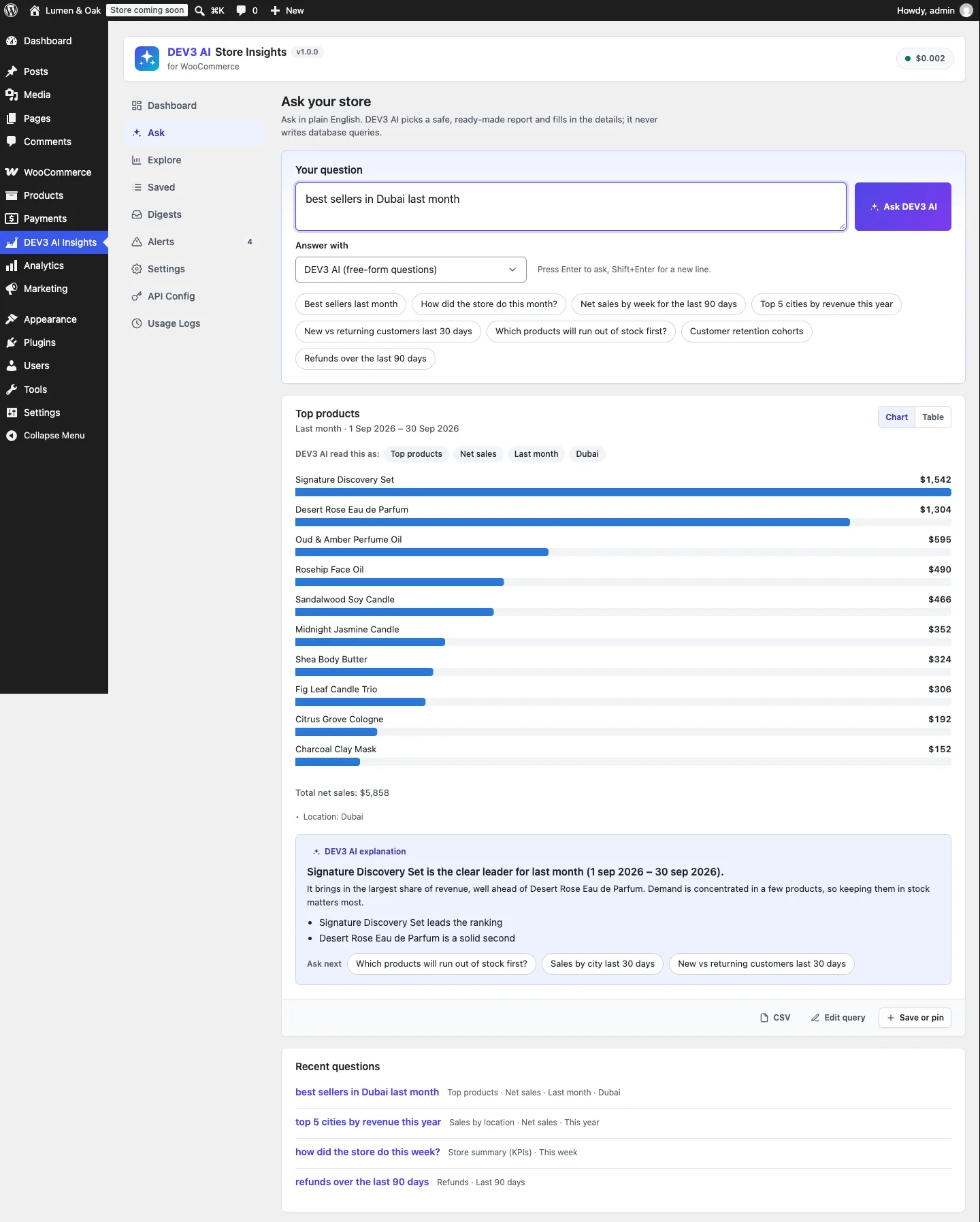
- Go to Ask and type a question such as "best sellers in Dubai last month". Check the "DEV3 AI read this as" chips, then use Save or pin to keep the answer.
- Use Explore to build any report by hand: report, measure, period, location, category and customer filters.
- Arrange pinned cards on the Dashboard and pick one date range for all of them.
- In Digests, schedule daily, weekly or monthly e-mails with your key numbers and saved questions. Use Preview and Send test before you activate one.
- In Alerts → Rules, review the default anomaly rules, add recipients and, optionally, let DEV3 AI suggest rules. Nothing is saved until you accept it.
Updating
Download the new version of the bundle, then upload this plugin's zip in Plugins → Add New → Upload Plugin and choose Replace current with uploaded. Settings and data are kept.
Uninstalling
Deactivate and delete the plugin from Plugins. Saved questions, digests, alerts and settings stay in the database unless you first turn on Delete saved questions, digests, alerts and settings when the plugin is deleted under Settings → Uninstall. Your WooCommerce orders and Analytics data are never changed.