"Our vendors' listings are letting the marketplace down"
If you run a multi-vendor marketplace on Dokan or WCFM, you've seen it: one-line descriptions, phone photos with no alt text, products filed in the wrong category, prices plucked from thin air, and buyer questions that sit unanswered for a week. Your best vendors are fine. Many others are small sellers who are good at making things and short on time for writing copy.
Their listings are your marketplace's storefront, though. Poor listings hurt search, buyer trust and sales for everyone.
Giving vendors a generic AI tool isn't the answer either. You'd have no control over cost, no review of what gets published, and no guarantee one vendor can't see another's data. This guide shows how to give vendors a proper assistant inside their own dashboard with DEV3 AI Vendor Assistant for Dokan & WCFM, while you keep control.
What good looks like
A vendor assistant that works for a marketplace owner:
- Lives inside the vendor dashboard vendors already use, matching its colours.
- Helps with the jobs vendors skip: listings, pricing, buyer replies, store profile, and knowing what to improve.
- Produces drafts, not surprises. Vendors accept or edit every result.
- Gives you cost control: monthly credits per vendor and a site-wide budget.
- Lets you moderate AI-written listings before they go live.
- Keeps every vendor's data private from every other vendor.
- Still helps without AI, so nobody hits a dead end.
Step-by-step setup
1. Install and confirm the marketplace
You need WordPress 6.0+, PHP 7.4+, WooCommerce 8+, and either Dokan (Lite or Pro) or WCFM Frontend Manager plus WCFM Marketplace (free or Ultimate). Upload the zip in Plugins → Add New → Upload Plugin and activate it, then open DEV3 AI Vendors in wp-admin. The dashboard shows which marketplace was detected.
Vendors now see AI Assistant in their dashboard menu (Dokan: /dashboard/ai-assistant/, WCFM: /store-manager/ai-assistant/). If that page shows "not found", visit Settings → Permalinks once and click Save.
2. Connect Google Gemini and set a budget
Create a key in Google AI Studio and paste it under DEV3 AI Vendors → API Config. Pick the models and set a monthly budget in USD for the whole site. When the budget is reached, AI pauses and vendors keep using the basic helpers. The key stays on your server; vendors' browsers only talk to your WordPress REST API.
3. Decide credits and access
Open Vendors & quotas. Each vendor gets monthly credits (100 by default; 0 means unlimited). A listing costs 2 credits and other requests cost 1, editable in Settings. Cached answers and basic drafts cost nothing. Per vendor, you can switch access off, set custom credits, or turn individual features on or off. Credits reset on the 1st of each month, and vendor staff use their vendor's credits.
4. Set moderation rules
In Settings, choose how AI-written listings are handled:
- Hold for review (the default): they're saved as pending until an admin approves them.
- Publish, but list for review: they publish with the marketplace's normal status and appear in the queue as flagged.
Add blocked words to flag listings or stop vendors saving them, and write your marketplace policies and preferred tone, which the assistant follows. In Moderation you can preview a listing, run a DEV3 AI policy check, approve and publish, or reject with a note that's emailed to the vendor.
5. Show vendors what they get
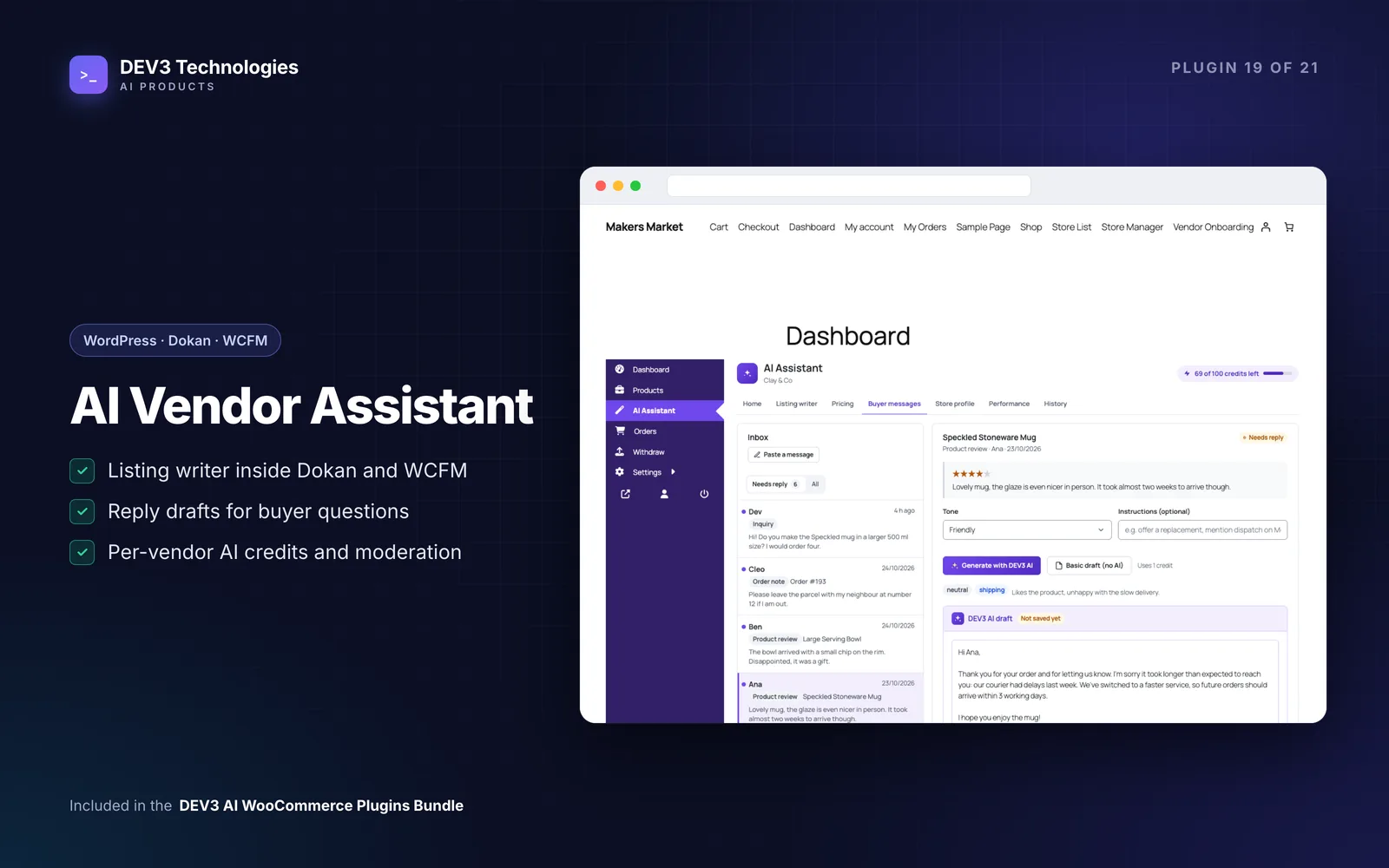
The assistant has tabs for Home, Listing writer, Pricing, Buyer messages, Store profile, Performance and History, with a credits pill showing what's left this month. Shortcut links also appear on the Dokan product edit form and in the WCFM product manager: "Improve this listing with AI" and "Suggest a price".
Listing writer. Vendors upload up to six photos and type a few notes; lines like Capacity: 350 ml become attributes. DEV3 AI writes a title, short description, description, tags, attributes, category, SEO title and description, and alt text for each photo. Choose "New listing" or improve an existing product with a diff of the changes. Create listing makes a WooCommerce product owned by the vendor.
Price suggestions. The assistant gathers similar published listings on your marketplace and shows the count and the lowest, median and highest prices. Only public data is used: title, price, rating and store name, never sales numbers. The vendor picks a goal (competitive, premium or quick sale) and gets a suggested price, range and reason, kept within sensible bounds of the comparables.
Buyer replies. One inbox brings together product reviews, order notes, WCFM inquiries and Dokan Pro store-support topics. The vendor picks a message and tone and gets a draft that follows your policies and theirs. Send reply posts it back to the right place, such as a reply under the review or a customer note on the order.
Store bio & SEO. A bio, tagline, SEO title, description and keywords saved into the marketplace's own store fields.
Performance tips. The last 30 days against the 30 before from the vendor's own orders: revenue, orders, average order, rating, top products, listing quality issues, low stock and unanswered reviews, with rule-based tips and an optional AI-written plan.
6. Watch the Activity ledger
Activity lists every vendor AI request with store, user, feature, credits, tokens, estimated cost and result, filterable by feature and month, with CSV export. The dashboard sums up vendors using AI, credits and estimated cost this month, and moderation counts.
Tips and pitfalls
- Start with Hold for review. Once you trust the output for your categories, consider switching to publish-and-flag.
- Write your policies first. Reply drafts and the policy check are only as good as the rules you give them.
- Budget for listings. Listings cost more credits than other features; set limits based on how many new products vendors typically add per month.
- Want it white-label? Turn off "Show the DEV3 AI name to vendors". Buttons then say "Generate with AI", and you can rename the menu item.
- Without AI, nothing breaks. With no key, AI off, the budget reached or a vendor out of credits, listings are drafted from notes, prices come from the comparables, replies use templates and tips come from rules.
- Data isolation is enforced. Every vendor request checks ownership of each product, photo, order, message and draft, and other stores' IDs return 404. Buyers are reduced to their first name before anything is sent to Google Gemini.
Who it's for
Marketplace owners running Dokan or WCFM who want better listings and faster buyer replies across many small sellers, and who need cost control and moderation before giving vendors AI tools. The case study explains how vendor data is kept separate on both marketplaces.
Wrapping up
When every vendor can produce a complete listing, a reasoned price and a polite reply in minutes, the whole marketplace looks more professional, and you stay in charge of cost and quality. DEV3 AI Vendor Assistant is included in the DEV3 AI WooCommerce Plugins Bundle; for custom marketplace features, talk to our web development team.