"We get the same five questions all day"
Where's my order? Do you ship to my country? Have you got this in blue? What's your returns policy? Is there anything under 30 that would make a good gift?
If you run a WooCommerce store, these questions arrive through your contact form, email, social media and phone, often outside business hours. Each one is easy to answer, but together they take hours a week, and the shopper who asked at 11pm and heard nothing probably bought somewhere else.
A chatbot can help, but only if it actually knows your products, prices and policies. A generic AI chat that invents a discount or a delivery date is worse than no chat at all. This guide shows how to set up DEV3 AI Shopping Assistant & Chatbot for WooCommerce so it answers from your real store data, and hands over to a person when it should.
What good looks like
A shopping assistant worth adding:
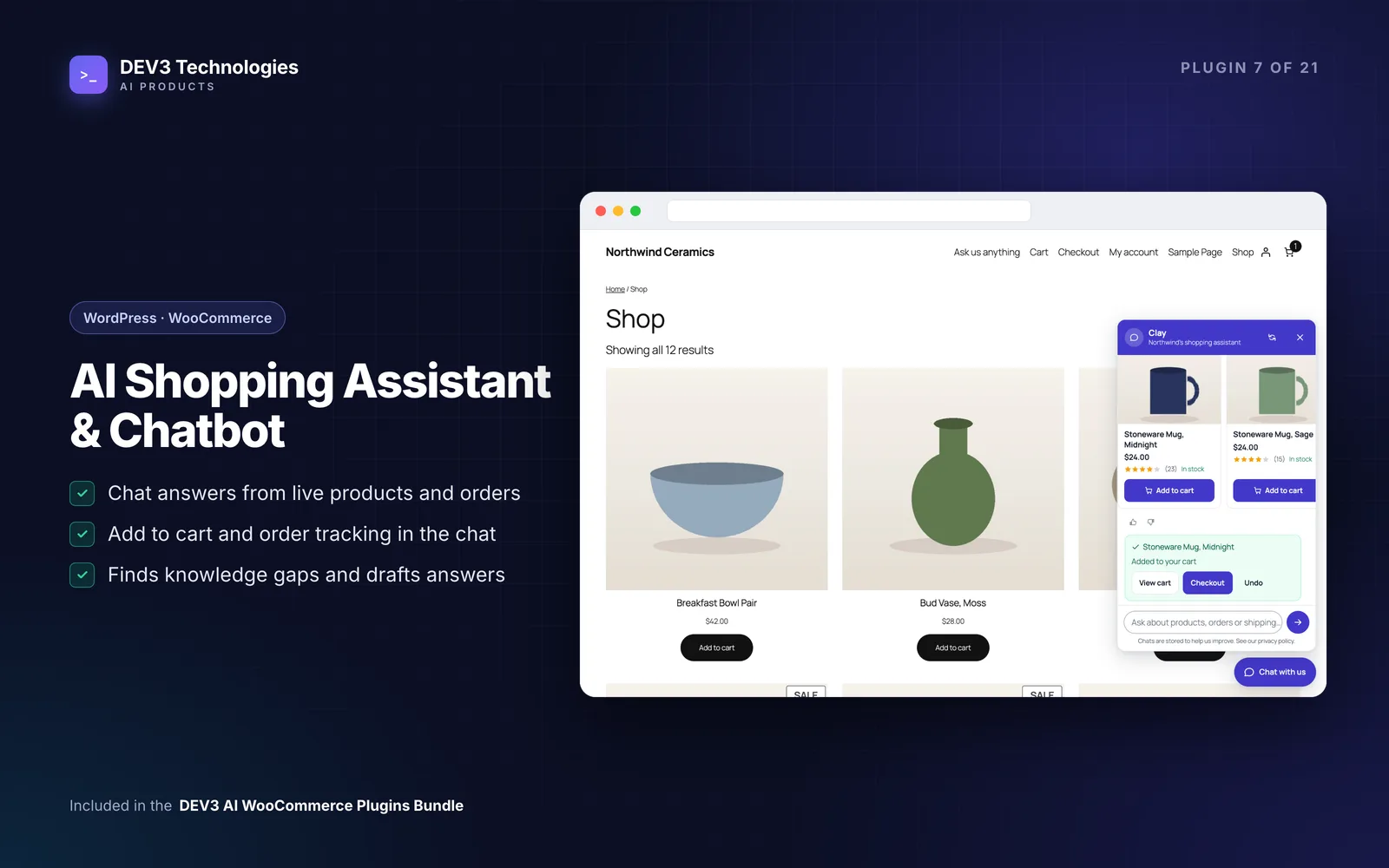
- Recommends real products with real WooCommerce prices, stock and an Add to cart button.
- Tracks orders for customers and guests without exposing addresses or payment details.
- Answers policy questions from your own shipping, returns and payment information.
- Hands over to a person with the transcript when the bot can't help.
- Works well on phones, where most chats happen.
- Still works without AI, and keeps AI costs under control when it's on.
- Shows you what people ask, including what it couldn't answer.
Step-by-step setup
1. Install the plugin
Upload the zip in Plugins › Add New › Upload Plugin and activate it (WordPress 6.0+, PHP 7.4+, WooCommerce 8.0+). Open DEV3 AI Assistant in the admin menu. No licence key is needed.
2. Import your store's answers
Go to Knowledge base › Import from store. Your refund page, terms, privacy page, shipping zones and payment methods become answers. It's safe to run again; existing titles are skipped.
Then add your own entries for the questions you get most. Each entry has a question or title, an answer, a type (FAQ, shipping, returns, payment, policy, product info, other), keywords and a status.
3. Design the chat widget
Under Chat widget, set:
- Appearance: assistant name, subtitle, avatar, accent colour, corner position and launcher style.
- Messages: greeting, up to six starter buttons (for example "Best sellers", "Track my order"), a placeholder, an away message, a greeting bubble and an optional auto-open delay.
- Where it shows: every page, shop pages only or chosen pages, with exclusions; hide on checkout; everyone, guests only or customers only.
The live preview shows the result on desktop or phone. On screens under 600px the chat opens as a full-screen sheet that stays above the keyboard.
4. Try it as a shopper
Visit your shop and try "best sellers", "mugs under 30" and "track my order". Even without AI, the product finder searches titles, SKUs, descriptions, categories, tags and attributes, and understands price limits, "on sale", "new arrivals", "top rated" and "cheapest". Simple products get an Add to cart button on their card, followed by View cart, Checkout and Undo.
For order tracking, logged-in customers see their recent orders; guests enter the order number and billing email. The card shows status, a timeline, items, total and tracking numbers from Advanced Shipment Tracking or common tracking meta keys.
5. Set up "Talk to a person"
The handoff form collects name, email and message, and emails your team with the transcript (Reply-To is the shopper). Set the address under Chat widget › Features & contact, and add WhatsApp and phone buttons and business hours with an away message if you use them.
6. Add DEV3 AI for real conversations
Create a key in Google AI Studio, paste it in API Config and click Validate. Then run Knowledge base › Build index with DEV3 AI. From then on the assistant holds real conversations in the shopper's language: it finds candidate products and knowledge entries, writes a short answer, picks products only from those candidates, and can add to cart ("add two of the blue mugs"), open order tracking or show the handoff form. Prices and stock always come from WooCommerce.
Useful admin tools once AI is on:
- Build my knowledge base drafts FAQ entries from your policies and settings, marking facts it couldn't find as
[CONFIRM: …]. - Persona writer drafts the name, greeting, starters and voice in your brand style.
- Test console lets you chat as a shopper and see the source, intent and knowledge used for each reply.
Admin AI results are drafts; nothing is saved until you click Accept.
7. Review conversations and gaps
The Conversations inbox lets you search and filter, read transcripts with the source of each answer, reply by email, summarise with DEV3 AI and export to CSV. AI insights › Knowledge gaps groups unanswered and low-rated questions and drafts the missing answers. The dashboard shows conversations, answered rate, add-to-carts, revenue from chat and satisfaction.
Tips and pitfalls
- Fill the knowledge base before launch. The assistant can only quote what it knows. Check every
[CONFIRM: …]marker before accepting a drafted entry. - Keep starter buttons practical. "Track my order" never uses AI, so common tasks stay free and instant.
- Control cost. Set a monthly budget in API Config, and limit AI answers per conversation and messages per minute under Chat widget › DEV3 AI. When a limit is hit, the assistant falls back to guided answers.
- Turn on PII masking in API Config so emails, phone numbers and card numbers are masked before anything is sent to Google Gemini.
- Hide it where it distracts. Many stores hide the chat on checkout.
- Inline chat works too: add the Shopping assistant block or
[dev3sa_chat height="560"]to a help page, or open the chat from any button with[dev3sa_chat_button label="Ask us"]. - Page caching is fine: the widget sends no requests until it's opened.
Who it's for
Stores with a broad catalogue where shoppers need help choosing, stores that field many "where's my order" messages, small teams that can't staff live chat all day, and anyone who wants AI chat without letting it make up prices or policies. Read the case study for how product retrieval and grounding were built.
Wrapping up
A good shopping assistant answers the routine questions instantly, sends shoppers to the right products, and passes the rest to your team with context. DEV3 AI Shopping Assistant & Chatbot is part of the DEV3 AI WooCommerce Plugins Bundle; for a custom assistant on your own data, see our AI implementation services.