All case studies

DEV3 Technologies · own product

DEV3 AI Shopping Assistant & Chatbot for WooCommerce: grounded product answers, order tracking and add to cart

Our own WooCommerce plugin: a chat assistant that recommends real products with WooCommerce prices, tracks orders, answers policy questions and adds to the cart, using hybrid keyword and semantic retrieval when AI is on and a guided mode when it isn't.

Industry
E-commerce (WooCommerce)

Live project preview

Client systems are private — screenshots shown where permitted.

DEV3 Technologies · own product — screenshots
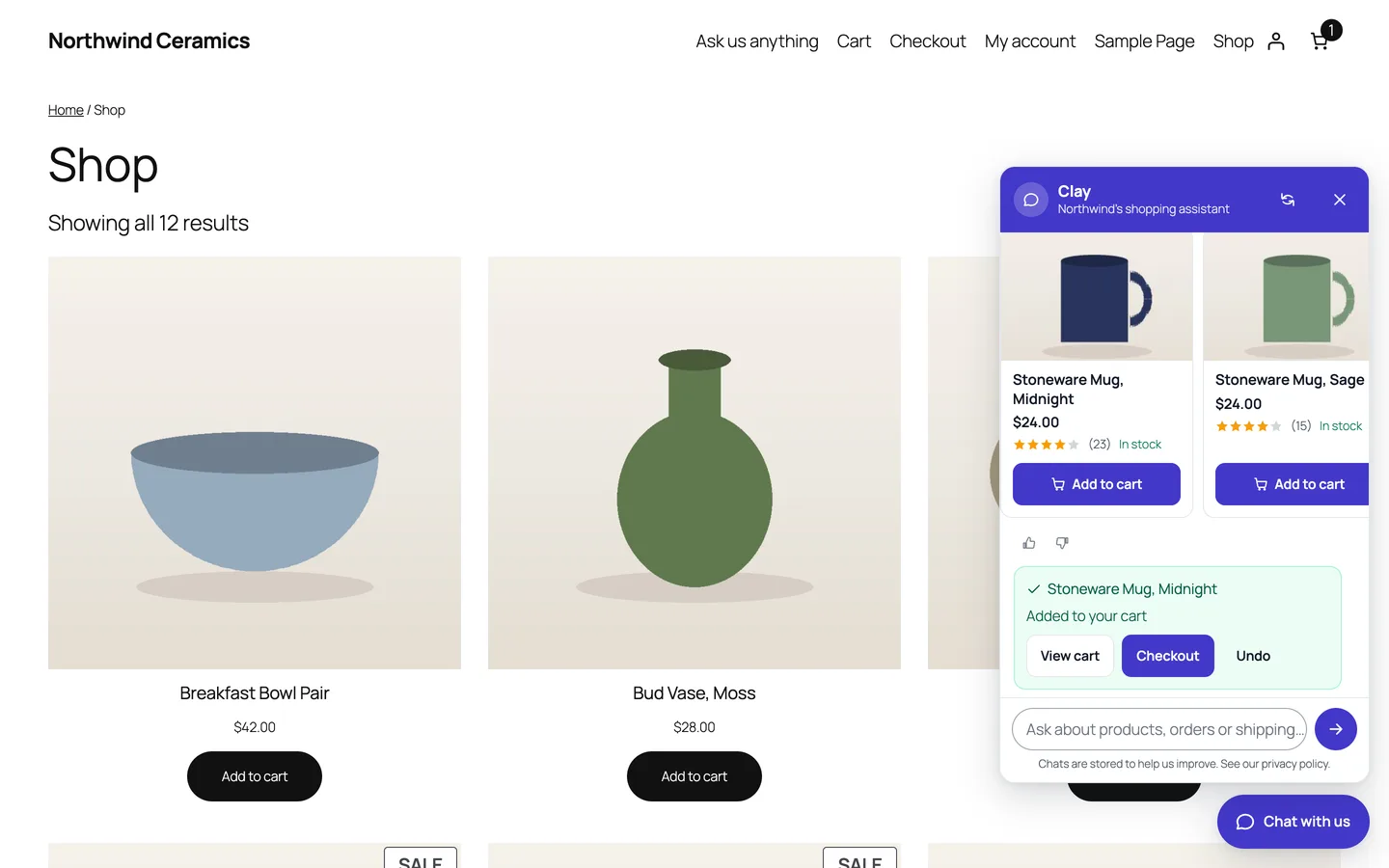
The assistant on a shop page: product cards with WooCommerce prices, ratings and stock, and an item added to the cart from the chat with View cart, Checkout and Undo.

The assistant on a shop page: product cards with WooCommerce prices, ratings and stock, and an item added to the cart from the chat with View cart, Checkout and Undo.

The challenge

Shoppers ask questions in their own words: "something cosy for cold days", "a gift for my mum under 100", "where is my order". Keyword search misses the first, a plain chatbot invents an answer to the second, and the third must never show one customer's order to another. A language model makes the conversation natural, but it can also recommend products the store doesn't sell, quote the wrong price, or be told by a shopper to ignore its rules. We needed an assistant that finds products by meaning, only ever shows real catalogue items with live prices, takes cart actions the server has checked, and keeps working when the AI is off or out of budget.

Our solution

We built DEV3 AI Shopping Assistant & Chatbot as a WooCommerce plugin in PHP, with a dependency-free storefront chat and a React admin. The model writes the reply; WooCommerce supplies every fact and the server validates every action.

Key design decisions

  • Hybrid retrieval. Each question runs a keyword product search (titles, SKUs, categories, tags, attributes, price phrases) and, when an index exists, a semantic search over product and knowledge embeddings. The two ranked lists are merged with reciprocal rank fusion.
  • The model only chooses. It sees up to 12 candidate products as facts and returns product ids in structured JSON. Ids outside the candidate set are dropped, and product cards (name, image, price, rating, stock, Add to cart) are rendered from WooCommerce, never from the model's text.
  • Validated actions. "Add the blue mug to my cart" becomes an add_to_cart action that must name a candidate product; the server rejects variable and out-of-stock products and offers Undo. Order status text always comes from WooCommerce.
  • Private orders. Logged-in customers see their own recent orders; guests need the order number and the matching billing email. Addresses and payment details are never shown.
  • Guided mode first. Without a key, or when the AI fails, hits its monthly cap or the per-conversation limit, rules answer: product finder, order tracking, knowledge base and handoff.
  • Incremental index. Products and knowledge entries are embedded in background jobs; only items whose content hash changed are embedded again.

Architecture

The chat is a floating launcher, an inline block or a shortcode; on phones it opens as a full-screen sheet that stays above the keyboard. A same-origin, rate-limited REST API handles messages, cart actions, order lookups, ratings and handoff. Conversations are stored with transcripts, ratings and outcomes, and chat-added items are attributed to orders so the dashboard shows revenue from chat (HPOS-safe). The knowledge base imports refund, terms and privacy pages, shipping zones and payment methods; with the Google Gemini API connected, DEV3 AI drafts knowledge answers, groups unanswered questions into gaps, writes insights and the assistant's persona, all as drafts. A test console shows why each answer was given. The API client, encrypted key storage, embeddings store and usage logs come from a shared core used across DEV3's plugins.
Results

The plugin is complete. It ships in the DEV3 AI WooCommerce Plugins Bundle on the DEV3 marketplace, alongside 20 other WooCommerce plugins, and is being prepared for CodeCanyon. What was built and verified:

  • 70 PHPUnit tests: rank fusion, a semantic match with no shared keywords, AI answers limited to retrieved products, validated add-to-cart, guest order lookup with matching email, fallback to rules on AI errors, caching, rate limits, attribution and GDPR export and erase
  • 41 Jest tests for the storefront chat (including the phone sheet) and the admin screens
  • Guided mode checked end to end on the Twenty Twenty-Five block theme: product cards, add to cart with Undo, and guest order tracking with a status timeline
  • AI chat, embeddings and admin drafts tested with mocked API responses; a run with a live key is still to come
  • Planned for v1.1: live agent chat and messaging channels

Setup guide

No licence key or activation is needed: install the zip and every feature works.

Requirements

  • WordPress 6.0 or newer and PHP 7.4 or newer
  • WooCommerce 8.0 or newer, active (classic and block cart/checkout and HPOS are supported)
  • Optional: Advanced Shipment Tracking, or tracking numbers in common order meta keys, to show tracking in the chat
  • Optional: a Google Gemini API key for conversational answers and semantic search. Without one, the assistant runs in guided mode (product finder, order tracking, knowledge base and handoff)

1. Install the plugin

  1. The plugin ships inside the DEV3 AI WooCommerce Plugins Bundle download. Unzip the bundle and find dev3-ai-woocommerce-plugins-bundle/dev3-ai-shopping-assistant-for-woocommerce/dev3-ai-shopping-assistant-for-woocommerce.zip.
  2. In WordPress, go to Plugins → Add New → Upload Plugin, choose that zip and click Install Now.
  3. Click Activate. DEV3 AI Shopping Assistant & Chatbot for WooCommerce appears in the plugin list and its menu, DEV3 AI Assistant, appears in the admin sidebar.

2. Connect Google Gemini (optional)

  1. Create a free API key in Google AI Studio (sign in with a Google account, then Create API key).
  2. Go to DEV3 AI Assistant → API Config, paste the key and click Validate & save. The key is stored encrypted (AES-256-GCM) and never sent to the browser; every AI call happens on your server.
  3. Optional: pick the models (gemini-2.5-flash is the fast default; gemini-embedding-001 is used for semantic search), and set the monthly budget cap.
  4. Go to Knowledge base and click Build index with DEV3 AI to embed your products and answers. New and edited items are re-indexed automatically.

Prefer config files? Add define( 'DEV3SA_GEMINI_API_KEY', 'your-key' ); to wp-config.php instead.

3. First-time setup

  1. In Knowledge base, click Import from store to add answers from your refund page, terms, privacy page, shipping zones and payment methods, then review and edit them. Add your own FAQ with New entry.
  2. In Chat widget, set the assistant's name, subtitle, colour, position and launcher on Appearance; the greeting and starter buttons on Messages; the pages it appears on in Where it shows; and add to cart, order tracking, handoff, WhatsApp, phone and business hours in Features & contact.
  3. On Privacy, set the consent line and how long transcripts are kept.
  4. Open Test console, ask the questions your customers ask, and check each answer.
  5. Click Save changes. The floating chat appears on the storefront. You can also use the chat block, [dev3sa_chat], or [dev3sa_chat_button] on any button.

Updating

Download the latest bundle, find the new plugin zip at the same path, then upload it in Plugins → Add New → Upload Plugin and choose Replace current with uploaded. Settings, knowledge and conversations are kept.

Uninstalling

Deactivate and delete the plugin from Plugins. Data is removed only if "delete data on uninstall" is turned on in the plugin's settings.

How to use

Help shoppers find and buy products

  1. Shoppers open the chat from the launcher (for example Chat with us) or a starter button such as Show me best sellers.
  2. They describe what they want, with price phrases like "under 50" or "between 20 and 40", or words like "on sale", "new" and "best sellers". The assistant replies with product cards showing WooCommerce prices, ratings and stock.
  3. They tap Add to cart on a card, or ask "add the blue mug to my cart". The chat confirms with View cart, Checkout and Undo. Products with options link to the product page instead.

Track an order

  1. Shoppers ask "where is my order" or tap Track my order.
  2. Logged-in customers pick from their recent orders. Guests enter their order number and billing email and click Find my order.
  3. The reply shows the status timeline, items, total and tracking numbers. Addresses and payment details are never shown.

Reply to conversations

  1. Open Conversations to see every chat with its first question, outcome and rating. Filter by status or rating, or search by email, name or message text.
  2. Open a conversation to read the transcript, change its status, or write a reply that is emailed to the shopper and saved in the transcript. Summarise with DEV3 AI gives a short summary.
  3. Use Export CSV for your own reporting.

Close knowledge gaps

  1. On the Dashboard, check Unanswered questions, or open Knowledge base.
  2. Click Find gaps with DEV3 AI to group the questions the assistant couldn't answer and draft the missing answers, or Build my knowledge base with DEV3 AI to draft answers from your policies and settings.
  3. Accept, edit or reject each draft. Only accepted entries go live.

Review performance

  1. The Dashboard shows conversations, answer rate, add-to-carts, revenue from chat, satisfaction and top questions for the chosen period.
  2. In AI insights, click Generate report for themes, demand for products you don't sell, sentiment and suggested actions.

Related case studies