All case studies

DEV3 Technologies · own product

DEV3 AI Product Options & Add-Ons: 25 field types and price formulas that match in PHP and JavaScript

Our own WooCommerce plugin for extra product options: 25 field types, conditional logic, steps, repeaters and safe price formulas, with a live price in the browser and the authoritative price on the server.

Industry
E-commerce (WooCommerce)

Live project preview

Client systems are private — screenshots shown where permitted.

DEV3 Technologies · own product — screenshots
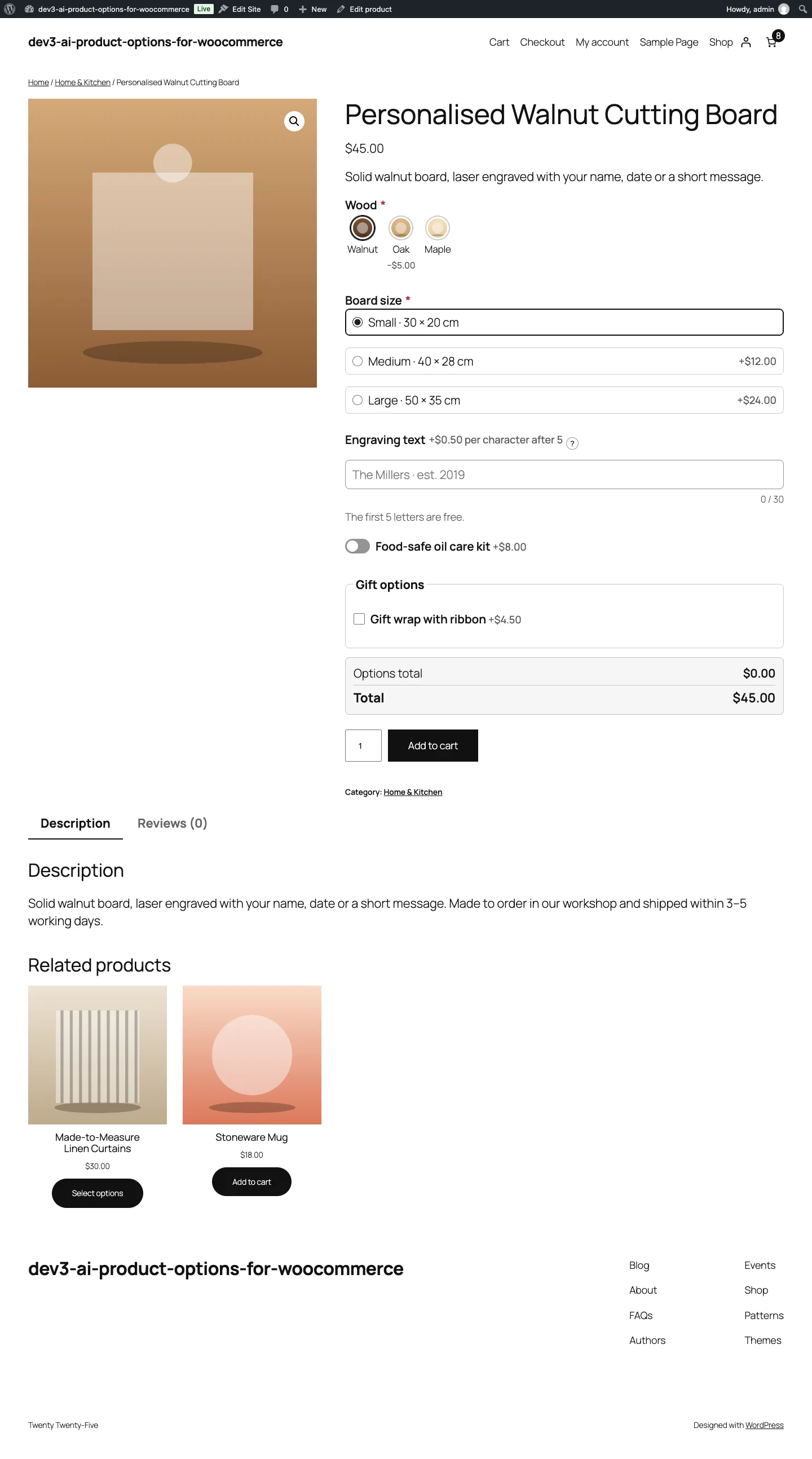
A personalised cutting board: wood swatches, size choices, engraving priced per letter after five free, extras and a live total.

A personalised cutting board: wood swatches, size choices, engraving priced per letter after five free, extras and a live total.

The challenge

Personalised products need more than WooCommerce variations: engraving priced per letter, a size measured in centimetres, a photo upload, gift options that only appear when a box is ticked. The shopper has to see the right total as they type, and the cart has to charge exactly that total, which means the same pricing rules running in the browser and on the server. Merchants also want formulas such as "2 per letter over 10" without a plugin that evaluates arbitrary code, and they need to catch impossible conditions and circular rules before a broken option set reaches customers.

Our solution

We built DEV3 AI Product Options & Add-Ons as a WooCommerce plugin in PHP, with a React option-set builder and a storefront script that shares its pricing engine with the builder's live preview.

Key design decisions

  • One grammar, two parsers, no eval. Price formulas are tokenised and parsed by a small recursive-descent parser written twice, in PHP and JavaScript, with ten whitelisted functions (min, max, round, ceil, floor, abs, sqrt, pow, if, clamp), a 500-character limit and division by zero defined as 0.
  • The server is authoritative. The browser shows a live total, but on add to cart the server re-parses the posted values, re-runs conditions and validation, stores only the visible values, and recalculates prices in woocommerce_before_calculate_totals for both the classic and block cart.
  • Shared fixtures from an independent reference. 127 pricing cases are generated by a separate Python implementation of the rules. Both the PHPUnit and Jest suites must reproduce every expected unit price, one-off fee and total.
  • A logic checker that needs no AI. It finds conditions that can never be true, loops (including loops through steps and sections), price conflicts and structural errors before a set is published.
  • Global sets with precise assignment. Sets apply by category (including sub-categories), tag or product, with priorities, exclusions, per-product overrides and an "own fields only" mode.
  • AI drafts only. With the Google Gemini API connected, DEV3 AI can draft a whole option set from a product description, review the logic, turn a plain-language rule into a formula, write labels and translations, and check uploaded images. Every result is a draft the merchant accepts or rejects.

Architecture

Option sets are stored as normalised field lists. The storefront renders them as accessible, translated markup (swatches, image pickers, steps, repeaters, uploads) and recalculates the total on every change with the shared engine. Uploads go to a protected folder with random names, type, size and minimum-resolution checks, and are deleted after a retention period if never ordered. Options flow into the cart, checkout, orders, emails and the admin, can be edited from the cart, and survive "order again". The API client, encrypted key storage and usage logs come from a shared core used across DEV3's plugins.
Results

The plugin is complete. It ships in the DEV3 AI WooCommerce Plugins Bundle on the DEV3 marketplace, alongside 20 other WooCommerce plugins, and is being prepared for CodeCanyon. What was built and verified:

  • 127 price fixtures generated by an independent Python reference, run by both test suites
  • 59 PHPUnit test methods (the fixture test runs once per case), covering the parser's rejection of unsafe input, conditions, validation, cart lines, edits, order meta, uploads, assignment rules and REST permissions
  • 39 Jest tests for the engine, builder and storefront, plus the same 127 fixtures through test.each
  • Logic checker tests for loops, loops through steps, impossible conditions, price conflicts and structural errors
  • AI paths (option-set generation, logic review, the formula helper with its retry loop, labels, the upload vision check) tested with mocked API responses; a run with a live key is still to come
  • Checked on the Twenty Twenty-Five block theme with the block cart and checkout, desktop and mobile

Setup guide

No licence key or activation is needed: install the zip and every feature works.

Requirements

  • WordPress 6.0 or newer and PHP 7.4 or newer
  • WooCommerce 8.0 or newer, active (classic and block cart/checkout and HPOS are supported)
  • Optional: a Google Gemini API key for the DEV3 AI tools. Every field, condition, price type and upload works without one
  • On Nginx, a deny rule for wp-content/uploads/dev3po-uploads/ so customer uploads can't be opened directly (Apache is covered automatically)

1. Install the plugin

  1. The plugin ships inside the DEV3 AI WooCommerce Plugins Bundle download. Unzip the bundle and find dev3-ai-woocommerce-plugins-bundle/dev3-ai-product-options-for-woocommerce/dev3-ai-product-options-for-woocommerce.zip.
  2. In WordPress, go to Plugins → Add New → Upload Plugin, choose that zip and click Install Now.
  3. Click Activate. DEV3 AI Product Options & Add-Ons for WooCommerce appears in the plugin list and its menu, DEV3 AI Product Options, appears in the admin sidebar.

2. Connect Google Gemini (optional)

  1. Create a free API key in Google AI Studio (sign in with a Google account, then Create API key).
  2. Go to DEV3 AI Product Options → API Config, paste the key and click Validate & save. The key is stored encrypted (AES-256-GCM) and never sent to the browser.
  3. Optional: pick the model (gemini-2.5-flash is the fast default; gemini-2.5-pro for the highest quality).

Prefer config files? Add define( 'DEV3PO_GEMINI_API_KEY', 'your-key' ); to wp-config.php instead.

3. First-time setup

  1. Open the Dashboard and click New option set, or open a product and use its DEV3 AI Options tab for product-only fields.
  2. Add fields with Add field, set each field's price in its Pricing tab, and choose under Assignment which categories (sub-categories included), tags or products show the set.
  3. Check that the Logic checker reports no problems, then publish the set.
  4. In Settings, choose whether the live price box is shown, how shop and category buttons behave for products with required options, and how long files that are never ordered are kept (14 days by default).
  5. Open a product the set applies to and test the live total, then add it to the cart.

Updating

Download the latest bundle, find the new plugin zip at the same path, then upload it in Plugins → Add New → Upload Plugin and choose Replace current with uploaded. Settings, option sets and uploads are kept.

Uninstalling

Deactivate and delete the plugin from Plugins. Data is removed only if "delete data on uninstall" ("Delete all plugin data when the plugin is uninstalled") is turned on in Settings. Options already saved on orders stay on those orders as order item meta.

How to use

Create a global option set

  1. Go to DEV3 AI Product Options → Option sets and click New option set.
  2. Give it a name and a priority (lower numbers show first), then click Add field for each option: swatches, radio buttons, text, uploads, repeaters, sections, steps and more.
  3. Under Assignment, choose Selected categories, tags or products, pick them, and add any products to exclude. Sub-categories are included automatically.
  4. Try it in the Live preview, check the Logic checker says No problems found, and publish. Use Update to save later changes.

Generate a set with DEV3 AI

  1. In the builder, find Generate options with DEV3 AI. Check the product title, paste the description and add optional instructions, for example "engraving up to 20 letters, gift box, express production".
  2. Click Generate options with DEV3 AI. The fields, choices, prices and conditions arrive as a draft in the builder.
  3. Edit or delete anything you don't want, then save. Nothing is saved until you do.

Price a field with a formula

  1. Open a field and go to its Pricing tab. Set Price type to Formula and choose Charge: per item or once per cart line.
  2. Write the formula using the variable chips, for example max(0, {len} - 10) * 2 or {width} * {height} * 0.002, or describe the rule in plain words and click Write formula with DEV3 AI.
  3. Type sample values in the test bench under the formula and check the result before clicking Done.

Show or hide fields with conditions

  1. Open the field, section or step and go to its Logic tab.
  2. Turn on conditions, choose show or hide, all or any, and add rules such as "Gift wrap is checked" or "Size is XL".
  3. Check the Logic checker. It flags conditions that can never be true, loops and price conflicts; Review with DEV3 AI adds a second opinion when AI is connected.

Give one product its own options

  1. Edit the product in WooCommerce and open the DEV3 AI Options tab in the product data box.
  2. Add product-only fields, exclude a global set, switch to "own fields only", or override a global set's prices for this product, then update the product.

Review customer uploads

  1. Open Uploads to see every customer file with its product, order and check status (Looks good, Flagged, Rejected or Not checked).
  2. Filter by In orders, Not ordered yet or Flagged, open a file, or delete it. Files never ordered are removed after the retention period.

Related case studies