"Customers keep asking the same thing, in the wrong places"
Does this jacket run small? Is the charger included? Will this fit a 13-inch laptop? Shoppers ask these questions before they buy, and on most WooCommerce stores they have nowhere good to ask them. So they post them as one-star "reviews", send them to your contact form, ask on social media, or simply leave.
Answering by email helps one person. The next shopper with the same question never sees it. And if you sell hundreds of products, keeping up with questions by hand quickly becomes someone's full-time job.
This guide shows how to add a proper product Q&A section with DEV3 AI Product Q&A for WooCommerce, and how to use AI-drafted answers without letting an AI say things about your products that aren't true.
What good looks like
A useful product Q&A section:
- Lives on the product page, next to the description and reviews, and works on phones.
- Lets shoppers search existing answers before they ask, so you answer each question once.
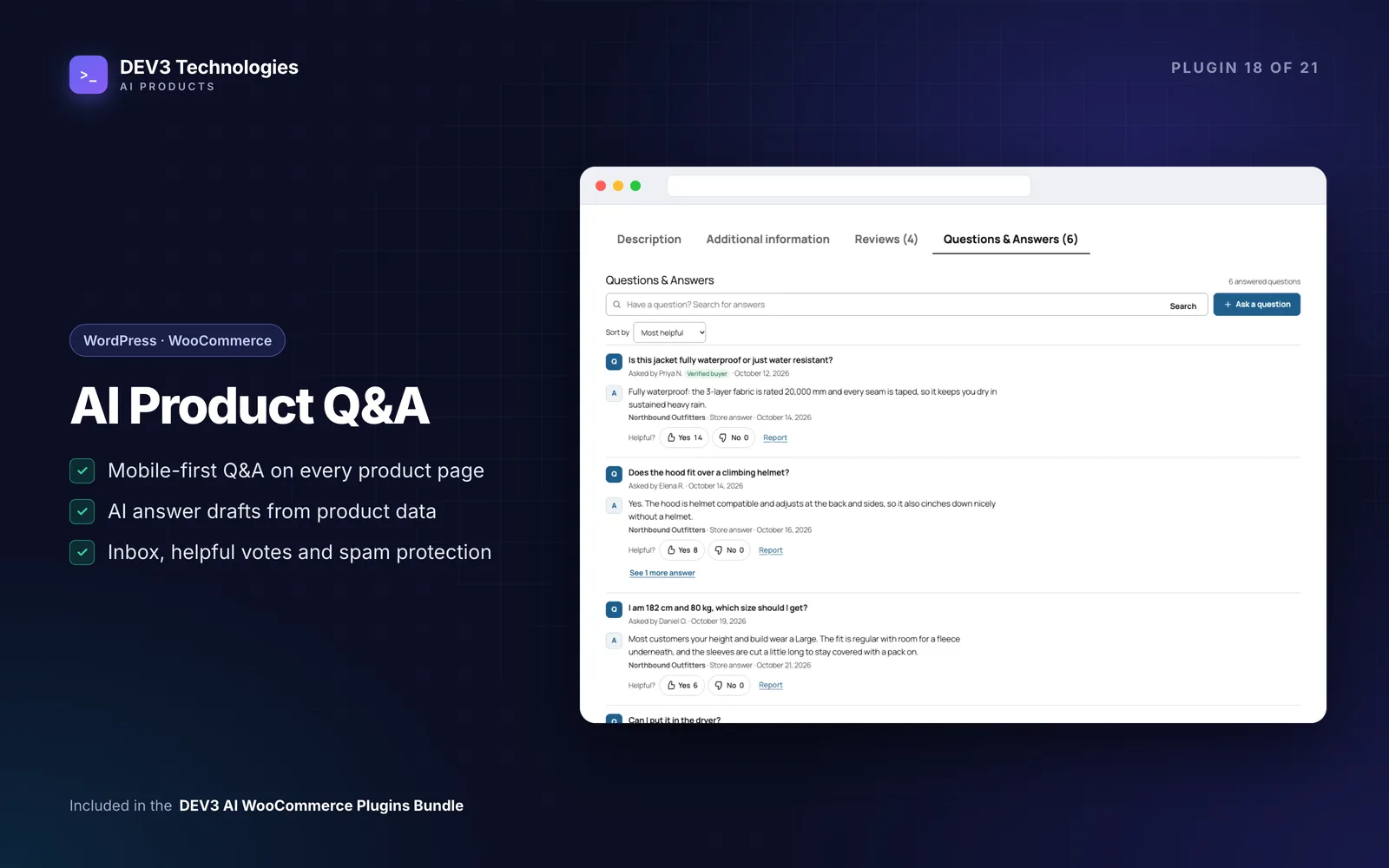
- Labels who answered: the store, a customer, or an automated answer.
- Keeps you in control. Nothing published without your approval unless you decide otherwise.
- Answers from facts. If an answer is drafted for you, it should come from the product's own data and reviews, with sources you can check.
- Stops spam without captchas.
- Helps search engines understand the page with structured data.
Step-by-step setup
1. Install and run a test question
Upload the zip in Plugins → Add New → Upload Plugin and activate it (WordPress 6.0+, PHP 7.4+, WooCommerce 8.0+). A DEV3 AI Q&A menu item appears, with a bubble showing how many questions are waiting.
Then do the quick start from the docs:
- Open any product page. A Questions & Answers tab is already there.
- Ask a test question as a guest. You get an email, and the question appears in Questions → Needs answer.
- Open it, write an answer and click Publish answer. The shopper is emailed and the Q&A shows on the product.
That's a working Q&A section without any AI at all.
2. Choose where it appears
In Settings, pick a placement: a product tab (the default, which also works with the block theme Product Details block), below the product summary, after the product tabs, or Manual. For manual placement use the Product Q&A block or the shortcode:
[dev3qa_qa product_id="123" per_page="10" title="no"]
The widget inherits your theme's fonts and text colour and uses your accent colour from Settings → Display.
3. Decide how shoppers and customers take part
The ask form takes a question of 10–500 characters, a name and email for guests (configurable), and an "Email me when it is answered" option. Logged-in customers can also answer each other's questions; you approve those answers first, and buyers of the product get a Verified buyer badge. Every answer has Helpful Yes/No votes and a report option.
4. Seed the section before launch
Empty Q&A tabs don't build trust. Fill them in three ways:
- Add & FAQ → Add a Q&A: enter questions you've been asked by phone or email, with answers.
- Import questions from reviews: Scan reviews finds reviews that contain a question; your replies to those reviews become store answers. Pick rows and import; a review is never imported twice.
- CSV import: columns
product_idorsku,question, and optionalanswer,status,author,email.
5. Connect DEV3 AI for drafted answers
Create a key in Google AI Studio, paste it under API Config, click Test key, then Save. From then on, new questions get a DEV3 AI draft in the background, so the shopper never waits on the page.
Each draft is built only from that product's knowledge: details (price, stock, SKU, dimensions, categories, rating), attributes, short description and description, the latest approved reviews and earlier published answers. You choose which of those sources may be used under Settings → DEV3 AI answers. The draft shows a confidence score and the sources it used; you can Accept & publish, edit, regenerate or reject it. When the product data doesn't contain the answer, the draft says so and the confidence is low.
For products with no questions yet, Suggest FAQ with DEV3 AI proposes up to six pre-purchase questions answered from the product data. Untick what you don't want and click Publish selected.
6. Work the inbox
The Questions screen has views for Needs answer, AI drafts, Customer answers, Published, Reported, Spam and Rejected. Bulk actions let you publish AI drafts, draft answers with DEV3 AI, reject or mark as spam. The dashboard button Draft open answers with DEV3 AI works through everything in Needs answer.
7. Consider instant answers (carefully)
If you turn on Publish high-confidence answers instantly, an answer goes live straight away only when DEV3 AI says the sources answer it, it cites at least one product passage, it isn't spam or off-topic, and the confidence meets your threshold (85% by default). Everything else goes to the inbox. You can show the label "Automated answer based on product details" under these answers, and you can still edit or unpublish them.
Tips and pitfalls
- Start with instant answers off. Review drafts for a few weeks to see how well your product data answers real questions, then decide on a threshold.
- Thin product data means low-confidence drafts. If DEV3 AI keeps saying "not in product data", the fix is usually better attributes and descriptions, which also helps SEO.
- Spam protection is built in: a honeypot, a signed form timestamp, a link limit, hourly limits, duplicate detection, a blocked-words list, and Akismet when it's connected. Spam is never deleted automatically.
- Rich results. Product pages output FAQPage (default) or QAPage JSON-LD with published Q&A only. Google shows FAQ rich results only for some sites, so treat it as a bonus.
- Page caching is fine: the first page of questions is cached with the product, while search, sorting and "Show more" always load fresh data.
- Block theme without a Product Details block? Choose Manual and add the Product Q&A block to the single product template.
- Privacy: with AI on, only the question text and product passages are sent to Google Gemini; names and emails are never sent. Set a monthly budget in API Config.
Who it's for
Stores selling products where details matter before purchase (electronics, fashion and fit, furniture, parts and accessories), stores that get repeat questions by email, and teams that want AI help answering without handing the AI the final say. The case study explains how the answer drafting was built.
Wrapping up
A searchable Q&A section turns each answered question into something every future shopper can read, and AI drafts grounded in your own product data make keeping up realistic. DEV3 AI Product Q&A is included in the DEV3 AI WooCommerce Plugins Bundle; for help with grounded AI on your own data, see our AI implementation services.