A lot of events still begin as a poster. A venue emails a PDF, a promoter hands over a JPEG, and someone at the events site retypes the title, date, times, price, venue and organiser into The Events Calendar. Along the way they often create "The Blue Room" as a new venue when "Blue Room" already exists, and the venue list slowly fills with near-duplicates. When we built DEV3 AI Event Writer for The Events Calendar, we added a flyer import that reads the poster with a vision model and turns it into a draft event. Reading the poster turned out to be the easy part. The real work is everything around it: treating the model's answer as untrusted form input, telling the editor which fields to doubt, and matching the venue and organiser to records that already exist before anything new is created. This post covers that pipeline.
 Illustration: details read from a flyer become a draft event for review.
What it does and who it's for
DEV3 AI Event Writer is an add-on for The Events Calendar (TEC). It drafts the words every event needs from the event's real details, and only saves what you accept:
- Venues and arts centres publishing a busy programme, where every event needs a description, an FAQ and SEO meta.
- Promoters and community calendars that receive events as flyers and posters and want them as draft events instead of retyping.
- Event marketers who need one post per social network, plus promo, reminder and recap emails for each date.
- Sites using Event Tickets, where recaps can mention real attendance numbers and emails can go to attendees.
- Teams catching up on a backlog, using bulk runs to fill in missing descriptions and SEO across dozens of events.
How to set it up
- Install The Events Calendar, then upload this plugin's zip from the bundle and activate it. A DEV3 AI Events menu and a DEV3 AI Writer shortcut under Events appear.
- Optionally paste a Google Gemini API key in API Config. Templates and manual flyer entry work without one.
- In Settings, set the default tone, language, hashtags and networks, where the FAQ shows, and how imported events are saved (draft or pending).
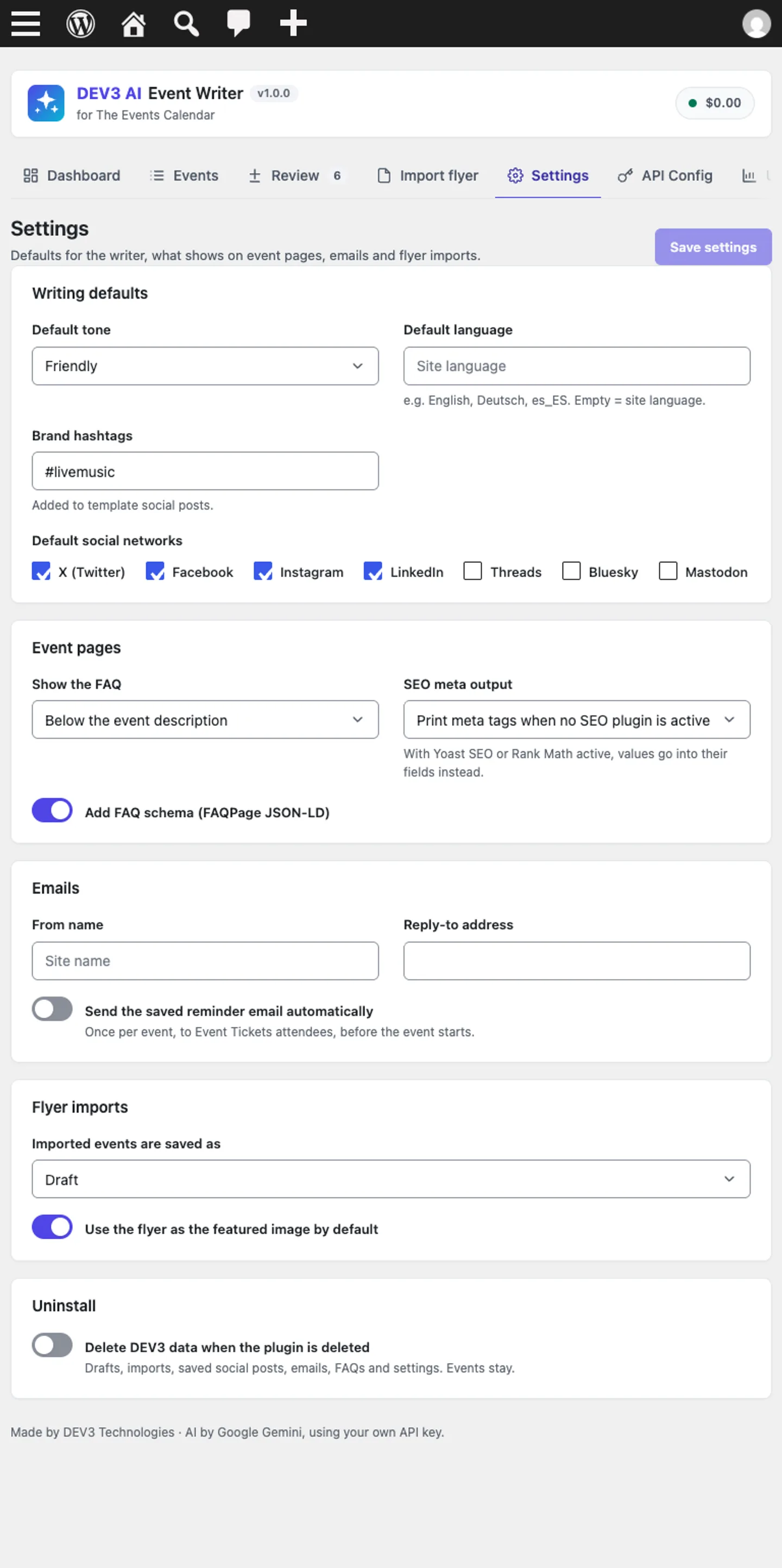 Settings: writing defaults, FAQ and SEO output, reminder emails and flyer import defaults.
How to use it
In the event editor. Click the DEV3 AI Event Writer icon in TEC's block editor (or use the metabox in the classic editor). Tabs for Description, Social, Emails, FAQ and SEO each produce a draft that you compare with the current text and accept, edit or reject. Accepted descriptions replace only the text blocks, so TEC's own date, price and venue blocks stay put.
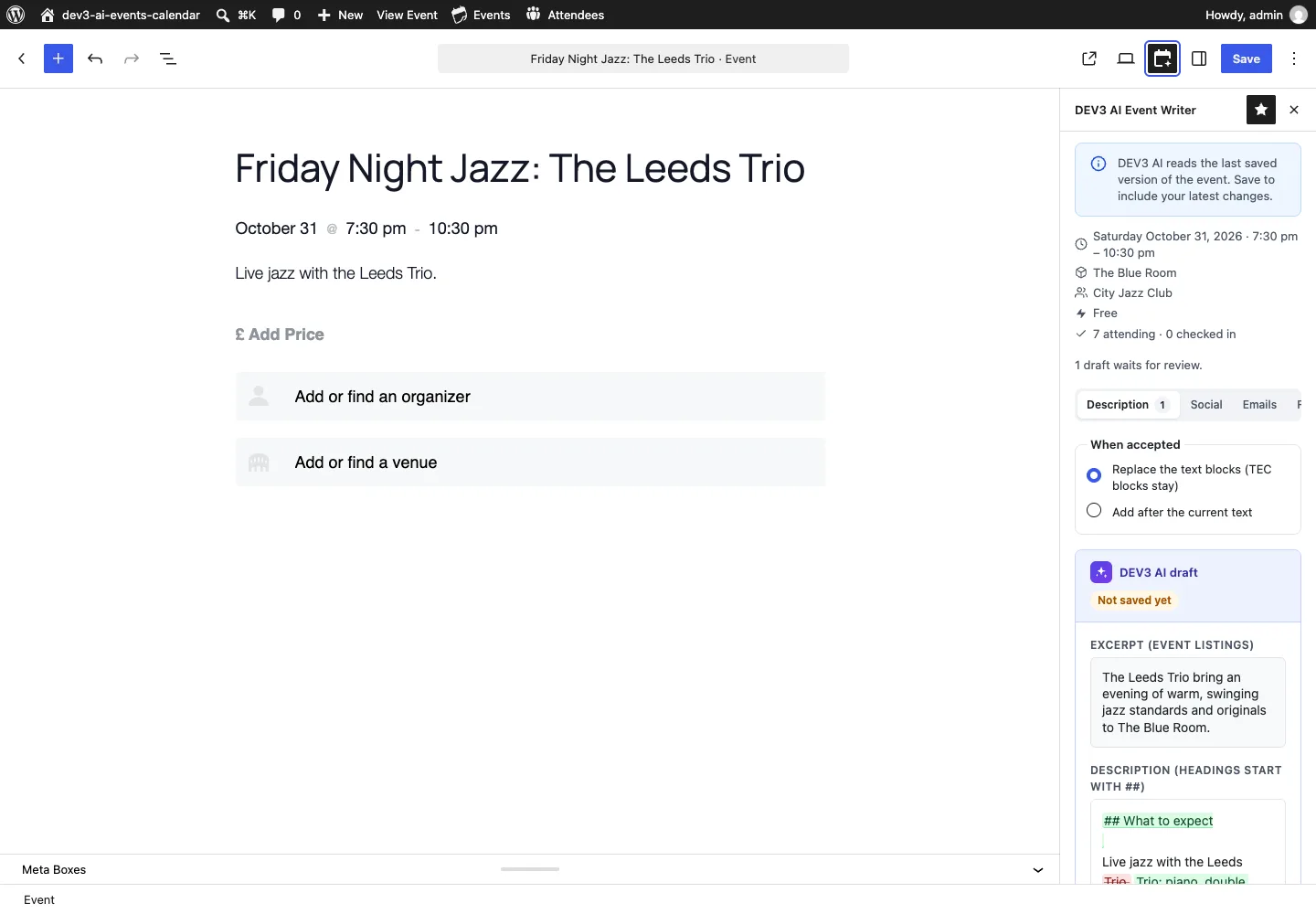 The sidebar shows the facts the AI will use, and the draft waits for review.
In bulk. The Events screen shows which pieces each event is missing. Select events, choose outputs and run the job; drafts land in Review.
From a flyer. Upload the poster under Import flyer, check the fields beside it, confirm the venue and organiser matches, and create a draft event.
The rest of this post is about that last workflow.
The pipeline at a glance
- Upload and validate. The admin uploads a JPG, PNG, WebP or PDF up to 15 MB, with optional notes such as "the year is 2027".
- Queue. An import row is created with status
queuedand a background job is scheduled, so a slow vision call never blocks the browser. - Read. The job sends the file inline to the pro model with a structured response schema.
- Normalise. Every field of the answer is re-validated in PHP.
- Match. The venue, organiser and categories are scored against existing records.
- Review. The admin sees the flyer beside the form, with flags on uncertain and missing fields and a suggested match for venue and organiser.
- Create. On confirmation, the event is created as a draft through TEC's own API, and the flyer optionally becomes the featured image.
With AI off, the same form opens empty beside the uploaded flyer ("Fill in by hand"), and steps 5 to 7 work exactly the same.
Asking for doubt, not just data
The prompt is strict about what counts as a fact: copy what is printed and never guess. Dates come back as YYYY-MM-DD, times as 24-hour HH:MM, and when only a start time is printed, end_time stays empty. Two fields exist only to express doubt:
'missing'   => array( 'type' => 'ARRAY', 'maxItems' => 20, 'items' => self::str( 20 ) ),
'uncertain' => array( 'type' => 'ARRAY', 'maxItems' => 20, 'items' => self::str( 20 ) ),
// ...
'required'  => array( 'title', 'start_date', 'description', 'missing', 'uncertain' ),
'model'     => 'pro',
'profile'   => 'heavy',
(condensed from the flyer_import prompt in Prompt_Library)
The model lists the keys of fields that are not on the flyer in missing, and those it is unsure about in uncertain. The review form turns those into short notes under each field: Not on the flyer or DEV3 AI is not sure: check this against the flyer. In the flyer shown in our screenshots, the end date is marked as not on the flyer (it defaults to the start date) and the £25 price as uncertain. That is more useful than a confident value the editor has no reason to check.
Every string in the schema also has a maxLength, which keeps a runaway answer from filling a field with repetition.
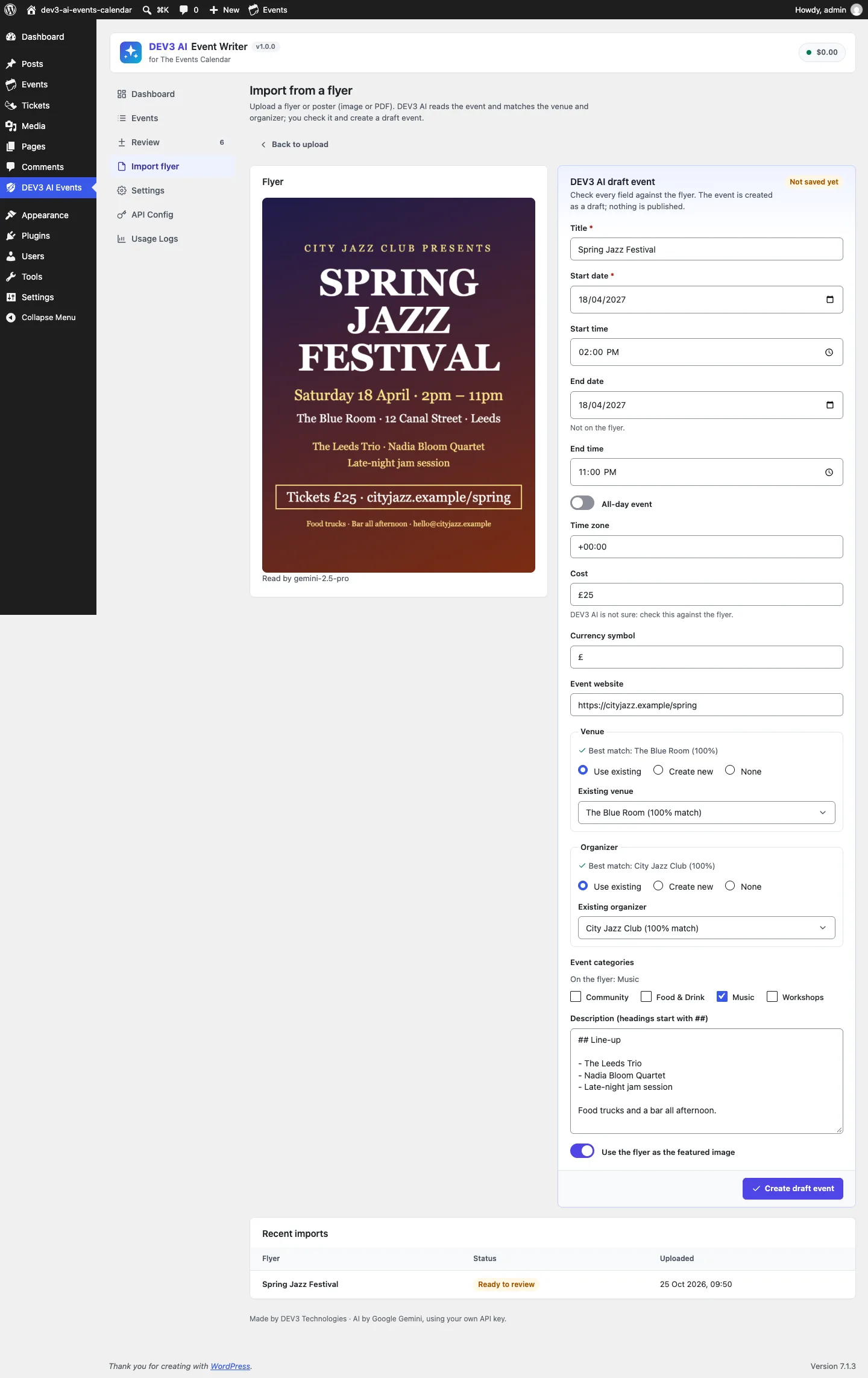 The flyer and the draft side by side, with doubt flags and suggested matches.
Normalising the answer as if a stranger typed it
A schema shapes the answer, but it doesn't validate it. A string field typed as "date" can still hold 2027-02-30. So Importer::normalize() treats the model's output the same way it would treat a form post from an unknown user:
public static function date( $d ) {
	$d = trim( (string) $d );
	if ( ! preg_match( '/^(\d{4})-(\d{2})-(\d{2})$/', $d, $m ) || ! checkdate( (int) $m[2], (int) $m[3], (int) $m[1] ) ) {
		return '';
	}
	return $d;
}

public static function time( $t ) {
	$t = trim( (string) $t );
	if ( ! preg_match( '/^(\d{1,2}):(\d{2})$/', $t, $m ) || (int) $m[1] > 23 || (int) $m[2] > 59 ) {
		return '';
	}
	return sprintf( '%02d:%02d', (int) $m[1], (int) $m[2] );
}
(from Service\Importer)
The rest of the normaliser follows the same rule: if a value is invalid it becomes empty, and it is never replaced with a guess.
- Timezone: anything that isn't a real IANA identifier falls back to the site timezone.
- End date: an empty end date becomes the start date.
- Email: an organiser email that fails
is_email()is dropped. - Flags:
missinganduncertainare intersected with the known field keys, so an invented key can't show up as a flag. - Text: every string is sanitised and capped to the same length as in the schema.
The import test feeds exactly these cases through a mocked response. The start time 7:30 comes back as 07:30, the timezone Mars/Olympus becomes the site timezone, the empty end date becomes the start date, the email bad-email is removed, and the missing list ['website', 'nonsense'] is reduced to ['website'].
The test also checks the outgoing request: the image goes as inline_data with mime type image/jpeg, and the admin's note ("Year is 2027") appears in the prompt. The vision model never sees anything from the site beyond today's date, the site timezone and those notes.
Matching before creating
The step that saves the most clean-up later is matching. Places::match_venue() compares the flyer's venue with every existing TEC venue and builds a short, scored candidate list.
Normalising names
Names are compared after normalisation: lower case, accents removed, HTML entities decoded, punctuation collapsed to spaces, and a leading article (the, la, le, el, der, die, das) removed. "The Blue Room" and "Blue Room" become the same string.
public static function similarity( $a, $b ) {
	$a = self::norm( $a );
	$b = self::norm( $b );
	if ( '' === $a || '' === $b ) {
		return 0;
	}
	if ( $a === $b ) {
		return 100;
	}
	if ( strlen( $a ) >= 4 && strlen( $b ) >= 4 && ( false !== strpos( $a, $b ) || false !== strpos( $b, $a ) ) ) {
		return 85;
	}
	similar_text( $a, $b, $pct );
	return (int) round( $pct );
}
(from Tec\Places::similarity)
An exact match after normalisation scores 100. One name containing the other scores 85, so "Blue Room Leeds" still finds "Blue Room". Anything else falls back to PHP's similar_text percentage.
Location and contact signals
For venues, a matching city adds 10 points, and a different city takes 15 away when the names aren't already identical. A matching normalised street address sets the score to at least 95, whatever the name says. For organisers, a matching email is decisive and sets the score to 100, and a matching website domain (ignoring www.) sets it to at least 95. In the matching test, an organiser called "Totally different" with the email HELLO@cityjazz.test is matched to City Jazz Club, with "email" as the reason.
Suggesting, not deciding
Candidates scoring under 50 are dropped and the top three are kept, each with a reason such as name + city, address or email. If the best one scores 80 or more, the form preselects Use existing; otherwise it preselects Create new, and with no name at all, None. The admin can always change it. Categories are matched the same way, against existing TEC categories at a threshold of 85, and simply ticked in the form.
 Illustration: a flyer's venue is matched to an existing record before anything is created.
Creating the event through TEC, not around it
When the admin clicks Create draft event, Importer::create_event() runs the reviewed fields through the same normaliser again, because they came back from a browser. A title and a valid start date are required. The rest is filled in rather than refused:
- With no start time, the event becomes all-day.
- With a start time but no end time, the event gets a two-hour default.
- If the end would come before the start, it is pushed to start plus two hours.
The event is then created as a draft (or pending, depending on the setting) through TEC's ORM, tribe_events()->set_args()->create(). That way TEC's custom tables, UTC date meta and caches stay consistent. Plain post meta writes are only a fallback for older TEC versions. New venues and organisers use tribe_venues() and tribe_organizers() in the same way. In the block editor, the description becomes core blocks placed between TEC's own blocks: date and time first, then the text, then price, organiser, venue, website and links.
Each import can only be created once. A second attempt returns dev3ec_import_done, so a double click or a retried request can't produce two events from one flyer.
Trade-offs
- Identical names in different cities tie. City only adjusts the score when the names aren't already identical, so "Blue Room, Leeds" and "Blue Room, York" can both score 100 for a Leeds flyer. The form lists both candidates with their full addresses and reasons, and the editor picks. A stricter rule would mean more false "create new" suggestions for venues whose city was never filled in.
- Matching scans existing records in PHP. The comparison loads up to 300 venues or organisers. That is fine for typical calendars, but a directory with thousands of venues would need a database-side pre-filter.
- The year is a judgement call. Flyers often omit the year. The prompt asks for the next future date and lets the admin add notes, but the server only checks that the date is real, not that it is the right year. That is what the review step is for.
- PDFs become events, not images. Image flyers can become the featured image; PDFs can't, and the event is created without one.
- No live-key run yet. Every AI path, including vision, was tested with mocked responses. Reading quality on real posters is still to be measured.
Conclusion
Vision models make reading a poster easy. What makes the result safe to save is the plain code around it: a schema that asks for doubt as well as data, a normaliser that treats the answer like any untrusted form post, matching that prefers existing records, and creation through the calendar's own API. The plugin has 60 PHPUnit tests and 44 Jest tests in total, and the case study covers the writer panels, bulk runs and emails. DEV3 AI Event Writer for The Events Calendar ships in the DEV3 AI Directory, Booking & Events Plugins Bundle on the DEV3 marketplace and is being prepared for CodeCanyon.