A contact form is the one place on a small business website where money walks in. DEV3 AI Entry Insights reads every Gravity Forms, WPForms and Contact Form 7 submission and tells the site owner which entries matter: a summary, an intent, a sentiment, an urgency, a category and a lead score from 0 to 100 with a reason. The hard part was not the prompt. It was doing all of that without making a single form slower, without losing anything when the AI is down, and without letting a late AI answer overwrite what the rules or a person had already decided. This post covers how the plugin splits the work between a synchronous rules engine and a background AI queue.

Illustration: submissions from three form plugins flow into one inbox and come out sorted.
What it does and who it's for
- Agencies and studios with a "Request a quote" form, who want the budget-and-deadline enquiries at the top of the list instead of under ten newsletter sign-ups.
- Service businesses whose bookings, complaints and support questions all arrive through the same Contact Form 7 form, and who need the urgent or unhappy ones flagged the same day.
- WPForms Lite and Contact Form 7 users, whose form plugin keeps no copy of submissions at all. The plugin stores every entry in its own table and gives them an inbox, search, notes and CSV export.
- Gravity Forms sites that already hold hundreds of entries. Those can be imported, scored and tagged in a background job, and each Gravity Forms entry gets an insights meta box.
- Teams that answer by email, who want a reply draft in the sender's language and their own brand voice, reviewed and sent by a person.
- Owners who want the trend, not every message: an insights dashboard and an AI digest of themes, risks and suggested actions for the last 7, 30 or 90 days.
How to set it up
- Install the plugin from the DEV3 AI Forms & Lead Generation Plugins Bundle and activate it next to Gravity Forms, WPForms or Contact Form 7. One of them is enough.
- Optional: add a Google Gemini API key in DEV3 AI Entry Insights → API Config and click Validate & save. Without a key every entry still gets a rule-based score, sentiment, urgency, category and tags.
- On Forms, check that each form is captured, choose which forms DEV3 AI analyses, and import older Gravity Forms or WPForms Pro entries.
- On Rules, set the starting score, the points per signal and the hot-lead threshold, then try a sample message.
- On Replies and Settings, fill in the brand voice and sender, and turn on email alerts for hot leads and urgent or unhappy entries.
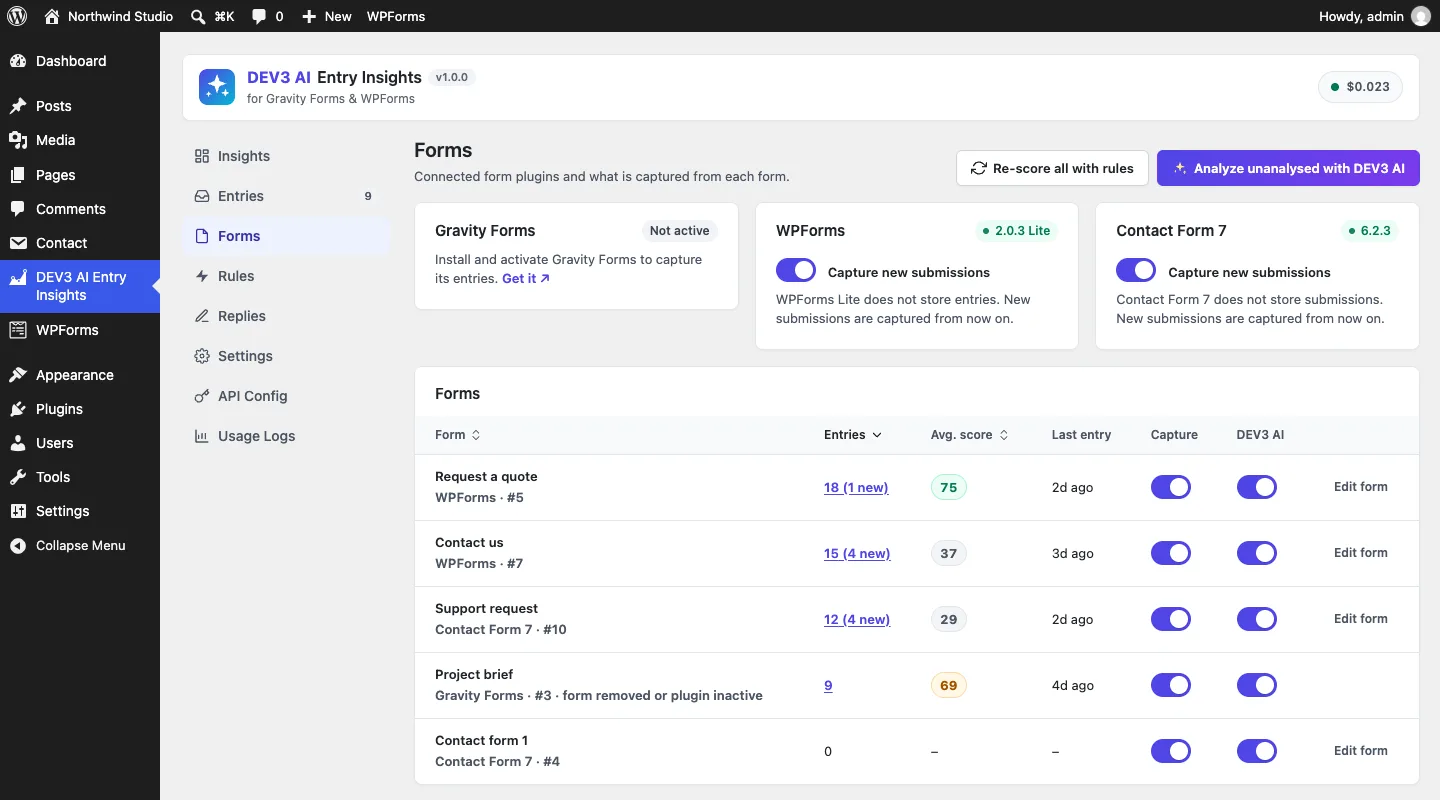
Each detected form plugin is listed with its version, and every form has its own capture and DEV3 AI switches.
How to use it
Triage the inbox. Open Entries and switch to Hot leads or Needs attention. Each row already carries a score, sentiment, urgency and tags. Click one to see the summary, the intent and the reason for the score, then star, archive or leave an internal note.
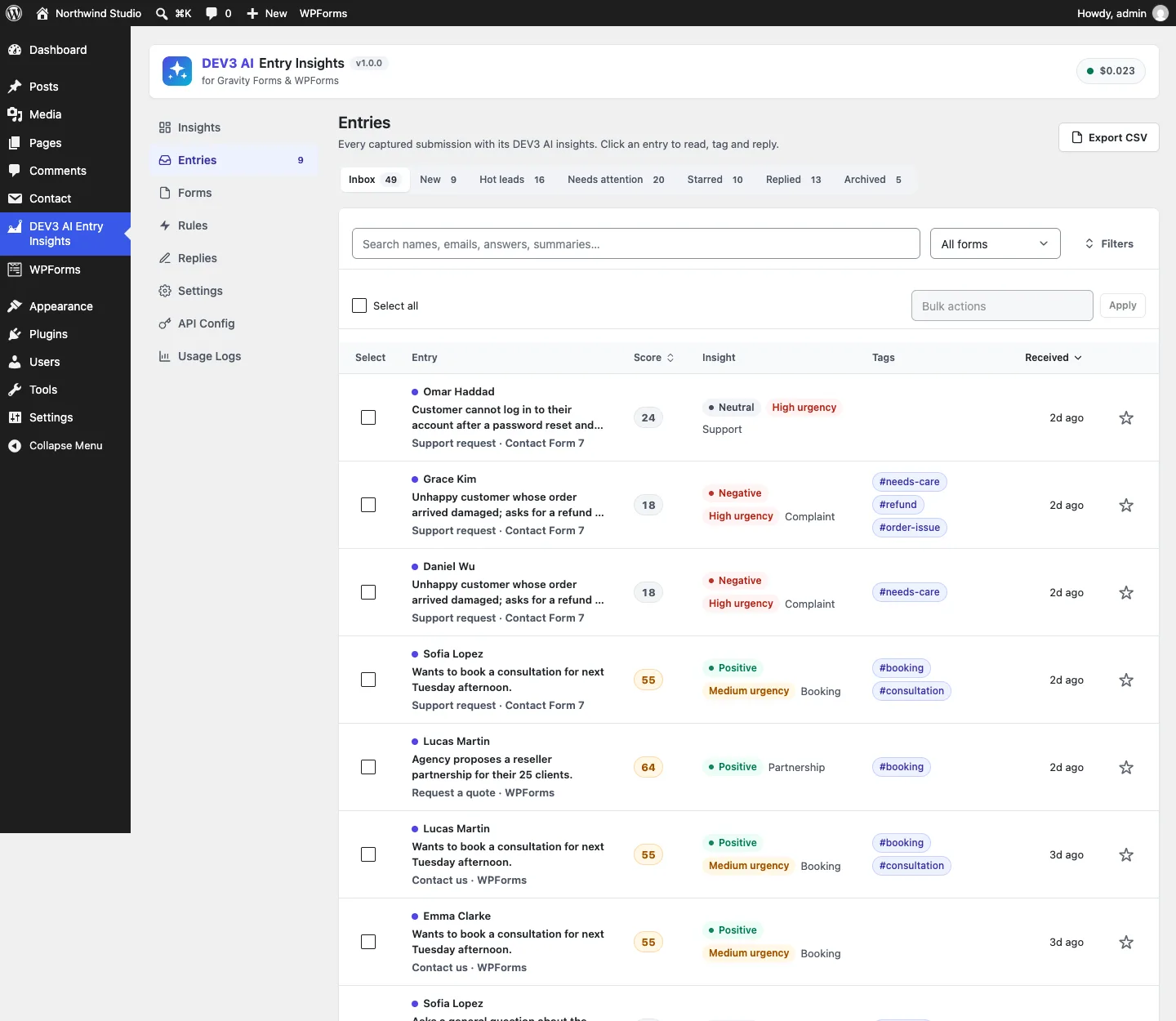
One inbox for three form plugins. Every row is scored the moment it arrives.
Reply from a draft. In the entry drawer, pick a tone, add notes such as a start date or a price you are happy to quote, and click Draft reply with DEV3 AI. Edit the draft, then send it. With no key, start from a template instead.
Read the period. On Insights, choose a period and a form, read the charts and the Needs attention list, and click Summarize trends with DEV3 AI for a digest you can pin to the dashboard.
Why the AI cannot run in the submit request
The obvious build hooks into gform_after_submission, sends the answers to a model and saves the result. It works in a demo and fails in three ways on a real site.
- Latency. A language model call takes seconds. Gravity Forms, WPForms and Contact Form 7 all fire their after-submit hooks inside the visitor's request, so every second spent waiting for the model is a second the visitor stares at a spinner.
- Failure. An expired key, a rate limit or a monthly cap would turn into an empty entry, or worse, an exception in the middle of someone else's form plugin.
- Overwrites. If the AI is the only source of truth, re-analysing an entry wipes whatever a person did in the meantime: tags they added, a status they changed.
So the plugin splits the work. Everything that is deterministic and cheap runs during the submit. Everything that needs the network runs later, in a queue, and is merged in without erasing what is already there.
Step 1: normalise, then score with rules, in the same request
Each adapter turns its plugin's submission into the same shape, [{key, label, type, value}], with a shared type vocabulary: name, email, phone, textarea, choice, consent, hidden and so on. Gravity Forms compound fields (names, addresses, checkboxes) are joined, WPForms name parts are combined, and Contact Form 7 labels are read from the <label> text in the form template. Spam-marked submissions are skipped before anything is stored. Contact Form 7 fires either wpcf7_mail_sent or wpcf7_mail_failed, and both count, because a valid submission should not disappear just because the site's mail server is broken.
Capture::record() then stores the row and immediately runs the rules engine. It is plain PHP with no network access:
$rules = Rules::analyze( $entry['fields'] );
$cols  = self::columns( $entry, $rules, null );
Entries::update( $id, $cols );
(from Analyzer::apply_rules)
Rules::analyze() starts from a configurable base score (20 by default) and adds points for named signals: a phone number left, an email domain that is not on a list of free mail providers, a company field, a budget field, buying words such as "quote" or "demo", deadline words such as "ASAP" or "today", and a message of 280 characters or more. An unhappy tone subtracts points, and merchant keyword rules can add or remove more. Each signal that fires appends a human-readable reason, so the stored reason reads like "Left a phone number, uses a company email, shared a budget." Sentiment comes from a small lexicon, urgency from deadline words, and the category from ordered keyword patterns. If the spam pattern matches, the score is capped at 5.
None of this needs the network. It is cheap, explainable in the admin's Try the rules box, and it means an entry is useful before the AI has seen it. The RulesTest suite checks that a strong enquiry scores high with its reasons, that a free-mail address with a vague message scores low, and that spam is capped.
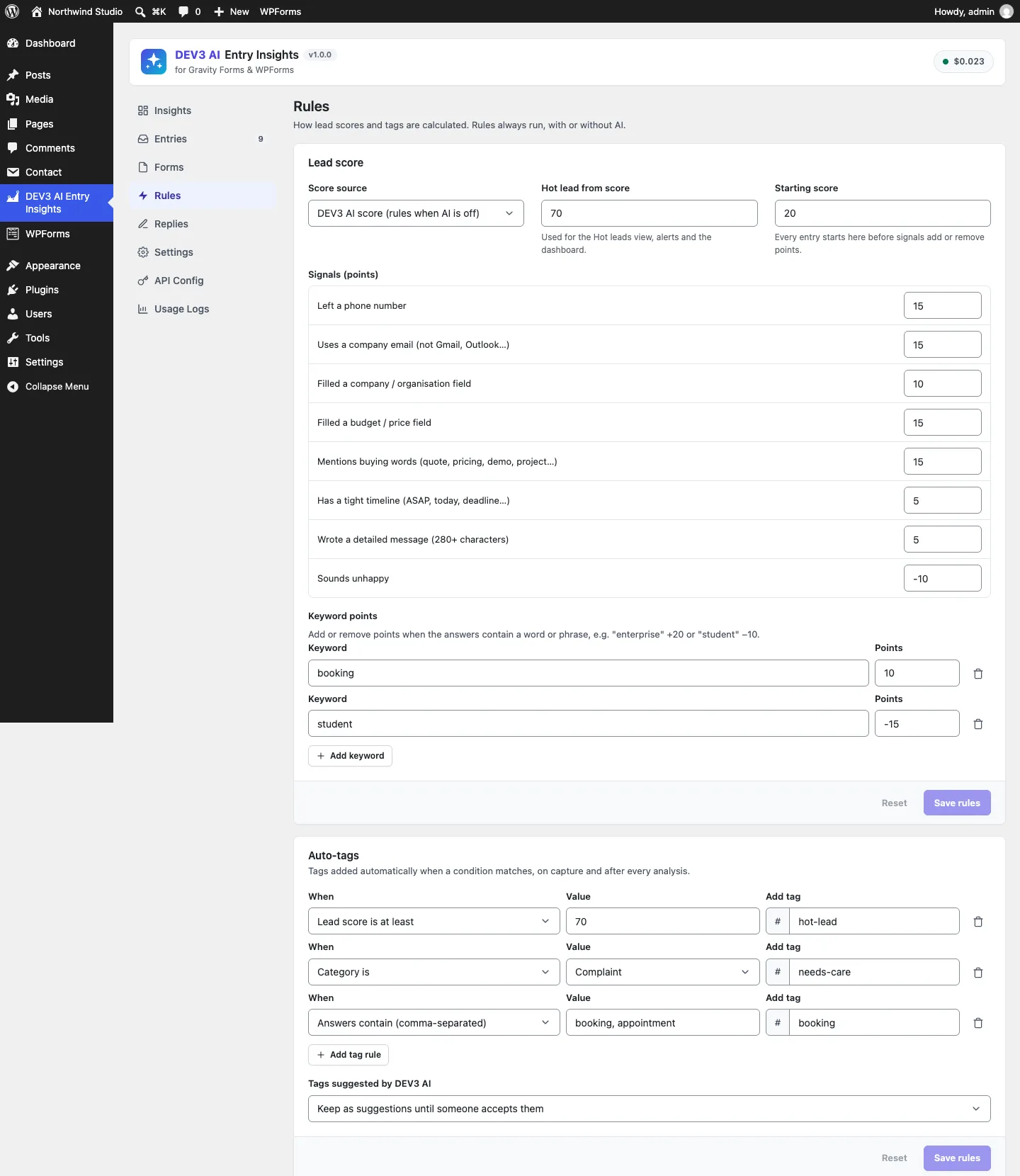
Every signal has editable points, and the same rules run whether or not AI is switched on.
Step 2: queue the AI, and make the queue survive a broken cron
If auto-analysis is on for that form and AI is available, the capture marks the entry pending and schedules a single WP-Cron event five seconds out. The visitor's request ends there.
The queue runner works in time slices, not batch sizes, because a slow model response should not push a PHP process past its time limit:
public static function process_queue( $budget = 20 ) {
	if ( get_transient( self::LOCK ) ) {
		return 0;
	}
	set_transient( self::LOCK, 1, 60 );
	$start = microtime( true );
	try {
		while ( microtime( true ) - $start < (float) $budget ) {
			$ids = Entries::pending( 5 );
			if ( ! $ids ) {
				break;
			}
			foreach ( $ids as $id ) {
				self::analyze( $id, true, 'cron' );
				if ( microtime( true ) - $start >= (float) $budget ) {
					break;
				}
			}
		}
	} finally {
		delete_transient( self::LOCK );
	}
	if ( Entries::pending( 1 ) ) {
		self::schedule();
	}
	// ...
}
(condensed from Analyzer::process_queue)
Three details matter here.
- The lock. A transient lock stops two cron runs from analysing the same entries at once, which matters on busy sites where WP-Cron can be triggered by overlapping requests. The lock has a 60-second expiry, so a crashed run cannot block the queue forever, and the
finallyblock releases it on any normal exit. - Oldest first, five at a time.
Entries::pending()reads ids in ascending order, so a burst of submissions is processed in arrival order, and the budget check runs after every entry rather than after every batch. - Reschedule while work remains. If entries are still pending when the slice ends, the runner schedules itself again instead of trying to finish everything in one request.
WP-Cron has a well-known weakness: it only runs when someone visits the site, and some hosts block the loopback request or set DISABLE_WP_CRON. A queue that depends on it can stall silently. So the admin screens carry a catch-up path:
public static function catch_up() {
	$oldest = Entries::oldest_pending();
	if ( '' === $oldest || strtotime( $oldest . ' UTC' ) > time() - (int) apply_filters( 'dev3ei_queue_stale_after', 30 ) ) {
		return 0;
	}
	return self::process_queue( 6 );
}
(from Analyzer::catch_up)
When the oldest pending entry has waited more than 30 seconds, opening the plugin runs a six-second slice inline. Fresh entries are left to cron, so the admin is not slowed down for nothing. The test for this records an entry, asserts that catch_up() processes nothing, backdates the entry by two minutes, and then asserts that one entry was processed and its state is done.
Step 3: what leaves the site
The queue sends a composed text, not the raw entry. Text::compose() walks the normalised fields and drops phone, password, hidden, signature, file, consent, card, captcha and HTML fields by type. Emails become Email domain: example.com, and a name field keeps only the first name, which is enough for tone. Passwords and card numbers are never stored in the first place. Because every adapter maps to the same types, this filter is written once and covers all three form plugins. A test feeds it a full name, an email, a phone number and a hidden campaign field, and checks that only the first name and the domain come out.
The prompt treats the submission as data, asks for a typed JSON object with enums for sentiment, urgency and 11 categories, and puts a maxLength on every string. The answer is clamped again in PHP by Analyzer::normalize(): an unknown category becomes other, an unknown urgency becomes low, the score is rounded and held between 0 and 100, tags are slugged, deduplicated and cut to five.
Step 4: merge, don't overwrite
Analyzer::columns() builds the stored row from the rule result and the AI result. It is the part of the plugin with the most thought per line.
The score has an owner
The Score source setting decides who owns the number:
$mode = (string) Settings::get( 'score_mode', 'ai' );
$base = $ai ? $ai : $rules;
if ( $ai && 'rules' === $mode ) {
	$score = $rules['lead_score'];
} elseif ( $ai && 'blend' === $mode ) {
	$score = (int) round( ( $ai['lead_score'] + $rules['lead_score'] ) / 2 );
} else {
	$score = $base['lead_score'];
}
(from Analyzer::columns)
In every mode the rule score is also stored in its own rule_score column, so the drawer can show "Rules: 60" next to an AI score of 86. A merchant who does not trust the model's judgement on leads can keep the rules in charge and still get AI summaries and intents.
Tags have provenance
Tags come from three places, and each is treated differently.
- Rule tags are recomputed on every analysis. The plugin remembers which tags the rules added last time in a
rule_tagscolumn, so a rule tag that no longer matches is removed. If an entry was taggedhot-leadat a rules score of 90 and the AI later scores it 30, the tag goes. - Tags people added are never touched. They are whatever is in
tagsminus the previousrule_tags. - AI tags go into
suggested_tagsand wait in the drawer until someone accepts them, unless the merchant turns on automatic application.
$kept = array_values( array_diff( (array) $entry['tags'], isset( $entry['rule_tags'] ) ? (array) $entry['rule_tags'] : array() ) );
$tags = Tagger::merge( $kept, $rule_tags );
(from Analyzer::columns)
The PipelineTest case for this adds a manual vip tag, re-analyses with a low AI score, and asserts that hot-lead is gone and vip is still there.
Failure keeps the rules
If the AI call returns an error, the rule values are written anyway, ai_state becomes failed, the error message is stored and logged in the entry history, and insight_src stays rules. The test stubs a 400 "API key not valid" response and checks that the entry keeps its rule score of 90. A monthly cap or a missing key behaves the same way: the inbox keeps working on rules, and the admin sees "AI paused" instead of empty rows.
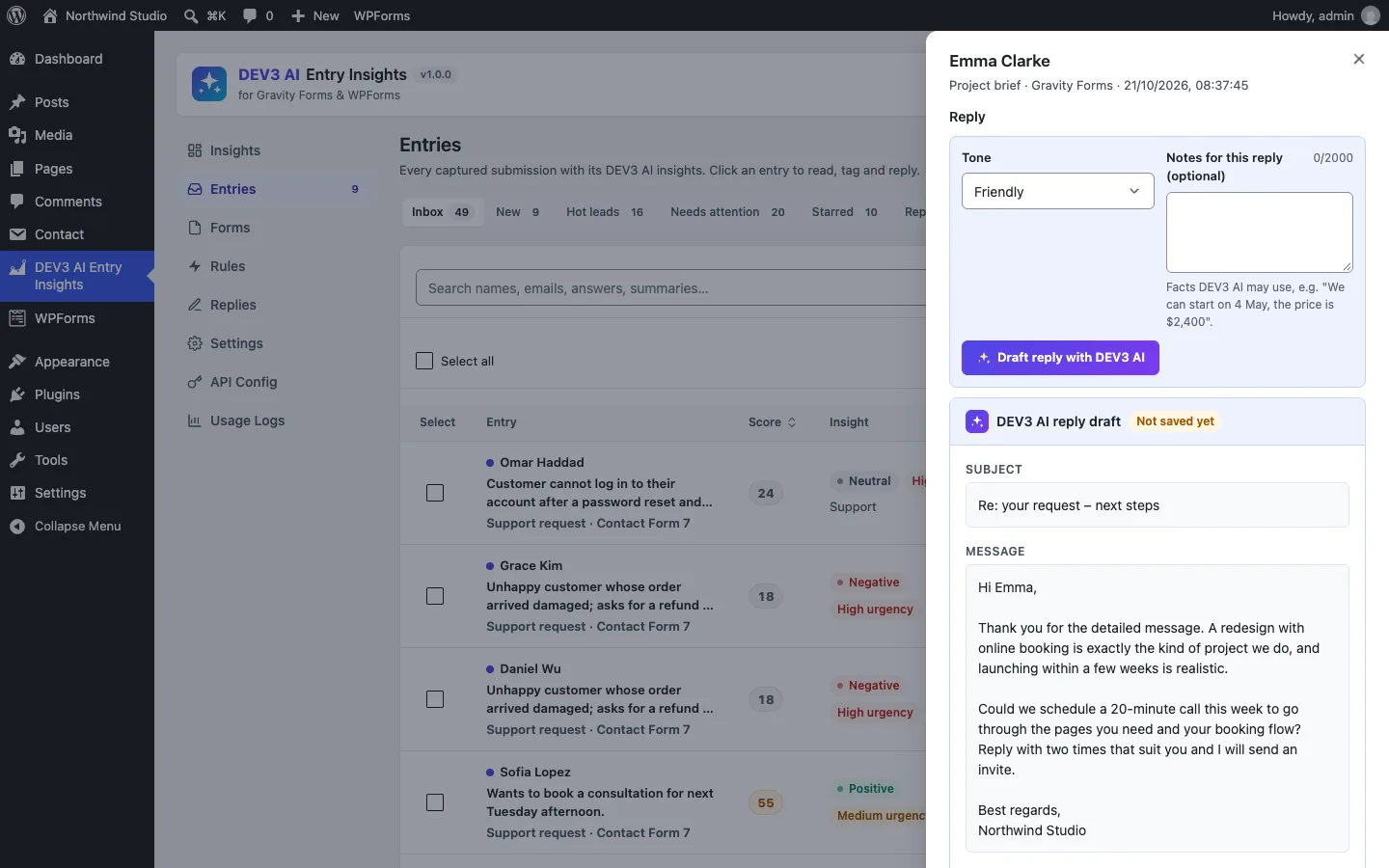
Replies are drafts too: nothing is emailed to a sender until a person sends it.
Alerts wait for the better answer
Hot-lead and urgent alerts create one timing problem. If the alert fires at capture time, it is based on the rules alone. If the AI then decides the entry is urgent, the owner either gets no alert or gets two. Alerts::maybe_send() returns early while an entry is pending, and marks the entry alerted after sending, so each entry produces at most one email, built from the best information available. When AI is off, capture sends the alert straight away from the rule values. A test queues an entry the AI will rate as urgent, asserts that no mail was sent at capture, runs the queue, and asserts exactly one mail with "Urgent" in the subject.

Illustration: the rules answer immediately, and the AI adds a second layer later without removing the first.
Trade-offs
- WP-Cron, not Action Scheduler. Entry analysis is a handful of items at a time, and the plugin should not require WooCommerce's job library on a brochure site. The catch-up path covers hosts where cron does not run. Large imports and "analyse all" use the shared core's chunked job runner instead.
- Rules are simple on purpose. A lexicon will misread sarcasm, and keyword categories are only a first guess. They exist so that nothing is ever empty and so that the merchant can see exactly why a score is what it is.
How it was tested
The plugin has 60 PHPUnit tests and 34 Jest tests. The PipelineTest suite alone covers capture without AI, queued analysis through cron, score modes and automatic tags, stale rule tags, AI failure, clamping of invalid AI values, per-form switches, deduplication of imported references, alerts, bulk jobs, the cron catch-up and the AI kill switch. The AdaptersTest suite drives the real hooks: gform_after_submission with compound fields, spam skipping, import and notes for Gravity Forms, a WPForms Lite submission, and a Contact Form 7 submission with labels read from the template. WPForms Lite and Contact Form 7 were also run for real in a WordPress test environment. Gravity Forms is a commercial plugin, so its adapter was built against the documented GFAPI and hooks and tested with stubs. All AI paths were tested with mocked Google Gemini API responses, and a run with a live key is the next step. We are not quoting any figures for AI speed or accuracy yet.
DEV3 AI Entry Insights ships in the DEV3 AI Forms & Lead Generation Plugins Bundle on the DEV3 marketplace, alongside the Form Builder, Popup & Lead Capture and Form Autofill & Spam Shield plugins, and is being prepared for CodeCanyon. The design decisions, stack and verified results are in the case study.