
The risky part of AI moderation isn't a missed spam comment. It's the AI overruling a person: approving a comment a moderator held, putting back something a human marked as spam, or deleting a post because it misread sarcasm. When we built DEV3 AI Comment & Community Moderator, we started from one rule: the machine may make content less visible, and only people may make it more visible. This post covers how that rule works as a one-way status ratchet across three systems with their own statuses (WordPress comments, WooCommerce reviews and bbPress), how screening runs before a comment is saved without making visitors wait, and how human decisions stay final.
What it does and who it's for
DEV3 AI Comment & Community Moderator screens new comments, WooCommerce product reviews and bbPress topics and replies with local rules, adds AI labels for spam, toxicity, harassment, off-topic posts and personal data, and collects everything that needs a person in one queue. It also drafts replies and discussion summaries, and can nudge writers to rephrase a hurtful comment before they post.
- Bloggers and publishers whose comment sections attract insults and link spam that Akismet alone doesn't catch.
- WooCommerce stores that want abusive or personal-data-laden product reviews held before they go live.
- Forum owners on bbPress who need one queue instead of three admin screens.
- Community managers who want a summary of what readers are saying and brand-voice reply drafts.
- Privacy-minded sites, with hashed IP addresses, masked personal data and export, erase and retention tools.
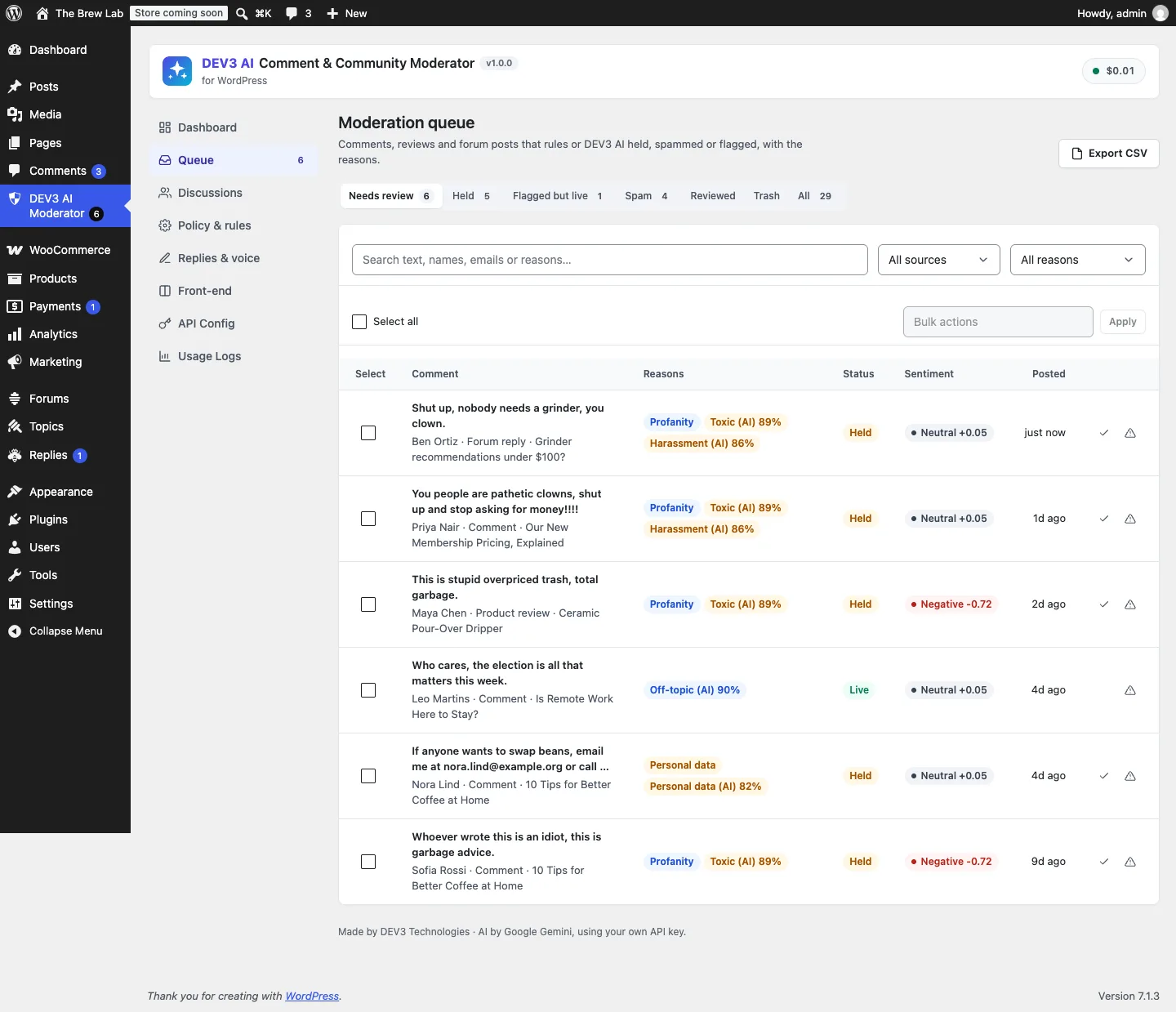
One queue for comments, product reviews and forum replies, each hold explained with its reasons and scores.
How to set it up
- Install the plugin zip from the bundle in Plugins → Add New → Upload Plugin and activate it.
- In DEV3 AI Moderator → Policy & rules, choose the sources and set an action for each rule.
- Optional: add a Google Gemini API key in API Config, or define
DEV3CM_GEMINI_API_KEYinwp-config.php. Then set a threshold and action for each AI label. - Paste a sample into the Policy tester to check what would happen.
- Optional: describe your brand voice in Replies & voice and switch on the nudge in Front-end.
How to use it
Clear the queue. Open Queue. Needs review shows everything held or flagged that no one has reviewed yet. Open an item to see why it was flagged, the AI label scores and its history, then Approve, Spam, Mark reviewed or Trash it.
Reply. In the drawer, pick a template or click Draft reply with DEV3 AI, edit the text and Post reply. It's posted under your name as a normal reply.
Understand a thread. In Discussions, open a post and click Summarize with DEV3 AI for a summary, themes and open questions. Accepted summaries can be shown on the site.
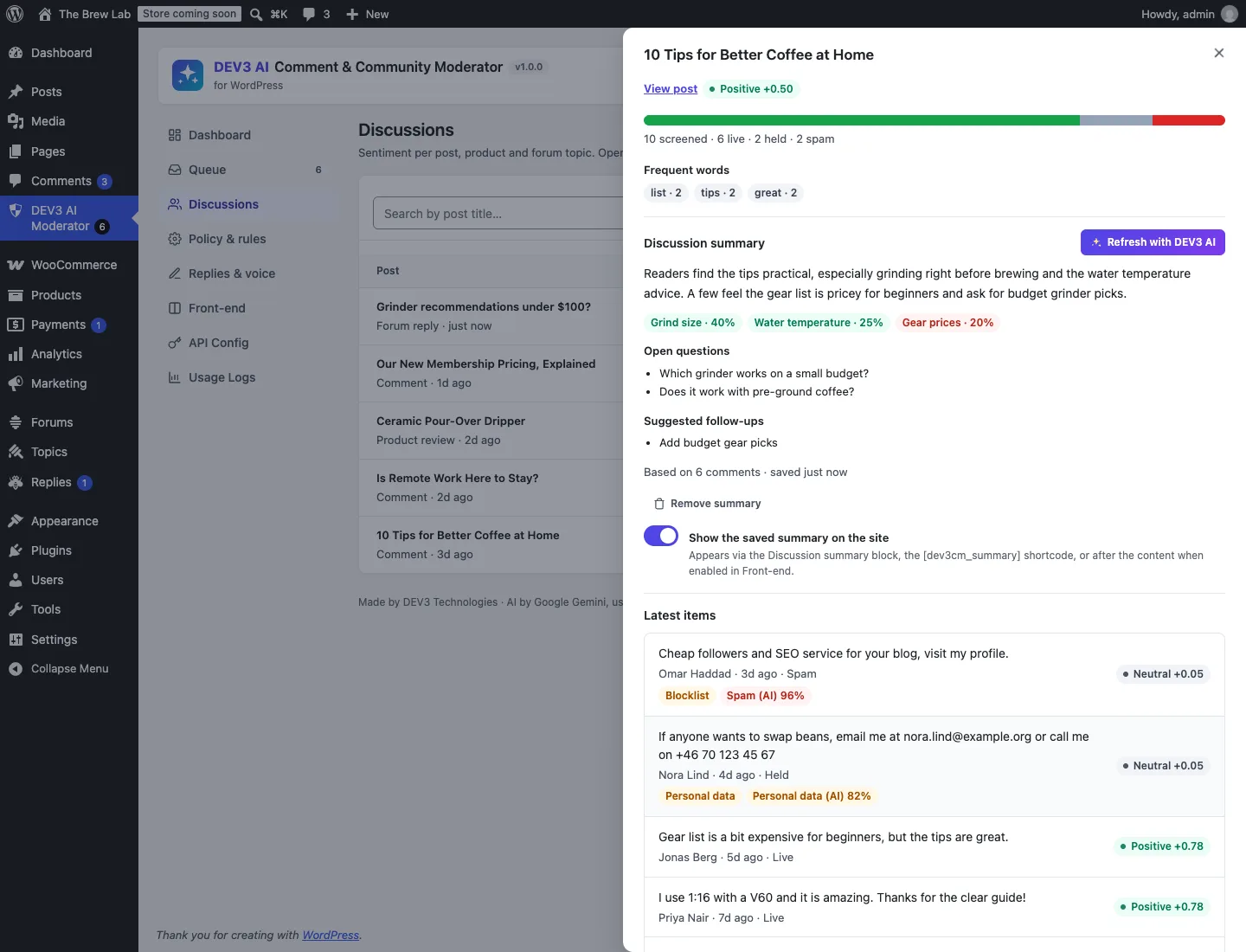
Discussions shows sentiment per post; summaries stay drafts until a person accepts them.
Tune the policy. In Policy & rules, change thresholds and actions, and use the tester to see the effect before real comments are affected.
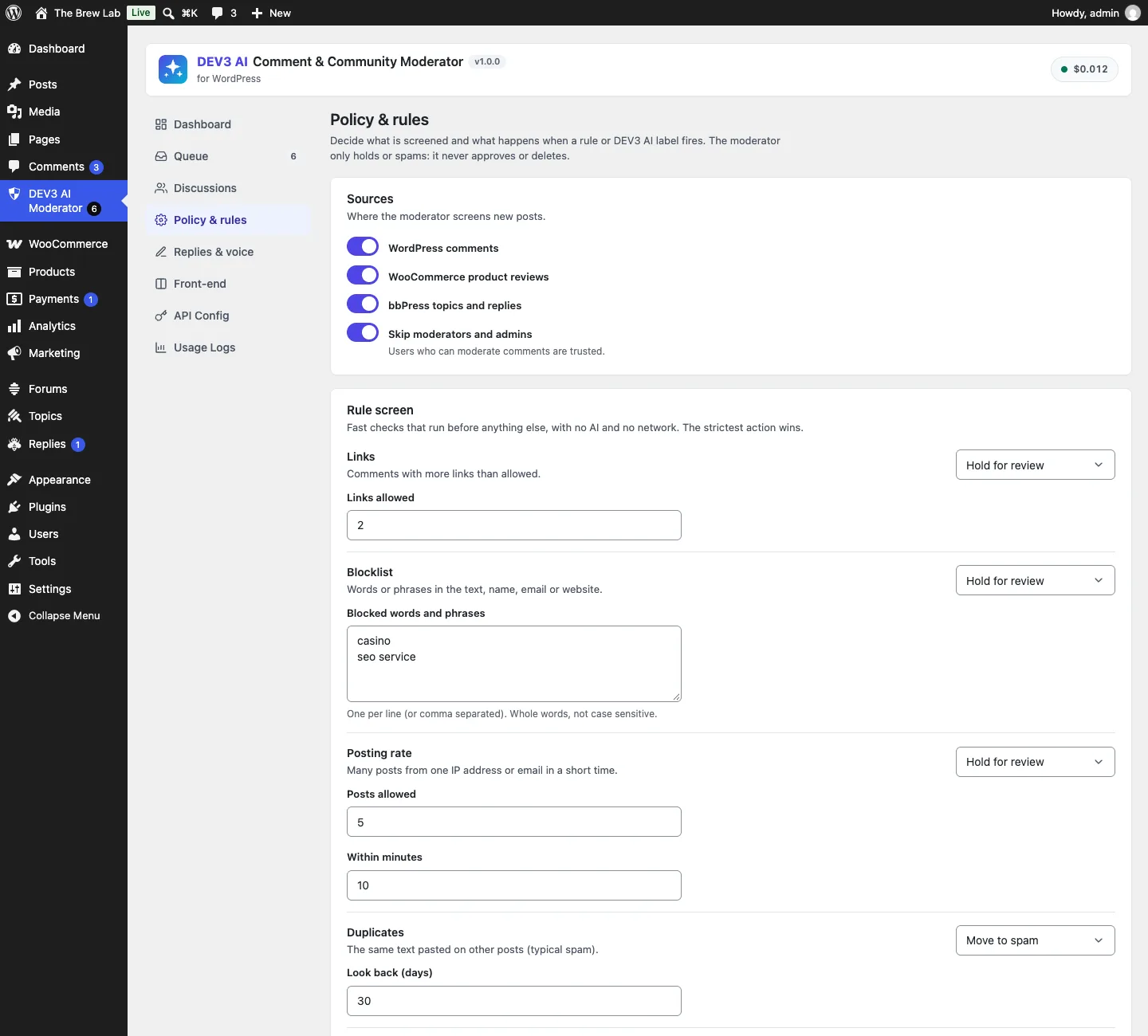
Each rule gets an action: flag, hold for review or move to spam. There's no "approve" option.
The ratchet: rank statuses, only move down
The three content systems store status differently. Comments use comment_approved (1, 0, spam, trash). WooCommerce reviews are comments with type review. bbPress topics and replies are posts with publish, pending, spam and trash. The plugin maps all of them onto four statuses and ranks them:
public static function severity( $status ) {
	$order = array( 'live' => 0, 'held' => 1, 'spam' => 2, 'trash' => 3 );
	return $order[ $status ] ?? 0;
}
(from Moderation/Sources.php)
Rules and AI labels each have an action (flag, hold or spam), and Policy::decide() picks the most severe one that fired. Then Policy::target() turns that decision into a status, and this is where the ratchet is:
public static function target( $current, $decision ) {
	$want = array( 'hold' => 'held', 'spam' => 'spam' );
	if ( ! isset( $want[ $decision ] ) ) {
		return $current; // 'none' and 'flag' never move content
	}
	return Sources::severity( $want[ $decision ] ) > Sources::severity( $current ) && 'trash' !== $current
		? $want[ $decision ]
		: $current;
}
(from Moderation/Policy.php)
There's no route from held to live in that function, and no delete anywhere in the policy. The test spells it out: live plus hold becomes held, held plus spam becomes spam, but spam plus hold stays spam ("Never moves up"), live plus flag stays live ("Flags never move content"), and trash stays trash. A dev3cm_policy_decision filter lets developers change the decision, but the result still goes through target(), so a filter can't approve anything either.
Flag matters more than it looks. Off-topic comments are often worth keeping, and a profanity match in a positive review ("this grinder is damn good") shouldn't hide the review. A flag puts the item in Flagged but live, where a moderator can look without the commenter being affected.
Screening before save without making visitors wait
To hold a comment before anyone sees it, the decision has to happen before WordPress saves it. For comments that's the pre_comment_approved filter. For bbPress, it's bbp_new_reply_pre_insert and bbp_new_topic_pre_insert. All three run while the visitor is waiting for the page to respond.
So the classifier runs in a "submission" context with a short timeout (8 seconds by default) and no retries. If it answers, its labels join the rules. If it doesn't, the visitor still isn't kept waiting:
if ( 'sync' === $mode && Classifier::available( 'submission' ) ) {
	$result = Classifier::classify( array( 0 => $item ), 'submission', array( 'timeout' => (int) Settings::get( 'ai_timeout', 8 ) ) );
	if ( ! is_wp_error( $result ) && isset( $result['labels'][0] ) ) {
		$labels   = $result['labels'][0];
		$ai_state = 'done';
	} else {
		// The visitor is not kept waiting: rules decide now, the queue retries the AI later.
		$ai_state = Classifier::available( 'cron' ) ? 'queued' : 'failed';
	}
} elseif ( 'async' === $mode && Classifier::available( 'cron' ) ) {
	$ai_state = 'queued';
}
$decision = Policy::decide( $flags, $labels );
(from Moderation/Pipeline.php, condensed)
The queued re-check uses the same ratchet. A comment that went live because the API was down can be held a minute later when the background job classifies it, but a held comment can't be released by it. One test simulates the API returning a 500: the comment stays live, exactly one request was sent ("Visitor context: no retries"), the item is queued, and when the queue runs with a harassment score of 0.95 the comment moves to held.
Async mode skips the call during submission completely. Its test turns on WordPress's own "comment must be manually approved" setting and has the AI find the comment clean. The comment stays held, because the AI's clean verdict isn't an approval.
WordPress runs the filter twice
There's a WordPress detail here: pre_comment_approved runs twice for each comment, once in wp_allow_comment() and again in wp_check_comment_data(). A naive implementation calls the AI twice and logs two screenings. The pipeline keeps the result of the first pass in a static, keyed by an MD5 of post id, lowercased email and normalised text. If the second pass has the same key, it reuses the decision. The same key is checked again in comment_post, which writes the moderation record, so a record is never attached to a different comment saved in the same request.
Human decisions are final
The ratchet stops the AI from moving content up. The other half is stopping it from moving content a person has already dealt with. Every status change, from our queue, from the core Comments screen or from bbPress's own moderation links, goes through transition_comment_status or transition_post_status, and the pipeline listens to both:
private static function sync_status( $source, $object_id, $status ) {
	$item = Items::find( $source, $object_id );
	if ( ! $item || $item['status'] === $status ) {
		return;
	}
	$fields = array( 'status' => $status );
	$human  = ! Sources::$internal && is_user_logged_in() && current_user_can( 'moderate_comments' );
	if ( $human ) {
		$fields['reviewed']    = 1;
		$fields['reviewed_by'] = get_current_user_id();
	}
	Items::update( $item['id'], $fields );
}
(from Moderation/Pipeline.php, condensed)
Sources::$internal tells our own moves apart from a person's. When the policy calls Sources::set_status(), the flag is set inside a try/finally around WordPress's native functions (wp_spam_comment(), wp_set_comment_status() or bbPress's status helpers). Those fire the same transition hooks, but they aren't recorded as human reviews. When a moderator approves a comment anywhere in WordPress, the item becomes reviewed, and Policy::apply() won't move it again:
if ( $move && ! $item['reviewed'] ) {
	$target = self::target( $current, $result['decision'] );
	// … move with native functions and log it
}
Items::update( $item_id, $fields ); // the decision is still recorded
(from Moderation/Policy.php, condensed)
The test for this holds and then approves a comment as an admin, re-classifies it with a toxicity score of 0.99, and checks that the comment is still approved ("A reviewed item is not moved again"), while the decision hold is recorded for the moderator to see. It then spams the comment and checks it still exists ("Spam is not deletion"). Only when an admin deletes the comment permanently does the moderation record go with it.
Using native functions matters for the same reason. Other plugins, caches and notification tools see normal WordPress events. A comment moved to spam by DEV3 counts in the core spam count, can be un-spammed from the core screen, and gets the core history. bbPress replies move with bbPress's pending and spam statuses, which a dedicated test checks with real bbPress loaded.

Illustration: the AI can only push content down a step; lifting it back up is a human action.
Rules first, no network needed
The AI isn't required. The local rules run on every submission: link count (URLs and anchors counted once each), a whole-word blocklist checked against text, name, email and URL, posting rate per IP hash or email, duplicates across posts, personal data (emails, phone numbers, card numbers that pass a Luhn check, IP addresses), a profanity list, and Akismet's verdict when it's active. They share the same policy and ratchet, so a site with no API key still gets holds with clear reasons. Sentiment falls back to a built-in lexicon with negation handling ("not good" scores negative). The front-end nudge falls back to a local word list and shouting heuristics, with no network call on page load.
Testing
The plugin has 62 PHPUnit tests and 40 Jest tests, counted from the repository. The PHP tests run in wp-env with WooCommerce and bbPress loaded. They cover the strictest-action policy and the ratchet, each rule, the AI failure fallback and queued retry, async mode, reviewed items, scanning existing comments without moving them, WooCommerce reviews screened as reviews, bbPress topics and replies moved with native functions, the public nudge endpoint (same origin, rate limit, cache, fallback), hashed IPs, retention pruning, and the GDPR exporter and eraser. The AI paths were tested with mocked API responses; a run with a live key is next.
Trade-offs
- Sync screening adds up to the timeout to a slow submission. Eight seconds is the worst case when the API hangs. Sites that care more about speed can use background mode, where content can be live briefly before a hold.
- Flags rely on someone looking. A flagged-but-live comment stays visible until a moderator acts, which is the point, but it needs a moderator.
- Trusted users skip screening. Moderators and admins aren't screened by default. That avoids holding staff replies, but a compromised moderator account won't be caught here.
- No reader reporting yet. Front-end "report this comment" is planned for v1.1.
Conclusion
Letting AI moderate is safe when its power runs in one direction: rank the statuses, allow only downward moves, record every reason, and treat a human decision as final. DEV3 AI Comment & Community Moderator applies that rule across comments, reviews and forums, and the case study covers replies, summaries and the nudge in more detail. The plugin ships in the DEV3 AI Content, SEO & Site Tools Plugins Bundle on the DEV3 marketplace and is being prepared for CodeCanyon.