All case studies

DEV3 Technologies · own product

DEV3 AI Comment & Community Moderator: AI screening for comments, reviews and forums that only holds or spams

Our own WordPress plugin: one moderation queue for comments, WooCommerce reviews and bbPress, with local rules plus Google Gemini API labels for spam, toxicity, harassment, off-topic and personal data. The AI can hold or spam, never approve or delete.

Industry
Communities & Publishing (WordPress)

Live project preview

Client systems are private — screenshots shown where permitted.

DEV3 Technologies · own product — screenshots
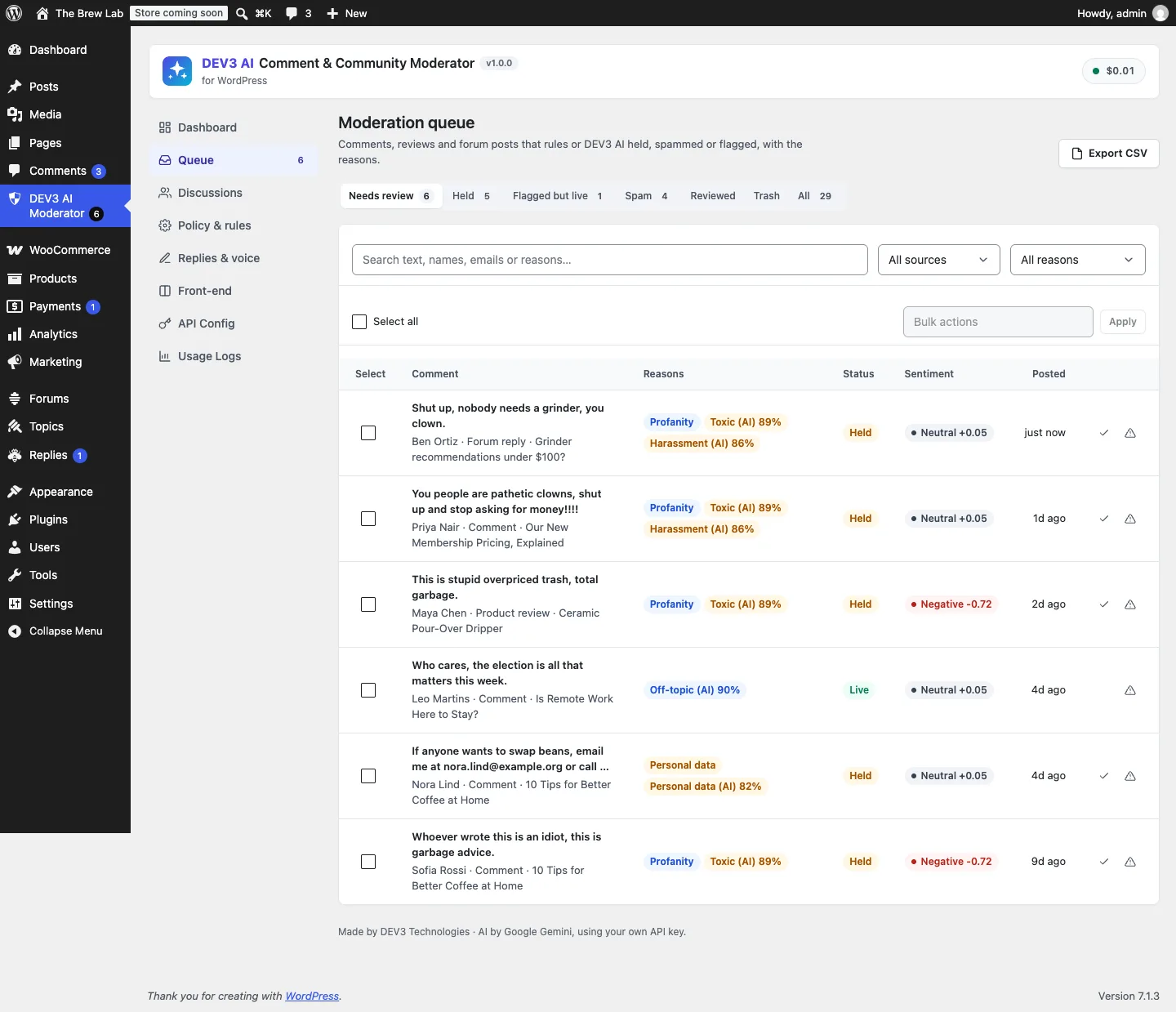
One moderation queue for comments, product reviews and forum replies, with the rule and AI reasons for every hold.

One moderation queue for comments, product reviews and forum replies, with the rule and AI reasons for every hold.

The challenge

Spam filters such as Akismet catch spam but not abuse, personal data or off-topic posts, and the toxicity APIs many plugins relied on have closed to new users. Handing moderation to an AI raises the opposite risk: a model that approves a held comment, overrules a moderator, or deletes something it misread. We needed screening that runs before a comment is saved without making visitors wait when the API is slow, covers three different content systems with their own statuses, and can only ever make content less visible. Humans approve; the machine only holds.

Our solution

We built DEV3 AI Comment & Community Moderator as a PHP plugin with a React admin app and a small front-end script. Rules run locally on every submission; the AI adds labels on top.

Key design decisions

  • A one-way ratchet. Statuses are ranked live < held < spam < trash. The policy can move an item down that list, never up, and flags never move content at all. Approving and deleting are left to people.
  • Strictest action wins. Each rule (links, blocklist, posting rate, duplicates, personal data, profanity, Akismet) and each AI label (spam, toxicity, harassment, off-topic, personal data) has a threshold and an action. The decision is the most severe action that fired, with every reason recorded.
  • Screening before save, with a time limit. In sync mode the classifier runs inside pre_comment_approved with an 8-second timeout and no retries. If the API fails, the rules decide now and the item is queued for a background re-check.
  • Humans win. When a moderator changes an item's status, it is marked reviewed and the AI never moves it again, though a later AI decision is still recorded.
  • Native status functions. Comments and reviews move through wp_spam_comment() and friends; bbPress topics and replies through bbPress's own pending and spam statuses, so other plugins see normal events.
  • Privacy by default. IP addresses are stored only as hashes, personal data is masked before AI requests, and records can be exported, erased and pruned.

Architecture

One pipeline screens WordPress comments, WooCommerce product reviews and bbPress topics and replies, and writes a moderation record with labels, reasons, sentiment and a history of who moved what. The queue has views for needs review, held, spam and flagged-but-live, bulk actions and a drawer with a reply composer. The Google Gemini API (gemini-2.5-flash) also drafts brand-voice replies and discussion summaries, which stay drafts until accepted. On the front end, an optional "be kind" nudge checks a comment locally (and optionally with AI) before it is posted and lets the writer choose. With AI off, rules, lexicon sentiment, reply templates and the local nudge all still work. The API client and settings come from a shared core used across DEV3's plugins.
Results

The plugin is complete. It ships in the DEV3 AI Content, SEO & Site Tools Plugins Bundle on the DEV3 marketplace, alongside 6 other content and site plugins, and is being prepared for CodeCanyon. What was built and verified:

  • 62 PHPUnit tests in wp-env, with real WooCommerce and bbPress loaded, covering the one-way policy, the AI failure fallback and retry, async mode never approving, reviewed items never moved again, bbPress replies moved with native functions and hashed IPs
  • 40 Jest tests, including the front-end nudge
  • The public nudge endpoint is same-origin only, rate-limited and cached, and falls back to the local check
  • The AI paths (classification, reply drafts, summaries, nudge rewrites) were tested with mocked API responses; a run with a live key is the next step
  • Front-end comment reporting by readers is planned for v1.1

Setup guide

No licence key or activation is needed: install the zip and every feature works.

Requirements

  • WordPress 6.0 or newer and PHP 7.4 or newer
  • Optional: WooCommerce 8 or newer (product reviews) and bbPress 2.6 or newer (topics and replies)
  • Optional: Akismet. Its spam verdicts are respected and shown as a reason
  • Optional: a Google Gemini API key for AI labels, reply drafts and summaries. Without one, the rules, queue, reply templates, lexicon sentiment and local nudge all work

1. Install the plugin

  1. Unzip the bundle download and find dev3-ai-content-seo-site-tools-plugins-bundle/dev3-ai-comment-moderator/dev3-ai-comment-moderator.zip.
  2. In WordPress, go to Plugins → Add New → Upload Plugin, choose the zip and click Install Now.
  3. Click Activate. DEV3 AI Comment & Community Moderator for WordPress appears in the plugin list and its menu, DEV3 AI Moderator, appears in the admin sidebar with a count of items that need review.

2. Connect Google Gemini (optional)

  1. Create a free API key in Google AI Studio (sign in with a Google account, then Create API key).
  2. Go to DEV3 AI Moderator → API Config, paste the key and click Validate & save. The key is stored encrypted and never sent to the browser.
  3. Optional: pick the model (gemini-2.5-flash is the fast default) and set a monthly budget.

Prefer config files? Add define( 'DEV3CM_GEMINI_API_KEY', 'your-key' ); to wp-config.php instead.

3. Set it up

  1. Open Policy & rules. Under Sources, choose WordPress comments, WooCommerce product reviews and bbPress topics and replies. Leave Skip moderators and admins on unless you want staff screened too.
  2. In Rule screen, set the links allowed, blocked words, posting rate and duplicate look-back, and pick an action for each: flag, Hold for review or Move to spam.
  3. With an API key, set a threshold and action for each AI label (spam, toxicity, harassment, off-topic, personal data), and choose sync (before the comment is saved) or background classification.
  4. Use the Policy tester to paste a sample comment and see which rules and labels fire. Nothing is saved.
  5. Optional: click Start scan under Scan existing content to record recent comments, reviews and replies.
  6. In Replies & voice, describe your brand voice and add reply templates. In Front-end, switch on the "be kind" nudge, a community note and public discussion summaries if you want them.

Updating

Download the new bundle version, then upload the plugin zip in Plugins → Add New → Upload Plugin and choose Replace current with uploaded. Settings and moderation records are kept.

Uninstalling

Deactivate and delete the plugin from Plugins. Moderation records are kept unless you turn on the delete-data-on-uninstall option first. Comments, reviews and forum posts are never deleted by the plugin.

How to use

Work through the moderation queue

  1. Open DEV3 AI Moderator → Queue. Needs review lists everything that was held or flagged and not yet reviewed, from comments, product reviews and forum posts.
  2. Each row shows the reasons as badges, for example Profanity, Toxic (AI) 89% or Personal data, plus the status and sentiment. Filter by source or reason, or search.
  3. Click a row to open the drawer: the full text, why it was flagged, the AI label scores and the history.
  4. Choose Approve, Spam, Mark reviewed or Trash. Once a person has decided, the AI never moves that item again.
  5. For many items, tick them and use the bulk actions, including Re-scan with DEV3 AI.

Reply to a commenter

  1. In the drawer, start from a template (Choose a template…) or click Draft reply with DEV3 AI, optionally with instructions such as "mention the new tutorial".
  2. Edit the draft in your own words. Leave Approve the comment when I reply ticked if the comment should go live.
  3. Click Post reply. It is posted as a normal reply under your name: a comment reply, a review reply or a forum reply.

Understand a discussion

  1. Open Discussions to see each post, product or topic with its live, held and spam counts and its sentiment.
  2. Open one and click Summarize with DEV3 AI. You get a summary, themes with their share, open questions and suggested follow-ups.
  3. Accept it, then switch on Show the saved summary on the site to display it with the Discussion summary block, the [dev3cm_summary] shortcode or automatically after the content.

Tune the policy

  1. In Policy & rules, paste a real example into the Policy tester and click Test policy to see which rules and AI labels fire and what would happen.
  2. Adjust thresholds or actions, for example move off-topic from hold to flag so it stays live but is marked.
  3. Use Export CSV in the queue for a log of moderation decisions.

Nudge writers to be kind

  1. In Front-end, switch on Show the nudge, and optionally Ask DEV3 AI before posting and Offer kinder wording.
  2. When a visitor submits a comment that may come across as hurtful, a notice appears with Edit my comment, Use suggested wording and Post anyway. Nothing changes without their click, and server-side screening still runs.

Related case studies