All case studies

DEV3 Technologies · own product

DEV3 AI B2B Wholesale & Quote Requests: wholesale tiers and priced quotes from one WooCommerce pricing engine

Our own WooCommerce plugin for selling to businesses: wholesale roles, tiered pricing, registration and quick order, plus request-a-quote with PDF quotes that become pay-later orders. DEV3 AI drafts quotes from free-text requests using real products and rule prices.

Industry
E-commerce (WooCommerce, B2B)

Live project preview

Client systems are private — screenshots shown where permitted.

DEV3 Technologies · own product — screenshots
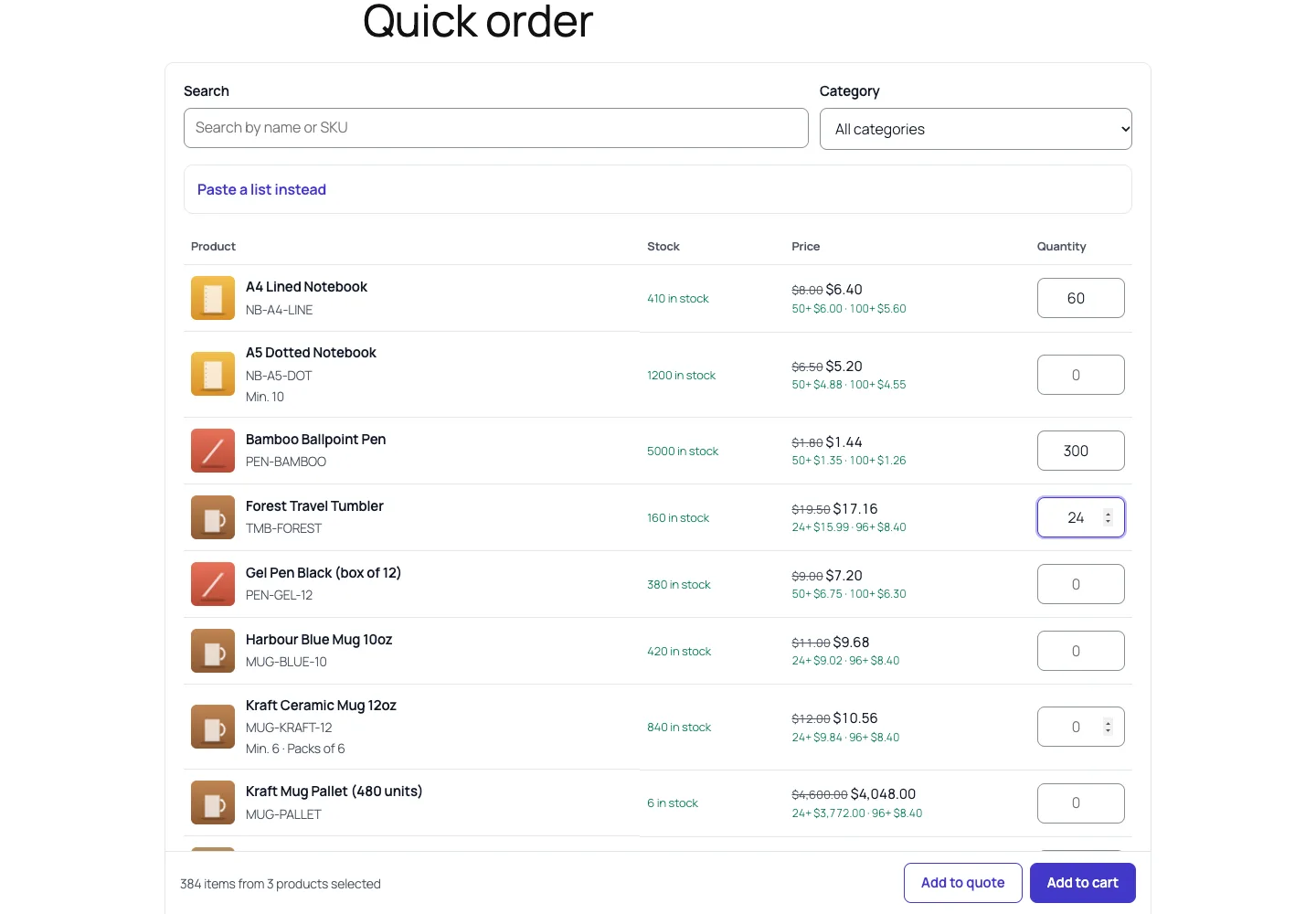
The quick-order table: role prices with the retail price struck through, quantity tiers under each price, pack sizes and one-click add to cart or quote.

The quick-order table: role prices with the retail price struck through, quantity tiers under each price, pack sizes and one-click add to cart or quote.

The challenge

Stores that sell to trade buyers usually stack two or three plugins: one for wholesale prices, one for a bulk order form and another for quote requests. They don't share a price calculation, so a quote typed by hand can contradict what the same buyer sees in the cart, and accepting a quote often means rebuilding the order manually. Buyers also send requests as free text ("200 kraft mugs and 50 A5 notebooks, delivery to Berlin"), which someone has to match to SKUs. We wanted one plugin where every price, in the cart or in a quote, comes from the same rules, where an accepted quote becomes exactly one order at exactly the quoted prices, and where AI can turn a request into a draft without ever choosing a product that doesn't exist or a price.

Our solution

We built DEV3 AI B2B Wholesale & Quote Requests as a WooCommerce plugin in PHP with a React admin and small dependency-free storefront scripts. It covers both halves of B2B selling and works fully with AI switched off.

Key design decisions

  • One pricing engine. Pricing\Engine::price( $product, $role, $qty ) is called by the cart, product pages, the quick-order table, the quote editor and the AI draft step. Precedence is fixed: a product-level price for the role, then the highest-priority rule (ties go to the lowest price), then the role's default discount. Quantity breaks can switch between percent off, amount off and a fixed unit price.
  • Wholesale roles as real WordPress roles. Each tier has its own default discount, minimum order value and quantity, tax exemption, allowed payment gateways and shipping methods, and price label. Minimums and restrictions apply to both the classic and the block checkout.
  • Quotes priced by rules, then frozen. New quote lines start at the engine price for the customer's role and quantity; a typed price overrides it, and only Re-price from rules goes back. Lines are stored in the plugin's own tables.
  • Accept creates exactly one order. A conditional status update claims the quote before any order exists, so two clicks can't create two orders. The order is built through WooCommerce CRUD with each line's subtotal and total fixed to the quoted amount, shipping as quoted and the discount as a negative fee, then left pending with a pay-for-order link.
  • AI that can't invent products or prices. The Google Gemini API sees the request and up to 40 candidate products without prices. Ids outside the candidate list are dropped, prices come from the engine, and nothing is saved until the admin accepts the draft. The same approach writes cover and follow-up emails and screens wholesale applications as advice only.

Architecture

Rules, applications, quotes, quote lines and a quote timeline live in five custom tables; product prices, breaks, visibility, minimum quantity and pack size are product meta. Storefront pieces are shortcodes and blocks: wholesale registration with approval emails, a searchable quick-order table with a paste-a-list box, a quote basket with "Request a quote for this cart", and a customer quote view (My Account or a signed guest link) with Accept, Decline, messages and the PDF. PDF quotes come from a small built-in PDF 1.4 writer, so no PDF library is needed. A daily cron sends one reminder per quote and expires old ones. HPOS and the Cart and Checkout blocks are declared compatible. The API client, settings and usage logs come from a shared core used across DEV3's plugins.
Results

The plugin is complete. It ships in the DEV3 AI WooCommerce Plugins Bundle on the DEV3 marketplace, alongside 20 other WooCommerce plugins, and is being prepared for CodeCanyon. What was built and verified:

  • 73 PHPUnit tests run against WooCommerce in wp-env, covering the pricing engine, checkout rules, quotes, applications, REST access and the AI paths
  • 37 Jest tests: 17 for the admin and storefront scripts and 20 for the shared UI kit
  • Quote to order on both storages: a sent quote is accepted after a cheaper rule is added, and the order still has the quoted subtotal and total, with HPOS on and off; a second accept fails and exactly one order exists
  • Pricing acceptance case: a $10 product costs a distributor $8, $7.50 and $6 at 1, 60 and 120 units, and a product-level price overrides the rule
  • AI draft guard rails, tested with mocked responses: a hallucinated product id is dropped and reported, prices never appear in the request, and nothing is saved before Accept. No run against a live key has been done yet
  • phpcs (WordPress standards) at 0 errors and 0 warnings; known limits are that quote tax is an estimate until the order and the PDF has no logo yet

Setup guide

No licence key or activation is needed: install the zip and every feature works.

Requirements

  • WordPress 6.0 or newer and PHP 7.4 or newer
  • WooCommerce 8.0 or newer, active (classic and block cart/checkout are both supported, and HPOS is compatible)
  • Optional: a Google Gemini API key. Without one, wholesale pricing, quotes, PDFs and orders all work; only the DEV3 AI drafting buttons are hidden

1. Install the plugin

  1. The plugin ships inside the bundle download at dev3-ai-woocommerce-plugins-bundle/dev3-ai-b2b-wholesale-for-woocommerce/dev3-ai-b2b-wholesale-for-woocommerce.zip. Unzip the bundle first.
  2. In WordPress, go to Plugins → Add New → Upload Plugin, choose dev3-ai-b2b-wholesale-for-woocommerce.zip and click Install Now.
  3. Click Activate. DEV3 AI B2B Wholesale & Quote Requests for WooCommerce appears in the plugin list and its menu, DEV3 B2B & Quotes, appears in the admin sidebar.

2. Connect Google Gemini (optional)

  1. Create a free API key in Google AI Studio (sign in with a Google account, then Create API key).
  2. Go to DEV3 B2B & Quotes → API Config, paste the key and click Validate & save. The key is stored encrypted and never sent to the browser.
  3. Optional: pick the model (gemini-2.5-flash is the fast default; gemini-2.5-pro for the highest quality).

Prefer config files? Add define( 'DEV3BQ_GEMINI_API_KEY', 'your-key' ); to wp-config.php instead.

3. Set it up

  1. Go to Settings and, under Pages, click Create page for the quote request, quick-order and wholesale registration pages (or add the matching blocks to your own pages).
  2. In Roles & tiers, review the default Wholesale and Distributor roles: default discount, minimum order value and quantity, tax exemption, allowed payment and shipping methods, and the price label.
  3. In Pricing rules, add rules for everyone, every wholesale role or one role, by product or category, with quantity breaks. Use the price preview to check which rule wins for a product, role and quantity.
  4. Optional: set per-product role prices, wholesale-only visibility, minimum quantity and pack size in the Wholesale tab of the product editor.
  5. In Settings, choose whether guests see prices, who gets the Add to quote button, the default quote validity and terms, and the follow-up reminder delay.
  6. Review applications and wholesale accounts in Wholesale customers, and price, send and convert quotes in Quotes.

Updating

Download the new bundle version, then upload the plugin zip in Plugins → Add New → Upload Plugin and choose Replace current with uploaded. Settings and data are kept.

Uninstalling

Deactivate and delete the plugin from Plugins. By default your roles, rules, quotes and applications are kept in the database, so reinstalling picks up where you left off. To remove them, turn on Delete all data when the plugin is uninstalled in Settings first. Orders created from quotes always stay in WooCommerce.

How to use

Approve a wholesale application

  1. A business fills in the wholesale registration form (the [dev3bq_wholesale_registration] shortcode or block). You get a "New wholesale application" email.
  2. Go to DEV3 B2B & Quotes → Wholesale customers and open the application on the Pending tab.
  3. Optional: click Screen with DEV3 AI for a short summary, signals and questions to ask. It is advice only.
  4. Choose the role (it can differ from the one requested) and click Approve, or Decline with a reason. The customer is emailed and sees their role's prices from their next page view.

Set tier prices and quantity breaks

  1. Go to Pricing rules and click New rule.
  2. Choose who it applies to (everyone, all wholesale roles or one role), what it covers (all products, categories or products), the discount (percent off, amount off or a fixed unit price) and any quantity breaks, such as 25% off from 50 units.
  3. Set the priority and optional start and end dates, then save. Higher priority wins; a price set on the product's Wholesale tab always beats rules.
  4. Use Price preview to check what a product costs for a role and quantity before customers see it.

Price and send a quote

  1. Quote requests arrive from the quote page, the "Add to quote" button or Request a quote for this cart. Open one in Quotes.
  2. To match a free-text request, paste it into Customer request, click Draft with DEV3 AI, review the lines, unmatched items and questions, and click Accept lines. Or search for products under Add a product.
  3. Lines are priced by your rules for the customer's role and quantity. Type a price to override one, or click Re-price from rules to go back to the rules.
  4. Fill in shipping, extra discount, tax mode, valid until and terms. Write the message to the customer, or click Write with DEV3 AI for a draft.
  5. Click Send quote. The customer gets an email with the PDF quote and a link to view it.

Turn an accepted quote into an order

  1. The customer opens the quote in My Account → Quotes, or through the private link in the email, and clicks Accept quote. They can also send a message or decline.
  2. A pending WooCommerce order is created with exactly the quoted prices, shipping and discount, and the customer is taken to the pay-for-order page.
  3. For buyers who pay by invoice, use Convert to order in the quote editor to create the order yourself.

Let trade buyers order in bulk

  1. Share the quick-order page ([dev3bq_quick_order] or the block). Buyers search or filter by category, type quantities and click Add to cart or Add to quote.
  2. Buyers with a list can click Paste a list instead and paste lines such as "MUG-KRAFT-12, 48". They confirm the matched products before anything is added.
  3. Role minimums, pack sizes and quantity tiers apply automatically, and the cart and checkout show what is missing if a minimum isn't met.

Related case studies