If your WooCommerce store has a few hundred products or more, you know the backlog. Half the descriptions were pasted from the supplier. Some products have no short description at all. Meta descriptions are missing, SEO titles run past the point where search results cut them off, and the image alt text is blank. Writing it all by hand would take months. Pointing an AI tool at the whole catalogue and hoping for the best feels reckless, because one bad prompt could overwrite every product.
There's a middle path: audit first, write in batches, review everything before it goes live, and keep an undo button. This guide shows that workflow with DEV3 AI Bulk Product Writer & SEO.
What a good catalogue clean-up looks like
- You know where the gaps are before you write a word.
- You fix the worst problems first, not product A to Z.
- Copy sounds like your brand, not like a generic AI.
- Nothing reaches a product page until someone approves it.
- SEO fields land in the SEO plugin you actually use.
- Mistakes can be undone, one product or a whole batch.
Step 1: Point SEO fields at the right plugin
Install the plugin, then open DEV3 AI Writer → Settings and check Write SEO fields to. Detect automatically picks Yoast SEO, then Rank Math, then SEOPress, then DEV3 native meta. If you've got more than one SEO plugin installed (it happens after a migration), set this explicitly. With no SEO plugin at all, the writer prints its own title and meta description on product pages.
On the same screen, choose whether new tags are added to or replace existing tags, and set Max products per run.
To use AI, add a Google Gemini key under API Config. It's optional: Templates (no AI) fills fields from product variables instead.
Step 2: Audit the catalogue
Open the Dashboard. Each product gets a 0–100 health score, and Catalog health counts how many products have each issue:
- no description, or a thin one,
- no short description,
- SEO title missing or over 60 characters,
- meta description missing or outside 120–160 characters,
- no focus keyword,
- images without alt text,
- no tags.
This gives you a to-do list in priority order. Missing meta descriptions and alt text are usually the quickest wins, because they're short fields you can review quickly.
Step 3: Set your brand voice before the first run
Open Brand Voices. Edit the default voice (tone, audience, language, length, format, words to use and avoid, house rules) or click New voice.
The faster route is Learn my voice with DEV3 AI. Tick 1–5 products whose copy you're proud of and click Learn voice with DEV3 AI. Review the proposed voice, adjust anything that's off, and save. Click Make default on the voice new runs should use.
If you sell to different audiences (trade and consumer, say), create a voice for each and pick the right one per run.
Step 4: Run a small pilot batch
Don't start with 3,000 products. On the dashboard, click Fix next to one issue, such as No meta description. The Bulk Writer opens with exactly those products filtered. Then:
- Narrow further with search, category or status, and select about 20 products.
- Under 2. What to write, choose DEV3 AI, tick the fields, choose your Brand voice, and add Extra instructions if needed (for example "Use British spelling").
- Turn on Only fill empty fields if you want to keep existing copy.
- Check the estimate and start the run.
The run continues in the background with a progress bar and a Cancel button. Failed products are listed with the reason.
Step 5: Review like an editor
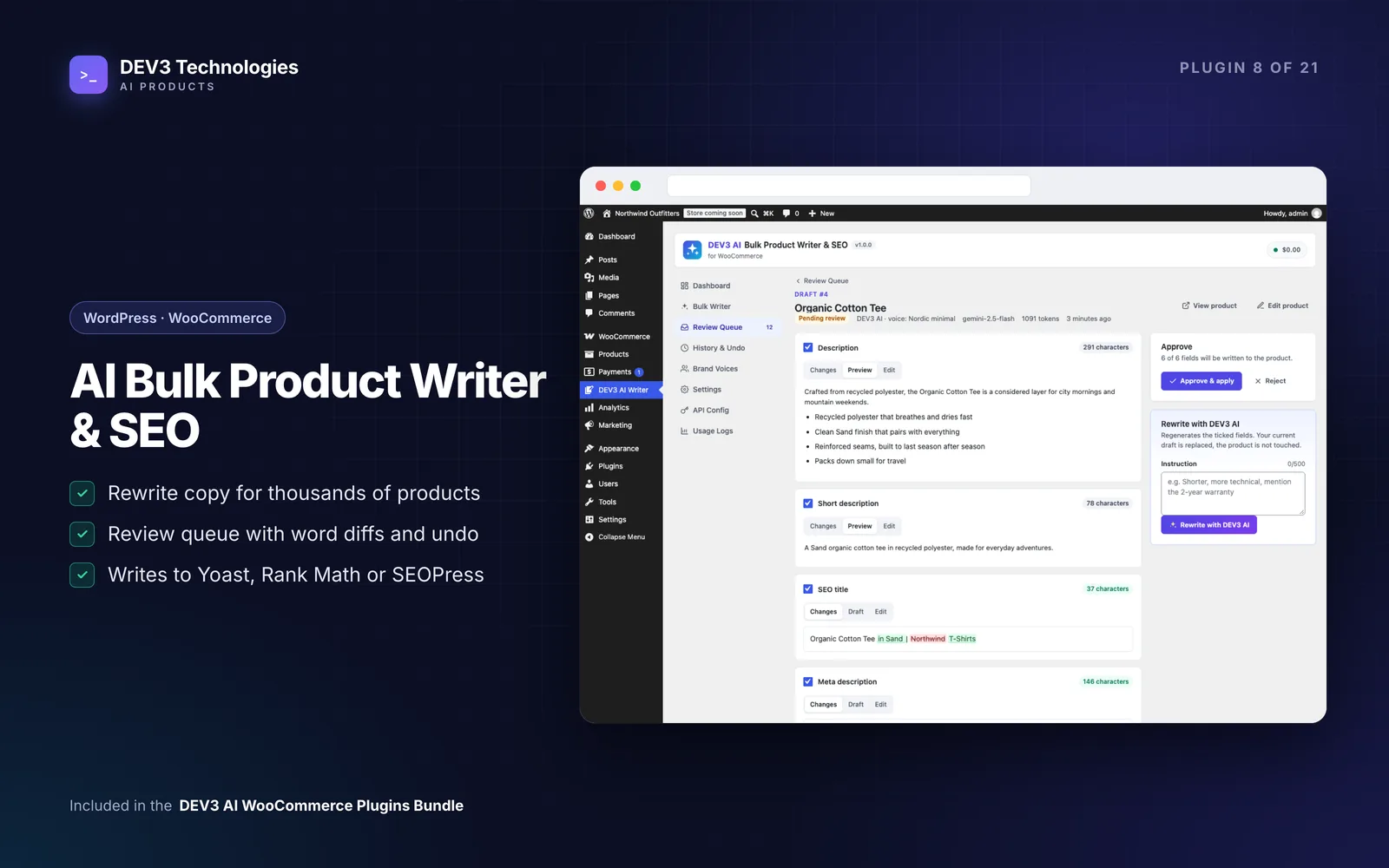
Open Review Queue → Pending. Click a product to see each field with:
- Changes: a word diff against the current copy,
- Preview or Draft,
- Edit, for small fixes in place.
Untick any field you don't want. If a draft is close but not right, type an instruction such as "shorter, mention the 2-year warranty" and click Rewrite with DEV3 AI. The product isn't touched until you click Approve & apply. If someone edited the product after the draft was written, you're asked before those edits are overwritten.
Read every draft in the pilot. If you're fixing the same thing over and over, go back and adjust the brand voice or extra instructions instead.
Step 6: Scale up
Once the pilot reads well, repeat with larger selections or select all matching products. For big queues, select drafts and click Approve selected, or Approve all pending to apply them as a background job. If the copy needs sign-off from someone else, Export CSV shares the queue.
You can also start runs from the regular Products list: tick products and choose Write with DEV3 AI from Bulk actions. Each product's edit screen has a DEV3 AI Writer box with its content health and links to write, review a pending draft, or see its change history.
Step 7: Know that you can undo
History & Undo lists every approval with the fields it changed, its batch, who applied it and when. Click Undo on a row to restore one product, or click a batch id and Undo whole batch to roll back everything from that run. If the product was edited since, you're asked first.
Back on the dashboard, click Re-check after approving to watch the issue counts drop.
Tips and pitfalls
- Work one issue at a time. A run for "meta descriptions only" is far easier to review than a run that rewrites seven fields.
- Protect your hero products. Use Only fill empty fields on categories where you've already written strong copy.
- Templates are useful too. For predictable fields like alt text on simple products, Templates (no AI) can be enough.
- Mind the run size. Large runs are fine in the background, but your review time is the real limit. Approve what you've read.
- Privacy is simple. Only product data is sent to Google Gemini, plus the main product photo if you use it for alt text. No customer data.
Who it's for
Stores with large or inherited catalogues, supplier-fed shops with copy-pasted descriptions, agencies cleaning up a client's catalogue before an SEO project, and anyone migrating between Yoast SEO, Rank Math and SEOPress. The case study explains how the review queue, conflict checks and undo fit together.
Get started
DEV3 AI Bulk Product Writer & SEO is part of the DEV3 AI WooCommerce Plugins Bundle. Run the audit, set a brand voice, and review a pilot batch of 20 products before you scale. If you'd like help planning the SEO side of a catalogue project, talk to us.