"Yoast shows a red dot on half our posts and we don't know where to begin"
Install Yoast SEO or Rank Math on a site that has been running for a few years and you usually find the same things. Hundreds of posts with no meta description. Titles that get cut off in Google. Two or three articles quietly competing for the same keyword. Good posts with no internal links pointing at them, so neither readers nor search engines find them. Fixing it one post at a time, inside the SEO plugin's own box, is the kind of job that never gets finished.
This guide shows how to clean up on-page SEO across a whole WordPress site, in bulk and with review, while still writing every value into Yoast or Rank Math where it belongs. It uses DEV3 AI SEO Assistant for Yoast & Rank Math.
What a good SEO clean-up looks like
- You start from a list, not a hunch. Duplicate titles, cannibalisation, thin content, orphans and missing alt text, all in one report.
- The fix lands in your SEO plugin. No second set of meta tags, no conflicts.
- Bulk work is reviewable. You see a diff for every field before it goes live.
- Your own edits are respected. If someone changed a field by hand, the tool asks before overwriting it.
- Everything can be rolled back.
Step by step: a site-wide SEO clean-up
The plugin is an add-on for Yoast SEO and Rank Math (free or premium). SEOPress and All in One SEO are supported too, and with no SEO plugin it stores and prints the tags itself. The SEO plugin is detected automatically, or you can force it under Settings → Write into. If you use Rank Math, finish or skip its setup wizard first, because Rank Math only prints its head tags after that.
1. Get the site report
Open DEV3 AI SEO. The dashboard shows a site score, top issues, recent runs and the link index. The content gaps report lists duplicate titles, keyword cannibalisation, thin content, orphan posts and images without alt text, plus topic ideas from DEV3 AI if a key is connected.
Add a Google Gemini key under API Config for AI suggestions. Without one you still get checks, scores, reports, rules-based suggestions, word-match link suggestions and history.
2. Fix the biggest gap first: missing descriptions
Open Bulk optimize. Filter posts by type, status or issue, such as "no meta description", "title too long" or "orphan". Select the posts, pick the fields to draft, choose the writer (DEV3 AI or Basic rules) and tick Only fill empty fields. Then start the run. It works in the background, for up to 2,000 posts per job.
You can also select posts in the normal Posts list and use the bulk action Optimize with DEV3 AI. The Posts list also gets an "SEO (DEV3)" score column, which helps you spot weak posts at a glance.
3. Review the drafts
Open the Review queue. Each draft shows a diff against the live value. Edit, apply or reject per field, in bulk, or apply a whole run at once. If a value changed after the draft was made, a conflict check stops you from overwriting it blindly.
4. Polish your most important posts in the editor
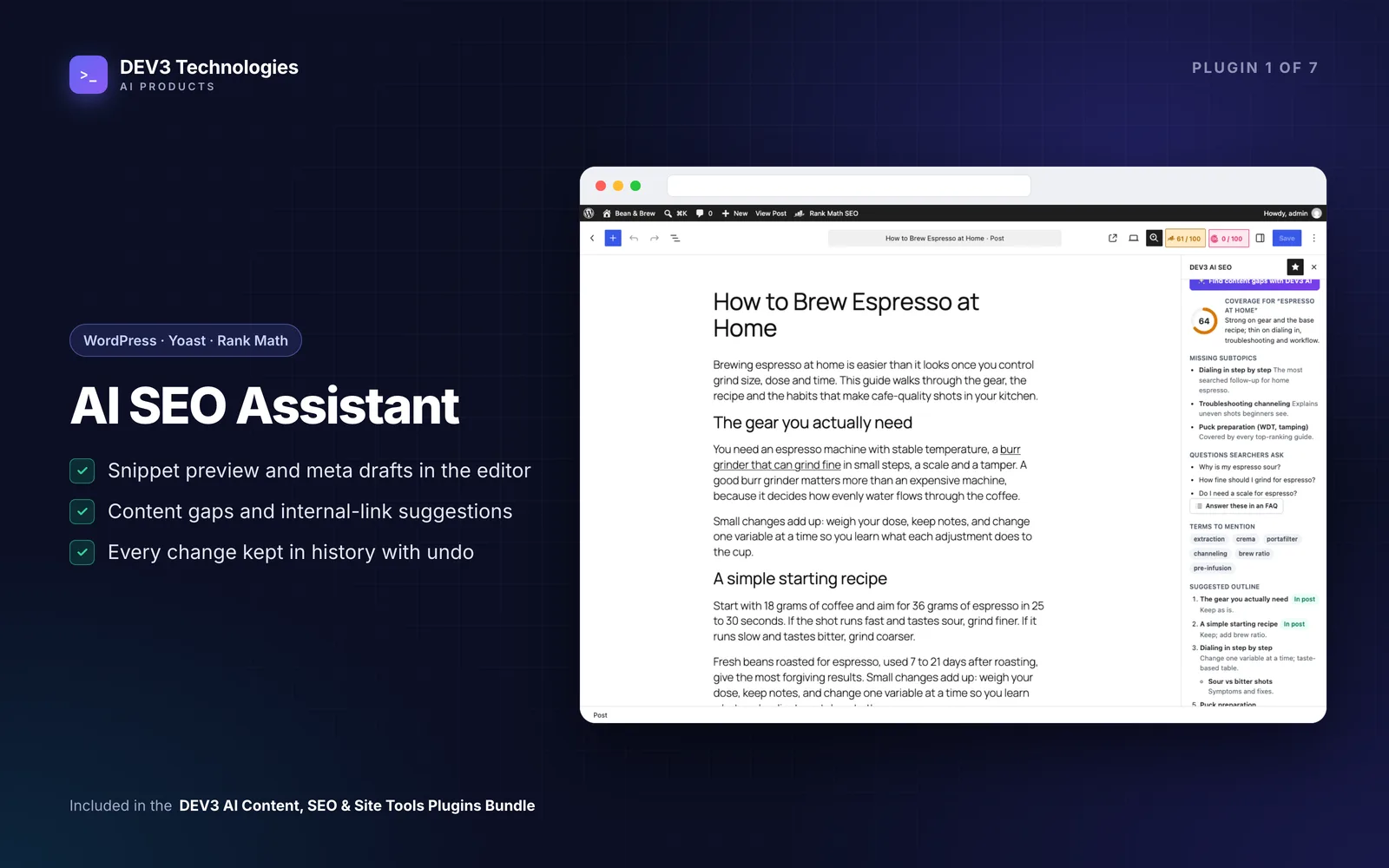
For pages that bring in money, do it by hand. Open the post in the block editor and click the DEV3 AI SEO icon in the top bar. The sidebar has:
- Checks: title and description length, keyword placement and density, cannibalisation, content length, subheadings, image alt text and internal links, with a 0-100 score.
- Snippet & meta: a Google-style preview for desktop and mobile with character and pixel meters. Choose fields and click Generate with DEV3 AI or Basic suggestions. You get up to three options per field, each as a draft you Edit, Apply or Reject. Applying writes into the SEO plugin straight away.
- Schema: Yoast page and article type, or Rank Math's main type, plus extra pieces such as HowTo, FAQPage, Product or Event, merged into the SEO plugin's own schema graph.
- Internal links: suggestions across your posts with the anchor text highlighted in its paragraph. Insert link adds it to that paragraph.
- Content gaps & outline: a coverage score, missing subtopics, questions and terms, and an outline you can insert as headings.
- FAQ: Insert FAQ block adds a Yoast or Rank Math FAQ block (which prints FAQPage schema), or core Details blocks with DEV3 schema.
- History: applied changes for this post, each with Undo.
5. Rescue orphan pages
Orphans are posts with no internal links pointing to them. The internal links report shows inbound and outbound links per post and lists orphans. For each one, open a related, well-linked post, check the Internal links suggestions, and insert one or two links with natural anchor text. Suggestions use embeddings when AI is on, and word matching when it is off.
6. Deal with cannibalisation
When two posts target the same keyword, decide which one should rank. Then give the other a different focus keyword and title, or link it to the main post. The checks in the editor flag cannibalisation, so you can confirm the fix before saving.
Tips and pitfalls
- Tick "Only fill empty fields" on your first bulk run. It leaves descriptions your team already wrote alone.
- Work in batches by post type or category. Smaller runs are easier to review properly.
- Do not chase the score on every post. Fix the issues that matter: titles cut off in results, missing descriptions, orphans and duplicates.
- Classic editor? The sidebar needs the block editor. Classic-editor sites use Bulk optimize → Open, which has every tool.
- Roles. Editors and authors can use the sidebar on posts they can edit. Bulk runs, reports and settings are for administrators.
- Data and cost. Only the post title, slug, excerpt, headings and up to 6,000 characters of text are sent, for the feature you run. Set a monthly budget and, if needed, PII masking in API Config.
Who this is for
- Site owners who inherited years of posts with patchy SEO.
- Agencies doing SEO clean-ups for clients on Yoast or Rank Math, who need to show what changed and roll it back if asked.
- Content teams who want an SEO check built into the editor they already use.
The case study covers how the plugin was built. For a full technical SEO review, site speed work or a redesign, our web development team can help.
Getting started
DEV3 AI SEO Assistant is part of the DEV3 AI Content, SEO & Site Tools bundle, alongside the Auto Blogger, Accessibility Checker and four more plugins. Run the site report, fix missing descriptions in one reviewed batch, then work through orphans and duplicates.