
Generating a course outline with AI is the easy part. The hard part is everything after: turning that outline into real objects inside a learning management system, in the right order, with the right parent links, without leaving half a course behind when something fails, and without creating a second copy when the job is retried. It gets harder when you support more than one LMS. Tutor LMS and LearnDash both call things "courses", "lessons" and "quizzes", but they store them in completely different shapes. When we built DEV3 AI Course Builder for LearnDash & Tutor LMS, we split the problem in two: a single reviewed course tree that knows nothing about any LMS, and a build job that writes that tree through an adapter, one recorded step at a time. This post explains that build pipeline with the real code.
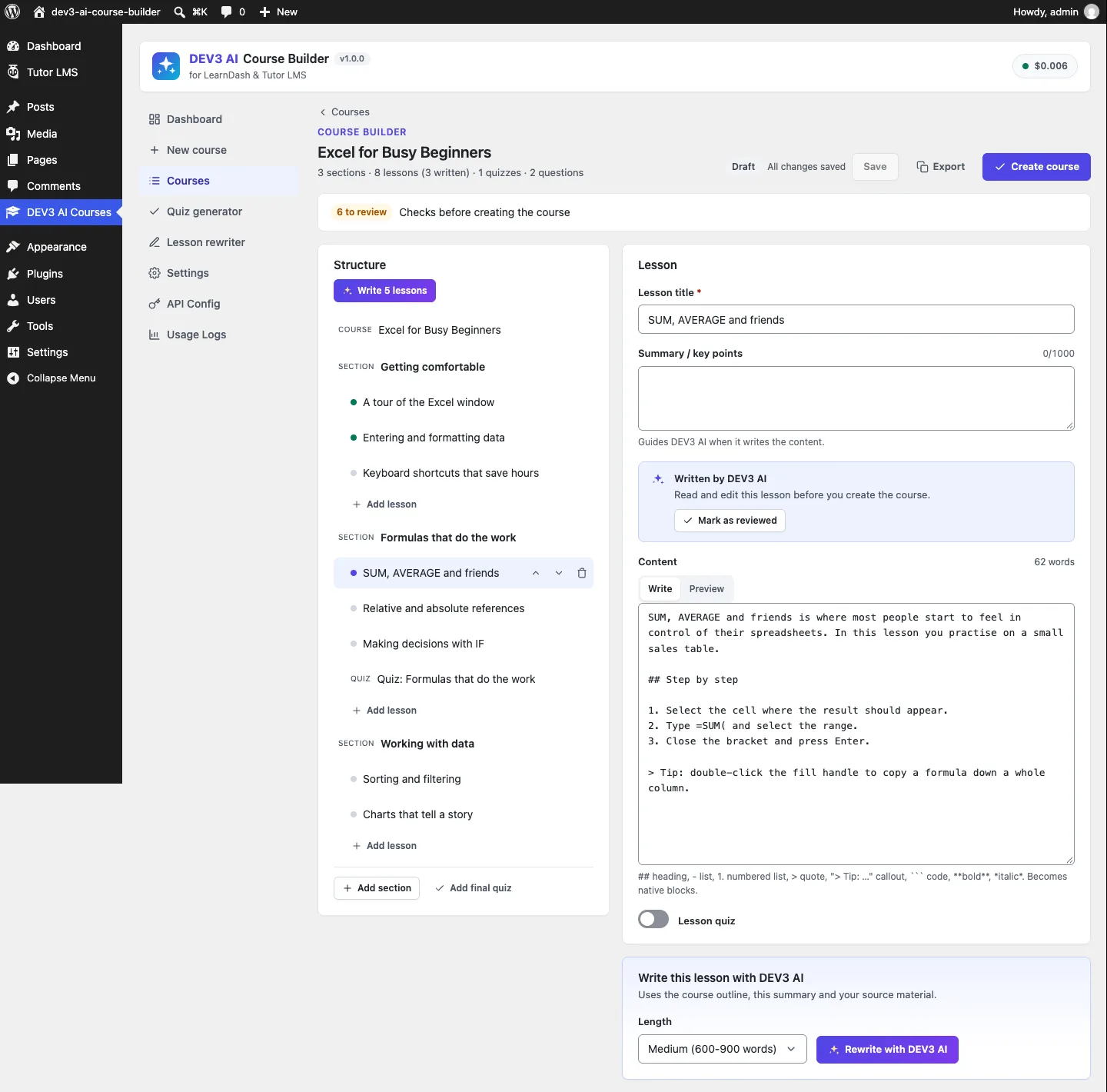 The course builder: the whole course is an editable tree, and AI-written lessons are flagged for review.
What it does and who it's for
DEV3 AI Course Builder turns a topic, a pasted outline or an uploaded PDF or DOCX into a complete course: sections, lessons, topics, quizzes with questions, a description and certificate text. You review and edit all of it before anything is created in your LMS. It suits:
- Course creators on Tutor LMS who want a full curriculum with quizzes in Tutor's own structures, not pasted text.
- LearnDash sites that need lessons, topics, quizzes with ProQuiz questions, course-builder steps, section headings and a certificate wired up.
- Sites without an LMS that want a simple course as linked WordPress pages with self-check quizzes and a certificate page.
- Trainers with existing material, such as slides exported as PDF, a handbook in Word, or notes in Markdown, who want it structured into lessons.
- Teams maintaining old courses, who need a quiz for a lesson they already have, or a lesson rewritten to be simpler, shorter, more formal or in another language, with undo.
The AI features use the Google Gemini API with your own key. Without a key, the outline parser, templates, manual editor and basic quiz questions still work.
How to set it up
- Install the plugin zip from the bundle and activate it. The menu DEV3 AI Courses appears.
- Optional: activate Tutor LMS or LearnDash. The Dashboard shows which targets are ready; plain pages are always available.
- Optional: paste a Google Gemini API key in API Config and set a monthly budget.
- In Settings, choose the default LMS, the status of created items (Draft by default), language, tone and the default course shape.
How to use it
From a topic
Click New course, describe the course on the Topic tab, set the course shape (target LMS, audience, level, sections, lessons per section, quiz placement and question types), then click Generate outline with DEV3 AI. The outline arrives as a draft marked "Not saved yet", with Use this outline, Regenerate and Discard.
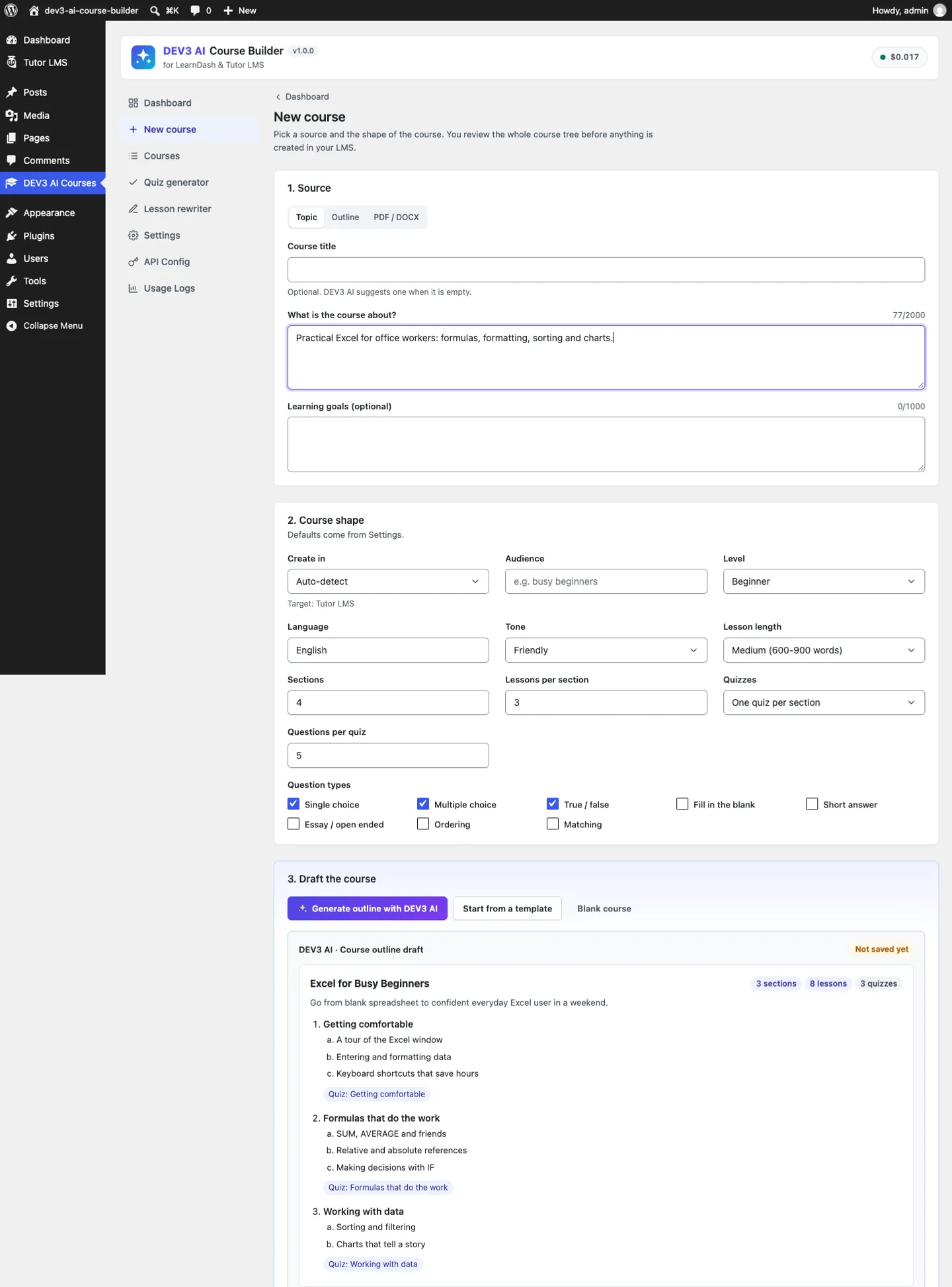 New course: the source, the course shape and an outline draft that is not saved until you accept it.
From your own material
The Outline tab accepts Markdown headings, numbered lists or bullets; the PDF / DOCX tab reads an uploaded file. A rules-based parser turns headings into sections, lessons and topics without AI. For a scanned PDF, the AI path sends the document itself so the model can read the pages.
Review, then create
In the course builder you write or generate lessons, edit questions, and clear the checks (empty lessons, quizzes without questions, questions without a correct answer). Create course starts a background job with progress. Undo build moves everything the build created to the trash and keeps the draft, so you can build it again, even into a different LMS.
Tools for existing lessons
The Quiz generator writes questions for any lesson you already have and places the new quiz right after it. The Lesson rewriter rewrites a lesson in one of eight modes and keeps the previous version for undo.
 The quiz generator: every question and answer is editable before the quiz is created.
The deep dive: retry-safe builds through LMS adapters
Step 1: one normalised tree
Every route into the builder (an AI outline, the outline parser, a JSON import, an editor save) produces the same thing: a tree that has passed through Tree::normalize(). That function assigns stable node ids (and fixes duplicates), clamps text lengths and counts, and repairs each question for its type. The repair rules are where AI output usually goes wrong:
} elseif ( 'single' === $type && $answers ) {
	$found = false;
	foreach ( $answers as $i => $a ) {
		$answers[ $i ]['correct'] = $a['correct'] && ! $found;
		$found                    = $found || $a['correct'];
	}
	if ( ! $found ) {
		$answers[0]['correct'] = true;
	}
}
// ...
if ( 'fill_blank' === $type ) {
	$text = (string) preg_replace( '/_{3,}|\[blank\]|\{dash\}/i', '{blank}', $text );
	if ( false === strpos( $text, '{blank}' ) && $answers ) {
		$text .= ' {blank}';
	}
}
(condensed from Tree::question)
A single-choice question with two "correct" answers keeps the first; one with none gets a flag the builder shows as a warning. True/false questions are rebuilt as exactly two answers, and the correct one is read in several languages ("richtig", "vrai", "verdadero", "wahr"). Fill-in-the-blank questions get one internal placeholder, {blank}, whatever the model or the author used (___, [blank], Tutor's {dash}). Every adapter can then rely on the tree being valid, so none of them needs its own clean-up.
Step 2: one contract, three very different LMSes
Adapter is an abstract class with seven creation hooks and a capability map:
abstract public function supports();            // { topics, certificate, section_quiz, types[] }
abstract public function create_course( array $course, array $ctx );
abstract public function create_section( array $section, array $ctx ); // 0 = virtual section
abstract public function create_lesson( array $lesson, array $ctx );
abstract public function create_topic( array $topic, array $ctx );
abstract public function create_quiz( array $quiz, array $ctx );
public function finalize( $course_id, array $map, array $tree, array $ctx ) { return true; }
public function cleanup( array $post_ids ) {}
(condensed from Lms\Adapter)
The differences live entirely inside the three implementations:
- Tutor LMS has sections (its "topics" post type), lessons and quizzes, but no sub-lessons. The adapter flattens a lesson's topics into extra lessons right after their parent, in the same Tutor topic. A course-level quiz gets its own "Final assessment" topic. Questions and answers go into Tutor's own
tutor_quiz_questionsandtutor_quiz_question_answerstables through Tutor's quiz builder, with a direct-insert fallback when that class is missing. - LearnDash has no section post at all:
create_section()returns 0, and section headings are written at the end intocourse_sections. A section quiz becomes a lesson quiz on the section's last lesson, because LearnDash doesn't support quizzes on section headings. Questions become ProQuiz models linked byquestion_pro_idandquiz_pro_id, and a certificate post is created and set as the course certificate. - Pages creates a parent course page with a linked table of contents, child pages for lessons and topics, quiz pages as self-check questions using core
detailsblocks, and a certificate page with the plugin's block.
The same fill-in-the-blank question shows why the placeholder matters. Tutor wants {dash} in the text and the answers joined with | in a separate column; LearnDash wants each answer written inside braces in the question itself:
// Tutor
$answers[] = $answer( str_replace( '{blank}', '{dash}', $q['text'] ), true, implode( '|', $this->blanks( $q ) ) );

// LearnDash: each {blank} is replaced, in order, by "{answer}"
return (string) preg_replace_callback( '/\{blank\}/', static function () use ( $blanks, &$i ) { /* … */ }, $q['text'] );
(condensed from Tutor::question_payload and LearnDash::question_text)
The tests check both encodings from one tree: Tutor stores Use beans within a {dash} and grind {dash}. with month|fresh as the gap answers, and the LearnDash stub receives Use beans within a {month} and grind {fresh}. as a cloze_answer question.
Step 3: the build as ordered steps
A build is a background job whose items are step names, in creation order:
$steps = array( 'course' );
foreach ( $tree['sections'] as $s ) {
	$steps[] = 's:' . $s['id'];
	foreach ( $s['lessons'] as $l ) {
		$steps[] = 'l:' . $l['id'];
		foreach ( $l['topics'] as $t ) {
			$steps[] = 't:' . $t['id'];
		}
		if ( $l['quiz'] && $l['quiz']['questions'] ) {
			$steps[] = 'q:' . $l['quiz']['id'];
		}
	}
	if ( $s['quiz'] && $s['quiz']['questions'] ) {
		$steps[] = 'q:' . $s['quiz']['id'];
	}
}
// … course quiz, then 'cert' (if there is certificate text), then 'final'
(condensed from Builder::steps)
A test pins the exact order for a sample tree: course, s:sbasics, l:lbeans, t:tlabel, l:lgrind, q:qgrind, q:qbasics, s:sbrew, l:lpour, q:qfinal, cert, final. Quizzes without questions are left out entirely, so the LMS never gets an empty quiz.
The job runs three steps per chunk. The shared jobs core claims a job with a conditional UPDATE … WHERE status IN ('queued','running') AND locked_until < now, so two cron runners can't work on the same job at once, and a chunk that runs out of its time budget is rescheduled.
Step 4: record before you move on
This is what makes the build retry-safe. Each step re-reads the blueprint, checks the node-to-post map, and writes to it immediately after creating a post:
$node_id = substr( $step, 2 );
if ( array_key_exists( $node_id, $map ) ) {
	return true;                       // already created on an earlier attempt
}
// ...
if ( $lesson && empty( $map[ $lesson ] ) ) {
	return new \WP_Error( 'dev3lm_parent', __( 'Skipped: its lesson was not created.', 'dev3-ai-course-builder' ) );
}
switch ( $entry['kind'] ) {
	case 'lesson':
		$post = $adapter->create_lesson( $entry['node'], $ctx );
		break;
	// section, topic, quiz …
}
Blueprints::merge_result( $bp['id'], array( 'map' => array( $node_id => (int) $post ) ) );
(condensed from Builder::step)
Three consequences follow:
- Retries don't duplicate. If the job dies after creating a lesson and recording it, the retried step sees the id in the map and returns. The course step itself checks both the map and that the post still exists.
- Failures don't cascade silently. A topic whose lesson failed is skipped with a named error, not created as an orphan. The job finishes as "built" if the course exists, and the UI reports "Created with N skipped items".
- Parents are always known. The context passed to each adapter carries the already-created course, section and lesson post ids from the map, plus the item's order inside its section and across the course. Tutor and LearnDash both rely on
menu_orderfor curriculum order.
finalize() runs last, once every id is known. For LearnDash, that is where the course-steps hierarchy (lessons → topics → quizzes, plus course-level quizzes) is built from the map and written through LearnDash's own course-steps model, or the ld_course_steps meta it reads. The LearnDash test asserts the lesson order, the topic under its lesson, the section quiz attached to the section's last lesson, and the section headings at positions 0 and 2.
Two more guards close the loop. Starting a build for a blueprint that is already built, while its course post still exists, returns dev3lm_built ("Undo the build first to create it again"), and a test checks it. Starting a build while one is running returns the running job instead of a new one.
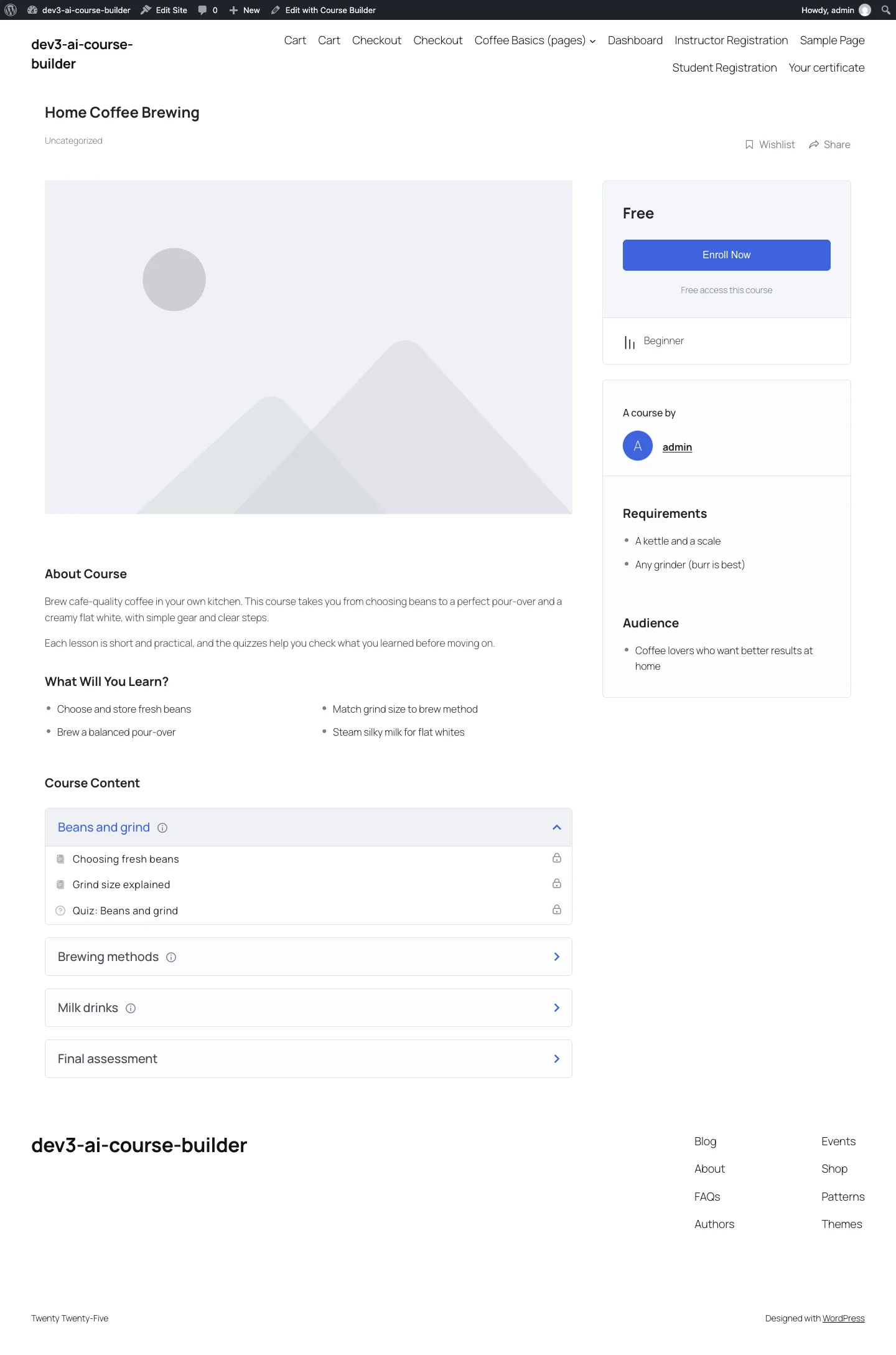 The same tree, built into Tutor LMS: topics, lessons and quizzes in Tutor's own curriculum.
Step 5: undo by tag
Every post an adapter creates goes through Adapter::insert(), which tags it with two meta keys: _dev3lm_blueprint and _dev3lm_node. Undo doesn't need the map at all: Builder::created_posts() queries every post with that blueprint id in any status, newest first, and trashes them. A permanent delete first calls the adapter's cleanup(), which for Tutor removes the question and answer rows that live outside the posts table. The blueprint goes back to "draft", so the same reviewed tree can be built again, into the same LMS or a different one.
The Tutor test does this for real: it builds a course, checks the question rows, runs a permanent undo, and asserts that the question count for that quiz is zero.
Trade-offs
- No sync after the build. Once created, the course lives in the LMS. Edits in the builder are not pushed to it; the UI says so and points to undo and rebuild.
- Tutor has no sub-lessons. LearnDash topics become extra lessons in Tutor, in order. Nothing is lost, but the hierarchy is flatter.
- LearnDash is tested against stubs. The adapter was written against LearnDash's documented post types, settings API, course-steps model and ProQuiz classes, and tested with stubs of them. A run on a licensed LearnDash install is still to do. Tutor LMS was tested for real.
- Certificates differ. LearnDash gets a native certificate post. Tutor's certificate builder is part of Tutor Pro, so Tutor and pages courses use this plugin's Course Certificate block.
- Live AI is untested. Outline, lesson, quiz and rewrite drafts were tested with mocked Google Gemini API responses. A live-key run is next, so we make no claims about generation quality or speed yet.
 Illustration: every step records what it created, so a retry skips it and undo knows what to remove.
Results so far
The plugin has 52 PHPUnit tests, covering the tree model and question repair, Markdown to native blocks, the outline parser, DOCX and PDF text extraction, all three adapters, build and undo, REST permissions and the AI drafts, plus 32 Jest tests. Build, PHP_CodeSniffer at 0 errors and 0 warnings, PHPUnit in wp-env and packaging all pass.
Conclusion
If you generate structured content into another system, separate the plan from the write. Normalise everything into one tree, keep the target-specific rules in adapters, run the write as ordered steps that record their result before moving on, and tag every created object so undo is a query, not a guess. DEV3 AI Course Builder ships in the DEV3 AI Membership, Learning & Support Plugins Bundle on the DEV3 marketplace, alongside our membership and helpdesk plugins, and is being prepared for CodeCanyon. The case study covers the rest of the plugin. If you need AI that writes into your platform safely, talk to our AI implementation team.