A restaurant order looks simple until you price it. A burger is £12, but "medium, smoked bacon, extra cheddar, no pickles on one" changes the unit price. Two of them change the line. Delivery to one postcode costs £3.50, but nothing over £40, and is refused below £15. The tip is a percentage of the food, not of the delivery. The lunch section stops at three, so a slot at 15:30 can't include it. If any of this is calculated in the browser, it can be wrong or tampered with. If every dish has to become a WooCommerce product to take payment, the menu turns into a catalogue that nobody wants to maintain. When we built DEV3 AI Restaurant Menu & Online Ordering, we solved both with one rule: the server prices the whole order once, and WooCommerce receives that price as a single line. This post explains how.
 Illustration: orders flow from a phone to the kitchen pass.
What it does and who it's for
DEV3 AI Restaurant Menu & Online Ordering runs a restaurant's menu, online orders and kitchen screen inside WordPress, with no per-order fees to a hosted platform:
- Takeaways and pizzerias taking pickup and delivery orders with sizes, extras and postcode-based delivery fees.
- Cafés and brunch spots with a breakfast menu in the morning and a lunch menu later, each available only in its own hours.
- Sit-down restaurants and bars that want guests to order from the table by scanning a QR code.
- Food trucks and pop-ups that need pay-at-the-counter ordering with time slots and a capacity per slot.
- Owners with a printed menu who want it online without retyping it.
How to set it up
- Install the plugin zip from the bundle and activate it. An Order online page is created for you.
- In Settings, set your order types, opening hours, time slots, delivery zones, payment methods and tips.
- Build the menu in Menus, or import it from a photo with DEV3 AI, and add option groups such as sizes and extras in Modifiers.
- For dine-in, add tables and print the QR sheet in Tables & QR. Give kitchen staff the Kitchen staff role.
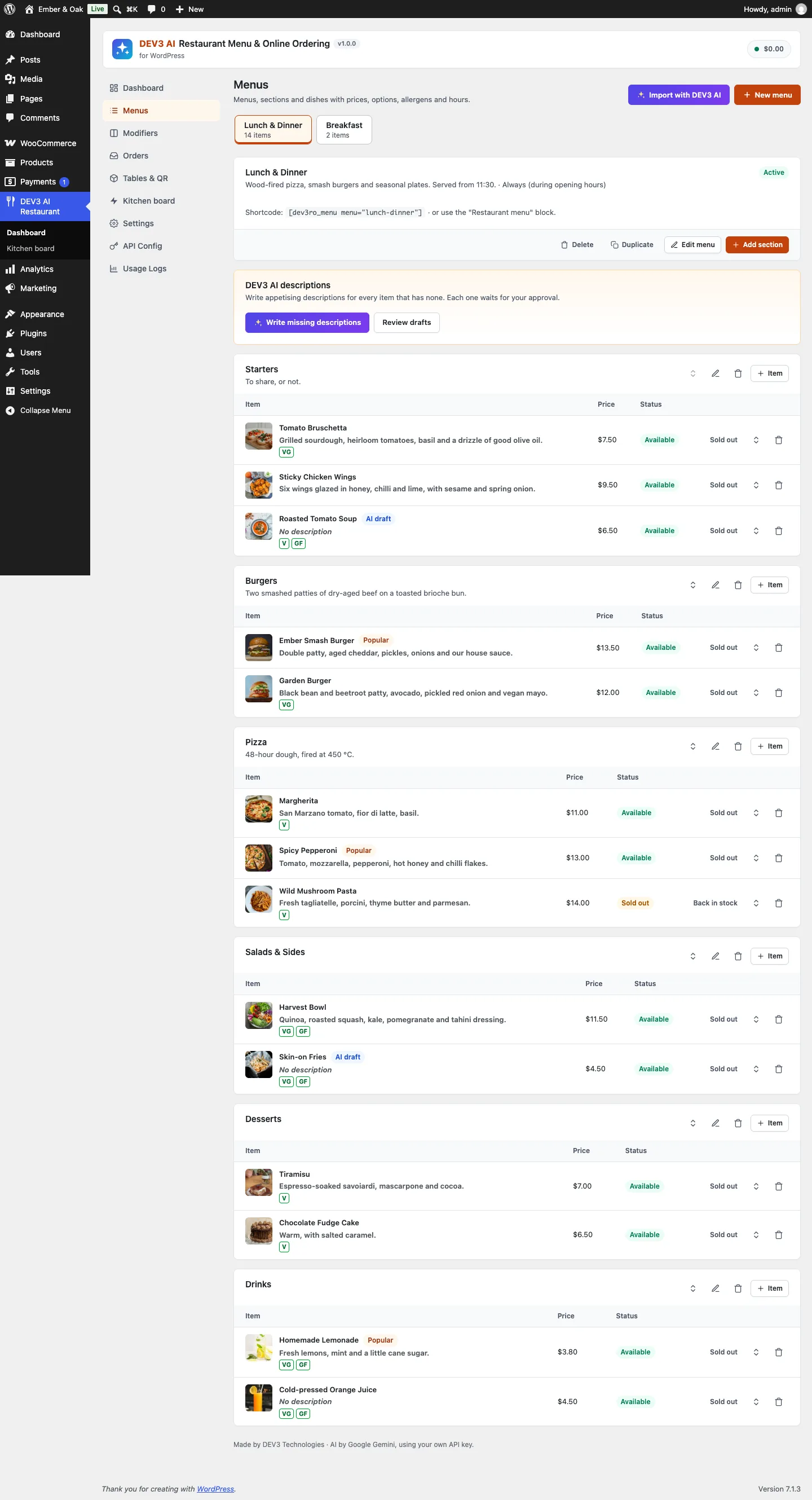 The menu builder: dishes stay dishes, not WooCommerce products.
How to use it
Guests order from their phone. They pick dishes and options, choose pickup, delivery or dine-in, ASAP or a slot, and pay at the counter or online through WooCommerce. A status page shows when the order is being prepared and when it is ready.
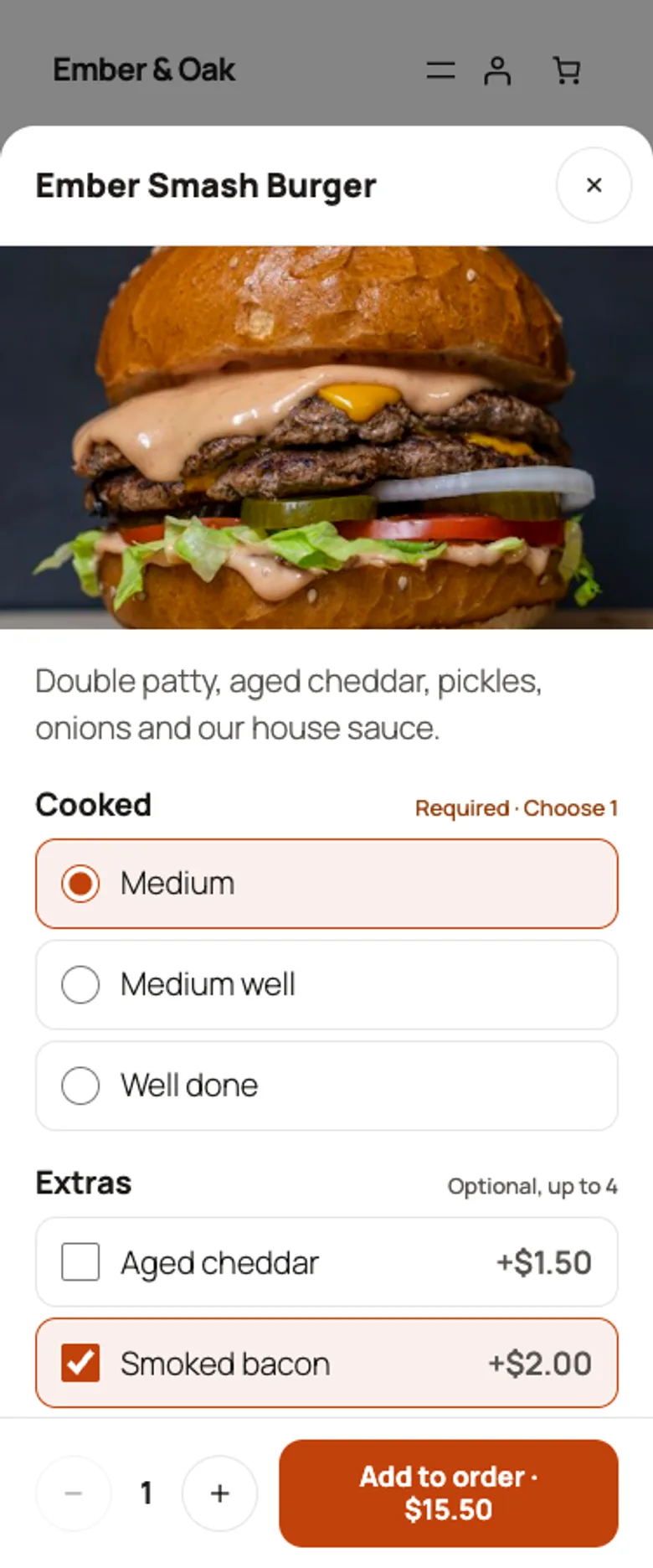 The item sheet shows the rules ("Required · Choose 1", "Optional, up to 4") and a live price.
The kitchen works from the board. New orders arrive with a chime and move through New, Preparing and Ready with one tap each, with timers that turn amber and then red.
The owner keeps the menu current. Mark dishes sold out during service, import a new menu from a photo, and approve AI-written descriptions one by one.
The rest of this post is about the money: how an order gets its price and how that price reaches WooCommerce.
The browser sends intent, not prices
The ordering front end shows prices, and updates them live as guests pick options, but it never sends them. A line in a quote or order request is just IDs and a quantity:
{ "item": 42, "qty": 2, "options": { "7": ["medium"], "9": ["bacon", "cheddar"] }, "note": "No pickles on one" }
The server turns that into a price in Pricing::line(), and every check that could reject the line happens there.
- The item must exist and be orderable. Hidden items are treated as gone and sold-out items are refused by name.
- The menu and section must be available at the order time. That is the actual order time, not the current time. A scheduled order for 18:00 can include a section that opens at 17:00, while an ASAP order at 15:00 can't. One test sets the sides section to Mondays 17:00 to 22:00, checks that an ASAP quote fails with
dev3ro_unavailable, then quotes the same lines for 18:00 and checks that it passes. - Quantities must be between 1 and 50, and an order can have at most 60 lines.
- Every option group in the request must belong to the item, and every option must belong to its group. An option removed from the menu after the guest loaded the page fails cleanly ("An option for Ember Smash Burger is no longer available") instead of being priced at zero.
- Each group's rule must hold. The number of picked options has to be between the group's minimum and maximum:
$n = count( $picked );
if ( $n < (int) $g['min_select'] || $n > (int) $g['max_select'] ) {
	return new \WP_Error( 'dev3ro_option_rule', sprintf( __( '%1$s for %2$s: %3$s.', 'dev3-ai-restaurant-menu' ), $g['name'], $item['name'], Modifiers::rule_label( $g ) ) );
}
foreach ( $picked as $oid ) {
	$unit  += (float) $by_id[ $oid ]['price'];
	$mods[] = array( 'group' => $g['name'], 'option' => $by_id[ $oid ]['name'], 'price' => (float) $by_id[ $oid ]['price'] );
}
(condensed from Pricing::line)
A required single choice such as Cooked is min = 1, max = 1; optional extras up to four are min = 0, max = 4. The error message uses the same rule label the guest saw, such as "Choose 1", so a rejected order explains itself. Picked options are de-duplicated before counting, so sending the same extra twice doesn't double its price or get around a maximum.
The priced line keeps a snapshot: item ID, name, quantity, unit price, line total, and each modifier with its group, option and price. That snapshot is stored on the order, so editing or deleting a dish later never changes what an old order says.
Fees, minimums and tips
Pricing::quote() adds the order-level parts after the lines.
Delivery zones from postcode patterns
Delivery zones are matched by postcode, without a maps API. Each zone holds a comma-separated list of patterns, and Zones::matches() understands four forms:
if ( preg_match( '/^(\d+)\s*-\s*(\d+)$/', $pattern, $m ) ) {
	return ctype_digit( $code ) && strlen( $code ) === strlen( $m[1] ) && (int) $code >= (int) $m[1] && (int) $code <= (int) $m[2];
}
if ( '*' === substr( $pattern, -1 ) ) {
	$prefix = self::norm( substr( $pattern, 0, -1 ) );
	return '' !== $prefix && 0 === strpos( $code, $prefix );
}
return self::norm( $pattern ) === $code;
(condensed from Order\Zones::matches)
Numeric ranges such as 1000-1099 also require the same number of digits, so 10500 isn't treated as inside 1000-1099. Prefixes such as SW1* match SW1A 1AA but not SE1 1AA. Exact codes are compared after removing spaces and upper-casing, so ec1a 1bb equals EC1A1BB. A lone * matches everything. Zones are checked in order and the first match wins. That lets a restaurant put a cheap central zone first and a catch-all outer zone last, which is exactly the fixture in the pricing tests:
sw1a 1aamatches Centre at £3.50, for a total of £34.50.- With three burgers the subtotal passes the £40 free-delivery threshold, so the fee drops to zero.
- A single side falls under the zone's £15 minimum and fails with
dev3ro_min_order. E2 8AAfalls through to Outer at £6.- With no zones configured, the same order fails with
dev3ro_no_zone.
Tips
Tips are calculated on the food subtotal only. A percentage is capped at 100%, and a fixed amount is capped at the subtotal, so a typo can't add a £500 tip to a £20 order. Pickup and dine-in have their own minimum orders.
One function for preview and order
The same quote() result drives the live total in the checkout sheet and the order itself. When the guest places the order, Manager::place() calls quote() again with the slot's time, and refuses the order if that quote fails, for example because a dish sold out during checkout.
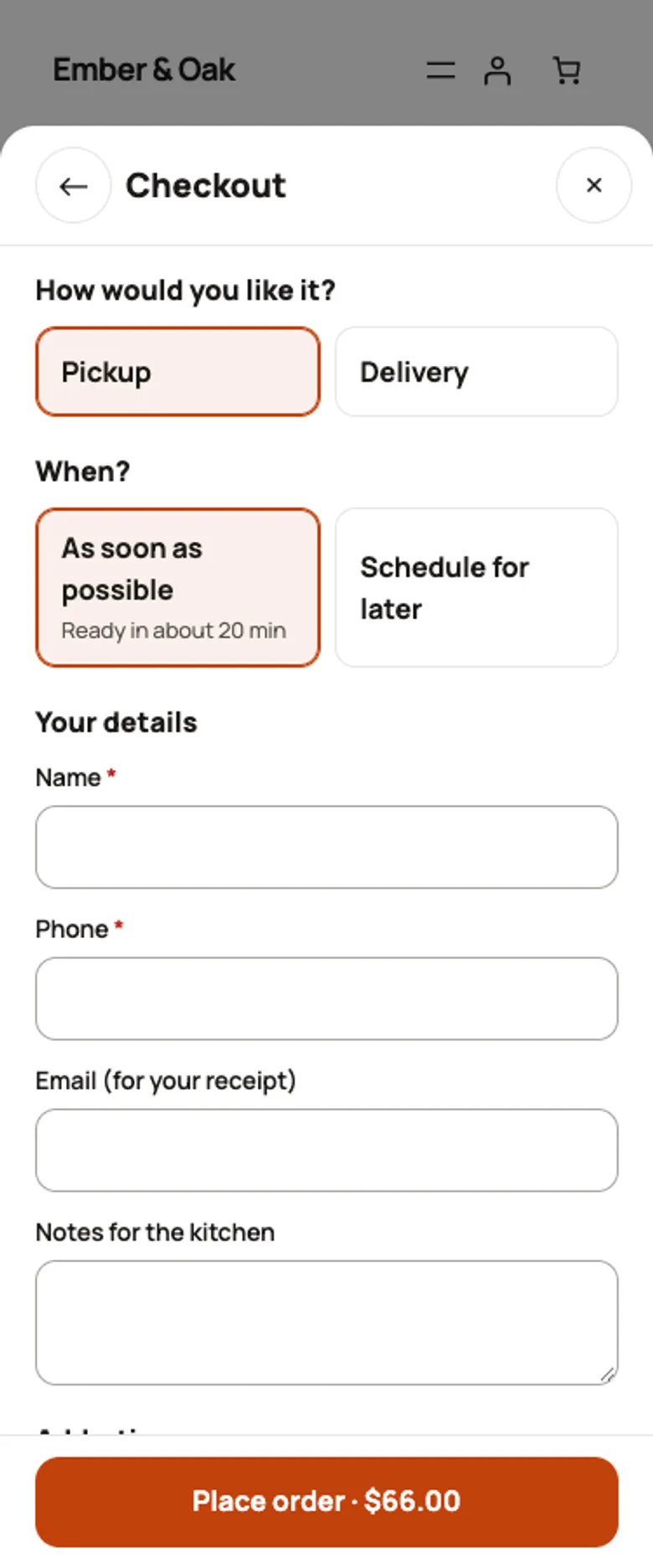 The checkout total is a server quote; the order call re-quotes before anything is saved.
A lock for the last place in a slot
Time slots can have a capacity, such as at most eight orders per 15-minute slot. Two guests can both see one place left. After pricing, Manager::place() takes a MySQL named lock for that slot (GET_LOCK('dev3ro_slot_' . md5( $slot ), 5)), validates the slot again inside the lock, inserts the order, then releases the lock. The second guest gets "That time is fully booked. Please pick another time." instead of a ninth order the kitchen didn't plan for.
One WooCommerce line for the whole order
For online payment, we didn't want a WooCommerce product per dish. A café with 80 dishes and a dozen option groups would need hundreds of products or a variations setup, and every price change would have to be made twice. Instead, the plugin creates one hidden, virtual product called "Food order" and puts it in the cart once, tagged with the restaurant order's ID:
// Load the session cart first, or the add below would overwrite it.
foreach ( WC()->cart->get_cart() as $key => $item ) {
	if ( isset( $item[ self::ITEM_KEY ] ) ) {
		WC()->cart->remove_cart_item( $key );
	}
}
$key = WC()->cart->add_to_cart( self::product_id(), 1, 0, array(), array( self::ITEM_KEY => (int) $order['id'] ) );
(condensed from Payments\Woo::add_to_cart)
From then on, WooCommerce hooks fill in the details from the restaurant order, never from the cart:
woocommerce_before_calculate_totalssets the line price to the order's server subtotal and the name to "Food order #1054 · Pickup".woocommerce_cart_calculate_feesadds Delivery and Tip as separate, untaxed fees, so the WooCommerce total shows the same breakdown the guest just saw.- Quantity is locked in the classic cart and through the Store API (
woocommerce_store_api_product_quantity_editable), so the block cart can't turn one order into three. - The line item gets the dishes, the time and the table as order meta, so the WooCommerce order email and admin screen show what was ordered.
woocommerce_check_cart_itemsremoves the line with a notice if the restaurant order is no longer waiting for payment, for example because it expired.
The test for this flow places an online order and checks that the cart has one line, a £31 subtotal, a £2.50 Delivery fee and a £3 Tip fee, for a £36.50 total. It also checks that the line description includes "2 × Burger (Large, Cheese)", that the quantity isn't editable, that the product is hidden from the catalogue, and that a second online order replaces the first in the cart instead of adding to it.
 Illustration: the server weighs every option and fee, then hands checkout one sealed total.
The kitchen only sees orders it can cook
Payment state decides when an order reaches the kitchen. A pay-at-the-counter order is created as new and appears on the board straight away. An online order is created as pending_payment, sends no kitchen email and stays off the board. WooCommerce status hooks then move it on:
- Paid (
payment_complete, processing or completed): the order becomesnewandpaid, is linked to the WooCommerce order ID, and the kitchen gets exactly one "New order" email. The test checks that no kitchen email exists before payment and exactly one after. - On hold (bank transfer, cheque): the order goes to the kitchen with payment
pending, because the restaurant may still choose to cook it. - Failed or cancelled: the order is cancelled, with
payment_failedas the reason for failures. - Refunded: the payment status becomes
refunded. - Abandoned: an online order still unpaid after 60 minutes is cancelled with the reason
payment_timeout, and its slot place is freed.
All of this goes through WooCommerce's order APIs, so it works with HPOS. On the board, every card shows a Paid or Unpaid badge, so staff know which pickups still need taking money for.
Where AI fits
AI never touches prices or orders. It reads a photographed menu into a draft that the owner reviews before anything is created, drafts descriptions that wait for approval, and suggests pairings using only real item IDs, which the server checks. The "Add something?" suggestion in the order drawer only offers items. It never changes the cart, and with AI off it falls back to the owner's own pairings. These paths were tested with mocked API responses; a run with a live key is still to come.
Trade-offs
- WooCommerce sees one product. Its reports show "Food order" lines, not individual dishes. Dish-level numbers come from the plugin's own dashboard and CSV export.
- No taxes per dish. The hidden product is taxable under the store's standard rate, and delivery and tip are added as untaxed fees. A restaurant with mixed VAT rates per dish needs to check this with its accountant before using online payment.
- Postcode zones, not distance. Patterns are quick to set up and need no API key, but a radius-based delivery area is planned for v1.1.
- Order-time windows follow the site timezone. Slots and section windows use the WordPress timezone, which suits a single-location restaurant; multiple locations are on the v1.1 list.
Conclusion
Price on the server once, store a snapshot, and let the payment system see a single total it can't change. That keeps the menu a menu, keeps WooCommerce for what it does well, and gives the kitchen a board with only orders it should cook. The plugin has 68 PHPUnit tests and 37 Jest tests in total, and the case study covers the kitchen board, table QR codes and menu import. DEV3 AI Restaurant Menu & Online Ordering ships in the DEV3 AI Directory, Booking & Events Plugins Bundle on the DEV3 marketplace and is being prepared for CodeCanyon.