A form that takes money has to do the same sum twice. The visitor wants the total to change the moment they pick the VIP ticket or bump the quantity to two, so the arithmetic runs in the browser. But the browser belongs to the visitor: anything it computes can be edited before it is posted, and a field that conditional logic has hidden can still carry a value. When we built DEV3 AI Form Builder, our WordPress form builder with Stripe and PayPal checkout, the central engineering question was how to make the browser's total and the server's charge the same number every time, without trusting the browser at all. This post explains how we did it: one logic and formula engine written twice, held together by shared test fixtures, and a payment flow in which the only amount that reaches a checkout page is the one the server computed.
 Illustration: a form built step by step, from the first field to the checkout.
What it does and who it's for
DEV3 AI Form Builder is a complete form plugin: 35 field types, multi-step layouts, conditional logic, calculations, payments, an entries inbox, integrations and DEV3 AI tools on top. Typical uses:
- Agencies and studios collecting multi-step quote requests, where an e-commerce question only appears for shop projects and each lead gets a 0–100 score and a summary.
- Event organisers selling tickets with prices, quantities, a fee calculated from the subtotal, and Stripe or PayPal checkout.
- Trades and service businesses offering instant estimates, such as a painting calculator that multiplies the area by the chosen finish.
- HR teams running job applications with CV upload, signature and consent, translated into the applicant's language.
- Marketing teams that want to know which field makes visitors leave, and want AI-suggested fixes they can preview before applying.
- Site owners without an API key, who still get the builder, logic, calculations, payments, entries and spam protection.
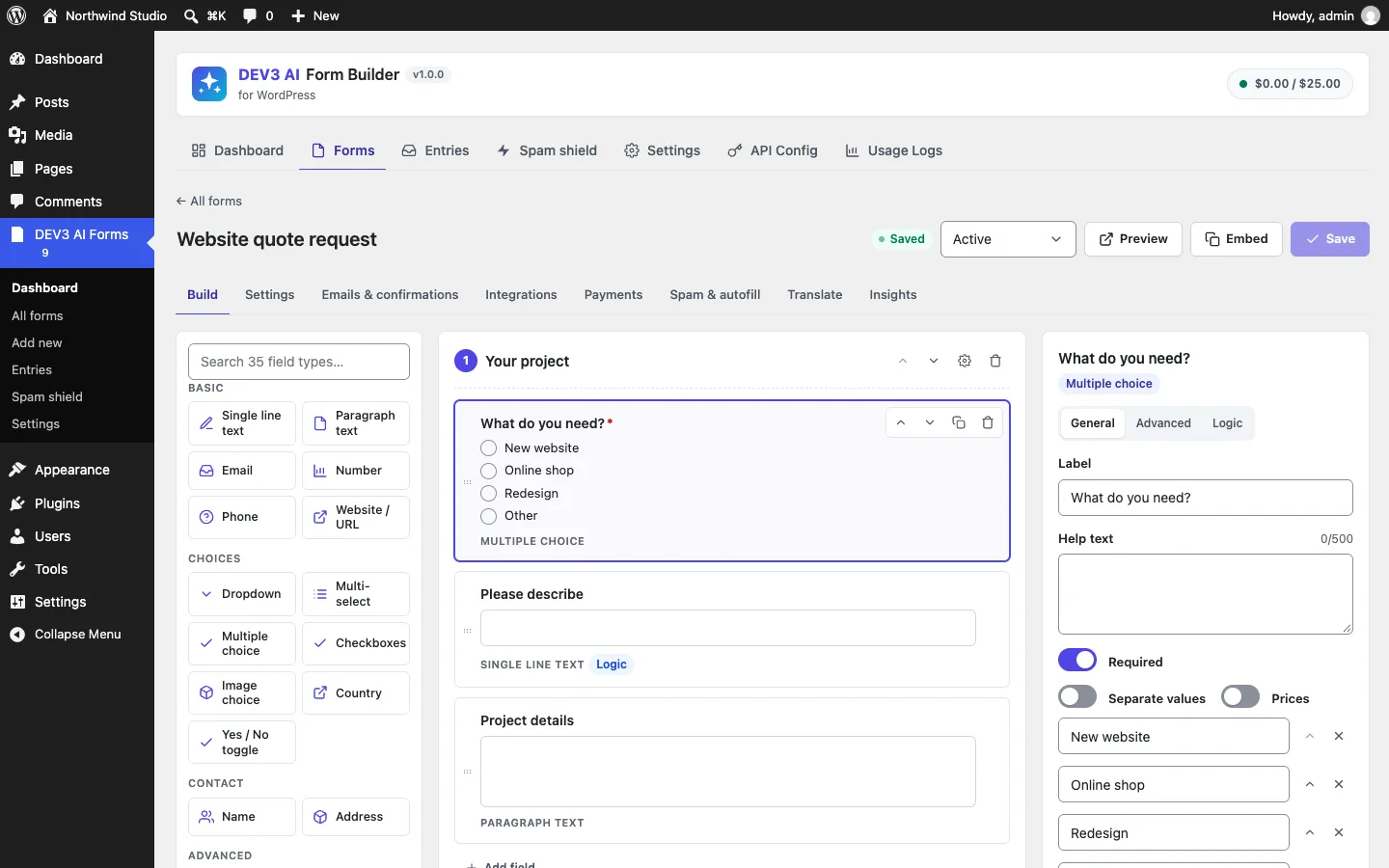 The builder: searchable field types, steps on the canvas, and General, Advanced and Logic settings for the selected field.
How to set it up
- Install the plugin zip from the bundle and activate it. The DEV3 AI Forms menu appears.
- In Settings → Emails, set the from name and address for notifications.
- To take payments, open Settings → Payments and paste a Stripe secret key (plus, optionally, a webhook signing secret) or a PayPal client ID and secret.
- Optionally, add a Google Gemini API key in API Config and click Validate & save to turn on the DEV3 AI features.
- Create a form under Add new, then place it with the DEV3 AI Form block or the
[dev3fb_form id="123"]shortcode.
How to use it
Describe a form. Under Add new, write one sentence such as "Customer satisfaction survey with NPS and a follow-up question for low scores" and click Generate with DEV3 AI. The result is a draft that lists every step, field, option and logic rule. Nothing is saved until you click Use this form, and the form starts as a draft you activate yourself.
Build a calculator or an order form. Add Product, Quantity, Custom amount and Calculation fields, write a formula like round({_subtotal} * 0.05, 2), and add an Order total. On the form's Payments tab, turn on Take payment for this form, choose a currency and tick Stripe, PayPal or both.
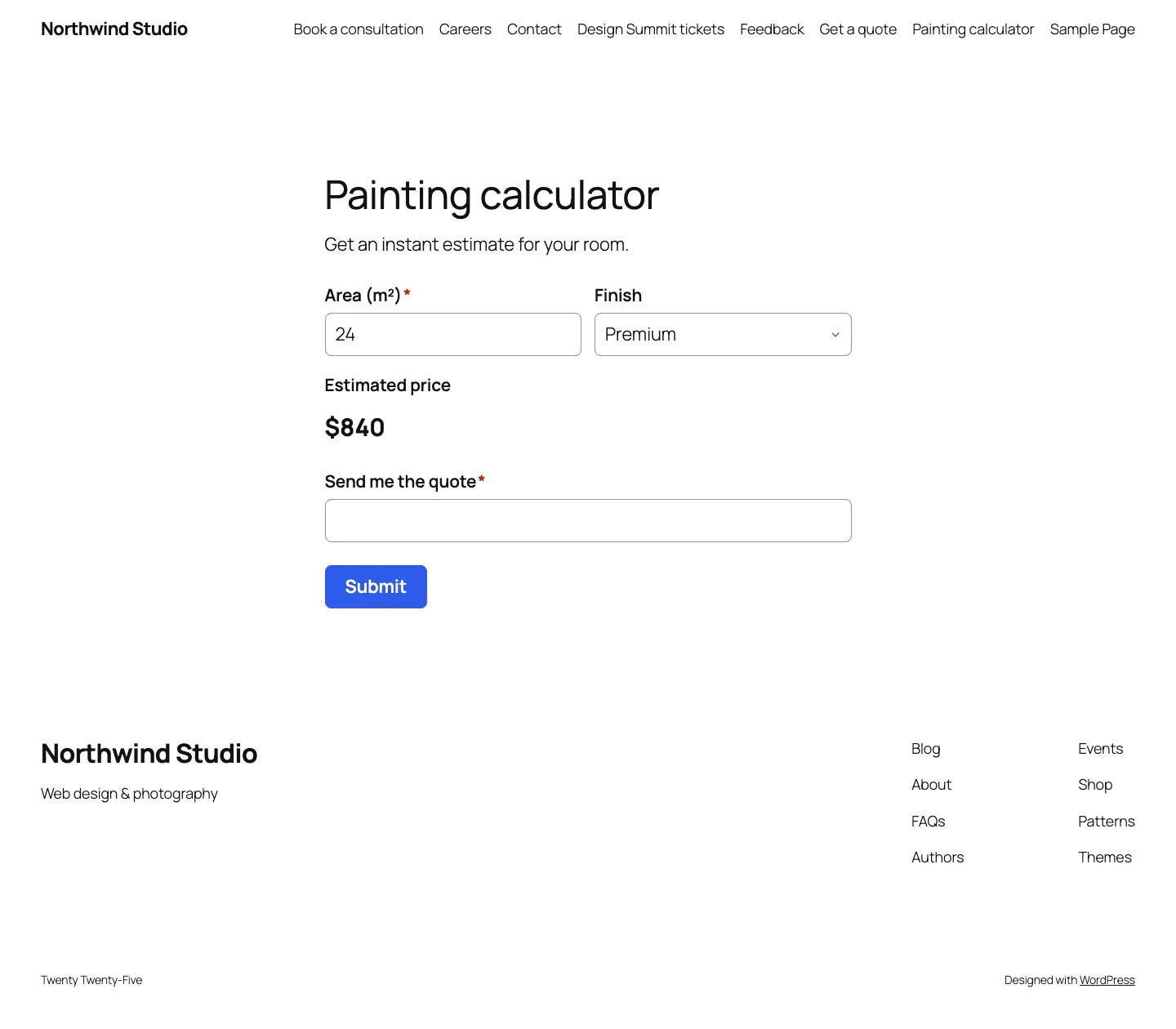 A calculator on a block theme: the estimate updates as the visitor types the area and picks a finish.
Work the inbox. In Entries, paid orders sit next to leads. Analyze with DEV3 AI adds a summary, sentiment and lead score, and Draft a reply with DEV3 AI writes a reply you edit and send yourself. The form's Insights tab shows where visitors give up, with AI-suggested fixes to preview and apply.
The rest of this post is about the second workflow: what happens between the visitor's live total and the amount on the Stripe or PayPal page.
Two runtimes, one set of rules
Three pieces of logic decide what a form charges:
- Conditional logic, which decides which steps and fields are visible. There are 12 operators, all/any matching, and rules on both steps and fields.
- Formulas in calculation fields, such as
{area} * {quality} + {extras}orif({qty} > 10, {_subtotal} * 0.9, {_subtotal}). - The totals calculator, which adds up products multiplied by their linked quantities, custom amounts and any calculations marked "add to total".
All three run in the browser for the live form and on the server for the real charge. We wrote each one twice, in src/shared/logic.js, formula.js and compute.js, and in includes/Engine/Logic.php, Formula.php and Calculator.php. Every PHP file starts by naming its JavaScript twin. Writing everything twice is only safe if something forces the copies to agree.
Hidden means empty, then zero
The first rule is the one that's easiest to get wrong: a field the visitor can't see must not contribute to the price. Logic is evaluated in form order, and a hidden field is blanked before the next rule reads it:
foreach ( $definition['steps'] as $step ) {
	$step_visible         = self::visible( $step['logic'] ?? null, $values );
	$steps[ $step['id'] ] = $step_visible;
	foreach ( $step['fields'] as $field ) {
		$visible                = $step_visible && self::visible( $field['logic'] ?? null, $values );
		$fields[ $field['id'] ] = $visible;
		if ( ! $visible ) {
			$values[ $field['id'] ] = '';
		}
	}
}
(condensed from Logic::evaluate)
Every field on a hidden step is hidden, whatever its own rules say. And because hidden values are blanked in order, a later rule that depends on a hidden field sees an empty value, so it can't be triggered by an answer the visitor gave before changing their mind. The calculator then receives the visibility map and treats any hidden field as 0, even if a value somehow survived.
A formula language without eval
Calculation formulas are user-authored strings, and some of them now come from an AI draft as well. Neither PHP's eval nor JavaScript's Function constructor was ever an option. Both runtimes use the same small recursive-descent parser. The grammar is numbers, {field_id} references, + - * / %, unary minus, parentheses, comparisons that return 1 or 0, and nine functions: min, max, round, floor, ceil, abs, sqrt, pow and if. Division or modulo by zero gives 0, an unknown reference is 0, and anything the parser can't read is an error, which the calculator turns into 0 rather than a broken total.
Rounding was the subtle part. JavaScript's Math.round rounds half up towards positive infinity, PHP's round rounds half away from zero, and both meet binary floating point on values like 1.005. We stopped relying on either built-in and wrote the same function in both languages:
function roundHalfAway( a, decimals ) {
	const factor = Math.pow( 10, decimals );
	return ( a < 0 ? -1 : 1 ) * Math.floor( Math.abs( a ) * factor + 0.5 + 1e-9 ) / factor;
}
// Half away from zero, same as Math.round on the absolute value in JS.
return ( $a < 0 ? -1 : 1 ) * floor( abs( $a ) * $factor + 0.5 + 1e-9 ) / $factor;
(from src/shared/formula.js and Formula::call)
The tiny epsilon pushes 1.005 × 100, which floating point stores as 100.49999…, over the half. One of the fixtures, round(1.005,2), expects 1.01 in both languages. Calculation fields round to their configured decimals with the same function, so a fee of 26.85 is 26.85 on both sides and not 26.84 in one of them.
Shared fixtures as the contract
The thing that keeps the two copies honest is a folder of JSON files that both test suites read: tests/fixtures/logic-cases.json (37 operator comparisons, 12 visibility cases and 3 full evaluations), formula-cases.json (41 formulas, including the malformed 1+, (1+2, foo(1), 1 $ 2, {a and 1 2) and compute-cases.json (4 complete forms with expected totals). That's 97 cases in all. On the JavaScript side they're table-driven Jest tests:
describe( 'compute fixtures', () => {
	test.each( computeCases.map( ( c ) => [ c.name, c ] ) )( '%s', ( name, c ) => {
		const out = run( c.fields, c.values, c.visible );
		expect( out.total ).toBeCloseTo( c.total, 2 );
		Object.keys( c.calc ).forEach( ( id ) => expect( out.values[ id ] ).toBe( c.calc[ id ] ) );
	} );
} );
(from tests/js/engine.test.js)
EngineTest.php loads the same files and asserts the same totals, and the same calculated values as exact strings, through Calculator::run(). One compute case is a ticket form: VIP at 129 × 2, a custom amount of 10.50, and a fee of {_subtotal}*0.1 added to the total. Both runtimes must produce a fee of "26.85" and a total of "295.35". Another hides a 5.00 product and expects a total of 20, not 25. When someone changes the parser or the calculator in one language, the build fails until the other matches.
 Illustration: the browser and the server run the same arithmetic, and only the server's total is sent to checkout.
The server ignores the browser's arithmetic
Identical engines mean the visitor sees the right total; they don't stop someone posting a different one. So the submission handler never reads a computed value from the request. It collects the raw inputs, evaluates logic, validates against the same visibility map (a required field is only required when visible), and then runs the calculator itself:
$values = self::collect( $definition, $input );
$logic  = Logic::evaluate( $definition, $values );
$values = $logic['values'];
// … validation against $logic['fields'] …
$calc   = Calculator::run( $definition, $values, $logic['fields'] );
$values = $calc['values'];
// …
$amount = '' !== $payments['amount_field'] && isset( $values[ $payments['amount_field'] ] )
	? round( max( 0, (float) $values[ $payments['amount_field'] ] ), 2 )
	: $calc['total'];
(condensed from Submission_Handler::handle)
Calculator::run() overwrites every calculation and total field in the values it returns, so whatever the browser posted for them is gone before the entry is stored. A PHPUnit test makes this concrete. It submits a VIP ticket at 129 with a quantity of 2 and a 5% fee formula, but posts fee = 0 and total = 0.01. The stored entry has a fee of "12.9" and a total of "270.90", and payment_total is 270.9. The same test posts a quantity of 11 against a maximum of 10 and gets a 422. The line items are stored in the entry's meta, so the inbox shows what was charged and why.
 The visitor sees a live total; the checkout amount is recomputed on the server from the ticket and quantity alone.
The amount then goes through one more conversion. Stripe wants minor units, but not every currency has cents. Payments::minor_units() multiplies by 100 except for a list of 16 zero-decimal currencies (JPY, KRW, VND and others), so 19.99 USD becomes 1999 and 500 JPY stays 500. A test checks both.
A payment flow that can't be forged
The plugin uses hosted checkout only: Stripe Checkout Sessions and PayPal Orders v2, reached by redirect, so card data never touches the site. That moves the risk to the return trip: the site must decide whether the entry is paid, and a return URL is just a URL anyone can type.
Pending until the provider says otherwise
A paid form always stores its entry, even if entry storage is turned off for the form, because the payment needs something to attach to. The entry is created with status pending and payment status pending, and notifications and integrations are held back. The Stripe session is created with client_reference_id and metadata set to the entry id, and the session id is saved on the entry as payment_ref.
Signed return URLs, stored references
The success and cancel URLs carry the entry id and a signature:
public static function sig( $entry_id ) {
	return substr( hash_hmac( 'sha256', 'dev3fb-pay|' . (int) $entry_id, wp_salt( 'auth' ) ), 0, 24 );
}
(from Payments::sig)
handle_return() rejects any return whose signature doesn't match, so nobody can mark someone else's entry as cancelled, or probe entries by id. The more important decision comes next. For Stripe, the plugin verifies the session stored on the entry, $entry['payment_ref'], and ignores the session_id in the URL. A visitor who paid for a cheap form can't paste their session id into the return URL of an expensive one. For PayPal, the token in the URL must equal the stored order id before the plugin captures. If PayPal answers 422 because the order was already captured, the plugin reads the order instead of failing. A session id has to match ^cs_[A-Za-z0-9_]+$ and an order id ^[A-Z0-9]{10,30}$ before either is used in an API path.
The tests cover each case: a forged signature returns invalid, a paid Stripe session returns paid and sends exactly one email, a mismatched PayPal token returns failed, and a cancel marks the entry cancelled.
Idempotent completion and the webhook
Visitors close tabs before the redirect finishes, so the return URL isn't enough. With a webhook signing secret configured, Stripe also posts checkout.session.completed (or async_payment_succeeded) to a REST route. The signature check follows Stripe's scheme: parse t= and every v1= from the header, reject timestamps more than 300 seconds old, compute an HMAC-SHA256 of t.payload with the whsec_ secret, and compare with hash_equals. The tests check a valid signature, a payload with one extra space, a replay from 999 seconds ago and a v1=bad header. Only the first passes, and the REST route returns 400 for the last.
Both paths end in Payments::complete(), which returns early if the entry is already paid. The browser return and the webhook can arrive in either order, or twice each, and the entry still moves to the inbox once, the notification email goes out once and the dev3fb_payment_completed action fires once. A test calls complete() a second time and asserts it returns false and that the mail count stays at one.
 Paid ticket orders appear in the inbox next to scored leads; unpaid ones stay under Awaiting payment.
What we tested, and what we haven't yet
The plugin has 71 PHPUnit tests, run in wp-env against a real WordPress install, and 53 Jest test calls, five of them table-driven over the shared fixtures. The payment tests intercept every outgoing HTTP request and assert its body: a unit amount of 9900 for two tickets at 49.50, the lower-case currency, the literal {CHECKOUT_SESSION_ID} placeholder surviving URL encoding, and a PayPal order value of "148.50" for three tickets.
We want to be precise about the limits. Stripe was tested with real signature verification against mocked API responses, and PayPal, Mailchimp and Brevo with mocks only. No live payment account has been run through the plugin yet; that is the next step before launch. The DEV3 AI features (describing forms, entry insights, reply drafts, conversion advice, translation) were tested with mocked Google Gemini API responses, with no live-key run so far. Two known gaps are documented: Google Sheets connects through an Apps Script web app rather than OAuth, and preview submissions are stored as entries.
Trade-offs
Writing the engine twice costs more than writing it once. The alternative, asking the server for the total on every change, would turn each keystroke on a calculator into a network round trip. Embedding a JavaScript runtime in PHP was too heavy for a plugin that must install on ordinary shared hosting. Two small, deliberately boring implementations plus 97 shared cases were the cheapest way to guarantee agreement, and the fixture files are where a new case goes when someone reports a mismatch.
The redirect-only flow gives up embedded card fields. In return the site never handles card data, needs no Stripe.js, and its trust boundary is three things: a signed return URL, a stored reference and a signed webhook.
DEV3 AI Form Builder ships in the DEV3 AI Forms & Lead Generation Plugins Bundle on the DEV3 marketplace, alongside the Popup & Lead Capture Builder, Entry Insights and Form Autofill & Spam Shield plugins, and is being prepared for CodeCanyon. The builder, the AI features and the full list of what was verified are in the case study.