
Google for Jobs shows a salary in search results only when the job's JobPosting markup has one it can read: a MonetaryAmount with numeric values, an ISO currency and a pay period. WP Job Manager, the most installed job board plugin for WordPress, stores the salary as one free-text field, so employers type "$50k-70k/yr", "£30,000 - £35,000 per annum", "INR 12 LPA" or just "Competitive", and that string goes into the markup as the salary's value. When we built DEV3 AI Job Listings Assistant, our add-on for WP Job Manager, structured salaries were the first problem we solved. This article covers the parser that reads salaries the way people write them, the filter that repairs WP Job Manager's JSON-LD without adding a second block, and where AI fits: only for the salaries the rules cannot read.
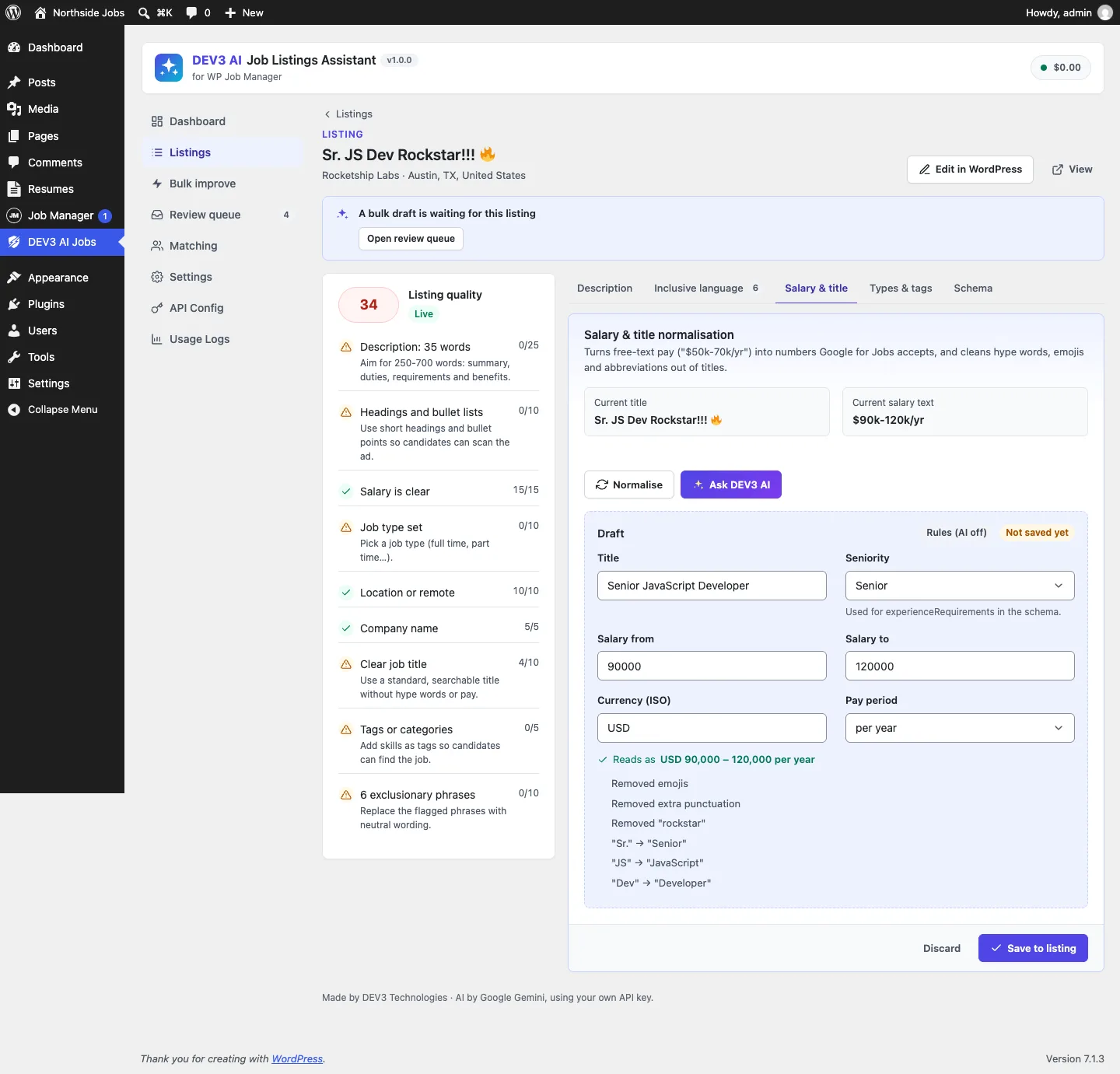 "$90k-120k/yr" read as USD 90,000 to 120,000 per year, with the title cleaned of hype words and abbreviations.
What it does and who it's for
DEV3 AI Job Listings Assistant improves WP Job Manager listings where they are created and across the existing catalogue, without replacing any WP Job Manager screen. It suits:
- Job boards built on WP Job Manager that want more of their jobs to show salary and remote details in Google for Jobs.
- Boards where employers post their own jobs, who need help writing a clear, structured, inclusive ad on the public submit form.
- Sites with hundreds of old listings that want them cleaned up in bulk, with every change reviewed before it goes live.
- Recruiters using Resume Manager who want resumes ranked against a job, with explanations and without names or protected attributes.
- Site owners who care about inclusive hiring, with a word list for age-coded, gender-coded and exclusionary phrases and one-click fixes.
Quality scores, salary and title normalising, the schema fix and the wording check all work without an API key.
How to set it up
- Install and activate WP Job Manager, then install the add-on zip from the bundle download and activate it.
- In WP Job Manager's settings, turn on the salary field, salary currency and salary unit.
- Open DEV3 AI Jobs → Dashboard and check the WP Job Manager setup card.
- In Settings, set the default salary currency and the Remote applicant country, and choose which helpers appear on the submit form.
- Optional: add a Google Gemini API key in API Config and click Validate & save.
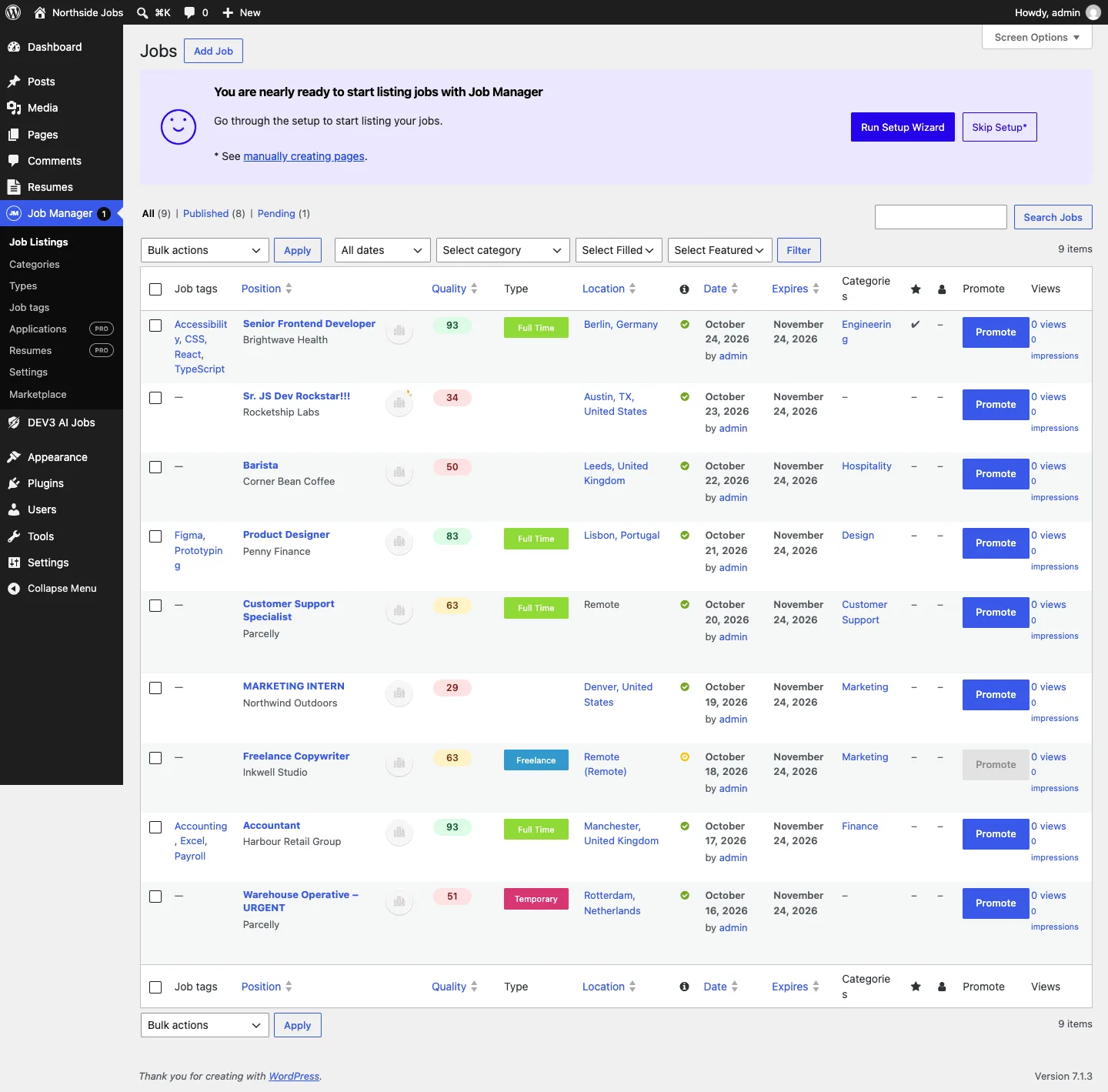 WP Job Manager's own Jobs list, with a sortable Quality column added by the add-on.
How to use it
Fix a listing
Open a listing in DEV3 AI Jobs → Listings. The quality card shows what is missing. On Salary & title, click Normalise: the draft shows the clean title, seniority, salary from and to, currency and pay period with a "Reads as" line. Ask DEV3 AI handles text the rules can't read. Click Save to listing. The Schema tab shows the resulting JobPosting markup.
Improve everything at once
In Bulk improve, pick "Salary missing or unclear" (or low quality, or all), tick Normalise salary and the other operations, and click Start bulk improve. Drafts land in Review queue, where Accept safe changes applies only salary, title and taxonomy drafts.
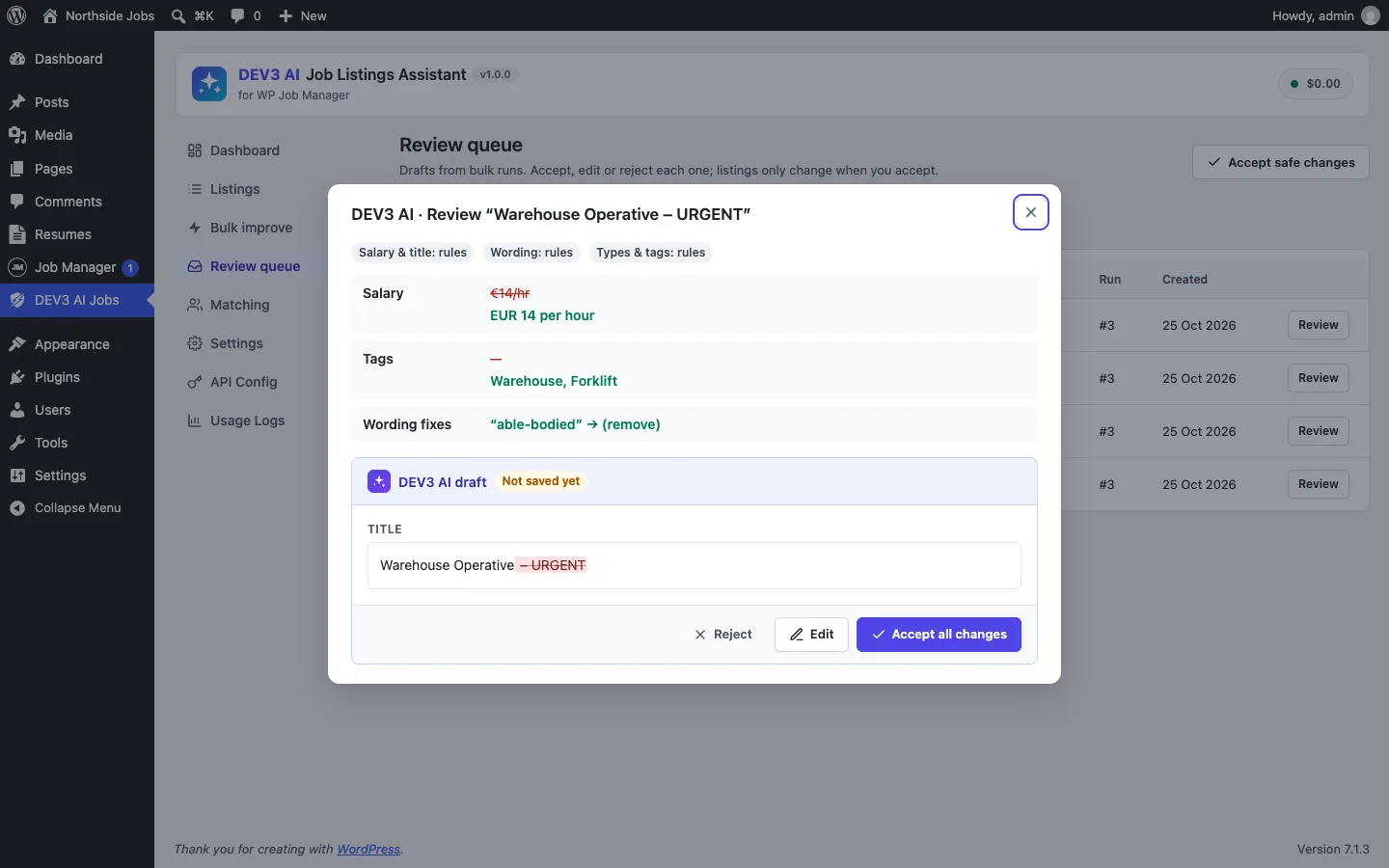 A bulk draft in the review queue: "€14/hr" becomes EUR 14 per hour, alongside tag and wording fixes.
Help employers on the submit form
The Writing assistant inside WP Job Manager's submit form drafts the description, checks wording and suggests type and tags. A live hint under the salary field shows how the text will be read.
The rest of this article is about the salary.
Why the raw string fails
Google's JobPosting documentation expects baseSalary to be a MonetaryAmount with a currency and a QuantitativeValue holding value, or minValue and maxValue, as numbers, plus a unitText of HOUR, DAY, WEEK, MONTH or YEAR. WP Job Manager 1.36 added separate currency and unit fields, which helps, but the amount is still the free-text _job_salary. A value of "$50k - $70k a year" is not a number, so Google can't show a salary range for the job.
You can't fix this by asking employers to type better. The fix has to read what they typed.
A parser for salaries as people write them
Salary::parse() returns { ok, min, max, currency, unit, label, negotiable, guessed_unit } and works in a fixed order.
1. Give up early on "Competitive"
Text containing "competitive", "negotiable", "DOE", "TBD", "market rate" and similar, with no digits at all, is marked negotiable and not parsed. The quality score treats it as "Salary is not a number" rather than inventing one.
2. Currency
WP Job Manager's own currency field wins when it is set. Otherwise the parser looks for one of 48 ISO codes as a word, then for symbols and words, longest first: US$, C$, A$, NZ$, HK$ and S$ before a bare $; £, €, ₹, ¥, ₩ and others; and words such as "euros", "pounds", "rupees", "lakh" and "LPA". A bare $ follows the site's default currency when that is a dollar currency (AUD, CAD and so on) and becomes USD otherwise. The test checks both: "$90k per year" reads as AUD on a site set to AUD, and as USD on a site set to GBP.
3. Pay period
Unit patterns are checked in order: hour, day, week, month, year. Each covers the forms people actually use. Year, for example, matches "per year", "per annum", "annual", "annually", "yearly", "/yr", "a year", "p.a.", "LPA" and "CTC". WP Job Manager's unit field, when set, again wins.
4. Numbers, suffixes and separators
This is the step that needs the most care:
preg_match_all( '/(\d{1,3}(?:[,.\s]\d{3})+(?:[.,]\d{1,2})?|\d+(?:[.,]\d+)?)\s*(k|m|mn|thousand|million)?\b/i', $text, $m, PREG_SET_ORDER );
foreach ( $m as $hit ) {
	$value  = self::to_number( $hit[1] );
	$suffix = isset( $hit[2] ) ? strtolower( $hit[2] ) : '';
	$mult   = 1;
	if ( 'k' === $suffix || 'thousand' === $suffix ) {
		$mult = 1000;
	} elseif ( in_array( $suffix, array( 'm', 'mn', 'million' ), true ) ) {
		$mult = 1000000;
	} elseif ( $lakh && $value < 1000 ) {
		$mult = 100000;
	} elseif ( $crore && $value < 1000 ) {
		$mult = 10000000;
	}
	$nums[] = array( 'value' => $value, 'mult' => $mult, 'suffix' => '' !== $suffix );
}
// "50-70k": the suffix of the second number applies to a bare, smaller first number.
if ( 2 === count( $nums ) && ! $nums[0]['suffix'] && $nums[1]['suffix'] && 1 === $nums[0]['mult'] && $nums[0]['value'] < 1000 ) {
	$nums[0]['mult'] = $nums[1]['mult'];
}
(condensed from Salary::parse)
Three real-world habits are handled here:
- Shared suffixes. In "50 - 70k" the "k" belongs to both numbers. If the first number has no suffix, is under 1,000, and the second has one, the first takes the second's multiplier. "50 - 70k" becomes 50,000 to 70,000, not 50 to 70,000.
- Indian notation. "12 LPA" means 12 lakh per annum. When "lakh", "lakhs", "lac" or "LPA" appears, a bare number under 1,000 is multiplied by 100,000; "crore" works the same way with 10,000,000. "INR 12 LPA" becomes 1,200,000 INR per year.
- European separators.
to_number()treats a number as grouped when it matchesd{1,3}followed by groups of exactly three digits with the same separator. "45.000" is forty-five thousand and "50,000" is fifty thousand, while "4,5" and "4.5" are both four and a half.
5. Ranges, "up to" and "from"
Two numbers become min and max (in either order). One number becomes a maximum with "up to", "max" or "under"; a minimum with "from", "min", "starting at", "at least" or a trailing "+"; and both min and max otherwise.
6. Guessing the period, and saying so
If there is still no unit, the parser guesses from the size of the top number: 15,000 and up is yearly, 1,000 and up monthly, anything smaller hourly. It also sets guessed_unit, which matters later: the quality score counts a guessed unit as only 70% of a clear salary, and the AI normaliser runs for guessed units as well as unreadable ones.
The fixtures
The PHPUnit data provider runs 11 salaries from real listings through the parser and checks min, max, currency and unit for each:
| Input | Min | Max | Currency | Unit |
|---|---|---|---|---|
$50k-70k/yr |
50,000 | 70,000 | USD | YEAR |
£30,000 - £35,000 per annum |
30,000 | 35,000 | GBP | YEAR |
20-25 USD/hour |
20 | 25 | USD | HOUR |
€4.5k monthly |
4,500 | 4,500 | EUR | MONTH |
INR 12 LPA |
1,200,000 | 1,200,000 | INR | YEAR |
up to 90000 EUR per year |
– | 90,000 | EUR | YEAR |
from 60k CAD annually |
60,000 | – | CAD | YEAR |
45.000 - 55.000 € pro Jahr p.a. |
45,000 | 55,000 | EUR | YEAR |
50 - 70k |
50,000 | 70,000 | USD | YEAR |
£450 per day |
450 | 450 | GBP | DAY |
(10 of the 11 cases; the eleventh is $50k - $70k a year)
 Illustration: free-text pay turned into minimum, maximum, currency and pay period.
Repairing WP Job Manager's JSON-LD in place
There are two ways to fix a plugin's structured data: print your own JSON-LD block next to it, or change its block before it is printed. A second block gives Google two JobPosting objects for one page, so we used WP Job Manager's own filter:
add_filter( 'wpjm_get_job_listing_structured_data', array( __CLASS__, 'filter' ), 20, 2 );

$salary = Salary::parse( $job['salary'], $job['salary_currency'], $job['salary_unit'] );
if ( $salary['ok'] ) {
	$value = array( '@type' => 'QuantitativeValue', 'unitText' => $salary['unit'] );
	if ( null !== $salary['min'] && null !== $salary['max'] && $salary['min'] !== $salary['max'] ) {
		$value['minValue'] = $salary['min'];
		$value['maxValue'] = $salary['max'];
	} else {
		$value['value'] = null !== $salary['min'] ? $salary['min'] : $salary['max'];
	}
	$data['baseSalary'] = array( '@type' => 'MonetaryAmount', 'currency' => $salary['currency'], 'value' => $value );
} else {
	unset( $data['baseSalary'] );
}
(condensed from Schema_Enhancer::init and Schema_Enhancer::enhance)
The else branch is deliberate. An unreadable salary is removed rather than printed, because invalid markup is worse than no salary property.
The same filter fixes the other gaps job boards commonly have:
- Remote jobs. If WP Job Manager's remote flag is set,
jobLocationTypebecomesTELECOMMUTEandapplicantLocationRequirementsis added from the geolocated country, the last part of the location text, or the Remote applicant country setting. A remote job with no location is otherwise missing a required property. - Plain-text locations such as "Leeds, United Kingdom" become a
PostalAddresswith locality and country. - Employment type is mapped from job type slugs (full-time to FULL_TIME, freelance and contract to CONTRACTOR, internship to INTERN) when the terms have no mapping of their own.
- Experience comes from the seniority found in the title: a senior role becomes
monthsOfExperience: 60, an entry-level role "no requirements". - Skills come from the job tags and industry from the first category, plus an
identifier.
Everything passes through a dev3jm_schema filter at the end, and the feature can be switched off in Settings. The integration test runs against a real WP Job Manager install in wp-env. It creates a remote listing with "$50k - $70k a year", the full-time type and two tags, calls wpjm_get_job_listing_structured_data(), and asserts a MonetaryAmount in USD with minValue 50000.0, maxValue 70000.0 and unitText YEAR, no leftover value, TELECOMMUTE, the configured country, FULL_TIME, 60 months of experience and the skills string. It then sets the salary to "Competitive" and asserts baseSalary is gone; then it turns the setting off and asserts WP Job Manager's original output is back.
Writing the fix back, but only on accept
Reading the salary at render time fixes the markup, but the stored data stays messy. When an admin accepts a salary draft, Salary::write() cleans the values (negative numbers become 0, min and max are swapped if reversed, the unit must be one of the five) and writes them into WP Job Manager's own fields: _job_salary becomes a plain "50,000 – 60,000", with the currency and unit in their fields. The add-on also keeps numeric _dev3jm_salary_min and _dev3jm_salary_max meta, refreshed on every save, for the schema and for filters.
Listings are never rewritten automatically. Bulk runs create drafts; the review queue shows before and after; Accept safe changes applies salary, title and taxonomy drafts only, because those are mechanical, while description rewrites need a person to read them.
Where AI fits
AI is the last step, and only when the rules are not enough. Normaliser::run() calls the Google Gemini API only when there is salary text that the rules couldn't parse and that isn't "Competitive"-style, or when the unit had to be guessed. The prompt includes the rules' partial result and a short excerpt of the description, which often states the pay period. The answer goes through the same Salary::clean() as a human edit. If the AI call fails, the rules result is kept and the error is shown next to it.
The test shows both sides. "$50k-70k/yr" with a key configured makes zero requests: the rules handled it. "drei bis dreieinhalb tausend Euro" (German for "three to three and a half thousand euros") goes to the mocked model and comes back as 3,000 to 3,500 EUR per month, with the model's note listed among the changes for the reviewer to see.
Trade-offs
- Ambiguous separators. "4,500" is read as four thousand five hundred. A site where "4,500" means four and a half would need the currency's locale, which the parser doesn't have.
- Unit guessing is a heuristic. A 12,000 salary with no period is read as monthly. The flag and the reduced quality score exist so a person checks it.
- Only the first two numbers count. "$50k-70k plus $10k bonus" ignores the bonus. That is usually right for
baseSalary, but not always. - WordPress 6.4. The add-on supports WordPress 6.0, but current WP Job Manager releases need 6.4 or newer, so in practice that is the floor.
All of this is covered by 51 PHPUnit tests, run against a real WP Job Manager install, and 42 Jest tests. As with every plugin in this release, AI paths were tested with mocked responses; Resume Manager, a paid add-on, was tested against a stub.
Conclusion
The rule we took from this build: when another plugin owns the data, improve it through that plugin's own filters, read user input the way people actually write it, remove structured data you can't make valid, and let AI handle only the leftovers, through the same validation as everything else. DEV3 AI Job Listings Assistant for WP Job Manager ships in the DEV3 AI Directory, Booking & Events Plugins Bundle on the DEV3 marketplace, alongside 7 other directory, booking and events plugins, and is being prepared for CodeCanyon. The case study covers the writing, bulk review and matching side of the add-on.