
Generating a good meta description is the easy part of an AI SEO plugin. The hard part is storing it. On most WordPress sites, Yoast SEO or Rank Math already owns the <title> tag, the meta description and the schema graph, and each one keeps that data in its own place and format. If an add-on keeps its own copy, the SEO plugin keeps printing the old value. If it writes into the SEO plugin's fields carelessly, the block editor can overwrite the new value a minute later, when the author clicks "Update". When we built DEV3 AI SEO Assistant, most of the engineering went into this layer: one interface that writes into Yoast SEO, Rank Math, SEOPress, All in One SEO or a native fallback, keeps the open editor in step, and can undo a change even after the site has moved to a different SEO plugin.
What it does and who it's for
DEV3 AI SEO Assistant is an add-on for sites that already run Yoast SEO or Rank Math (SEOPress and All in One SEO are supported too). It drafts SEO titles, meta descriptions, focus keywords, social text, schema, internal links and FAQ blocks, and writes each accepted field into the SEO plugin you already have.
- Bloggers and publishers with hundreds of posts that have no meta description, or none worth keeping.
- Agencies who manage client sites on different SEO plugins and want one workflow for all of them.
- Content teams who want internal-link suggestions based on meaning, with the anchor text already found in the paragraph.
- Editors who need a reviewable trail: every suggestion is a draft, and every applied change can be undone.
- Sites without an API key, which still get checks, a 0–100 score, rules-based suggestions and a site audit.
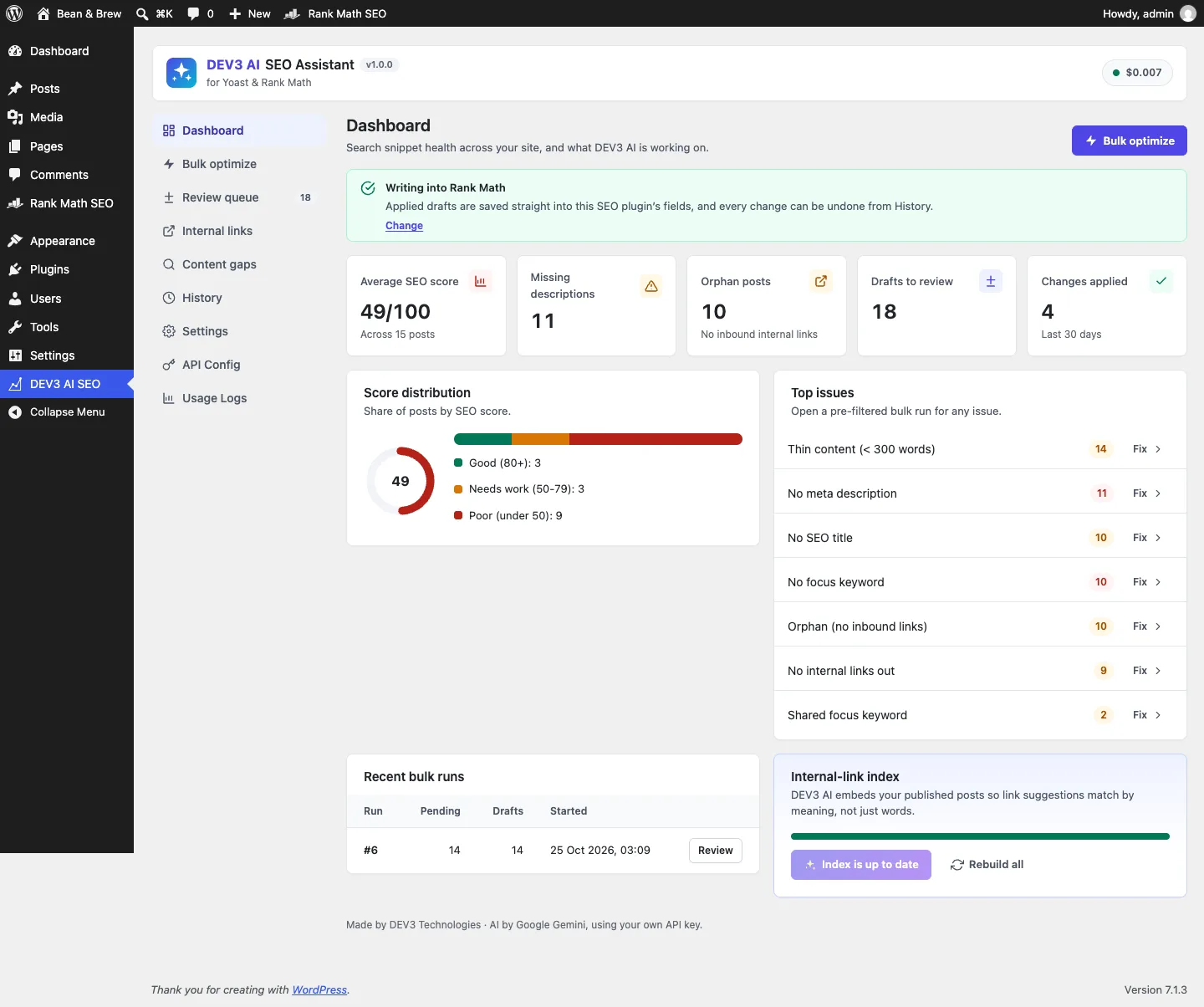
The dashboard names the SEO plugin DEV3 writes into and links each issue to a pre-filtered bulk run.
How to set it up
- Install the plugin zip from the bundle in Plugins → Add New → Upload Plugin and activate it.
- Keep Yoast SEO or Rank Math active. With Rank Math, finish or skip its setup wizard so it prints its head tags.
- Optional: paste a Google Gemini API key in DEV3 AI SEO → API Config, or define
DEV3SE_GEMINI_API_KEYinwp-config.php. - In Settings, set title and description limits, the title separator, language, tone and post types.
- In Internal links, click Update index with DEV3 AI to embed your published posts.
How to use it
One post in the editor. Open the post, click the DEV3 AI SEO icon, tick the fields in Snippet & meta and click Generate with DEV3 AI. Each field comes back as a draft with up to 3 options. Apply writes it into Yoast or Rank Math, and their own panels update straight away.
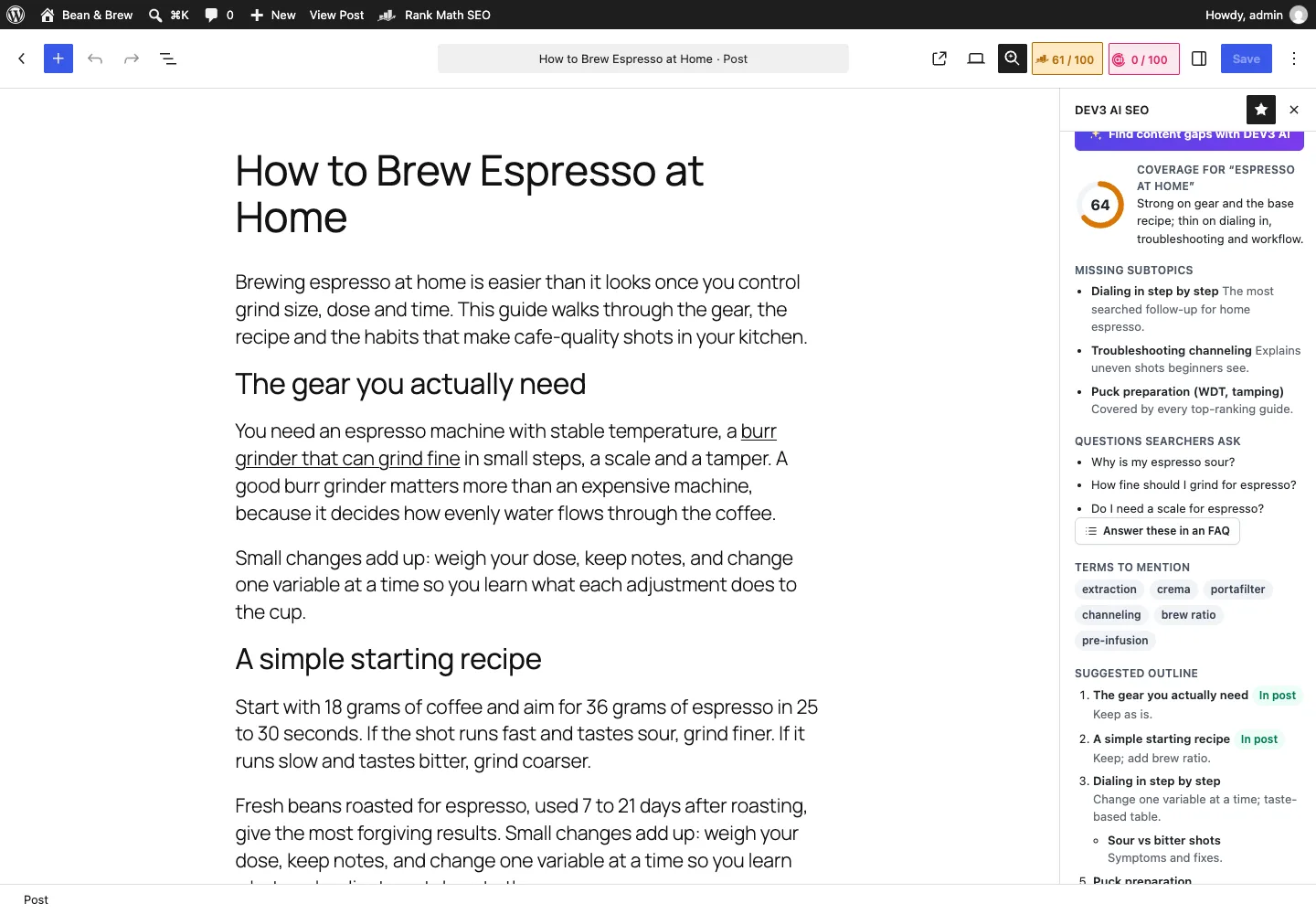
Content gaps lists missing subtopics, questions and terms, plus an outline that can be inserted as headings.
Content gaps and FAQ. In Content gaps & outline, click Find content gaps with DEV3 AI, insert the outline if you want it, then Answer these in an FAQ and Insert FAQ block. On Yoast and Rank Math the FAQ becomes their native FAQ block.
A bulk run. Click Fix next to an issue on the Dashboard, or filter in Bulk optimize, select up to 2,000 posts and start the run. The drafts land in Review queue, where you edit, apply or reject them one field at a time or in bulk.
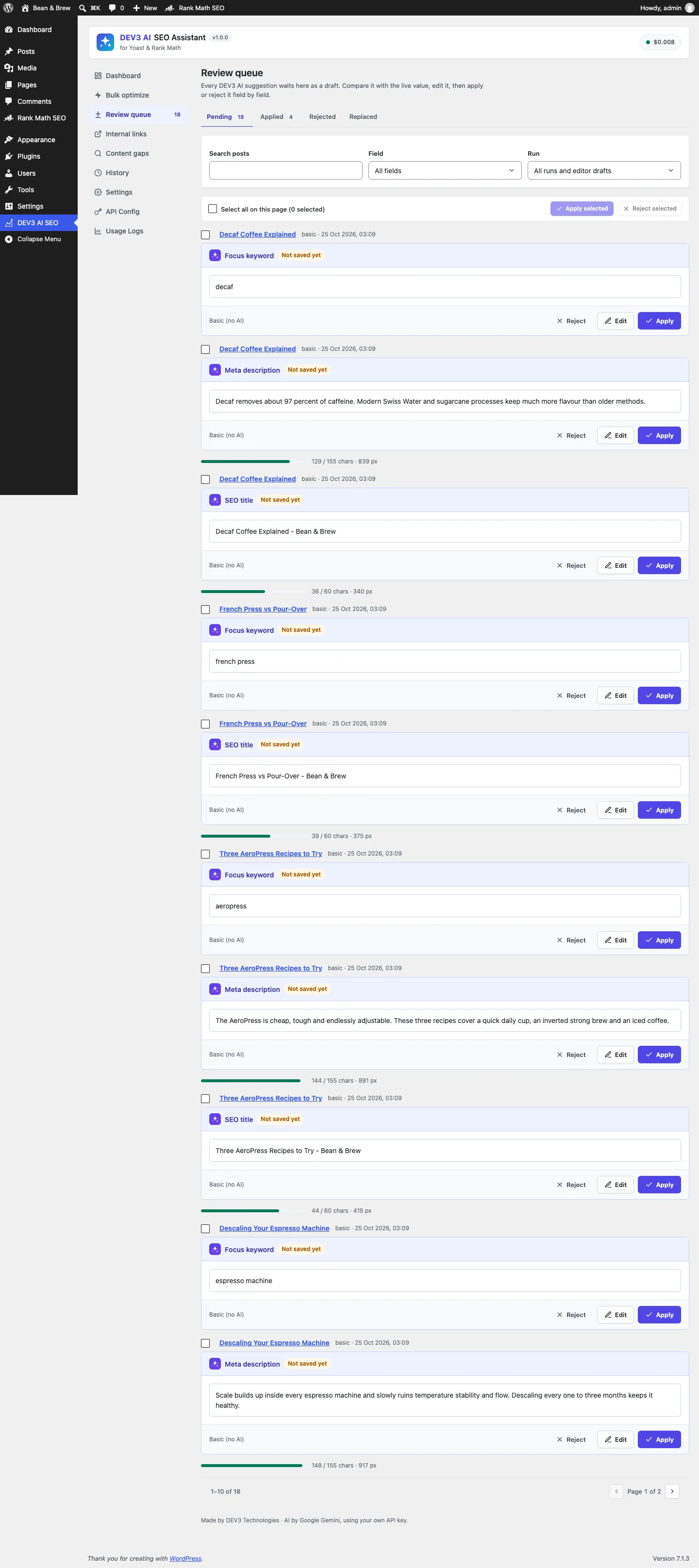
Bulk runs never write directly: each field waits in the review queue with its length in characters and pixels.
Undo. History lists every applied value. Undo works on one row or a whole run.
The rest of this post is about the part you don't see: getting those values into five different SEO plugins correctly.

Illustration: every applied value is recorded with where it was written, so it can be reversed.
Six fields, five storage formats
We kept the plugin's own vocabulary small. Every adapter supports the same six fields: seo_title, meta_description, focus_keyword, og_title, og_description and schema_type. Everything the AI produces, from the meta writer to bulk runs, uses these names. Only the adapter knows where a field really lives.
The base class does the common case, which is post meta. A subclass lists its keys:
abstract class Adapter {
	abstract public function id();
	abstract public function active();
	abstract protected function keys(); // field => meta key

	public function set( $post_id, $field, $value ) {
		$keys = $this->keys();
		if ( ! isset( $keys[ $field ] ) ) {
			return new \WP_Error( 'dev3se_field_unsupported', /* … */ );
		}
		$this->write_meta( $post_id, $keys[ $field ], $value ); // '' deletes the key
		$this->after_write( $post_id );                          // cache + dev3se_after_write action
		return true;
	}

	public function editor_store() {
		return ''; // JS data store the sidebar keeps in sync
	}
}
(from Seo/Adapter.php, condensed)
For Yoast the map is _yoast_wpseo_title, _yoast_wpseo_metadesc, _yoast_wpseo_focuskw and the two _yoast_wpseo_opengraph-* keys. Rank Math uses rank_math_title, rank_math_description, rank_math_focus_keyword and the rank_math_facebook_* keys. SEOPress uses _seopress_titles_*. An empty value deletes the key rather than storing an empty string. For Yoast and Rank Math, "no key" means "use the template default", while an empty string can mean "print nothing".
Detection takes the first active SEO plugin; admins can force a choice in Settings and developers can use the dev3se_adapter filter. With no SEO plugin active, the native adapter stores DEV3's own meta and prints the tags itself, so a page never gets two descriptions.
Where the key map isn't enough
A key map handles most fields. Three cases needed real logic, and those are where an add-on usually breaks a site quietly.
Yoast's two schema fields
Yoast doesn't have a single "schema type". It has a page type (WebPage, FAQPage, ItemPage and so on) and an article type (Article, BlogPosting, TechArticle and so on), stored in two meta keys. If both are set, the page type wins. Writing TechArticle into a post that already had FAQPage would therefore do nothing visible. The Yoast adapter routes the value by family:
public function set( $post_id, $field, $value ) {
	if ( 'schema_type' !== $field ) {
		return parent::set( $post_id, $field, $value );
	}
	if ( '' === $value ) {
		$this->write_meta( $post_id, '_yoast_wpseo_schema_page_type', '' );
		$this->write_meta( $post_id, '_yoast_wpseo_schema_article_type', '' );
	} elseif ( in_array( $value, Fields::ARTICLE_TYPES, true ) ) {
		$this->write_meta( $post_id, '_yoast_wpseo_schema_article_type', $value );
		$this->write_meta( $post_id, '_yoast_wpseo_schema_page_type', '' ); // so the article type wins
	} elseif ( in_array( $value, Fields::PAGE_TYPES, true ) ) {
		$this->write_meta( $post_id, '_yoast_wpseo_schema_page_type', $value );
	} else {
		return new \WP_Error( 'dev3se_bad_schema_type', /* … */ );
	}
	$this->after_write( $post_id );
	return true;
}
(from Seo/Yoast.php, condensed)
Reading works the same way in reverse: the page type if one is set, otherwise the article type. A PHPUnit test sets FAQPage, then TechArticle, and checks that the page-type key is empty afterwards.
Rank Math's keyword list
Rank Math stores several focus keywords in one comma-separated string, with the primary keyword first. The free version accepts five. The AI's meta writer returns a primary keyword plus secondary ones, and people type messy lists, so the adapter normalises the list before saving it: trim each entry, drop empty and duplicate entries, keep the first five. The test feeds it 'espresso, home espresso,espresso, a, b, c, d' and expects 'espresso,home espresso,a,b,c'.
Schema type is different on Rank Math. Its schema lives in templates stored as rank_math_schema_<Type> meta, and rewriting those would change data the merchant may have built by hand. So the Rank Math adapter stores the chosen type as a DEV3 override, and a rank_math/json_ld filter changes only the @type of the main Article or WebPage entity at output time. Rank Math's own templates are never edited.
AIOSEO's own table
All in One SEO keeps post SEO data in its own aioseo_posts table, not in post meta. The adapter goes through AIOSEO's documented model class, \AIOSEO\Plugin\Common\Models\Post. Keyphrases are a JSON document with a focus entry and an additional list, so writing a focus keyword means decoding it, replacing only the focus entry, leaving the additional keyphrases alone and saving through $model->save().
One caveat: Yoast SEO and Rank Math were loaded for real in the test environment, but AIOSEO was tested against a stub of that model, built from its documented API. It's on the list to test against the real plugin before we rely on it.
The editor overwrite problem
This one only shows up with a real editor open. In the block editor, Yoast and Rank Math don't read their fields from the database on each save. They load them once into a @wordpress/data store, show them in their own panels, and send the store's values back when the post is saved.
Now suppose the author clicks Apply in the DEV3 sidebar. The REST call writes _yoast_wpseo_metadesc on the server, and the next page load would show it. But Yoast's store in the open tab still holds the old description. When the author fixes a typo and clicks Update, Yoast saves the old description back over the new one. The server write succeeded, and the value was still lost.
The fix is to apply the value in two places: on the server through the adapter, and in the SEO plugin's editor store through its own actions. Each adapter declares its store name (yoast-seo/editor or rank-math), and the sidebar's bridge maps each field to the right action:
export function syncField( adapter, field, value ) {
	const store = adapter && adapter.store;
	if ( ! store ) {
		return false;
	}
	let d;
	try {
		if ( ! select( store ) ) {
			return false; // plugin not loaded in this editor
		}
		d = dispatch( store );
	} catch ( e ) {
		return false;
	}
	const v = value || '';
	if ( store === 'yoast-seo/editor' ) {
		switch ( field ) {
			case 'seo_title':        return call( d, 'updateData', { title: v } );
			case 'meta_description': return call( d, 'updateData', { description: v } );
			case 'focus_keyword':    return call( d, 'setFocusKeyword', v );
			case 'schema_type':
				if ( ARTICLE_TYPES.includes( v ) ) {
					call( d, 'setPageType', '' );
					return call( d, 'setArticleType', v );
				}
				return call( d, 'setPageType', v );
		}
	}
	if ( store === 'rank-math' ) {
		switch ( field ) {
			case 'seo_title':
				call( d, 'updateSerpTitle', v );
				return call( d, 'updateTitle', v );
			case 'focus_keyword':
				return call( d, 'updateKeywords', v.split( ',' ).map( ( s ) => s.trim() ).filter( Boolean ).join( ',' ) );
		}
	}
	return false;
}
(from src/editor/bridge.js, condensed)
Three details matter here.
- Mirror the server rules. The page-type and article-type rule from the PHP adapter appears again in JavaScript, so the store and the database agree on which type wins. The Rank Math keyword normalisation is mirrored too.
- Rank Math has two titles. One is the stored title and the other is the SERP preview title. Updating only one leaves the preview wrong, or saves the old value, so both are dispatched.
- Every call is defensive.
call()checks that the action exists before calling it. If an SEO plugin renames an action in a future release, the sync step does nothing and returnsfalserather than throwing an error in the editor. The server write has already happened, and it's still the source of truth after a reload.
Undo uses the same bridge. When an author undoes a change from the sidebar's History section, the server restores the old value and the sidebar calls syncField( adapter, row.field, row.before ). For a content change (an inserted link or FAQ block), it calls resetEditorBlocks() with the restored HTML. Without that step, undo would hit the same overwrite problem in reverse.
The bridge has 6 Jest tests that run against mocked @wordpress/data stores.
Undo that remembers which plugin it wrote to
Every apply goes through Applier::apply(), which reads the live value first. If that value is different from the original value saved with the draft, apply stops with a 409 and returns the current value, so the UI can show what changed and ask before overwriting:
$live = Adapters::read( $post->ID, $field );
if ( ! $force && ! self::same( $live, $draft['original'] ) ) {
	return new \WP_Error( 'dev3se_conflict', /* … */, array( 'status' => 409, 'current' => $live ) );
}
$result = Adapters::write( $post->ID, $field, $clean );
History::insert( array(
	'post_id' => $post->ID,
	'field'   => $field,
	'adapter' => $adapter->id(),  // remembered for undo
	'before'  => $live,
	'after'   => Adapters::read( $post->ID, $field ),
	'batch'   => $batch,
) );
(from Service/Applier.php, condensed)
The adapter column is there because sites change SEO plugins. A site that moved from Yoast to Rank Math last week may want to undo a title it applied while Yoast was active. If undo used the current adapter, it would write Yoast's old value into Rank Math's field, which is wrong twice over. So undo() passes the recorded adapter id to Adapters::write(). A test applies a focus keyword with Yoast, switches to Rank Math, undoes, and checks that _yoast_wpseo_focuskw is gone.
Undo has its own conflict check. It refuses if the live value no longer equals the after value it recorded, because someone has edited the field since and undo would wipe that work. Batch undo (undoing a whole bulk run) goes newest first, skips rows that conflict and reports them, so one hand-edited post doesn't block undoing the other 199.
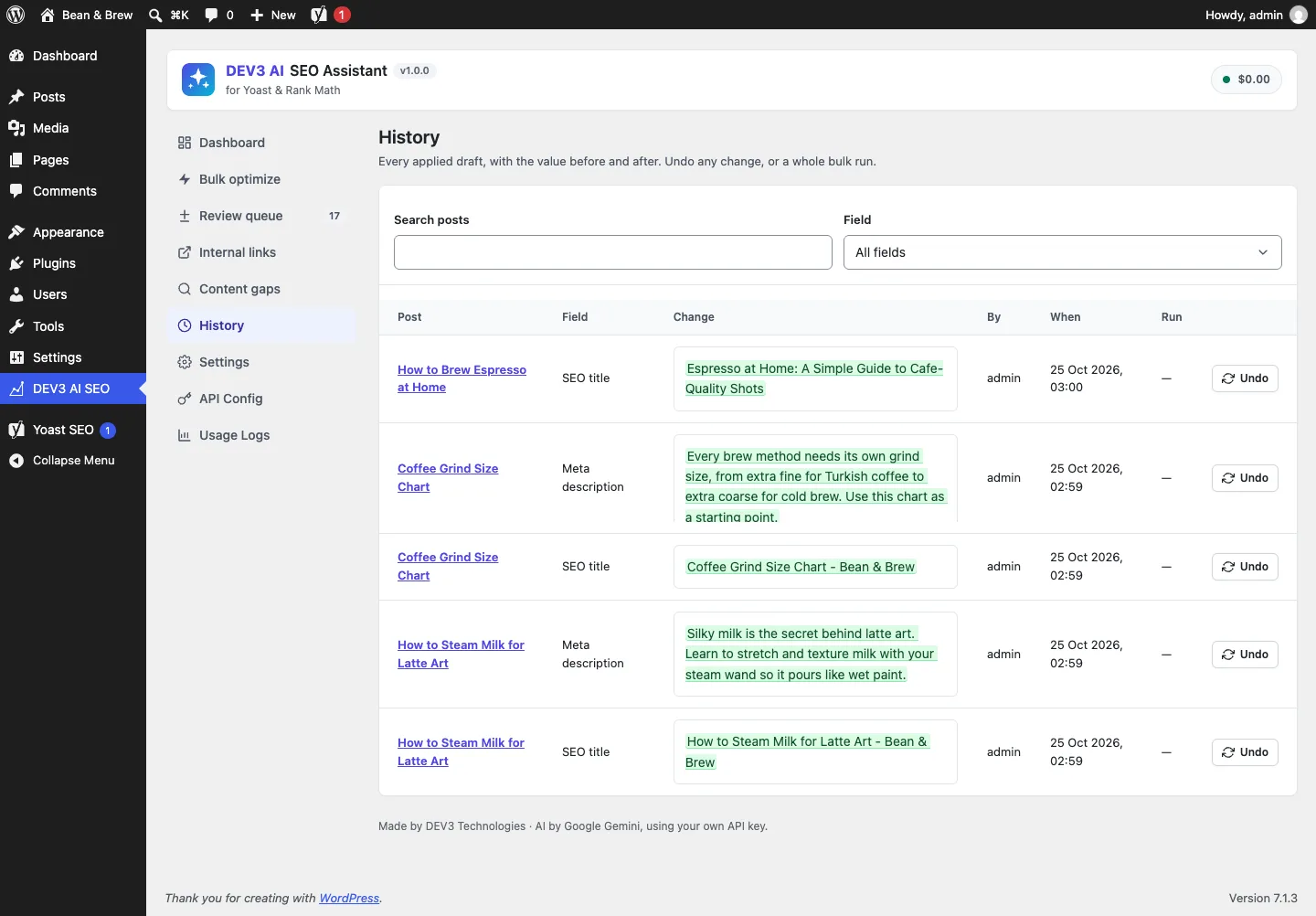
History shows each applied value; undo writes back into the plugin that was written, not the current one.
Schema: add to the graph, never compete with it
Yoast and Rank Math each print one JSON-LD graph per page. A second <script type="application/ld+json"> block from another plugin is valid, but it often duplicates entities or contradicts the main graph. DEV3 adds its extra pieces (FAQPage, HowTo, Product, Event and others drafted from the post) to the SEO plugin's own graph through wpseo_schema_graph and rank_math/json_ld. It prints a standalone script tag only when neither plugin produces a graph.
The FAQ needed one more rule. The plugin can insert an FAQ as the SEO plugin's native block (yoast/faq-block or rank-math/faq-block), and those blocks already print FAQPage schema. If DEV3 also added its stored FAQPage piece, Google would see two. So output_pieces() checks the post content for a <!-- wp:yoast/faq-block or <!-- wp:rank-math/faq-block comment and skips its own FAQPage piece when either is there. Every other piece gets a stable @id based on the permalink, so it can be referenced from the rest of the graph.
The schema tests cover merging into Yoast's graph, Rank Math's type override, the native-FAQ deduplication, and the generated FAQ markup being valid block markup for each plugin.
Testing against the real plugins
Mocks would have hidden every problem in this post, so the PHPUnit suite loads the real Yoast SEO and Rank Math plugins in wp-env. The adapter tests then read values back through each plugin's own API, WPSEO_Meta::get_value() and \RankMath\Post::get_meta(), rather than through our own meta reads, and the rendered front-end <title> was also checked in wp-env. In total the plugin has 69 PHPUnit tests and 48 Jest tests, counted from the repository. The AI paths (meta writer, schema, gaps, FAQ, embeddings) were tested with mocked API responses; a run with a live API key is still to come.
Trade-offs
- We depend on other plugins' internals. Meta keys and editor store actions aren't a formal public API. The bridge fails safe, but a major Yoast or Rank Math release still needs a check.
- Native FAQ detection is a string match. An FAQ block inside a synced pattern stored elsewhere wouldn't be seen.
- AIOSEO needs a real-plugin test. Until then it's supported only against its documented model.
Conclusion
A field that one plugin owns, another plugin writes and a browser tab caches needs three things: write in the owner's format, update every copy the user can see, and record enough to reverse the change later. DEV3 AI SEO Assistant does all three for five SEO back ends. The case study covers the rest of the plugin, including bulk runs, embeddings-based internal links and content gaps. The plugin ships in the DEV3 AI Content, SEO & Site Tools Plugins Bundle on the DEV3 marketplace and is being prepared for CodeCanyon.