Your main navigation is printed on every page of your site. That makes it the largest set of internal links you have, and the first thing a crawler reads after the logo. A broken link there is broken on every URL at once. A link that only appears after JavaScript runs may be missed. A menu that only opens on hover shuts out keyboard and touch users. When we built DEV3 AI Mega Menu for WordPress, we also wanted a language model to restructure a 200-page site into a clear mega menu. That raises a new question: how do you stop the model from inventing a tidy-looking /pricing link the site never had? This post covers how the plugin answers it: the AI works with references to content that exists, never with URLs, and the server renders plain, crawlable markup that doesn't depend on the AI or on JavaScript.

Illustration: a mega menu whose every link is wired to a page that exists.
What it does and who it's for
DEV3 AI Mega Menu turns any WordPress menu into a mega menu, with columns, tabs, flyouts, product and post widgets, and promos. It works in classic and block themes. Five DEV3 AI tools build, label, audit and decorate the menu, and every AI result is a draft you accept or reject.
- WooCommerce stores with deep catalogues that need product categories in columns, a bestsellers widget and a seasonal promo in the panel.
- Content sites and magazines whose topics, latest posts and search belong in one "Journal" panel.
- Agencies and service businesses with dozens of service pages that have grown into a four-level dropdown nobody can use.
- Block-theme sites (Twenty Twenty-Five and others) whose Navigation block can't do mega panels, through a block or an automatic replacement of the Navigation block.
- Teams that care about accessibility: keyboard, screen-reader and touch support follow the WAI disclosure navigation pattern.
How to set it up
- Install the plugin zip from the bundle download under Plugins → Add New → Upload Plugin, then activate it. DEV3 AI Mega Menu appears in the admin sidebar.
- Optional: paste a Google Gemini API key in DEV3 AI Mega Menu → API Config and click Validate & save. Everything except the DEV3 AI buttons works without one.
- Build or pick a menu in Menu Builder or AI Studio → Build my menu.
- Show it. In a classic theme, go to Locations, pick the menu for the header and turn on Use the DEV3 AI Mega Menu here. In a block theme, add the DEV3 AI Mega Menu block to the header, or set Replace the Navigation block in Locations → Blocks, shortcodes & builders.
- Choose a style in Styles, and set the mobile breakpoint and drawer in Locations.
How to use it
Build a menu from your content
In AI Studio → Build my menu, choose how many top-level items you want and which content to read, then add optional notes ("Put Sale first"). Click Build with DEV3 AI, or Auto-build without AI for an instant draft based on your page hierarchy and categories. Edit labels, remove items, check the desktop and mobile preview, then click Accept and save menu into a new menu or an existing one.
Shape the panels
In Menu Builder, select a top-level item. On the Panel tab, choose Mega panel (columns) or Mega panel with tabs. Children become columns on their own. Add custom rows on a 12-column grid for products, recent posts, a search box or a promo block.
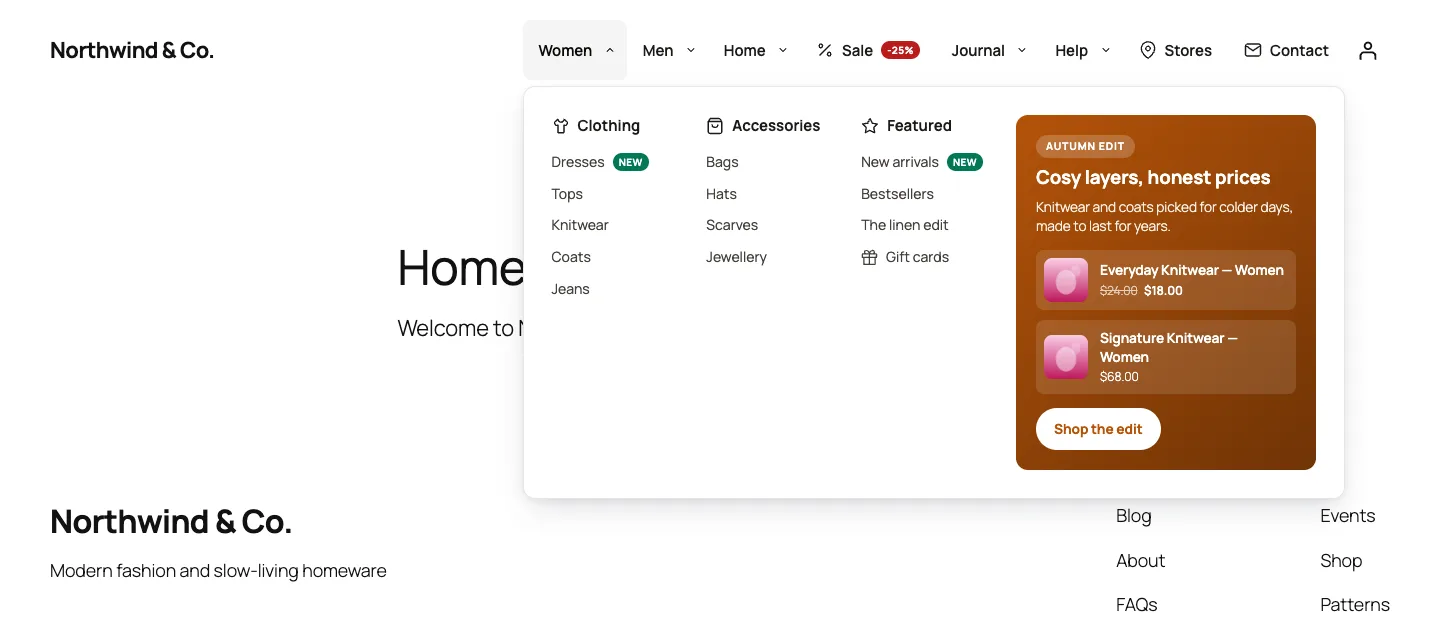
Mega panel on a block theme: automatic columns, badges, and a promo with real products in the side column.
Audit and fix
In AI Studio → UX audit, click Quick audit for the rules-based checks, or Audit with DEV3 AI to add a review of labels and grouping. You get a 0–100 score, issues sorted by severity, and one-click fixes such as Apply label or Add "Contact".
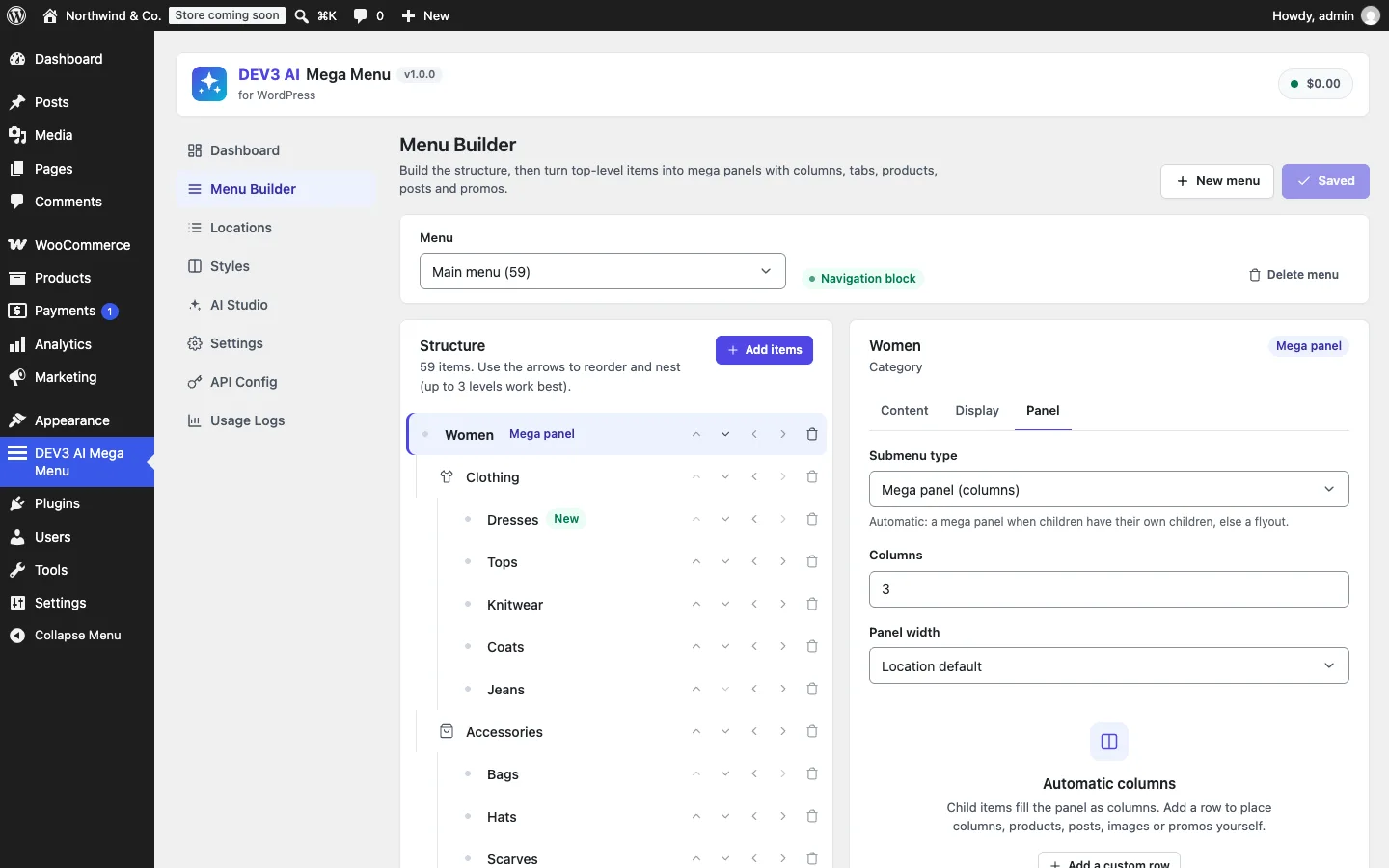
The Menu Builder edits the same menus as Appearance → Menus; nothing is saved until you click Save menu.
The engineering problem: an AI that can't add a broken link
Give a model a list of page titles and ask for a navigation, and it returns something that looks right. Some links will point at pages that don't exist. Models fill gaps with plausible URLs, and in a menu a plausible URL is worse than a missing one, because it ships a 404 to every page of the site.
We solved this with three layers, and none of them trusts the model.
Layer 1: an inventory of refs, not a list of URLs
Menu_Builder::inventory() reads published pages (400 by default, configurable), post categories, product categories and up to 40 best-selling products. It then writes them into a compact text table where each row starts with a ref: the type and id of a real object.
$lines = array( 'PAGES (ref | title | parent ref)' );
foreach ( $inv['pages'] as $p ) {
	$lines[] = 'page:' . $p['id'] . ' | ' . $p['title'] . ' | ' . ( $p['parent'] ? 'page:' . $p['parent'] : '-' ) . ( $p['utility'] ? ' | utility' : '' );
}
// ... POST CATEGORIES, PRODUCT CATEGORIES, BESTSELLING PRODUCTS ...
$lines[] = 'SPECIAL REFS: ' . implode( ', ', $specials );   // home, shop, blog
(condensed from Menu_Builder::inventory_text)
The table keeps the page hierarchy. Cart, checkout, account, terms and privacy pages are marked utility, and the prompt tells the model to put them last or leave them out.
The system prompt sets the contract in one sentence: "You only link to content that exists in the inventory you are given, using its exact ref." The answer comes back as structured JSON against a response schema: items (at most 10), each with label, ref, a type enum of mega, flyout or link, an icon and up to 6 groups of up to 12 links. Every string has a maxLength, so a label can't run past 40 characters and a flash model can't spiral into a runaway repetition.
Ids also keep the prompt small: a test with 200 pages and 50 categories asserts the prompt stays under 60,000 characters.
Layer 2: the allowlist decides, not the prompt
A prompt is a request, not a guarantee. The real check happens after the response arrives. valid_refs() builds a lookup from the same inventory the model saw, and node() refuses anything outside it:
private static function node( array $in, array $valid, $container = false ) {
	$ref   = isset( $in['ref'] ) ? strtolower( trim( (string) $in['ref'] ) ) : '';
	$label = isset( $in['label'] ) ? mb_substr( sanitize_text_field( (string) $in['label'] ), 0, 40 ) : '';
	if ( '' === $ref || ! isset( $valid[ $ref ] ) || ( '#' === $ref && ! $container ) ) {
		return null;
	}
	if ( '' === $label ) {
		$label = self::ref_title( $ref );
	}
	$icon = isset( $in['icon'] ) ? sanitize_key( (string) $in['icon'] ) : '';
	return array(
		'title' => $label,
		'ref'   => $ref,
		'icon'  => Icons::exists( $icon ) ? $icon : '',
		// layout, description (max 90 chars), children ...
	);
}
(condensed from Menu_Builder::node)
Each rule handles a specific way models fail:
- An unknown ref drops the node. There is no fuzzy matching and no "closest page". A top-level item whose ref doesn't exist disappears together with its groups.
#is only allowed for containers. The model may use#for a top-level item that exists only to hold a panel, such as "Shop" on a site without a shop page. A container with no surviving groups is dropped, because a top-level item that opens nothing is a dead end.- Empty labels fall back to the real title. If the model returns a ref with a blank label,
ref_title()reads the page or term name from WordPress. - Unknown icons are removed. Only the 60 built-in line icons are allowed.
- Hard caps. At most 10 top-level items, 6 groups per item, 12 links per group and 300 nodes in total, whatever the model returns.
The PHPUnit test for this feeds the builder exactly the output we were worried about. A real "What we do" mega item contains an invented page:999999 link. There is a top-level "Ghost" at page:888888, an "Empty container" of type mega with ref # and no groups, a Contact item with an empty label, and an icon called not-real. The draft that comes out is Home, What we do, Contact. The invented link is gone from its column, the ghost and the empty container are gone, Contact got its title from the page, and the unknown icon is an empty string.

Illustration: suggestions are checked against an allowlist of real content before anyone sees the draft.
Layer 3: refs become menu items, and WordPress writes the URL
Even after the draft is accepted, no URL from the model is ever stored. resolve() turns each ref into the fields of a normal WordPress menu item:
if ( ! preg_match( '/^(page|post|product|category|product_cat):(\d+)$/', $ref, $m ) ) {
	return null;
}
$id = (int) $m[2];
if ( in_array( $m[1], array( 'page', 'post', 'product' ), true ) ) {
	$post = get_post( $id );
	if ( ! $post || $post->post_type !== $m[1] ) {
		return null;
	}
	return array( 'type' => 'post_type', 'object' => $m[1], 'object_id' => $id, 'url' => (string) get_permalink( $id ) );
}
$term = get_term( $id, $m[1] );
// ... taxonomy item with get_term_link( $term )
(condensed from Menu_Builder::resolve)
This re-checks each ref at the moment you accept, so a page deleted after the draft is skipped. The menu items it creates are post_type and taxonomy items with an object_id, exactly like items added by hand in Appearance → Menus. WordPress builds their URLs from the object every time the menu is rendered. Change a page's slug later and the menu follows; a model-written URL would not.
The same test then applies the draft, reads the saved menu back and asserts that "What we do" is a post_type item whose object_id is the services page. It also checks that Home resolves to home_url( '/' ) and that the chosen theme location now points at the new menu.
The same rule everywhere the AI touches the menu
The ref allowlist isn't only for the builder. Two other AI tools follow the same rule.
- Labels & descriptions sends the menu as
id | label | parentlines and accepts suggestions only for ids that are really in that menu. A test sends a suggestion for item424242, which isn't in the menu, and checks that it's discarded. It also checks that nothing is saved until the admin applies the selected rows. - The AI audit may suggest a missing page as a one-click "add link" fix. The candidates it sees are the published pages that aren't yet in the menu, and
suggested_refmust be one of them. In the test, the model suggestspage:31337with a made-upcriticalseverity. The issue is kept as advice, but its fix becomesnoneand its severity is normalised tolow. A validpage:suggestion becomes an Add button.
Keeping the menu correct after launch
Allowlists protect the moment a menu is built. Sites keep changing after that, so the rules-based audit watches for drift, and it runs without any AI.
Tree::node() flags an item as invalid when WordPress already marked it _invalid, or when its target post is no longer published. Drafts, trashed pages and deleted pages all count. The builder shows these items in red, and Audit::rules() reports them as high-severity broken_link issues. A custom item with no URL (or #), no children and no panel rows is a dead_end. The quick audit also flags:
- menus deeper than three levels
- more than 8 top-level items
- groups with more than 12 links
- vague labels from a fixed list ("misc", "stuff", "click here", "resources" and others)
- labels over 28 characters
- duplicates in the same group
- the same target linked more than twice
- icon-only items with no icon
- a missing link to Home, Contact or Shop
Issues cost 15, 7 or 3 points by severity from a score of 100. If the AI review fails, the rule results still come back; a test forces a 500 response to check this.
Markup that crawlers and keyboards can both use
None of the above helps if the links aren't in the HTML. The front end has no AI and no client-side rendering. Renderer prints the whole menu on the server as nested lists inside a named <nav> landmark, and every item with a destination is a real <a href>.
The interesting part is items that have both a link and a submenu. Many mega menus turn "Women" into a button, so its category page is never linked. We follow the WAI disclosure navigation pattern instead: the link stays a link, and a separate button controls the panel.
$sr = sprintf( __( '%s submenu', 'dev3-ai-mega-menu' ), wp_strip_all_tags( (string) $item->title ) );
return $this->link( $item, $config, $css_class )
	. '<button type="button" class="dev3mm__sub-toggle" aria-expanded="false" aria-controls="' . esc_attr( $panel_id ) . '">'
	. self::chevron() . '<span class="dev3mm__sr">' . esc_html( $sr ) . '</span></button>';
(from Renderer::link_with_toggle)
Only items with no real destination (an empty URL or #) become a single button. They never render as <a href="#">, which would add a meaningless link to every page. The current page gets aria-current="page", and links that open in a new tab get rel="noopener". A RenderTest parses the output with DOMXPath and checks every submenu button: aria-expanded="false", an aria-controls that points at an element that really exists, and a non-empty accessible name.
The panels are in the DOM from the start, hidden with CSS. Until the script marks the menu is-ready, plain CSS hover still opens them. The 2,817-byte (gzipped) script then adds the keyboard model: Left and Right move between top-level items, Down opens a panel and moves focus into it, Escape closes it and returns focus to its button, tabs follow the ARIA tabs pattern, and hover only reacts to mouse pointers so taps work on touch screens. Twelve Jest tests cover this behaviour.
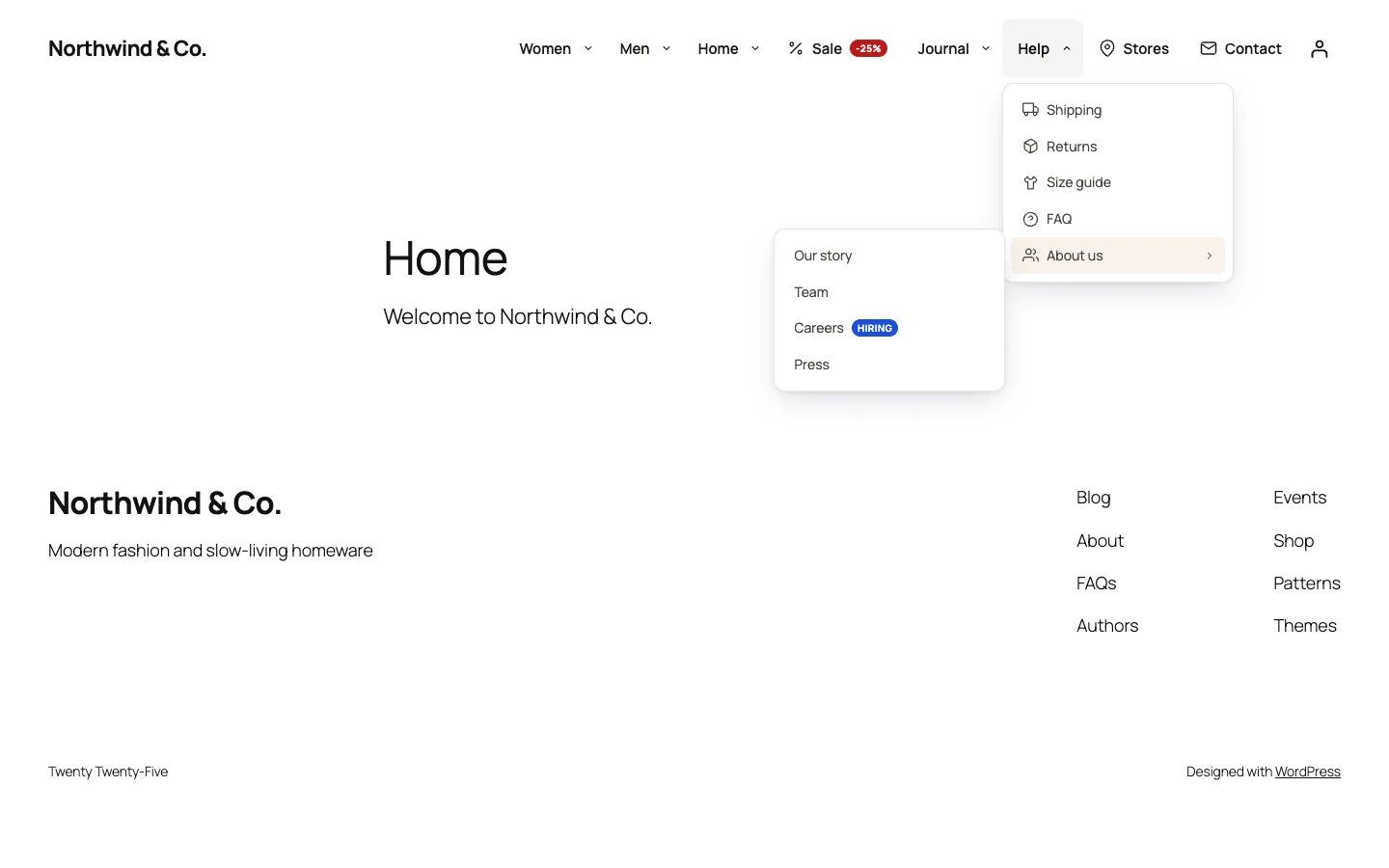
Flyouts nest to any depth; a nested flyout flips left when it would leave the viewport.
The markup holds no per-visitor data, so full-page caching works. Styles are CSS custom properties set on the <nav>, so all five presets and any custom style share one 8,564-byte (gzipped) stylesheet.
Trade-offs
- The model can't suggest a page you haven't written. That's deliberate. If the best menu needs a Pricing page, the audit can say "Pricing is missing", but the fix button only appears when such a page exists.
- The inventory is capped. By default the builder reads 400 pages, 200 terms per taxonomy and 40 products. Very large sites get a menu built from their most important content, not from all of it.
- Validation is strict, not forgiving. A ref with a typo is dropped rather than guessed. The admin sees the draft before saving, so a missing item costs one click in Add items. A wrong link would cost a 404 on every page.
- Arrow buttons, not drag and drop. Items are reordered and nested with keyboard-accessible arrow buttons; drag and drop isn't built yet.
Testing and what's still to do
The plugin has 64 PHPUnit tests, run in wp-env against a real WordPress, and 45 Jest tests. All AI paths were tested with mocked Google Gemini API responses, including the invented-ref cases above. A run with a live key is still to come, so we make no claims about live response quality or speed. The Elementor widget and the WPBakery element were tested against stubs.
DEV3 AI Mega Menu ships in the DEV3 AI Page Builder & Design Plugins Bundle on the DEV3 marketplace, alongside our Gutenberg page builder, Element Pack and Content & Layout Builder, and is being prepared for CodeCanyon. The design decisions, stack and verified results are in the case study.