All case studies

DEV3 Technologies · own product

DEV3 AI Job Listings Assistant: WP Job Manager listings with readable salaries and inclusive wording

Our own add-on for WP Job Manager. It scores every listing's quality, turns free-text salaries and messy titles into structured data, completes the JobPosting markup Google for Jobs reads, and drafts descriptions and fixes with the Google Gemini API for review.

Industry
Recruitment & HR (WordPress)

Live project preview

Client systems are private — screenshots shown where permitted.

DEV3 Technologies · own product — screenshots
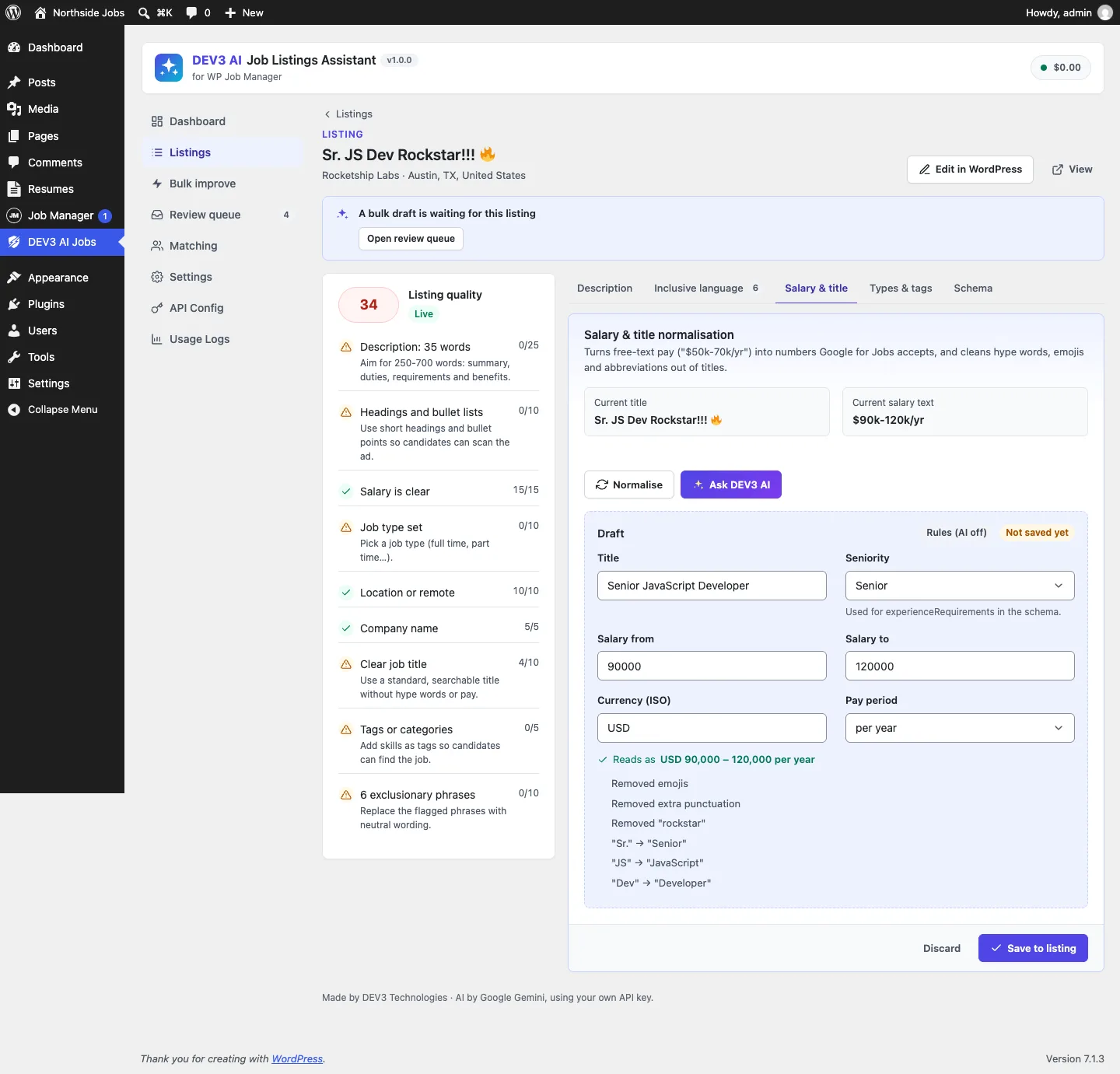
A listing's quality breakdown and the Salary & title tab: "$90k-120k/yr" becomes USD 90,000 to 120,000 per year, and the title loses its hype words and abbreviations.

A listing's quality breakdown and the Salary & title tab: "$90k-120k/yr" becomes USD 90,000 to 120,000 per year, and the title loses its hype words and abbreviations.

The challenge

WP Job Manager is the most installed job board plugin for WordPress, but what employers type into it is often poor: "Sr. JS Dev Rockstar!!!" as a title, "$90k-120k/yr" or "Competitive" in the one salary text field, no job type, no tags and age-coded phrases such as "young team". WP Job Manager prints that salary text straight into its JobPosting markup, where Google expects numbers, and job ads with exclusionary wording put good candidates off. Site owners need listings fixed where they are created and across the existing catalogue, without replacing WP Job Manager's screens and without anything changing until a person approves it.

Our solution

We built DEV3 AI Job Listings Assistant as an add-on, not a job board. WP Job Manager keeps its job post type, submit form, listings and JSON-LD; the add-on improves what goes in and what Google reads out, through WP Job Manager's own hooks and filters.

Key design decisions

  • Rules first, AI when rules give up. A salary parser reads ranges, k/m suffixes, lakh and crore, European number formats, 48 ISO currency codes plus common symbols and words, and pay periods. The AI normaliser runs only for text the rules cannot read, such as a salary written out in words.
  • Fix the schema through WP Job Manager's filter. The add-on hooks wpjm_get_job_listing_structured_data, so there is still one JSON-LD block. It replaces the salary string with a MonetaryAmount holding numeric min and max, an ISO currency and a unit; adds TELECOMMUTE and an applicant country for remote jobs; maps job types to employmentType; and adds experience, skills and industry.
  • Remove what Google would reject. When a salary cannot be read ("Competitive"), the invalid baseSalary is removed rather than printed.
  • A quality score on every save. Description length and structure, salary, job type, location, company, clean title, tags and inclusive wording add up to 0–100, shown as a sortable column in WP Job Manager's Jobs list.
  • Drafts and a review queue. Bulk improve runs in the background and only creates drafts. Each draft shows a diff with Accept, Edit or Reject, and "Accept safe changes" applies only salary, title and taxonomy drafts.
  • Help on the public submit form. A neutral writing assistant inside WP Job Manager's form drafts the description, checks wording and suggests job type and tags, with rate-limited, same-origin endpoints and non-AI fallbacks.

Architecture

Listing data stays in WP Job Manager's post meta; the add-on stores the quality score, numeric salary bounds and seniority alongside it, and keeps drafts and match results in two small tables. When the Job Tags add-on is missing, it registers the same job_listing_tag taxonomy itself. With Resume Manager installed, a Matching screen ranks resumes against a job with a transparent rule score and an optional AI explanation, without names or protected attributes. The API client, background jobs and usage logs come from a shared core used across DEV3's plugins.
Results

The plugin is complete. It ships in the DEV3 AI Directory, Booking & Events Plugins Bundle on the DEV3 marketplace, alongside 7 other directory, booking and events plugins, and is being prepared for CodeCanyon. What was built and verified:

  • 51 PHPUnit tests, run in wp-env against a real WP Job Manager install; the salary parser test alone runs 11 real-world salary formats through a data provider
  • 42 Jest tests for the admin app, the edit-screen assistant, the submit-form panel and the shared UI kit
  • Schema test: a listing with $50k - $70k a year and the remote flag produces minValue 50000, maxValue 70000, USD, YEAR, TELECOMMUTE and an applicant country; with the feature switched off, WP Job Manager's output is untouched
  • Bulk improve creates one draft per listing and changes nothing until a draft is accepted
  • AI paths were tested with mocked Google Gemini API responses; Resume Manager (a paid add-on) was tested against a stub of its post type and fields
  • Note: WP Job Manager itself needs WordPress 6.4 or newer

Setup guide

No licence key or activation is needed: install the zip and every feature works.

Requirements

  • WordPress 6.0 or newer and PHP 7.4 or newer. Note that current WP Job Manager releases need WordPress 6.4 or newer
  • WP Job Manager 1.36 or newer (free, from WordPress.org), active
  • Optional: WP Job Manager Resume Manager, for candidate matching
  • Optional: a Google Gemini API key. Without one, quality scores, salary and title normalising, type and tag suggestions, the inclusive word list, template descriptions and the improved schema all still work

1. Install the plugin

  1. Install and activate WP Job Manager first, from Plugins → Add New.
  2. The add-on ships inside the bundle download at dev3-ai-directory-booking-events-plugins-bundle/dev3-ai-wp-job-manager/dev3-ai-wp-job-manager.zip.
  3. In WordPress, go to Plugins → Add New → Upload Plugin, choose that zip and click Install Now, then Activate. The menu DEV3 AI Jobs appears in the admin sidebar.

2. Connect Google Gemini (optional)

  1. Create a free API key in Google AI Studio (sign in with a Google account, then Create API key).
  2. Go to DEV3 AI Jobs → API Config, paste the key and click Validate & save. The key is stored encrypted (AES-256-GCM) and never sent to the browser.
  3. Optional: pick the model (gemini-2.5-flash is the fast default; gemini-2.5-pro for the highest quality).

Prefer config files? Add define( 'DEV3JM_GEMINI_API_KEY', 'your-key' ); to wp-config.php instead.

3. Set it up

  1. In Job Manager → Settings (WP Job Manager's own settings), turn on the salary field, salary currency and salary unit. The add-on writes clean values into those fields.
  2. Open DEV3 AI Jobs → Dashboard. The WP Job Manager setup card confirms the version, the salary field, job tags and Resume Manager, and every listing already has a quality score.
  3. In Settings, choose the default currency, the Remote applicant country used in the schema for remote jobs, the writing tone, and which helpers appear on the public submit form.
  4. Leave the improved JobPosting schema on unless another plugin already rewrites WP Job Manager's markup.

Updating

Download the new bundle version, then upload the plugin zip in Plugins → Add New → Upload Plugin and choose Replace current with uploaded. Settings and drafts are kept.

Uninstalling

Deactivate and delete the plugin from Plugins. Your WP Job Manager listings are never removed; accepted changes stay in them.

How to use

Fix one listing

  1. Go to Job Manager → Job Listings and sort by the Quality column, or open DEV3 AI Jobs → Listings.
  2. Open a listing. The left card shows its quality score and exactly what is missing.
  3. On the Salary & title tab, click Normalise. The draft shows the clean title, seniority, salary from and to, ISO currency and pay period, with a "Reads as" line and every change listed. Click Ask DEV3 AI for salaries the rules cannot read.
  4. Use the Inclusive language, Types & tags and Description tabs the same way, then click Save to listing. The Schema tab shows the JobPosting markup Google will read and what is still missing.

Write and check a job while editing it

  1. Open a job in the WordPress editor. The DEV3 AI Job Assistant box shows the quality score.
  2. Add notes and a tone and click Write with DEV3 AI, or click Check wording and use Fix on each flagged phrase.
  3. Click Normalise salary & title, then save the job as usual.

Improve the whole catalogue

  1. Open Bulk improve. Choose which listings (low quality, salary missing or unclear, missing type or tags, exclusionary wording, or all).
  2. Tick what to improve: rewrite description, inclusive-language fixes, normalise salary, clean up title, suggest job types and tags. Turn on Use DEV3 AI if you have a key.
  3. Click Start bulk improve. The run happens in the background and fills the review queue; no listing changes yet.
  4. In Review queue, open each draft to see before and after, then Accept all changes, Edit or Reject. Accept safe changes applies only salary, title and taxonomy drafts in one go.

Help employers on the submit form

  1. The Writing assistant appears inside WP Job Manager's submit form, under the description.
  2. Employers click Help me write it, describe the role in a few bullet points, pick a tone and click Write description; or use Check wording and Suggest type & tags.
  3. Nothing changes until they choose to use a suggestion.

Rank candidates (with Resume Manager)

  1. Open Matching and choose a job listing.
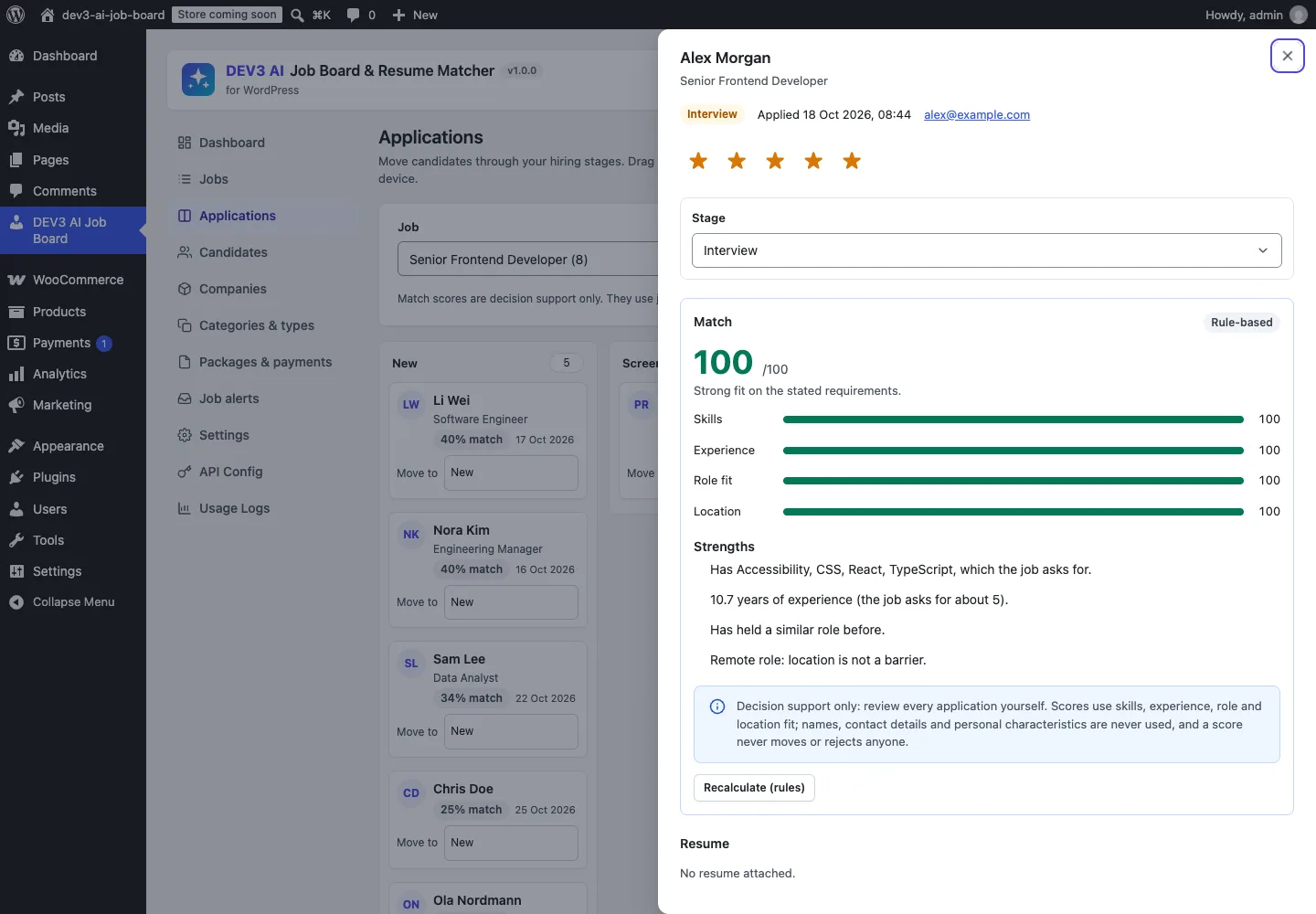
  2. Resumes are ranked with skills, experience, role fit and location bars, strengths and gaps to ask about. Click Rescore top 10 to refresh them.
  3. Scores are decision support only: names, contact details and protected attributes are never used, and nothing changes a resume or application.

Related case studies