All case studies

DEV3 Technologies · own product

DEV3 AI Job Board & Resume Matcher: a WordPress job board with explainable, privacy-safe match scores

Our own WordPress job board with employer and candidate dashboards, paid job packages, private resumes and a kanban hiring pipeline. Match scores combine a transparent rule score with a Google Gemini API review of an anonymised profile, and never move a candidate.

Industry
Recruitment & HR (WordPress)

Live project preview

Client systems are private — screenshots shown where permitted.

DEV3 Technologies · own product — screenshots
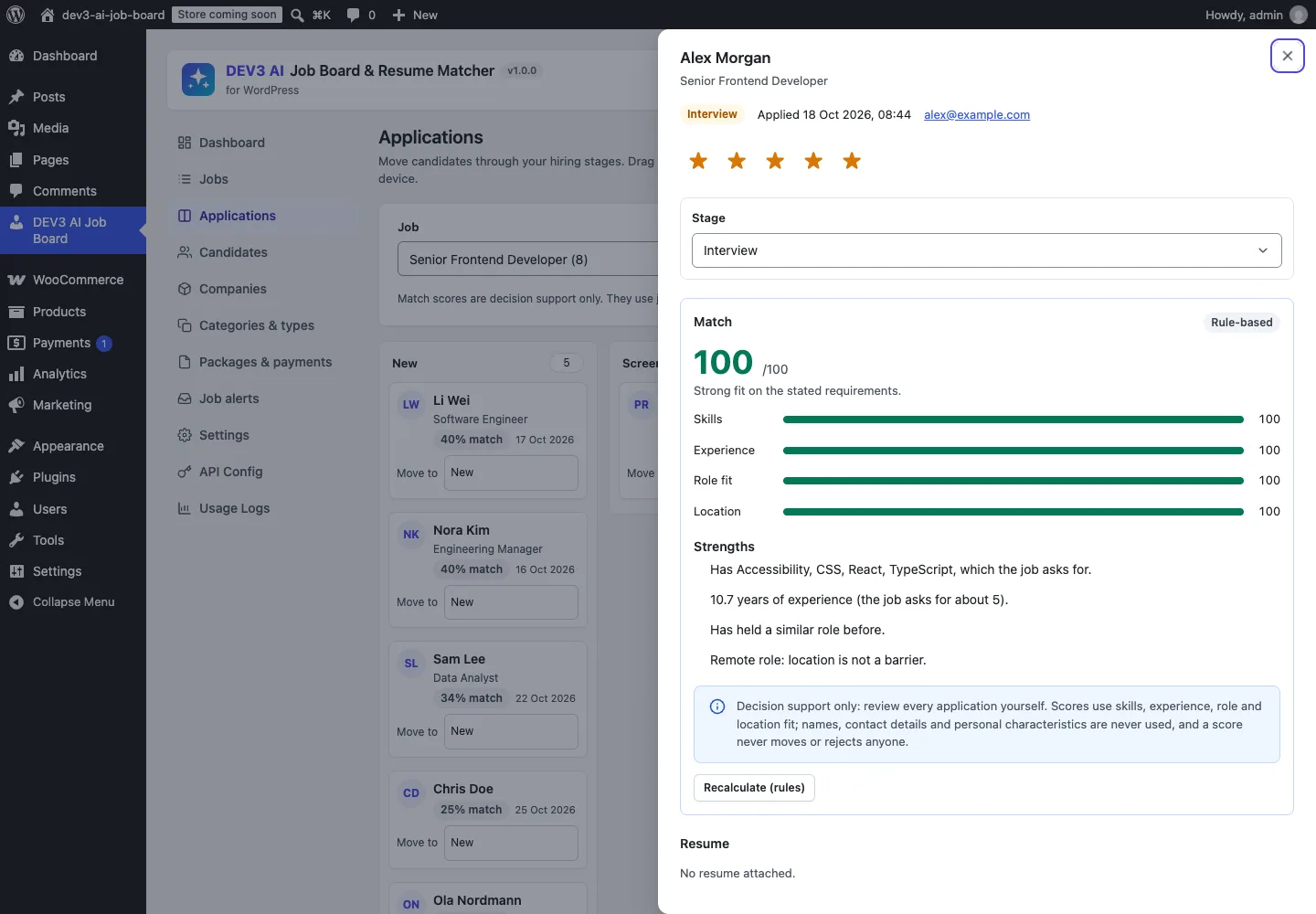
An application's match card: score, four criteria, strengths in plain language, and the decision-support notice.

An application's match card: score, four criteria, strengths in plain language, and the decision-support notice.

The challenge

Job board plugins for WordPress sell applications, resumes, paid listings and alerts as separate add-ons, keep resume files in the public uploads folder, and offer no way to sort a pile of applications. AI resume matching sounds like the obvious fix, but it is also where hiring software gets into trouble: a model that sees a name, a photo, an age or a nationality can be influenced by them, and a score that silently filters people out is an automated hiring decision. We needed matching that only ever sees job-relevant data, explains every point of its score, works without AI, and leaves every decision to a person.

Our solution

We built DEV3 AI Job Board & Resume Matcher as a WordPress plugin in PHP with a React admin and front-end dashboards for employers and candidates. One plugin covers what usually takes a job board core plus four paid add-ons: job listings with JobPosting schema, company profiles, front-end submission with paid packages, applications with a hiring pipeline, candidate profiles with private resume files, and job alerts.

Key design decisions

  • Protected attributes removed before matching. Matcher::strip_protected() drops 49 normalised key names (name, email, phone, photo, age, date of birth, gender, marital status, nationality, religion, disability and more) at every depth of the profile, and anonymise() masks emails and phone numbers in free text and replaces the candidate's name with "[candidate]".
  • A transparent rule score first. Skills 40%, experience 25%, role 20% and location or workplace fit 15%, each shown as its own bar with plain-language strengths and gaps. It runs without AI and gives the same result for the same input.
  • AI reviews, rules anchor. With a key, the Google Gemini API sees the anonymised profile, the job and the rule pre-check, and returns its own criteria scores and explanation. The final score is the average of the rule score and the AI score, so the model cannot move it alone.
  • Decision support only. A score never changes a pipeline stage, never hides an application and never rejects anyone. Every match card says so. Optional blind screening hides names on employer cards until the Interview stage.
  • No protected fields in the parser. The resume-parsing schema has no field for any protected attribute, and a test asserts that none of those words appear in it.
  • Private resumes. Files go to a private folder with random names and deny rules, and are streamed only to the candidate, the employer of an application that uses them, or a site manager.

Architecture

Jobs, companies and resumes are custom post types; applications, pipeline events, packages, payments, alerts and files have their own tables. Resume text is extracted in plain PHP from PDF text streams and Word .docx files; scanned PDFs go to the AI as a file instead. Embeddings of jobs and anonymised profiles power recommendations and part of the role score. Packages are paid through Stripe Checkout, WooCommerce or offline payment. The API client, background jobs, embeddings store and usage logs come from a shared core used across DEV3's plugins.
Results

The plugin is complete. It ships in the DEV3 AI Directory, Booking & Events Plugins Bundle on the DEV3 marketplace, alongside 7 other directory, booking and events plugins, and is being prepared for CodeCanyon. What was built and verified:

  • 65 PHPUnit tests in wp-env, covering protected-attribute stripping, reproducible rule scores, private file access, ownership checks on every employer route, blind screening, packages and credits, alerts and JobPosting schema
  • 39 Jest tests for the admin app, the front-end dashboards and the shared UI kit
  • Privacy test: scoring a real application with AI on sends a request that contains neither the candidate's name, email nor phone digits, and the application stays in the New stage
  • AI paths were tested with mocked Google Gemini API responses; a live-key run is the next step before launch
  • Stripe Checkout was tested with signature checks against a stub of its documented API; WooCommerce package purchases were tested for real in wp-env
  • Planned for v1.1: a searchable resume database for employers and an importer from WP Job Manager

Setup guide

No licence key or activation is needed: install the zip and every feature works.

Requirements

  • WordPress 6.0 or newer and PHP 7.4 or newer
  • Works with block and classic themes
  • Optional: WooCommerce (HPOS and block checkout supported) or a Stripe account, if you sell job posts
  • Optional: a Google Gemini API key. Without one, job outlines come from templates, resumes are read with the built-in parser, and match scores use the transparent rules

1. Install the plugin

  1. The plugin ships inside the bundle download at dev3-ai-directory-booking-events-plugins-bundle/dev3-ai-job-board/dev3-ai-job-board.zip.
  2. In WordPress, go to Plugins → Add New → Upload Plugin, choose that zip and click Install Now.
  3. Click Activate. The menu DEV3 AI Job Board appears in the admin sidebar, and five pages are created: Jobs, Post a Job, Employer Dashboard, Candidate Dashboard and Companies.

2. Connect Google Gemini (optional)

  1. Create a free API key in Google AI Studio (sign in with a Google account, then Create API key).
  2. Go to DEV3 AI Job Board → API Config, paste the key and click Validate & save. The key is stored encrypted (AES-256-GCM) and never sent to the browser.
  3. Optional: pick the model (gemini-2.5-flash is the fast default; gemini-2.5-pro for the highest quality).

Prefer config files? Add define( 'DEV3JB_GEMINI_API_KEY', 'your-key' ); to wp-config.php instead.

3. Set it up

  1. Open Settings. Check the pages, choose whether new jobs wait for your approval, whether guests can apply without an account, the maximum resume file size and which emails are sent.
  2. In the Fairness section of Settings, decide whether employers see match scores and whether to turn on Blind screening, which hides candidate names on employer cards until the Interview stage.
  3. In Categories & types, set up job categories, job types, locations and skills.
  4. In Packages & payments, create free or paid packages (price, number of job posts, days live, featured) and choose the payment gateway: Stripe, WooCommerce or offline bank transfer.
  5. Optional: with an API key, turn on the DEV3 AI features you want in Settings → DEV3 AI features and click Update index for semantic recommendations.

Updating

Download the new bundle version, then upload the plugin zip in Plugins → Add New → Upload Plugin and choose Replace current with uploaded. Settings and data are kept.

Uninstalling

Deactivate and delete the plugin from Plugins. Jobs, applications and settings are kept unless you ticked Delete all job board data when the plugin is deleted in Settings.

How to use

Post a job with a structured description

  1. Employers open Post a Job (admins use DEV3 AI Job Board → Jobs). They pick the company and fill in the title, workplace, location, salary and skills.
  2. In Quick outline, they write a few notes about the role and click Build outline for a structured ad with responsibilities, requirements and benefits. With an API key, DEV3 AI writes it; without one, a template does.
  3. Check wording flags exclusionary phrases with neutral alternatives.
  4. They click Preview job, choose a package and pay if needed. The job goes live or waits for your approval.

Review applications in the pipeline

  1. Open Applications (or the employer's dashboard) and pick a job. Applications appear as cards in New, Screening, Interview, Offer, Hired and Not a fit.
  2. Drag cards between stages on a computer, or use Move to on any device.
  3. Click Score all to calculate match scores, and Best match first to sort by them. Every application stays visible whatever its score.
  4. Open a card to see the match breakdown (skills, experience, role fit, location), strengths, gaps, the resume, notes and a star rating. Change the stage yourself; a score never does.

Let candidates fill their profile from a resume

  1. Candidates open Candidate Dashboard → Profile and click Choose file under Upload your resume (PDF, DOCX or TXT).
  2. The headline, summary, location, skills, experience and education fill in, highlighted for checking.
  3. They correct anything and click Save profile. Applying to a job then takes one click.

Sell job posts

  1. In Packages & payments, set up packages such as a free basic post, a featured post or a multi-job hiring pack.
  2. Employers buy credits at checkout; unused credits are kept for the next job.
  3. Offline payments appear in Payments until you click Mark paid. You can also give an employer free job posts with Add credits.

Related case studies