All case studies

DEV3 Technologies · own product

DEV3 AI Bulk Product Writer & SEO: catalog-scale product copy that waits for approval and can always be undone

Our own WooCommerce plugin: it audits every product's copy and SEO, writes titles, descriptions, SEO meta, tags and alt text for thousands of products as reviewable drafts, and records each approval so it can be undone.

Industry
E-commerce (WooCommerce)

Live project preview

Client systems are private — screenshots shown where permitted.

DEV3 Technologies · own product — screenshots
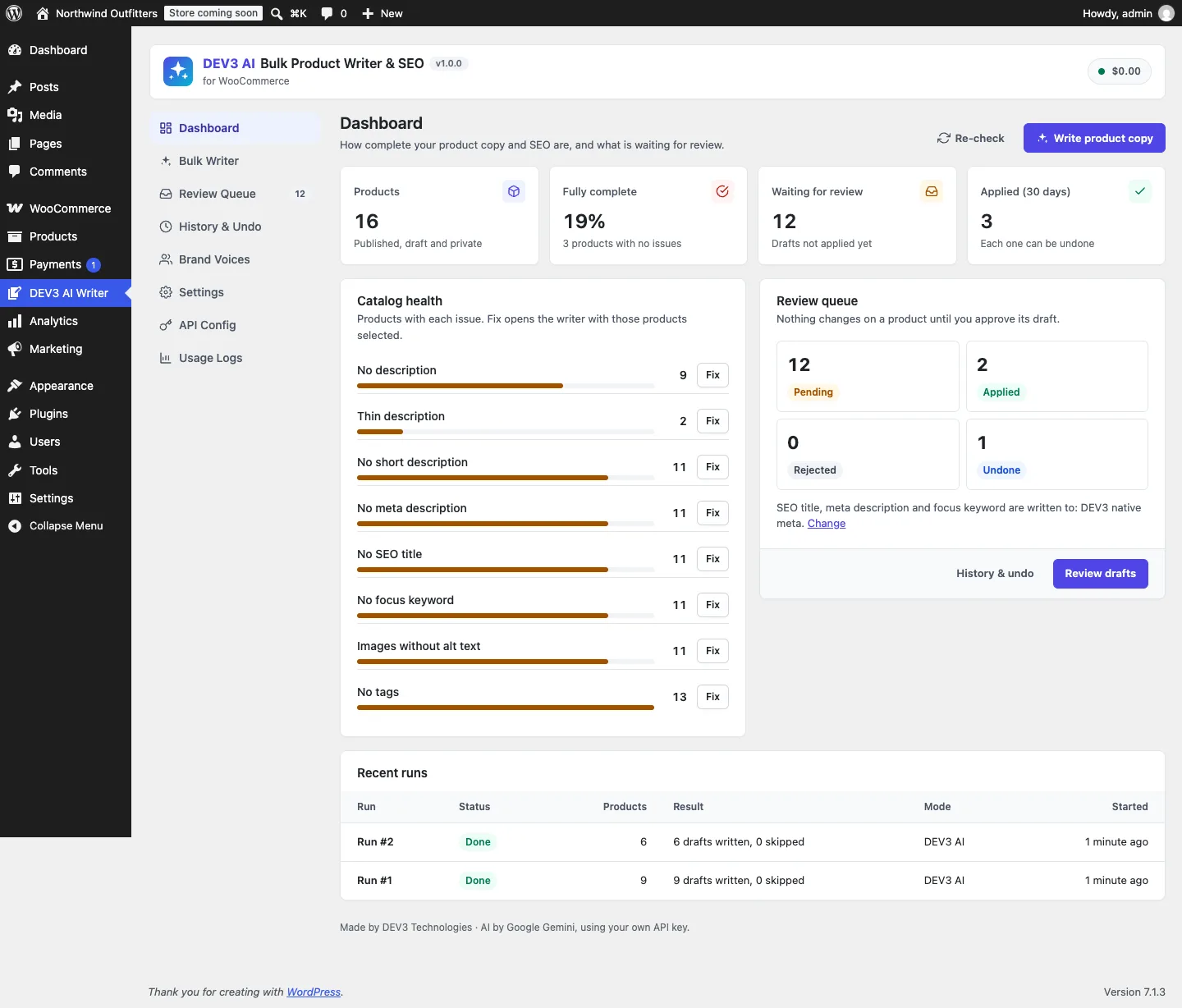
Catalog health: products with each copy and SEO issue, a Fix button per issue, the review queue and recent runs.

Catalog health: products with each copy and SEO issue, a Fix button per issue, the review queue and recent runs.

The challenge

Stores with hundreds or thousands of products usually have the same gaps: empty descriptions, no meta description, SEO titles that are too long and images without alt text. Bulk AI writers fix this by writing straight into products, which means one bad prompt can overwrite a whole catalog with no way back. They also tend to assume one SEO plugin, so a store on Rank Math or SEOPress gets meta written to keys nobody reads. We needed a writer that never touches a product without approval, writes SEO fields into whichever SEO plugin the store actually runs, detects when a merchant edited a product in the meantime, and can undo any change, one product or one batch at a time.

Our solution

We built DEV3 AI Bulk Product Writer & SEO as a WooCommerce plugin in PHP with a React admin. Every write goes through one class, Applier, and everything before it produces drafts only.

Key design decisions

  • Catalog health in SQL. Ten weighted checks (no description, thin description, no short description, SEO title missing or over 60 characters, meta description missing or outside 120–160 characters, no focus keyword, images without alt text, no tags) give each product a 0–100 score. The same checks exist as SQL conditions, so the dashboard counts and the "Fix" filters work across the whole catalog without loading products.
  • One field map, four SEO stores. Seo_Target maps SEO title, meta description and focus keyword to Yoast SEO, Rank Math, SEOPress or DEV3 native meta. Reads, writes, the audit SQL, conflict checks and undo all go through it. With no SEO plugin, the plugin prints its own <title> and meta description on product pages.
  • Drafts, not edits. A run produces one draft per product with a snapshot of the original values. The review queue shows a word diff per field, inline edits, per-field include toggles and "rewrite with an instruction". A newer draft for the same product supersedes the older pending one.
  • Optimistic conflict checks. Approving compares the product's current values with the draft's snapshot (tags compared as a sorted, case-insensitive set). If someone edited the product since, the approve returns 409 and asks before overwriting. Undo does the same check against the values it applied.
  • Revisions with batch undo. Every approval stores before and after values per field, the user and a batch id. One revision or a whole batch can be undone; undone revisions stay in the log.
  • Bounded AI output. One structured-output call per product returns every selected field, with maxLength on every string. Brand voices set tone, length, format and words to use or avoid, and "Learn my voice" proposes a voice from 1–5 products the merchant likes. Template mode fills drafts from product variables with no AI at all.

Architecture

Runs of up to 5,000 products (configurable) are background jobs on Action Scheduler, with WP-Cron as a fallback and a progress screen that advances stalled jobs itself. Runs of up to 3 products start inline so single products feel instant. Selection is server-side: filters, an issue filter driven by the audit SQL, and "all matching". Approving a whole run is its own background apply job, which skips conflicting drafts and reports them. SEO meta and alt text are written before the product save, so SEO plugins that reindex on save_post see the new values. A Products-list bulk action and a product-editor box link into the writer. The API client, job runner, usage logs and settings screens come from a shared core used across DEV3's plugins.

Results

The plugin is complete. It ships in the DEV3 AI WooCommerce Plugins Bundle on the DEV3 marketplace, alongside 20 other WooCommerce plugins, and is being prepared for CodeCanyon. What was built and verified:

  • 51 PHPUnit tests in wp-env, covering runs that leave products untouched, conflict detection on approve and undo, exact tag-set restore, Yoast meta keys, batch undo over REST, conflict skipping in background apply jobs, native meta output and CSV formula neutralising
  • A test that checks the audit's PHP issue list against its SQL counts and product filters, issue by issue
  • 37 Jest tests for the admin screens, the diff and helper utilities and the shared UI kit
  • AI paths (bulk writing, regenerate with an instruction, learn my voice) tested with mocked API responses; a run with a live key is the next step
  • Build, PHP_CodeSniffer (WordPress standards, 0 errors and 0 warnings), translation template and packaging gates all pass; HPOS and Cart/Checkout blocks compatibility declared and tested

Setup guide

No licence key or activation is needed: install the zip and every feature works.

Requirements

  • WordPress 6.0 or newer and PHP 7.4 or newer
  • WooCommerce 8.0 or newer, active (HPOS and Cart/Checkout blocks are supported)
  • Optional: Yoast SEO, Rank Math or SEOPress. Without one, the plugin stores SEO fields itself and prints them on product pages
  • Optional: a Google Gemini API key. Without one, template mode, the audit, the review queue and undo all still work

1. Install the plugin

  1. The plugin ships inside the bundle download as dev3-ai-woocommerce-plugins-bundle/dev3-ai-bulk-product-writer-for-woocommerce/dev3-ai-bulk-product-writer-for-woocommerce.zip.
  2. In WordPress, go to Plugins → Add New → Upload Plugin, choose that zip and click Install Now.
  3. Click Activate. DEV3 AI Bulk Product Writer & SEO for WooCommerce appears in the plugin list and its menu, DEV3 AI Writer, appears in the admin sidebar.

2. Connect Google Gemini (optional)

  1. Create a free API key in Google AI Studio (sign in with a Google account, then Create API key).
  2. Go to DEV3 AI Writer → API Config, paste the key and click Validate & save. The key is stored encrypted and never sent to the browser.
  3. Optional: pick the model (gemini-2.5-flash is the fast default) and set a monthly spending cap.

Prefer config files? Add define( 'DEV3BW_GEMINI_API_KEY', 'your-key' ); to wp-config.php instead.

3. Set it up

  1. Go to Settings and check Write SEO fields to. Detect automatically picks Yoast SEO, then Rank Math, then SEOPress, then DEV3 native meta. Choose whether tags are added to or replace existing tags, and set Max products per run.
  2. In Brand Voices, edit the default voice (tone, audience, language, length, format, words to use and avoid) or use Learn my voice with DEV3 AI on 1–5 products whose copy you like.
  3. Open the Dashboard to see catalog health. Each issue has a Fix button that opens the Bulk Writer with those products selected.
  4. In Bulk Writer, filter products, select a page or all matching, tick the fields to write, pick DEV3 AI or Templates (no AI), and start the run. It runs in the background with progress, cancel and retry.
  5. In Review Queue, open each draft to see the changes per field, edit or rewrite them, then Approve & apply. Nothing changes on a product before this step.
  6. Every approval is listed in History & Undo, where you can undo one product or a whole batch. You can also start a run from the Write with DEV3 AI bulk action on Products.

Updating

Take the new zip from the updated bundle download, then upload it in Plugins → Add New → Upload Plugin and choose Replace current with uploaded. Settings, drafts and history are kept.

Uninstalling

Deactivate and delete the plugin from Plugins. Drafts, history, voices and settings are kept unless you tick Delete drafts, history and settings when the plugin is uninstalled in Settings. Copy you already applied always stays on your products.
How to use

Fix the gaps the dashboard finds

  1. Open DEV3 AI Writer → Dashboard. Catalog health lists how many products have each issue, such as No meta description or Images without alt text.
  2. Click Fix next to an issue. The Bulk Writer opens with exactly those products filtered.
  3. Tick the fields to write, pick a brand voice and click Write drafts with DEV3 AI. Click Re-check on the dashboard after you approve the drafts to see the counts drop.

Run a bulk job across the catalog

  1. In Bulk Writer, narrow the list with search, category, status and the content-state filter, then use Select page or select all matching products.
  2. Under 2. What to write, choose DEV3 AI or Templates (no AI), tick the fields, choose a Brand voice and add optional Extra instructions (for example "Use British spelling").
  3. Turn on Only fill empty fields if you want to keep existing copy, check the estimate, and start the run.
  4. The run continues in the background with a progress bar and a Cancel button; failed products are listed with the reason. When it finishes, go to the review queue.

Review and apply drafts

  1. Open Review Queue. The Pending tab lists every draft with the fields it would change.
  2. Click a product to open its draft. Each field has Changes (a word diff against the current copy), Preview or Draft, and Edit. Untick any field you don't want.
  3. Not quite right? Type an instruction such as "shorter, mention the 2-year warranty" and click Rewrite with DEV3 AI. The product is not touched.
  4. Click Approve & apply. If someone edited the product after the draft was written, you are asked before those edits are overwritten.
  5. For many drafts at once, select them and click Approve selected, or Approve all pending to apply them as a background job. Use Export CSV to share the queue for sign-off.

Undo a change or a whole batch

  1. Open History & Undo. Every approval is listed with the fields it changed, its batch, who applied it and when.
  2. Click Undo on a row to restore that product's previous values. If the product was edited since, you are asked before those edits are lost.
  3. Click a batch id to show that batch of approvals, then click Undo whole batch to restore them together.

Write in your brand's voice

  1. Open Brand Voices and click New voice, or Edit an existing one: tone, audience, language, length, format, words to use and avoid, and house rules.
  2. Or, under Learn my voice with DEV3 AI, tick 1–5 products whose copy you like and click Learn voice with DEV3 AI. Review the proposed voice before saving it.
  3. Click Make default on the voice new runs should use.

Write from the product screens

  1. On Products, tick some products and choose Write with DEV3 AI from Bulk actions. The Bulk Writer opens with them selected.
  2. On a single product's edit screen, the DEV3 AI Writer box shows its content health, with Write with DEV3 AI, Review pending draft and Change history and undo links.

Related case studies