A WooCommerce store run by two or three people has the same jobs as a store with a dedicated team: answering "where's my order?", checking suspicious orders before they ship, chasing abandoned carts and knowing what sold last week. The difference is that the same person does all of it, usually between packing orders. Automation helps, but only if it's clear which decisions the software makes and which ones still come to a person.
This guide shows how four plugins in the DEV3 AI WooCommerce Plugins Bundle split that work: DEV3 AI Shopping Assistant & Chatbot, DEV3 AI Store Insights, DEV3 AI Order Fraud & Risk Scoring, and DEV3 AI Abandoned Cart & Win-back Emails, all for WooCommerce. For each one it sets out what runs on its own, what waits for you, and how to fit the review points into a short daily and weekly routine. The how-to for each plugin is linked rather than repeated.
Who does what
| Job | Plugin | Runs on its own | Waits for a person |
|---|---|---|---|
| Shopper questions and order tracking | Shopping Assistant & Chatbot | Product suggestions, order status, policy answers, add to cart | Handoffs, knowledge-base drafts, persona changes |
| Knowing how the store is doing | Store Insights | Saved questions, email digests, anomaly alerts | Deciding what to do about them |
| Fraud triage | Order Fraud & Risk Scoring | Scoring every order, holding risky paid orders | Approving, cancelling or marking as fraud |
| Cart recovery | Abandoned Cart & Win-back | Capturing carts, sending approved sequences, unique coupons | Reviewing AI-written copy before it is sent |
All four need WooCommerce 8.0 or newer and support HPOS and the block cart and checkout. Each has a working mode without AI: guided chat, rule-based report questions, rule-based risk scores and template emails. AI then adds drafts and second opinions on top.
1. Let the chat assistant take first-line questions
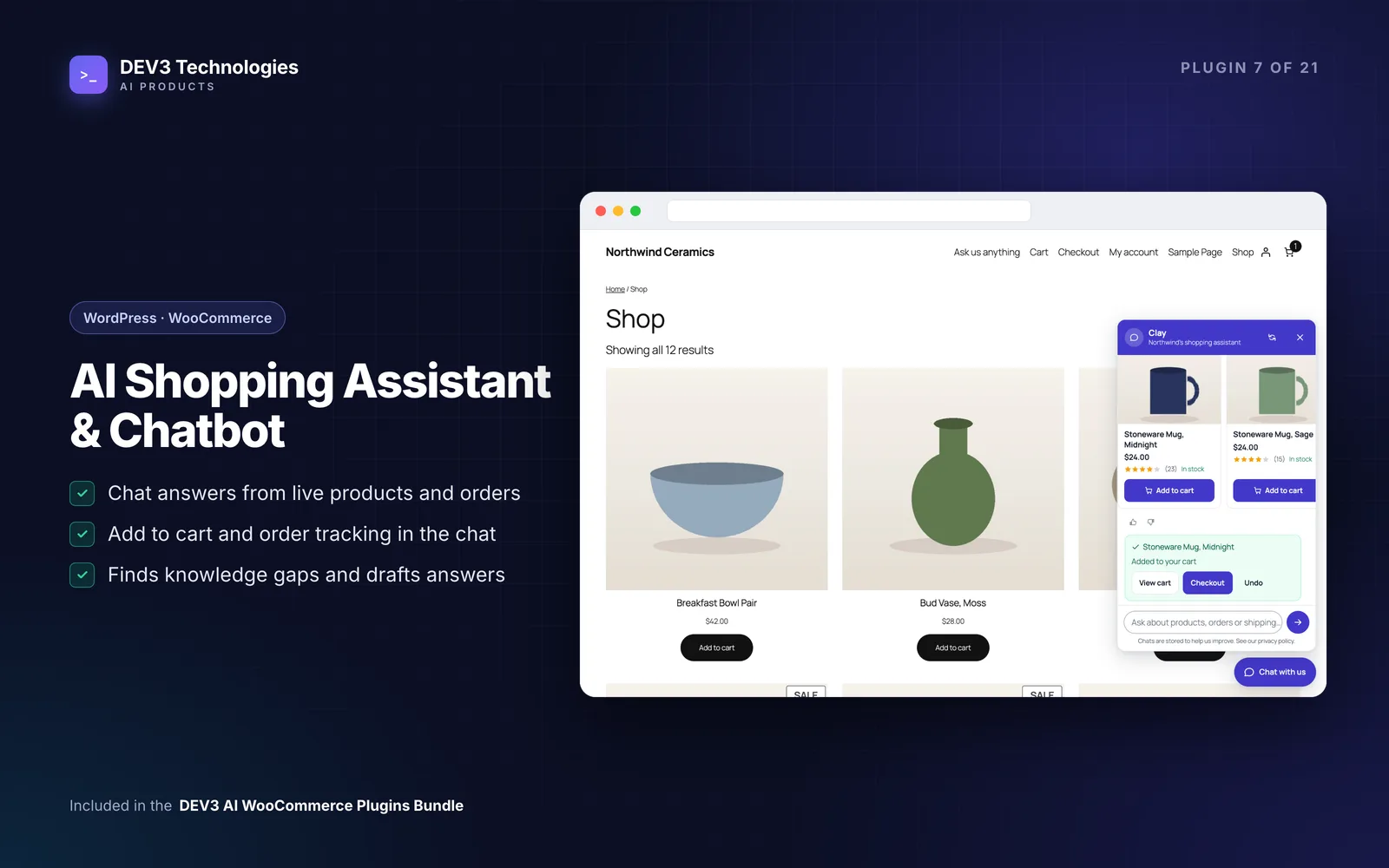
The Shopping Assistant sits on the storefront as a floating launcher, an inline block or a shortcode. It covers the questions that eat a small team's day:
- "Where's my order?" Logged-in customers see their own recent orders. Guests enter the order number and the matching billing email. Status text always comes from WooCommerce, and addresses and payment details are never shown.
- "Do you have this in blue?" It searches the catalogue and shows real product cards with WooCommerce's prices and stock. Product facts never come from the AI's text, and add-to-cart requests are checked on the server, with Undo.
- "What's your returns policy?" It answers from a knowledge base you import from your refund, terms and privacy pages, shipping zones and payment methods.
Without an AI key, or if the AI fails or hits its monthly cap, it falls back to guided mode: product finder, order tracking, knowledge base and handoff. The chat keeps working either way.
Human-in-the-loop points:
- Handoff. When a shopper asks for a person, the handoff form emails your team with the transcript. Replies from the conversations inbox go to the shopper by email. There is no live agent chat in this version; the plugin's case study lists it as planned for a later release.
- Knowledge gaps. With AI on, unanswered questions are grouped into gaps and the AI drafts knowledge answers. Nothing is added until you accept it.
- The test console shows why each answer was given, which helps when a reply looks wrong.
Full setup: how to add an AI chatbot to a WooCommerce store.
2. Let reports come to you
A small team rarely opens a reports screen. Store Insights lets you type a question such as "best sellers last month" or "refunds this year" and get a chart, the table behind it and a short explanation. The AI only picks one of 11 read-only reports and fills in typed options; it never writes a database query. Without AI, a rule-based parser handles common phrasings and Explore builds any report by hand.
The features that matter most for a small team are the ones that run without you:
- Saved questions re-run on fresh data.
- A pinned dashboard with one date range for every card.
- Scheduled email digests so the numbers arrive in your inbox.
- Anomaly alerts that compare against a 28-day baseline and name the products and countries that moved most.
Human-in-the-loop point: the alerts tell you something changed, not why or what to do. If sales of one product drop sharply, the next step is yours: check stock, check the product page, check whether a campaign ended.
One limit to know: orders in different currencies aren't converted, so multi-currency stores see totals at face value. Details in how to get plain-English sales reports from WooCommerce.
3. Let the risk score triage, and keep the decision
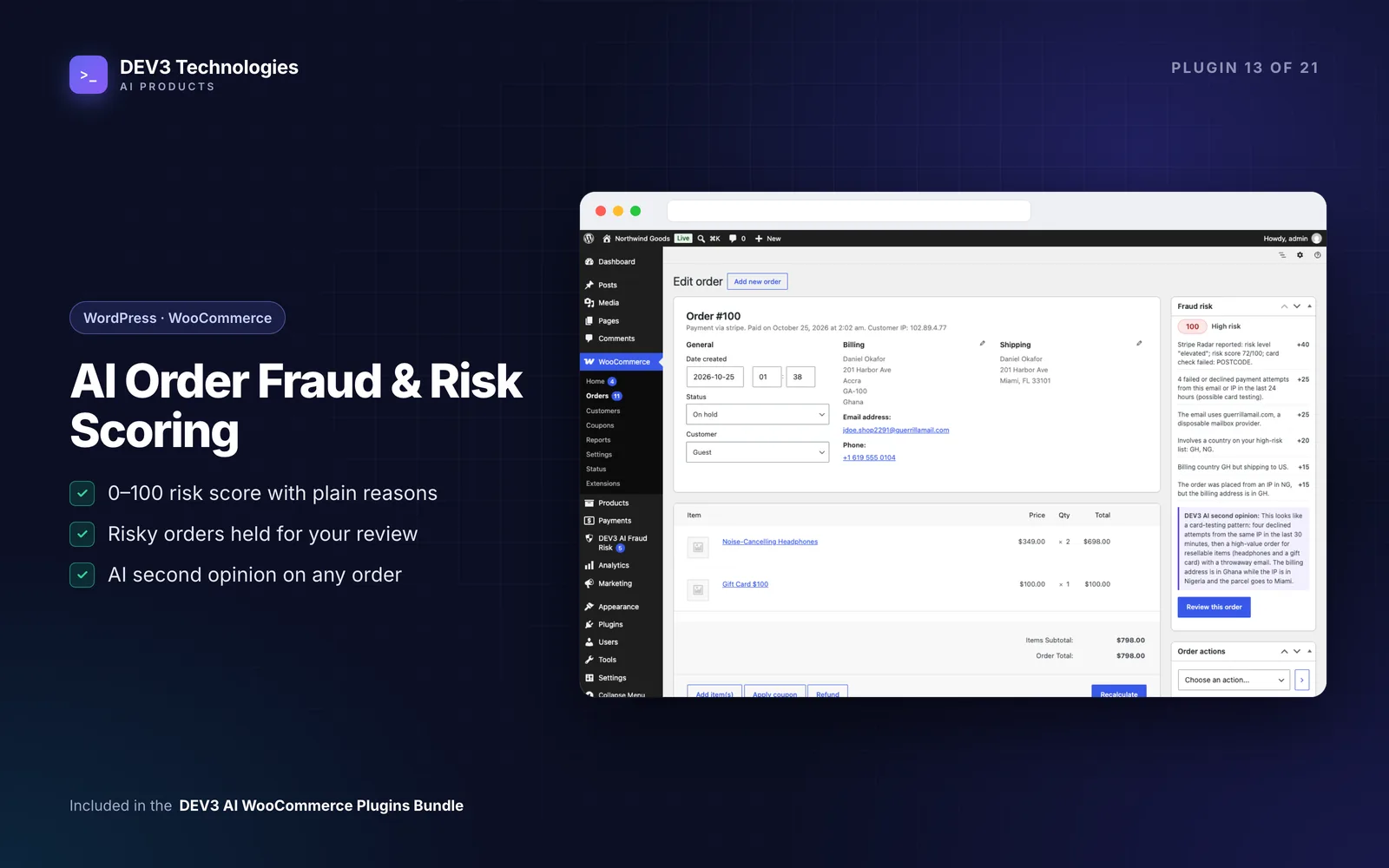
Fraud checks are where automation most needs a clear boundary. Order Fraud & Risk Scoring gives every order a 0–100 score built from 16 signals, such as failed payment attempts from the same email or IP, billing and shipping mismatches, disposable email domains, unusually high order values and first-time customers. Every point comes with a plain sentence explaining it. Scoring is rule-based and works without AI.
What it does automatically:
- Scores the order when it is created but acts only once payment completes. A pending order is never touched, so the payment gateway can always finish.
- Holds risky paid orders for review, with a neutral notice on the thank-you page.
- Reads gateway outcomes such as Stripe Radar's risk level and WooPayments' fraud outcomes, and can raise the action on a paid order but never lower it.
- Sends email alerts about risky orders.
What it doesn't do on its own:
- Cancel. Automatic cancellation is off by default. Cancel-level orders are held instead.
- Override you. Once a reviewer has approved, cancelled or marked an order as fraud, automation leaves it alone.
- Hold staff orders. Orders created by staff or imports are scored but never held automatically.
Human-in-the-loop points: the reviewer makes every final call. The optional AI second opinion receives countries, totals, product categories, signal counts and the email domain, never the name, street, phone or full email, and returns a verdict, reasons and checks to make before shipping. "Use suggestion" only pre-selects a decision you still confirm. The tuning advisor proposes changes to points and thresholds from your review outcomes as a draft.
More in how to stop fraudulent orders and card testing on WooCommerce and score at checkout, hold after payment.
4. Let cart recovery run, with a review gate on new copy
Abandoned Cart & Win-back captures carts on both the classic and block checkout, with a consent mode you choose (notice, opt-in or none). It then runs email, and optionally SMS, recovery and win-back sequences. SMS always needs its own opt-in. Each step can create a unique single-use coupon locked to the shopper's email, and the recovery link restores the cart and pre-fills the checkout. Sends can be moved later, never earlier, to the hour that suits each shopper in their own timezone, outside quiet hours.
Human-in-the-loop point: the review gate. When AI rewrites a template for a specific cart, the draft waits in a review queue with a word-by-word comparison against the template. If nobody reviews it before the send time, the approved template copy goes out instead, or the message is held for a set number of hours, whichever you choose. Only templates you mark as auto-approve send AI copy without review.
For a small team, that fallback is the important part: a busy week never means unreviewed AI copy going to customers. The worst case is that your standard template is sent.
See the abandoned cart email sequence guide.
A 15-minute daily routine
| When | Where | What to do |
|---|---|---|
| Start of day | Fraud & Risk: held orders | Approve, cancel or mark as fraud before packing begins |
| Start of day | Shopping Assistant: conversations | Reply to handoffs from overnight |
| Midday | Abandoned Cart: review queue | Approve or edit AI drafts due today |
| End of day | Skim any Store Insights alert and note what to check tomorrow |
A weekly review
- Read the Store Insights digest; re-run saved questions for anything unusual
- Shopping Assistant: review knowledge gaps and accept or edit the drafts
- Shopping Assistant: check answers rated "not helpful"
- Fraud & Risk: look at the tuning advisor's draft; adjust thresholds only if reviews keep disagreeing with the score
- Abandoned Cart: check the per-step funnel and recovered revenue on the dashboard
- Compare discount limits in Abandoned Cart with any other coupon tools you run, so offers stay consistent
Where the plugins don't talk to each other
These four plugins each do their own job and don't share data:
- Store Insights reports on WooCommerce sales, refunds, customers, stock and coupons. It doesn't report on chat conversations, fraud reviews or cart-recovery funnels; those have their own dashboards.
- Fraud & Risk doesn't tell Abandoned Cart about held or blocked customers, so risk decisions and recovery sequences are managed separately.
- The chat assistant's handoff is email, so if you run a separate helpdesk, point the handoff address at its support mailbox.
If you need a combined view, for example chat-attributed revenue alongside fraud holds, that is a possible customisation rather than a built-in feature.
Closing thoughts
The aim isn't to remove people from running the store. It's to make sure their time goes on the decisions that need judgement: whether to ship a risky order, what to say to an unhappy customer, what to change when sales move. Everything else, from order lookups and risk scores to digests and reminder emails, runs without them.
All four plugins come as installable WordPress plugin zips with documentation in the DEV3 AI WooCommerce Plugins Bundle. For how Store Insights answers questions without letting the AI write queries, read the case study.