A fraud score is only half of a fraud tool. The other half is deciding when to act on it, and that turns out to be the harder problem. In WooCommerce, the evidence about an order arrives in pieces: the addresses, email and IP at checkout, the payment result when the gateway answers, Stripe Radar's verdict in a separate callback, and sometimes a shop manager marking a cash-on-delivery order as paid by hand. Act too early and you stop the gateway from finishing the payment. Act twice and you put an order your team already approved back on hold. When we built DEV3 AI Order Fraud & Risk Scoring for WooCommerce, most of the engineering went into the order lifecycle, not the arithmetic. This post explains how the plugin scores at checkout, acts only after payment, escalates but never relaxes, and always lets a person have the last word.

Illustration: most orders pass straight through; a risky one is held aside for a person to check.
What it does and who it's for
The plugin gives every WooCommerce order a 0–100 risk score where each point has a plain-language reason, holds risky paid orders for review, and offers an optional AI second opinion. It is built for:
- Stores selling resellable goods (electronics, gift cards, sneakers) that see card-testing runs and orders shipped to a different country from the card.
- Small teams without a fraud analyst, who need a queue of a handful of orders a day with the reasons written out, not a black-box "declined".
- Merchants who want to keep data in WordPress. Scoring runs locally; only a minimised summary goes to the Google Gemini API, and only when staff ask for an opinion.
- Stores already on Stripe or WooPayments that want Radar's risk level, CVC and address checks shown next to their own rules instead of buried in order notes.
- Shops with repeat customers, where a trusted-customer signal and an allow list stop loyal buyers from being held every time they order a gift card.
How to set it up
- Unzip the DEV3 AI WooCommerce Plugins Bundle and upload
dev3-ai-fraud-risk-for-woocommerce.zipunder Plugins → Add New → Upload Plugin, then activate it. WooCommerce 8.0+ must be active. - Open DEV3 AI Fraud Risk → Rules and check the thresholds: flag from 40, review from 60, hold from 75, cancel from 95. Auto-hold is on and auto-cancel is off by default.
- Add your high-risk countries, products and categories, and any extra disposable email domains.
- In Settings, turn on email alerts and decide whether to enable the checkout guard.
- On the Dashboard, click Start scan under Scan past orders so velocity and history have data from day one.
- Optional: paste a Google Gemini API key under API Config for second opinions and rule tuning, or define
DEV3FR_GEMINI_API_KEYinwp-config.php.
How to use it
Clearing the morning queue. Open Review queue. Each held order shows its score, top reasons and age. Click one to see Why this score, the gateway result and the customer's history, then Approve, Cancel order or Mark as fraud. Approving releases the hold to Processing. Marking as fraud can also block the email and IP.
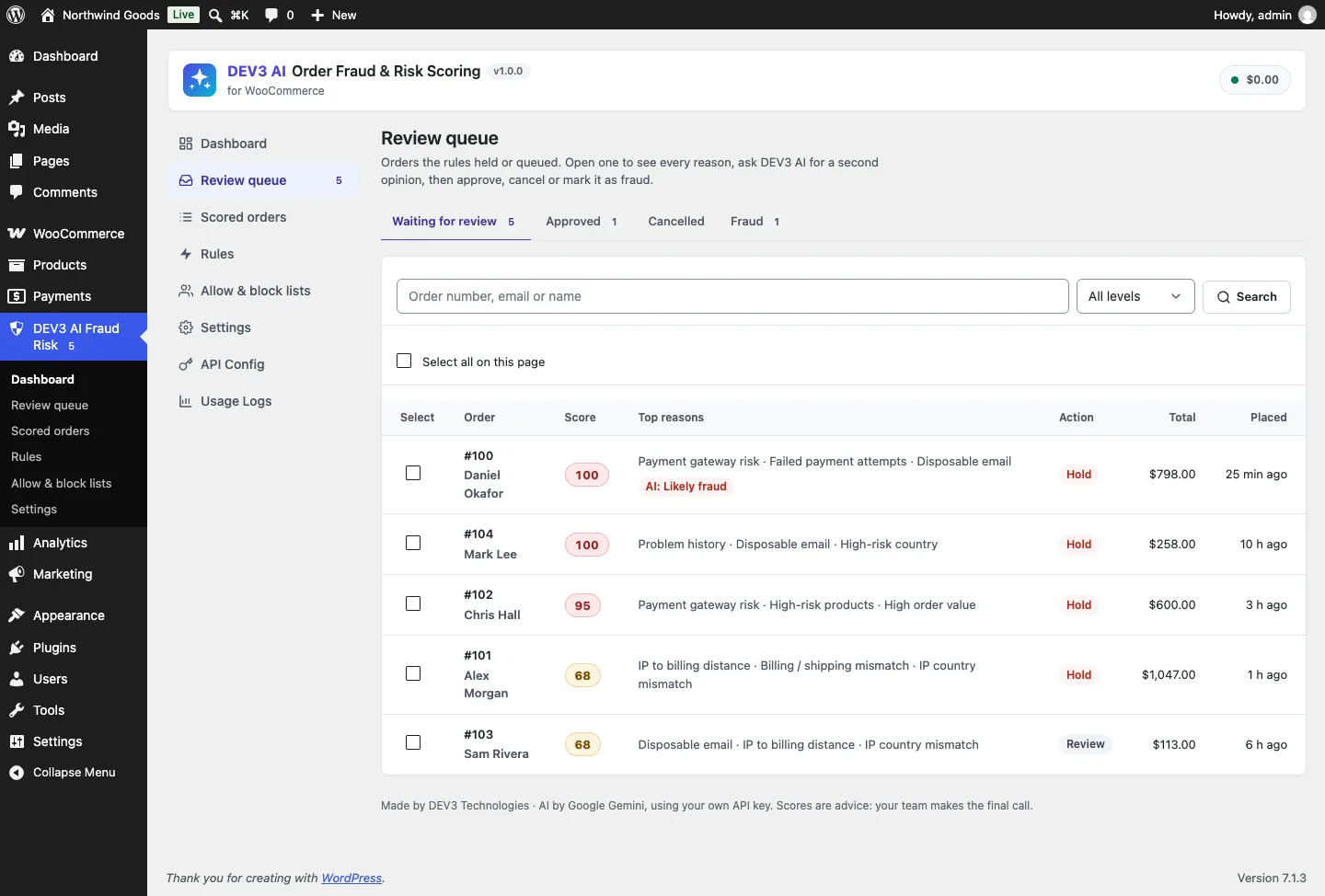
The review queue: every held or queued order with its score, top reasons, action and age.
Checking from the order screen. The same score lives on the WooCommerce order itself: a Risk column on the orders list and a Fraud risk box on the edit screen with every reason and its points.
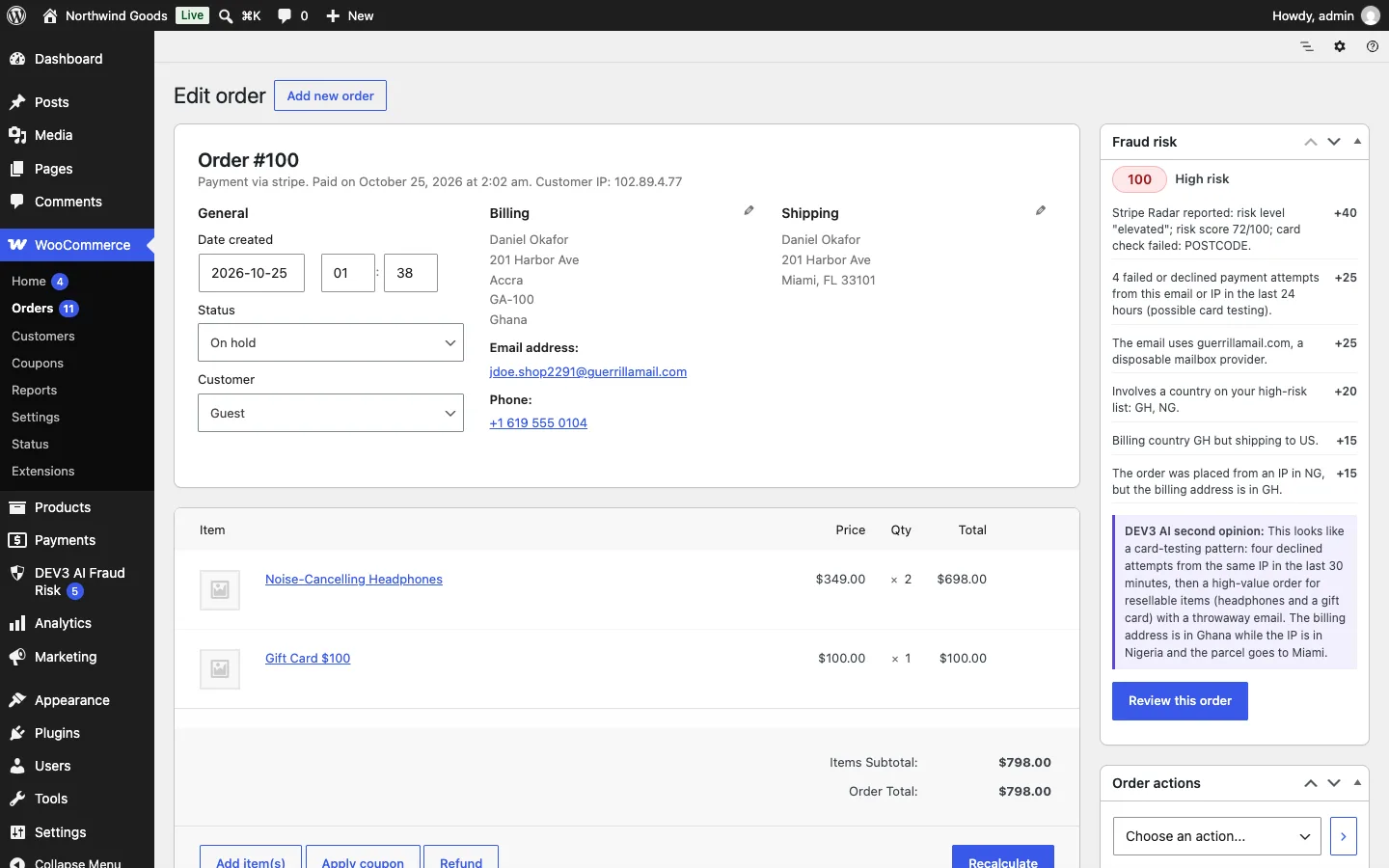
The Fraud risk box on the order screen, with the AI opinion shown as advice.
Asking for a second opinion. On a borderline order, click Get a second opinion with DEV3 AI. You get a verdict, a confidence, reasons and Checks before you ship. Use suggestion only pre-selects a decision; you still confirm it.
Tuning rules. Use Test on an order to dry-run unsaved changes against a real order, and after a few weeks of decisions, Tune my rules with DEV3 AI proposes new points and thresholds as a draft you accept or discard.
Why timing is the hard part
Every enabled signal returns points and a sentence: "4 failed or declined payment attempts from this email or IP in the last 24 hours", "The order was placed from an IP in NG, but the billing address is in GH". The engine adds them up and clamps to 0–100. That part is ordinary, and 13 engine tests cover it.
The hard part is that a WooCommerce order is not one event. It is a series of hooks, and the plugin listens to six lifecycle hooks (plus order deletion, to remove scores):
add_action( 'woocommerce_checkout_order_processed', array( $this, 'on_classic_checkout' ), 20, 3 );
add_action( 'woocommerce_store_api_checkout_order_processed', array( $this, 'on_block_checkout' ), 20 );
add_action( 'woocommerce_payment_complete', array( $this, 'on_paid' ), 20 );
add_action( 'woocommerce_order_status_changed', array( $this, 'on_status' ), 20, 4 );
add_action( 'woocommerce_order_status_failed', array( $this, 'on_failed' ), 10, 2 );
add_action( 'wc_gateway_stripe_process_response', array( $this, 'on_stripe' ), 20, 2 );
(condensed from Processor::register)
Each one carries different evidence and needs a different answer to the question "may I change this order now?". The rest of this section walks through them.
Score at checkout, but don't touch a pending order
When the classic or block checkout creates the order, the plugin saves the request-time IP location (exact coordinates when the host sends Cloudflare's CF-IPLatitude/CF-IPLongitude headers) and scores the order straight away. It does not apply an action:
public static function capture_checkout( \WC_Order $order ) {
	$geo = Geo::from_request( (string) $order->get_customer_ip_address() );
	if ( '' !== $geo['country'] ) {
		$order->update_meta_data( '_dev3fr_ip_geo', $geo );
		$order->save();
	}
	self::evaluate( $order, array( 'stage' => 'checkout' ) );
}
(condensed from Processor::capture_checkout)
There is no apply flag. At this point the order is pending: the shopper may be on a 3-D Secure screen or a PayPal redirect. Changing the status to On hold now would interfere with the gateway completing payment, and a pending order hasn't cost the merchant anything yet. The test test_checkout_scores_without_acting pins this down: a 100-point order is scored, gets an order note and stays pending, with applied still 0.
Scoring early still matters. The score is in the database before payment, so the order note and the risk column are there as soon as staff look, and the velocity counts for the next order from the same IP already include this one.
Act when paid, through two doors
The action is applied once the money is real. Most gateways fire woocommerce_payment_complete. Some don't: cash on delivery and bank transfer move straight to Processing, or a manager changes the status by hand. So the plugin also watches the first move to Processing or Completed:
public function on_status( $order_id, $from, $to, $order = null ) {
	if ( self::$busy || ! in_array( $to, array( 'processing', 'completed' ), true ) ) {
		return;
	}
	$row = Store::get( $order->get_id() );
	if ( $row && $row['applied'] ) {
		return;
	}
	// A shop manager marking the order paid in wp-admin is a human decision: score and queue, never re-hold.
	$human = is_admin() && ! wp_doing_ajax() && current_user_can( 'edit_shop_orders' );
	self::evaluate( $order, array( 'stage' => 'paid', 'apply' => ! $human ) );
}
(condensed from Processor::on_status)
Three guards are packed in here.
appliedon the score row means the paid-stage action has already run, so the second door is a no-op when the first one already fired.$busyis a static flag the plugin sets while it changes a status itself. When the plugin moves an order to On hold, or a reviewer's approval moves it back to Processing, WooCommerce fireswoocommerce_order_status_changedagain. Without the flag, approving an order would trigger a rescore that holds it again.- A person in wp-admin is a decision. If a shop manager marks a bank-transfer order as Processing, the plugin scores and queues it but doesn't override them with a hold.
Orders that didn't come through the storefront are treated the same way. auto_eligible() only allows automatic holds on orders created via checkout or store-api; staff-created and imported orders are scored but never held, which test_staff_created_orders_are_not_held checks.
Escalate, never relax
Stripe Radar's outcome arrives in wc_gateway_stripe_process_response, sometimes after the order is already paid and Processing. The plugin stores the outcome (risk level, risk score, outcome type, CVC and address checks) in order meta and rescores, applying only if the order is paid. That raises a question the first two hooks didn't: what if the action was already applied?
if ( in_array( $row['review_status'], array( 'approved', 'cancelled', 'fraud' ), true ) ) {
	return $row;
}
if ( ! self::auto_eligible( $order ) ) {
	return Store::upsert( $order->get_id(), array( 'applied' => 1 ) );
}
$action   = $result['action'];
$previous = (string) $order->get_meta( '_dev3fr_applied_action' );
if ( $row['applied'] && Rules::severity( $action ) <= Rules::severity( $previous ) ) {
	return $row;
}
(condensed from Processor::apply)
Actions have a severity: none 0, flag 1, review 2, hold 3, cancel 4. A later rescore may raise the action (a flagged order can become held when Radar reports "highest") but can never lower it. If a new signal happened to bring the score down, the order is not quietly released; it stays in the queue until a person decides. In test_stripe_radar_outcome_escalates_a_paid_order, a Processing order receives a Radar outcome with risk level "highest", risk score 91 and a failed CVC check. The gateway signal is worth 65 points, the order moves to On hold, and the gateway reason becomes the top reason.
The first check matters even more: a human decision ends automation. Once a reviewer has approved, cancelled or marked an order as fraud, no later hook can change it. test_review_decisions approves a held order and then checks that it is still Processing afterwards, with no re-hold.
Failed payments are evidence too
woocommerce_order_status_failed doesn't change any score directly. It logs a failed_payment event with the email hash and IP. Stripe's issuer_declined, blocked and invalid outcomes are logged the same way. The next order from that email or IP counts those events in its card-attempts signal, which is how a card-testing run (several declines, then one successful high-value order) gets caught on the order that actually goes through.
Never cancel by default
The thresholds map scores to actions, and custom rules can raise them further. Before the result leaves the engine, two switches can lower it:
if ( 'cancel' === $action && empty( $rules['auto_cancel'] ) ) {
	$action = 'hold';
}
if ( 'hold' === $action && empty( $rules['auto_hold'] ) ) {
	$action = 'review';
}
(from Engine::decide)
Auto-cancel is off by default, so a 100-point order is held, not cancelled. A cancelled order means a refund and an email to someone who may be a real customer with an unusual address. A held order costs a few minutes of a person's time. Merchants who switch auto-cancel on get exactly what they asked for (test_auto_cancel_when_switched_on). With auto-hold off, risky orders are only queued and keep shipping (test_auto_hold_off_only_queues).
Allow and block lists sit outside this ladder. An allow-list match returns score 0 and action allow before any signal runs. A block-list match forces the score to 100 and uses the configured block action, hold by default. A matching custom allow rule beats every threshold, but never the block list.

Illustration: the order is scored at checkout, held only after payment, and released by a person.
Back-scans that don't rewrite history
Installing a fraud tool on a store with existing orders leaves the velocity and history signals empty. The Scan past orders job scores the last N days in chunks of 25 through the shared job runner, with stage scan: no apply, no order notes and no list hit counts.
The subtle part is time. Velocity counts windows like "orders from this IP in the last 24 hours". For a live order, "now" is the current time. For a three-day-old order in a back-scan, "now" has to be that order's creation time, or every past order would look as if it was placed today. Context::build only passes the current time for the checkout, paid and gateway stages; otherwise the window ends at the order's own date. test_back_scan_scores_without_touching_orders creates three orders a day apart, runs the scan, and checks that all three stay Processing with applied at 0, and that the last one still fires email_velocity. Its comment says what the test is for: "Velocity uses order dates in back-scans".
Where the AI fits, and where it doesn't
None of the lifecycle above involves AI. The second opinion is called from the review screen, a batch job or, if switched on, for newly queued orders above a chosen score. It receives a minimised set of facts: total and currency, item categories and quantities, countries, the IP-to-billing distance in km, the email domain, guest or registered, gateway outcome, history counts and velocity. It never receives the name, street, phone or full email, and a REST test captures the outgoing request and asserts that none of them appear in it, and that the order status is unchanged afterwards. The answer is stored with the score row and shown next to the rule reasons. It cannot call apply(). Even the automatic opinion for queued orders runs only after the rules have already held the order. The rule-tuning advisor works the same way: it sees only aggregated counts of how often each signal fired on approved and fraud orders, and returns a draft.
All AI paths were tested with mocked Google Gemini API responses; no live-key run has been done yet, so we make no claims about opinion quality.
Proving it on both order storages
Hooks behave slightly differently on legacy post storage and on HPOS. The plugin reads and writes orders only through WooCommerce CRUD and keeps velocity data in its own tables, but we wanted proof. test_full_flow_on_hpos_and_legacy_storage switches storage, places a risky paid order, checks that it is held and stored in the right table, approves it, deletes it and checks the score row is gone, then repeats in the other mode. It also asserts that the HPOS tables exist, so the test can't pass by quietly running only the legacy branch.

On a phone, the review queue collapses to cards.
Results and limits
The plugin has 71 PHPUnit tests running in wp-env. 51 are for the plugin itself: 13 engine, 20 order lifecycle, 8 lists and rules, and 10 REST and AI. The other 20 cover the shared core. There are also 30 Jest tests: 10 for the admin and 20 for the shared UI kit. Build, PHP_CodeSniffer at 0 errors and 0 warnings, make-pot and packaging all pass.
Two limits are worth stating. The admin screens need manage_options unless a site changes that through the dev3fr_manage_capability filter, so shop managers don't see the queue out of the box. Gateway signals for Stripe and WooPayments are read from documented response fields and order meta and were tested against stubs of those documented shapes, not against a live Stripe or WooPayments account.
DEV3 AI Order Fraud & Risk Scoring ships in the DEV3 AI WooCommerce Plugins Bundle on the DEV3 marketplace, alongside 20 other WooCommerce plugins, and is being prepared for CodeCanyon. For the full design, test breakdown and screenshots, read the case study.