
Logs are the best evidence for why a WordPress site broke, and they're also full of things that must never leave the server. A single debug.log can contain Access denied for user 'shop_live'@'10.0.0.12', a Stripe secret key in a failed API call, a session cookie from a "headers already sent" warning, an absolute path that shows the hosting account name, and the email address of the customer whose order failed. DEV3 AI Site Health & Security Log Analyst asks the Google Gemini API to explain these issues in plain words, so before any request we had to answer one question: what exactly is allowed to leave the site? This post walks through the redactor that runs in front of every AI call, the order its rules run in, and how the tests prove the outgoing request is clean.
What it does and who it's for
DEV3 AI Site Health & Security Log Analyst collects the signals a WordPress site already produces (the PHP error log, Site Health tests, failed logins, suspicious requests, plugin and theme changes, updates, cron, slow queries and file checksums) and groups them into a short, ranked list of issues. Each issue gets a built-in explanation and, with an API key, a plain-words AI explanation with fix steps. Nothing on the site changes unless an admin turns on fixes and confirms each one.
- Site owners who see "There has been a critical error" and need to know what broke and who should fix it.
- Agencies looking after many client sites, who want a weekly email with a health score instead of reading logs.
- Developers who want repeated errors grouped by fingerprint, with counts and first and last seen.
- Security-minded admins who want failed logins, probes and modified core files in one place, without a heavy firewall plugin.
- Privacy-conscious teams who need proof that logs are masked before any AI request.
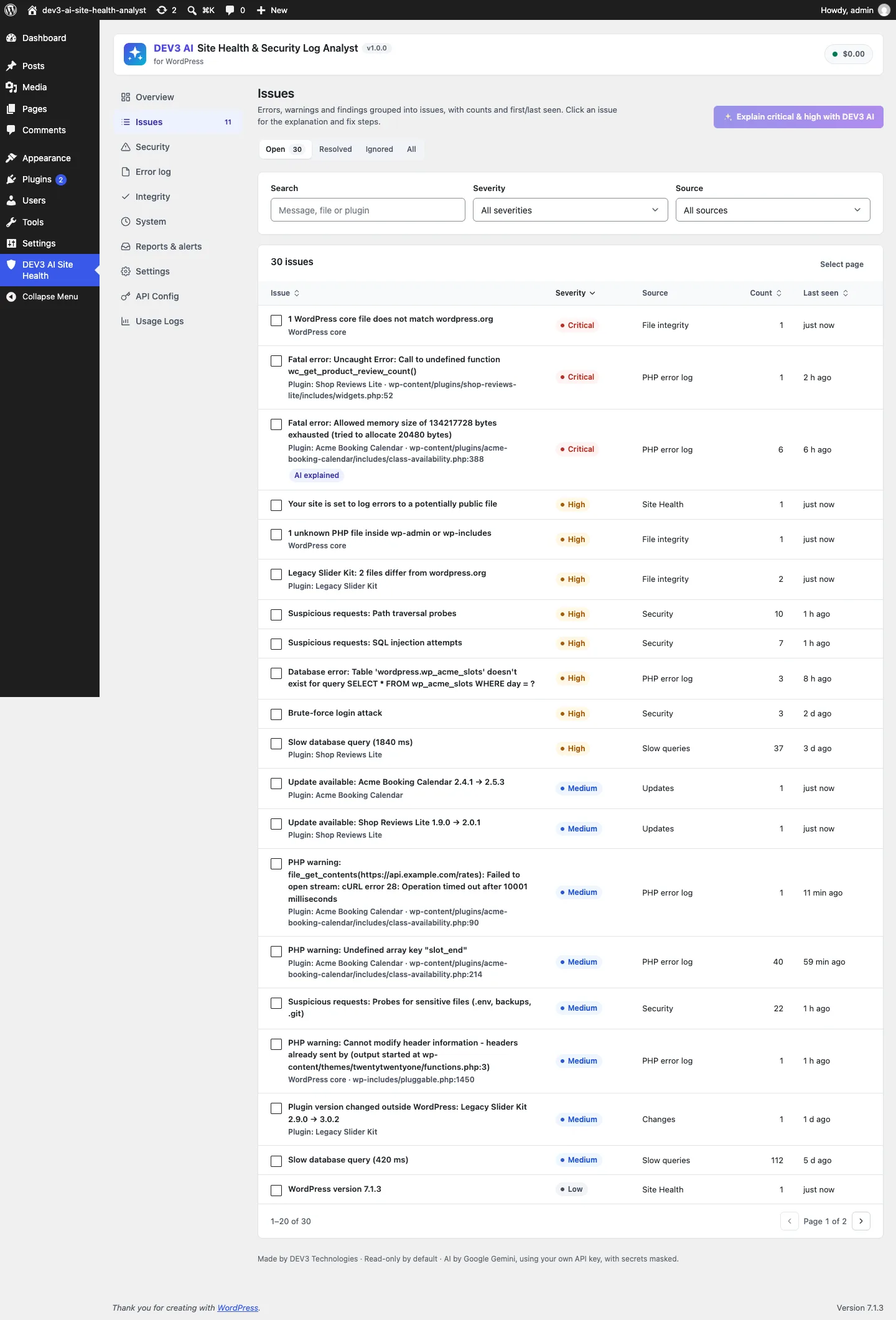
Errors, file checks and security events become one ranked list; 40 copies of a warning are one issue with a count.
How to set it up
- Install the plugin zip from the bundle in Plugins → Add New → Upload Plugin and activate it.
- Make sure PHP errors are logged (for example
WP_DEBUG_LOGinwp-config.php). The Error log screen shows the snippet if they aren't. - Open DEV3 AI Site Health → Overview and click Scan now. After that, checks run every hour.
- Optional: add a Google Gemini API key in API Config, or define
DEV3SH_GEMINI_API_KEYinwp-config.php. - In Reports & alerts, add recipients for alerts and the weekly report.
How to use it
Fix the top issues. Open Issues, start with critical and high, and open one. Read the built-in explanation or click Explain with DEV3 AI for a summary, likely cause, impact, numbered steps and who should do them. Mark it resolved when it's done. If it comes back, it reopens as regressed.
Watch security. Security shows failed logins, probe types and the busiest addresses. With fixes allowed, an address can be blocked after a preview and confirmation.
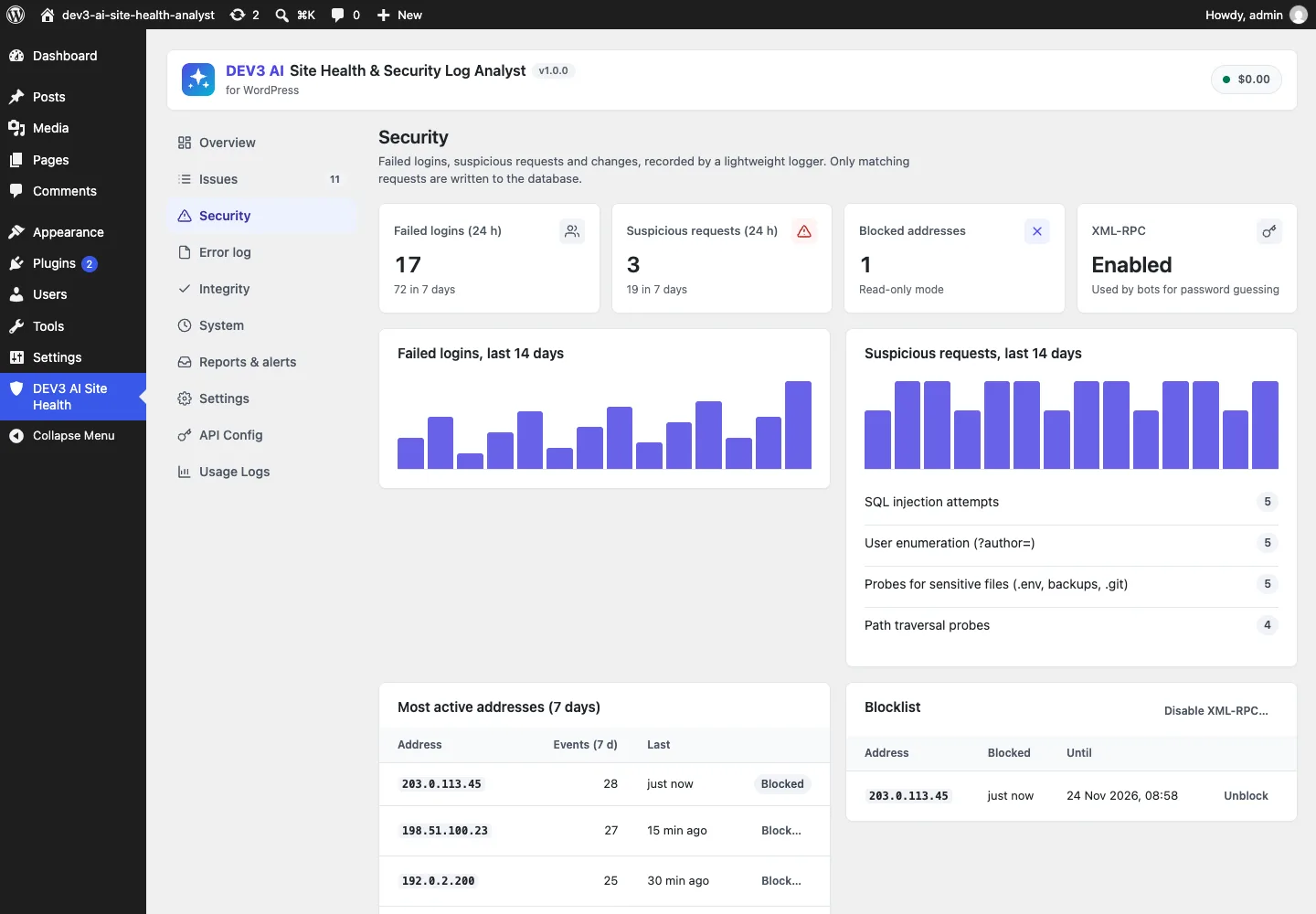
Only requests that match a rule are written to the database, at most 30 per IP per minute.
Check your files. Integrity compares WordPress core and wordpress.org plugins with the official checksums and lists changed or unknown files.
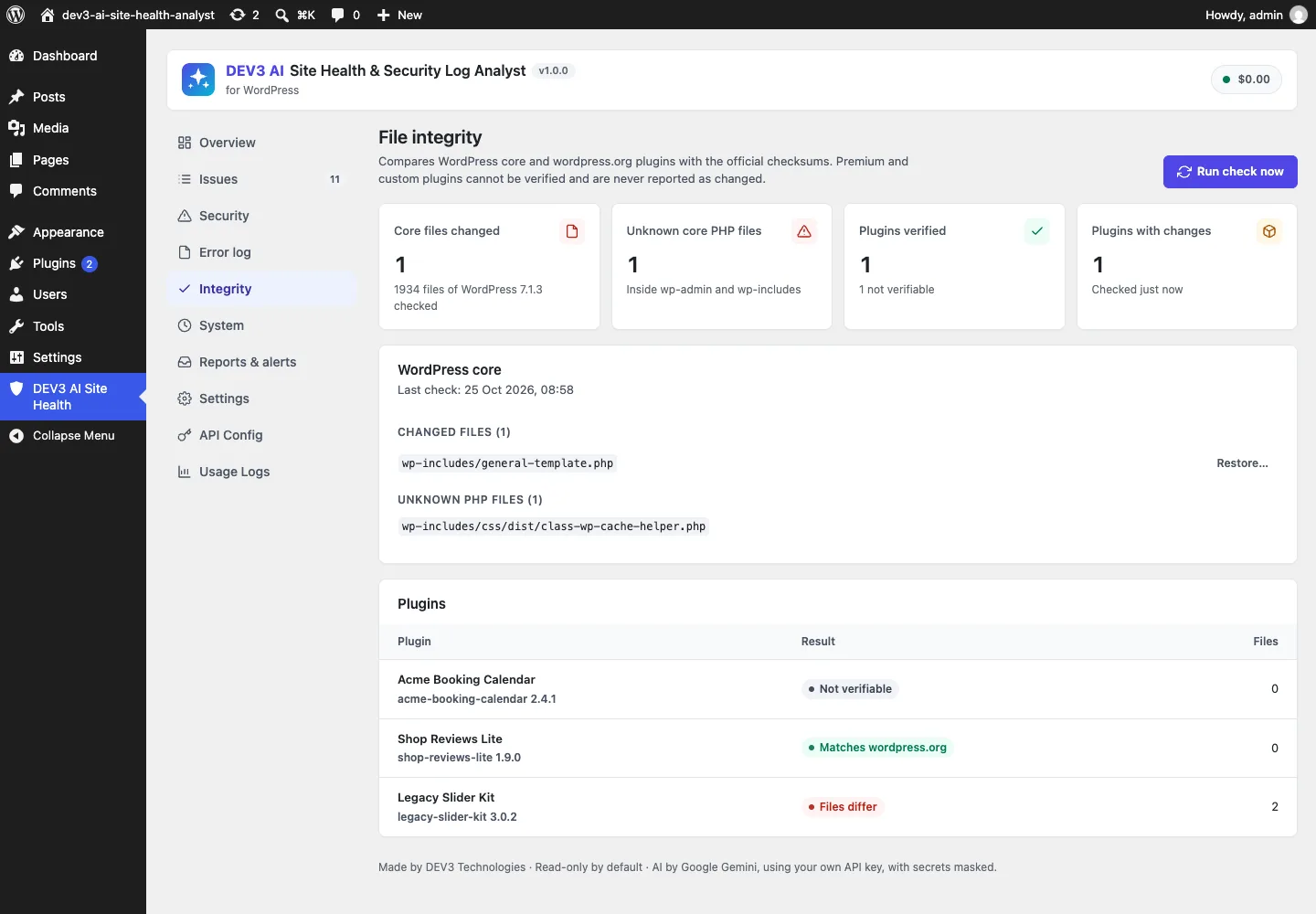
Plugins that aren't on wordpress.org are "not verifiable", never "modified".
Read the weekly report. Reports & alerts previews the weekly email and can send it now.
What the AI actually receives
The redactor is the last step. Before it, Explainer::payload() decides which fields go out at all, and it's deliberately small:
public static function payload( array $issue ) {
	self::prepare_literals();
	$details = $issue['context']['details'] ?? null;
	if ( is_array( $details ) ) {
		unset( $details['ip'] ); // Never send IPs, even masked placeholders add nothing.
		foreach ( array( 'modified', 'missing', 'added', 'unknown', 'hooks' ) as $list ) {
			if ( isset( $details[ $list ] ) ) {
				$details[ $list ] = array_slice( $details[ $list ], 0, 15 );
			}
		}
	}
	$data = array(
		'source'      => $issue['source'],
		'title'       => $issue['title'],
		'message'     => mb_substr( (string) $issue['message'], 0, 1500 ),
		'file'        => $issue['file'],
		'component'   => $issue['component'],
		'occurrences' => self::bucket( (int) $issue['count'] ), // "10-99 times", not the exact count
		'first_seen'  => substr( (string) $issue['first_seen'], 0, 10 ), // date only
		'samples'     => array_slice( (array) $issue['context']['samples'], 0, 3 ),
		'details'     => $details,
	);
	return array(
		'issue'       => Redactor::mask_deep( $data ),
		'environment' => Redactor::mask_deep( self::environment() ),
	);
}
(from Ai/Explainer.php, condensed)
Leaving data out is the first layer of masking. IP addresses are dropped, not masked. Counts are bucketed ("10-99 times"), timestamps are cut to the date, at most three raw samples go out, each capped at 900 characters, and file lists are capped at 15. The environment block (WordPress and PHP versions, active plugin slugs and versions) has its own test that asserts it contains no paths.
prepare_literals() adds site-specific values that no pattern could know about. It loads up to 300 users' login names, nicenames and display names and the admin email, and registers them as literals to mask, skipping very short names and generic words such as "admin", "user" and "editor" that would wreck ordinary messages.
Then everything goes through Redactor::mask_deep(), which walks arrays and masks every string.
The redactor: order matters
Redactor::mask() is a sequence of regex passes, and most of the design is in the order. Each pass replaces a sensitive span with a placeholder such as [email], [api-key] or [path]/file.php, which a later pass won't match again.
1. Emails before hosts
Emails go first. Later, the site host is replaced with [site], and if that ran first, orders@shop.example would become orders@[site], which still reveals the mailbox. A second pass after the host replacement catches user@[site] addresses for local hosts without a dot.
2. Secrets with a known shape
Credentials in URLs (scheme://user:pass@) come next, then tokens recognisable by their prefix:
$patterns = array(
	'/\bAIza[0-9A-Za-z_\-]{20,}/'                     => '[api-key]', // Google
	'/\b(?:sk|pk|rk)_(?:live|test)_[0-9A-Za-z]{8,}/'  => '[api-key]', // Stripe
	'/\bsk-(?:proj-)?[0-9A-Za-z_\-]{16,}/'            => '[api-key]', // OpenAI
	'/\bgh[pousr]_[0-9A-Za-z]{20,}/'                  => '[api-key]', // GitHub
	'/\bxox[abposr]-[0-9A-Za-z-]{10,}/'               => '[api-key]', // Slack
	'/\b(?:AKIA|ASIA)[0-9A-Z]{16}\b/'                 => '[api-key]', // AWS
	'/\beyJ[0-9A-Za-z_-]{8,}\.[0-9A-Za-z_-]{8,}\.[0-9A-Za-z_-]{8,}/' => '[jwt]',
	'/\b(Bearer|Basic|Token)\s+[0-9A-Za-z._~+\/=-]{8,}/i' => '$1 [token]',
);
(from Analyze/Redactor.php)
These run before the generic key/value rules, so Authorization: Bearer abc… ends up as Bearer [token] rather than losing the word "Bearer". That word helps the AI tell an authentication failure from a parse error.
3. Secrets by their name
Most leaked secrets don't have a recognisable shape. They're whatever follows password=, 'DB_PASSWORD', or "client_secret":. The redactor builds one alternation of secret-like key names (password, passwd, pwd, secret, token, api key, authorization, auth key and salt, nonce key, private key, access key, client secret, licence key, plus short keys such as key, pass, auth, sig) and applies it in four syntaxes:
// PHP defines: define( 'DB_PASSWORD', '…' )
$t = preg_replace( "/(define\\(\\s*['\"]" . $keys . "['\"]\\s*,\\s*)(['\"]).*?\\2/i", '$1$2[secret]$2', $t );
// JSON and PHP arrays: "client_secret": "…" / 'api_key' => '…'
$t = preg_replace( "/(['\"]" . $keys . "['\"]\\s*(?:=>|:)\\s*)(['\"])(?:\\\\.|(?!\\2).)*\\2/i", '$1$2[secret]$2', $t );
// Query strings and assignments: token=…&page=2
$t = preg_replace( '/(\b' . $keys . '\s*=\s*)("[^"]*"|\'[^\']*\'|[^\s&;,]+)/i', '$1[secret]', $t );
// Headers: X-Api-Key: …
$t = preg_replace( '/(\b' . $keys . '\s*:\s*)(?!\[secret\]|(?:Bearer|Basic|Token)\s)("[^"]*"|\'[^\']*\'|[^\s,;]+)/i', '$1[secret]', $t );
(from Analyze/Redactor.php, condensed)
The query-string rule stops at &, so ?token=abc123&page=2 becomes ?token=[secret]&page=2. The non-secret parameter stays because it might matter for the diagnosis. The header rule skips values that the bearer-token pass has already handled. WordPress auth cookies (wordpress_logged_in_*, wordpress_sec_*), wp-settings-* and PHPSESSID values are masked by name.
The test has nine inputs, one per syntax: a callback URL, password=hunter2, two define() lines (DB password and auth key), a JSON client_secret, a PHP array api_key, an X-Api-Key header, a logged-in cookie and a PHPSESSID. It asserts the secret is gone from each.
4. Database credentials
MySQL errors have their own shape. Access denied for user 'shopdb_user'@'10.0.0.12' (using password: YES) becomes Access denied for user '[db-user]'@'[db-host]' (using password: [masked]). DSNs such as mysql://root:pw@db.internal:3306/shop (also mysqli, pgsql, redis and mongodb, including +srv) become mysql://[dsn]. The test checks that the user name, the internal IP and the internal host name are all gone.
5. Host, then paths, keeping what's useful
The site's host (with and without port, from both home_url() and site_url(), longest first) becomes [site]. Then paths: anything under the WordPress root is rewritten relative to it, and other absolute paths keep only the file name.
$t = Fingerprint::relative_in_text( $t ); // ABSPATH/wp-content/plugins/acme/x.php → wp-content/plugins/acme/x.php
// Absolute paths outside WordPress keep only the file name. URLs (after "//" or a host) are kept.
$t = preg_replace( '#(?<![\w.\]:/\\-])(?:[A-Za-z]:)?(?:/|\\\\)(?:[\w .@-]+(?:/|\\\\))+([\w.@-]+)#', '[path]/$1', $t );
(from Analyze/Redactor.php)
This is where redaction can destroy the diagnosis if it's careless. wp-content/plugins/acme/inc/cart.php is exactly what the AI needs to say "the Acme plugin's cart code". /home/client7/private/secrets.php reveals the hosting account and isn't needed beyond secrets.php. The lookbehind stops the pattern from matching inside URLs, so https://wordpress.org/support/ survives. Windows paths with a drive letter are handled too.
6. Opaque blobs, users, IPs and PII
Hex strings of 32 or more characters become [hash], and base64-looking runs of 40 or more become [blob]. These are often tokens, salts or nonces with no recognisable name next to them. Then the user-name and email literals from prepare_literals() are replaced as whole words, followed by IPv6 and finally the shared core's PII masking (emails, card numbers, IPv4, phone numbers).
IPv6 needed a guard. The colon patterns that match 2001:db8::7334 also match PHP's Class::method. The callback masks a match only if it contains a digit, because real IPv6 addresses do and method names like Feed::add don't.
The last line runs a dev3sh_redact filter, so an agency can add its own rules, such as replacing a client's company name.

Illustration: secrets and personal data are swapped for placeholders before the request leaves the site.
Not destroying the message
Masking everything is easy and useless. One test exists only to stop over-masking:
$msg = 'Uncaught Error: Call to undefined function Feed::add() at 10:11:12 in wp-content/themes/shop/functions.php version 6.8.1';
$out = Redactor::mask( $msg );
$this->assertStringContainsString( 'Feed::add()', $out );                         // not an IPv6 address
$this->assertStringContainsString( '10:11:12', $out );                            // a time, not an address
$this->assertStringContainsString( 'wp-content/themes/shop/functions.php', $out ); // WordPress-relative path kept
(from tests/php/RedactorTest.php)
Probe paths such as /?author=1 stay readable, so the AI can explain user enumeration. Non-secret query parameters stay. Version numbers stay, because "WordPress 6.8.1 with PHP 8.3" often is the diagnosis.
Proving it end to end
Unit tests on mask() show that each rule works. They don't show that every field of a real request went through it. So one test builds a deliberately leaky issue (a customer email, a user login and display name, a Stripe live key, a password, an IP, a Google API key, an FTP user name, the absolute WordPress path, the site host and the admin email), calls the real issues/<id>/explain REST route with a mocked API response, captures the raw outgoing HTTP body, and asserts that none of those strings appear in it. The follow-up "Ask DEV3 AI" box has its own test: the admin's typed question is masked too, and the answer isn't stored.
Admins can check this themselves. The issue drawer's Masked data sent to DEV3 AI view shows the exact payload the AI would receive, built by the same payload() function.
With no key, or with AI switched off, no HTTP call is made at all (also tested), and every issue still has a built-in explanation with steps from the plugin's knowledge base.
Testing
The plugin has 72 PHPUnit tests and 32 Jest tests, counted from the repository. Eight of the PHP tests cover the redactor and the masked request above. Others cover the log tail (only new bytes are read, rotation and truncation are detected without double counting, stack traces fold into one entry), fingerprint grouping and regression, the health score caps, request rules and the per-IP write cap, brute-force detection, the change log and FTP snapshot diff, cron and slow queries, file integrity for core and for plugins on and off wordpress.org, and the opt-in fixes with single-use confirmation tokens and undo. The AI calls were tested with mocked responses; a run with a live key is next.
Trade-offs
- Regex redaction is best effort. A secret with no telling name and no known shape that's shorter than 32 hex or 40 base64 characters can slip through. The payload preview and the
dev3sh_redactfilter exist for exactly that reason, and the explanation still works on the masked text. - Some useful context is lost. Exact counts, times and IPs would occasionally help a diagnosis. We decided they don't help enough to send.
- User-name masking can over-match. A user called "booking" would mask that word in messages. Short and generic names are skipped, but site-specific words can still collide.
- Logs only. PHP errors are read from log files, so logging must be enabled; errors that never reach a log aren't seen.
Conclusion
Before sending operational data to a model, decide what leaves at all, mask the rest in an order where each rule protects the next, test both that secrets go and that meaning stays, and then capture the real outgoing request and check it. The case study covers the rest of DEV3 AI Site Health & Security Log Analyst, from the log tail to opt-in fixes. The plugin ships in the DEV3 AI Content, SEO & Site Tools Plugins Bundle on the DEV3 marketplace and is being prepared for CodeCanyon.