
DEV3 Technologies home

ClinicPro V3 – Clinic & Practice Management SaaS: EMR, Billing & Insurance with Gemini AI admin tools (Next.js)

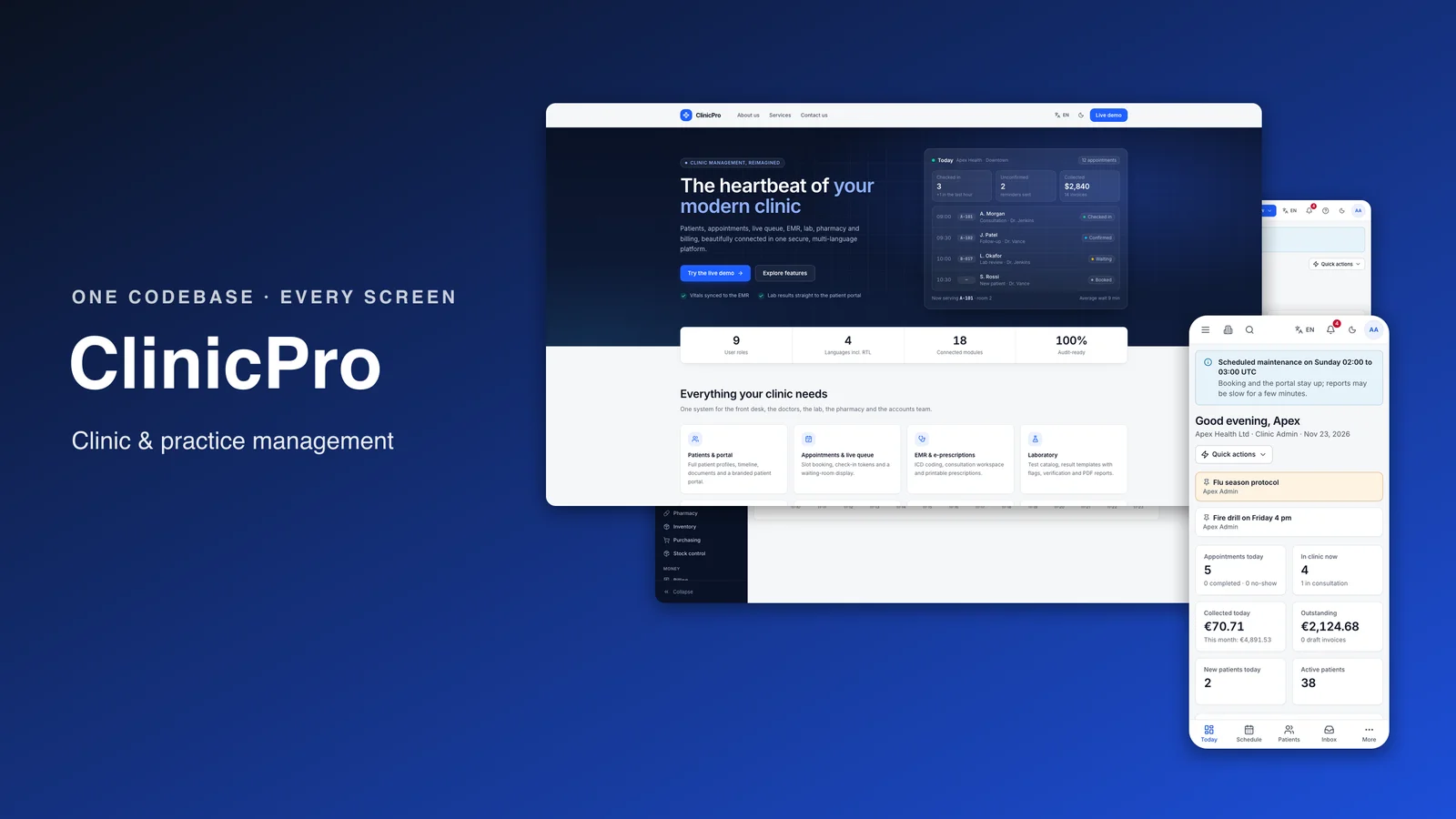
The complete clinic OS: scheduling with waitlist and online booking, EMR and clinical inbox, billing, insurance claims, stock and purchasing, rota and payroll, campaigns, 35 reports and a patient portal, with custom roles and Gemini AI admin tools.
by DEV3 TechnologiesVerified AuthorUpdated 22 Oct 2026

Black Friday: up to 30% off

This item is 30% off: $69.30 instead of $99

Ends in
--
Days
--
Hrs
--
Min
--
Sec

Feature walkthrough

Prefer YouTube? Watch it there.

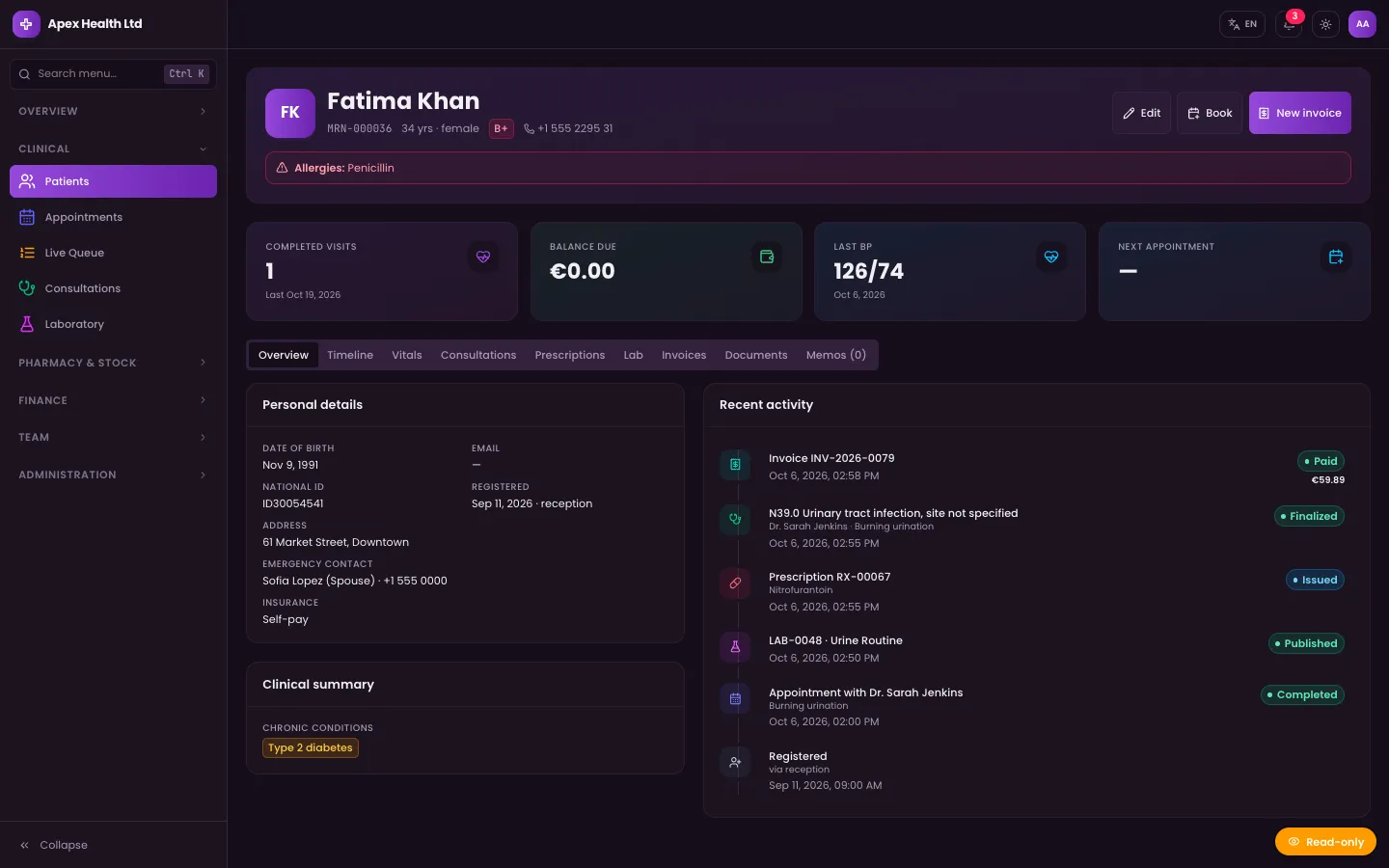
ClinicPro V3 is a self-hostable, multi-tenant SaaS for clinics and medical practices, built by DEV3 Technologies on Next.js 15 (App Router + Server Actions) and MongoDB. One installation serves many clinics, each with its own locations, staff, roles, branding, currency and language, plus a patient portal, public booking page, self check-in kiosk and waiting-room display. V3 covers every corner of running a practice in a fast, redesigned interface with light and dark themes.

Try it: the live demo is read-only with one-click logins for every role (Clinic Admin, Doctor, Nurse, Receptionist, Accountant, Pharmacist, Lab Technician, Patient and Super Admin).

What's new in V3

  • Interface – grouped navigation with a location switcher, Cmd-K command palette, role dashboards that answer "what needs me now", saved views, filters, bulk actions and export on every list, phone cards and bottom tabs.
  • Practice setup and security – locations with hours and holidays, custom roles with scopes, two-factor sign-in, active sessions, IP allowlist.
  • Scheduling – resource and agenda calendars, rooms and equipment, group sessions, waitlist offers, deposits and cancellation fees, a public booking page and embeddable widget.
  • Clinical – problem list, medication reconciliation, coded allergies, immunisations, clinical inbox with tasks and result sign-off, referrals, letters and certificates, telehealth, order sets and outcome measures.
  • Money and insurance – estimates, payment links, payment plans, one approvals queue, credit notes, statements, cash drawer, packages, memberships, gift cards, payers, eligibility, claim scrubber, batches and remittance posting (simulated clearing house).
  • Stock and team – suppliers, purchase orders, goods receipt, stock takes, transfers, controlled-drug register, batch recall, rota with swaps, leave balances, timesheets and commission.
  • Engagement and insight – two-way messaging, recalls, campaigns, NPS surveys, a 35-report catalogue with a custom builder and schedules, API keys, signed webhooks, retention and privacy tools.
  • Gemini AI admin tools – drafts, summaries and suggestions across the admin modules. Add your own Gemini key; the AI controls stay inactive without one.

The clinical workflow, end to end

  • Patients – MRN sequence, duplicate merge with undo, family links, allergies and chronic conditions, insurance, documents and a visit timeline. National ID, policy number and clinical notes are encrypted at rest (AES-256-GCM).
  • Appointments and queue – doctor schedules, a slot engine that blocks double-booking, live queue tokens, nurse vitals and a full-screen waiting-room display.
  • EMR and prescriptions – autosaving consultation workspace with ICD-10/ICD-11 search, prescription PDFs with QR verification and signed finalisation with addenda.
  • Laboratory and pharmacy – result-template builder with reference ranges, sample to publish workflow, First-Expiry-First-Out dispensing and stock alerts.
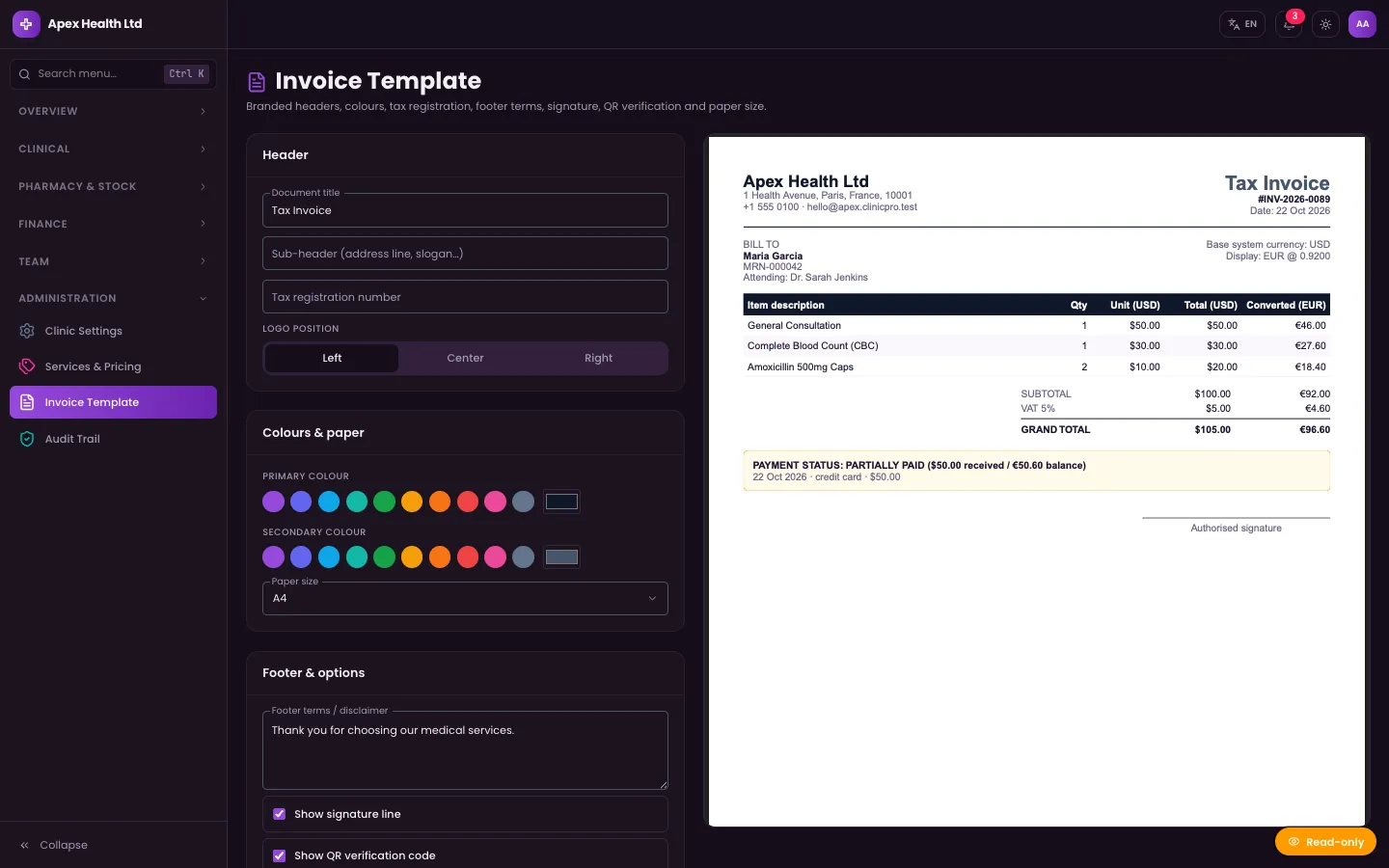
  • Billing and HR – invoices drafted from visits, lab and pharmacy lines, split payments, refunds, an invoice template builder, attendance, leave and payroll.

Built for many clinics on one platform

  • Tenant isolation enforced twice: every query is filtered by clinic, and a Mongoose plugin throws on any query that is missing the clinic filter.
  • RBAC: built-in roles plus custom roles, each permission granted at an all, read or self scope and checked on every server action.
  • Multi-currency with integer-cent amounts and exchange-rate snapshots on every invoice.
  • 4 languages (English, Arabic, Hebrew, Spanish) with full right-to-left layouts.
  • Super Admin console: provision clinics, gate modules by plan, manage subscriptions, translations, logs and the audit trail, and edit the public website through the built-in CMS.

What's in the package

  • Full TypeScript source, .env.example, README, CHANGELOG and an upgrade guide for 1.x installs.
  • Hundreds of Vitest tests plus RTL, segment and server-action checks.
  • 4-step web installer, Docker Compose and PM2 configuration, cron endpoints, backup and restore, and a read-only demo mode.
  • HTML documentation: help file, installation guide and project documentation.

Requirements

  • Node.js 20.9 or newer and npm
  • MongoDB 5 or newer (a replica set or Atlas is recommended)
  • Optional: Stripe, Cloudinary, SMTP and a Google Gemini API key

Native iOS app included

The download now also contains ClinicPro iOS, a native iPhone and iPad app built with SwiftUI for iOS 26 and Swift 6, in the iOS-App/ folder. One app serves visitors, patients and clinic staff through the included /api/mobile layer, and each screen appears only when the user's role permissions and the clinic's plan modules allow it, using the same rules as the web app.

  • Visitors: the public website rendered natively from the CMS, a clinic directory with each clinic's doctors, services, prices and hours, pricing plans, the contact form and one-tap demo sign-in.
  • Patients: book, reschedule and cancel visits, see lab results, prescriptions and visit notes, pay invoices with Stripe and download PDFs.
  • Clinic staff: today's dashboard and schedule, the live queue with vitals and walk-ins, patient files with vitals charts and document scanning, doctor consultations (notes, ICD diagnoses, prescriptions, lab orders, finalise and addenda), lab result entry, pharmacy dispensing, billing, attendance and leave.
  • Admin console: stock, expenses, payroll, staff and schedules, services, settings, the lab catalogue and the audit log, rendered from server-described screens; Super Admins get the platform console and can pick a clinic.
  • Four languages: English, Arabic, Hebrew and Spanish, with right-to-left layouts for Arabic and Hebrew.
  • iOS integration: push notifications for bookings and published results, a Home Screen widget (next visit or today's queue), Spotlight, Siri and Shortcuts, Handoff, Universal Links and a Face ID lock.

Rebrand in one file. App name, bundle id, team, brand colours, URL scheme, Universal Links domain and the server URL per build type are set in iOS-App/Config.xcconfig; scripts/make-icons.sh redraws the icon and accent colour from the brand colours, and xcodegen generate creates ClinicPro.xcodeproj. Push notifications (APNs) and a forced-update version are switched on with environment variables on the server; the server also serves the Universal Links association file once its Apple team id is set.

What you need. The app runs against this package's web app, deployed with its included /api/mobile layer; it has no backend of its own. Signing, device installs and push need your own Apple Developer account. The app is not published on the App Store and there is no hosted iOS demo: you build it and release it under your own account.

How it's built

Architecture, stack, key decisions and the quality gates ClinicPro V3 passed before release.

Our own product: one Next.js + MongoDB platform that runs many clinics — patients, appointments, live queue, EMR, lab, pharmacy, billing, HR and a patient portal — with tenant isolation enforced in the data layer.

The problem it solves

Small and mid-size clinics usually stitch together separate tools for booking, records, lab, pharmacy stock and invoicing, which means re-keying, stock that expires on the shelf and invoices that miss lab or pharmacy lines. For a vendor serving many clinics there is a second problem: one isolated install per customer is expensive to run, yet a shared database must never leak one clinic’s health records to another.

Approach

We built ClinicPro as a single Next.js 15 application on MongoDB where one installation serves many clinics, and designed the safety properties into the data layer rather than leaving them to code review.

Key design decisions

  • Shared database, enforced tenancy. 24 of the 39 Mongoose models are tenant-scoped. A schema plugin throws on any find, update, delete, count or aggregate that lacks a clinicId filter; cross-tenant access needs an explicit option used only by the Super Admin console.
  • One mutation pipeline. Every server action is built from guarded wrappers (read-only check → session and tenant → permission → zod validation → handler → audit → revalidate). A repo script fails the build if an action skips them.
  • Scoped RBAC. 9 roles and 20 permission keys, each granted at an all, read or self scope, shared by the server guards and the UI.
  • Money done in integer cents. USD storage, a per-clinic display currency, an exchange-rate snapshot on every invoice and largest-remainder allocation so ledger rows always sum exactly.
  • Integrity in the database. A unique partial index prevents double-booking; pharmacy dispensing picks batches first-expiry-first-out with optimistic concurrency.
  • Health-data protection. AES-256-GCM field encryption for identifiers and clinical notes, rate-limited sign-in, session revocation and an audit trail.
  • AI as an assistant only. ICD suggestions and prescription safety checks are schema-validated, labelled as suggestions and never applied automatically.

Architecture

React Server Components render the staff app, patient portal, kiosk and waiting-room display. Server Actions and route handlers (/api/v1 for staff, /api/admin, PDF streams, the portal, a public queue endpoint, a daily cron and the Stripe webhook) call domain services in lib/services, which use Mongoose on MongoDB. Integrations sit beside the services: Stripe Checkout, Cloudinary, SMTP and Google Gemini. A Super Admin console provisions clinics, gates modules by plan and edits the CMS-driven public website.

Native iOS app

The package also ships ClinicPro iOS, a SwiftUI app for iPhone and iPad (iOS 26, Swift 6). It signs in with a bearer token from /api/mobile/auth/login, which the web app's own session lookup accepts, and sends the app language with every request (plus the chosen clinic for Super Admins), so tenant isolation, role permissions and plan modules are enforced by the same server code as the website.

  • One app, three audiences. Visitors get the CMS website and a clinic directory, patients get booking, results and Stripe payments, and staff get the queue, consultations, lab, pharmacy and billing.
  • Server-driven admin. Long-tail screens such as stock, payroll and settings are described by the server and rendered as native lists and JSON-Schema forms.
  • Tested against real responses. The Swift package's models are decoded in tests against JSON captured from a seeded server.

Quality gates and results

ClinicPro ships as a complete, sellable product with a public read-only demo. By the numbers, counted from the source:

  • 15 plan-gateable modules
  • 9 roles and 20 permission keys with all/read/self scopes
  • 4 languages, 2 of them right-to-left
  • 65 pages, 54 API routes and 39 Mongoose models (24 tenant-scoped)
  • 73 automated test cases in 23 Vitest files

It installs through a 4-step web installer or Docker Compose, and is available on the DEV3 marketplace.

Tech stack

Area Technologies
Frontend Next.js 15 (App Router), React 19, Tailwind CSS 4, shadcn/ui (Radix), TanStack Query & Table, next-intl (4 locales, RTL), three.js / React Three Fiber
Backend Server Actions, Route handlers, zod 4, Auth.js v5 (credentials, JWT), @react-pdf/renderer, exceljs, nodemailer
Data MongoDB 5+, Mongoose 9, Tenant-scope plugin, AES-256-GCM field encryption
Integrations Stripe Checkout, Cloudinary, Google Gemini (optional)
Delivery Vitest, Docker Compose, PM2, Vercel
Mobile SwiftUI (iOS 26+), Swift 6, XcodeGen, WidgetKit, App Intents

Inside the build

Public website with the animated 3D hero, edited through the built-in CMS Public website with the animated 3D hero, edited through the built-in CMS
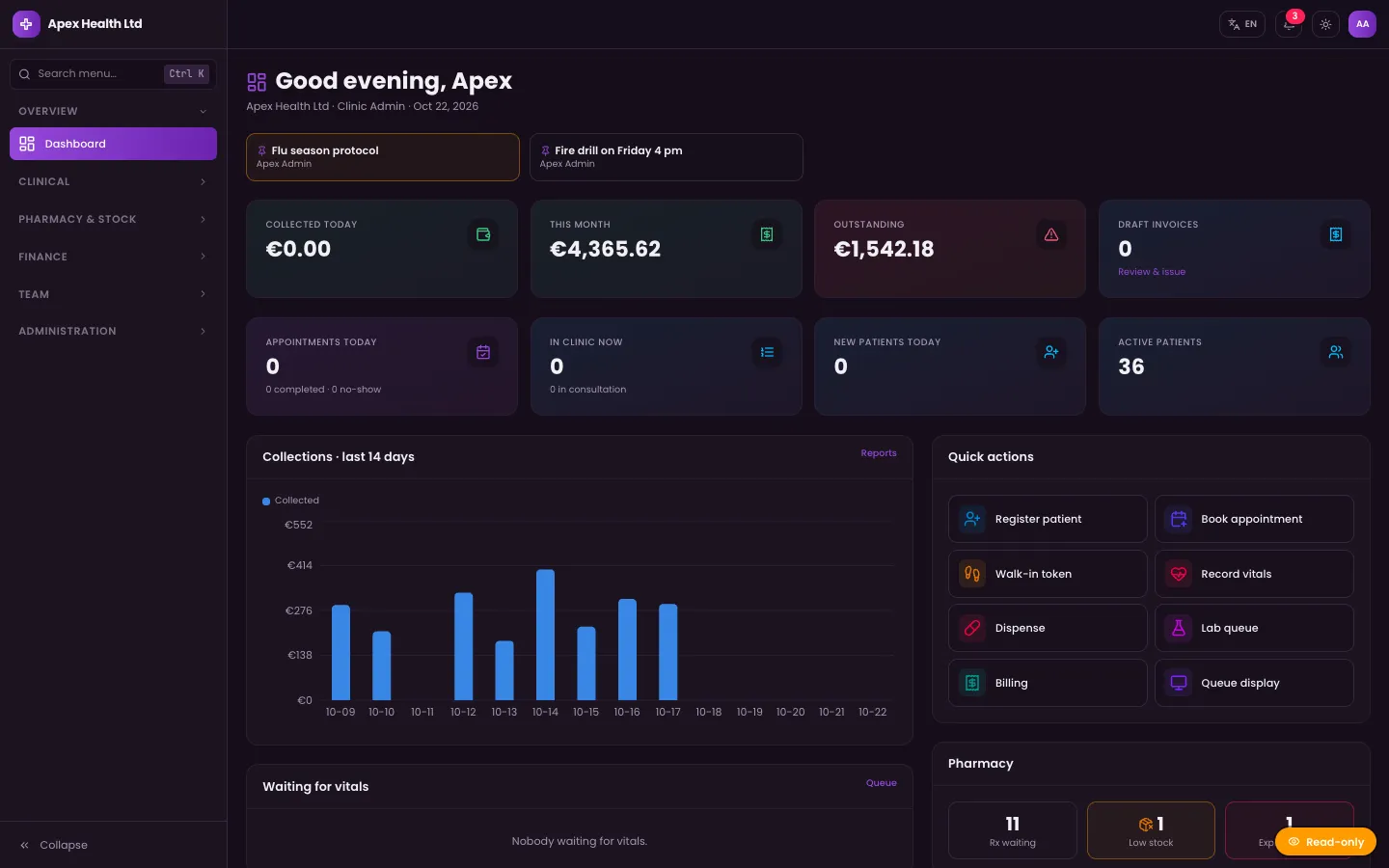
Clinic Admin dashboard: pinned memos, collections and outstanding balances, 14-day collections chart Clinic Admin dashboard: pinned memos, collections and outstanding balances, 14-day collections chart

Guides & articles

Practical guides and engineering write-ups for ClinicPro V3.

An iOS clinic management app in SwiftUI: one app for patients, staff and visitors

Last updated
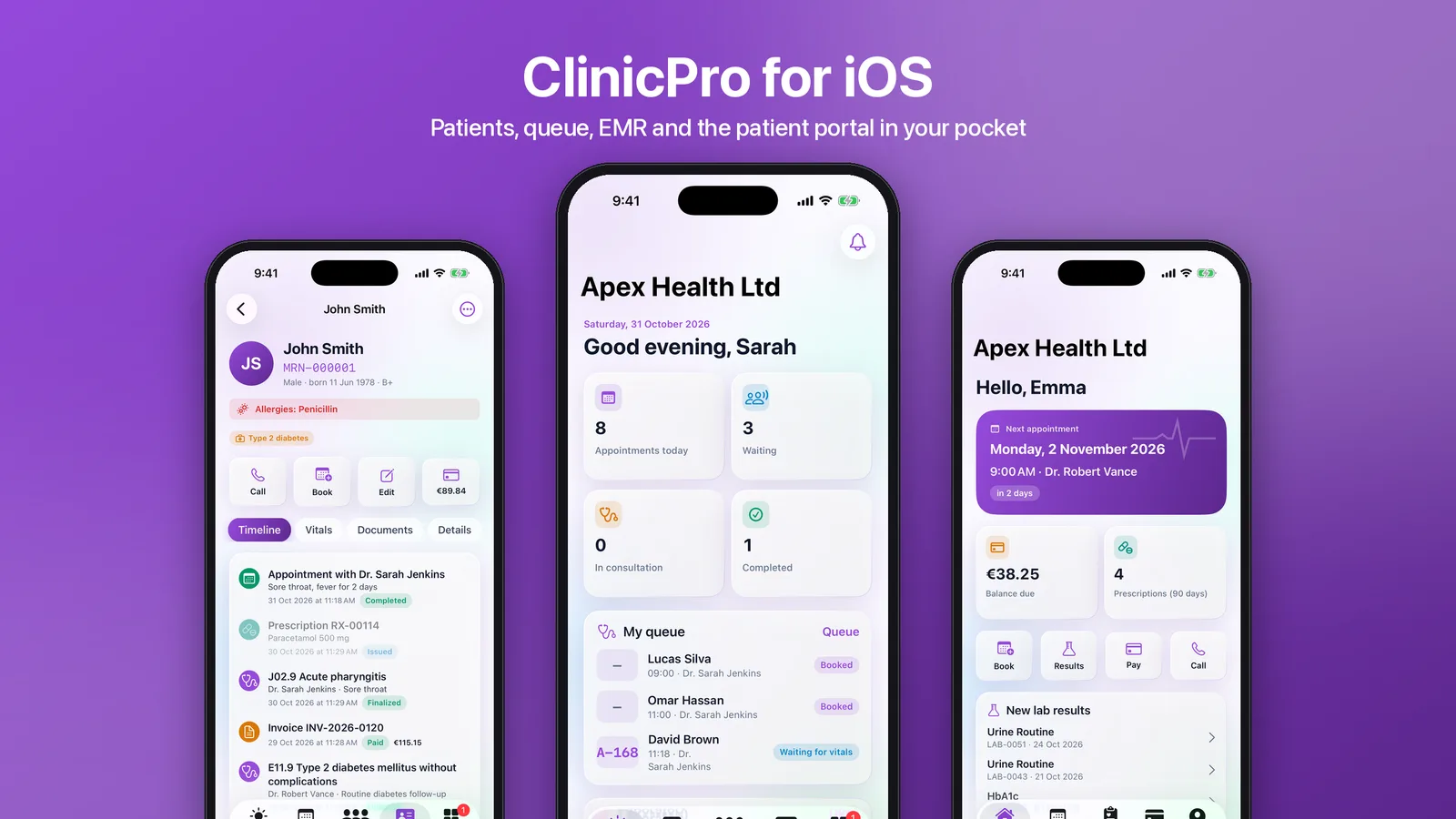
An iOS clinic management app in SwiftUI: one app for patients, staff and visitors: ClinicPro

Clinic software usually ends up as three apps: a booking app for patients, a staff app for the people at the desk and in the consulting room, and a website for everyone else. Each one gets its own login, its own idea of who may see what, and its own lag behind the web product. ClinicPro iOS is one SwiftUI app that does all three jobs. It now ships in the iOS-App/ folder of the ClinicPro download. This post looks at how the source decides what each person sees, and why every decision stays on the server.
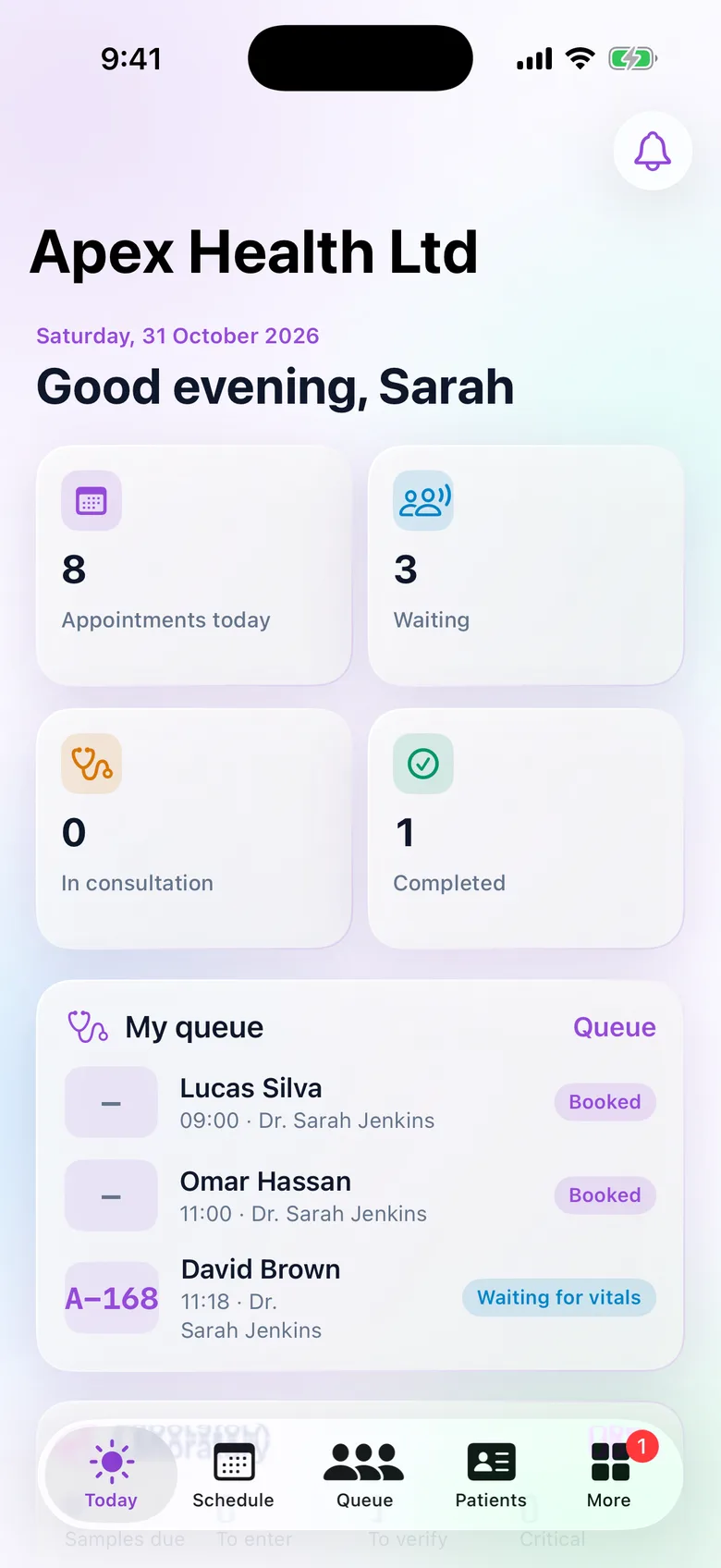
A doctor's Today dashboard: appointments, patients waiting, in consultation and completed, with her own queue

What is in the source

The app targets iOS 26 with Swift 6, for iPhone and iPad, and is generated with XcodeGen from project.yml. The code splits into two local Swift packages and the app:

  • ClinicProKit holds the API client, the Keychain token store, a response cache and Codable models for every response. Its tests decode JSON captured from a seeded server, so a renamed field fails a test instead of crashing a screen.
  • ClinicProUI holds the white-glass theme, controls, skeleton loaders, the ambient background, Metal effects and the launch animation.
  • The app has feature folders for Public, Auth, Patient, Staff, Console and Me, plus a Home Screen widget extension. Nuke loads images.

The strings live in a String Catalog with English, Arabic, Hebrew and Spanish. Arabic and Hebrew switch the layout to right to left.

One app, four shells

What a person sees depends on who they are. The tab bar is computed from the signed-in viewer, and this function is the whole decision (from MainTabs.swift):

nonisolated static func tabs(for v: Viewer?) -> [AppTab] {
    guard let v else { return [.site, .clinics, .pricing, .signIn] }
    if v.isPatient { return [.home, .appointments, .records, .billing, .me] }
    var t: [AppTab] = [.today]
    if v.has("appointments"), v.canAny(["manage_appointments", "view_patient_emr"], "read") { t.append(.schedule) }
    if v.has("queue"), v.canAny(["manage_queue", "view_patient_emr", "manage_billing"], "read") { t.append(.queue) }
    if v.has("patients"), v.can("view_patients", "read") { t.append(.patients) }
    t.append(.more)
    return t
}

Two checks gate each staff tab. has asks whether the clinic's plan includes the module. can asks whether the user's role holds the permission at the required scope. Both come from the server in the viewer payload, using the same permission names and module keys as the web app. A clinic on a plan without the lab module never sees Lab, whatever the role says.

The app only hides screens, though. Every request still goes through the server's own checks, so a hand-crafted request gets the same refusal as on the website.

  • Visitors (signed out) get the public website, a clinic directory, pricing and sign-in.
  • Patients get Home, Appointments, Records, Billing and Me.
  • Staff (doctor, nurse, reception, accountant, pharmacist, lab and clinic admin) get Today, Schedule, Queue and Patients, filtered as above, plus More.
  • Super Admins without a clinic get a clinic picker and the platform console.

How the app talks to the web backend

The ClinicPro web app in the same package includes an /api/mobile layer. Sign-in goes to /api/mobile/auth/login with an email and password. The server mints a cpm_ bearer token and stores only its SHA-256 hash on a session row. The token is accepted wherever the website's session is accepted, because the web app's session lookup falls back to the bearer token when there is no cookie. Existing routes and server actions work for the app with no other changes.

Every request carries the following headers:

  • Authorization: Bearer cpm_… when signed in.
  • X-Locale with the app language (en, ar, he or es), so CMS content, the directory and messages come back already translated.
  • X-Clinic for a Super Admin working inside a chosen clinic. Everyone else is tied to their own clinic by the server, and the header is ignored for them.

Sessions slide 90 days forward on use. A deactivated account, or a session-version bump after a password change or admin reset, ends the session, the same way the web's JWT re-check ends a browser session.

Tenant isolation is the core promise of ClinicPro. The case study explains how it is enforced in the data layer, and the iOS app inherits it because it calls that same layer.

The clinical workflow on a phone

The staff screens are hand-built for the daily flow:

  • Schedule: a week strip and day agenda with an "only my patients" switch, with booking, check-in, no-show, cancel and reschedule.
  • Queue: the live stages from vitals to doctor, room and billing, with vitals entry and walk-ins.
  • Patient file: allergies and conditions at the top, quick call, book, edit and balance actions, and a timeline of visits, prescriptions, diagnoses and invoices. It also has vitals charts and camera document scanning.
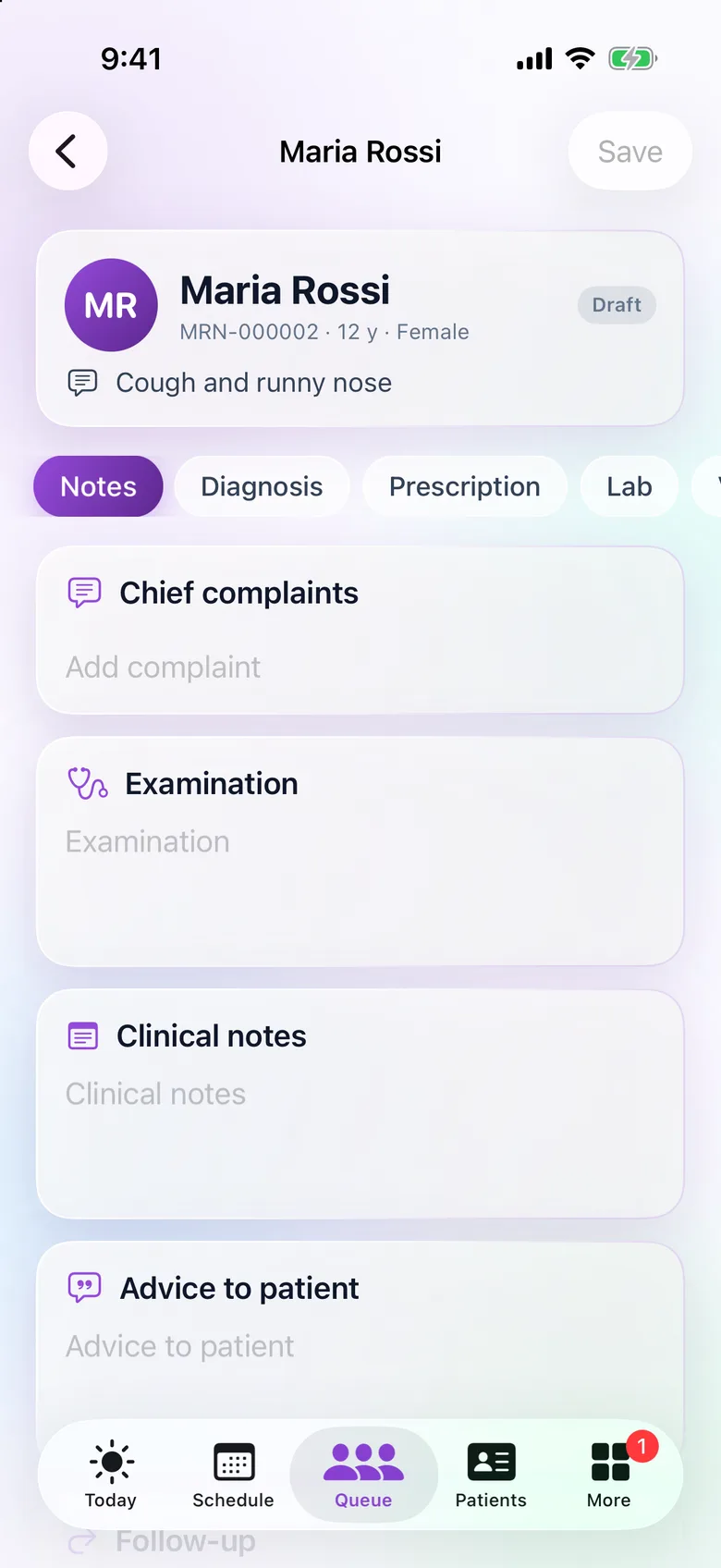
  • Consultation (EMR): chief complaints, examination, clinical notes and advice, then tabs for ICD diagnoses, prescriptions and lab orders. Finalising locks the note, and later changes are added as addenda.
  • Lab, pharmacy and billing: lab result entry and verification, pharmacy dispensing and counter sales, and billing with new invoices and payments.
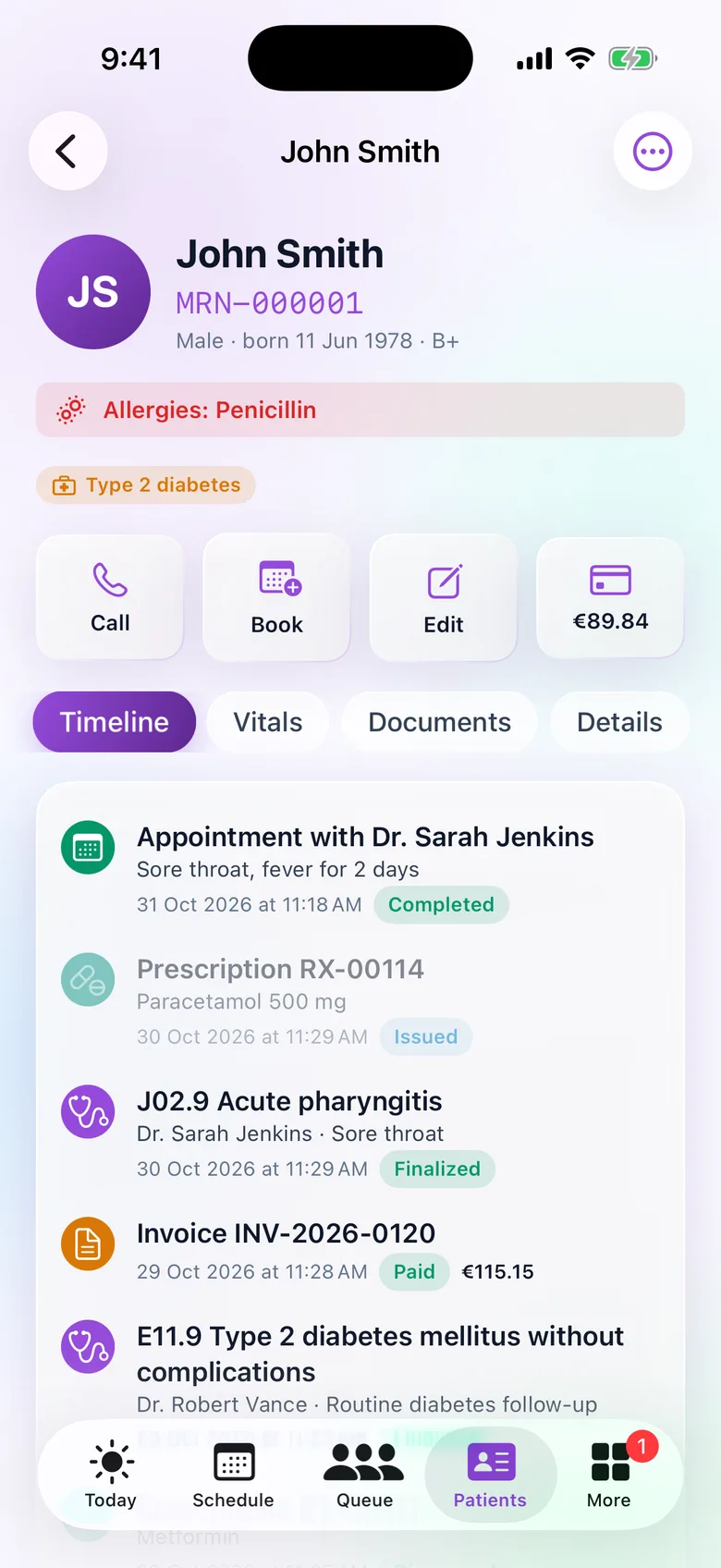
A patient file with allergies, conditions and a timeline of visits, prescriptions, diagnoses and invoices

The consultation screen: complaints, examination, notes and advice, with diagnosis, prescription and lab tabs

The AI assist in the consultation appears only when the server has the AI features configured. Without them, the screen works exactly the same, minus the button.

Patients get their own app, in the same binary

A patient who signs in sees their next appointment, balance due, recent prescriptions and new lab results, with quick actions to book, view results, pay or call. Flagged lab results are highlighted, and results, prescriptions and visit notes download as PDFs.
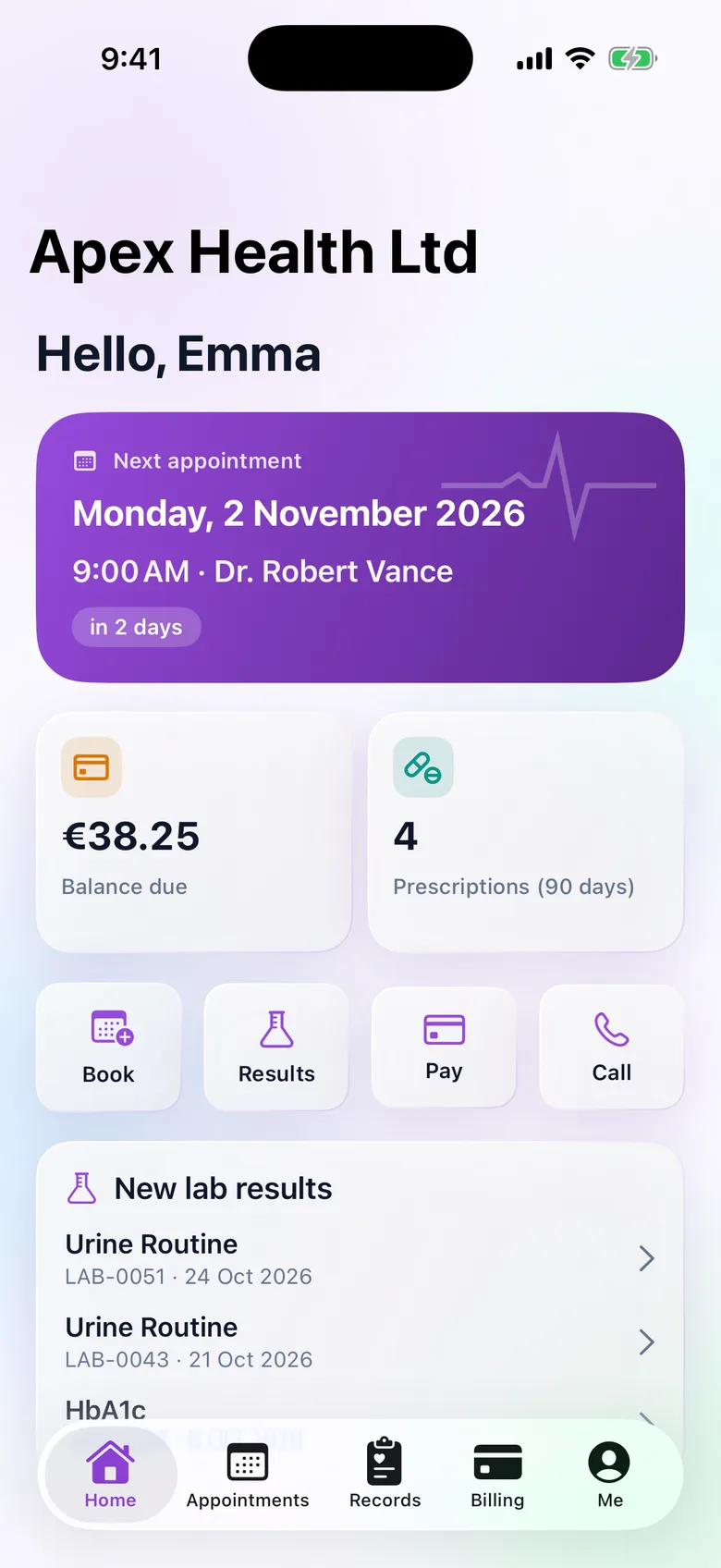
The patient home screen: next appointment, balance due, prescriptions and new lab results

Invoices are paid with Stripe Checkout. It opens in a web authentication session and returns to the app through /api/mobile/pay/return. The Stripe webhook on the server stays the source of truth.

Visitors and the clinic directory

Signed out, the Home tab is the platform website, rendered natively from the CMS with every block type and the animated hero. The Clinics tab is a public directory that searches by name, code, city or country. Each clinic profile shows its bookable doctors and their days, its services with prices in the clinic's currency, and its opening hours. "Book a visit" leads to patient sign-in or registration for that clinic.
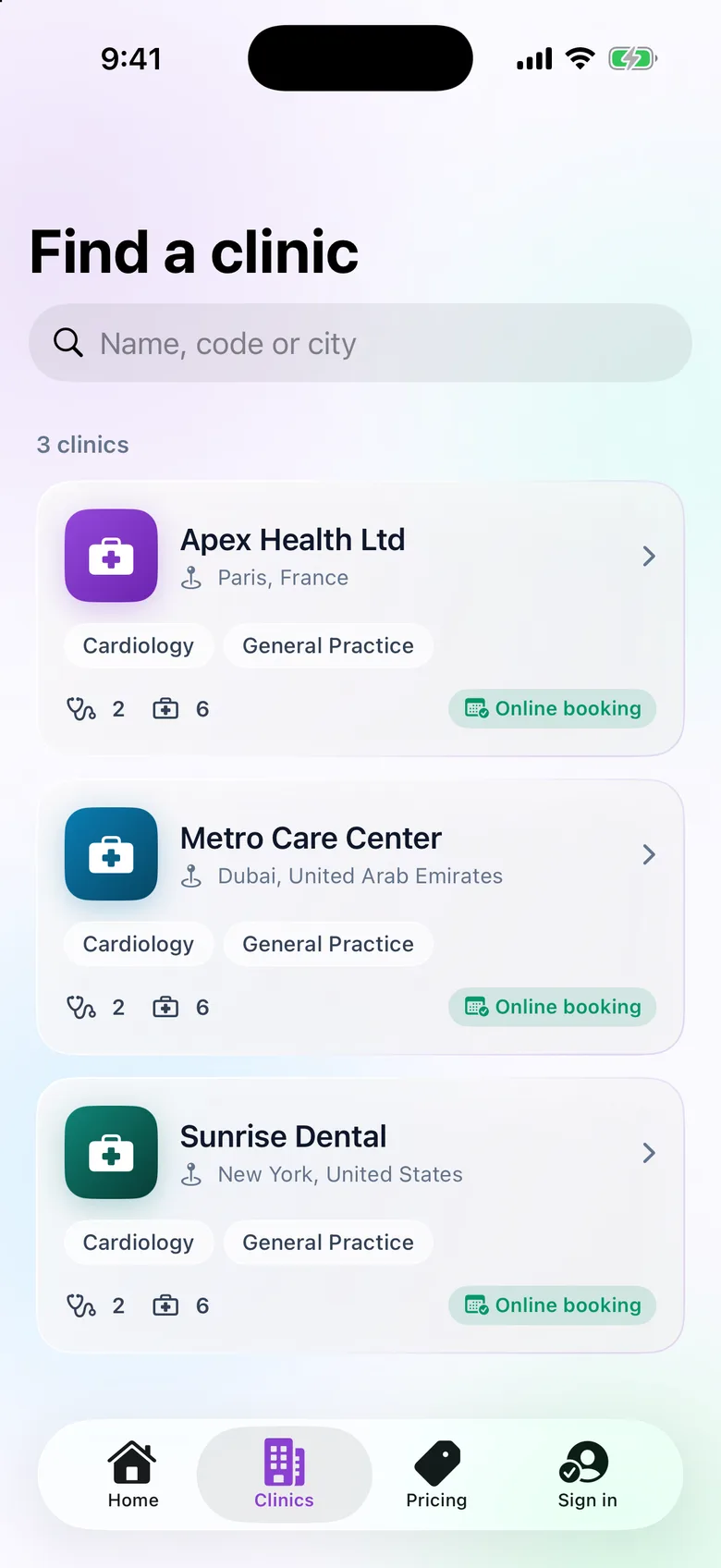
The public clinic directory, searchable by name, code or city

The public queries are tested to never return staff emails or phone numbers, the CMS notification address, licence keys, subscription state, payment or kiosk settings, inactive clinics or services, or doctors without a schedule. Locking a clinic hides it from the directory.

The admin long tail, server-driven

Hand-building a native form for every settings page would double the work and drift from the web. Stock, expenses, payroll, staff and schedules, services, clinic settings, the invoice template, the lab catalogue and the audit log are described by the server instead, at /api/mobile/admin/screens. Each description names the query that loads it, its columns and formats, its filters and its actions. Every action points at one of the website's own server actions, with a form built from the website's own zod validator as JSON Schema. Super Admins get the platform side the same way: clinics, plans, subscriptions, currencies, logs, CMS pages and translations.

iOS integration

  • Push notifications (APNs) tell patients about bookings and published lab results, and doctors about portal bookings.
  • A Home Screen widget shows the patient's next visit, or today's queue for staff.
  • Spotlight, Siri, Shortcuts and Handoff: appointments are indexed in Spotlight, and App Intents power Siri and Shortcuts.
  • Universal Links cover the website, the directory, the patient portal and the staff pages. The web app serves the apple-app-site-association file once its Apple team id is set.
  • Face ID lock, appearance and updates: an optional Face ID lock, light and dark mode, and a forced-update screen driven by a minimum version on the server.

See it in motion

Video tour of ClinicPro iOS in the simulator: the public site, a doctor's day and the patient portal

Rebrand and set up

  1. Deploy the backend. Deploy the included ClinicPro web app with its /api/mobile layer. The app cannot run without it, and nothing needs switching on. For push, set the APNs key, key id, team id and bundle id on the server. For online payments, set the Stripe keys.
  2. Rebrand. Edit Config.xcconfig: the app name, bundle id, Apple Team ID, the two brand colours, the URL scheme, your link domain and a server URL for debug and release builds.
  3. Icon. Run scripts/make-icons.sh to regenerate the icon and accent colour from the brand colours.
  4. Build. Run xcodegen generate, open the project and build. Long-press the logo on the welcome screen to try another server without rebuilding.

Signing the app, installing it on devices and sending push notifications need your own Apple Developer account. The app is not on the App Store and there is no hosted iOS demo. You build it and publish it under your own name.

Tests. The Swift package has 10 decoding tests against captured server responses. On the server, 20 integration tests cover the mobile API, the public queries (including the no-leak checks) and the admin console.

Get it

ClinicPro iOS is included in the ClinicPro download, next to the web app it depends on.
Getting the money right in clinic billing: integer cents, FX snapshots and FEFO dispensing

Last updated
Getting the money right in clinic billing: integer cents, FX snapshots and FEFO dispensing: ClinicPro

Clinic software mixes two kinds of arithmetic that don't forgive mistakes: money and medicine. An invoice that's a cent off undermines every report built on it. A double-booked slot, or a pharmacy that dispenses fresh stock while older batches expire on the shelf, costs the clinic time and money. Here are the decisions we made in ClinicPro's billing, pharmacy and scheduling code, including one we're openly cautious about: where exchange rates come from.

Store one currency, compute in integer cents

ClinicPro stores every amount in USD with two decimal places. Each clinic picks a display currency, but storage and arithmetic always happen in one currency.

Because 0.1 + 0.2 is not 0.3, every money helper works in integer cents:

export const toCents = (usd: number): number => Math.round((Number.isFinite(usd) ? usd : 0) * 100);
export const fromCents = (cents: number): number => Math.round(cents) / 100;
export const round2 = (n: number): number => fromCents(toCents(n));
export const mulUSD = (usd: number, qty: number): number => fromCents(Math.round(toCents(usd) * qty));

Invoice totals follow the same rule. Each line is qty × unit − discount, with tax applied to the discounted amount. Subtotal, discount, tax and grand total are accumulated as integer cents and converted back only at the end. Status checks such as "is this invoice fully paid?" compare cents too, never floats.

Largest-remainder allocation for the revenue ledger

Each payment also goes into a revenue ledger, split by category: consultation, laboratory, pharmacy, procedure, other. The difficulty is that proportional splits rarely come out as whole cents. Split $10.00 three ways, round each share, and you get $9.99 or $10.01. Over many partial payments, the ledger drifts away from the invoices.

We use the largest-remainder method. Floor every share in cents, then hand out the leftover cents one at a time to the shares with the largest fractional parts:

export function allocate(totalUSD: number, weights: number[]): number[] {
  const total = toCents(totalUSD);
  const wsum = weights.reduce((s, w) => s + Math.max(0, w), 0);
  if (wsum <= 0 || weights.length === 0) return weights.map((_, i) => (i === 0 ? fromCents(total) : 0));
  const raw = weights.map((w) => (total * Math.max(0, w)) / wsum);
  const floored = raw.map((r) => Math.floor(r));
  let remainder = total - floored.reduce((s, v) => s + v, 0);
  const order = raw.map((r, i) => ({ i, frac: r - Math.floor(r) })).sort((a, b) => b.frac - a.frac);
  for (const { i } of order) {
    if (remainder <= 0) break;
    floored[i]++;
    remainder--;
  }
  return floored.map(fromCents);
}

Allocating $10.00 equally three ways gives $3.34, $3.33 and $3.33, exactly $10.00. ledgerSplit sums the invoice's lines (total plus tax) per category, feeds those totals to allocate as weights, and writes one ledger row per non-zero share. A refund runs the same split on the absolute amount and puts the minus sign back afterwards, so refund rows mirror payment rows. Unit tests assert that partial payments and refunds both sum back exactly.

An FX snapshot on every invoice

An invoice printed in AED or EUR must show the same numbers next week, so every invoice stores the displayCurrency and fxRate it was issued with. The rate is refreshed when a draft is issued and then frozen. The PDF prints the rate it used ("Display: EUR @ 0.9200"), and payments taken in the display currency are converted back to USD at that snapshot rather than at today's rate:

if (inv.status === 'VOID') throw new UserError('This invoice is void.');
if (inv.status === 'PAID' || inv.balanceUSD <= 0) throw new UserError('This invoice is already fully paid.');
const amountUSD = input.currency === 'USD' ? round2(input.amount) : round2(input.amount / (inv.fxRate || 1));
if (toCents(amountUSD) > toCents(inv.balanceUSD) + 1) throw new UserError(`The payment exceeds the balance due (${inv.balanceUSD.toFixed(2)} USD).`);
const applied = Math.min(amountUSD, inv.balanceUSD);

The one-cent tolerance is deliberate: converting the exact printed total back to USD can overshoot the balance by a cent, so the payment is accepted and the applied amount is capped at the balance.

Where the rates come from, honestly

ClinicPro does not call a forex data feed. Rates are requested from Google Gemini (the same AI key the product already uses for clinical suggestions and translation), and we treat the answer as untrusted input. resolveRate uses layered fallbacks:

  1. a manual override set by the Super Admin, which always wins;
  2. an in-process memory cache (TTL configurable, default 60 minutes);
  3. a shared MongoDB ExchangeRate cache within the same TTL;
  4. a fresh Gemini rate, validated with a zod schema and accepted only if it falls within a maximum deviation from the last known rate (default 25%);
  5. the last known (stale) rate, retried a few minutes later;
  6. parity 1.0, logged as an error.

Rejected rates are written to the system log, and concurrent requests for the same currency share a single in-flight lookup. Because amounts are stored in USD, a bad rate can only affect displayed figures and display-currency payments, never stored totals.

FEFO dispensing with optimistic concurrency

Pharmacy stock is tracked in batches, each with its own quantity, expiry date and cost price. Dispensing follows First-Expiry-First-Out: skip empty and expired batches, take from the earliest expiry first, and spill over into later batches as needed:

const today = new Date(Date.UTC(now.getUTCFullYear(), now.getUTCMonth(), now.getUTCDate()));
const usable = batches
  .map((b) => ({ ...b, expiryDate: new Date(b.expiryDate) }))
  .filter((b) => b.quantity > 0 && b.expiryDate >= today)
  .sort((a, b) => a.expiryDate.getTime() - b.expiryDate.getTime() || a.batchNumber.localeCompare(b.batchNumber));
const available = usable.reduce((s, b) => s + b.quantity, 0);
if (available < qty) throw new InsufficientStockError(available, qty);

(Condensed from pickBatchesFEFO; the allocation loop follows.) The function is pure, and its tests cover earliest-first picking, skipping expired and empty batches, and spanning three batches. Each allocation carries the batch cost price for margin reporting.

The caller handles concurrency. InventoryItem uses Mongoose's optimisticConcurrency, so if two pharmacists dispense the same item at once, one save() fails with a VersionError. The dispense loop then re-reads the item and tries again, up to four times, before asking the user to retry. For a multi-line prescription, a pre-check confirms that every line can be filled before any stock moves.

Double-booking, enforced by the database

The slot engine computes free times from schedules, breaks and leave, but two receptionists can still click the same slot at the same moment. An application-level check can't close that race; a unique partial index can:

AppointmentSchema.index(
  { clinicId: 1, doctorId: 1, start: 1 },
  { unique: true, partialFilterExpression: { slotLocked: true }, name: 'uniq_active_slot' },
);

export const holdsSlot = (status: AppointmentStatus, type: AppointmentType): boolean =>
  type !== 'WALK_IN' && ACTIVE_APPOINTMENT_STATUSES.includes(status);

slotLocked is derived from status and type. Booked, checked-in and in-consultation appointments hold their slot. Walk-ins, cancellations, completed visits and no-shows release it, so a cancelled slot can be rebooked. A stored boolean keeps the partial filter expression trivial, which matters because ClinicPro supports MongoDB 5+. A duplicate-key error (code 11000) comes back to the user as "That slot was just taken. Pick another time."

Trade-offs and what we'd do differently

  • Not every money path runs in a transaction. ClinicPro has a withTransaction helper that uses a session on a replica set and falls back to plain writes on a standalone server. Today it wraps clinic provisioning. In a payment, the invoice save and the ledger insert are sequential writes, and a dispense saves the stock before inserting the movement rows. Wrapping both of those is the next step.
  • Status changes made with updateOne must set slotLocked by hand. The derived flag is recomputed in a pre('validate') hook, which only runs on save(). Bulk updates such as the daily no-show cron set it explicitly. Nothing enforces that convention.
  • LLM-sourced FX rates are a convenience, not a source of truth. The sanity bounds stop wild values, but they can't make a plausible wrong rate right. A pluggable forex provider would be a sensible extension.

Conclusion

The common thread is pushing correctness as low as possible: integer cents in the helpers, exact sums in the allocator, a rate frozen on the invoice, and uniqueness in the index. The live demo is read-only, with one-click demo logins,. The design story is in the ClinicPro case study, the source is on our marketplace, and if you need this kind of rigour in your own product, see our SaaS engineering service.

Building multi-tenant RBAC for a clinic SaaS with Next.js and MongoDB

Last updated
Building multi-tenant RBAC for a clinic SaaS with Next.js and MongoDB: ClinicPro

In a shared-database SaaS, the bug that keeps you up at night is one missing clinicId filter. It usually arrives in a quick findById added during a late fix. In a clinic product, that means one practice can see another practice's patients. When we built ClinicPro, our multi-tenant clinic management platform on Next.js 15 and MongoDB, we set out to make that mistake hard to write and loud when it slips through. This post covers the layers we ended up with. The ClinicPro case study covers the product side.

One database, logical isolation

One ClinicPro installation serves many clinics from one MongoDB database. Each clinic has its own staff, branding, currency, language and patient portal. A separate database per tenant would make isolation simpler, but it makes self-hosted operations heavier, so we chose logical isolation instead.

Of the 39 Mongoose models, 24 are tenant-scoped and carry a clinicId. The other 15, such as Clinic, User, Plan, AuditLog and ExchangeRate, are global by nature. Every model is compiled through a defineModel(name, schema, { tenant }) helper. Tenant scoping is therefore declared once, in the model definition, and when tenant is true the helper attaches the plugin below.

A tenant plugin that fails closed

The plugin rejects any query on a tenant model that doesn't filter by clinicId. It hooks twelve query operations (find, count, update, delete, replace and distinct variants) and aggregate:

function hasClinicFilter(filter: Record<string, unknown> | undefined): boolean {
  if (!filter) return false;
  if (filter.clinicId !== undefined && filter.clinicId !== null) return true;
  const and = filter.$and;
  return Array.isArray(and) && and.some((f) => hasClinicFilter(f as Record<string, unknown>));
}

export function tenantPlugin(schema: Schema, opts: { modelName: string }): void {
  for (const op of QUERY_OPS) {
    schema.pre(op, function () {
      const options = this.getOptions();
      if (options.crossTenant) return;
      if (!hasClinicFilter(this.getFilter() as Record<string, unknown>)) throw new TenantScopeError(opts.modelName, op);
    });
  }
  schema.pre('aggregate', function () {
    if (this.options.crossTenant) return;
    const first = this.pipeline()[0] as { $match?: Record<string, unknown> } | undefined;
    if (!first?.$match || !hasClinicFilter(first.$match)) throw new TenantScopeError(opts.modelName, 'aggregate');
  });
}
  • It fails closed. A bare Patient.find({}) throws before anything reaches MongoDB. For aggregates, the first stage must be a scoped $match. That stops a $lookup or $group from running over the whole collection before scoping happens.
  • The escape hatch is explicit. Super Admin and system code pass { crossTenant: true }. A reviewer can grep for it, and nobody turns it on by accident. Populate, which looks documents up by _id alone, goes through a scopedPopulate helper that sets the option, because the parent query was already scoped.
  • It surfaces as a bug. The action error mapper logs TenantScopeError on the server and shows the user a generic message.

An integration test checks the contract directly. Patient.find({}) and Patient.aggregate([{ $match: {} }]) must reject, and an explicit cross-tenant count must resolve.

Scoped RBAC: all, read and self

ClinicPro has 9 roles and 20 permission keys. A flat role-to-permission list wasn't expressive enough for clinical work: a nurse should be able to read an EMR but not sign it, and a patient should see only their own lab results. So each grant carries a scope. all gives full access within the clinic, read is read-only, and self covers only the signed-in person's own records. A nurse holds write_patient_emr: 'read', and a patient holds self on EMR, appointments, billing and lab results.

export function roleCan(role: Role, permission: Permission, required: Scope = 'all'): boolean {
  const held = scopeOf(role, permission);
  if (!held) return false;
  if (required === "self") return true; // any grant includes your own records
  if (required === "read") return held === "read" || held === "all";
  return held === "all";
}

The rule that matters is that self never satisfies read. A patient's grant can't be stretched into browsing other people's records. The matrix lives in a client-safe types file. The UI calls can() to hide buttons and the server calls assertPermission() to enforce.

A self grant only gets the caller past the gate, so the handler still has to check ownership. Internal memos are an example. Every staff member holds manage_memos: 'self', and the memo actions then allow an edit only by the author or by someone with the full grant.

One guarded pipeline for every server action

Any exported function in a 'use server' file is a callable endpoint. We didn't want each action to remember auth, tenancy, permissions and validation on its own. Every mutation is built from a wrapper: tenantAction, adminAction, patientAction, publicAction, or installerAction for the setup wizard. Here is the staff pipeline (condensed; the audit object is abbreviated):

return async (raw) => {
  try {
    assertWritable();
    await connectDB();
    const ctx = await tenantOrThrow();
    const perms = Array.isArray(cfg.permission) ? cfg.permission : [cfg.permission];
    const allowed = perms.some((p) => {
      try { assertPermission(ctx.user, p, cfg.scope); return true; } catch { return false; }
    });
    if (!allowed) throw new ForbiddenError();
    const input = cfg.schema.parse(raw) as z.infer<S>;
    const data = await cfg.handler(input, ctx);
    if (cfg.audit) await audit({ clinicId: ctx.clinicId, /* actor, action, entity… */ });
    runRevalidate(cfg.revalidate, input, data);
    return { ok: true, data };
  } catch (err) {
    return toActionError(err);
  }
};

The read-only check runs first. That is what lets the public demo run safely: it is read-only, with one-click demo logins for every role. After the permission check, zod parses the input. The handler then receives a ctx with clinicId already resolved, so scoping a query takes no effort. When a Super Admin "enters" a clinic, the audit log records the actor as SUPER_ADMIN→<slug>.

A wrapper only helps if everyone uses it, so npm run check:actions walks app/ and lib/ and finds every 'use server' file. It exits with an error if any export there isn't a const built from one of the wrappers. The check runs inside npm run verify, alongside the typecheck, lint and the test suite.

Not found, not forbidden

If clinic B asks for clinic A's invoice ID, the response should be identical to the one for an ID that doesn't exist. Returning "forbidden" would confirm that the record exists. Most services get this for free by loading with both keys:

const inv = await Invoice.findOne({ _id: id, clinicId: ctx.clinicId });
if (!inv) throw new NotFoundError('Invoice');

For documents loaded another way, assertSameTenant applies the same rule: a missing document and a foreign one both throw NotFoundError, and only Super Admin bypasses it.

Field-level encryption

Tenant isolation does nothing about a leaked backup. So the most sensitive fields are encrypted with AES-256-GCM: national ID, insurance policy number and medical notes on the patient, and examination and clinical notes in the EMR. They are stored as enc:v1:<iv>:<tag>:<ciphertext>, with a random 12-byte IV per write. A Mongoose setter and getter keep this transparent to the services:

export const encryptedString = {
  type: String,
  set: (v: string) => encryptField(v),
  get: (v: string) => decryptField(v),
} as const;

Unprefixed values pass through unchanged, so legacy plaintext gets encrypted on its next save. A test reads the raw collection to confirm the stored value really is ciphertext.

Trade-offs and what we'd do differently

  • The plugin checks presence, not correctness. It confirms that a clinicId is in the filter, not that it belongs to the caller. The wrapper's resolved ctx covers that. A stricter design would inject the tenant from async context.
  • $or isn't treated as scoped. Only $and is searched, so a top-level $or needs a clinicId beside it.
  • The action check is lexical. It matches source lines, not an AST, so an unusual export style could get past it. Code review still matters.
  • Encrypted fields can't be range-searched or sorted. Fields that fail to decrypt render as [unreadable]. Next time we would design key rotation in from day one.

Conclusion

None of these layers is clever on its own. They work because they overlap. The plugin catches forgotten filters. The wrapper makes the scoped context the easy path, and the check script stops people from bypassing it. Not-found-not-forbidden stops anyone probing IDs across clinics. The behaviour is covered by 73 automated test cases across 23 files. ClinicPro's source is available on our marketplace. If you're building something similar, this is the kind of work our SaaS engineering team does.

How to choose clinic management software: a practical checklist

Last updated
How to choose clinic management software: a practical checklist: ClinicPro

Choosing clinic management software is rarely about one feature. Most demos look good for ten minutes: a calendar, a patient list, an invoice. The problems show up months later, when the pharmacy stock does not match the shelf, a lab charge never reached the bill, a receptionist can read clinical notes she should not see, or you discover that the vendor owns your data and the only export is a PDF.

This checklist is for clinic owners, practice managers and healthtech founders who are comparing systems. It walks through the eight areas worth testing before you commit, the questions to ask in a demo, and how ClinicPro, our source-code clinic platform, answers each one. Use it as a scorecard for any product, not only ours.

How to use this checklist

Run every vendor through the same steps, ideally with the people who will use the system every day:

  1. Bring a real visit. Take one recent patient journey (booking, check-in, consultation, a lab test, a prescription, payment) and ask the vendor to walk it through live.
  2. Sign in as each role. Ask for a doctor, nurse, receptionist, pharmacist and accountant login, not just an admin account.
  3. Ask to see the data leave. Export a report, download an invoice, and ask how you would move every record to another system.
  4. Score each section below from 0 (missing) to 2 (works well), and note anything that needs customisation.

1. Patients and medical records

The patient record is the centre of everything. A weak one forces staff to keep side notes in spreadsheets.

What to check

  • Is there a unique record number (MRN) and does the system warn you about duplicate patients?
  • Are allergies and chronic conditions visible wherever a clinician works, not buried in a tab?
  • Can you attach documents and see one timeline of visits, diagnoses, prescriptions, lab reports and invoices?
  • Does the consultation screen support diagnosis coding (ICD-10 or ICD-11), and can a signed note be corrected only by an addendum?

How ClinicPro handles it

Patients get an MRN sequence with duplicate detection, allergies and chronic conditions, insurance details, secure document uploads and a linked visit timeline. The EMR workspace autosaves, searches ICD-10 and ICD-11 codes, and finalises a consultation with a signature; later changes are added as addenda. Prescriptions are generated as PDFs with a QR code that can be used to verify them.

2. Scheduling and the front desk

Scheduling decides how your day feels. Look past the calendar view to the rules behind it.

What to check

  • Can each doctor have their own working hours, breaks and leave?
  • Does the system calculate free slots, or does reception guess?
  • What stops two people booking the same doctor at the same time?
  • Can walk-ins and online bookings share the same queue?

How ClinicPro handles it

Doctor schedules include breaks and leave, and a slot engine offers only valid times in day, week and list views. Double-booking is blocked by a unique index in the database, so it holds even when two receptionists click at once. Walk-ins, a daily token queue, nurse vitals and a drag-and-drop patient-flow board are included. We covered the front desk in detail in how to run a paperless clinic front desk, so this post will not repeat it.

3. Billing and invoices

Billing is where disconnected systems cost real money. The key question is whether charges reach the invoice by themselves.

What to check

  • Are consultation, lab and pharmacy charges pulled onto the invoice automatically, or typed again?
  • Can a patient pay in parts, by more than one method, and can you refund or void with a record of why?
  • Can you design the invoice layout yourself, including a thermal receipt for the counter?
  • If you work in more than one currency, which exchange rate is kept on each invoice?

How ClinicPro handles it

Invoices are drafted from visit, lab and pharmacy lines, and staff can still edit them before issuing. Split payments, refunds and voids are supported, and every payment is posted to a revenue ledger. An invoice template builder with live preview produces A4, Letter and 80 mm thermal layouts. Amounts are stored in one base currency and calculated in integer cents; each clinic chooses its display currency and every invoice keeps the exchange rate used. Patients can also pay invoices online through the patient portal with Stripe Checkout. The reasoning behind the money handling is in getting the money right in clinic billing.

4. Pharmacy and stock

If your clinic dispenses medicines or sells over the counter, stock control matters as much as scheduling.

What to check

  • Does the system track batches and expiry dates, and which batch does it pick first?
  • Will it warn you about low stock and items close to expiry?
  • Is there a stock history you can audit, not just a current quantity?
  • Can the counter sell to walk-in customers who are not booked patients?

How ClinicPro handles it

The pharmacy module tracks batches and dispenses first-expiry-first-out, so the oldest stock goes first. Low-stock and expiry alerts, a stock movement ledger and counter (OTC) sales are included, and margin data feeds the drug-margin and inventory-turnover reports.

5. Branches, staff and roles

Many buyers underestimate permissions until a privacy problem appears. Ask to sign in as a junior role and try to open things they should not see.

What to check

  • How many roles are there, and can a role have read-only access to an area?
  • Are permissions checked on the server, or only hidden in the menu?
  • How does the system handle several branches or sites?
  • Can you lock out a member of staff immediately when they leave?

How ClinicPro handles it

ClinicPro ships with 9 roles: Super Admin, Clinic Admin, Doctor, Nurse, Receptionist, Accountant, Pharmacist, Lab Technician and Patient. There are 20 permission keys, each granted at an all, read or self scope (for example, a nurse can read the EMR without signing it), and every server action checks the permission before it runs. Deactivating a user or changing their password revokes their sessions.

For branches, ClinicPro treats each site as its own clinic: separate staff, data, branding, display currency and language, all managed from one Super Admin console. This is a good fit when branches run independently. If you need staff to move between branches inside one shared record set, raise that early, as it is a customisation rather than a setting.

6. Data isolation and security

Health data needs stronger answers than "we use HTTPS". Ask how the vendor keeps one clinic's data away from another, and what is encrypted.

What to check

  • If many clinics share one platform, what stops a query from returning another clinic's records?
  • Are sensitive identifiers and clinical notes encrypted at rest?
  • Is there an audit trail of who opened or changed records?
  • Are sign-in attempts rate-limited?
  • Is AI output clearly labelled, and can it change a record on its own?

How ClinicPro handles it

Every clinic-owned record carries a clinic ID, and a database plugin throws an error on any query or aggregation that is missing that filter, so a forgotten filter fails instead of leaking data. National ID, insurance policy number, medical notes, clinical notes and examination findings are encrypted with AES-256-GCM. EMR and document access is written to the audit trail, sign-in and public endpoints are rate-limited, and failed sign-ins are logged. The optional AI features (ICD code suggestions and prescription safety checks) are labelled as suggestions and are never applied automatically. Each clinic can also turn AI off.

The engineering behind the isolation is explained in building multi-tenant RBAC for a clinic SaaS.

7. Reports

A report you cannot filter or export is a screenshot. Ask for the reports your accountant and your medical director will actually request.

What to check

  • Can you see revenue and margin after the cost of medicines, not just takings?
  • Are receivables aged, and is tax liability reported?
  • Can you measure doctor productivity and no-show rates?
  • Does every table export to spreadsheet and PDF?

How ClinicPro handles it

Reports cover revenue, net margin including cost of goods sold, receivables ageing, tax liability, drug margins, doctor productivity, appointment and no-show rates, inventory turnover and daily cash. Tables are searchable, filterable and paginated, and export to CSV, XLSX and PDF.

8. Hosting and ownership of the source code

This is the question many buyers leave until last, and it often matters most over five years.

What to check

  • Where is the data stored, and can you choose the country or provider?
  • Can you take a full backup yourself and restore it?
  • Do you get the source code, or only a login?
  • If the vendor disappears or changes its terms, what happens to your records?

How ClinicPro handles it

ClinicPro is sold as full TypeScript source code on the DEV3 marketplace. You host it where you choose: a 4-step web installer, a Docker Compose file (app plus a MongoDB replica set) and a PM2 configuration are included. A Super Admin backup tool can create, download and restore full database backups, with an optional daily automatic backup from the cron job. Because you hold the code and the database, your records are not tied to anyone's subscription.

One practical warning from the README: the field-encryption key is generated at install time. Back it up with your database backups, because encrypted fields cannot be read without it.

A quick scorecard

Area Key question ClinicPro
Patients & records One timeline, coded diagnoses, signed notes? Yes
Scheduling Slot rules and a hard double-booking guard? Yes
Billing Charges flow onto invoices automatically? Yes
Pharmacy & stock Batches, expiry, first-expiry-first-out? Yes
Roles & branches Scoped roles; how branches are modelled? 9 roles; branch = clinic
Isolation & security Enforced isolation, encryption, audit? Yes
Reports Margin, ageing, export? Yes
Ownership Source code, self-hosting, backups? Yes

Beyond the eight areas, ClinicPro also includes a laboratory workflow, HR and payroll, expenses, internal memos, a patient portal and four interface languages (English, Arabic, Hebrew and Spanish, with right-to-left layouts). The source includes 73 automated test cases across 23 Vitest files, counted from its tests folder.

Closing

The best clinic system is the one your team can run a real visit through without workarounds, and whose data you can still reach years from now. Score every option against the same checklist, sign in as every role, and insist on seeing how the data leaves.

If ClinicPro matches your list, you can try the role logins in the read-only demo and get the source from ClinicPro; DEV3 can also install it or customise it for your clinics. For the design decisions behind it, read the case study.

How to run a paperless clinic front desk: online booking, a self check-in kiosk and a live waiting-room queue

Last updated
How to run a paperless clinic front desk: online booking, a self check-in kiosk and a live waiting-room queue: ClinicPro

"The waiting room is full, the phone keeps ringing, and nobody knows who is next." If you run a clinic, you have probably heard some version of that from your front desk. Appointments live in one book, walk-ins are written on a sticky note, the nurse shouts names, and the doctor finds out a patient has been waiting forty minutes only when they complain.

This guide walks through how to set up a calmer patient flow, from the online booking to the waiting-room screen, using ClinicPro, our self-hosted clinic management platform. It is written for clinic owners and practice managers, and for agencies that set up software for clinics.

What a good front desk looks like

Before picking any software, it helps to agree on what "good" means. For most clinics it comes down to five things:

  • One list of who is coming today. Booked patients, online bookings and walk-ins in the same place, per doctor.
  • No double-booking. A slot that is taken is taken, even if two receptionists click at the same moment.
  • Patients can help themselves. Booking from a phone, checking in on a tablet, without queuing at the counter.
  • Everyone can see the queue. Staff see where each patient is; patients in the waiting room see when it is their turn.
  • The visit flows into the bill. The consultation, lab tests and medicines end up on one invoice without being typed in again.

ClinicPro is built around exactly this journey. Reception registers the patient (or the patient registers at the kiosk or in the portal), check-in issues a token that appears on the waiting-room display, the nurse records vitals, the doctor finalises the consultation, and accounts take payment on an invoice that has already collected the consultation, lab and pharmacy lines.

Step 1: Set up the clinic and its doctors

1. Create the clinic

After the 4-step web installer (environment check, database and keys, Super Admin account, done), sign in as the Super Admin and open Clinics → New clinic. This also creates the clinic's first Clinic Admin account, starter services and lab tests. One installation can run many clinics, so a group with several practices, or an agency serving several clients, creates one clinic for each.

2. Fill in the clinic settings

Sign in as the Clinic Admin and open Settings. This is where the front-desk behaviour is decided:

  • profile, address, time zone, language and display currency
  • brand colour and logo, which also brand the patient portal and printed documents
  • opening hours and rooms
  • the queue token prefix (tokens look like A-101, A-102…)
  • switches for online booking and the kiosk, and offline payment instructions

3. Add staff and doctor schedules

In Staff, create each person with their role: Doctor, Nurse, Receptionist, Accountant, Pharmacist or Lab Technician. For doctors, set the specialty, fee, room, signature and weekly schedule, including breaks and leave. The slot engine uses these schedules, so a doctor on leave never shows free slots.

Step 2: Take bookings without the phone

1. Bookings at the desk

The Appointments screen has a day and week calendar with a column per doctor and a "now" line, plus a list view. The booking dialog searches for the patient and only offers free slots from the doctor's schedule. Double-booking is prevented by the database itself, not just by the screen, so two people booking the same slot at once cannot both succeed.

Registration checks for duplicates (by phone, or by name plus date of birth) before a new record and MRN are created. That alone saves a lot of tidying up later.

2. Bookings from the patient's phone

Each clinic gets its own branded, mobile-first patient portal at /portal/<clinic-slug>. Patients register (they are linked to their existing record by phone), verify their email, or accept an invitation sent by staff. When online booking is switched on in Settings, the flow is short: choose a doctor, choose a slot, confirm. Patients can also reschedule and cancel, which frees the slot for someone else.

Put the portal link on your website, your Google Business profile and your social media pages.

Step 3: Let patients check themselves in

Place a tablet at reception and open the self check-in kiosk at /kiosk/<clinic-slug>. It is a touch-friendly screen where patients:

  1. check in for an appointment with their phone number and date of birth,
  2. register as a new patient, or
  3. take a walk-in token.

The kiosk is rate-limited, so a curious child tapping the screen cannot flood it. Receptionists stay free for the patients who actually need help.

Step 4: Put the queue on the wall

1. The staff board

The Queue screen is a drag-and-drop patient-flow board with five columns: Checked in → Vitals → Waiting → In consultation → Billing. Nurses move patients along as they record vitals; doctors open the next patient straight from the queue into the consultation workspace.

2. The waiting-room display

Connect a TV to any browser and open /q/<clinic-slug>. The full-screen display shows tokens, the doctor and the room, with a highlighted Now serving row and a chime. Patient names are masked (for example "John S."), so the screen is useful without exposing who is in the room. It refreshes every few seconds by itself.

Step 5: Close the loop at billing

When the doctor finalises the consultation, the record locks (later changes are added as addenda), the appointment is completed and the items are added to the draft invoice. Lab and pharmacy lines join the same invoice. Accounts can take split payments, and patients can see the invoice in the portal and pay through Stripe Checkout, if you connect a Stripe account, or follow your offline payment instructions.

Tips and pitfalls

  • Run the daily job. Patients who never arrive are marked as no-shows automatically by the daily maintenance endpoint. Schedule it with cron as described in the installation guide; without it, your no-show reports stay empty.
  • Back up the encryption key. National ID, insurance policy number and clinical notes are encrypted at rest with FIELD_ENCRYPTION_KEY. If that key is lost, those fields cannot be recovered.
  • Remove the demo accounts. The demo data is great for training, but its passwords are public. Clear demo clinics with Admin → Developer tools → Data cleaner before going live.
  • Test on the real TV and tablet. Open the kiosk and queue display on the actual devices before opening day, and check that the chime is audible in the waiting room.
  • Start with the front desk. You do not need every module on day one. Get booking, check-in and the queue running, then add lab, pharmacy and HR.

Who this is for

  • Single clinics and small groups that want booking, queue, EMR, lab, pharmacy and billing in one system they host themselves.
  • Multi-language practices: ClinicPro runs in English, Arabic, Hebrew and Spanish, with full right-to-left layouts.
  • Agencies and software vendors that want to offer clinic software to many clients from one installation, with plans and module gating per clinic. The ClinicPro case study explains how each clinic's data is kept apart.

If you would rather have it installed, branded or extended for you, our web development team can help.

Getting started

ClinicPro gives your clinic online booking, a self check-in kiosk, a live queue board and a waiting-room display that all feed the same patient record and invoice. Try the one-click role logins in the live demo, then get the full source code on the ClinicPro marketplace page.

Lab, pharmacy and billing in one clinic workflow: from consultation to payment

Last updated
Lab, pharmacy and billing in one clinic workflow: from consultation to payment: ClinicPro

Most clinics do not lose money in the consulting room. They lose it in the gaps between departments: a blood test that was run but never billed, a prescription dispensed from the wrong batch, a patient who left before the pharmacy charge reached the front desk, or an invoice retyped from three different paper slips. Each gap is small; together they explain why takings rarely match the work done.

This guide follows one patient visit through ClinicPro, our source-code clinic platform, from the moment the doctor opens the consultation to the moment the invoice is paid. It shows which records each step creates, who touches them and where the charge lands. Use it as a model for the hand-offs in any system you evaluate.

The principle: every department adds to one visit invoice

The design rule behind the workflow is simple. A visit has one draft invoice, and each department adds its own lines to it as the work happens:

Step Who What gets created What reaches the invoice
Lab order Doctor Lab order with a reference number One line per test
Finalise consultation Doctor Signed record, issued prescription Consultation or procedure fee
Sample and results Lab technician Results with flags, then verification Nothing new (already billed)
Dispensing Pharmacist Stock movements per batch One line per dispensed item, with its cost
Payment Receptionist or accountant Payment and ledger entries Balance reduced to zero

Nobody types a charge twice: the invoice is created the first time a department needs it, and every later step finds the same open invoice.

Step 1: the consultation and the lab order

The EMR consultation workspace shows the patient's allergies, chronic conditions, vitals and last five finalised visits, and autosaves as the doctor types.

When a test is needed, the doctor picks it from the clinic's lab catalogue, sets a priority (routine, urgent or STAT) and adds clinical information for the lab. One action then does three things:

  1. Creates the lab order with its own reference number, linked to the consultation.
  2. Creates the visit's draft invoice if it does not exist yet.
  3. Adds one invoice line per test at the catalogue price, using the clinic's default tax rate.

That is the key moment for revenue. The test is billable the instant it is ordered, not when someone remembers to tell reception.

If the doctor changes their mind, the order can be cancelled while the sample is still pending. Cancelling removes the test lines from the invoice as long as the invoice is still a draft. Once the sample is collected, the order can no longer be cancelled, which stops a test from being quietly un-billed after the lab has done the work.

Walk-in lab patients. Not every test comes from a consultation. Lab staff or reception can also create a direct order for a registered patient, which gets its own draft invoice in the same way.

Step 2: finalising the consultation

When the doctor is done, they finalise the note. ClinicPro will not finalise without at least one diagnosis. Finalising then:

  • marks the medical record as finalised and signed, so later changes can only be added as dated addenda;
  • issues the prescription, if it has any items (an empty draft prescription is discarded);
  • completes the appointment and moves the patient to the Billing stage on the patient-flow board;
  • adds the consultation fee to the visit invoice.

The fee comes from the booked service if there is one (and is labelled as a procedure if that service is a procedure), otherwise from the doctor's consultation fee. A service can carry its own tax rate; otherwise the clinic default applies.

Step 3: in the laboratory

The lab works from its own queue. Each order moves through two tracks, the sample and the result:

  1. Collect the sample. The technician marks it collected, and the system records who did it and when. A sample can also be rejected with a reason, which sends it back to be collected again.
  2. Enter results. Results are typed into a template built for that test, with reference ranges that can differ by sex and age. Each numeric value is flagged automatically as normal, high, low, critical high or critical low against those ranges. Partial entry is allowed; the order stays pending until the technician marks it complete.
  3. Verify. A completed result must be verified before it goes anywhere. Verified results are locked; to change them, someone has to reopen them, which clears the verification.
  4. Publish. Only verified results can be published. Publishing makes the report visible in the patient portal, with a PDF download.

Nothing here touches the invoice, because the tests were billed when they were ordered. The lab focuses on accuracy; billing does not wait for results.

Set up first: templates for your most common tests, with reference ranges your pathologist signs off. Tests without a template accept free-form values but are not flagged.

Step 4: dispensing in the pharmacy

The issued prescription appears in the pharmacy queue (the dashboard shows how many are waiting). The pharmacist matches each prescribed line to a stock item and enters the quantity to dispense.

Before any stock moves, ClinicPro checks that every line can be filled from non-expired stock. If one item is short, the whole dispense stops with a clear message, so you never end up with half a prescription deducted and half not.

When the check passes:

  • Stock is taken first-expiry-first-out: the batch closest to expiry goes first, and expired batches are skipped. A batch expiring today is still usable.
  • One stock movement is written per batch touched, linked to the prescription, the patient and the invoice.
  • One invoice line is added per dispensed item at the item's selling price, and the line also stores the cost of the batches used. That cost feeds the drug-margin and net-margin reports later.
  • The prescription becomes partially dispensed or dispensed. A patient can collect part now and the rest later; the system will not let you dispense more than was prescribed.

If two pharmacists dispense the same item at once, the stock update retries on conflict instead of overwriting the other sale.

Over-the-counter sales follow a shorter path. A counter sale deducts stock the same way, but creates and issues its own invoice, for a registered patient or a walk-in customer.

Step 5: the invoice and payment

By the time the patient reaches the desk, the invoice already holds the consultation fee, the tests and the medicines. Staff can still review and edit the lines while nothing has been paid; auto-added lines keep their link back to the order or prescription that created them.

Status Meaning
Draft Lines are still being added by departments
Issued Sent to the patient; the exchange rate printed on it is fixed
Partially paid Some money received, balance outstanding
Paid Balance is zero; the patient leaves the Billing stage
Void Cancelled with a reason, only after any payments are refunded

Taking payment works like this:

  • Payments can be split: part cash, part card, part insurance, or any of the five methods (cash, card, insurance, bank transfer, online).
  • Staff can record an amount in the base currency or the clinic's display currency. Display-currency payments are converted at the rate saved on that invoice, and the system refuses any payment larger than the balance.
  • Each payment is posted to the revenue ledger and split across consultation, laboratory, pharmacy and procedure revenue in proportion to the invoice's lines. That is how reports show what the lab earned without anyone tagging payments by hand.
  • Refunds are recorded as negative payments with a note, and reverse the ledger in the same proportions.
  • Patients can also pay outstanding invoices online from the patient portal.

The invoice prints from a template the clinic designs itself (A4, Letter or 80 mm thermal), and can carry a QR code for public verification.

One edge case worth knowing. If the visit invoice is already fully paid and the pharmacy dispenses something afterwards, ClinicPro does not reopen the paid invoice. It starts a new draft for that visit, so a settled bill never changes under the accountant's feet.

Roles: who can do what

The workflow only holds if each person can do their part and nothing else. ClinicPro checks permissions on the server for every action:

Role Lab Pharmacy Billing
Doctor Order tests, manage results No No
Lab Technician Collect, enter, verify, publish No No
Pharmacist No Dispense, manage stock No
Receptionist Walk-in lab orders No Create invoices, take payments
Accountant Walk-in lab orders No Billing plus reports and expenses
Clinic Admin All All All

One point to plan for: verification is a permission, not a separate person. A lab technician who enters results can also verify them. If your lab rules require a second person to verify, that is a policy to enforce in your procedures, or a small customisation we can add.

What this gives you at the end of the day

Because each charge was created by the department that did the work, the reports reconcile against reality:

  • Daily cash shows what was collected and how.
  • Receivables ageing shows which patients still owe money and for how long.
  • Drug margins compare what medicines sold for with the cost of the batches actually used.
  • Net margin includes that cost of goods, not just takings.
  • Revenue by category comes straight from the ledger split above.

Every table can be filtered and exported to CSV, XLSX or PDF.

A go-live checklist

  • Enter your lab catalogue with prices, sample types and departments.
  • Build result templates and reference ranges for your common tests.
  • Load pharmacy stock as batches with expiry dates and cost prices.
  • Set doctor consultation fees and any service prices and tax rates.
  • Design the invoice template and choose the paper size for your printer.
  • Create staff accounts with the right role for each person.
  • Run one test patient through the full journey and check the invoice before you open.

For a broader comparison of clinic systems, see how to choose clinic management software, and for the money handling behind these invoices, getting the money right in clinic billing.

Closing

When the lab, pharmacy and front desk all write into the same visit, billing stops being a chase and becomes a check. You can try the role logins in the read-only demo and get the full source from ClinicPro; DEV3 can install it for you or adapt the workflow, for example to add second-person lab verification. The architecture decisions behind it are in the case study.

Frequently asked questions

The complete source code (version 1.1.0) as a download from your account, with the setup and usage guides shown on this page. You can modify the code to suit your product.

Buying guides: Clinic management software source code · Buy SaaS source code or build from scratch? · Next.js or Laravel for a SaaS script?

Questions about this product (0)

Answers from the DEV3 team and the community.

Ask a question

No questions yet.

Wondering about setup, licensing or customisation? Ask, and the DEV3 team will help.

More from this author

View all

Related in Enterprise SaaS Starters

View all