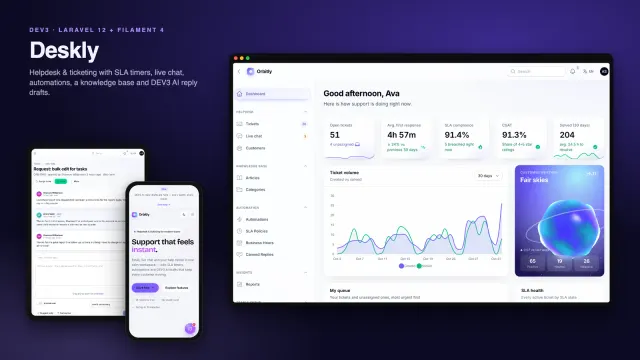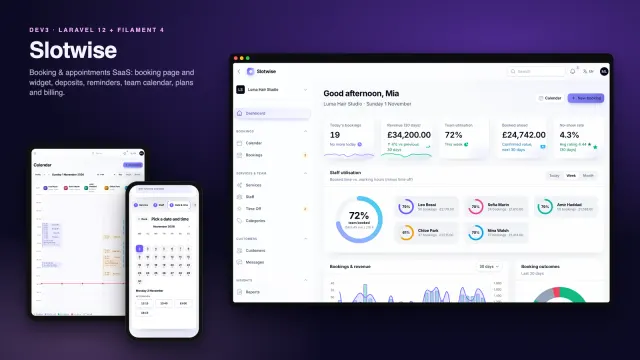
DEV3 Learnova – Learning Management System Laravel Script with Quizzes, Certificates & Payouts

A self-hosted LMS on Laravel 12 and Filament 4: courses with video, article, PDF and quiz lessons, drip schedules, verifiable PDF certificates, coupons and bundles, an instructor studio with commissions and payouts, reports and a web installer.

by DEV3 TechnologiesVerified Author(0) 0 sales 0 viewsUpdated 01 Nov 2026

Video tour. Pick a section below to browse 118 screenshots in 31 sections.

Learnova is a complete online academy that you host yourself, built by DEV3 Technologies on Laravel 12, Filament 4 and Livewire 3. Three panels share one installation: an admin panel that runs the catalogue, people and money, an instructor studio for building courses and tracking earnings, and a student panel for learning, certificates and purchases. A public website sells the courses, and a focused lesson player teaches them.

No live demo: the 118 grouped screenshots and the two video tours above show every screen, including step-by-step flows from registration to a verified certificate and from an instructor application to a paid payout. Install it with the bundled demo data (the fictional school "Learnova Academy") to try every role on your own server.

Courses and the course builder

  • Courses with a title, subtitle, description, category, level, language, price and sale price (0 = free), outcomes, requirements and a cover upload. Without a cover, a unique cover is generated for the course.
  • A drag-and-drop curriculum builder: sections and lessons are cards you reorder by dragging, and lessons can move between sections. Changes save instantly.
  • Lesson types: video (an uploaded MP4/WebM, or a YouTube, Vimeo or MP4 link), article, PDF shown inline with a download button, and quiz.
  • Uploaded videos and PDFs stay private: they live on a private disk (or a private S3-compatible bucket) and stream through short-lived signed URLs, re-checked on every request against enrolment and drip or sequential unlocks (prerequisites are enforced at enrolment), with seeking supported.
  • Free preview lessons open for guests from the course page.
  • Prerequisites: a course can require other courses, and the course page lists what the learner still needs to finish.
  • A review workflow: draft, submit for review, then approve and publish or request changes with a note. Admins can feature courses on the home page.

Drip content

  • Open a lesson on an absolute date, or a set number of days after enrolment, per lesson or for a whole section.
  • Sequential mode also requires the previous lesson to be completed.
  • Locked lessons show a padlock with the reason ("Unlocks Mar 14", "Complete the previous lesson"), and students see upcoming unlocks on their dashboard. Drip needs no cron: it is worked out whenever a student opens the course.

Quizzes

  • Multiple choice with one or several correct answers, true/false, and short answers matched against accepted answers, ignoring case, extra spaces and punctuation.
  • Points per question, a pass mark, optional attempt limits (or unlimited retakes), question shuffling and explanations shown after submitting.
  • Every attempt is stored and visible to the student, the instructor and the admin. Passing completes the quiz lesson.

The lesson player

  • A distraction-free player with the curriculum sidebar, a progress ring, previous/next controls and "complete & continue".
  • Direct video files remember the playback position. YouTube and Vimeo links become privacy-friendly embeds.
  • Timestamped notes, lesson Q&A answered by the instructor, and a review form for enrolled learners.

Paid content stays paid

  • Uploaded lesson videos and PDF handouts are kept in storage/app/private, never in the public folder, and the player loads them from signed links that expire after about two hours.
  • Every request, including every video seek (HTTP Range), is checked again: preview lessons are open to anyone, the course's instructor and admins always get in, and an enrolled student gets in once drip and sequential rules unlock the lesson. A copied link gives a non-enrolled visitor a 403.
  • Optional private S3, R2, Wasabi or MinIO bucket with "Block all public access": after the check, Learnova redirects to a 10-minute pre-signed URL.
  • Videos added by URL (YouTube, Vimeo or an external MP4) are hosted elsewhere and not covered; use that host's privacy settings, such as domain-restricted embeds.

Certificates anyone can verify

  • Completing every lesson and passing every quiz issues a certificate with a unique code such as LNV-7KQM-4XPA and emails the student.
  • A landscape A4 PDF generated by dompdf, with the student, course, instructor, hours, date, signatory and a QR code that links to the public verification page.
  • The PDF downloads only for the student who earned it and for admins, while anyone can check the certificate at /certificates/<code> or with the lookup form at /verify. Admins can revoke a certificate with a reason and restore it later.
  • Names are stored when the certificate is issued, so later renames never change an issued certificate.

Selling courses

  • Free enrolment, paid checkout and manual enrolment by an admin.
  • Coupons: percent or fixed amount, start and expiry dates, usage limits, and a scope of every course, one course or (for instructor coupons) only that instructor's courses.
  • Bundles: several courses for one price. The price is split across the courses in proportion to their list prices, and courses the student already owns are left out.
  • Refunds go back through the gateway, remove access and reverse the instructor's earnings.
  • Payments through Stripe, PayPal, Razorpay or a built-in simulated gateway, with printable receipts in the student panel.

Instructors, commissions and payouts

  • Students apply to teach with a headline, subject, bio, experience, sample link and first course idea; approval grants the instructor role.
  • Commission resolves from the most specific rate: course override, then instructor, then category, then the global rate (30% by default). The platform fee is rounded and the instructor gets the exact remainder, so no cent is lost.
  • An earnings ledger of sales, refunds and payouts. Sales become available after a hold period (14 days by default, your refund window).
  • Payouts: instructors request their available balance above a minimum; admins approve, mark paid with a reference, or reject, which returns the amount. Payouts are recorded, and you send the money through your bank or PayPal.
  • Instructors also send course announcements (in-app and email), answer Q&A from an inbox, reply to reviews and create their own coupons.

Students

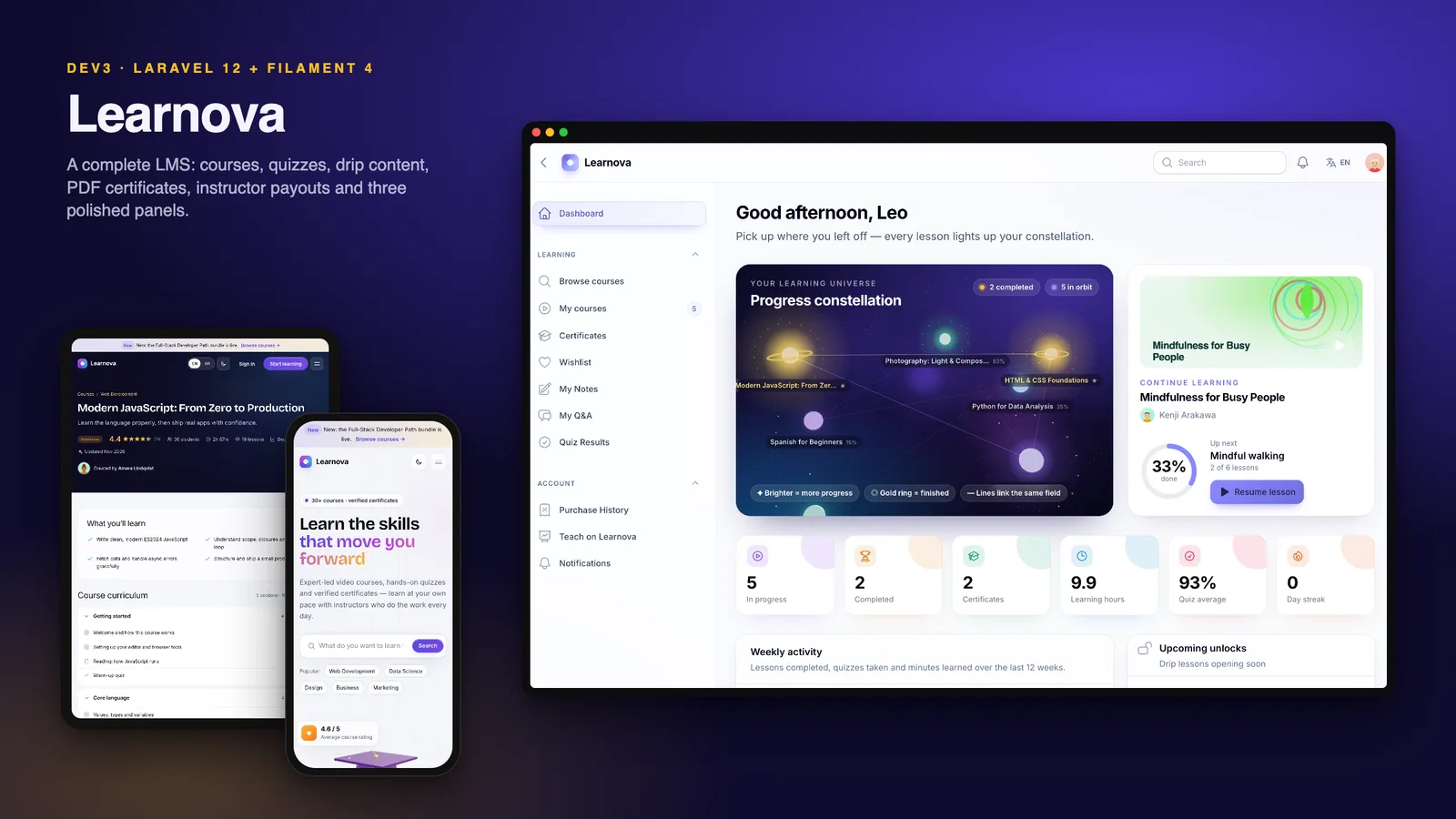
  • A dashboard with a 3D progress constellation: each course is a star that brightens with progress and wears a gold ring when finished. It also shows the learning streak, hours, quiz average, weekly activity, upcoming drip unlocks and recommendations.
  • My courses, certificates (PDF and share link), wishlist, notes, Q&A, quiz results and purchase history.

Admin and reports

  • An approval queue for courses, categories with Arabic names, colours, cover motifs and commission overrides, bundles, coupons, applications, instructors, students, enrolments, orders, payouts, review moderation and certificates.
  • A commissions page with the global rate, every override and a worked example.
  • Reports with revenue split by platform and instructors, enrolments by source, completions and the completion funnel, top courses and instructors, category share, quiz pass rates, coupon usage and refunds, from 30 days to 12 months or a custom range, with CSV export of every sale line.

Platform

  • A public website with a 3D open book and graduation cap in the hero, smooth motion, a course catalogue with search, filters and sorting, course, instructor and bundle pages, a "Teach" landing page with an earnings calculator, dark mode and a cookie banner.
  • English and Arabic with a full right-to-left layout on the website, the lesson player and all three panels.
  • Two-factor sign-in: an authenticator app (TOTP) with 8 single-use recovery codes, or email codes. A Require 2FA for staff setting enforces it on the admin panel; it is optional for instructors and students. A super admin can reset a user's 2FA, and php artisan dev3:2fa-reset recovers a locked-out account.
  • Roles with a permission editor, an audit log, a media library (private lesson files stay out of it), one-click backups that include storage/app/private, system health and notifications.
  • A REST API with Sanctum tokens for courses, certificate verification and the token owner's enrolments, described in OpenAPI.
  • Demo mode with one-click role logins, locked destructive actions and a nightly reset.

Installs like a script, not a project

  • A 5-step web installer at /install (requirements, database, demo or empty data, admin account, finish) or php artisan dev3:install.
  • vendor/ and the compiled assets are included, so you need PHP and a database but not Composer or Node.js. It runs on shared hosting with one cron entry; a queue worker is optional.

What's in the download

  • learnova-v1.0.1.zip: the full Laravel source with vendor/, the DEV3 core and public/build, ready to upload.
  • Documentation/: HTML documentation covering shared hosting, VPS, Docker, the CLI installer, two-factor authentication, courses and the builder, lessons and drip, file storage and privacy, quizzes, certificates, payments, coupons and bundles, commissions and payouts, cron and queue, the REST API, languages, demo mode, customisation, updating and a troubleshooting FAQ.
  • Demo and empty seeders, 142 Pest tests and the Larastan and Pint configuration.

Requirements

  • PHP 8.2 or newer (8.3 and 8.4 work) with bcmath, ctype, curl, dom, fileinfo, json, mbstring, openssl, pdo, tokenizer, xml, zip and gd
  • MySQL 8, MariaDB 10.6+ or SQLite 3
  • Apache with mod_rewrite or Nginx, and one cron entry every minute
  • For uploaded lesson videos, raised PHP and web server upload limits (video links need none)

Good to know

  • A quiz's time limit is shown to students but not enforced by a countdown in 1.0.1.
  • The certificate itself (the page and the PDF) is in English; the pages around it are translated. Its PDF font covers Latin, Cyrillic and Greek, so add a font for other scripts.
  • Private lesson files cover uploaded videos and PDFs; videos linked from YouTube, Vimeo or another host are protected only by that host's settings.
  • Payouts are recorded, not sent: Learnova does not transfer money to instructors automatically.
  • The PayPal and Razorpay drivers follow the providers' documented APIs but were not tested against live accounts, so test with sandbox keys first.

See how we built Learnova for the engineering behind it.

How it's built

Architecture, stack, key decisions and the quality gates DEV3 Learnova passed before release.

Our own learning management system in the DEV3 Laravel suite: Laravel 12 and Filament 4 on a shared DEV3 core, with one panel per role, a drip engine, a quiz engine, commission rules with a payouts ledger and dompdf certificates with QR verification, installed from a zip through a web wizard.

The problem it solves

An LMS is three products that share one database. Learners need a catalogue, a checkout and a lesson player that remembers where they stopped. Instructors need a course builder, a fair view of what they earned and a way to get paid. The school needs approvals, moderation and reports. Several of the hardest parts are about trust. Drip rules decide when content opens, so a lesson must not unlock early or stay locked for a paying student. Quiz scores decide who gets a certificate. Certificates are only worth something if an employer can check them. Commission splits and refunds are real money owed to real people, and a rounding error on every sale adds up. All of this had to install on ordinary PHP hosting: no Node.js, no guaranteed queue worker, one cron entry at best, and a buyer who expects a web installer rather than a terminal. Learnova also had to reuse the shared DEV3 Laravel core built with Deskly, adding only what is specific to teaching.

Architecture and approach

We built Learnova as a Laravel 12 application with three Filament 4 panels: /admin for the school, /instructor for the instructor studio and /student for learners, with registration. A user only sees the panels their roles allow, and an instructor or admin can also learn as a student. The lesson player is a Livewire component at /learn/<course>/<lesson>; the public website is Blade with a small vanilla-JS layer, which keeps the landing page at 33.4 KB of gzipped JS and CSS.

A shared DEV3 core

  • One package, five products. Everything that is not about learning comes from dev3/laravel-core: the installer, typed and encrypted settings, branding, the Blade UI kit, motion and 3D helpers, demo mode, roles and permissions, the audit log, the payment gateways, backups, system health, the Sanctum API with OpenAPI, and English / Arabic with RTL. Learnova registers its roles, demo logins, seeders, settings and API paths through a product manifest and registers its own 3D presets, and the packaging script copies the core into the zip so buyers get one self-contained download.

Key design decisions

  • A drip engine with one set of rules. A single service decides whether a lesson is open for an enrolment: preview lessons are always open, an absolute "available from" date wins next, then drip days on the lesson or its section count from the enrolment day, and sequential mode also requires the previous lesson to be complete. The same service returns the reason for every locked lesson, so the sidebar, the course page and the student's "upcoming unlocks" agree. Unlocks are calculated when a course is opened, so drip needs no cron job at all.
  • A quiz engine that grades strictly and keeps every attempt. Multiple choice scores only when the chosen set equals the correct set, true/false checks one answer, and short answers are normalised for case, spacing and punctuation before matching any accepted answer. Each question carries its own points, the percentage is compared with the pass mark, attempt limits are enforced on the server, and every attempt is stored for the student, the instructor and the admin. A course completes only when every lesson is done and every quiz has a passing attempt, and completion issues the certificate.
  • Commission resolved from the most specific rule. The platform rate for a sale is the course override, else the instructor override, else the category override, else the global setting. Amounts are integers in minor units: the platform fee is rounded half-up and the instructor gets the exact remainder, and coupon discounts and bundle prices are spread across the lines by largest remainder, so every split adds up to the cent. The rate is stored on each order line, so a later change never rewrites past sales.
  • Payouts on a ledger, not a balance column. Each paid line adds a sale to the instructor's earnings ledger that becomes available after the hold period (14 days by default, the refund window). A refund writes a negative entry at once and revokes access; a payout request debits the ledger immediately, so the same money cannot be requested twice, and a rejection removes that debit. Fulfilment runs in a locked transaction and is idempotent, so a repeated gateway webhook cannot enrol twice or pay an instructor twice.
  • Certificates that can be checked. Certificates are issued once per student and course, with a code such as LNV-7KQM-4XPA from an alphabet without look-alike characters. The student, course and instructor names are stored at issue time, so renames never alter an issued certificate. The landscape A4 PDF is rendered on demand by dompdf with remote loading switched off, and carries a QR code, generated locally, that links to /certificates/<code>. Anyone can check a code there or at /verify, and admins can revoke a certificate with a reason that the verification page then shows.
  • Paid lesson files behind an access check. Uploaded videos and PDF handouts live on the private disk (or a private S3-compatible bucket), never under public/storage. The player gets a signed URL that expires after about two hours, and every request to /media/lessons/{id}/video or /pdf, including every seek, runs the same lesson-access rules again: preview lessons for anyone, the course instructor and admins, and enrolled students only once drip and sequential rules open the lesson (prerequisites are checked when they enrol). Local files are sent as Range-capable responses (206 Partial Content), and cloud disks redirect to a 10-minute pre-signed URL. Certificate PDFs follow the same idea: the verification page is public, the PDF is for its owner and admins. Videos linked from YouTube or Vimeo stay with that host's privacy settings.
  • Two-factor sign-in from the shared core. The core adds an authenticator app (TOTP) with 8 single-use recovery codes and email codes to every panel. A Require 2FA for staff setting enforces it on /admin, instructors and students opt in, super admins can reset a user's 2FA (also php artisan dev3:2fa-reset), and demo logins skip the challenge so the showcase stays one click.
  • An installer instead of a README. If .env is missing the app creates it and an APP_KEY, then redirects to the 5-step /install wizard: requirements, database (MySQL or SQLite, tested before writing), demo or empty data, admin account and a lock file. php artisan dev3:install does the same from SSH. vendor/ and public/build ship in the zip, and the queue defaults to sync, so one cron entry is the only server setup.
  • Demo data generated by code. The seeders build a deterministic "Learnova Academy" in about ten seconds in one transaction: 8 instructors, 33 courses with 301 lessons, about 250 students and 650 enrolments over eight months, quiz attempts, certificates, reviews, Q&A and payouts. Course covers, avatars and bundle art are SVG generated by code, the lesson clips were rendered with ffmpeg and the PDF handouts with dompdf, so nothing in the demo carries a third-party licence.

The 3D and motion approach

  • One small scene per page. The home hero shows an open book whose pages breathe and turn, with a graduation cap and a gold tassel floating above it and drifting glints, all following the pointer. The student dashboard shows a progress constellation: each enrolled course is a star sized by its lesson count and lit by progress, with a halo of lesson motes that light up as lessons are finished. Finished courses turn gold with a ring, and courses in the same category are linked.
  • Cheap by default. three.js loads lazily as its own 187 KB chunk, the device pixel ratio is capped, scenes pause off-screen, reduced motion is respected, and poster images show without WebGL or when 3D is switched off in Settings → Branding. The hero relights for dark mode.
  • Motion without a licensing question. Reveals, split text, parallax, counters and a magnetic call to action come from the core's data-attribute motion.js with Lenis smooth scrolling, not GSAP, which keeps resale licensing simple.

Quality gates and results

Learnova 1.0.1 passed all seven release gates of the DEV3 Laravel suite, run by one script against the packaged build:

  • Static analysis: Pint clean, Larastan level 6 with 0 errors, and php -l on 301 files.
  • Tests: 142 Pest tests with 616 assertions, including required money-path suites for checkout with coupons and bundles, refunds, commissions, enrolment, drip, quiz scoring, progress and certificates, and payouts, plus lesson-media access checks and two-factor sign-in.
  • Front-end budget: 11.0 KB of JS and 22.4 KB of CSS gzipped on the public page against a 180 KB budget, with the 187 KB three.js chunk loaded only when a scene needs it.
  • Databases: the demo and empty seeders run on both MySQL 8 and SQLite.
  • Browser checks: 98 pages in headless Chrome with 0 console errors, plus 6 happy paths: a free enrolment and the player, a paid checkout with a coupon, a quiz, certificate verification and the PDF, an instructor payout request and an admin course approval.
  • Installer: the release zip unzipped into a clean folder, installed through the /install wizard on MySQL with demo data, then signed in as the admin.
  • Secret scan: 19,884 files in the 29 MB zip, clean.

The 118 screenshots and the two video tours were captured from the seeded demo across all three panels, light and dark mode and Arabic, and double as the listing's demo. Building the second product on the shared core also fed back into it: Learnova's change requests fixed link-button colours in the core stylesheet and made the release-gate script product-neutral for the other three scripts.

Version 1.0.1 hardened what buyers protect most: paid lesson videos and PDFs moved to private storage behind per-request checks, certificate PDFs became owner-only, and every panel gained two-factor sign-in. Known gaps are listed openly: a quiz's time limit is shown but not enforced by a countdown, the certificate document is English-only, videos linked from YouTube or Vimeo rely on that host's privacy settings, and the PayPal and Razorpay drivers have not been run against live accounts. Learnova is on the DEV3 marketplace, where the video tours and grouped screenshots show every screen.

Tech stack

Area Technologies
Backend Laravel 12, Filament 4 panels per role, Livewire 3 lesson player, Laravel Sanctum, Two-factor sign-in (TOTP), spatie/laravel-permission, Scheduler and database queue
Frontend Blade, Tailwind CSS 4, Vite 7, Vanilla JS motion, Lenis, three.js
Data MySQL 8 / MariaDB, SQLite, Private disk or private S3 bucket, Earnings ledger, Deterministic demo seeders, Audit log
Documents and media dompdf certificates, Local QR code generation, Code-generated SVG art, YouTube and Vimeo embeds
Integrations Stripe, PayPal, Razorpay, Simulated gateway, SMTP, REST API with OpenAPI
Delivery Pest, Larastan level 6, Pint, Headless Playwright, Web installer, Secret scan

Inside the build

Home page with a 3D book and mortarboard: A GPU-rendered open book and graduation cap float in the hero and follow the cursor, beside a course search. Home page with a 3D book and mortarboard — A GPU-rendered open book and graduation cap float in the hero and follow the cursor, beside a course search.

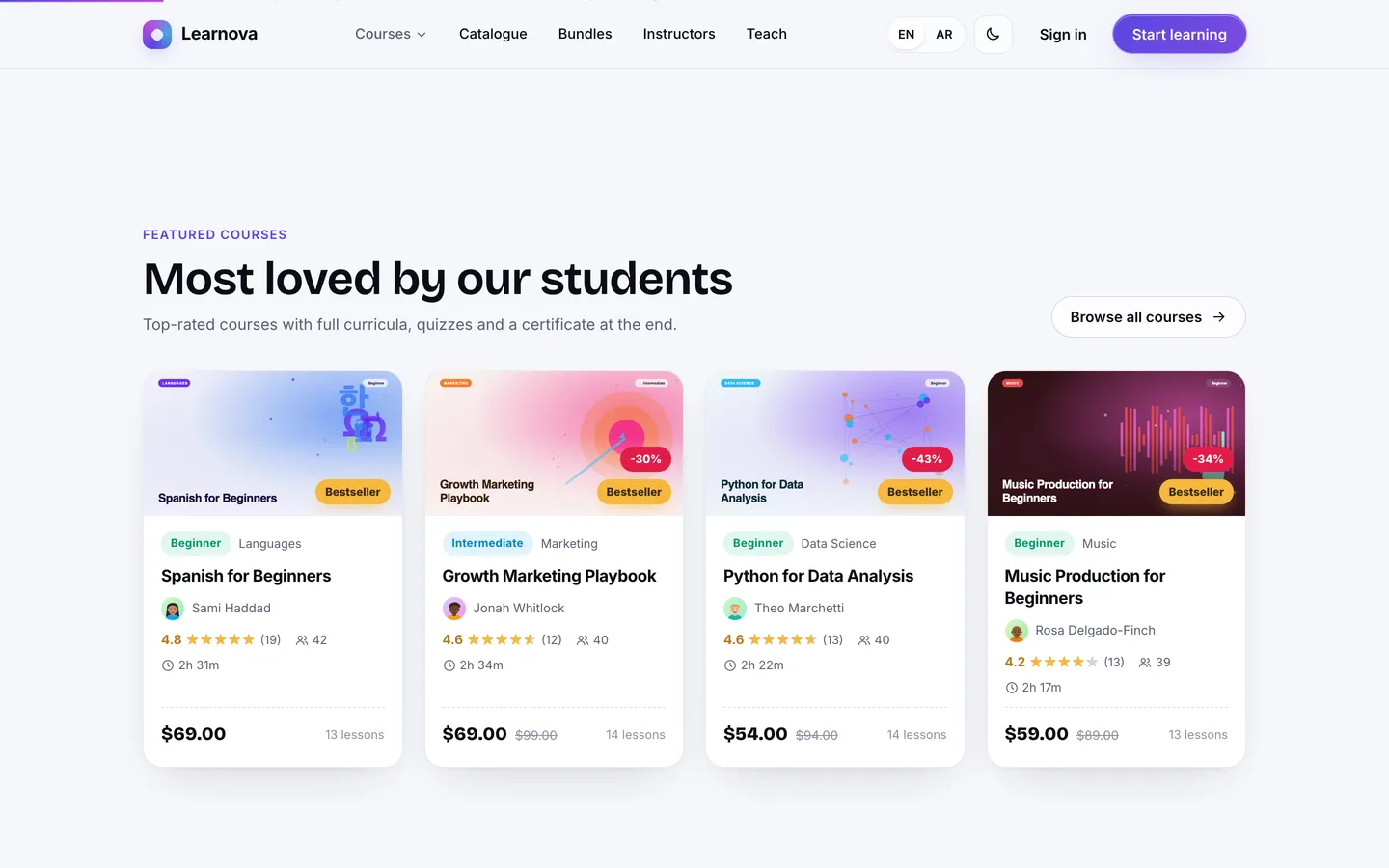
Featured courses: Hand-picked courses appear as rich cards with generated cover art, ratings, lesson counts and level badges. Featured courses — Hand-picked courses appear as rich cards with generated cover art, ratings, lesson counts and level badges.

Guides & articles

Practical guides and engineering write-ups for DEV3 Learnova.

Laravel LMS script: 8 things to check before you self-host an online academy

Last updated
Laravel LMS script: 8 things to check before you self-host an online academy: DEV3 Learnova

If you are comparing Laravel LMS scripts, the feature lists all look alike: courses, lessons, quizzes, certificates, maybe instructors. The differences show up later, when a paying student finds a lesson still locked, when an employer asks whether a certificate is real, or when an instructor asks why their earnings don't match the sales. This article is a checklist of the eight things worth testing before you choose a self-hosted learning management system, with how we answered each one in DEV3 Learnova, an LMS built on Laravel 12 and Filament 4.
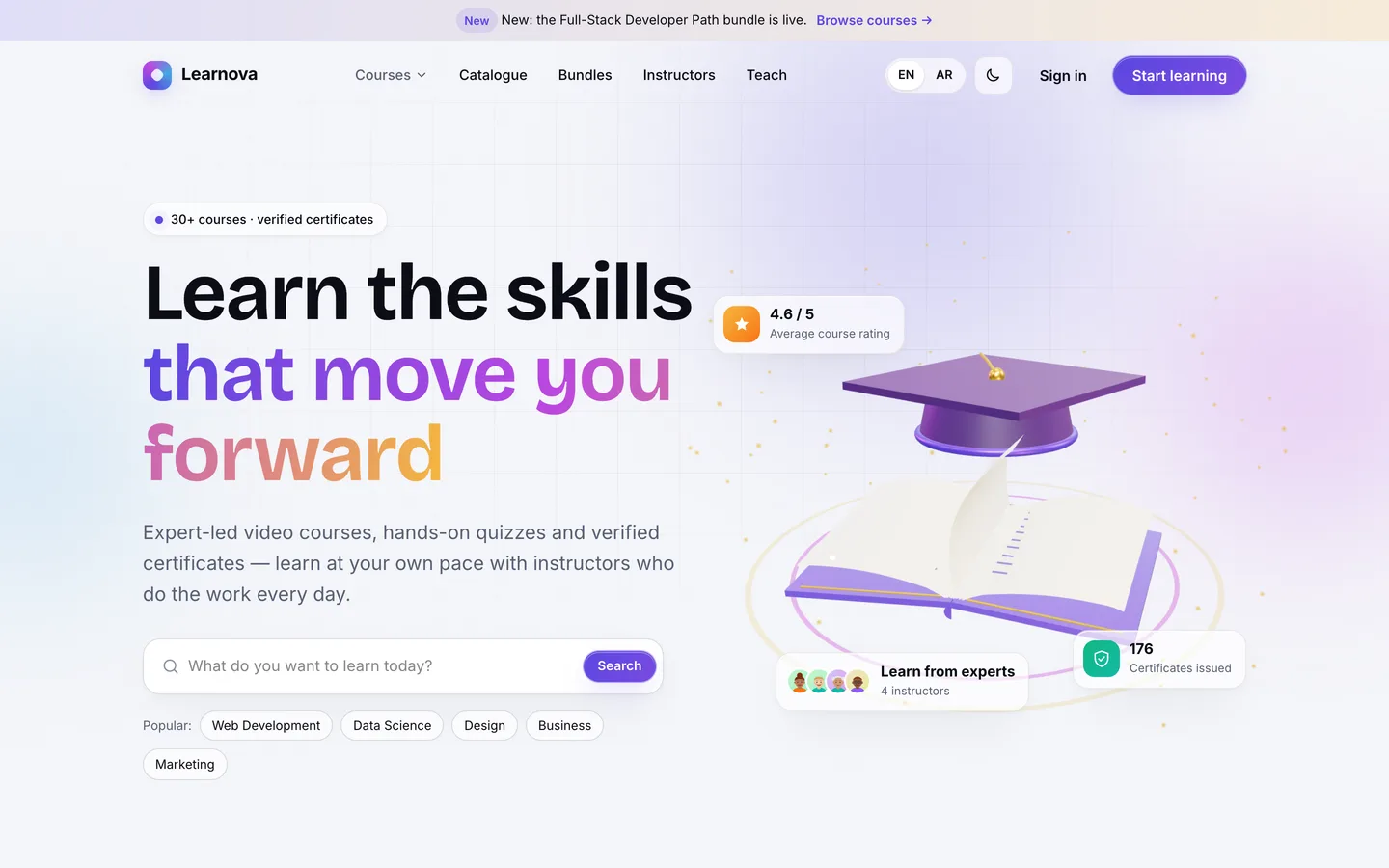
The Learnova website: a 3D open book and graduation cap in the hero, beside a course search

1. Is building a course quick for instructors?

Instructors build the content, so the course builder decides how full your catalogue gets. Check which lesson types it supports, how easy it is to reorder a curriculum, and whether there is a review step before a course goes live.

In Learnova an instructor fills in the course basics (category, level, language, price and sale price, outcomes, requirements, prerequisites and drip mode), then opens the curriculum builder. Sections and lessons are cards you drag to reorder, and lessons can move between sections; changes save as you go. A lesson is a video (an upload, or a YouTube, Vimeo or MP4 link), an article, a PDF shown inline, or a quiz, and any lesson can be a free preview. Uploaded videos and PDFs are stored privately, which matters more than it sounds: see point 5. When the course is ready, the instructor submits it and it waits in the admin's approval queue, where the admin publishes it or sends it back with a note.
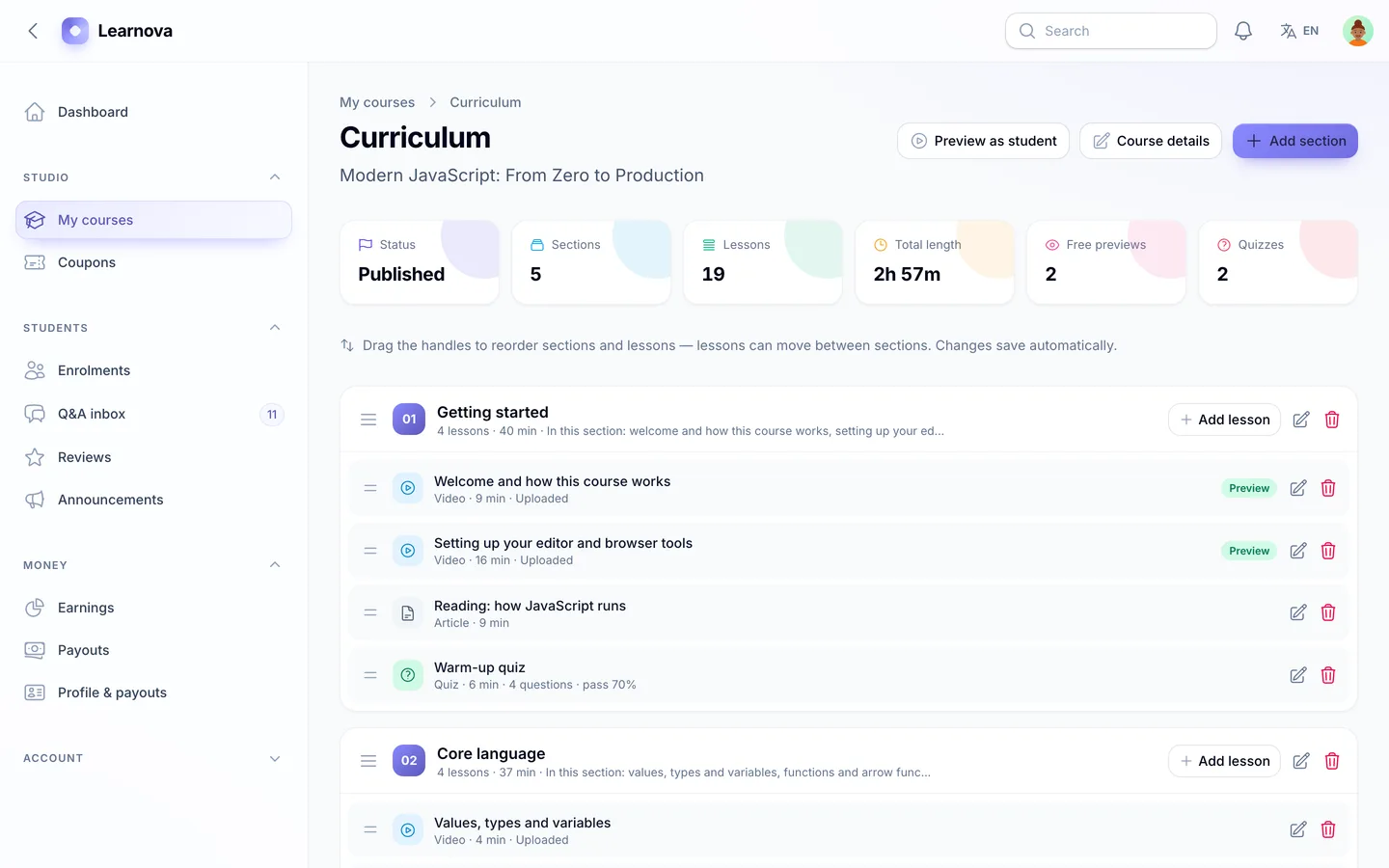
The drag-and-drop curriculum builder: sections and lessons with type icons, durations, previews and drip days

2. Can you drip content, and do learners see why a lesson is locked?

Drip schedules keep cohorts together and stop learners from skipping ahead. The detail to test is what a student sees: a padlock with no explanation creates support tickets.

Learnova supports three rules that combine. A lesson can open on a fixed date, or a set number of days after the student enrolled, set on the lesson or for a whole section. Sequential mode adds a second condition: the previous lesson must be complete. Preview lessons are always open. Every locked lesson shows its reason, such as "Unlocks Mar 14" or "Complete the previous lesson", and the student dashboard lists upcoming unlocks. Unlocks are worked out whenever the course is opened, so drip doesn't depend on a cron job running on time.
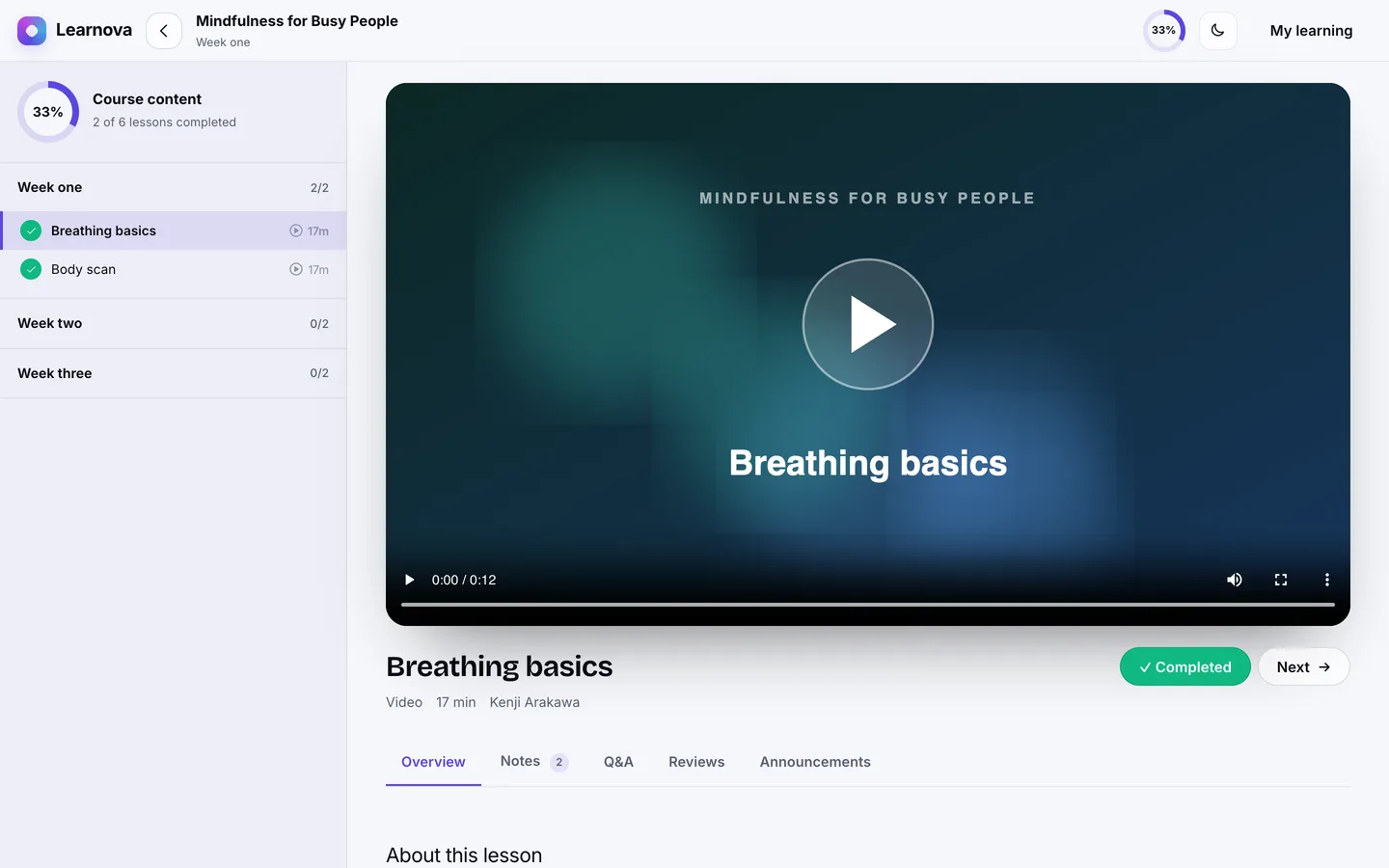
Drip schedule in the lesson player: sections unlock days after enrolment and the sidebar shows when each lesson opens

3. How are quizzes scored?

A quiz that decides who gets a certificate needs clear scoring rules. Check how multiple-answer questions are marked, how short answers are matched and whether retakes can be limited.

Learnova's quizzes mix multiple choice (with one or several correct answers), true/false and short answers. A multiple-choice question scores only when the student picks exactly the correct set. Short answers are compared with a list of accepted answers after ignoring case, extra spaces and punctuation, so "Primary key." matches "primary key". Spelling variants still count as different answers, which is why an instructor can list several accepted answers. Each question has its own points, the quiz has a pass mark, and attempts can be unlimited or capped. The result shows the score against the pass mark, which answers were right and an explanation for each, and every attempt is kept for the student, the instructor and the admin.

To be clear about the limits: an instructor can set a time limit and students see it, but version 1.0.1 doesn't enforce it with a countdown.
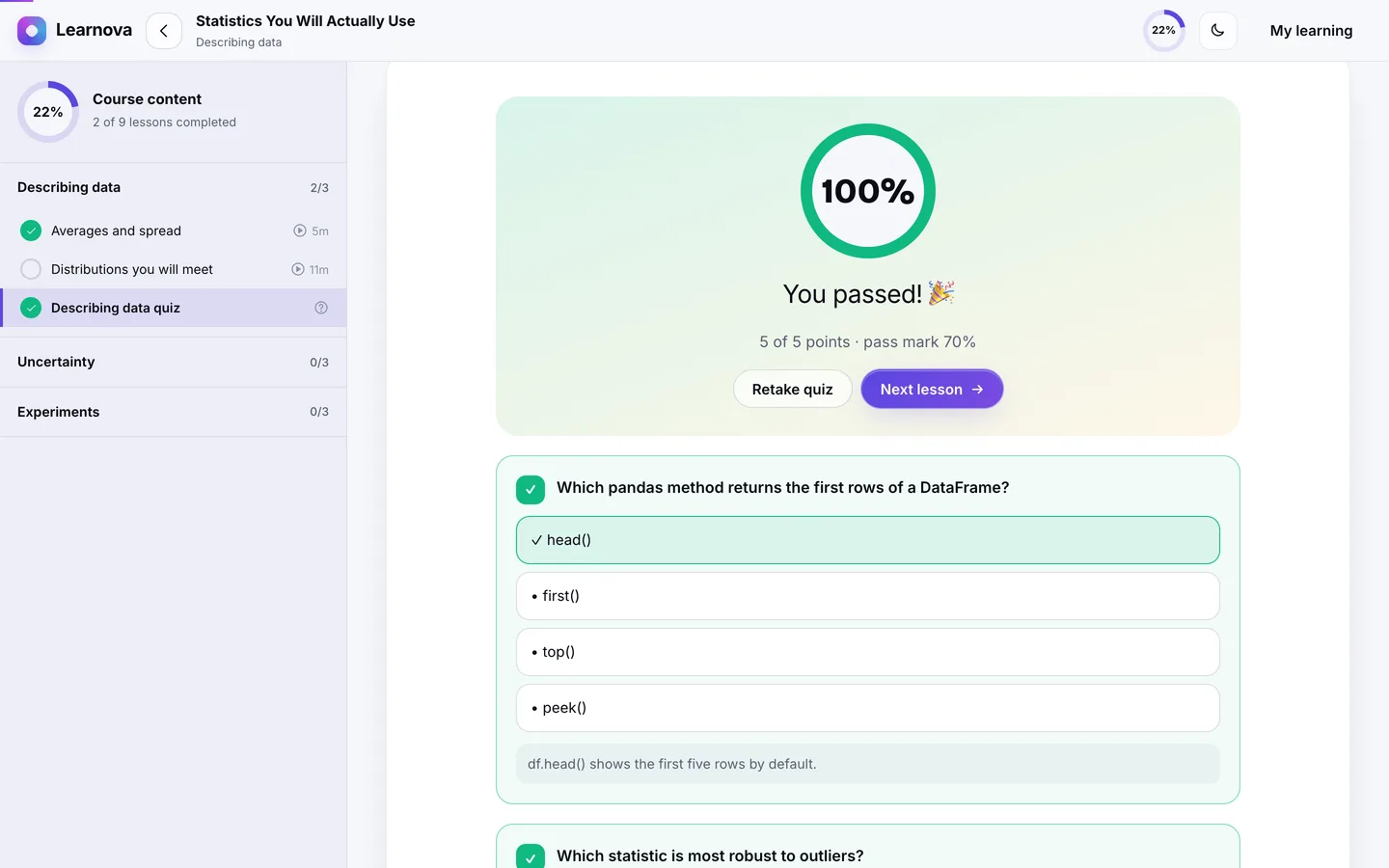
The quiz result: the score against the pass mark, the right and wrong answers and an explanation for each

4. Can anyone verify a certificate?

A certificate PDF on its own is easy to fake. A useful certificate has a unique code and a public page where anyone can check it.

When a student finishes every lesson and passes every quiz, Learnova issues a certificate automatically with a code such as LNV-7KQM-4XPA. The landscape A4 PDF shows the student, course, instructor, hours, date and signatory, plus a QR code that opens the public verification page. Anyone can also type the code at /verify. Admins can revoke a certificate with a reason, and the verification page then shows it as revoked. The verification page is public, but the PDF itself downloads only for the student who earned it and for admins. The names are stored when the certificate is issued, so renaming a course later doesn't change certificates already out in the world. The certificate document itself is in English in 1.0.1, while the pages around it are translated.
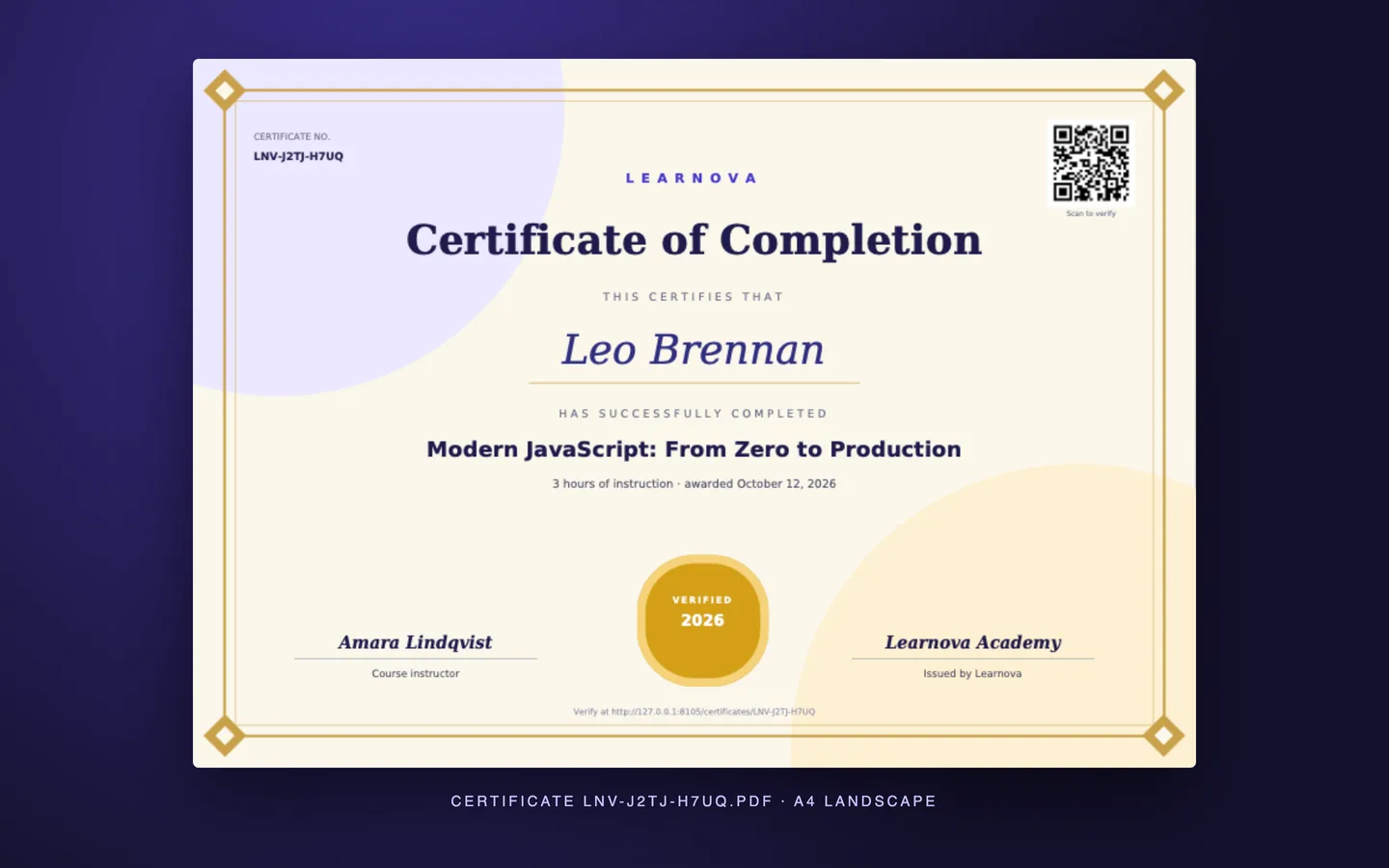
The PDF certificate: an A4 landscape layout with a seal, the signatory and a QR code linking to the verification page

5. Does checkout handle coupons, bundles and refunds, and does paid content stay paid?

Selling courses means more than a Buy button. Look for coupons you can scope, bundles that price fairly, and refunds that also take back access and the instructor's share. Then check where the paid videos actually live: if a lesson file sits in a public folder, anyone with the link can watch it without buying.

Learnova's coupons are a percentage or a fixed amount, with dates, usage limits and a scope of every course, one course or one instructor's courses. Bundles sell several courses for one price, split across the courses in proportion to their list prices, and leave out courses the student already owns. A refund goes back through the gateway, removes access and reverses the instructor's earnings. Payments run through Stripe, PayPal or Razorpay, and a simulated gateway lets you test the whole flow without moving money.

Since version 1.0.1, uploaded lesson videos and PDF handouts are kept in private storage (a private folder, or a private S3-compatible bucket). The player streams them through signed links that expire, and every request, including every seek in a video, checks again that the viewer is enrolled and that drip or sequential rules have opened the lesson (prerequisites are checked at enrolment). A shared link gives a non-enrolled visitor a 403, and a refund takes access away at once. Videos you link from YouTube or Vimeo stay under that host's own privacy settings.
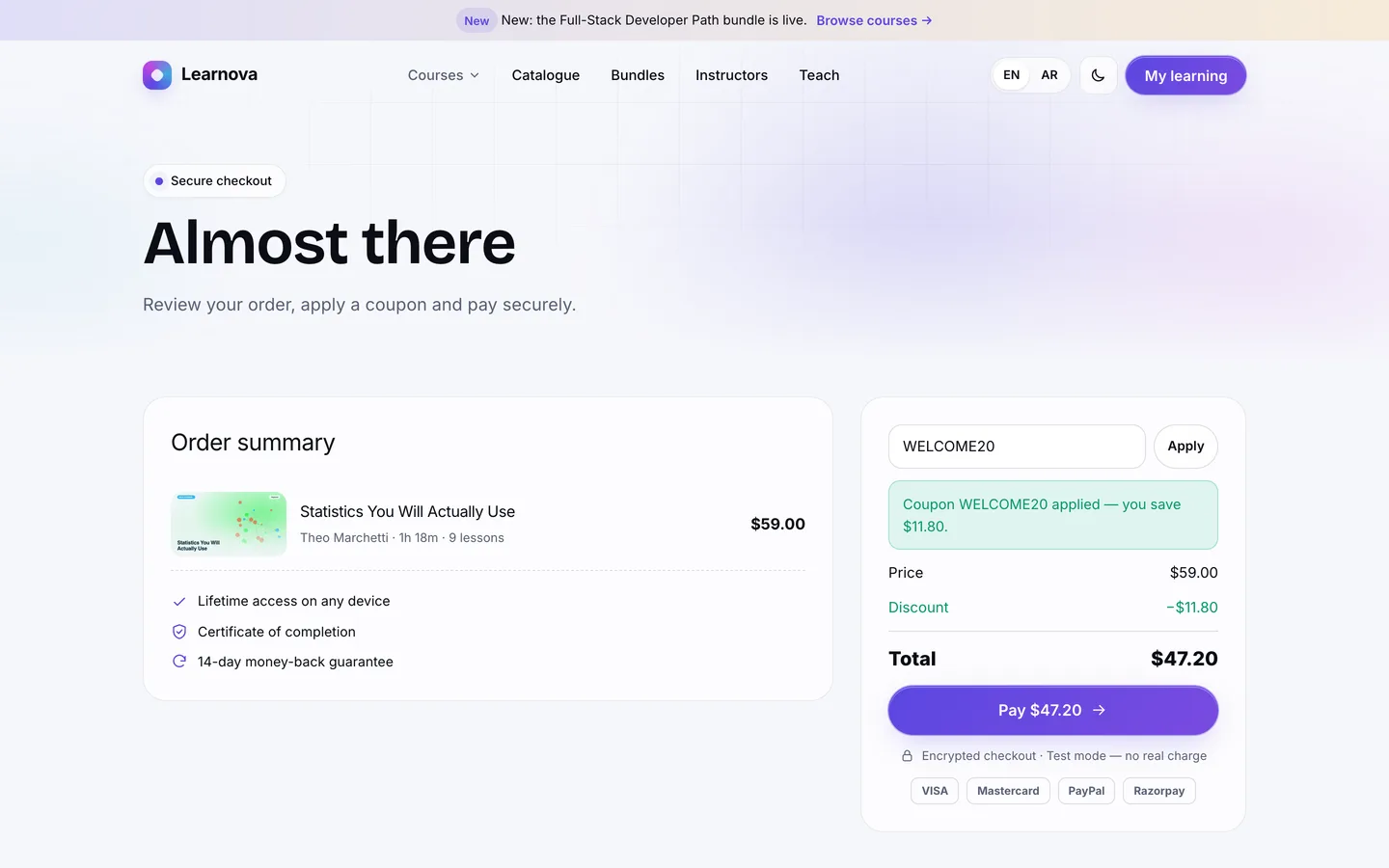
Checkout with a coupon applied: the order summary updates the total before payment

6. If instructors sell, are commissions and payouts traceable?

As soon as other people teach on your platform, you owe them money, and they will check the numbers. Look for commission rules you can override and a ledger instructors can read.

Learnova resolves the platform's commission from the most specific rule: the course's own rate, then the instructor's, then the category's, then the global rate. The fee is rounded and the instructor receives the exact remainder, so the two always add up to the sale price. Each sale lands in the instructor's earnings ledger and becomes available after a hold period that matches your refund window, 14 days by default. Instructors request a payout of their available balance above a minimum, and admins approve it and mark it paid with a transfer reference, or reject it, which returns the amount. Learnova records payouts; you send the money through your bank or PayPal.
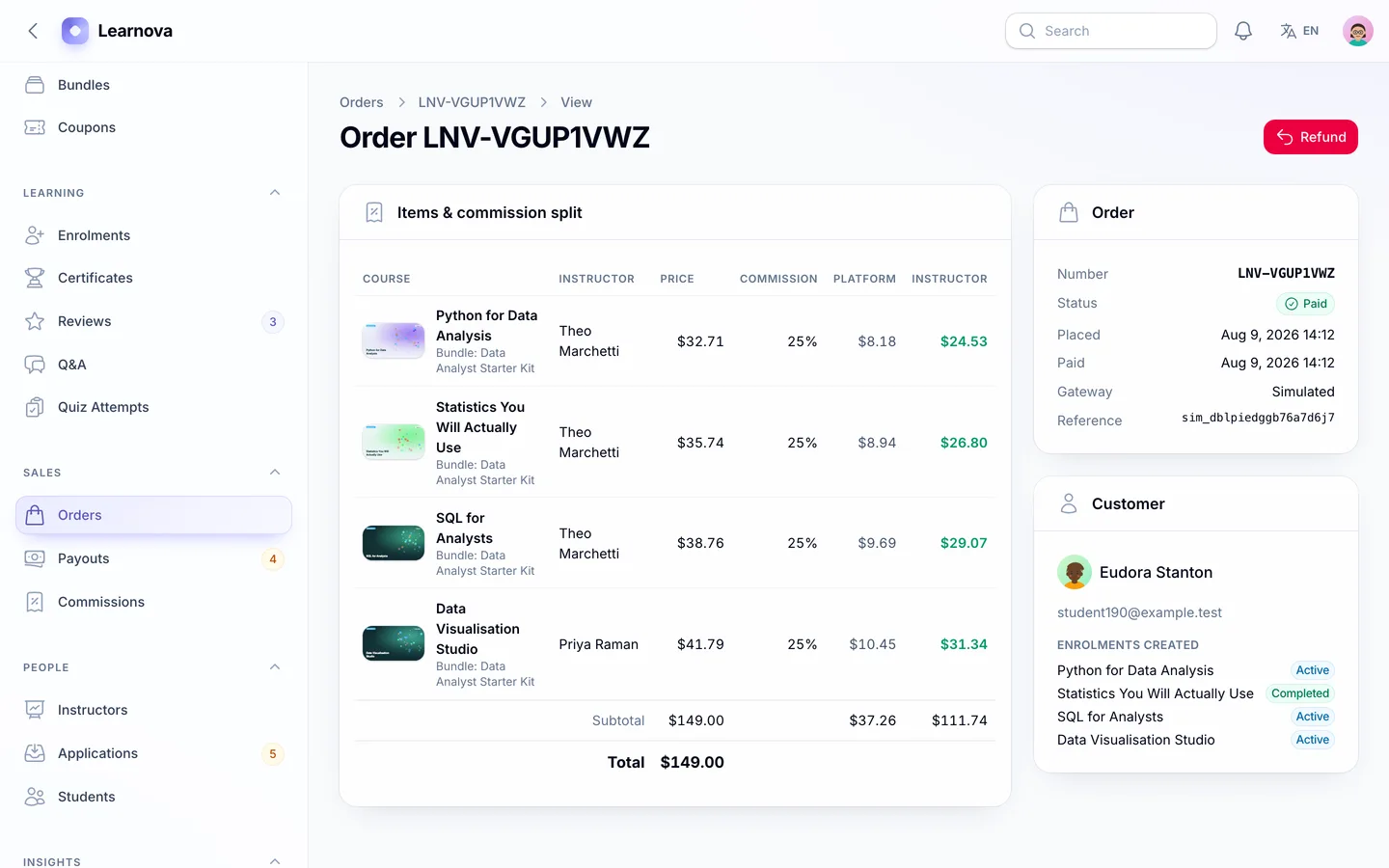
The admin order view: each line shows the price, the commission rate, the platform fee and the instructor's earning

7. Will learners keep coming back?

Completion rates depend on the learning experience after the sale. Check the lesson player, progress tracking and the student's home screen.

Learnova's lesson player keeps the curriculum beside the lesson, with a progress ring and "complete & continue". Direct video files remember where the student stopped, and students keep timestamped notes and ask questions that the instructor answers from an inbox. Their dashboard shows a 3D progress constellation, where each course is a star that brightens with progress and wears a gold ring when finished, along with their streak, learning hours, weekly activity, upcoming unlocks and recommendations. Admin reports show the completion funnel and quiz pass rates, so you can see where learners drop off.
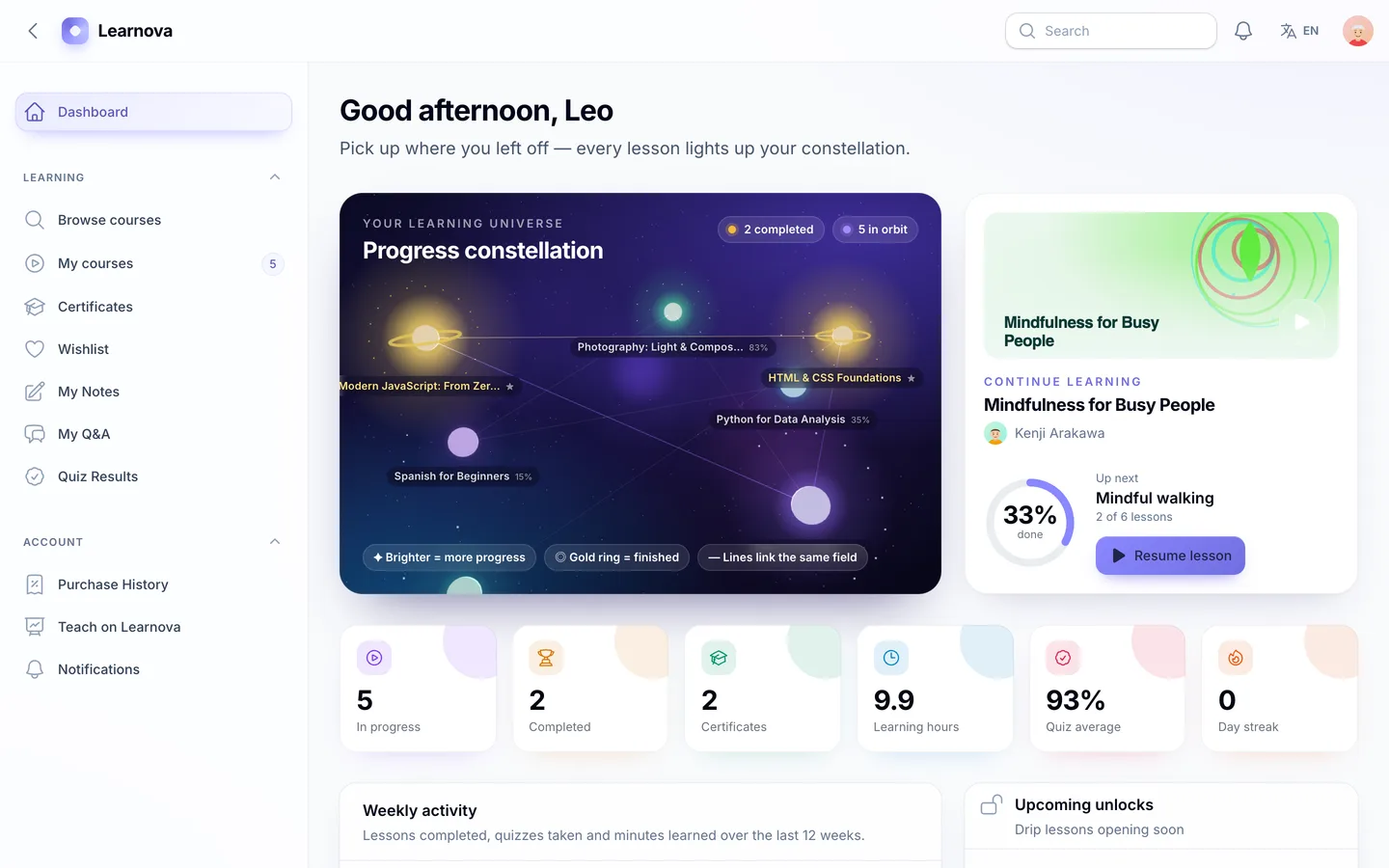
The student dashboard: a 3D constellation where each course is a star that glows brighter with progress

8. Can you install it without being a Laravel developer?

A script you can't install is a project you have to hire for. Check whether it ships with vendor/ and built assets, whether there's a web installer, and what the server really needs.

Learnova's download includes vendor/ and the compiled assets, so you need PHP 8.2+ and MySQL, MariaDB or SQLite, but not Composer or Node.js. Visit /install and a five-step wizard checks requirements, tests the database, loads demo or empty data, creates your admin and locks itself; php artisan dev3:install does the same over SSH. The queue runs in sync mode by default, so one cron entry is the only extra setup. If you plan to upload lesson videos rather than link them, raise your PHP and web server upload limits.
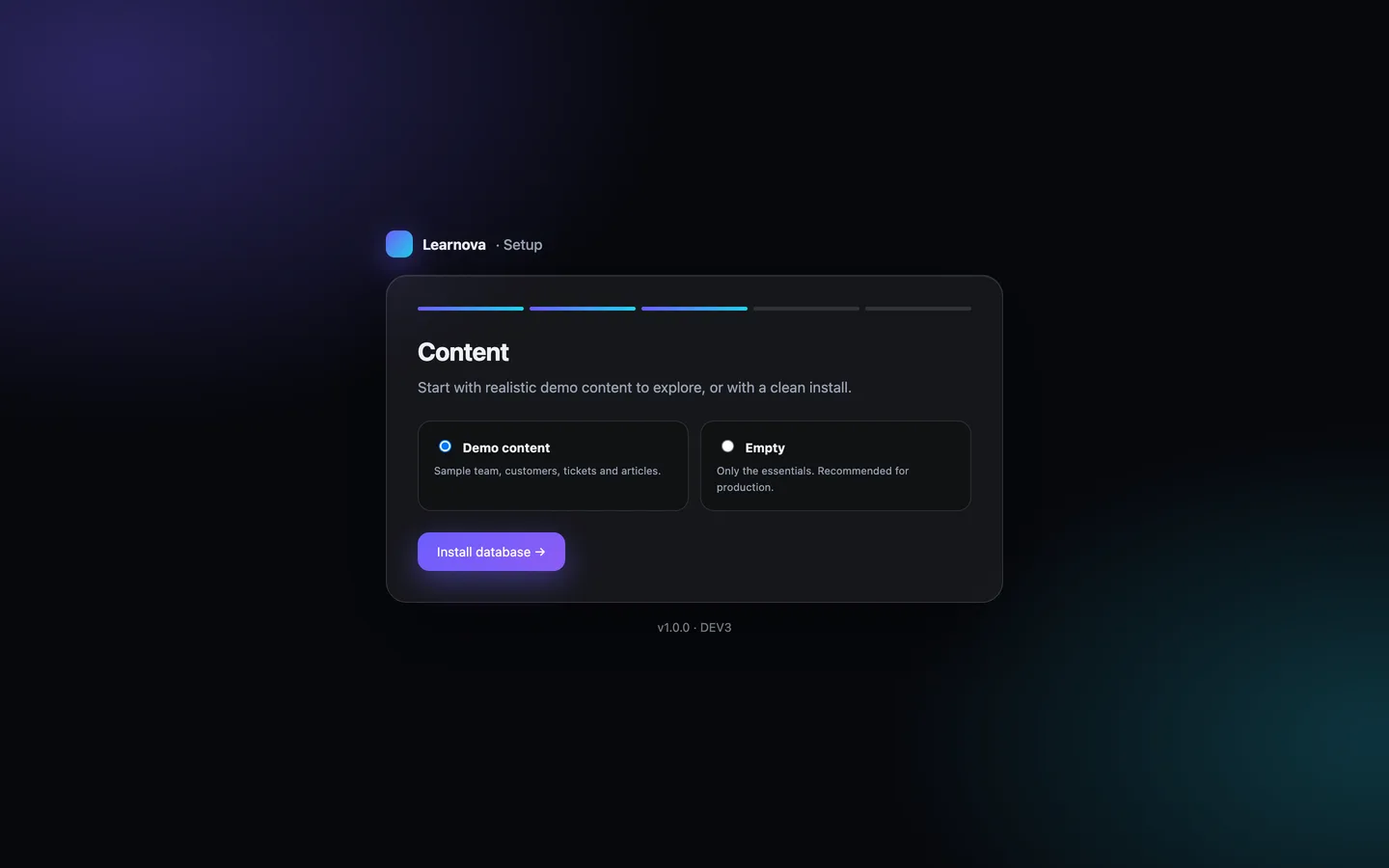
The installer's data step: the full Learnova Academy demo to explore, or a clean install for production

See it in action

The video tour follows a student from the catalogue through a coupon checkout, the lesson player and a quiz to a verified certificate, then shows the instructor studio with the curriculum builder, earnings and a payout request, and the admin's approvals and reports.

Video tour of Learnova

What else to compare

  • Reports: revenue split between the platform and instructors, enrolments by source, completions, top courses and instructors, quiz pass rates, coupon usage and refunds, with CSV export.
  • Languages: English and Arabic with a full right-to-left layout on the website, the lesson player and all three panels.
  • Security and admin: two-factor sign-in with an authenticator app (8 recovery codes) or email codes, which you can require for admin staff while instructors and students opt in; roles with a permission editor, an audit log, review moderation, backups that include private lesson files, and system health.
  • API: a Sanctum-secured REST API for courses, certificate verification and a user's enrolments, described in OpenAPI.
  • Quality: Learnova 1.0.1 shipped with 142 Pest tests, Larastan level 6 with no errors and 98 pages checked in a headless browser with no console errors.

Learnova is available as DEV3 Learnova on the DEV3 marketplace for $29, with 118 screenshots and two video tours in place of a live demo. How it's built explains the architecture in more detail.
Frequently asked questions

The complete source code (version 1.0.1) as a download from your account, with the setup and usage guides shown on this page. You can modify the code to suit your product.

Buying guides: Laravel scripts with Filament panels and a web installer · Next.js or Laravel for a SaaS script?

More from this author

View all

Related in Web Scripts & Software

View all