DEV3 Deskly – Helpdesk & Ticketing Laravel Script with Live Chat, SLAs & Knowledge Base

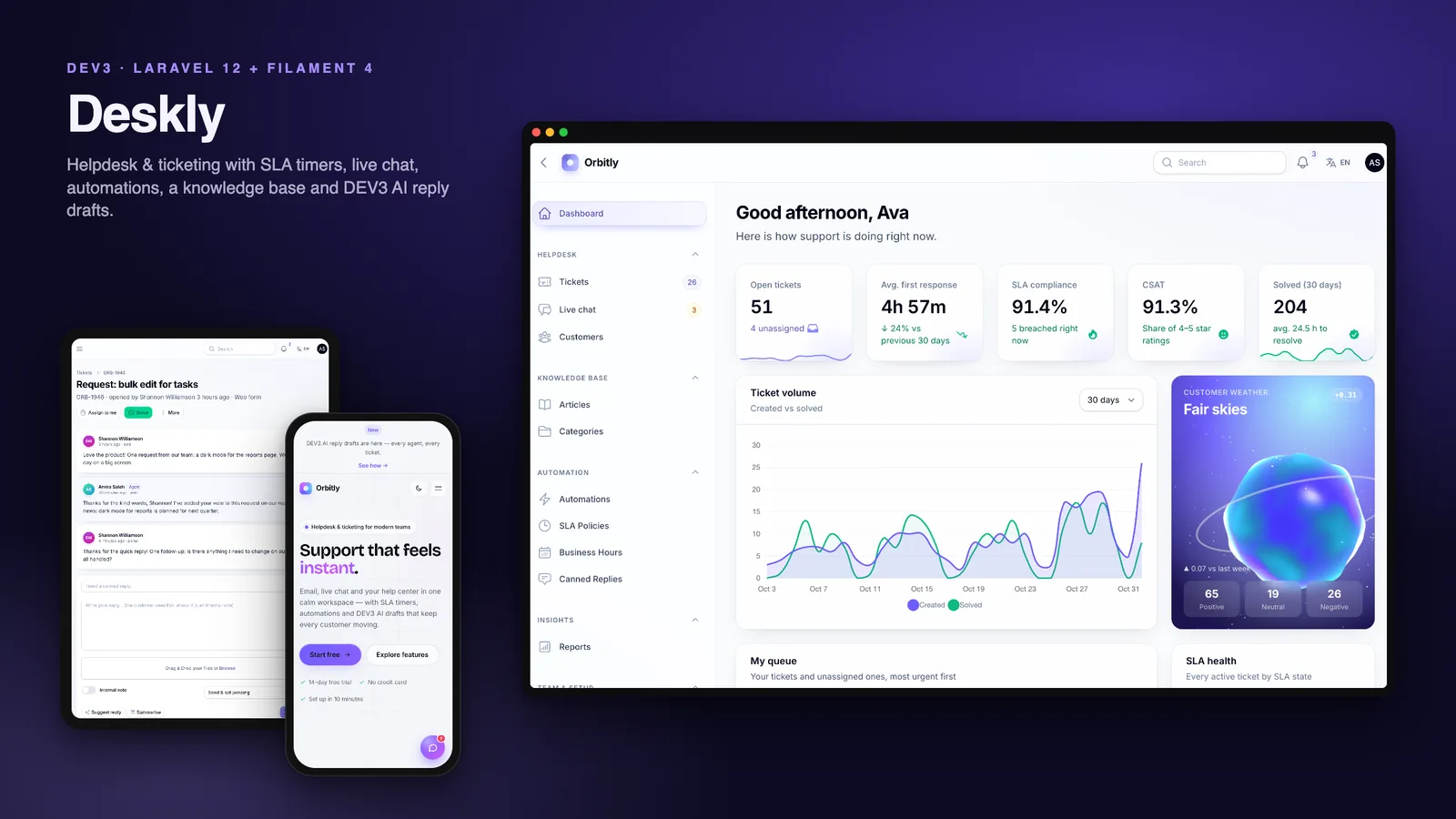
A self-hosted helpdesk on Laravel 12 and Filament 4: email-to-ticket, live chat, web form and API in one queue, SLA timers on business hours, automations, canned replies, a bilingual knowledge base, a customer portal with CSAT, reports, DEV3 AI drafts and a web installer.

by DEV3 TechnologiesVerified Author(0) 0 sales 0 viewsUpdated 01 Nov 2026

Video tour. Pick a section below to browse 117 screenshots in 31 sections.

Deskly is a complete support desk that you host yourself, built by DEV3 Technologies on Laravel 12, Filament 4 and Livewire 3. Email, live chat, the website contact form, the customer portal, the REST API and phone calls all become tickets in one queue. SLA timers count business hours, automations route and escalate, and agents answer with canned replies, internal notes and optional DEV3 AI drafts. Customers get a help centre, a portal and a satisfaction survey.

No live demo: the 117 grouped screenshots and the two video tours above show every screen, including step-by-step flows from a new ticket to the CSAT rating. Install it with the bundled demo data (the fictional company "Orbitly Software") to try every role on your own server.

Tickets from every channel

  • Channels: web form, email (an inbound webhook or an IMAP mailbox), live chat, the customer portal, the REST API and phone tickets logged by agents.
  • Email-to-ticket: a new email opens a ticket and creates the customer; a reply threads onto the right ticket by its In-Reply-To / References headers or the [#DSK-1042] tag in the subject. Quoted text is stripped and duplicate messages are ignored.
  • Statuses open, pending, on hold, solved and closed; priorities low, normal, high and urgent; tags and custom fields (text, number, select, checkbox or date, optionally shown in the portal).
  • Merge duplicate tickets into one thread and split any message off into its own ticket.

Agent workspace

  • Queue tabs for mine, unassigned, open, breaching, pending and solved, with filters by status, priority, channel, team, assignee, tag and SLA state, and bulk actions.
  • A ticket workspace with the conversation, SLA countdowns, properties that save themselves, customer details and an activity timeline.
  • Round-robin assignment by team that skips unavailable agents.
  • Canned replies with placeholders such as the customer's name and the ticket number, shared or private.
  • Internal notes and collision detection: a live banner when a teammate is viewing or replying to the same ticket.

SLAs on business hours

  • First-response and resolution targets per priority, linked to a business-hours schedule with its own timezone and holidays.
  • The clock pauses while a ticket waits on the customer and resumes when they reply.
  • Tickets show On track, At risk, Breached, Paused or Met; a scheduled check flags breaches every minute, alerts the team and fires SLA-breached automations.

Automations

  • Trigger → condition → action rules on 4 events (ticket created, ticket updated, customer message, SLA breached).
  • 10 condition fields, including subject, body, channel, team, tag, the requester's priority status and business hours, with 6 operators and "any" or "all" matching.
  • 9 actions: set priority or status, assign a team or agent, round robin, add a tag, add an internal note, send a canned reply and notify admins.
  • Stop-processing per rule, a run counter on every rule and a guard that stops rules from re-triggering themselves.

Knowledge base and help centre

  • Categories and Markdown articles in English and Arabic, with a table of contents, search, view counts and "Was this helpful?" votes.
  • A public help centre at /help, and article suggestions while customers type on the contact form and the portal's new-ticket form.

Live chat

  • A website chat widget in a shadow DOM, embeddable on any site with one <script> tag.
  • It polls every 3 seconds on any host, or uses Laravel Reverb websockets when you run Reverb, with a slow poll as a safety net.
  • Agents answer from a chat inbox and can convert a conversation into a ticket with the full transcript.

Customer portal and CSAT

  • Registration, a dashboard, my tickets, new tickets with attachments, replies and "mark as solved".
  • Private attachments: files are stored on a private disk under random names and served only after an access check: to the ticket's customer and to staff who can see the ticket, never from internal notes. Reply emails link files with signed links that expire after 7 days, and a private S3-compatible bucket is supported.
  • A 1–5 satisfaction survey on solve, by email (a signed link, no sign-in) or in the portal; solved tickets close automatically after 4 days.
  • A paid Priority support pack (12 months): new tickets get High priority and automations can target priority customers.

Reports and dashboard

  • Volume, first response, resolution time, SLA compliance, CSAT, channel and priority mix and an agent leaderboard, from 7 days to a year, with CSV export.
  • A dashboard with KPI sparklines, a volume chart, an SLA-health doughnut, the agent's own queue and a 3D sentiment "weather" orb that follows the mood of customer messages.

DEV3 AI (optional, provider-agnostic)

  • Reply suggestions that land in the reply box for the agent to edit (never sent automatically), one-click thread summaries and sentiment scoring.
  • The default built-in demo model makes no API calls and costs nothing. Connect OpenAI, Anthropic or Google with your own key in Settings when you want real models; every call is logged with its token counts.

Platform

  • A public website with a 3D floating ticket stack in the hero, smooth motion, a mega menu, a pricing page with a monthly / yearly switch, dark mode, a cookie banner and a language switcher.
  • English and Arabic with a full right-to-left layout on the website, both panels, the installer and the chat widget.
  • Four roles (admin, supervisor, agent, customer) with a permission editor, an audit log with before/after diffs, a media library (private files stay out of it), one-click backups that include the private attachments, system health and notifications.
  • Two-factor sign-in: an authenticator app with 8 single-use recovery codes, or codes by email. Optional for everyone, and a Require 2FA for staff setting makes it mandatory in the agent panel. Super admins can reset a user's 2FA, and php artisan dev3:2fa-reset covers a locked-out admin.
  • A REST API with Sanctum tokens for tickets, replies and knowledge-base search, described in OpenAPI.
  • Payments for the priority pack through Stripe, PayPal, Razorpay or a built-in simulated gateway.
  • Demo mode with one-click role logins that skip the 2FA challenge, locked destructive actions and a nightly reset.

Installs like a script, not a project

  • A 5-step web installer at /install (requirements, database, demo or empty data, admin account, finish) or php artisan dev3:install.
  • vendor/ and the compiled assets are included, so you need PHP and a database but not Composer or Node.js. It runs on shared hosting with one cron entry; a queue worker and Reverb are optional.

What's in the download

  • deskly-v1.0.1.zip: the full Laravel source with vendor/, the DEV3 core and public/build, ready to upload.
  • Documentation/: HTML documentation covering shared hosting, VPS, Docker, the CLI installer, two-factor sign-in, file storage and privacy, mail, email-to-ticket, live chat and Reverb, payments, DEV3 AI, cron and queue, the REST API, languages, demo mode, customisation, updating and a troubleshooting FAQ.
  • Demo and empty seeders, 186 Pest tests and the Larastan and Pint configuration.

Requirements

  • PHP 8.2 or newer (8.3 and 8.4 work) with bcmath, ctype, curl, dom, fileinfo, json, mbstring, openssl, pdo, tokenizer, xml, zip and gd
  • MySQL 8, MariaDB 10.6+ or SQLite 3
  • Apache with mod_rewrite or Nginx, and one cron entry every minute

Good to know

  • The built-in IMAP reader handles plain-text, HTML and simple multipart mail; for complex mail use the inbound webhook.
  • Customers created from an email or a chat set their portal password with "Forgot password".
  • The PayPal and Razorpay drivers follow the providers' documented APIs but were not tested against live accounts, so test with sandbox keys first.
  • /api/docs is a readable reference, not an interactive console.

See how it's built for the engineering behind it.

How it's built

Architecture, stack, key decisions and the quality gates DEV3 Deskly passed before release.

Our helpdesk product and the reference app of the DEV3 Laravel suite: Laravel 12, Filament 4 and Livewire on a shared core, with email-to-ticket, live chat, a business-hours SLA engine, automations, a bilingual knowledge base, a portal with CSAT and private attachments, 2FA and DEV3 AI.

The problem it solves

A helpdesk sounds simple until you list what support teams actually need. Tickets arrive by email, chat, web forms and APIs, and replies have to thread onto the right ticket. SLA promises are made in business hours, so a ticket opened on Friday evening must not breach over the weekend, and the clock has to stop while the team waits on the customer. Rules should route and escalate without looping on their own changes, and agents need help writing replies without an AI sending anything on its own. On top of that, a script sold for self-hosting has to install on ordinary PHP hosting: no Node.js, no guaranteed queue worker, often no websockets, one cron entry at best, and a buyer who expects a web installer rather than a terminal. Deskly was also the first of five Laravel products, so everything that was not specific to a helpdesk had to become a shared core the other four could build on.

Architecture and approach

We built Deskly as a Laravel 12 application with two Filament 4 panels: /admin for admins, supervisors and agents, and /portal for customers. Livewire 3 powers the panels; the public website is plain Blade with a small vanilla-JS layer, which keeps the landing page at 28.4 KB of gzipped JS and CSS.

A shared DEV3 core

  • One package, five products. Everything that is not about tickets lives in dev3/laravel-core: the installer, typed and encrypted settings, branding, a Blade UI kit, motion and 3D helpers, demo mode, roles and permissions, the audit log, payments, the AI client, backups, system health, the Sanctum API with OpenAPI, and English / Arabic with RTL. Deskly registers itself through a product manifest (roles, permissions, demo roles, seeders, settings groups and API paths), and the packaging script copies the core into the zip so buyers get one self-contained download.

Key design decisions

  • One ticket service for every channel. The web form, portal, inbound email webhook, IMAP reader, chat conversion, REST API and phone tickets all create tickets and messages through the same service, so the SLA policy, automations, round-robin assignment, sentiment and notifications behave the same whatever the channel. Email replies thread by In-Reply-To / References and fall back to the [#DSK-1042] subject tag; quoted text is stripped and duplicate message IDs are ignored.
  • An SLA engine that counts business minutes. Deadlines are computed against a business-hours schedule with its own timezone and holidays, per priority. When a ticket goes pending or on hold the clock pauses, and the paused time is added back to the deadlines when the customer replies. A deskly:sla-check command runs every minute from the scheduler to flag breaches, alert the team and fire SLA-breached automations, so timers stay correct even with no queue worker.
  • Automations that cannot loop. Rules are trigger → conditions → actions: 4 events, 10 condition fields, 6 operators and 9 actions, with any/all matching, stop-processing and a run counter. Actions run with a depth guard, so a rule that changes a ticket never re-triggers the rule engine, and every firing is written to the audit log and the ticket timeline.
  • Realtime when available, polling when not. The chat widget renders in a shadow DOM so it can be embedded on any site. With Laravel Reverb configured it uses websockets and keeps a slow 10-second poll as a safety net; on shared hosting it polls every 3 seconds. Collision detection needs no websockets either: the ticket workspace keeps a short-lived presence heartbeat in the cache, so agents see who else is viewing or replying.
  • DEV3 AI behind a contract. Reply drafts, thread summaries and sentiment go through one AiClient contract with OpenAI, Anthropic and Google drivers as thin HTTP clients. The default is a deterministic fake driver with per-task responders and a word-list sentiment score, so the demo, the seeders and the 186 tests never call a paid API. Drafts land in the reply box for the agent to edit and are never sent automatically.
  • Attachments behind an access check. Customers attach screenshots, logs and invoices, so since 1.0.1 every file lives on a private disk under tickets/{id}/ with a random 40-character name, and nothing under it is reachable through public/storage. One controller serves them after checking access on every request: staff only on tickets they can see, customers only on their own tickets and never on internal notes. Agent-reply emails carry signed links that expire after 7 days, images and PDFs preview inline while every other type, SVG and HTML included, is forced to download with nosniff, and on a private S3-compatible bucket the controller redirects to a 10-minute pre-signed URL. The core's backups now include storage/app/private, and the media library hides private files.
  • Two-factor sign-in from the shared core. The core wires Filament's multi-factor authentication once for all five products: an authenticator app with 8 single-use recovery codes, or codes by email. It is optional in both panels, a Require 2FA for staff setting makes it mandatory in /admin, super admins can reset it from the agent and customer lists, and php artisan dev3:2fa-reset recovers a locked-out admin. Secrets are encrypted with the app key, every change is audit-logged, and demo logins never see a challenge.
  • An installer instead of a README. If .env is missing the app creates it and an APP_KEY, then redirects to a 5-step /install wizard: requirements, database (MySQL or SQLite, connection tested before writing), demo or empty data, admin account, and a lock file. php artisan dev3:install does the same from SSH. vendor/ and public/build ship in the zip, and the queue defaults to sync, so one cron entry is the only server setup.
  • Demo mode for showing it safely. DEMO_MODE=true adds one-click role logins, blocks deletes, role edits, refunds and settings saves, sends mail to the log and reseeds nightly. The seeders build a deterministic "Orbitly Software" helpdesk: 10 staff, 141 customers, about 950 tickets over six months in every status, SLA state and channel, 3,102 messages, 36 knowledge-base articles in English and Arabic, 26 chats and 17 payments.

The 3D and motion approach

  • One small scene per page. The home hero shows a floating stack of glass-and-paper ticket cards drawn from canvas textures; every few seconds the front ticket flips to "Resolved", slides away and the stack shuffles forward, while the pointer tilts the whole stack. The agent dashboard has a sentiment "weather" orb with a noise shader whose colour, turbulence and particles follow the average customer sentiment, from sunny sparkles to rain and the odd lightning flicker.
  • Cheap by default. three.js loads lazily as its own 188 KB chunk, the device pixel ratio is capped, scenes pause off-screen, reduced motion gets a still frame, and an SVG poster shows without WebGL or when 3D is switched off in Settings → Branding.
  • Motion without a licensing question. Reveals, split text, parallax chips, counters, a magnetic call to action, a marquee and stacking cards come from the core's data-attribute motion.js with Lenis smooth scrolling, not GSAP, which keeps resale licensing simple.

Quality gates and results

Deskly 1.0.1 passed all seven release gates of the DEV3 Laravel suite, run by one script against the packaged build:

  • Static analysis: Pint clean, Larastan level 6 with 0 errors, and php -l on 277 files.
  • Tests: 186 Pest tests with 590 assertions, including required money-path suites for the SLA engine, business hours, payments and refunds, and the ticket lifecycle, plus suites for private attachments and two-factor sign-in.
  • Front-end budget: 11.2 KB of JS and 17.2 KB of CSS gzipped on the public page against a 180 KB budget, with the 188 KB three.js chunk loaded only when a scene needs it.
  • Databases: the demo and empty seeders run on both MySQL 8.4 and SQLite.
  • Browser checks: 86 pages in headless Chrome with 0 console errors, plus 5 happy paths: a portal ticket with article suggestions, an agent AI draft and reply, a contact form becoming a ticket, a visitor-to-agent live chat and a priority pack bought through the simulated gateway.
  • Installer: the release zip unzipped into a clean folder, installed through the /install wizard on MySQL with demo data, then signed in, with the installer locked afterwards.
  • Secret scan: 19,420 files in the 24 MB release zip, clean.

Capturing the 117 screenshots and the two video tours worked as a final QA pass and turned up five bugs that we fixed before release, including a shared rate-limit counter that let chat polling lock out the contact form, now split into per-route limits.

Version 1.0.1 added two-factor sign-in and moved ticket attachments to private storage behind an access check, with a migration that moves 1.0.0 files. The remaining known gaps are listed openly: the IMAP reader handles plain-text, HTML and simple multipart mail, customers created from email or chat set their password with "Forgot password", and the PayPal and Razorpay drivers have not been run against live accounts. Deskly is on the DEV3 marketplace, where the video tours and grouped screenshots show every screen.

Tech stack

Area Technologies
Backend Laravel 12, Filament 4 panels, Livewire 3, Laravel Sanctum, Laravel Reverb (optional), spatie/laravel-permission, Scheduler and database queue, Two-factor sign-in (TOTP, email)
Frontend Blade, Tailwind CSS 4, Vite 7, Vanilla JS motion, Lenis, three.js, Shadow-DOM chat widget
Data MySQL 8 / MariaDB, SQLite, Deterministic demo seeders, Audit log, Private disk or private S3 bucket
Integrations Inbound email webhook, IMAP, SMTP, Stripe, PayPal, Razorpay, DEV3 AI drivers
Delivery Pest, Larastan level 6, Pint, Headless Playwright, Web installer, Secret scan

Inside the build

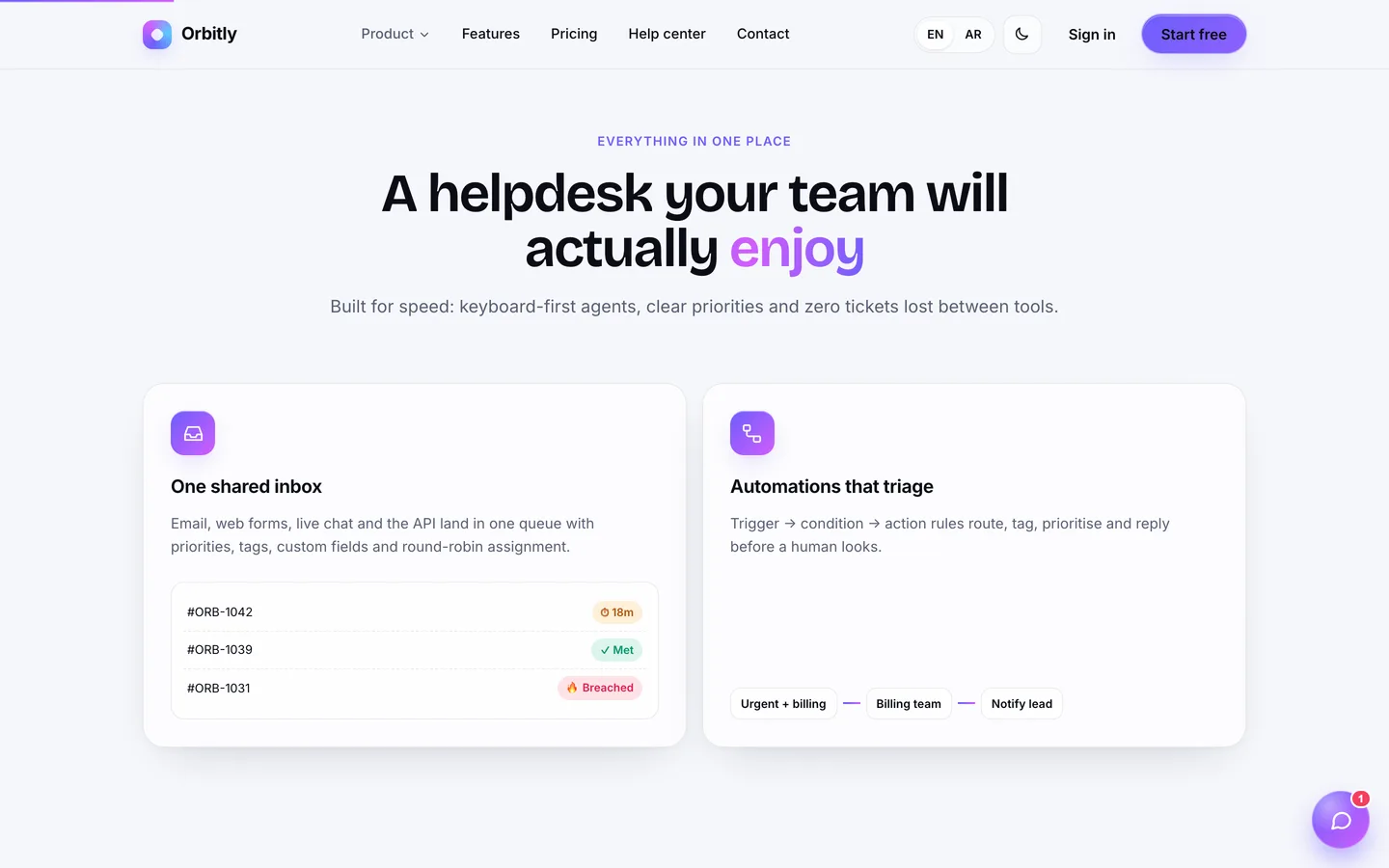
Home page with a live 3D ticket stack: Floating support tickets drift and tilt with the cursor in a GPU-rendered hero, with a clear call to action for your helpdesk. Home page with a live 3D ticket stack — Floating support tickets drift and tilt with the cursor in a GPU-rendered hero, with a clear call to action for your helpdesk.

Feature highlights: Shared inbox, SLA timers, automations, live chat and DEV3 AI drafting are introduced with motion reveals as visitors scroll. Feature highlights — Shared inbox, SLA timers, automations, live chat and DEV3 AI drafting are introduced with motion reveals as visitors scroll.

Guides & articles

Practical guides and engineering write-ups for DEV3 Deskly.

Laravel helpdesk script: 8 things to check before you self-host a ticketing system

Last updated
Laravel helpdesk script: 8 things to check before you self-host a ticketing system: DEV3 Deskly

If you are comparing Laravel helpdesk scripts, the feature lists all look alike: tickets, agents, a knowledge base, maybe live chat. The differences show up later, when a customer replies to an email and it opens a second ticket, when an SLA breaches at 2 a.m. on a Sunday, or when the live chat needs a websocket server your hosting does not allow. This article is a checklist of the eight things worth testing before you choose a self-hosted ticketing system, with how we answered each one in DEV3 Deskly, a helpdesk built on Laravel 12 and Filament 4.
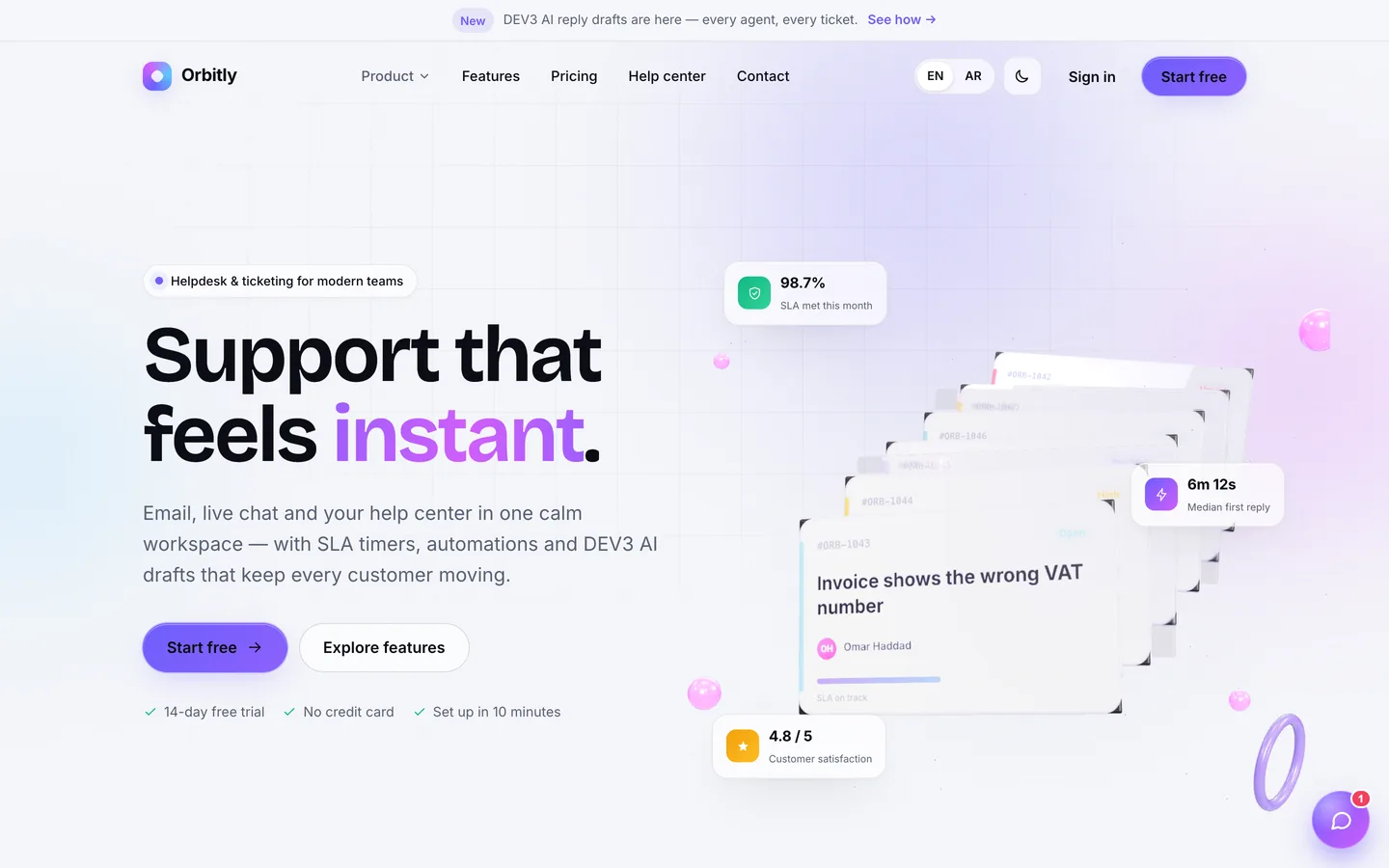
The Deskly website: a floating 3D stack of support tickets in the hero, with a call to action for the helpdesk

1. Does email become a ticket, and do replies thread?

Most support still starts in an inbox, so email-to-ticket is the feature to test first. Two questions matter: how mail gets in, and what happens when the customer replies.

Deskly accepts mail two ways. An inbound webhook takes the JSON or form posts that mail services send (the documentation has set-ups for Mailgun and Postmark), protected by a secret. Or an IMAP mailbox is read every minute by the scheduler, with no PHP imap extension needed. A new sender becomes a customer automatically. A reply is matched to its ticket by the In-Reply-To and References headers, then by the [#DSK-1042] tag Deskly puts in its subjects. Quoted text is stripped and duplicate message IDs are ignored, so a resent email doesn't create a twin.

To be clear about the limits: the built-in IMAP reader handles plain-text, HTML and simple multipart messages. For complex mail, use the webhook.
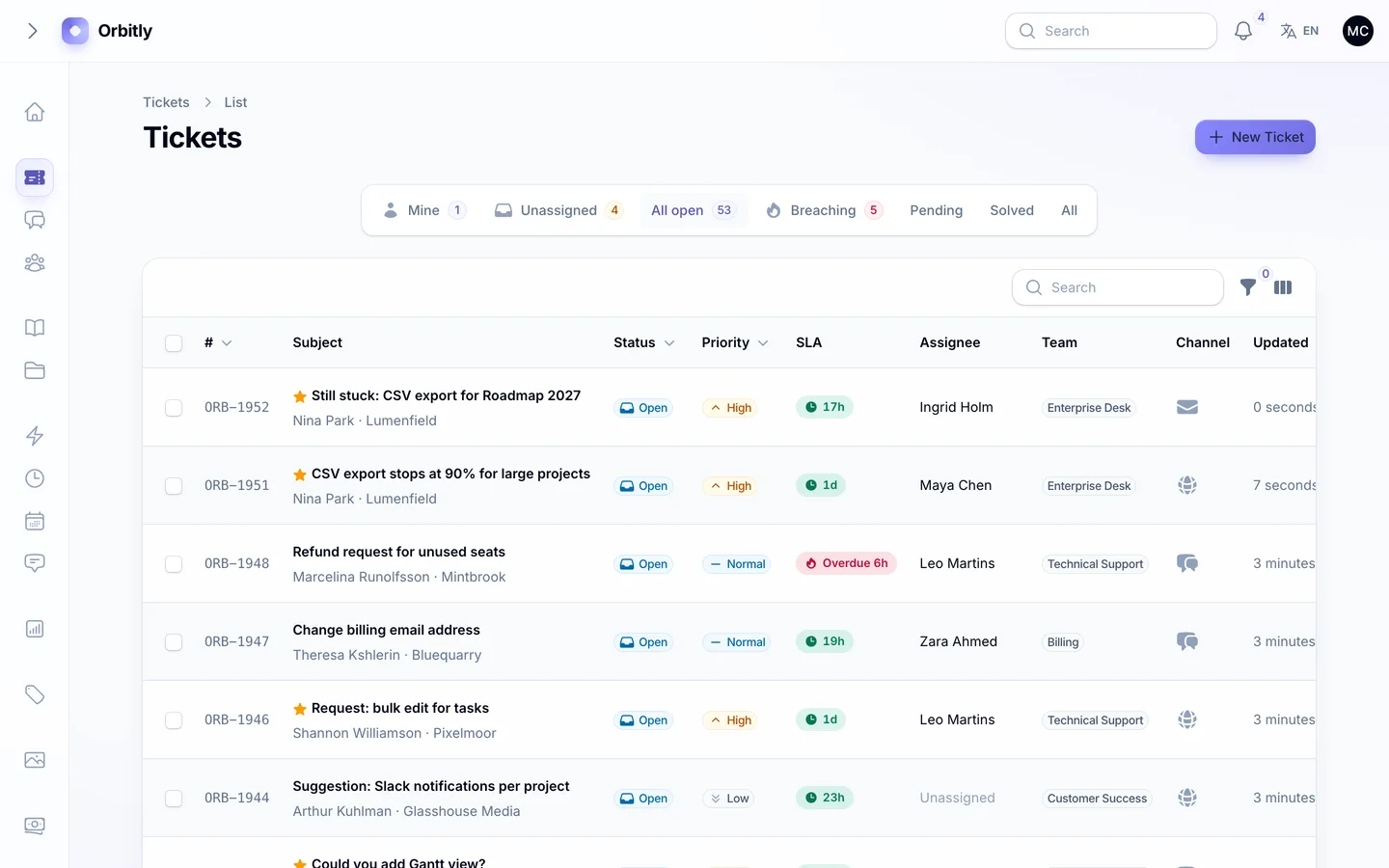
An email arrives and lands in the queue as a ticket tagged with the Email channel

2. Are SLAs counted in business hours?

An SLA that counts wall-clock minutes is useless for a team that works Monday to Friday. Check three things: business hours with a timezone, holidays, and a clock that stops while you wait on the customer.

In Deskly an SLA policy sets first-response and resolution targets in business minutes, for every priority or just one, and links a business-hours schedule with its own timezone, weekly opening times and holidays. When a ticket is set to Pending, the clock pauses; when the customer replies, the paused time is added back to the deadlines. Tickets show On track, At risk, Breached, Paused or Met, and a check every minute flags breaches, alerts the team and fires any "SLA breached" automation.
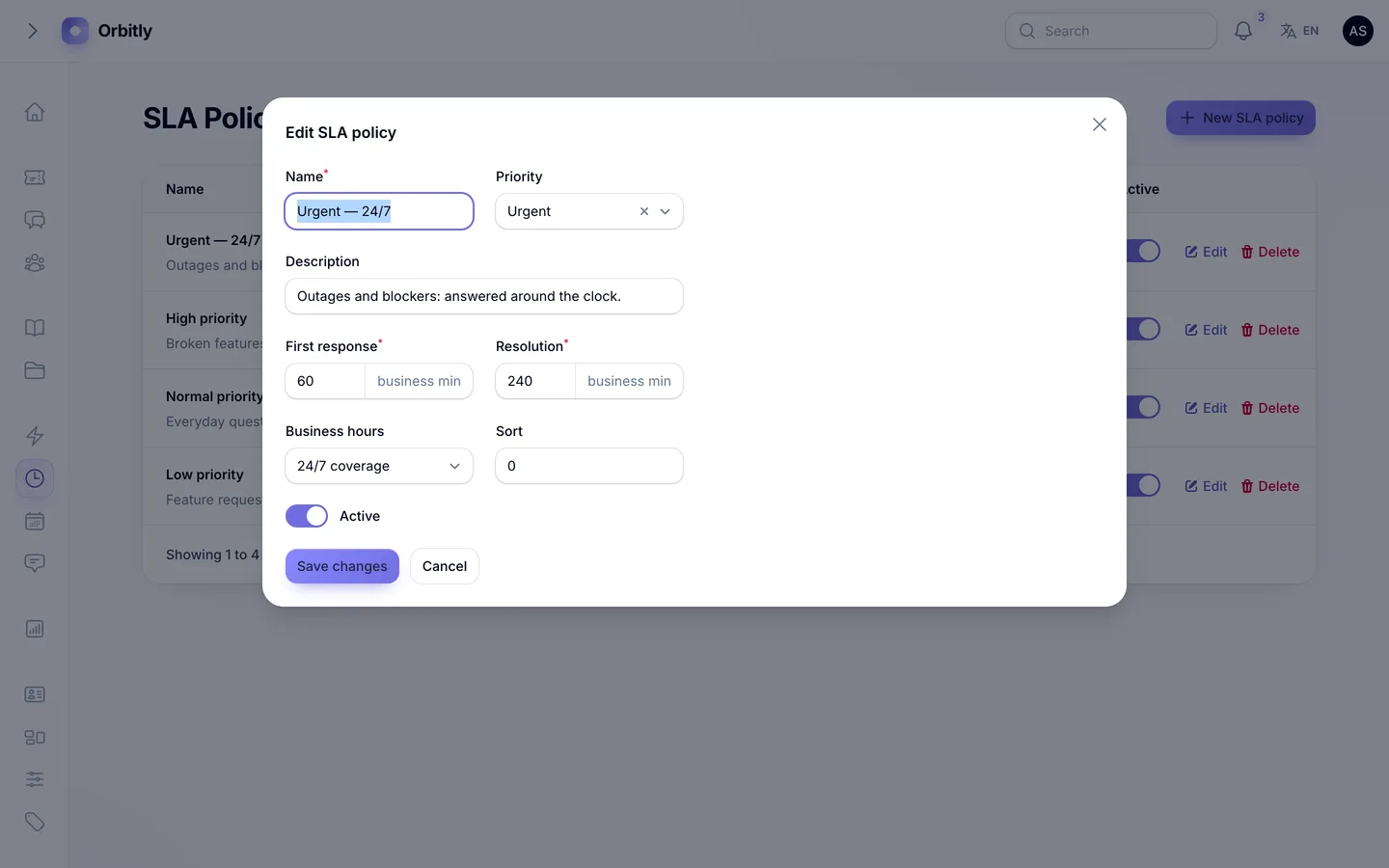
Editing an SLA policy: response and resolution targets per priority, tied to a business-hours calendar

3. Can automations route and escalate without looping?

Rules are where helpdesks save the most time and cause the most confusion. Look for clear events, enough conditions to be useful, and protection against a rule that keeps triggering itself.

Deskly's automations are trigger → condition → action rules on four events: ticket created, ticket updated, customer message and SLA breached. Conditions cover 10 fields, including subject, body, channel, team, tag, whether the requester has priority support and whether it is inside business hours, with six operators and "any" or "all" matching. Nine actions set priority or status, assign a team or agent, use round robin, add a tag or an internal note, send a canned reply or notify admins. Each rule counts its runs, can stop further rules, and runs under a guard so its own changes never re-trigger the engine.
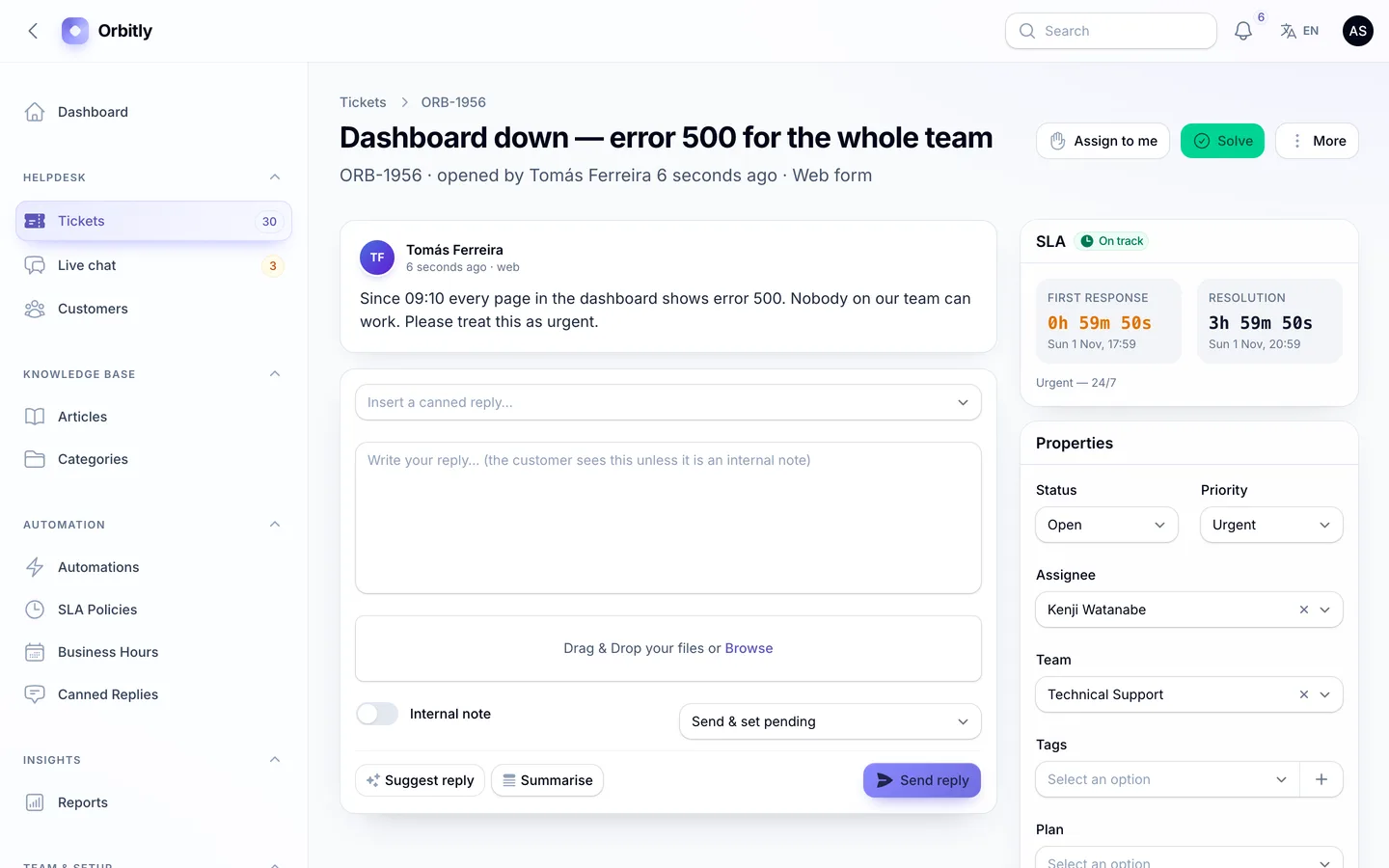
The rule fired: the outage ticket is already Urgent and routed to Technical Support, and the timeline shows which automation acted

4. Is the agent workspace fast for real work?

Agents live in one screen all day. A good ticketing system puts the conversation, the SLA countdown and the ticket's properties side by side, and keeps two agents from answering the same customer.

Deskly's workspace shows the thread, SLA timers, properties that save as you change them, customer details and an activity timeline. Queue tabs cover mine, unassigned, open, breaching, pending and solved. Canned replies fill in placeholders such as the customer's name and ticket number, internal notes are highlighted so nobody mistakes them for replies, tickets can be merged or split, and a live banner warns when a teammate is viewing or replying to the same ticket.
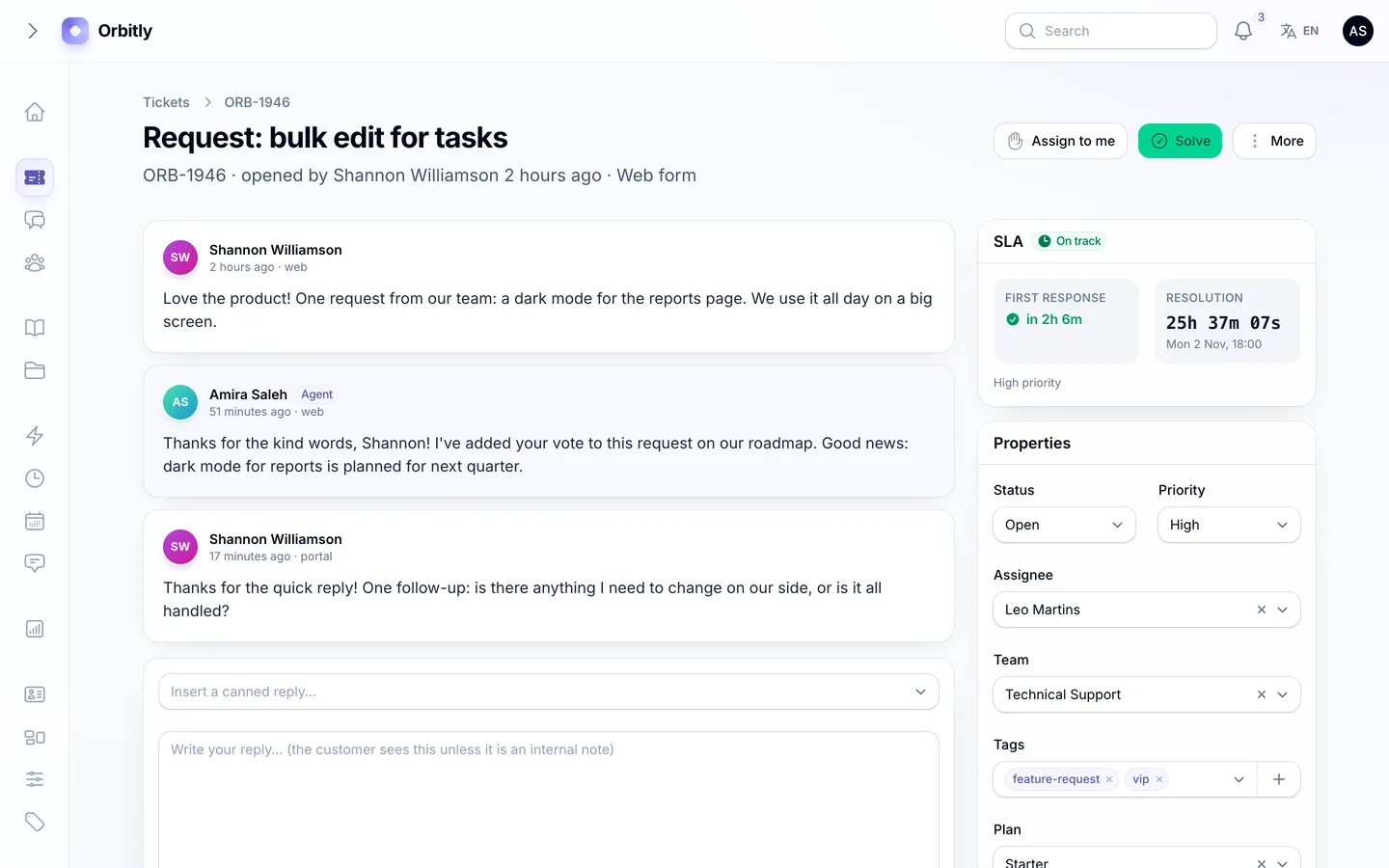
The ticket workspace: the conversation beside SLA countdowns, auto-saving properties, customer details and the activity timeline

5. Does live chat work without a websocket server?

Many PHP hosts can't run a long-lived websocket process. If the chat only works with one, it doesn't work on that hosting.

Deskly's widget runs in a shadow DOM, so its styles never clash with your site, and embeds anywhere with one script tag. By default it polls every 3 seconds, which works on shared hosting. On a VPS you can run Laravel Reverb (included) for instant delivery, and the widget keeps a slow poll as a safety net. Agents answer from a chat inbox and can turn a chat into a ticket with the full transcript.
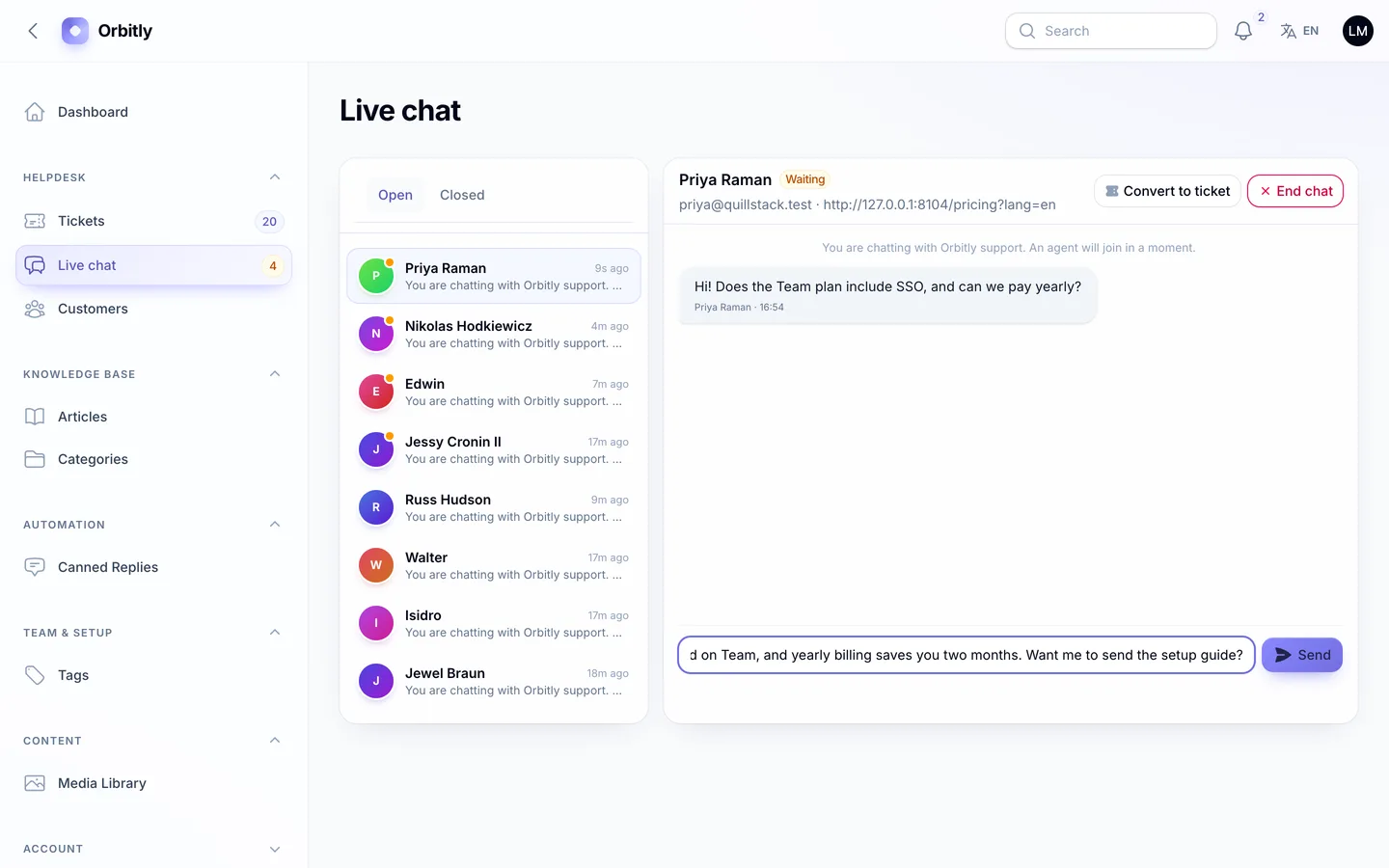
The agent answers a website chat from the live chat inbox

6. Do customers get a help centre, a portal and a survey?

Self-service reduces tickets, and a portal reduces "any update?" emails. Check for article suggestions while customers write, and a way to measure satisfaction.

Deskly's help centre has categories, Markdown articles with a table of contents, search, view counts and "Was this helpful?" votes, in English and Arabic. Articles are suggested as customers type on the contact form and in the portal. In the portal, customers see every ticket from any channel, open new ones with attachments and reply. Since version 1.0.1 those attachments live on a private disk and are served only after an access check: to the ticket's customer and to agents who can see the ticket, never from internal notes. Emails link files with signed links that expire after 7 days. When a ticket is solved they get a 1–5 survey, by email through a signed link or in the portal. There's also an optional paid Priority support pack: customers buy it in the portal and get High priority on new tickets for 12 months.
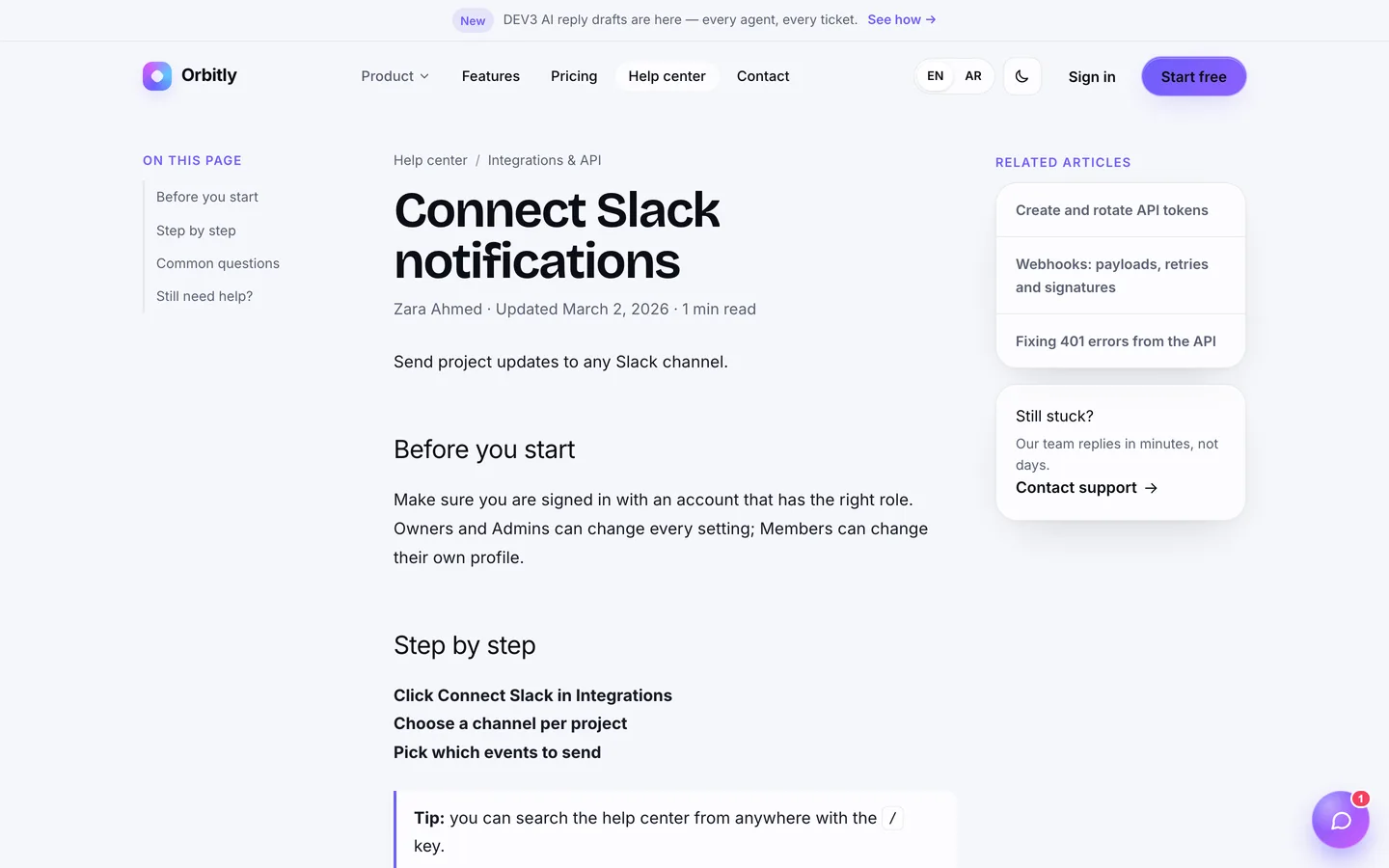
The help centre article page: Markdown content, a table of contents and a

7. Is the AI optional, and does it stay in its lane?

AI drafting is useful, but it should never answer customers on its own, and it shouldn't lock you into one provider or bill you while you test.

DEV3 AI in Deskly drafts replies into the reply box for the agent to edit, summarises long threads and scores customer sentiment from −1 to +1, which drives the 3D "weather" orb on the dashboard. The default provider is a built-in demo model that makes no API calls. When you want real models, connect OpenAI, Anthropic or Google with your own key in Settings; every call is logged with its token counts.
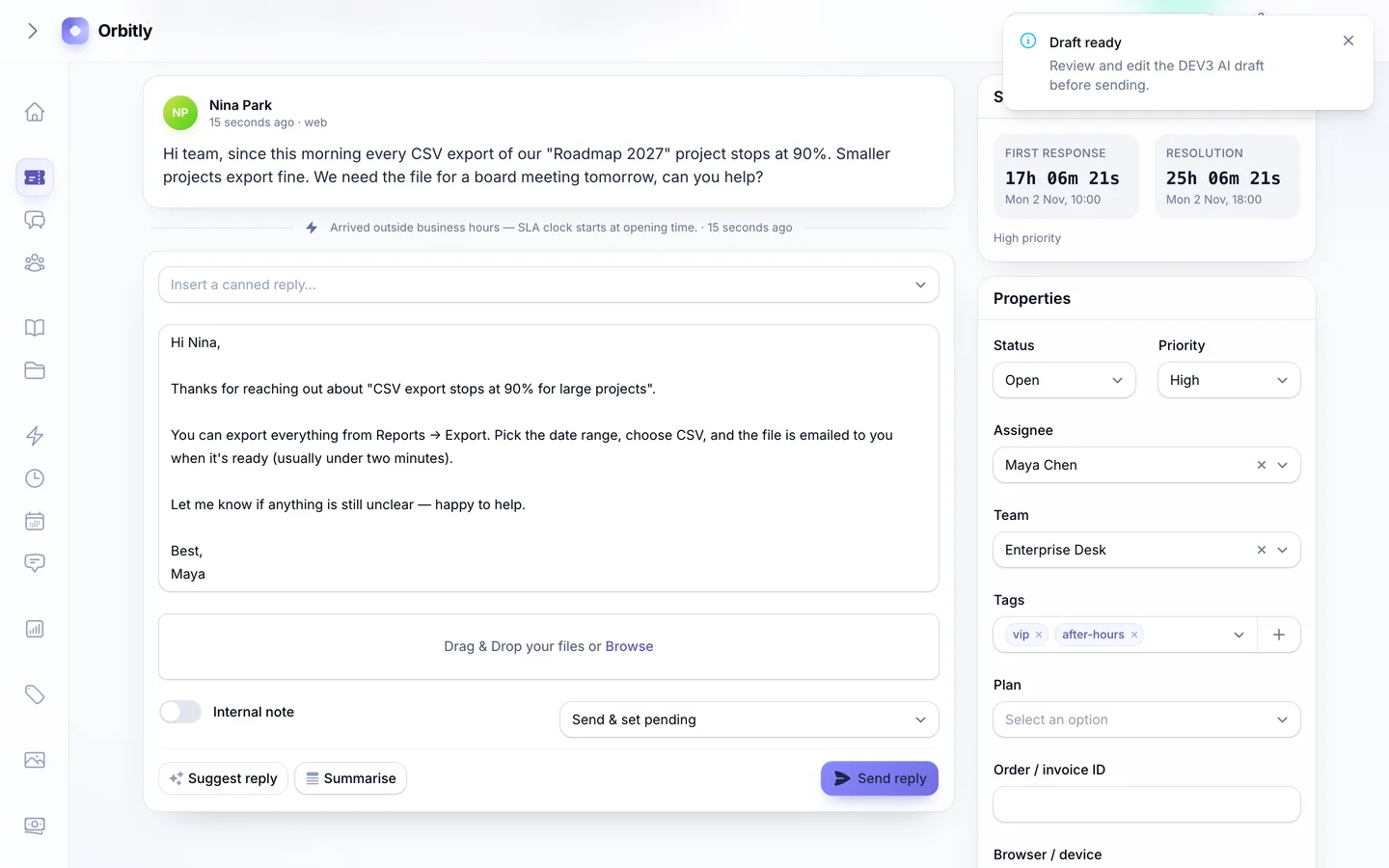
DEV3 AI drafts a reply from the thread and help articles, ready for the agent to review

8. Can you install it without being a Laravel developer?

A script you can't install is a project you have to hire for. Check whether it ships with vendor/ and built assets, whether there's a web installer, and what the server really needs.

Deskly's download includes vendor/ and the compiled assets, so you need PHP 8.2+ and MySQL, MariaDB or SQLite, but not Composer or Node.js. Visit /install and a five-step wizard checks requirements, tests the database, loads demo or empty data, creates your admin and locks itself; php artisan dev3:install does the same over SSH. The queue runs in sync mode by default, so one cron entry is the only extra setup.
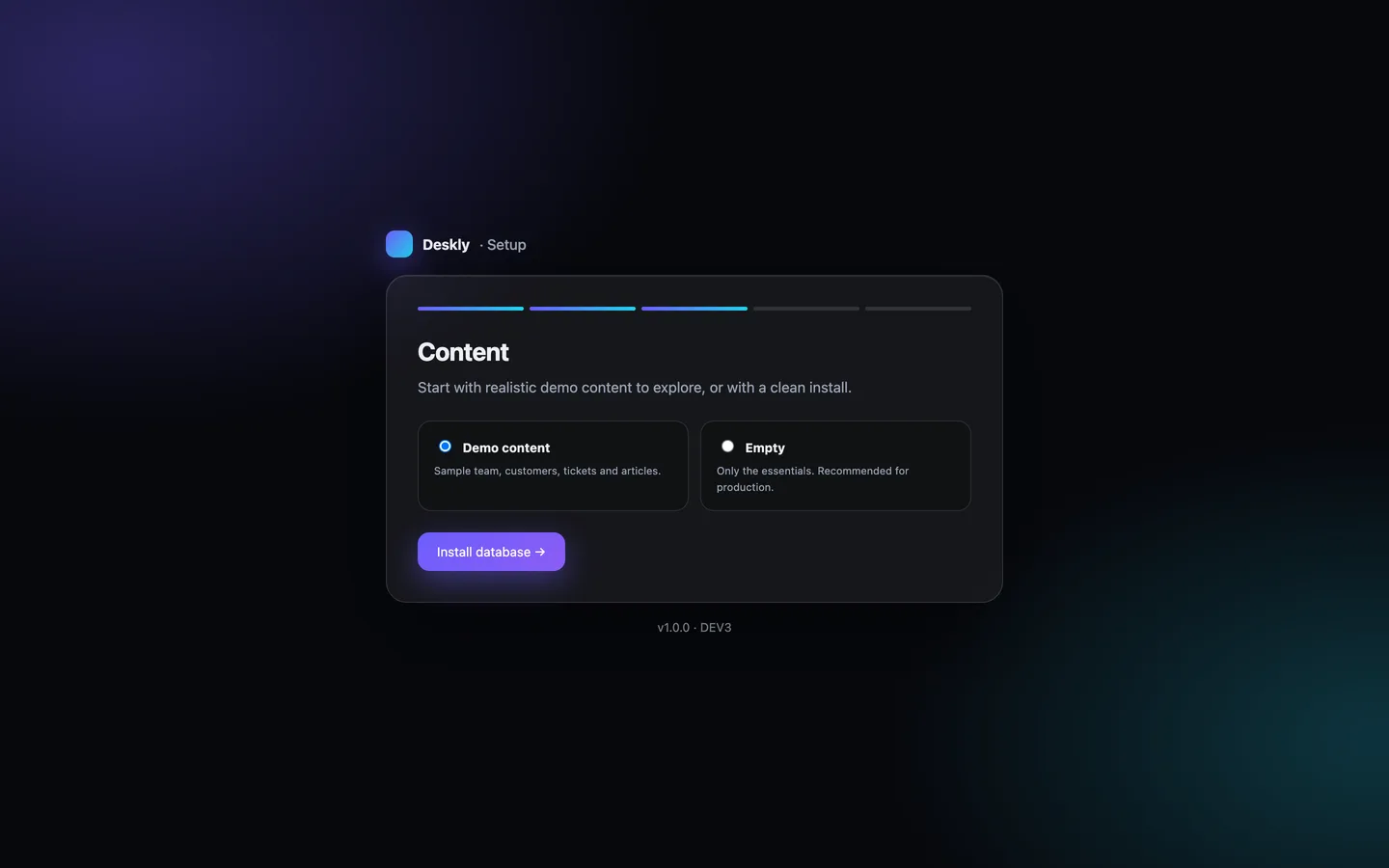
The installer's data step: the full Orbitly demo data to explore, or an empty install for production

See it in action

The video tour follows one ticket from the customer portal to the agent workspace, through an AI draft and a reply, then shows live chat, automations, reports and the customer's satisfaction rating.

Video tour of Deskly

What else to compare

  • Reports: volume, first response, resolution time, SLA compliance, CSAT and an agent leaderboard, with CSV export.
  • Languages: English and Arabic with a full right-to-left layout on the website, panels, installer and chat widget.
  • Security and admin: two-factor sign-in with an authenticator app (8 recovery codes) or email codes, which you can require for all staff; roles with a permission editor, an audit log with before/after diffs, backups that include private attachments, and system health.
  • API: a Sanctum-secured REST API for tickets, replies and knowledge-base search, described in OpenAPI.
  • Quality: Deskly 1.0.1 shipped with 186 Pest tests, Larastan level 6 with no errors and 86 pages checked in a headless browser with no console errors.

Deskly is available as DEV3 Deskly on the DEV3 marketplace for $29, with 117 screenshots and two video tours in place of a live demo. How it's built explains the architecture in more detail.
Frequently asked questions

The complete source code (version 1.0.1) as a download from your account, with the setup and usage guides shown on this page. You can modify the code to suit your product.

Buying guides: Laravel scripts with Filament panels and a web installer · Next.js or Laravel for a SaaS script?

More from this author

View all

Related in Web Scripts & Software

View all