DEV3 Slotwise – Booking & Appointments SaaS Laravel Script with Staff Schedules, Deposits & Reminders

A self-hosted, multi-tenant booking SaaS on Laravel 12 and Filament 4: plans, trials and billing, a slot engine for staff hours, buffers, rooms and time zones, deposits with refund rules, email and SMS reminders, ICS feeds, an embeddable widget and a web installer.

by DEV3 TechnologiesVerified Author(0) 0 sales 0 viewsUpdated 01 Nov 2026

Video tour. Pick a section below to browse 118 screenshots in 23 sections.

Slotwise is a complete booking and appointments platform that you host yourself and sell as a SaaS, built by DEV3 Technologies on Laravel 12, Filament 4 and Livewire 3. Salons, clinics, studios and tutors sign up, choose a plan and get a booking page, a website widget, deposits, reminders, a team calendar and dashboards. You run the platform and collect the subscriptions. Four panels share one installation: a super-admin panel for you, a business panel for every tenant, a staff app and a customer account.

No live demo: the 118 grouped screenshots and the two video tours above show every screen, including step-by-step flows from a customer's booking to the reminder, and from a business sign-up to its first paid invoice. Install it with the bundled demo data (fictional businesses such as "Luma Hair Studio" and "Northside Physio") to try every role on your own server.

Four panels, one platform

  • Super-admin (/admin): tenants, plans, subscriptions, invoices, payments, MRR and churn, users, settings, roles, the audit log, backups and system health. Your support staff sign in here too, read-only: they can look up tenants, invoices and payments but can't change, refund or delete anything.
  • Business (/app/<business>): the calendar, bookings, customers, services, staff, time off, locations, rooms, reminders, reports, booking settings, API tokens, team members and billing. Owners, managers and front-desk staff each see what their role allows, and one login can belong to several businesses.
  • Staff app (/staff/<business>): my day, my calendar with a private ICS feed, my bookings and time-off requests.
  • Customer account (/account): bookings at every business on the platform, with reschedule, cancel and review.

Booking page and website widget

  • Every business gets a branded booking page at /b/<business> (or its own subdomain or custom domain): service → staff member or "anyone available" → date and time → details → deposit → confirmation.
  • Times are shown in the customer's own time zone, detected by the browser, and grouped into morning, afternoon and evening. The confirmation page has "Add to calendar" links and a private link to reschedule or cancel.
  • Customers book as guests, or the business switches off guest bookings and customers sign in or register right on the booking page (inside the widget too). A returning customer is matched by email, so their history stays together.
  • The widget: one script tag adds a floating "Book now" button in the business's colour, or an inline booking form. The frame sizes itself, and deposit payments open in the top window. Deep links such as ?service=12 jump straight to a service. The widget is a plan feature enforced on the server: on plans without it the embed page shows a link to the booking page instead, and the booking page refuses to be framed by other websites.

The slot engine

  • Weekly hours per staff member in the business time zone, with split shifts (add a second row for a lunch break) and closed days.
  • Time off: approved leave blocks the calendar and the booking page; staff requests wait as pending until a manager approves them.
  • Buffers before and after each service. An existing booking blocks its own buffers, and a new slot needs room for the requested service's buffers too.
  • Rooms and equipment: a service can need a colour chair or a treatment room, and a slot is offered only while one of them is free.
  • Booking rules: minimum notice (2 hours by default), booking window (60 days), start-time interval (15 minutes), cancel and reschedule cut-offs, a maximum number of reschedules and auto-confirm.
  • Time zones and daylight saving: each day's hours are built in local time, so a 09:00 opening stays at 09:00 when the clocks change.
  • "Anyone available" pools every qualified person and gives the booking to whoever has the fewest appointments that day.
  • No double bookings: the booking is re-checked inside a database transaction that locks the staff rows and then the rooms or equipment the service needs, so two customers can't take the same slot or the last free room.

Deposits and cancellation rules

  • Each service can take no deposit, a fixed amount or a percentage of the price, paid through Stripe, PayPal, Razorpay or the built-in simulated gateway.
  • The booking holds its slot as pending while the customer pays. Unpaid holds are released after 30 minutes by default, and a payment that arrives after the hold expired is refunded automatically.
  • Refund rules: a customer who cancels before the cut-off (24 hours by default) is refunded automatically. A later cancellation or a no-show keeps the deposit, and a cancellation by the business always refunds. The cancel dialog tells the customer which applies before they confirm.
  • Reschedules follow the same live availability, a limit (2 by default) and a cut-off (12 hours).

Reminders, messages and calendars

  • Any number of reminder rules per business, by email or SMS, at a chosen time before the appointment, with your own wording and placeholders for the name, service, staff member, business, time, reference and manage link.
  • Each reminder is sent once per start time, so a rescheduled booking is reminded again. Confirmations, reschedules and cancellations go out by email, and by SMS when the plan includes it.
  • SMS drivers: Log (writes to the Messages log and sends nothing) or Twilio, set in the super-admin settings.
  • Messages: every email and SMS is kept in a searchable log and on the booking's timeline.
  • Calendars: confirmation and reschedule emails carry an .ics invite, every staff member has a private ICS feed for their phone calendar, and the business has one for the whole team.

Running a business

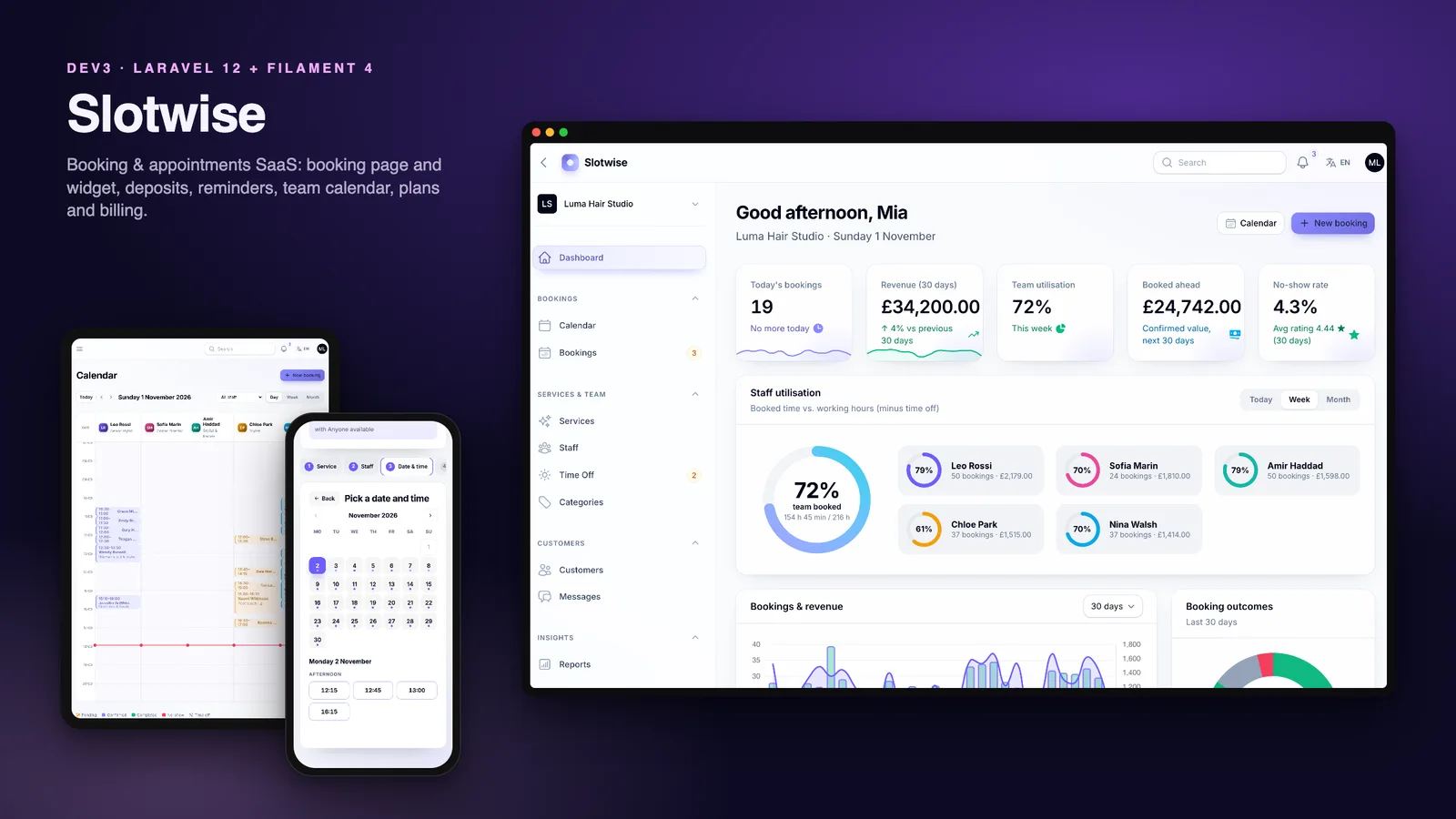
  • A dashboard with today's bookings, 30-day revenue, team utilisation, booked-ahead value and the no-show rate, plus utilisation rings (booked time against working hours for each person, for today, the week or the month), trends, outcomes, top services and a busiest-hours heatmap.
  • A calendar with a day view by staff member, a week view with a lane per person and a month view, with time off hatched and a live "now" line.
  • Bookings with tabs for upcoming, today, pending deposit, completed, cancelled and no-show. The front desk creates bookings from live free slots and can skip the deposit; each booking has confirm, reschedule, check-out, no-show, send reminder, refund deposit and cancel actions, and a timeline of every event.
  • Customers with visits, lifetime value, no-shows, tags, notes and ratings. Services with duration, price, buffers, deposit, colour, staff and rooms, sorted by dragging. Staff with hours, services, location and live utilisation. Several locations per business.
  • Reports for 7 to 365 days against the previous period: revenue, bookings, average ticket, new customers, no-show and cancellation rates, staff and service performance, booking sources and CSV export.

SaaS: plans, trials and billing

  • Four default plans you can edit: Starter (free), Growth ($29 a month, the default, with a 14-day trial), Pro ($79) and Enterprise ($199), each with a yearly price.
  • Limits per plan for staff, locations and bookings per month (blank means unlimited), and feature switches for deposits, SMS, the widget code, rooms and equipment, advanced reports, removing the "Powered by" badge and API access. The pricing page and its comparison table are built from the plans table.
  • A Billing page for every business: plan and trial countdown, usage meters, upgrade or downgrade with a monthly or yearly price, cancel at the end of the period, resume, and an invoice history with PDFs.
  • A new plan starts only when its payment succeeds, and a downgrade is blocked while the business uses more than the new plan allows. A daily job renews subscriptions, ends trials and cancellations and gives past-due accounts a grace period (3 days by default), during which bookings continue.
  • A business whose trial ended or whose subscription lapsed stops taking new online bookings: the booking page, the widget and the public API show a friendly "not accepting online bookings" notice, /explore hides it, and existing bookings keep working. Owners can also switch online bookings off themselves.
  • Numbered PDF invoices with your company details and tax rate, and refunds from the super-admin panel.

Super-admin

  • A platform overview with MRR, ARR, revenue per account, active tenants, trials and churn, MRR growth, new sign-ups, the plan mix, bookings across every business, the busiest tenants and the latest invoices.
  • Tenants with usage meters, members and invoices: change a plan for free, extend or restart a trial, suspend an account or set a custom domain. Subscriptions, plans, invoices and payments from every gateway.
  • Settings for the site, branding, SEO, mail, payments, sign-ups and trial length, the public directory, the SMS driver and the website copy.

Sign-up and onboarding

  • Businesses sign up from the pricing page, and the chosen plan is remembered. Creating the business sets its name, public URL, time zone and industry (13 to choose from) and starts the trial.
  • A five-step onboarding wizard collects the business details, opening hours, the first service and the team, then shows the booking link and widget code ready to copy. New businesses get a 24-hour email reminder and a 2-hour SMS reminder to start with.
  • Owners invite managers, front-desk staff and stylists by email; each invitee lands in the right panel.

Website and 3D

  • A marketing site with a 3D glass calendar cube in the hero: it flips through the last two days and lands on today's date, tilts with the pointer and is circled by appointment chips. It relights for dark mode.
  • A how-it-works section with stacking cards, a feature bento grid, a deposits explainer, pricing with a plan comparison, a public business directory at /explore, contact and legal pages.
  • English and Arabic with a full right-to-left layout on the site, booking pages, emails and every panel, and dark mode throughout.

Platform

  • Single-database multi-tenancy: every business's rows carry its id and are filtered automatically. Businesses resolve by path (/b/<business>), subdomain or custom domain.
  • Roles per business (owner, manager, front desk, staff), platform roles (super-admin and a read-only support role) with a permission editor, an audit log with before and after values, one-click backups of the database, uploads and private files, system health and notifications.
  • Two-factor sign-in: an authenticator app (TOTP) with 8 single-use recovery codes, or a code by email. A Require 2FA for staff setting makes it mandatory for the platform team in /admin; for business teams, staff and customers it is optional. A super-admin can reset a user's 2FA, and php artisan dev3:2fa-reset helps if you lock yourself out.
  • A read-only REST API with Sanctum: public services and free slots, and booking lists through business API tokens that owners and managers create in the business panel on plans with API access. Each token reads only its own business. Documented with OpenAPI.
  • Demo mode with one-click logins for 9 roles (including a manager and a read-only support agent) that skip the 2FA challenge, locked destructive actions and a nightly reset.

Installs like a script, not a project

  • A 5-step web installer at /install (requirements, database, demo or empty data, super-admin account, finish) or php artisan dev3:install.
  • vendor/ and the compiled assets are included, so you need PHP and a database but not Composer or Node.js. It runs on shared hosting with one cron entry; a queue worker is optional.

What's in the download

  • slotwise-v1.0.2.zip: the full Laravel source with vendor/, the DEV3 core and SaaS packages and public/build, ready to upload.
  • Documentation/: HTML documentation covering requirements, two-factor sign-in, shared hosting, VPS, Docker, subdomains and custom domains, plans and billing, running a business, the booking page and widget, how availability works, payments and deposits, reminders, SMS and calendars, cron and queue, the REST API, languages, demo mode, customisation, updating and a troubleshooting FAQ.
  • Demo and empty seeders, 149 Pest tests and the Larastan and Pint configuration.

Requirements

  • PHP 8.2 or newer (8.3 and 8.4 work) with bcmath, ctype, curl, dom, fileinfo, gd, intl, json, mbstring, openssl, pdo, tokenizer, xml and zip
  • MySQL 8, MariaDB 10.6+ or SQLite 3.35+
  • Apache with mod_rewrite or Nginx, HTTPS (required for the widget on other websites), and one cron entry every minute

Good to know

  • The widget on another website needs your Slotwise site on HTTPS: browsers only send the session cookie inside a third-party frame when it is SameSite=None; Secure, which Slotwise sets automatically over HTTPS. Over plain HTTP the widget works only on the same site.
  • The Stripe, PayPal and Razorpay drivers follow the providers' documented APIs but were not tested against live accounts, so test with sandbox or test-mode keys first. Subscription renewals on those gateways depend on the gateway's webhook marking the invoice paid; only the simulated gateway charges renewals by itself.
  • Plan changes are not prorated: an upgrade starts a new full billing period.
  • Every appointment is one customer with one staff member. Group classes with several places and prepaid packages or memberships are not included.
  • The calendar feeds are one-way ICS subscriptions. There is no two-way sync with external calendars, so events added in a phone calendar don't block time in Slotwise.
  • The REST API is read-only: it lists services, free slots and a business's bookings, but doesn't create bookings.

The How it's built section below covers the engineering behind Slotwise.

How it's built

Architecture, stack, key decisions and the quality gates DEV3 Slotwise passed before release.

The engineering behind Slotwise, the DEV3 Laravel suite's booking SaaS: Laravel 12 and Filament 4 on the DEV3 core and SaaS packages, four panels, single-database tenancy, metered plans, a slot engine for real staff schedules, deposits with refund rules, reminders, ICS feeds and a widget.

The problem it solves

A booking page looks simple until you compute the times on it. A stylist works 09:00 to 13:00 and 14:00 to 18:00, takes Friday off, needs 15 minutes to clean up after a colour but none after a cut, and shares two colour chairs with three colleagues. The salon is in London, the customer books from Toronto, and the clocks change next Sunday. Two people pick the same 10:30 at the same moment, and one of them chose "anyone available". Then money joins in: a deposit holds the slot while the customer pays, a late cancellation keeps it, an early one refunds it, and a payment that arrives after the hold expired must not leave a ghost booking behind. Reminders have to go out once, and again if the appointment moves. On top of that Slotwise is a SaaS: hundreds of businesses share one database without ever seeing each other's rows, each on a plan with limits, a trial, renewals and invoices, and the platform owner needs MRR and churn. Businesses also want the booking form on their own websites, inside a third-party frame where browsers drop ordinary cookies. And because Slotwise is sold as a script, all of it had to install from a zip on ordinary PHP hosting, with no Node.js, one cron entry and a web installer instead of a terminal.

Architecture and approach

Slotwise is a Laravel 12 application with four Filament 4 panels on one user table: /admin for the platform owner, /app/{business} for each tenant through Filament's tenancy, /staff/{business} for the people who do the work and /account for customers. The marketing site and the booking page are Blade and Livewire with a small vanilla-JS layer, which keeps the public page at 25.5 KB of gzipped JS and CSS.

Two shared DEV3 packages

  • The DEV3 core. dev3/laravel-core supplies the installer, typed and encrypted settings, branding, the Blade UI kit, motion and 3D helpers, demo mode, roles and permissions, the audit log, the payment gateways, backups, system health, Sanctum tokens and English / Arabic with RTL. Slotwise registers its demo roles, platform settings (sign-ups, trials, the directory, the SMS driver and website copy), OpenAPI paths and its 3D preset through a product manifest.
  • A new SaaS layer. dev3/laravel-saas was written with Slotwise and knows nothing about bookings, so the suite's AI SaaS reuses it. It holds teams, invitations, roles per team, plans, subscriptions, invoices, usage metering, the tenant Billing and Team members pages and the super-admin SaaS resources. The packaging script copies both packages into the zip, so buyers get one self-contained download.

Tenancy, plans and billing

  • One database, scoped rows. Every tenant-owned model carries a team_id and a global scope that filters it whenever a tenant is set. Creating a row stamps the current tenant, and saving a row that belongs to another tenant throws. Public pages resolve the business by path, by subdomain or by a custom domain set on the tenant; suspended tenants get a 404. Livewire components on public pages keep the team id in a locked property, because route middleware does not run on Livewire's update requests.
  • Limits that count themselves. The plan catalogue declares counted limits (active staff, locations), a metered limit (bookings per calendar month, recorded in a usage table and given back when a booking is cancelled) and seven feature switches. The booking service calls ensure('bookings') before it writes, the staff form stops at the seat limit, and the same catalogue builds the pricing page's comparison table.
  • Billing through the core gateway. Choosing a paid plan creates an incomplete subscription, an open invoice and a core payment; the plan starts only when the payment-succeeded event marks the invoice paid, so a declined card changes nothing. A downgrade that the current usage does not fit is refused. A daily saas:renew run ends trials and scheduled cancellations, renews due subscriptions and expires past-due ones after a grace period. Invoices are numbered and rendered as PDF with dompdf, and refunds go back through the gateway.
  • Lapsed businesses stop taking bookings. One check in the booking service decides whether a business accepts online bookings: switched off by the owner, a trial that ended or a subscription that expired all block new bookings, while a past-due renewal keeps booking through the grace period. The booking page, the widget and the public API (accepting: false, slots answer 403) all read the same answer and show a friendly notice, /explore hides the business, and existing bookings and their manage links keep working.
  • Metrics from history. Subscriptions keep their start and end dates, so MRR, ARR, revenue per account, trials, churn (plan changes excluded), the plan mix and sign-ups are computed for any month, and the demo's twelve-month MRR chart is real data.

The slot engine

  • Local days, UTC instants. For each day in the range the engine builds every staff member's working intervals in the business time zone, then converts them to UTC. A split shift is simply two rows for the same weekday, and a 09:00 opening stays at 09:00 across a daylight-saving change. Results are grouped by date in the customer's time zone, which the booking page reads from the browser.
  • Busy time with the right buffers. Pending, confirmed, completed and no-show bookings block time, each expanded by its own service's buffers; cancelled bookings free it. Approved time off is added, pending requests are not. A candidate start, stepped at the business's interval, is expanded by the requested service's buffers and must not overlap anything, while the appointment itself must fit inside the working interval.
  • Rooms and equipment. When a service needs a resource (a colour chair, a treatment room), a slot survives only if at least one of them is free, and the booking takes the first free one.
  • Rules from the business. Minimum notice, the booking window and the start interval come from the business's booking policy, with defaults of 2 hours, 60 days and 15 minutes.
  • "Anyone available" and the race. For "anyone" the engine pools every active, bookable person who performs the service, and the booking goes to whoever has the fewest appointments that day. The booking service opens a transaction, locks the candidate staff rows and then the rooms or equipment the service needs with SELECT … FOR UPDATE (always staff first, then rooms, in id order, so concurrent bookings can't deadlock), asks the engine again for that exact start and only then writes, so a second request for the same slot, or for the last free room, fails with a clear message instead of creating a double booking. Rescheduling uses the same path and ignores the booking's own current time.

The booking lifecycle and the money

  • Deposits that hold a slot. A service can take a fixed or percentage deposit on plans with the deposits feature. The booking waits as pending, blocking its time, while the customer pays through the core gateway; a scheduled job cancels holds older than the hold window (30 minutes by default). Confirming a paid deposit is idempotent, and a payment that lands after the hold expired is refunded at once.
  • Cancellation outcomes in one place. A customer cancelling before the cut-off is refunded through the original payment, later than that the deposit is forfeited, a no-show forfeits it too, and a cancellation by the business always refunds. The customer's cancel dialog states the outcome before they confirm, and the cancellation email repeats it.
  • A timeline per booking. Every step (created, deposit paid, confirmed, reminder sent, rescheduled, cancelled, refunded, completed, reviewed) is a booking event linked to the exact email or SMS, which is what the business sees on the booking page.

Reminders, calendars and the widget

  • Reminders sent once. Every five minutes the scheduler finds confirmed bookings inside each active rule's offset that have no log entry for that rule and that start time. A rescheduled booking has a new start time, so it is reminded again. SMS rules run only on plans with SMS, through a driver interface with a log driver and a Twilio driver.
  • ICS everywhere. Confirmation and reschedule emails attach an invite, the manage link offers a download protected by the booking's token, and each staff member and business has a feed at a secret URL covering the last 30 days and the next 180.
  • A widget that survives third-party frames. widget.js is a 4 KB script that adds a floating button or an inline frame and resizes it from postMessage events checked against its own origin. Browsers do not send SameSite=Lax cookies inside a frame on another site, so Livewire would answer 419. For the embed page and its requests over HTTPS, a middleware issues the session cookie as SameSite=None; Secure; Partitioned. Payments break out to the top window, because card forms and 3-D Secure don't run inside third-party frames. When a business turns off guest bookings, the details step signs the customer in or registers them inline, inside the widget too.
  • The widget as an enforced plan feature. Hiding the embed code is not enough, so the server checks the plan: without the widget feature the embed page shows a link instead of the form, widget.js asks /api/v1/public/{business}/widget before drawing anything, and the booking page is sent with frame-ancestors 'self' so other sites can't frame it.

Access and security

  • Two-factor sign-in from the core. Every panel offers an authenticator app (TOTP) with 8 single-use recovery codes, or email codes. A Require 2FA for staff setting enforces it for the platform team in /admin; for business teams, staff and customers it stays optional. Secrets are encrypted, enabling, disabling and resets are audit-logged, a super-admin can reset a user's 2FA and php artisan dev3:2fa-reset covers a locked-out owner. Demo logins never see the challenge.
  • A read-only support role. Support staff sign in to /admin with view permissions only: every mutating SaaS action (plan changes, trials, suspensions, refunds) is hidden, create and edit pages answer 403, and settings, roles and backups are out of reach.
  • Business API tokens. Owners and managers on a plan with API access create tokens in the business panel. Each token carries its business id and a bookings:read ability, so the bookings API reads only that business even when the person works for several, and the token stops working when they leave, lose the role or the business drops to a plan without API access.
  • Private files in backups. The core's one-click backups include the private storage folder as well as the database and public uploads, and the media library never lists private files.

From sign-up to a live booking page

  • An onboarding wizard. A new business picks its name, URL, time zone and industry and starts a trial of the default plan (or the plan chosen on the pricing page). Until onboarding is complete, the panel sends owners to a five-step wizard: business details, opening hours, the first service, the team (limited by the plan's seats) and a go-live step with the booking link and widget code. Each new business also gets a default email and SMS reminder.
  • An installer instead of a README. If .env is missing the app creates it and an APP_KEY, then redirects to a 5-step /install wizard: requirements, database (MySQL or SQLite, tested before writing), demo or empty data, the super-admin account and a lock file. php artisan dev3:install does the same over SSH. vendor/ and public/build ship in the zip and the queue defaults to sync, so one cron entry is the only server setup.
  • A demo that looks lived in. The seeders build 8 fictional businesses in different countries, currencies and plan states (an Arabic-language clinic in Dubai on a trial, a grooming salon past due, a churned tutoring company) plus 13 recent sign-ups. A bulk generator writes about five months of history and six weeks ahead: 10,204 non-overlapping bookings inside real working hours in every status, 1,015 customers, 49,473 timeline events, 12,514 logged messages, 1,298 payments and 79 subscription invoices. It uses a fixed seed, and it is fast enough to run inside the installer's request.

The 3D and motion approach

  • A glass calendar cube in the hero. Each face of a rounded glass cube is a calendar page drawn on a canvas. On load it flips from two days ago to yesterday and lands on today's date, then floats, tilts toward the pointer and re-flips every few seconds while appointment chips orbit it. The pages are redrawn for dark mode and for Arabic.
  • Utilisation rings on the dashboard. A large ring shows the team's booked time against its working hours (minus approved time off) for today, the week or the month, with a smaller ring for each person in their calendar colour. They are animated SVG, so the panels need no WebGL.
  • Cheap by default. three.js loads lazily as its own 188 KB chunk, the device pixel ratio is capped, the scene pauses off-screen, reduced motion renders the final frame, and an SVG poster shows without WebGL or when 3D is switched off. Reveals, counters and the stacking how-it-works cards come from the core's data-attribute motion.js with Lenis smooth scrolling, not GSAP, which keeps resale licensing simple.

Quality gates and results

Slotwise 1.0.2 passed all seven release gates of the DEV3 Laravel suite, run by one script against the packaged build:

  • Static analysis: composer validate, Pint clean, Larastan level 6 with 0 errors (including the SaaS package) and php -l on 273 files.
  • Tests: 149 Pest tests with 685 assertions. The required suites cover the slot engine (split shifts, buffers, time off, notice and window, time zones, daylight saving, rooms and "anyone"), the booking lifecycle (double booking, room locks, deposits, refunds and forfeits, hold expiry, reschedule rules, reminders, guest and account bookings), and the SaaS layer (tenant isolation, limits and metering, billing, renewals, lapsed businesses, invoices and MRR), plus business API tokens, the read-only support role, the widget plan feature and two-factor sign-in.
  • Front-end budget: 9.9 KB of JS and 15.5 KB of CSS gzipped on the public page (25.5 KB against a 180 KB budget), with the 188 KB three.js chunk loaded only on pages that show the cube.
  • Databases: the demo and empty seeders run on both MySQL 8 and SQLite; the demo seed writes 10,204 bookings, 49,473 timeline events, 12,514 messages and 79 invoices.
  • Browser checks: 166 pages in headless Chrome with no console errors, plus 8 happy paths: a guest booking without a deposit, a reschedule from the email link, a booking with a simulated deposit, a business sign-up through onboarding to a plan upgrade, a front-desk booking, the widget opening its booking frame on another site, a lapsed business showing its closed state, and the widget script with an ICS feed.
  • Installer: the release zip unzipped into a clean folder, installed through the /install wizard on MySQL with demo data, then signed in as the super-admin.
  • Secret scan: the 28 MB release zip with 20,032 files, clean, and every text file inside it is scanned again when the listing is published.

The 118 screenshots and the two video tours were captured from the seeded demo across all four panels, light and dark mode, Arabic, tablet and phone, and they double as the listing's demo. They follow a booking step by step, from the service list to the deposit, the business's timeline, the reschedule and the reminder, and a business from sign-up through onboarding to its first paid invoice.

After launch, version 1.0.1 closed the gaps a real platform runs into first: lapsed businesses stop taking bookings, business API tokens, a read-only support role, a server-enforced widget feature, inline sign-in when guest bookings are off and room locks. Version 1.0.2 added two-factor sign-in. The remaining gaps are listed openly: the widget on other websites needs HTTPS; the Stripe, PayPal and Razorpay drivers have not been run against live accounts, and their subscription renewals depend on the gateway's webhook; plan changes are not prorated; there are no group classes or packages; and calendar sync is one-way ICS.

Tech stack

Area Technologies
Backend Laravel 12, Filament 4 panels with tenancy, Livewire 3, Laravel Sanctum, spatie/laravel-permission, Scheduler and database queue, Two-factor sign-in (TOTP, email)
SaaS layer Single-database tenancy, Plans, limits and metering, Subscriptions and renewals, dompdf invoices, MRR, ARR and churn metrics, Invitations and team roles, Tenant-scoped API tokens
Booking engine Slot engine, Staff and room row locks, Deposit and refund rules, Reminder scheduler, ICS feeds and invites, Embeddable widget
Frontend Blade, Tailwind CSS 4, Vite 7, Vanilla JS motion, Lenis, three.js
Integrations Stripe, PayPal, Razorpay, Simulated gateway, Twilio SMS, SMTP
Delivery Pest, Larastan level 6, Pint, Headless Playwright, Web installer, Secret scan

Inside the build

Home page with the 3D glass calendar cube: The cube flips to today’s date and tilts with the cursor while appointment chips orbit around it. Home page with the 3D glass calendar cube — The cube flips to today’s date and tilts with the cursor while appointment chips orbit around it.

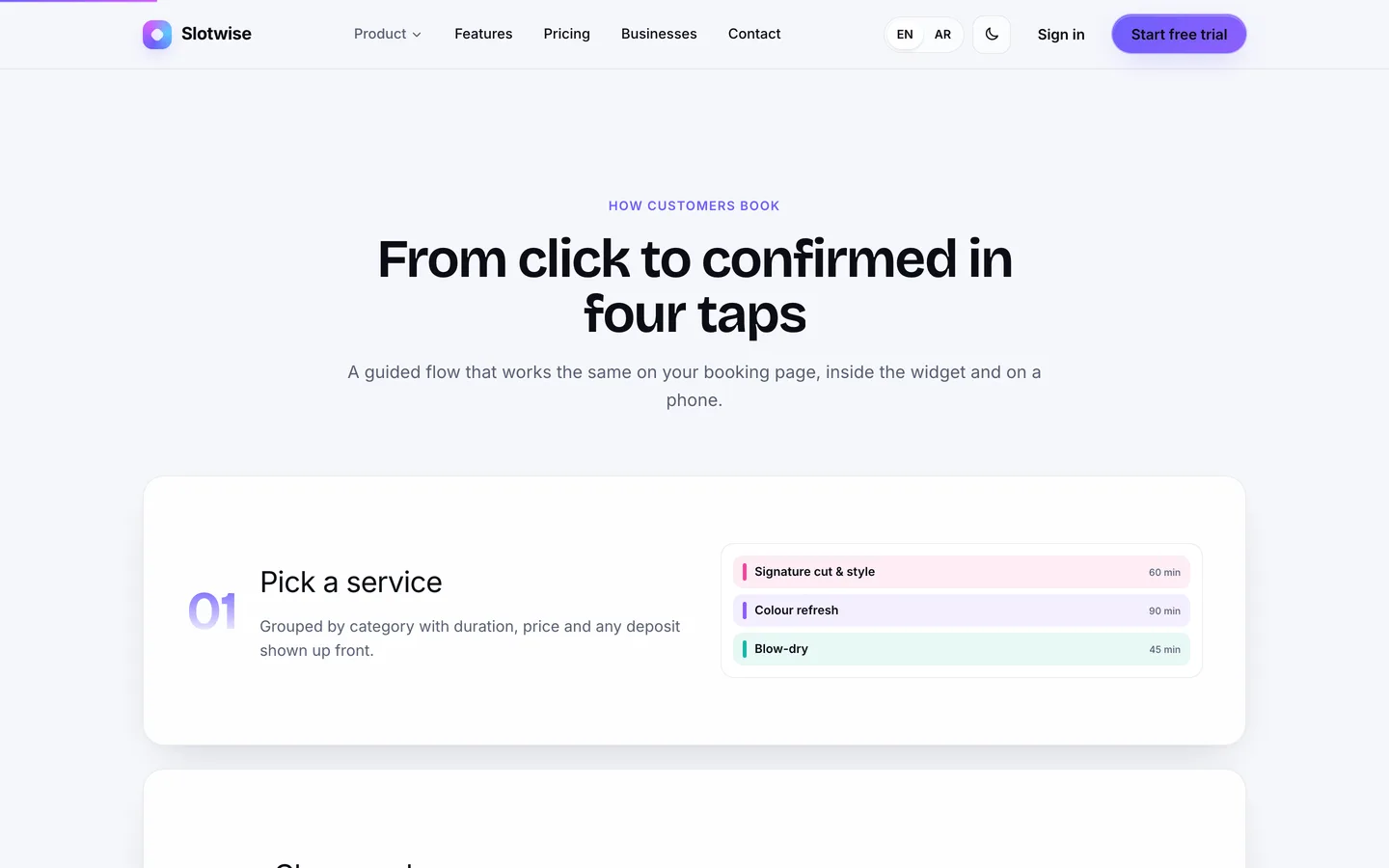
How customers book: Stacking cards walk visitors through service, staff, time and confirmation, each with a live mini preview. How customers book — Stacking cards walk visitors through service, staff, time and confirmation, each with a live mini preview.

Guides & articles

Practical guides and engineering write-ups for DEV3 Slotwise.

Booking & appointment SaaS script: 9 things to check before you launch

Last updated
Booking & appointment SaaS script: 9 things to check before you launch: DEV3 Slotwise

Booking and appointment scripts all show the same demo: pick a service, pick a time, done. The differences appear once real businesses use them. A stylist's lunch break shows up as a free slot, two customers grab the same 10:30, a client in another time zone turns up an hour early after the clocks change, a late cancellation walks away with the deposit refunded, or the widget on a salon's website answers every click with an error. And if you plan to sell bookings as a service to many businesses, tenancy and billing matter as much as the calendar. This guide covers nine things worth testing before you choose a self-hosted booking SaaS script, and how Slotwise, built on Laravel 12 and Filament 4, handles each one.
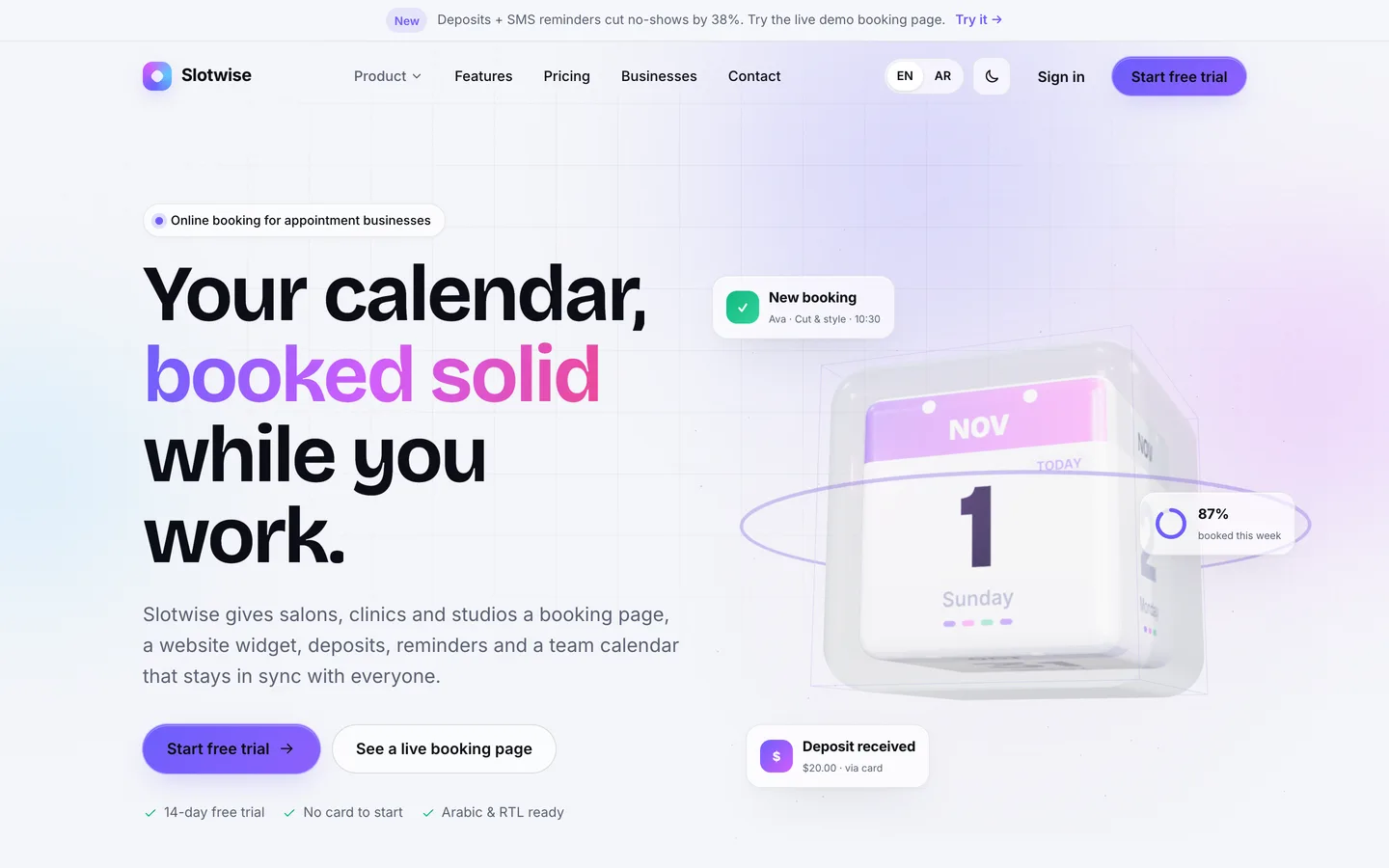
The Slotwise home page: a 3D glass calendar cube flips to today's date while appointment chips orbit it

1. Does availability follow how people really work?

Most teams don't work one block from nine to five. People take lunch, work late on Thursdays, take leave, and need time to clean up between appointments. If the script only knows opening hours, the booking page will offer times nobody can take.

In Slotwise each staff member has weekly hours in the business time zone, and a split shift is just a second row for the same day. Approved time off blocks the booking page; requests from staff wait as pending until a manager approves them. Every service has buffers before and after, and they are applied in both directions: an existing colour appointment blocks its own clean-up time, and a new slot needs room for the requested service's buffers too. Services can also need a room or a piece of equipment, such as a colour chair, and a time is offered only while one of them is free.
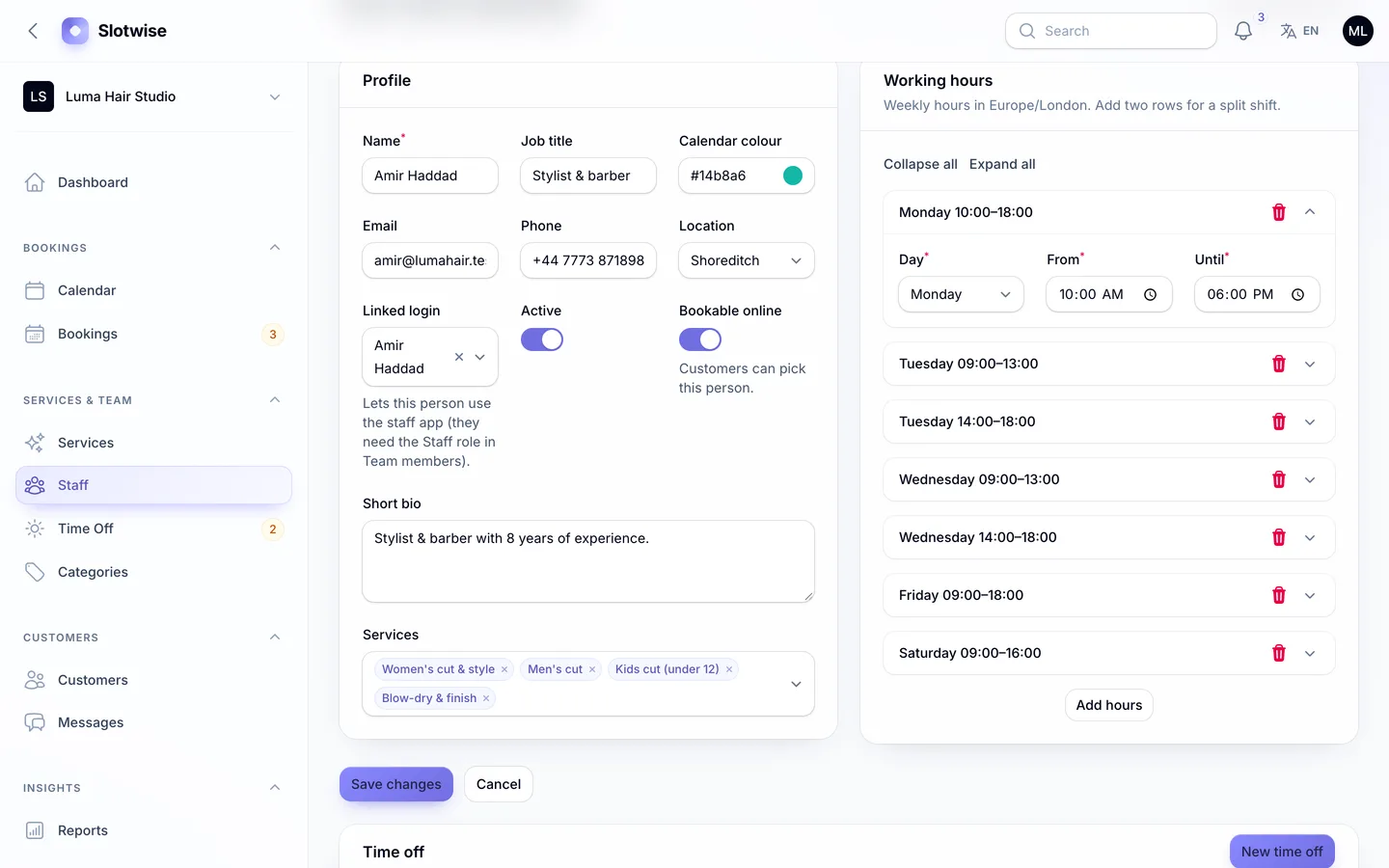
Working hours per staff member, including a split shift with a lunch break

2. Can two customers book the same slot?

Test this one deliberately: open the same booking page in two browsers and confirm the same time in both. A script that checks availability only when the page loads will accept both bookings.

Slotwise re-checks the slot at the moment of booking, inside a database transaction that locks the candidate staff rows and then the rooms or equipment the service needs, and only then writes the booking. The second request gets a clear "that time was just taken" message instead of a double booking, and two bookings with different staff can't both take the last free treatment room. When the customer picks "anyone available", every qualified person is pooled and the booking goes to whoever has the fewest appointments that day, so work is shared fairly.
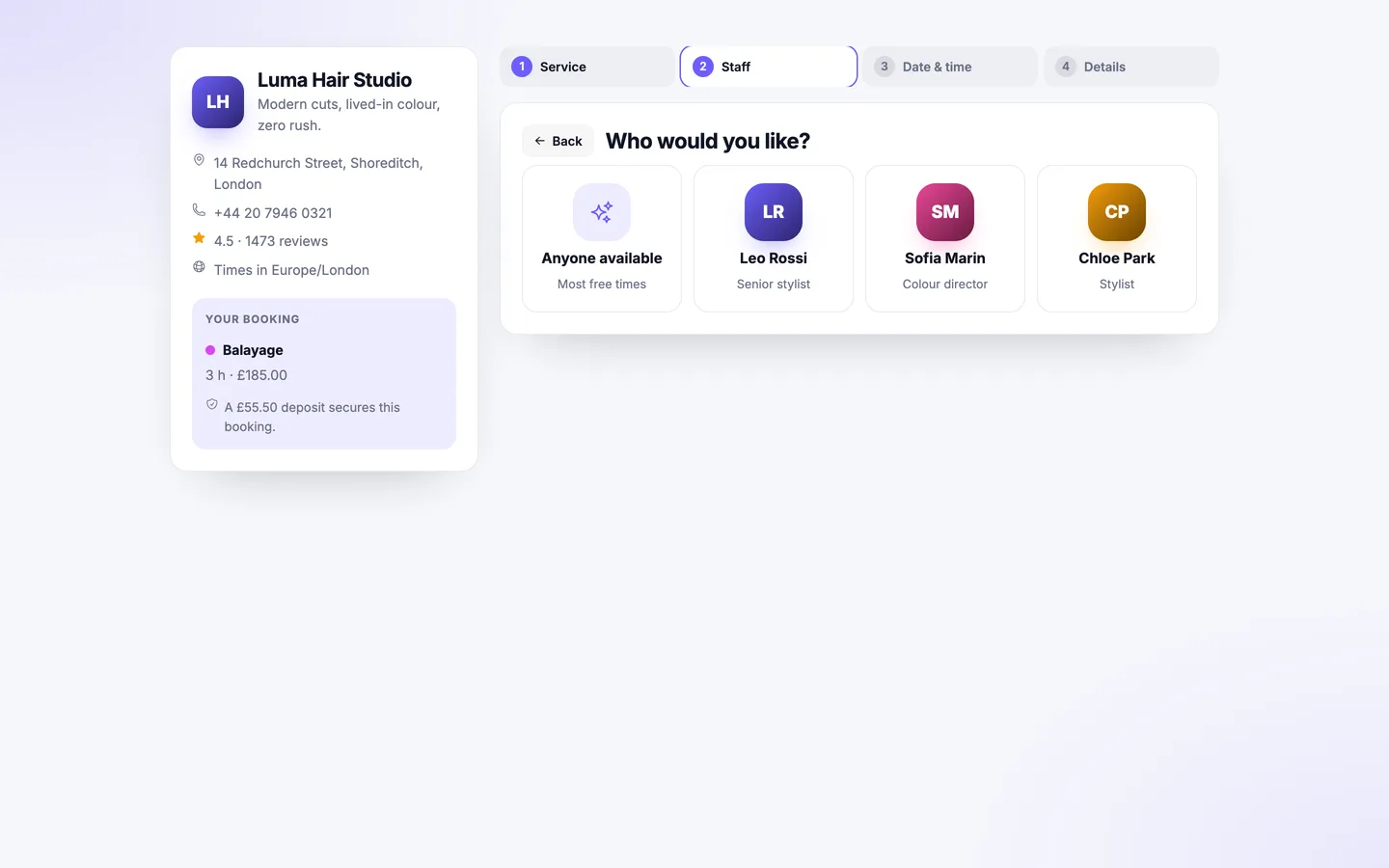
Choosing who: a specific stylist, or

3. Are time zones and daylight saving handled?

A business in London takes bookings from customers in Toronto and Dubai, and twice a year the clocks change. Ask how the script stores times and what a customer sees.

Slotwise builds each day's working hours in the business's local time and stores every booking in UTC, so a 09:00 opening stays at 09:00 across a daylight-saving change. The booking page reads the customer's time zone from the browser and groups times by morning, afternoon and evening in their own day. Emails show the time with its zone, and the minimum notice (2 hours by default), the booking window (60 days) and the start-time interval (15 minutes) are set per business.
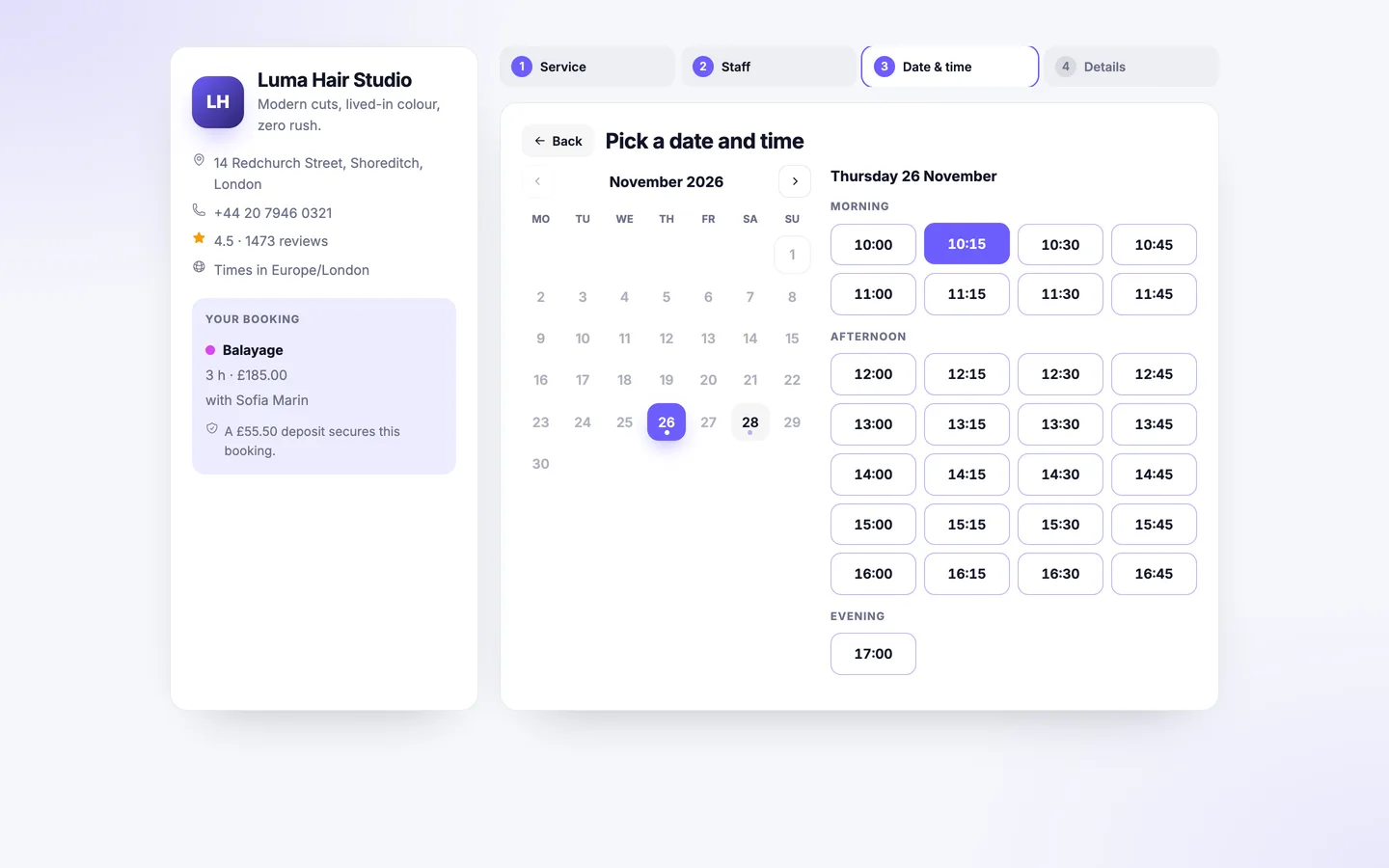
Picking a time: only genuinely free slots appear, grouped by part of day in the customer's time zone

4. What happens to the deposit when a booking is cancelled?

Deposits are the best protection against no-shows, but only if the rules are automatic. Check who gets refunded, when, and whether the customer knows before they cancel.

In Slotwise a service can take no deposit, a fixed amount or a percentage of the price. The booking holds its slot as pending while the customer pays, and unpaid holds are released after 30 minutes by default. A customer who cancels before the cut-off (24 hours by default) is refunded automatically through the original payment; a later cancellation or a no-show keeps the deposit; and a cancellation by the business always refunds. The cancel dialog states which applies before the customer confirms. Payments run through Stripe, PayPal, Razorpay or a built-in simulated gateway for testing. The real gateways have not been tested against live accounts yet, so start with sandbox keys.
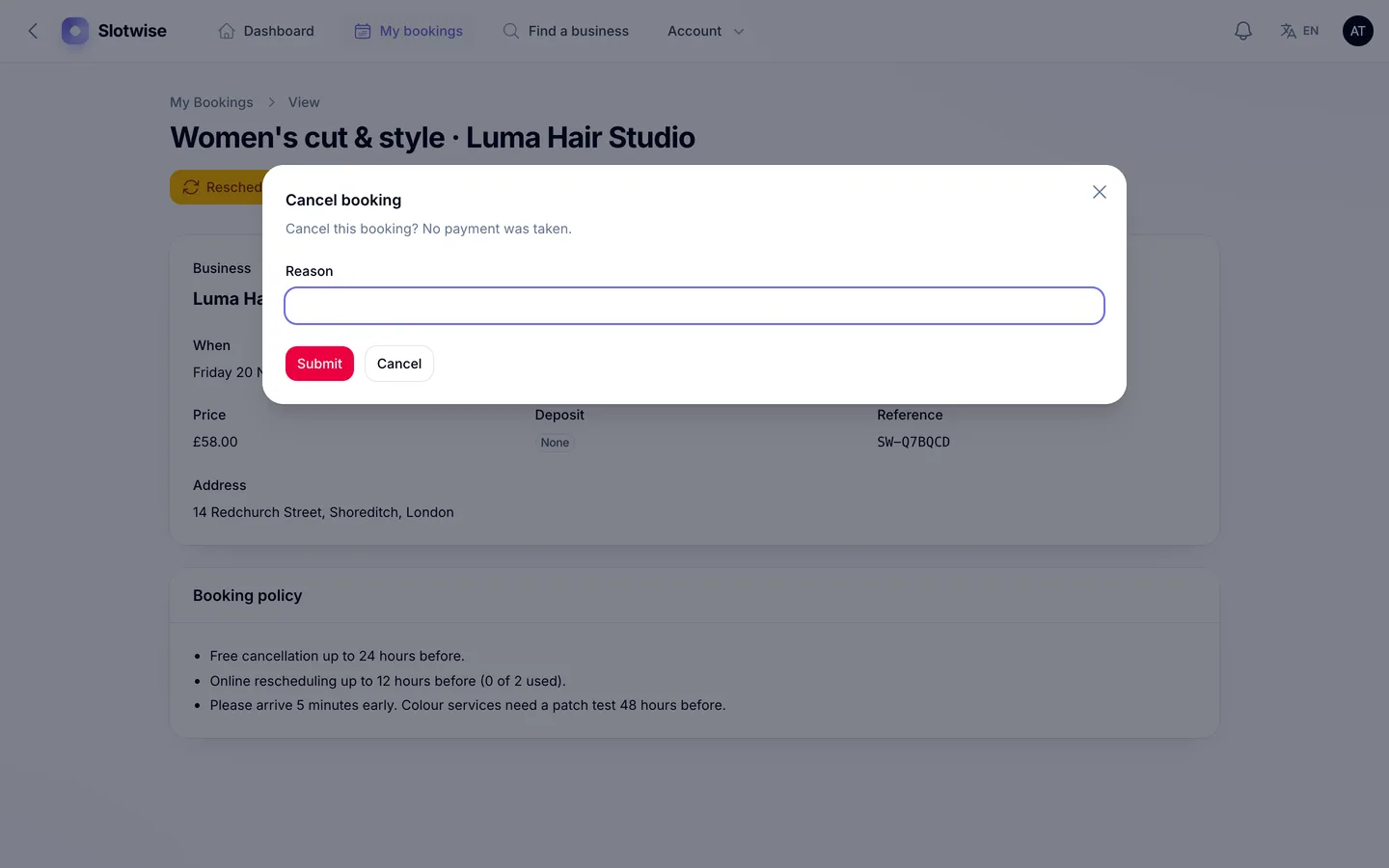
Cancel with a clear policy: the dialog says whether the deposit will be refunded or kept

5. Do reminders go out once, and again after a reschedule?

Reminders cut no-shows, but a script that sends them twice annoys customers, and one that forgets rescheduled bookings defeats the point. Ask to see the message log, too: when a client says they never got a reminder, the business needs proof.

Slotwise lets each business add any number of reminder rules by email or SMS, at a chosen time before the appointment and with its own wording. Each reminder is sent once per start time, so a rescheduled booking is reminded again. SMS goes through a driver: Log (records the text and sends nothing) or Twilio. Every email and SMS is kept in a searchable Messages log and on the booking's timeline. Confirmation emails carry a calendar invite, and staff can subscribe to a private ICS feed on their phones. The feeds are one-way: events added in a phone calendar don't block time in Slotwise.
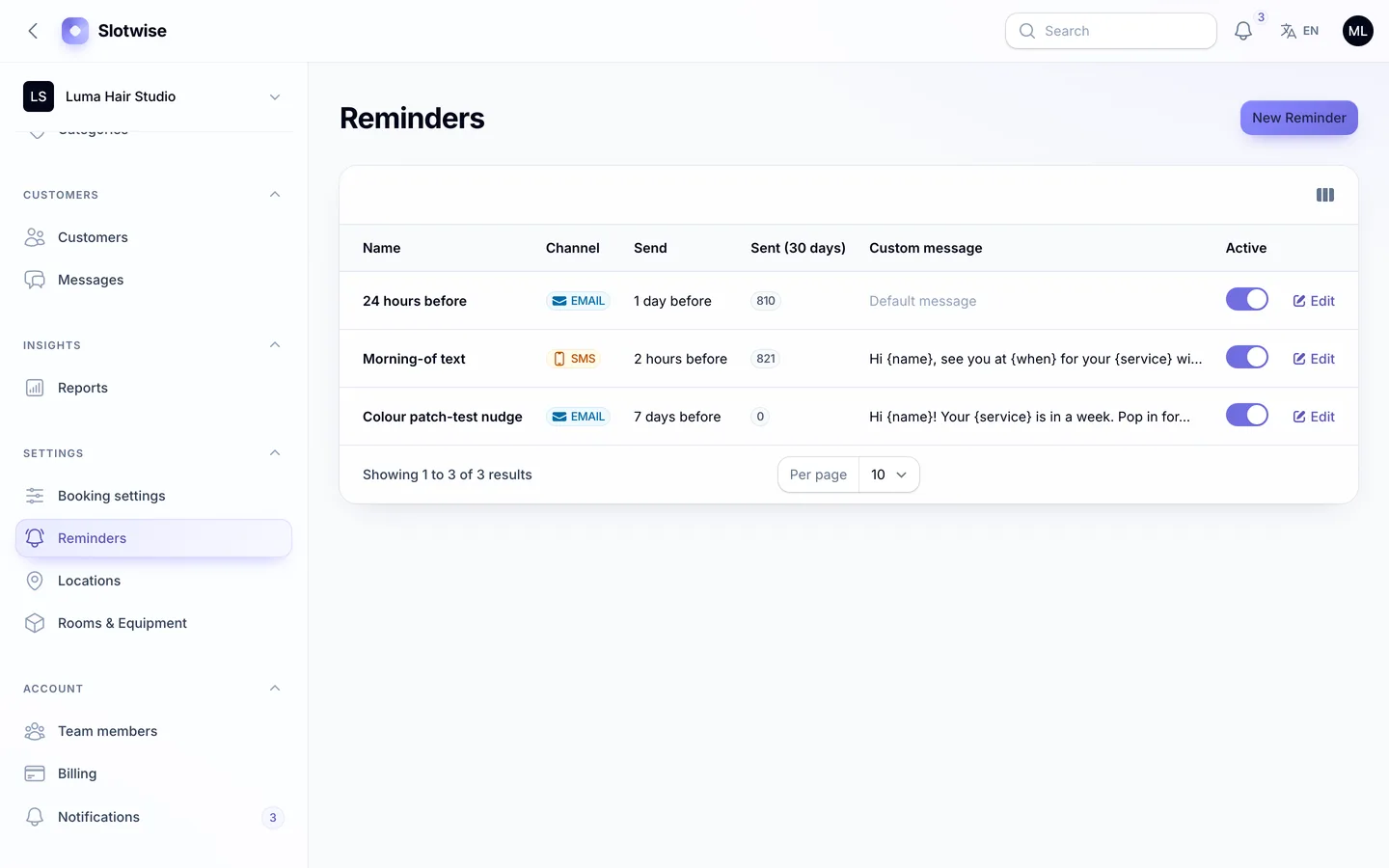
Reminder rules: email and SMS at any offset, with custom wording and a 30-day sent count

6. Will the widget work on the business's own website?

Most businesses want the booking form on their own site, not just a link. Embedding is harder than it looks: inside a frame on another site, browsers drop ordinary session cookies, and many embedded booking forms fail with an expired-session error on the first click.

Slotwise's widget is one script tag that adds a floating "Book now" button in the business's colour, or an inline form. The frame sizes itself, and payments open in the top window because card forms and 3-D Secure don't run inside third-party frames. Over HTTPS the embed page issues its session cookie as SameSite=None; Secure automatically. That's also the requirement to plan for: your Slotwise platform must run on HTTPS for the widget to work on other websites.

Two more things to check in any widget: whether it respects the plan, and whether customers can be asked to sign in. In Slotwise the widget is a plan feature enforced on the server, so on plans without it the embed page shows a link instead and the booking page refuses to be framed by other sites. A business can also switch off guest bookings, and then the customer signs in or registers inline, right inside the widget, without leaving the business's website.
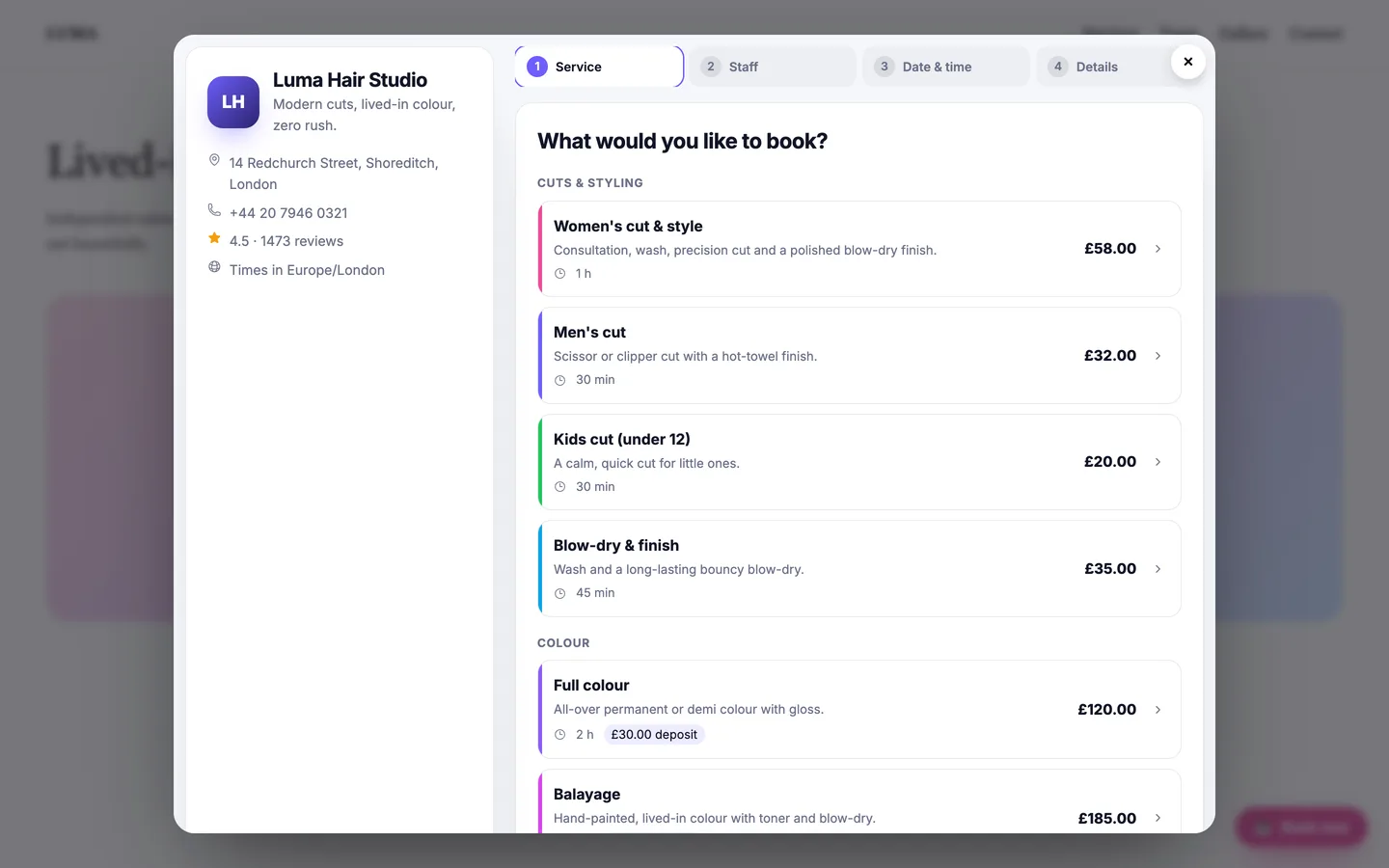
The widget's booking modal open over a business website, deposits included

7. Is it really multi-tenant, with plans and billing?

A booking script for one salon and a booking platform for many businesses are different products. If you want to charge businesses monthly, check how their data is separated, how plans limit them and what happens when a payment fails.

Slotwise keeps every business in one database, with each row scoped to its business automatically; a write into another tenant is refused. Businesses resolve by path, subdomain or their own domain. Four editable plans (Starter free, then $29, $79 and $199 a month) set limits for staff, locations and bookings per month, and switch features such as deposits, SMS, rooms and API access. A new plan starts only when its payment succeeds, downgrades that don't fit current usage are blocked, and a daily job renews subscriptions, ends trials and gives past-due accounts a short grace period. When a trial ends unpaid or a subscription lapses, the business stops taking new online bookings: the booking page, the widget and the API show a polite "not accepting online bookings" notice, while existing bookings keep working. Invoices are numbered PDFs, and the super-admin dashboard shows MRR, ARR, trials and churn. Your support team gets a read-only seat in the same panel, and businesses on plans with API access create their own API tokens, each limited to that business. Plan changes are not prorated: an upgrade starts a new full period.
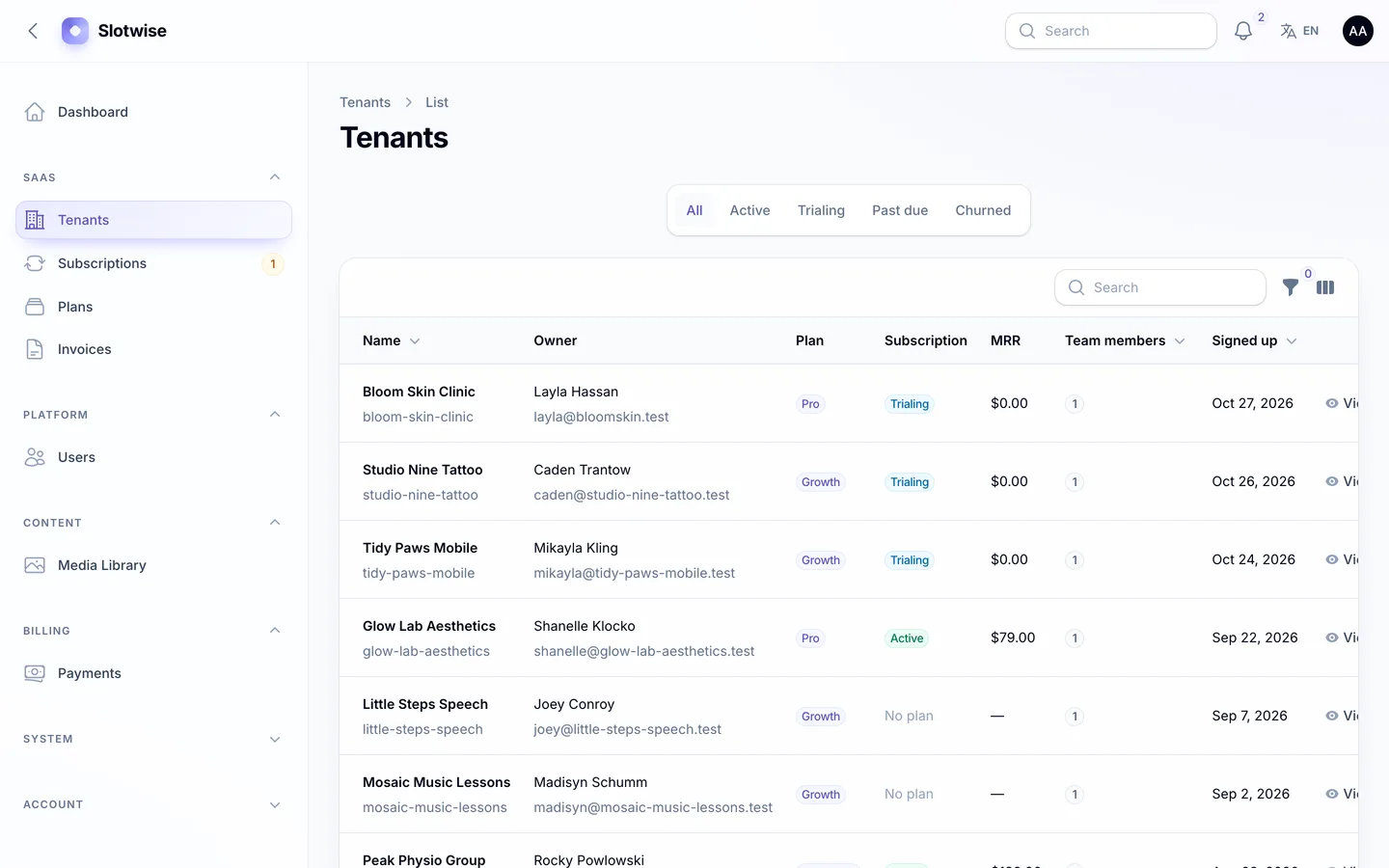
The super-admin tenants list: owner, plan, subscription status, MRR and team size for every business

8. How fast can a new business go live?

Every business that signs up and never finishes setup is a lost subscription. Look for a guided first run rather than a blank dashboard.

A Slotwise business signs up from the pricing page, picks its name, URL, time zone and industry, and starts a trial. A five-step wizard then collects the business details, opening hours, the first service and the team, and finishes with the booking link and widget code ready to copy. New businesses also get a 24-hour email reminder and a 2-hour SMS reminder to start with. Owners invite their managers, front desk and staff by email, and each person lands in the right panel.
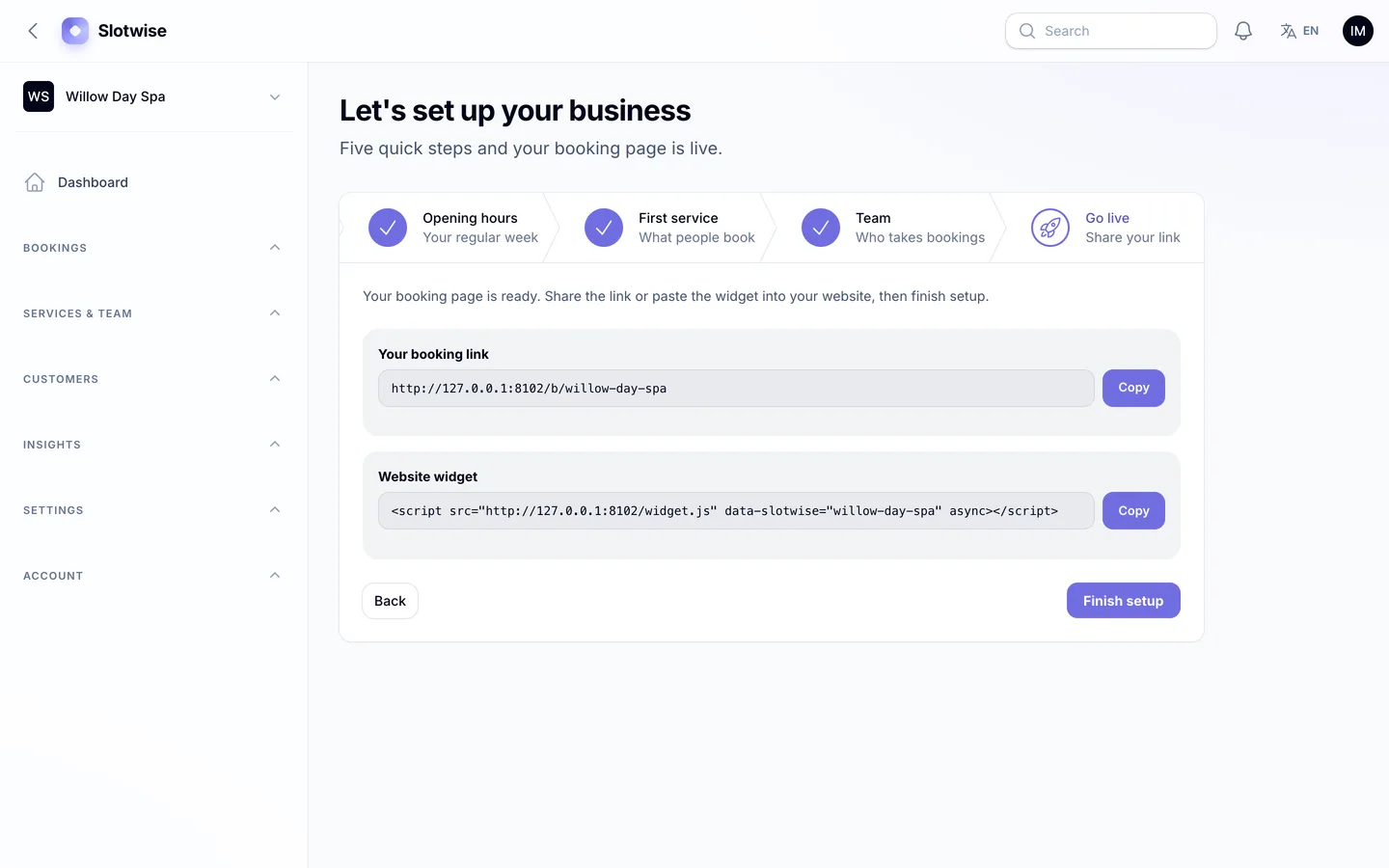
Onboarding's last step: the booking link and widget code are ready to copy

9. Can you install it without being a Laravel developer?

A script you can't install is a project you have to hire for. Check whether it ships with vendor/ and built assets, whether there is a web installer, and what the server really needs.

Slotwise's download includes vendor/ and the compiled assets, so you need PHP 8.2+ and MySQL, MariaDB or SQLite, but not Composer or Node.js. Visit /install and a five-step wizard checks the requirements, tests the database, loads demo or empty data, creates your super-admin and locks itself; php artisan dev3:install does the same over SSH. One cron entry runs the reminders, the hold expiry and the daily renewals.
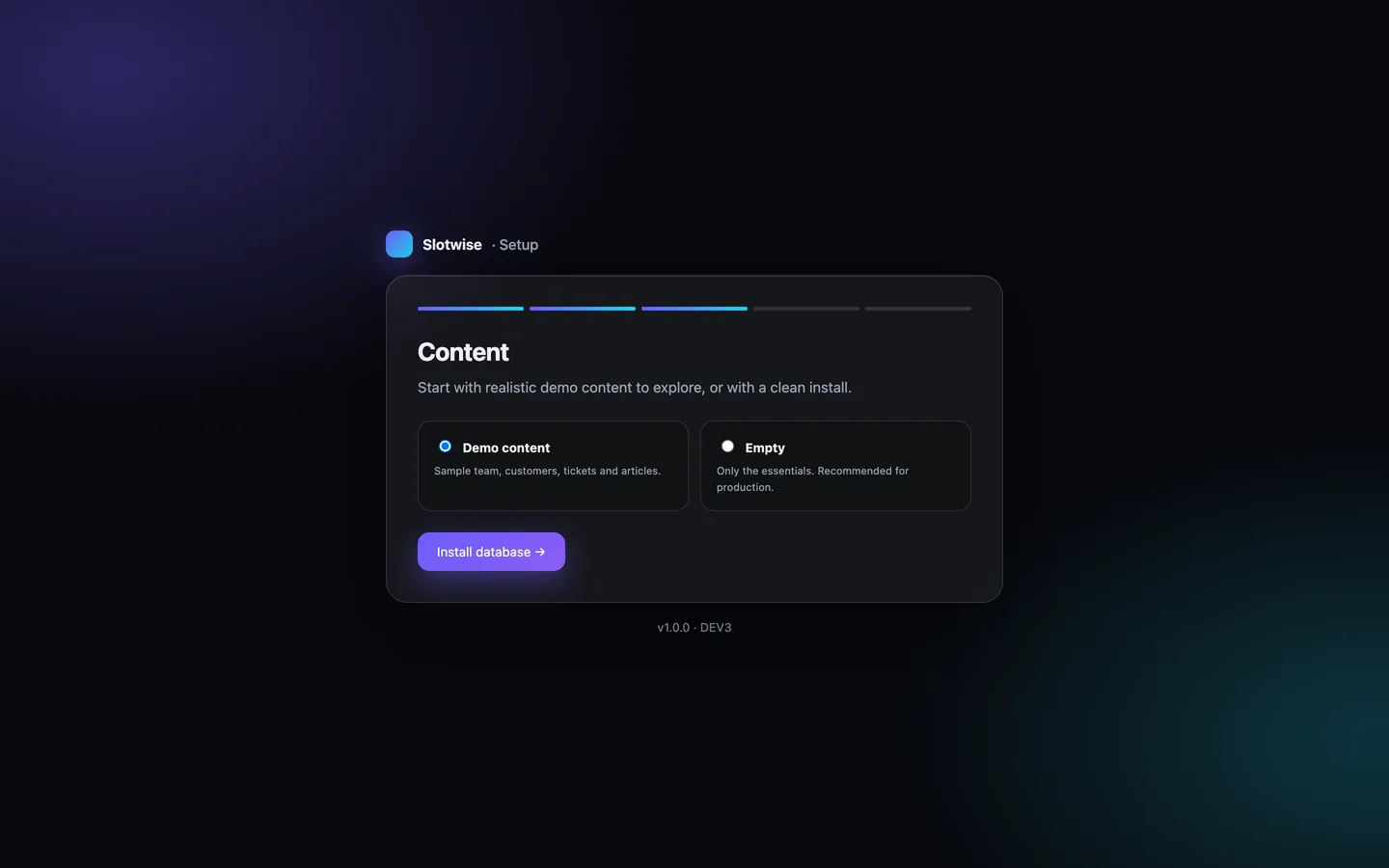
The installer's data step: the full demo, or an empty platform with the default plans

See it in action

The video tour starts on the 3D site, books a balayage with a deposit and reschedules it from the email link. It then follows the salon's dashboard, calendar and booking timeline, the stylist's day, the customer's account and the platform owner's MRR and tenants, and ends in Arabic.

Video tour of Slotwise

What else to compare

  • Dashboards: today's bookings, revenue, no-show rate and utilisation rings that show booked time against working hours for each person, plus reports with CSV export.
  • Staff and customers: a staff app for each person's day with check-out and no-show buttons, and a customer account with bookings at every business on the platform.
  • Security: two-factor sign-in with an authenticator app (8 recovery codes) or email codes, a setting that requires it for the platform team, super-admin resets, an audit log and one-click backups that include private files.
  • Languages: English and Arabic with a full right-to-left layout on the site, booking pages, emails and every panel.
  • What's not included: group classes with several places, prepaid packages, proration and two-way calendar sync are not in version 1.0.2, and the REST API is read-only.
  • Quality: Slotwise 1.0.2 shipped with 149 Pest tests covering the slot engine, the booking lifecycle and the SaaS billing, Larastan level 6 with no errors and 166 pages plus 8 happy paths checked in a headless browser with no console errors.

Slotwise costs $29 on DEV3. Instead of a live demo, the listing has 118 grouped screenshots and two video tours, and the "How it's built" section explains the architecture in more detail.
Frequently asked questions

The complete source code (version 1.0.2) as a download from your account, with the setup and usage guides shown on this page. You can modify the code to suit your product.

Buying guides: Laravel scripts with Filament panels and a web installer · Next.js or Laravel for a SaaS script?

More from this author

View all

Related in Web Scripts & Software

View all