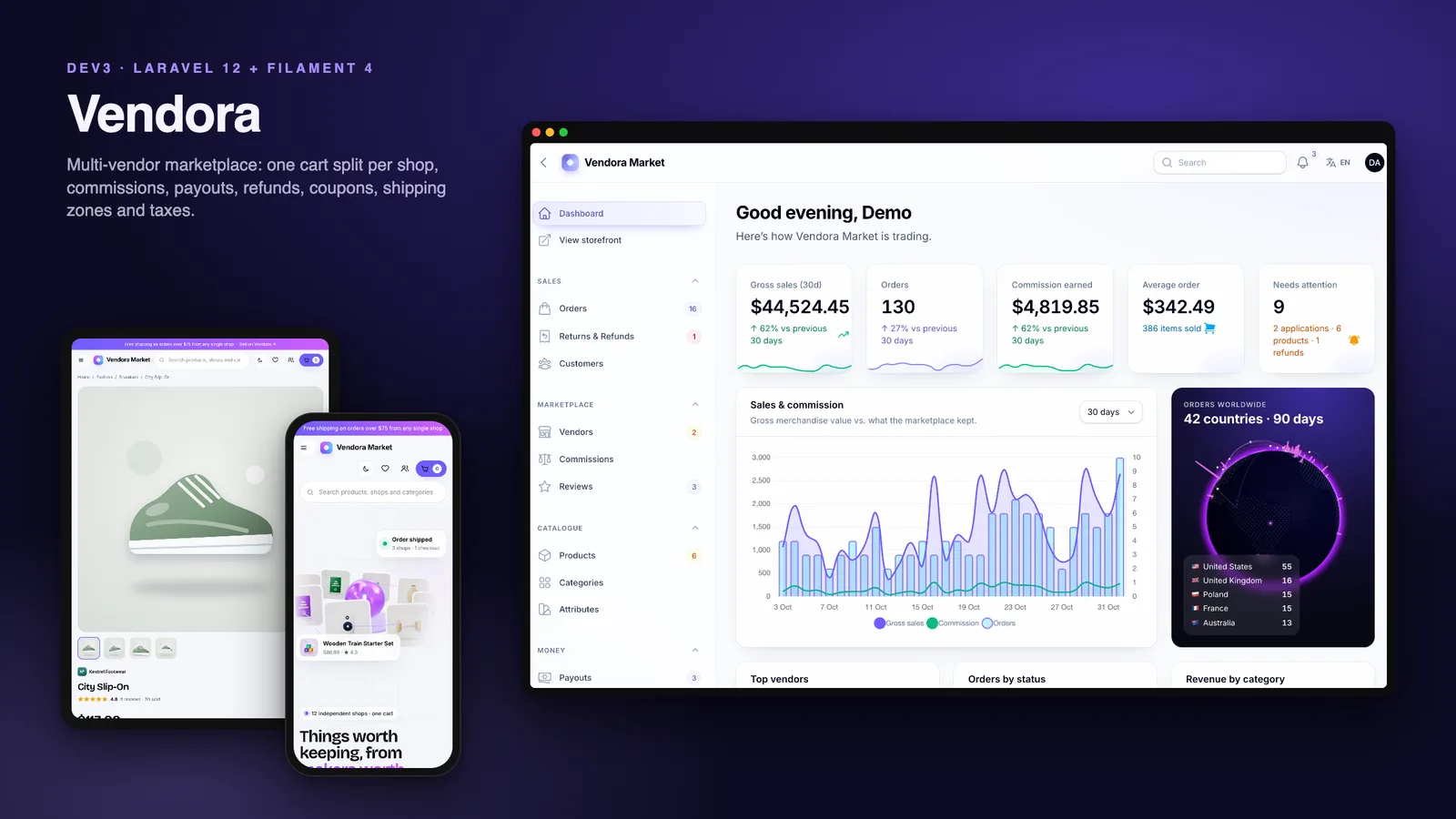
DEV3 Vendora – Multi-Vendor Marketplace Laravel Script with Vendor Shops, Commissions & Payouts

A self-hosted multi-vendor marketplace on Laravel 12 and Filament 4: one cart split into a package per shop, commission rules, coupons, tax and shipping zones, a vendor ledger with payouts, refunds, digital downloads, a seller centre, a REST API, two-factor sign-in and a web installer.

by DEV3 TechnologiesVerified Author(0) 0 sales 0 viewsUpdated 01 Nov 2026

Video tour. Pick a section below to browse 118 screenshots in 36 sections.

Vendora is a complete multi-vendor marketplace that you host yourself, built by DEV3 Technologies on Laravel 12, Filament 4 and Livewire 3. Independent shops sell physical and digital products through one storefront and one cart. The marketplace takes a commission on every line, each shop ships its own package, and vendors withdraw their earnings from a ledger. Three panels share one installation: an admin panel that runs the marketplace, a seller centre for every shop and a customer account for buyers.

No live demo: the 118 grouped screenshots and the two video tours above show every screen, including step-by-step flows from browsing to delivery, from a seller application to a payout, and from a review to a refund. Install it with the bundled demo data (the fictional "Vendora Market") to try every role on your own server.

Storefront

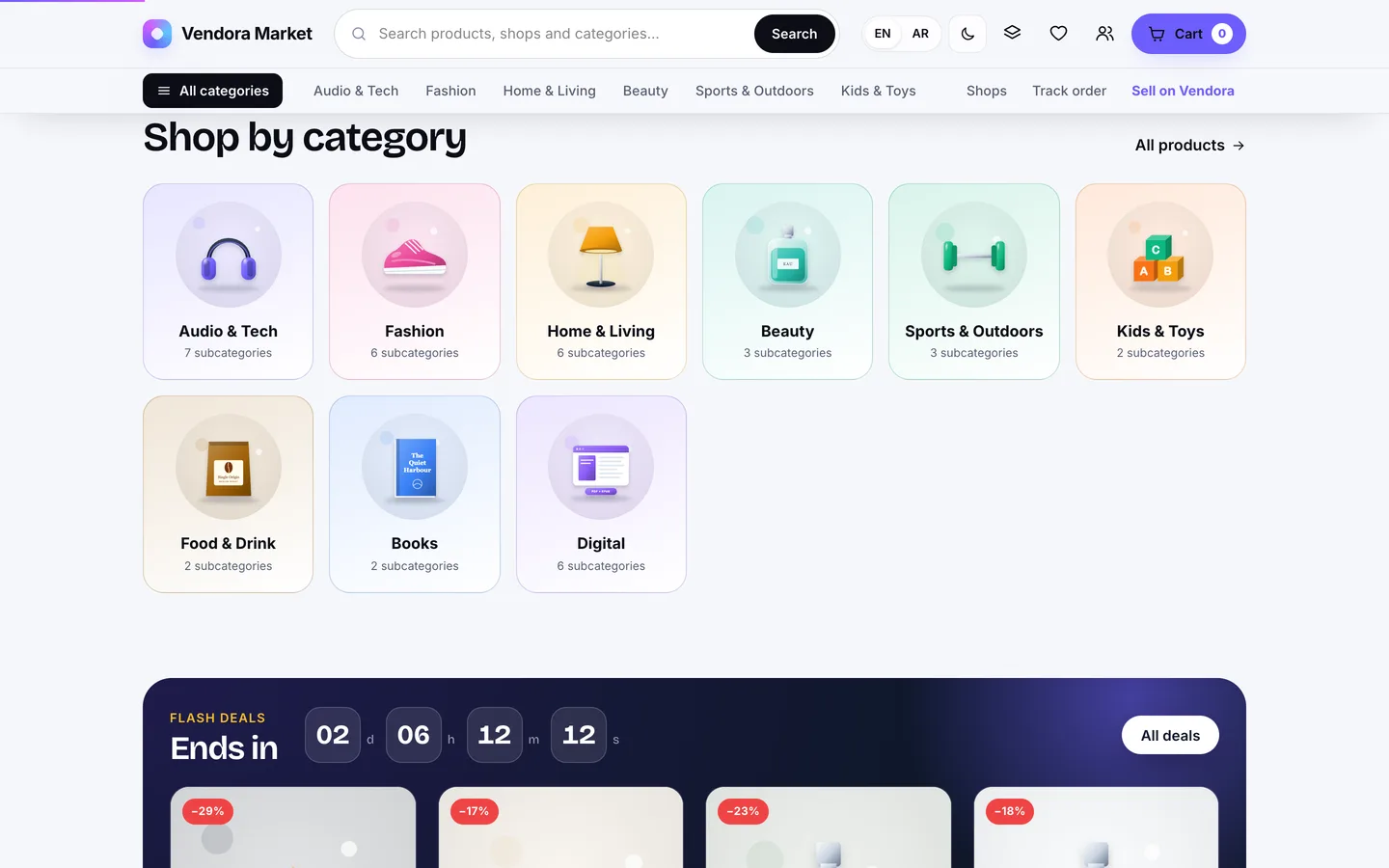
  • A home page with a 3D product orbit in the hero: product cards circle a glass pedestal and tilt with the pointer. Below it come live marketplace counters, category tiles, flash deals with a countdown, promo banners, trending products, a how-it-works strip, featured shops and reviews.
  • A catalogue with filters for the category tree, price range, rating, product type, availability and shop, plus sorting. A mega menu lists every category, and the header search suggests products as you type.
  • Product pages with a gallery, colour swatches and size buttons that swap the price, stock and images per variant, specifications and verified reviews.
  • A shops directory and a branded page for every shop at /store/<slug>, with a banner, logo, rating, in-shop search and recent reviews.
  • Wishlist, side-by-side compare of up to 4 products, a cart drawer with a fly-to-cart animation, public order tracking at /track, CMS pages and admin-managed banners.

One cart, many shops

  • Shoppers add products from any number of shops. The cart groups the lines into one package per shop, each with its own shipping method, delivery estimate, tax and total.
  • One payment at checkout creates one order (for example VM-10421) with a sub-order per shop (VM-10421-1, VM-10421-2…). Customers check out with a saved address, as a guest, or by creating an account on the way.
  • Each shop marks its own package shipped with a carrier and tracking number, then delivered. The parent order rolls up to partially shipped, shipped and completed, and the customer is emailed when a package ships.

Catalogue, variants and digital products

  • Categories nested to any depth; a category page shows the products of all its subcategories.
  • An attribute library (colours with swatches, sizes and your own) shared by every shop, and variants with their own price, stock and SKU.
  • Digital products: the file is stored privately, and buyers get a tokenised download link with a download limit and no shipping charge. A digital-only package is delivered the moment payment clears.
  • Compare-at prices, tax classes, inventory tracking and low-stock alerts.
  • Upload a gallery, or use generated studio art: pick one of 35 product kinds and a colour, and Vendora draws four SVG views, so a new shop looks finished before its photos arrive.
  • Optional moderation: new vendor products wait in an approval queue.

Vendors and the seller centre

  • Sellers apply at /sell and see a status page until an admin approves the shop (it goes live and the owner is emailed) or rejects it with a reason. Suspending a live shop hides its products at once.
  • The seller centre has a dashboard (sales, earnings, withdrawable balance, packages to ship and low stock), products with variants and digital files, orders and fulfilment, returns and refunds, review replies, shop coupons, the earnings ledger, payouts, analytics with CSV export, and shop settings for the story, brand colour, logo, banner and payout details.

Commission

  • The most specific rule wins: a vendor rule or the vendor's own rate, then a category rule found by walking up the category tree, then a global rule, then the default in Settings (10% out of the box).
  • Any rule can add a fixed fee per line. Commission is charged on the price after discount, without tax or shipping, and the rate is stored on every order line.

Coupons, tax and shipping

  • Coupons: percentage (with an optional cap), fixed amount or free shipping; minimum spend, total and per-customer limits, and start and end dates. A coupon can cover the whole marketplace or a single shop, and vendors create their own shop coupons.
  • Tax: prices are tax-exclusive. Rates match on country, optional state and tax class (standard, reduced, digital goods or your own), add up when several match, and can also apply to shipping. A setting decides whether collected tax stays with the marketplace or goes to the vendor.
  • Shipping zones: lists of countries (or the rest of the world) with a base cost, a cost per extra kilogram, a free-over threshold and a delivery estimate, charged separately for each shop's package.
  • One pricing engine applies them in a fixed order (coupon → shipping per package → tax → commission) in the cart, at checkout and on the stored order. Every amount is an integer in cents, so the totals always add up.

Earnings and payouts

  • Every money movement for a shop is a signed row in its earnings ledger: sales, refunds, payouts and adjustments.
  • A sale becomes withdrawable after a hold period (7 days by default), so refunds can still be covered.
  • Vendors request a payout above a minimum. The amount is reserved at once and only one request can be open. Admins mark it paid with a bank or PayPal reference, reject it (the funds go back to the balance), or pay a vendor who uses Stripe Connect with a Stripe transfer.

Returns and refunds

  • Customers request a return or a refund per item, with a quantity and a reason, inside the return window (30 days by default).
  • Approving it refunds the customer through the original gateway (partial refunds work), reverses the shop's earning, gives back the marketplace commission, optionally restocks, and refunds the shipping when the whole package comes back. Admins can also refund any package from the order page.

Customer account

  • A dashboard, orders with a progress tracker for each shop's package, download buttons for digital items, returns and refunds, reviews, a wishlist and saved addresses.
  • Only buyers of a delivered item can review it. Reviews carry a verified-buyer badge, feed the product and shop ratings, and shops can reply in public.

Admin and reports

  • Orders with packages by shop, customers, vendors and applications, commission rules, review moderation, products and the approval queue, categories, attributes, payouts, coupons, shipping zones, taxes, banners, CMS pages, gateway payments and settings.
  • A dashboard with KPI sparklines, sales against commission, top vendors, order statuses, the category mix and a 3D orders globe: a glowing pillar for each destination country and arcs that flow from shop countries to buyers.
  • Reports on gross sales, orders, commission, average order value, items and refund rate against the previous period, with daily orders, top countries, top vendors and top products, and CSV export. Every vendor gets the same report for their own shop.

REST API

  • A read-only REST API at /api/v1 on Laravel Sanctum, described in OpenAPI (/api/v1/openapi.json, with a reference page at /api/docs).
  • Public: products with search, category, shop, type, price and on-sale filters, sorting and pagination; one product by slug with its variants; and the approved shops.
  • With a token: a customer's own orders with a package per shop, a single order (another customer's order returns 404), and an approved vendor's own packages with commission and earnings.
  • Customers create tokens at /account/api-tokens, vendors in the seller centre. Rate limits: 60 requests a minute per IP on the catalogue and 120 per user on orders.

Platform

  • English and Arabic with a full right-to-left layout on the storefront and every panel, and dark mode throughout.
  • Two-factor sign-in: an authenticator app with 8 single-use recovery codes, or email codes. Staff in /admin can be required to use it (Settings → Security → Require 2FA for staff); it is optional for vendors and customers. A super admin can reset a user's 2FA, and php artisan dev3:2fa-reset covers a locked-out owner.
  • Four roles (admin, manager, vendor, customer) with a permission editor, an audit log with before and after values, a media library, one-click backups that include private files such as digital products, system health and notifications.
  • Payments through Stripe, PayPal, Razorpay or a built-in simulated gateway, with the keys stored encrypted.
  • Demo mode with one-click role logins (they skip the 2FA challenge), locked destructive actions and a nightly reset.

Installs like a script, not a project

  • A 5-step web installer at /install (requirements, database, demo or empty data, admin account, finish) or php artisan dev3:install.
  • vendor/ and the compiled assets are included, so you need PHP and a database but not Composer or Node.js. It runs on shared hosting with one cron entry; a queue worker is optional.

What's in the download

  • vendora-v1.0.2.zip: the full Laravel source with vendor/, the DEV3 core and public/build, ready to upload.
  • Documentation/: HTML documentation covering requirements, shared hosting, VPS, Docker and the CLI installer, vendors and approvals, the catalogue and digital products, the cart split and checkout, commission, tax and shipping, earnings and payouts, returns and refunds, payment gateways, two-factor authentication, the REST API, a settings reference, cron and queue, languages, demo mode, customisation, updating and a troubleshooting FAQ.
  • Demo and empty seeders, 89 Pest tests and the Larastan and Pint configuration.

Requirements

  • PHP 8.2 or newer (8.3 and 8.4 work) with bcmath, ctype, curl, dom, fileinfo, json, mbstring, openssl, pdo, tokenizer, xml, zip and gd
  • MySQL 8, MariaDB 10.6+ or SQLite 3.35+
  • Apache with mod_rewrite or Nginx (HTTPS strongly recommended), and one cron entry every minute

Good to know

  • There is no product Q&A and no messaging between vendors and customers. Buyers and shops talk through return requests and review replies.
  • The store has one currency. Prices are not converted or shown in other currencies.
  • The PayPal and Razorpay drivers and the Stripe Connect payout transfer follow the providers' documented APIs but were not tested against live accounts, so test with sandbox or test-mode keys first.
  • Bank and PayPal payouts are recorded, not sent: you send the money and enter the reference. Only Stripe Connect payouts move money from Vendora.
  • The REST API is read-only: the cart, checkout and fulfilment happen in the storefront and panels.
  • Vendora calculates and records tax with the rates you set. It does not file or remit tax for you.

The How it's built section below covers the engineering behind Vendora.

How it's built

Architecture, stack, key decisions and the quality gates DEV3 Vendora passed before release.

The engineering behind Vendora, the DEV3 Laravel suite's multi-vendor marketplace: Laravel 12 and Filament 4 on a shared core, one pricing engine for split carts, commission from the most specific rule, a vendor ledger with a hold period, payouts, refunds that reverse the money and a REST API.

The problem it solves

A single-shop store has one seller, one shipment and one bank account. A marketplace has many of each, and the money has to be right for all of them at once. One cart holds products from several shops, so shipping has to be priced per package, a coupon has to be split fairly across lines from different sellers, and tax has to be charged on the discounted price. Commission depends on who is selling and what: a founding seller may have a special rate, digital goods may carry a higher one, and the rate on a sub-category should fall back to its parent. Vendors are paid out of what they earned, but a refund can arrive after the sale, so earnings need a hold period, and the same balance must never be withdrawn twice. A refund then has to undo all of it: the customer's money, the vendor's earning, the marketplace's commission and the stock. Digital files have to reach only the people who paid for them. And because Vendora is sold as a script, all of this had to install from a zip on ordinary PHP hosting, with no Node.js, no guaranteed queue worker, one cron entry at best and a web installer instead of a terminal, while reusing the shared DEV3 Laravel core built with Deskly.

Architecture and approach

Vendora is a Laravel 12 application with three Filament 4 panels on one user table: /admin for marketplace staff, /vendor for the seller centre and /account for customers. Each user reaches only the panels their role allows. The storefront is Blade with a small vanilla-JS layer for the cart drawer, search suggestions and motion, which keeps the public page at 35.2 KB of gzipped JS and CSS.

A shared DEV3 core

  • One package, five products. Everything that is not about selling comes from dev3/laravel-core: the installer, typed and encrypted settings, branding, the Blade UI kit, motion and 3D helpers, demo mode, roles and permissions, the audit log, the payment gateways, backups, system health, Sanctum tokens, two-factor sign-in and English / Arabic with RTL. Vendora registers its four roles, six demo logins, its permissions, the Marketplace and Storefront settings groups and its two 3D presets through a product manifest. The packaging script copies the core into the zip, so buyers get one self-contained download.

Key design decisions

  • One pricing engine, one order of operations. A single PricingEngine turns cart lines into a quote in a fixed order: split the lines by vendor, apply the coupon, price shipping per package from the destination country's zone, tax each line after its discount (and the shipping, where a rate says so), then work out the commission per line. The same class prices the cart drawer, the cart page and checkout, and its result is frozen onto the order and its lines, so the totals never drift between screens. The demo seeder pushes every one of its orders through the same engine.
  • Money in integer cents, allocated exactly. Every price, discount, tax, commission and payout is an integer in the store currency's minor unit. A coupon's discount is spread across the eligible lines by largest remainder, so the line discounts always add up to the coupon. A shop coupon only touches that shop's lines, a percentage coupon can be capped, and a free-shipping coupon clears the shipping of the packages it covers.
  • Commission from the most specific rule. CommissionResolver checks a vendor rule or the vendor's own rate first, then walks up the product's category lineage looking for a category rule or a rate on the category, then a global rule, and finally the default in Settings. A rule can add a fixed fee per line, and the commission can never exceed the line. It is charged on the price after discount, without tax or shipping, and the rate is stored on each order line, so a later rule change never rewrites past sales.
  • A ledger, not a balance column. Every money movement for a shop is a signed row with an available_at date. A sale's earning (items after discount, minus commission, plus shipping, plus tax when vendors keep it) becomes available after the hold period, 7 days by default. The withdrawable balance is the sum of rows whose date has passed, so earnings clear without a cron job. A payout request locks the vendor row, checks the minimum, the available balance and that no other request is open, then writes the debit at once, so the same money cannot be requested twice; a rejection writes it back.
  • Two ways to pay a vendor. Admins mark a payout paid with a bank or PayPal reference after sending the money themselves. For a vendor on Stripe Connect with an acct_… id, leaving the reference empty makes Vendora call the Stripe Transfers API with the secret key from Settings and store the transfer id as the reference.
  • Payment confirmation that is safe to repeat. Marking an order paid is idempotent: a repeated gateway webhook returns early. In one transaction it reduces stock (per variant), redeems the coupon, credits each shop's ledger, delivers digital-only packages, notifies every shop and rolls the order status up.
  • Refunds that undo the money, not only the status. A refund can cover some units of one line. For each line the shop's earning is reversed and the matching share of the marketplace commission is given back; when the whole package comes back, the shipping is refunded too. The shop gets one negative ledger row that records the gross and the commission returned, the gateway refund is capped at what is still refundable, stock is optionally restored, and the order rolls up to partially refunded or refunded.
  • Tokenised digital downloads. Digital files live on the private disk and never get a public URL. Each purchased line gets its own download token. The download route checks that the order is paid and the line is not fully refunded, enforces the product's download limit and counts every download, so refunding an item also closes its link. The core's backups include storage/app/private and its media library hides private files, so digital products are backed up without ever being listed.
  • A read-only API scoped to the token. /api/v1 runs on Sanctum. Products, a product by slug and the approved shops are public, behind a 60-requests-a-minute limit per IP; a shop's profile never exposes owner or payout details. With a token, a customer reads only their own orders (another customer's order number returns 404, not 403) and an approved vendor reads only their own shop's packages with commission and earnings, enforced by policies and a 120-a-minute limit per user. Every path is in the OpenAPI spec.
  • Two-factor sign-in from the core. Filament's MFA is wired once in the DEV3 core: an authenticator app with 8 single-use recovery codes, or email codes. /admin honours a Require 2FA for staff setting, while the seller centre and customer account keep it optional. Super admins can reset a user's 2FA (audit-logged), php artisan dev3:2fa-reset rescues a locked-out owner, and the one-click demo logins never see a challenge.
  • Moderation at the edges. A seller application creates a pending shop; approval, rejection with a reason and suspension, which hides every product of the shop at once, are all emailed. New vendor products can wait in an approval queue, reviews can be held for moderation, and only buyers of a delivered item can leave a review.
  • An installer instead of a README. If .env is missing the app creates it and an APP_KEY, then redirects to a 5-step /install wizard: requirements, database (MySQL or SQLite, tested before writing), demo or empty data, admin account and a lock file. php artisan dev3:install does the same over SSH. vendor/ and public/build ship in the zip and the queue defaults to sync, so one cron entry is the only server setup.
  • Demo data made by the real services. The seeders build a deterministic "Vendora Market": 12 approved shops plus 3 applicants and 1 rejected application, 191 products with 285 variants, 60 customers, and 597 orders over about eight months in every status, with 958 shop packages, a ledger row for every movement, about 540 reviews, refunds and monthly payouts, 6 shipping zones and 31 tax rates. The orders go through the pricing, order, refund and payout services, so the demo's numbers reconcile. Product images, shop logos and banners are SVG drawn by code (35 product kinds, 4 views each), so nothing in the demo carries a third-party licence.

The 3D and motion approach

  • A product orbit in the hero. Rounded product cards, textured with the generated studio art, circle a glass pedestal on a tilted ring like a rotating shop shelf. The scene tilts with the pointer and relights for dark mode.
  • An orders globe on the admin dashboard. A dotted Earth built from simplified land outlines carries a glowing pillar for each destination country, sized by its orders in the last 90 days, with animated arcs that flow from the shops' countries to the buyers.
  • Cheap by default. three.js loads lazily as its own 187 KB chunk, the device pixel ratio is capped, scenes pause off-screen, reduced motion is respected, and an SVG poster shows without WebGL or when 3D is switched off in Settings → Branding.
  • Motion without a licensing question. Reveals, counters, the flash-deal countdown and the fly-to-cart animation come from the core's data-attribute motion.js and a small store script with Lenis smooth scrolling, not GSAP, which keeps resale licensing simple.

Quality gates and results

Vendora 1.0.2 passed all seven release gates of the DEV3 Laravel suite, run by one script against the packaged build:

  • Static analysis: composer validate, Pint clean, Larastan level 6 with 0 errors, and php -l on 316 files.
  • Tests: 89 Pest tests with 533 assertions, including required money-path suites for the cart split, commission, coupons, tax, shipping, checkout, payouts, refunds and the API's cross-customer and cross-vendor authorisation, plus the core's two-factor tests.
  • Front-end budget: 13.0 KB of JS and 22.2 KB of CSS gzipped on the public page (35.2 KB against a 180 KB budget), with the 187 KB three.js chunk loaded only when a scene needs it.
  • Databases: the demo and empty seeders run on both MySQL 8.4 and SQLite; the demo seed writes 597 orders, 1,426 order lines, 958 shop packages and 536 reviews.
  • Browser checks: 122 pages in headless Chrome with 0 console errors, plus 4 happy paths: a multi-vendor checkout with a simulated payment and tracking, a vendor shipping a package, a seller application approved by an admin, and a customer review.
  • Installer: the release zip unzipped into a clean folder, installed through the /install wizard on MySQL with demo data, then signed in as the admin.
  • Secret scan: 18,885 files in the 21 MB release zip, clean, and every text file inside it is scanned again when the listing is published.

The 118 screenshots and the two video tours were captured from the seeded demo across all three panels, light and dark mode, Arabic, tablet and phone, and they double as the listing's demo. They follow the money step by step: a two-shop cart, the vendor's fulfilment, a refund reaching the ledger, and a payout from request to payment.

Known gaps in 1.0.2 are listed openly: there is no product Q&A, vendor-to-customer messaging or multi-currency display; the REST API is read-only; and the PayPal and Razorpay drivers and the Stripe Connect transfer have not been run against live accounts.

Tech stack

Area Technologies
Backend Laravel 12, Filament 4 panels per role, Livewire 3, Laravel Sanctum REST API, TOTP two-factor sign-in, spatie/laravel-permission, Scheduler and database queue
Commerce engine Pricing engine, Commission resolver, Coupon allocation, Tax and shipping calculators, Vendor earnings ledger, Refund service
Frontend Blade, Tailwind CSS 4, Vite 7, Vanilla JS motion, Lenis, three.js
Data MySQL 8 / MariaDB, SQLite, Integer cents, Deterministic demo seeders, Audit log
Integrations Stripe, PayPal, Razorpay, Stripe Connect transfers, Simulated gateway, SMTP
Delivery Pest, Larastan level 6, Pint, Headless Playwright, Web installer, Secret scan

Inside the build

Home page with a rotating 3D product orbit: Featured products circle a glass pedestal in a GPU-rendered hero that tilts with the cursor and counts up live marketplace stats. Home page with a rotating 3D product orbit — Featured products circle a glass pedestal in a GPU-rendered hero that tilts with the cursor and counts up live marketplace stats.

Shop by category: Colourful category tiles with generated studio art lead into a nested category tree with any number of levels. Shop by category — Colourful category tiles with generated studio art lead into a nested category tree with any number of levels.

Guides & articles

Practical guides and engineering write-ups for DEV3 Vendora.

Multi-vendor marketplace script: 8 things to check before you launch

Last updated
Multi-vendor marketplace script: 8 things to check before you launch: DEV3 Vendora

Multi-vendor marketplace scripts all promise the same list: vendor shops, commissions, payouts, reviews. The differences show up after launch, when a cart with items from three shops charges shipping once instead of three times, when a coupon pushes a vendor's commission below zero, when a refund comes in after the vendor has already withdrawn the money, or when a paid download link gets shared on a forum. This guide covers the eight things worth testing before you choose a self-hosted marketplace script, and how Vendora, built on Laravel 12 and Filament 4, handles each one.
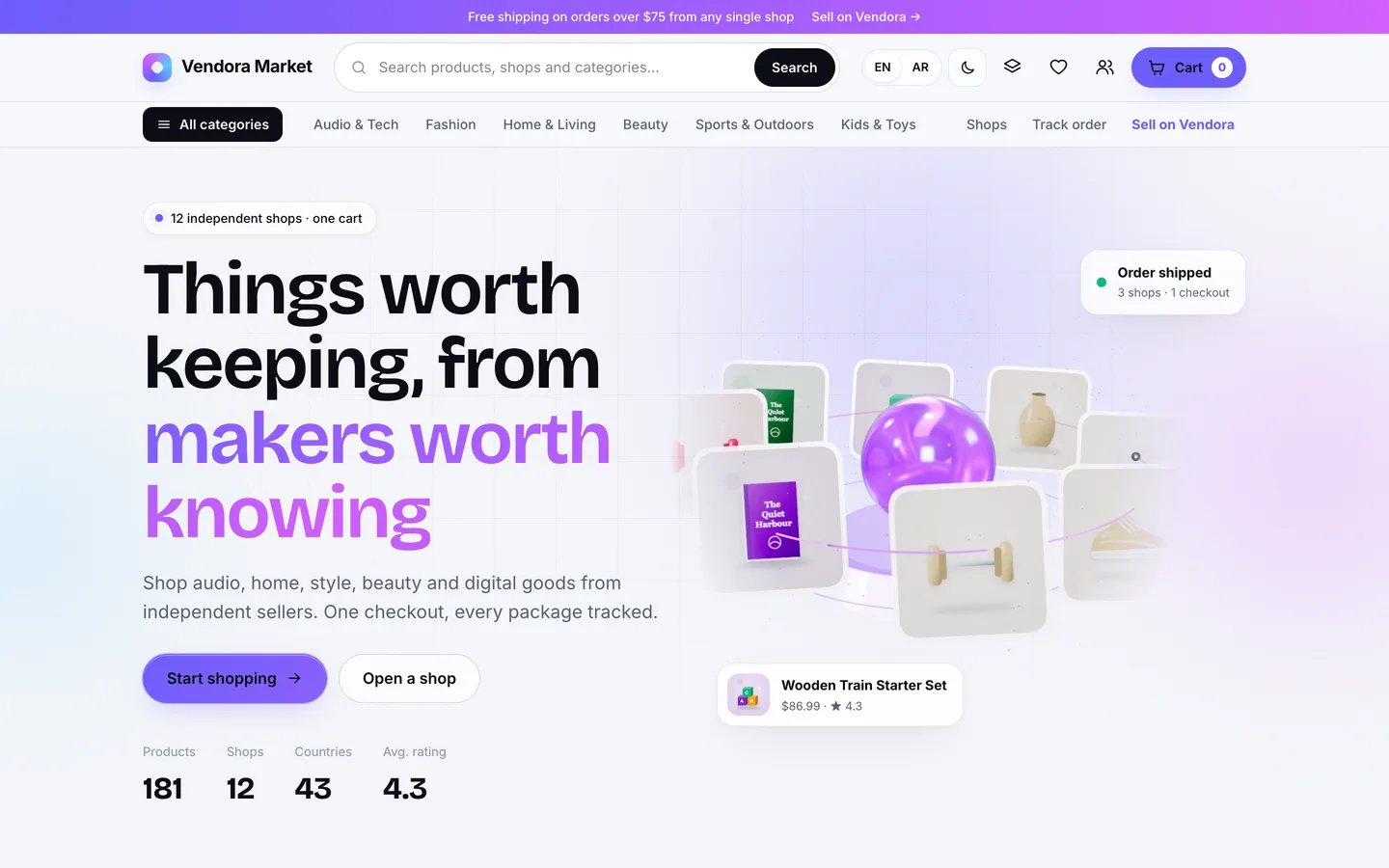
The Vendora storefront: product cards orbit a glass pedestal in a 3D hero above the marketplace search

1. Does one cart really split by shop?

A marketplace order is several shipments sold as one purchase. If the cart treats it as one parcel, shipping, tax and delivery estimates are wrong for every multi-shop order. Ask the vendor to show a cart with items from two shops and look for separate packages.

In Vendora the cart groups lines into one package per shop. Each package has its own shipping method, delivery estimate, tax and total, and the customer pays once. Checkout creates one order with a sub-order per shop (for example VM-10421-1 and VM-10421-2). Each shop ships its own package with a carrier and tracking number, and the parent order moves to partially shipped, shipped and completed as the packages go out. Customers follow every package in their account, or at /track with the order number and email.
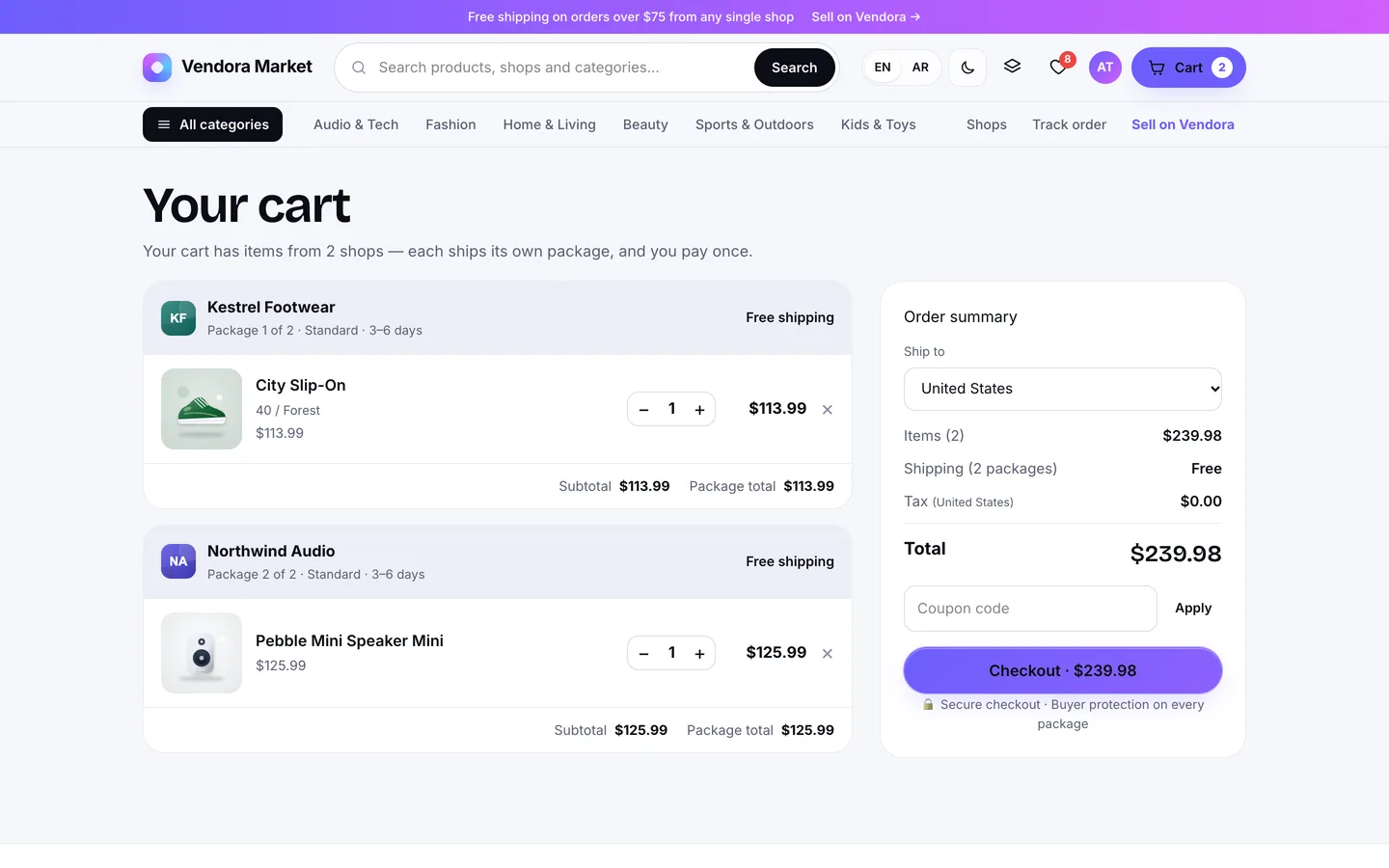
The multi-vendor cart: one package per shop, each with its own shipping method, delivery estimate, tax and total

2. Is the pricing order defined, and the same everywhere?

Coupons, shipping, tax and commission all interact. Is tax charged before or after the discount? Is commission charged on shipping? If the cart, the checkout and the stored order each calculate totals their own way, they will eventually disagree by a cent, and someone will ask why.

Vendora uses one pricing engine everywhere, in a fixed order: split the lines by shop, apply the coupon, price shipping per package from the destination country's zone, tax each line after its discount (and shipping where a rate says so), then work out the commission on each line. Every amount is an integer in cents. A coupon's discount is spread across the eligible lines so the parts always add up to the whole, and a coupon limited to one shop only touches that shop's items.
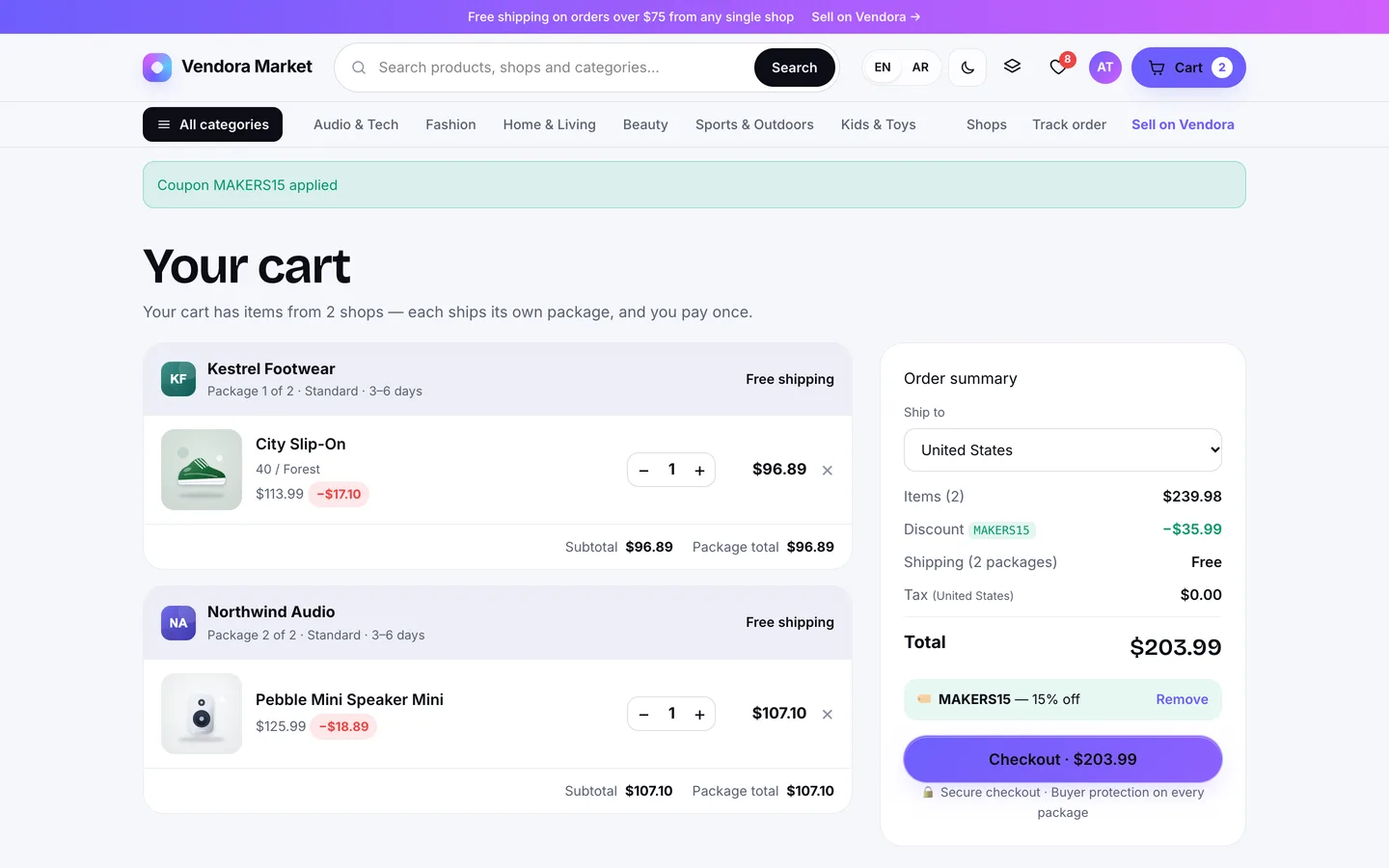
A coupon applied in the cart: the discount is spread across eligible lines and the ship-to country drives tax

3. How is commission decided?

One flat rate rarely survives the first month. You will want a better rate for founding sellers, a higher one for digital goods and a lower one for thin-margin categories. Check whether rules can be set per vendor and per category, what happens with sub-categories, and whether a rate change rewrites past orders.

In Vendora the most specific rule wins: a vendor rule (or the vendor's own rate), then a category rule found by walking up the category tree, so a rule on "Electronics" also covers "Electronics › Cameras", then a global rule, then the default in Settings. Any rule can add a fixed fee per line. Commission is charged on the price after discount, never on tax or shipping, and the rate is stored on every order line, so changing a rule never changes past sales.
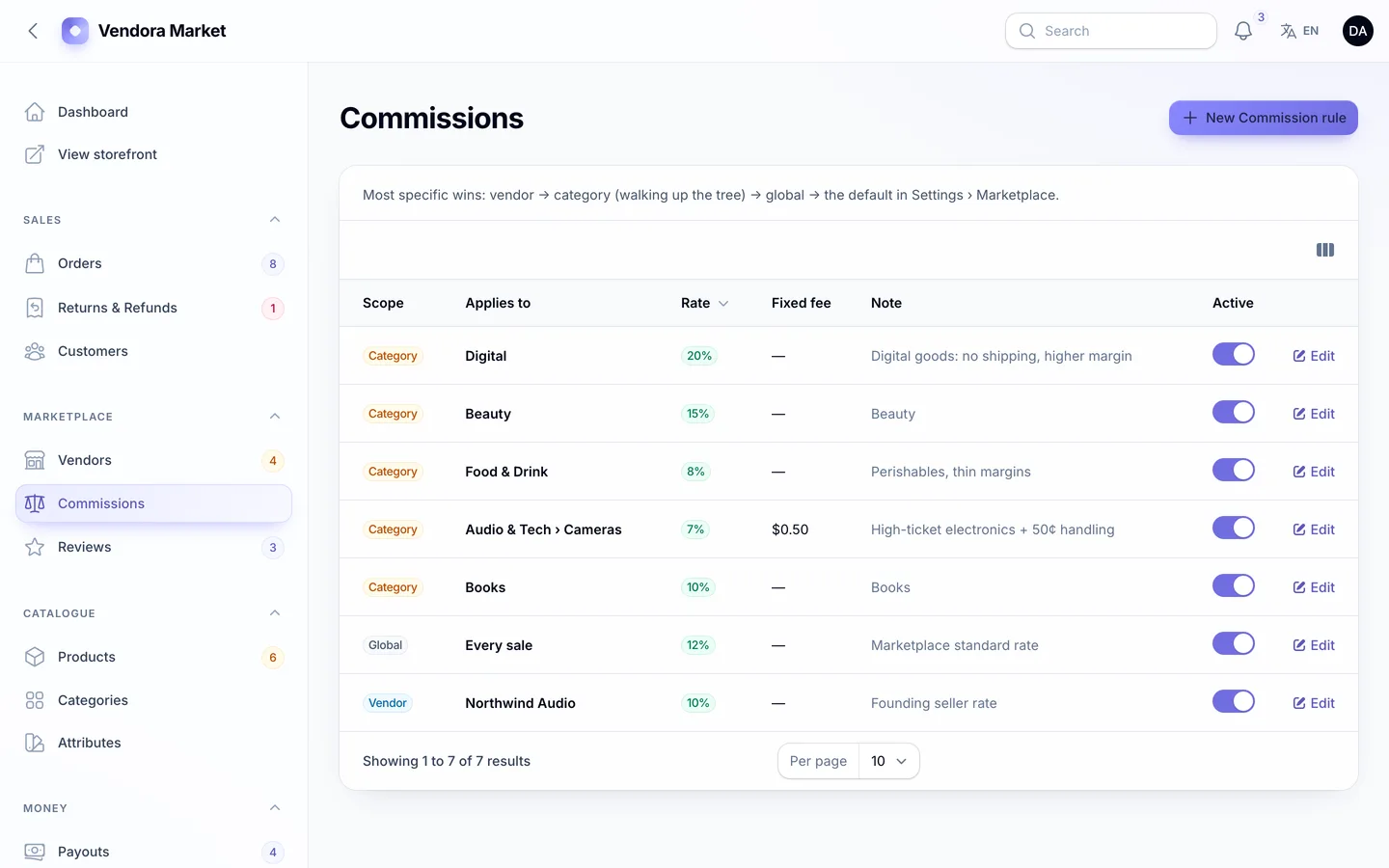
Commission rules: global, category and vendor rates with optional fixed fees, and the order of precedence explained

4. Can vendors see their money, and withdraw it safely?

Vendors trust a marketplace that shows them exactly where every cent went. The marketplace needs protection too: if a sale can be withdrawn the same day, a refund next week comes out of your pocket.

Vendora gives every shop an earnings ledger. Sales, refunds, payouts and adjustments are signed rows, and each sale shows the gross amount and the commission taken. A sale becomes withdrawable after a hold period (7 days by default). A payout request must be above a minimum, only one can be open at a time, and the amount is reserved the moment it's requested, so the same balance can't be withdrawn twice. Admins mark a payout paid with a bank or PayPal reference, reject it (the money returns to the balance), or pay vendors who use Stripe Connect with a Stripe transfer. Bank and PayPal payouts are recorded rather than sent, and the Stripe Connect transfer has not yet been run against a live account, so try it in test mode first.
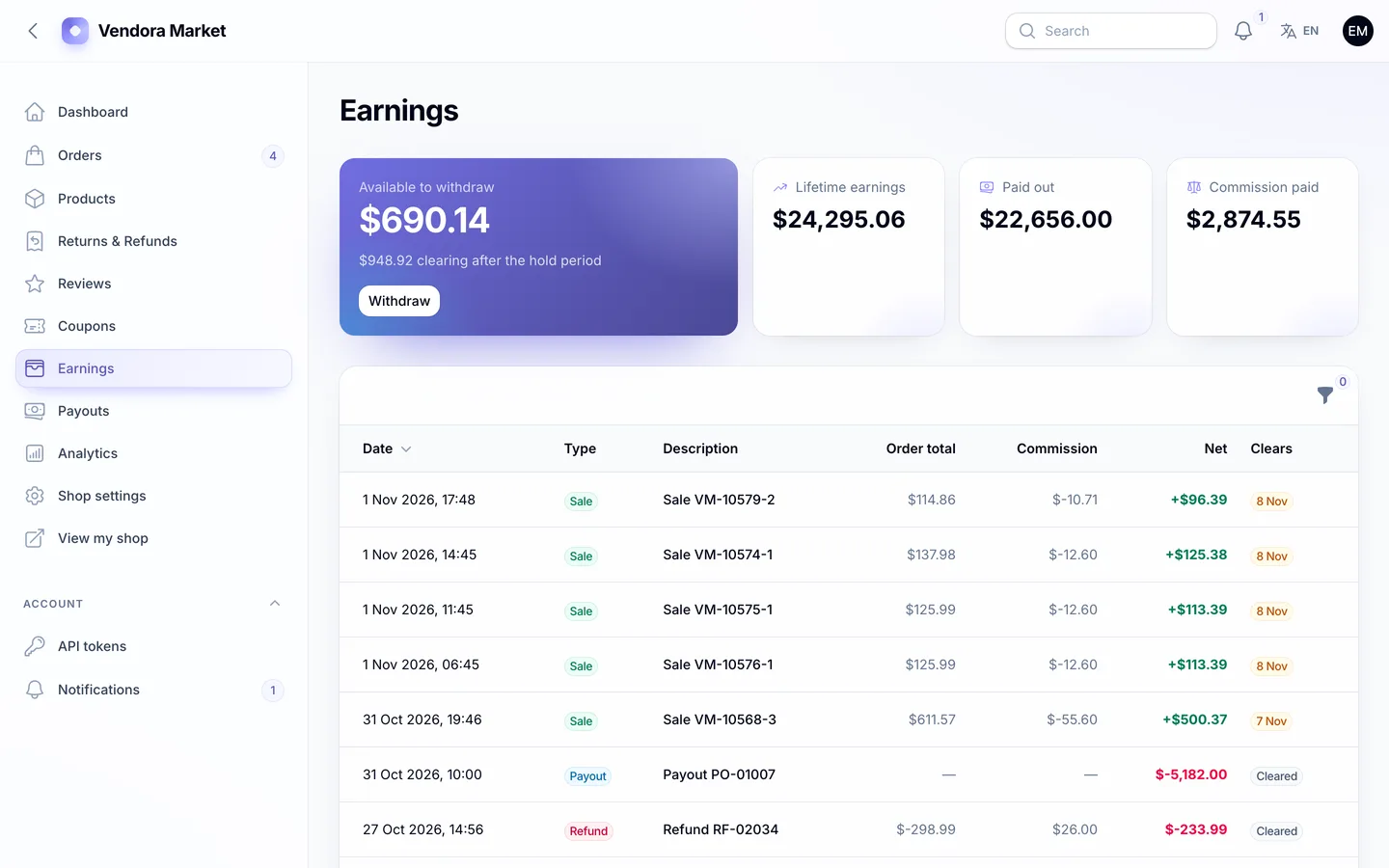
The vendor's earnings: available, clearing, lifetime and paid-out totals over a ledger with the commission on each sale

5. What happens to the money on a refund?

Many scripts treat a refund as a status change. A real refund has to return the customer's money, take the earning back from the vendor, give back the commission and maybe restock the item, sometimes for just one unit of one line.

In Vendora customers request a return or refund per item, with a quantity and a reason, inside the return window (30 days by default). When the shop or the admin approves it, the customer is refunded through the original gateway (partial refunds work), the shop's earning is reversed, the marketplace commission is given back, the stock is optionally restored, and shipping is refunded when the whole package comes back. The vendor sees it all as one negative row in the ledger, and the order becomes partially refunded or refunded.
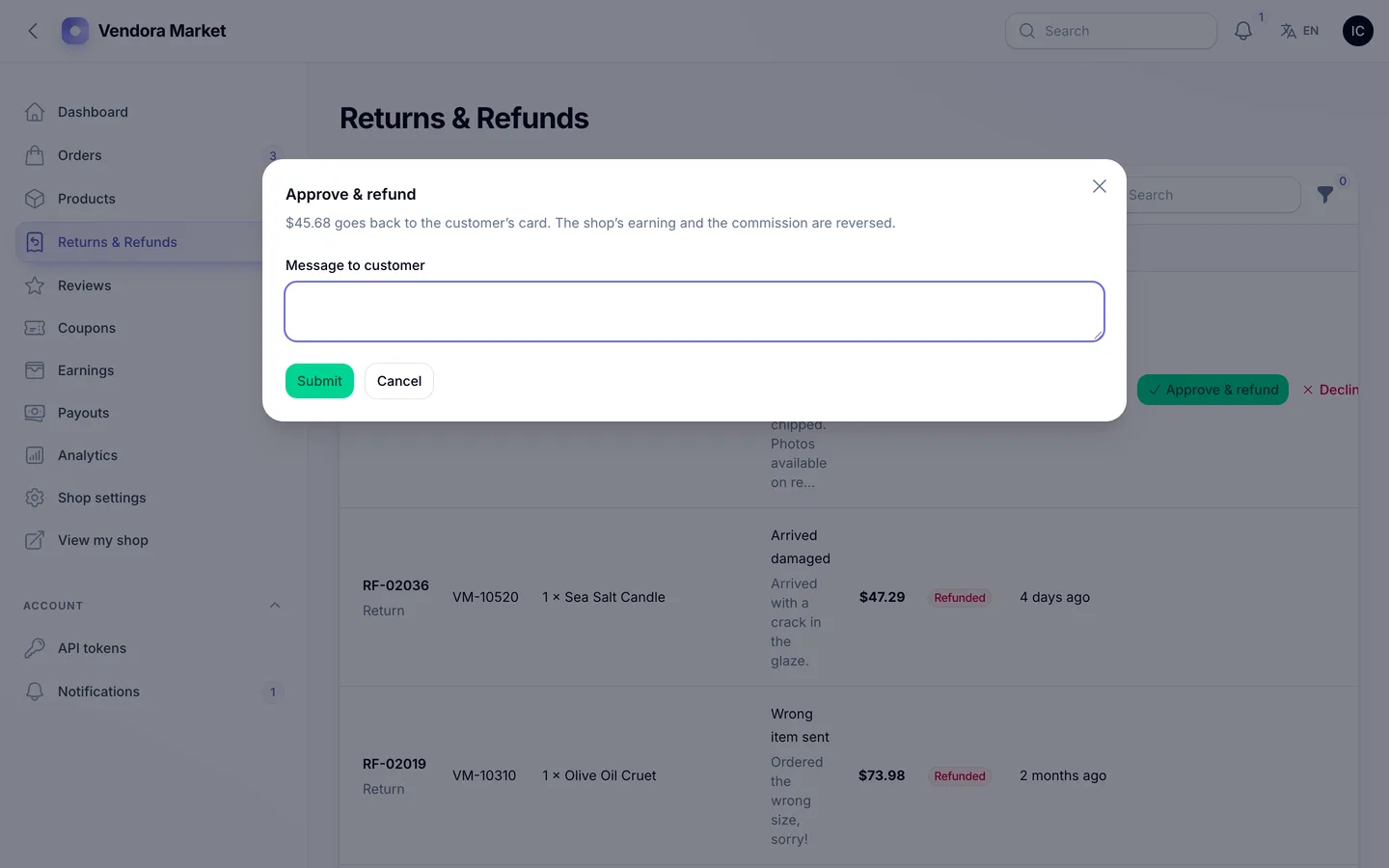
The vendor approves a refund: the money goes back to the card while the earning and the commission are reversed

6. How do new sellers join, and who checks them?

Open registration fills a marketplace with junk; manual onboarding doesn't scale. Look for an application step, a clear approval queue and a way to act quickly when a shop misbehaves.

Sellers apply at /sell with a shop name, country, business type and a note, then see a status page until an admin decides. Approval puts the shop live and emails the owner; a rejection carries a reason the applicant can read. Suspending a live shop hides all its products immediately. You can also hold new vendor products for approval and hold reviews for moderation, and only buyers of a delivered item can review it.
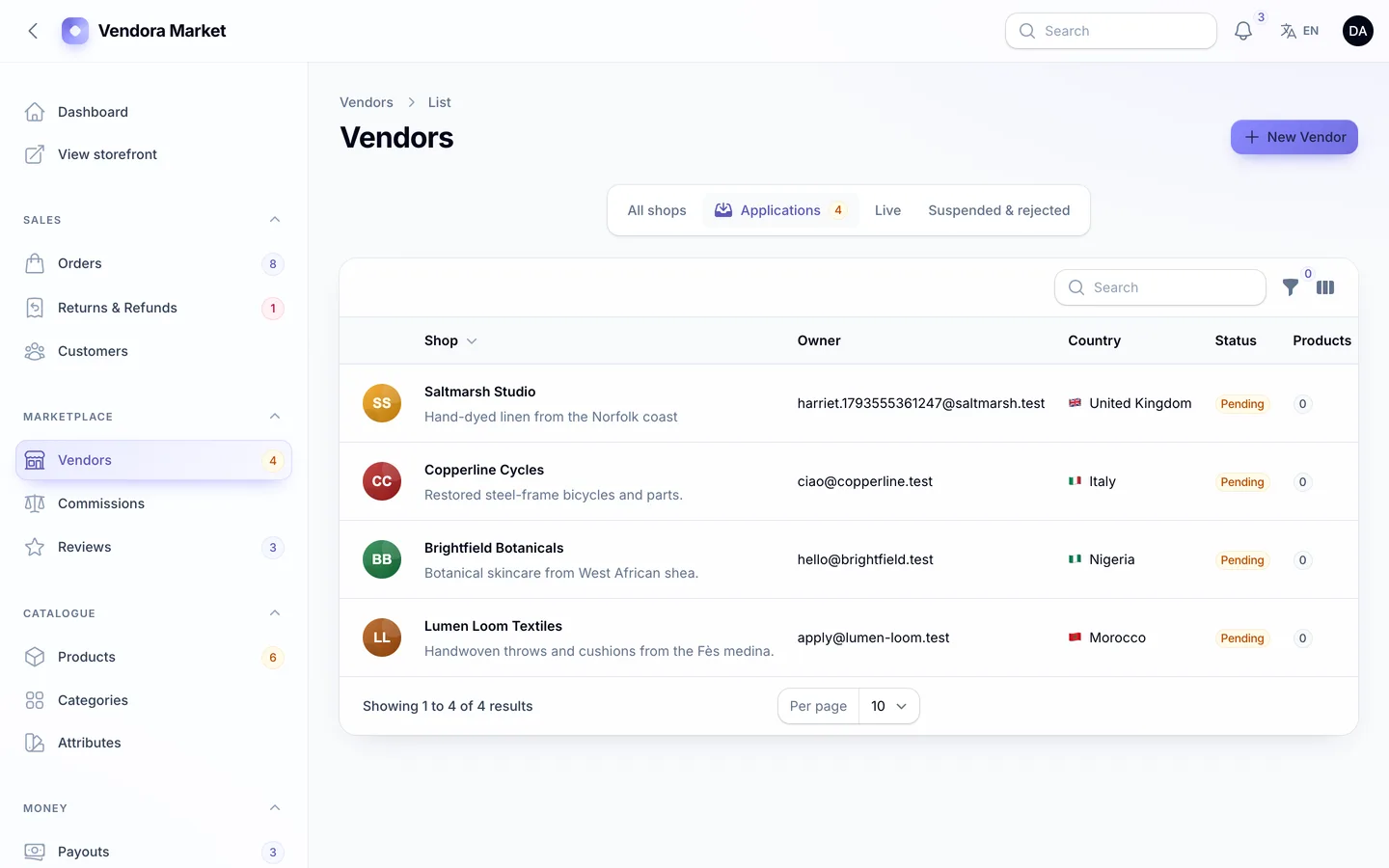
The vendor applications queue: new shops wait with one-click Approve and Reject actions

7. Does the catalogue handle variants and digital products?

Fashion needs colour and size variants with their own stock. Templates, fonts and presets need digital delivery without shipping, and a download link that only works for the person who paid.

Vendora has nested categories, a shared attribute library with colour swatches, and variants with their own price, stock and SKU; picking a colour on the product page swaps the images, price and stock. Digital products are stored privately. Each purchased line gets its own tokenised download link with a download limit, and the link stops working when the item is refunded. A digital-only package is delivered as soon as payment clears.
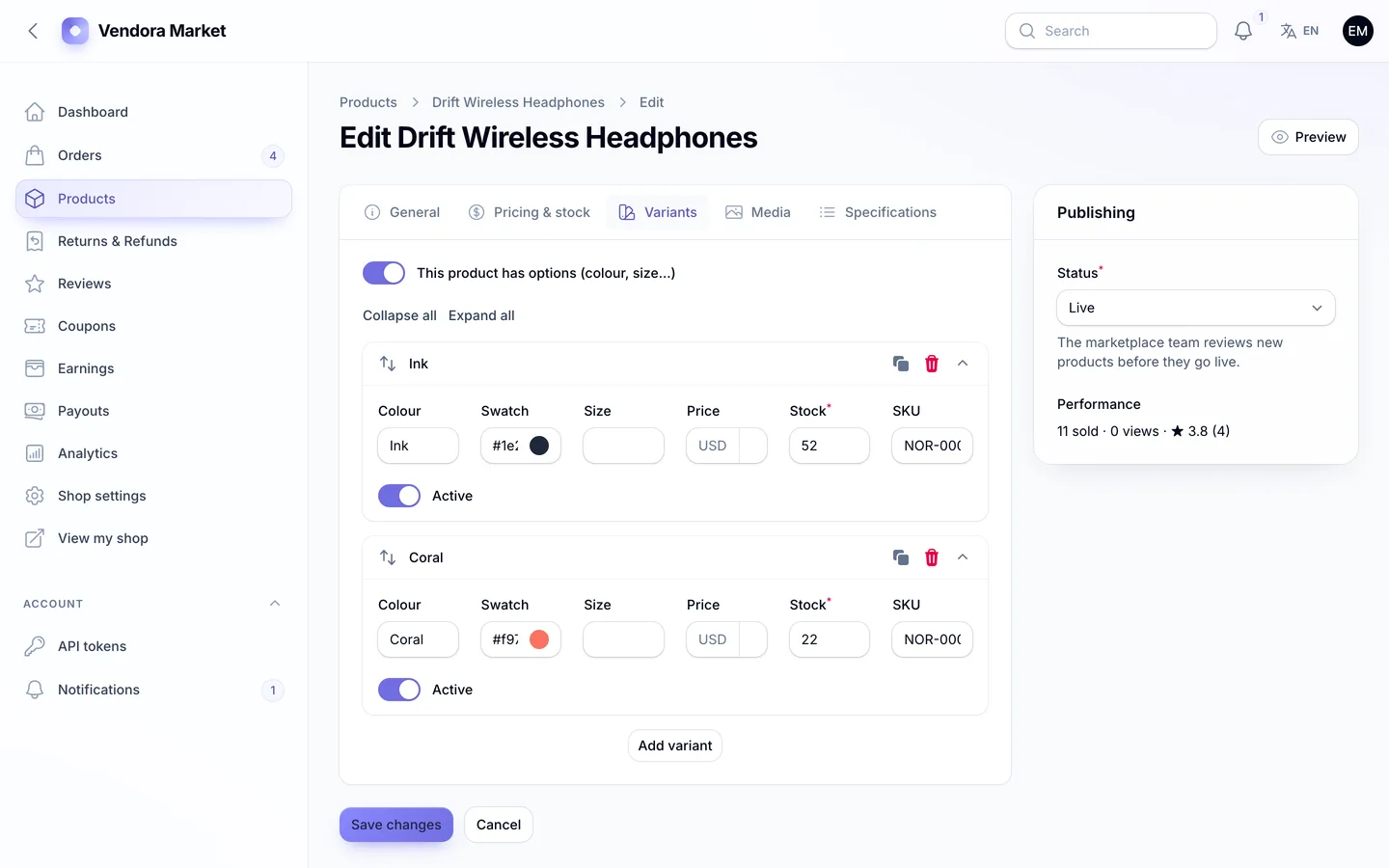
The variants editor: colour and size combinations with their own swatch, price, stock and SKU

8. Can you install it without being a Laravel developer?

A script you can't install is a project you have to hire for. Check whether it ships with vendor/ and built assets, whether there's a web installer, and what the server really needs.

Vendora's download includes vendor/ and the compiled assets, so you need PHP 8.2+ and MySQL, MariaDB or SQLite, but not Composer or Node.js. Visit /install and a five-step wizard checks the requirements, tests the database, loads demo or empty data, creates your admin and locks itself; php artisan dev3:install does the same over SSH. Earnings clear by date rather than by a background job, so one cron entry is the only extra setup.
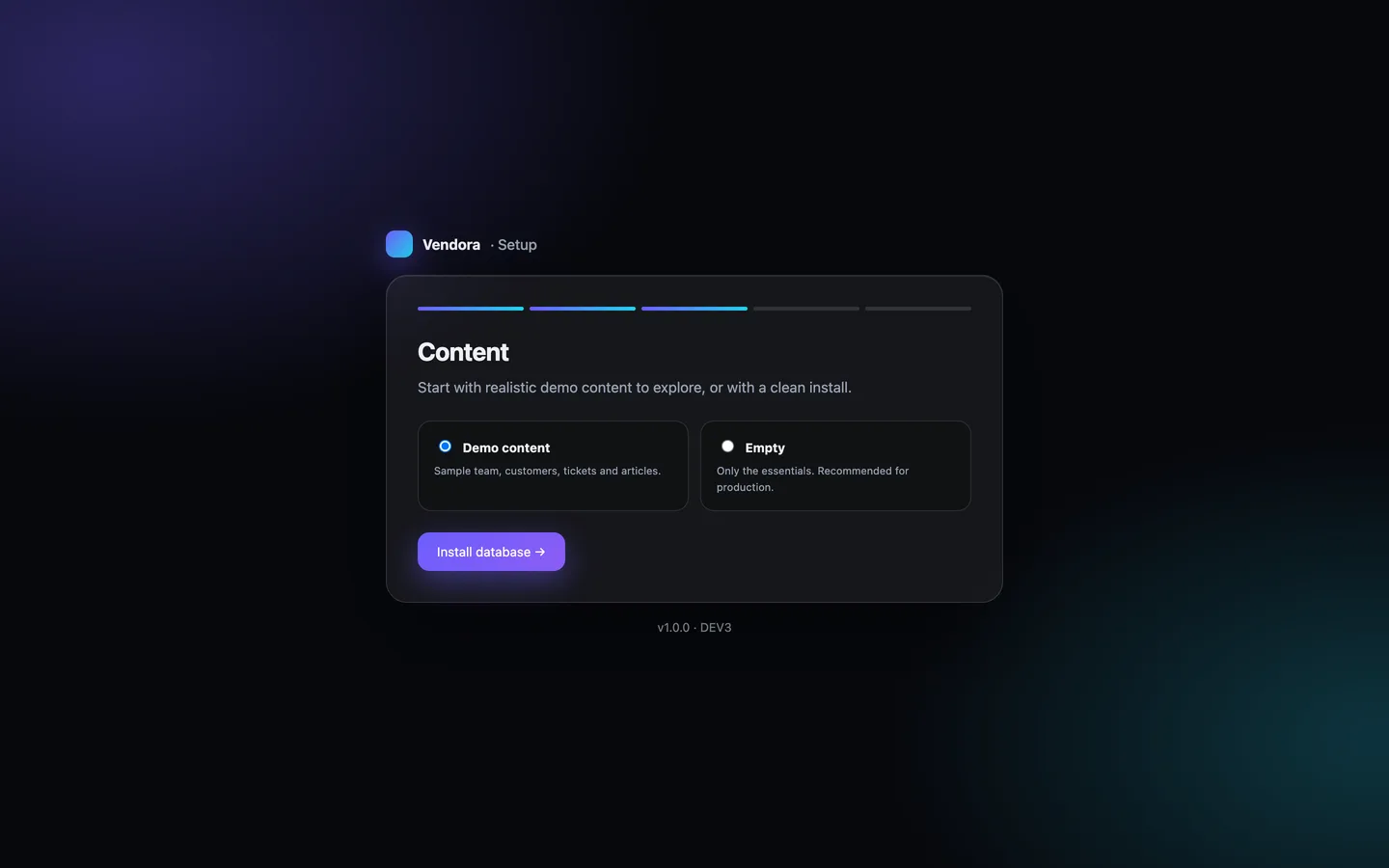
The installer's data step: the full Vendora Market demo, or a clean store with starter pages and a worldwide shipping zone

See it in action

The video tour starts on the 3D storefront, fills a cart from two shops, checks out, then switches to the seller centre to ship the package and show the earnings and payouts. It ends with the customer's tracking and the admin's orders globe, payouts and reports.

Video tour of Vendora

What else to compare

  • Reports: gross sales, commission, orders, average order value and refund rate against the previous period, top vendors, products and countries, with CSV export, plus a version scoped to each shop.
  • Languages: English and Arabic with a full right-to-left layout on the storefront and every panel.
  • Security and admin: two-factor sign-in (an authenticator app with recovery codes, or email codes) that you can require for staff, roles with a permission editor, an audit log with before and after values, backups that include private files, and system health.
  • API: a read-only REST API on Sanctum for products, shops, a customer's own orders and a vendor's own packages, with rate limits and an OpenAPI spec.
  • What's not included: product Q&A, messaging between vendors and customers and multi-currency display are not in version 1.0.2. The PayPal and Razorpay drivers and the Stripe Connect transfer have not been run against live accounts.
  • Quality: Vendora 1.0.2 shipped with 89 Pest tests covering the money paths and the API's authorisation, Larastan level 6 with no errors and 122 pages checked in a headless browser with no console errors.

Vendora costs $29 on DEV3. Instead of a live demo, the listing has 118 grouped screenshots and two video tours, and the "How it's built" section explains the architecture in more detail.
Frequently asked questions

The complete source code (version 1.0.2) as a download from your account, with the setup and usage guides shown on this page. You can modify the code to suit your product.

Buying guides: Laravel scripts with Filament panels and a web installer · Next.js or Laravel for a SaaS script?

More from this author

View all

Related in Web Scripts & Software

View all