DEV3 Technologies home

DEV3 Torquely – CMMS Maintenance SaaS: Work Orders, Preventive Maintenance, Spare Parts & Gemini AI admin tools

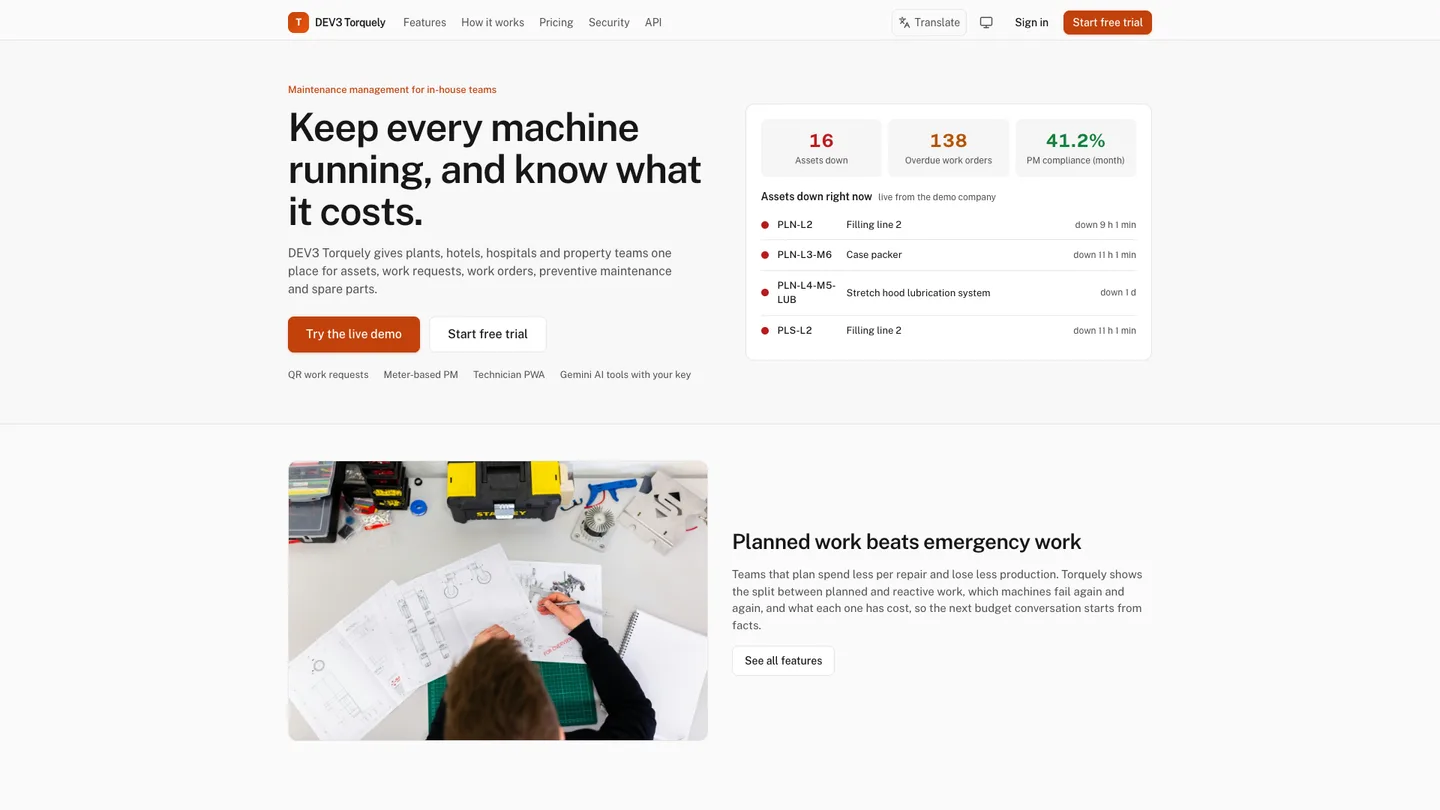
Self-hosted CMMS on Next.js 16 and MongoDB: asset tree and meters, QR requests, work orders with SLA and costs, calendar and meter PM, spare parts and purchasing, lockout and permits, reliability reports, an offline technician app. Gemini AI admin tools, demo data.
by DEV3 TechnologiesVerified AuthorUpdated 26 Nov 2026

Black Friday: up to 30% off

This item is 30% off: $69.30 instead of $99

Ends in
--
Days
--
Hrs
--
Min
--
Sec

Video tour. Pick a section below to browse 34 screenshots in 12 sections.

App & phone tours

Tap play to watch each app. Nothing downloads until you do.

  • Mobile web0:06

Torquely is a maintenance management system (CMMS) you run as the operator, built by DEV3 Technologies on Next.js 16, React 19, TypeScript, Tailwind 4 and MongoDB. Each tenant is one company with one or many sites: requesters raise problems from a QR code, planners schedule the work, technicians finish it from a phone, the storekeeper issues parts, and the manager sees uptime and cost per asset. The demo data is fictional: a food plant group, a hotel and hospital estate, and a property portfolio.

Web plus an installable technician app (PWA) with an offline queue. No native mobile source. The look is compact and industrial: safety orange on neutral, Public Sans with tabular figures, light and dark themes.

Assets, meters and requests

  • Asset register: unlimited-depth tree (site, area, line, machine, component), criticality, status, bill of materials, documents, 360-degree photos, a printable QR label and CSV import.
  • Meters: manual, CSV and API readings with rollover handling, anomaly flags and trend charts.
  • Requests: a public QR portal that needs no login, a triage inbox, and one-click conversion to a work order.

Work orders and procedures

  • Work orders: a strict state machine, SLA clocks, assignments, checklists with pass, fail and reading steps, labour timers with overtime, parts and vendor costs, child jobs, comments and a full timeline.
  • Procedure library: reusable step lists run from the work order or the phone.
  • Cost control: orders over an approval limit wait for a manager before they close.

Preventive maintenance and scheduling

  • Four triggers: calendar, floating, meter and condition. A background tick creates each job exactly once, even when two workers run at the same time.
  • Forecast and compliance: the next months of planned work and PM compliance by site.
  • Schedule board and calendar: drag work across technicians and days with capacity bars, working calendars per site, and handover notes.

Parts, purchasing and vendors

  • Stock: parts across several stores with minimums, reservations, issues, returns, transfers, adjustments and counts with variance approval.
  • Purchasing: reorder suggestions grouped by vendor, purchase orders with approval limits, receiving and PDF.
  • Vendors: insurance expiry, performance, and a contractor link that opens a single job without an account.

Safety

  • Lockout/tagout: isolation points with photos, release steps and supervisor verification. Work cannot start or finish over a live lockout.
  • Permits to work: checklists, issuer and acceptor, time windows and expiry, enforced as gates on the work order.

Technician app, reliability and reports

  • Technician app: installable, scans QR labels, downloads your work for offline use, queues starts, steps, labour, parts, meter readings and new requests, and syncs with conflict handling.
  • Reliability: a downtime log with failure codes, merged stops, shift calendars, MTBF, MTTR and availability by asset.
  • Reports hub: 13 reports with CSV and PDF, a manager home, and scheduled report emails that run with the recipient's own role and site scope.

AI and the platform

  • Gemini AI admin tools on every module: draft a work order from a request, suggest steps and a lockout procedure, summarise failures, explain a chart, ask for filters in plain English. They use your own key; in the demo a labelled sample driver answers.
  • Platform: multi-tenant with plans and limits, 9 roles with site scoping and server-side permissions, an audit log on every change, saved views, CSV import and export, bulk actions, a REST API under /api/v1 with keys and webhooks, per-member notification channels, a setup wizard and a public site.

Safe by design

  • Money is stored in integer minor units. Stock, work order and permit changes are conditional updates, so two people acting at once cannot reserve the same part twice, complete a job twice or accept a permit twice.
  • Every tenant query goes through a guard that fails closed, and site-scoped members only see their own sites.
  • 780 app tests and 81 core tests pass, including race tests, 403 tests for every role and regression tests for each finding of independent reviews, all fixed before release.

Good to know

  • Payments are simulated. Subscription billing records payments; there is no card processing in the demo.
  • No live IoT, SCADA or accounting connectors. Meters arrive by API, CSV or manual entry; costs export as CSV.
  • No native app. The installable technician app (PWA) covers the shop-floor flows.
  • AI needs your own key. Without one the AI buttons use the labelled sample driver in the demo.
  • Email is stored in the admin Outbox until you set an SMTP driver.
  • You need Node.js 20.9+, MongoDB 6+ as a (single-node) replica set, HTTPS and a cron or systemd timer for the scheduled jobs.

What you get

The application source with the core under packages/next-core, a setup wizard, demo data, .env.example, scripts (seed, PM tick, reports, notifications, billing renewal), tests, the buyer documentation, START-HERE.txt and the licence.

How it's built

Architecture, stack, key decisions and the quality gates DEV3 Torquely passed before release.

The engineering behind Torquely: a preventive maintenance tick that creates each job exactly once, part reservations that cannot oversell, a work order state machine with lockout and permit gates, an offline technician queue with idempotency keys and reliability maths that merge overlapping stops.

The problem it solves

Maintenance records look like tickets until two people act on the same job at once. A PM must not raise twice when two workers tick, a part must not be reserved for a job that was just cancelled, a job must not finish over a live lockout, and a phone that was offline for a shift must replay its work without duplicates, for many sites that share one install.

Architecture and approach

Torquely is a Next.js 16 application on MongoDB. Every tenant-owned model passes through a guard that requires a tenant id on each query and throws when a filter has none; site-scoped roles add a site filter on top. Money is integer minor units and every posting runs in a transaction with conditional updates.

Preventive maintenance

Calendar, floating, meter and condition triggers share one tick. Each schedule claims its next occurrence with a conditional update, so two workers ticking together create one job, and a condition trigger fires once until its job is closed.

Parts and purchasing

A reservation changes a stock level by naming the values it read, and re-checks the work order inside the same transaction, so a reserve racing a cancel or a close cannot leave stock held on a finished job. Returns go back at the issue cost and cannot exceed what was issued.

Safety gates

The work order state machine refuses start, complete and cancel over an unreleased lockout. A procedure edited mid-job needs a new supervisor verification, a permit has one acceptor, and the safety flags lock once work has started.

Offline technician app

Each queued action carries a client id that is claimed with a unique row before it runs, so a replay or the same action sent twice at once applies once. Business refusals become conflicts the technician settles, step answers are last-write-wins by the time given, and labour that overlaps other logged time is trimmed and flagged.

Reliability

Downtime events merge overlapping stops per asset, respect shift calendars and daylight-saving changes, and feed MTBF, MTTR and availability.

Quality gates and results

The release passed seven gates (static checks, app and core tests, build with a JavaScript budget, seed, a headless smoke run with happy paths, an install from the zip and a secret scan) and independent reviews of the work order, stock, safety, sync and reliability logic whose findings were fixed before release. The known limits are in the listing: simulated payments, no live IoT or accounting connectors, no native app, AI that needs your own key.

Tech stack

Area Technologies
Application Next.js 16, React 19, REST API, Installable PWA
Data MongoDB (replica set), Mongoose
Frontend Tailwind CSS 4, Public Sans
Quality Vitest, Headless smoke run

Inside the build

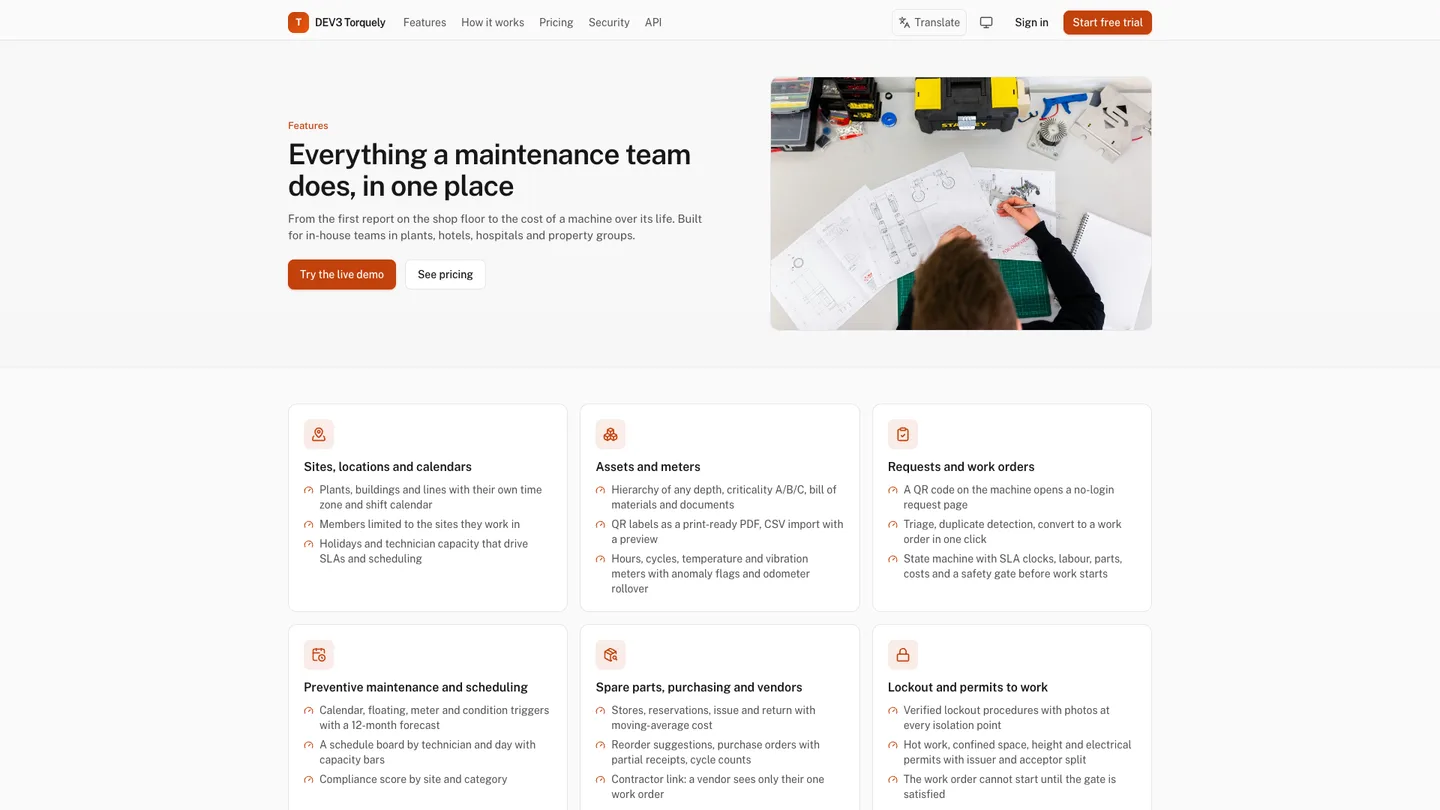
Landing: Live uptime widget, pillars and a plain promise for plant teams. Landing — Live uptime widget, pillars and a plain promise for plant teams.
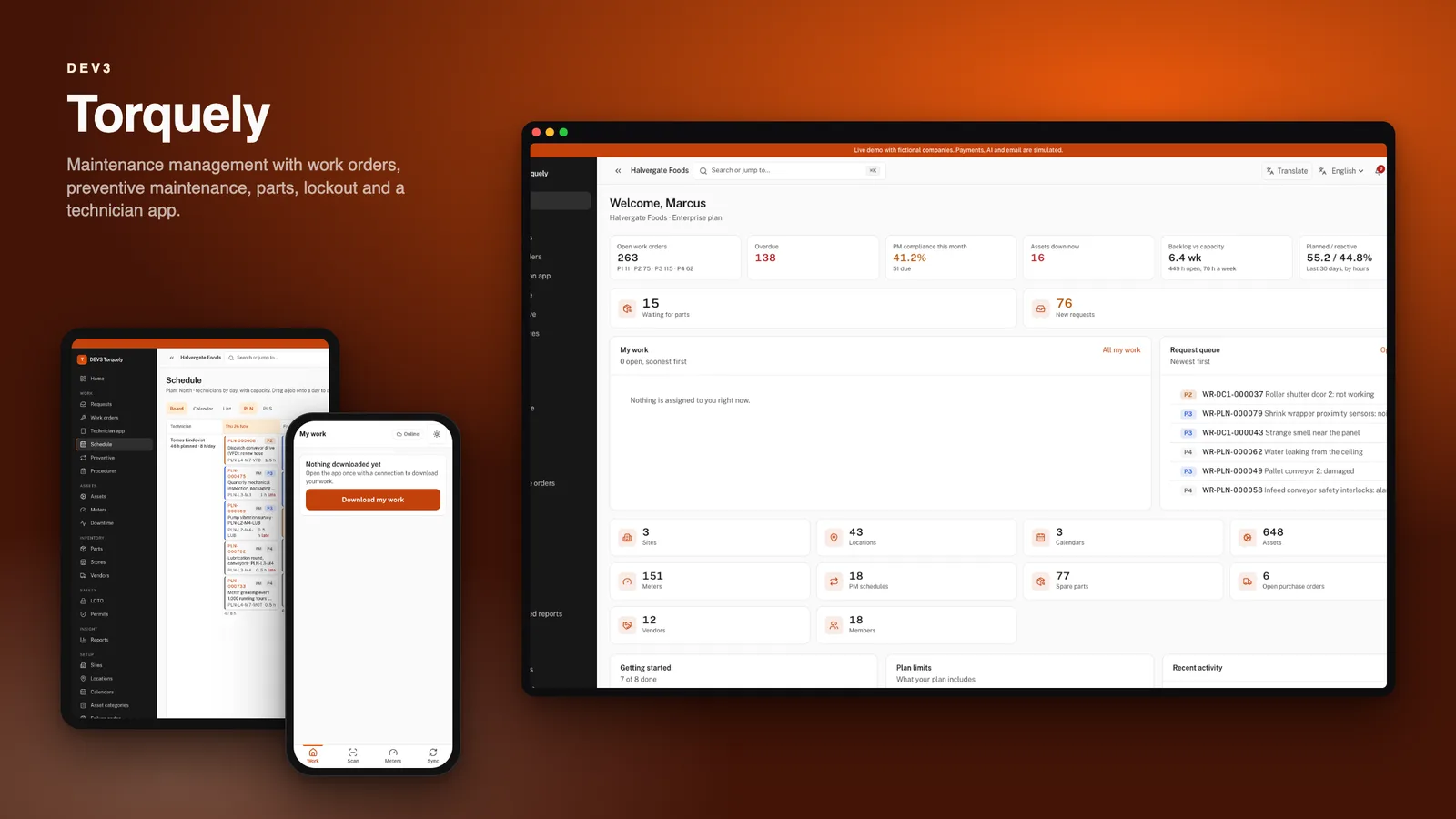
Features: Every module from requests to reliability, one page. Features — Every module from requests to reliability, one page.

Guides & articles

Practical guides and engineering write-ups for DEV3 Torquely.

CMMS software: 6 things to check before you pick one

Last updated
CMMS software: 6 things to check before you pick one: DEV3 Torquely

Maintenance software looks alike in a feature list until you ask the awkward questions: what stops a job finishing over a live lockout, what a part reservation does when the job is cancelled, and what happens when the phone has no signal. Here are six things to check, with DEV3 Torquely as the worked example.
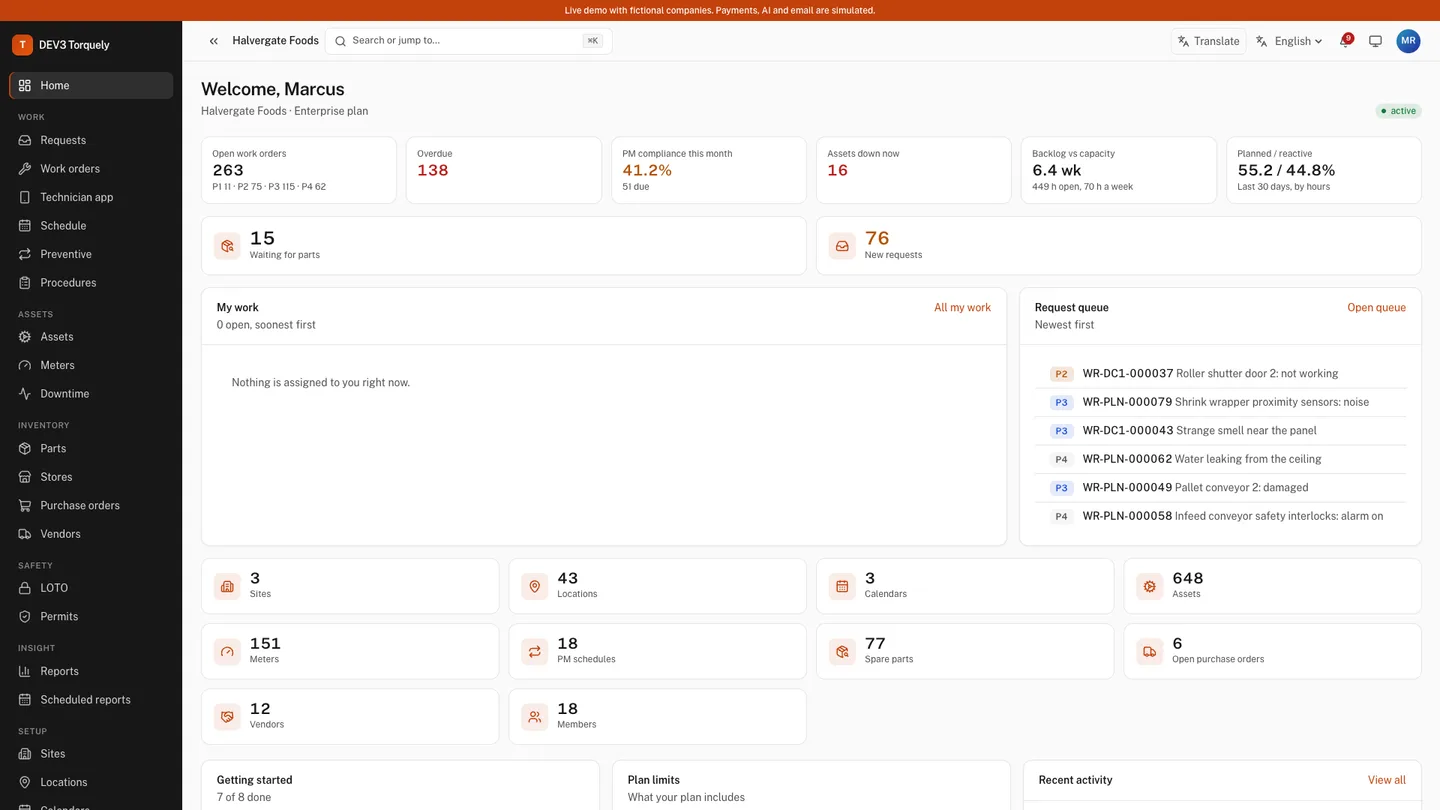
The manager home with backlog, overdue work and PM compliance

A walk through the manager home, work orders, assets, PM forecast and reliability

1. Does PM run on meters as well as the calendar?

A pump that has run 1,000 hours needs service whether or not a month has passed. Torquely supports calendar, floating, meter and condition triggers, and a tick that creates each job exactly once.
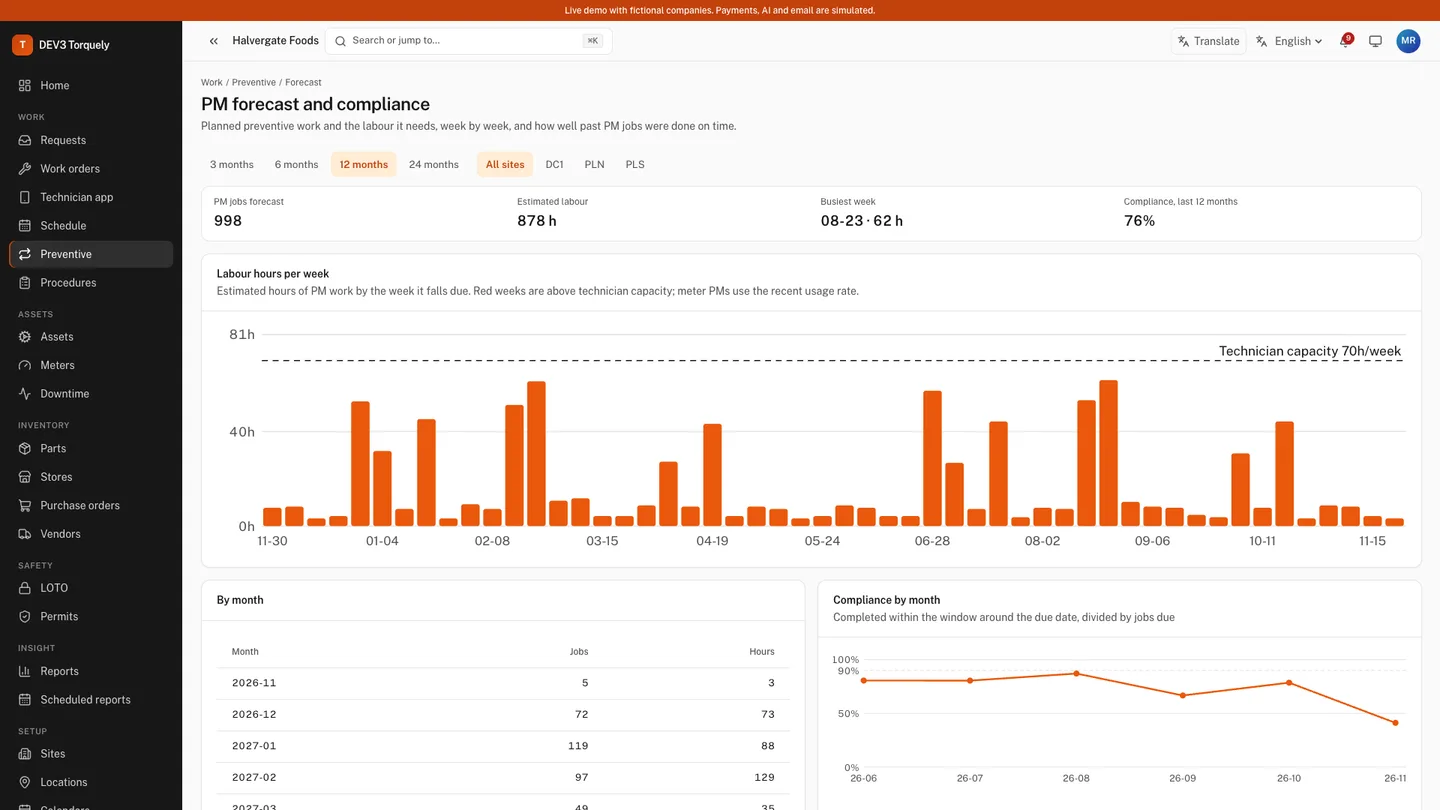
The PM forecast with planned work by month

2. Are spare parts part of the job?

Parts that live in a separate spreadsheet are never costed. Torquely reserves and issues stock against the work order, returns it at the issue cost, and turns shortages into reorder suggestions and purchase orders.
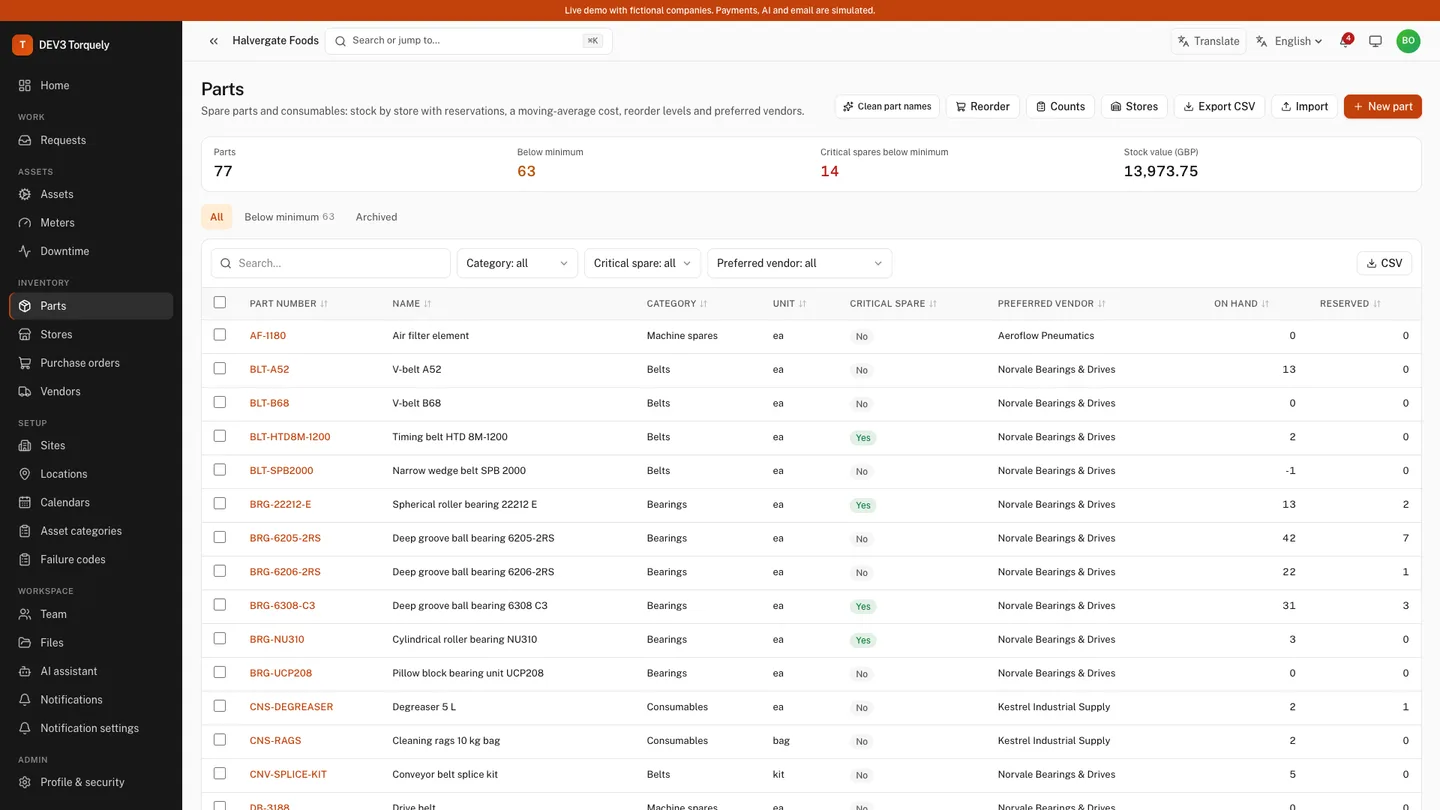
Stock by store with minimums and reservations

3. Do safety rules stop the work, or only warn?

A lockout procedure and a permit to work should be gates. In Torquely a job cannot start or finish over an unreleased isolation, and a procedure edited mid-job needs a new supervisor verification.
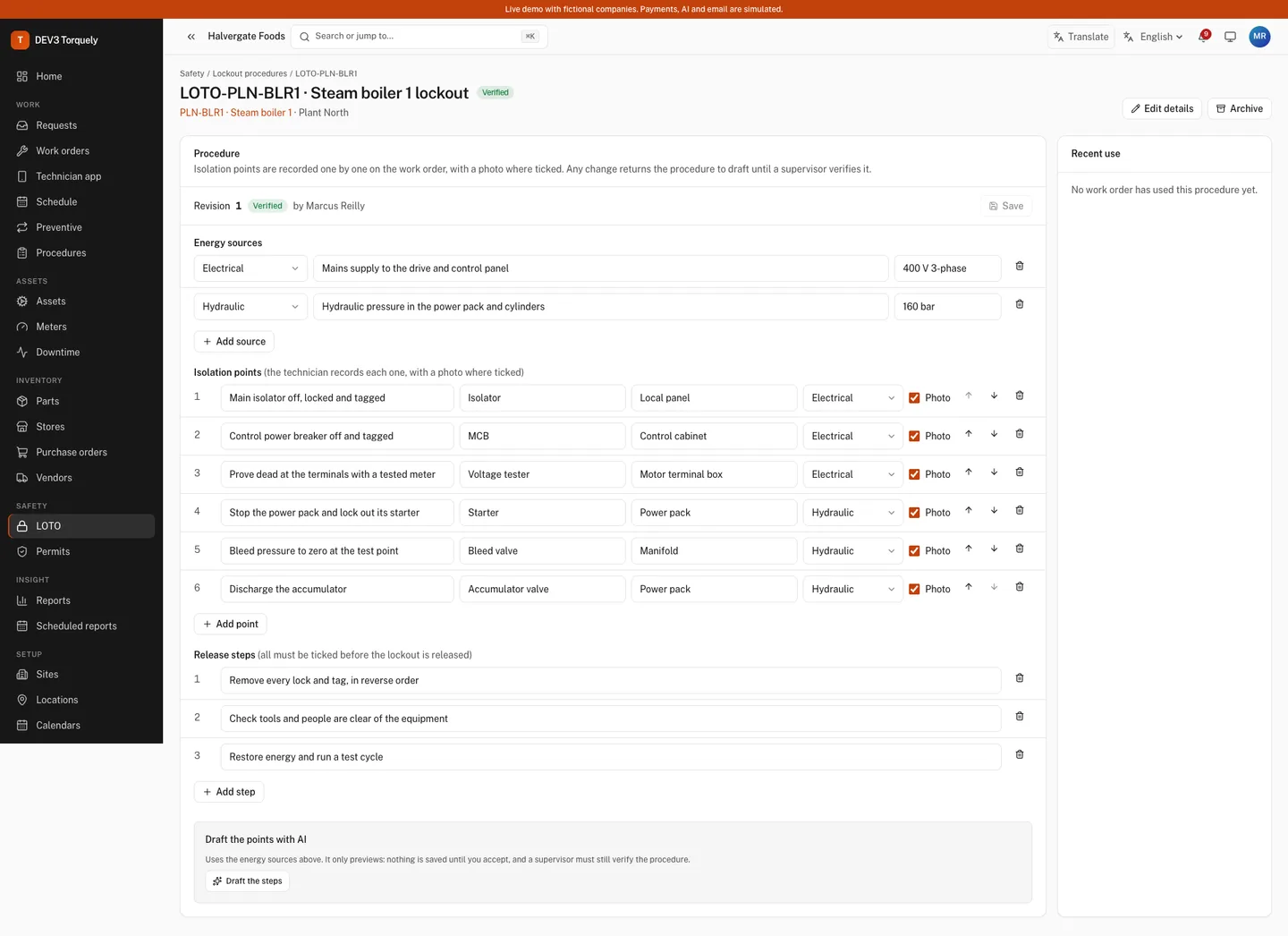
Lockout procedures with isolation points and release steps

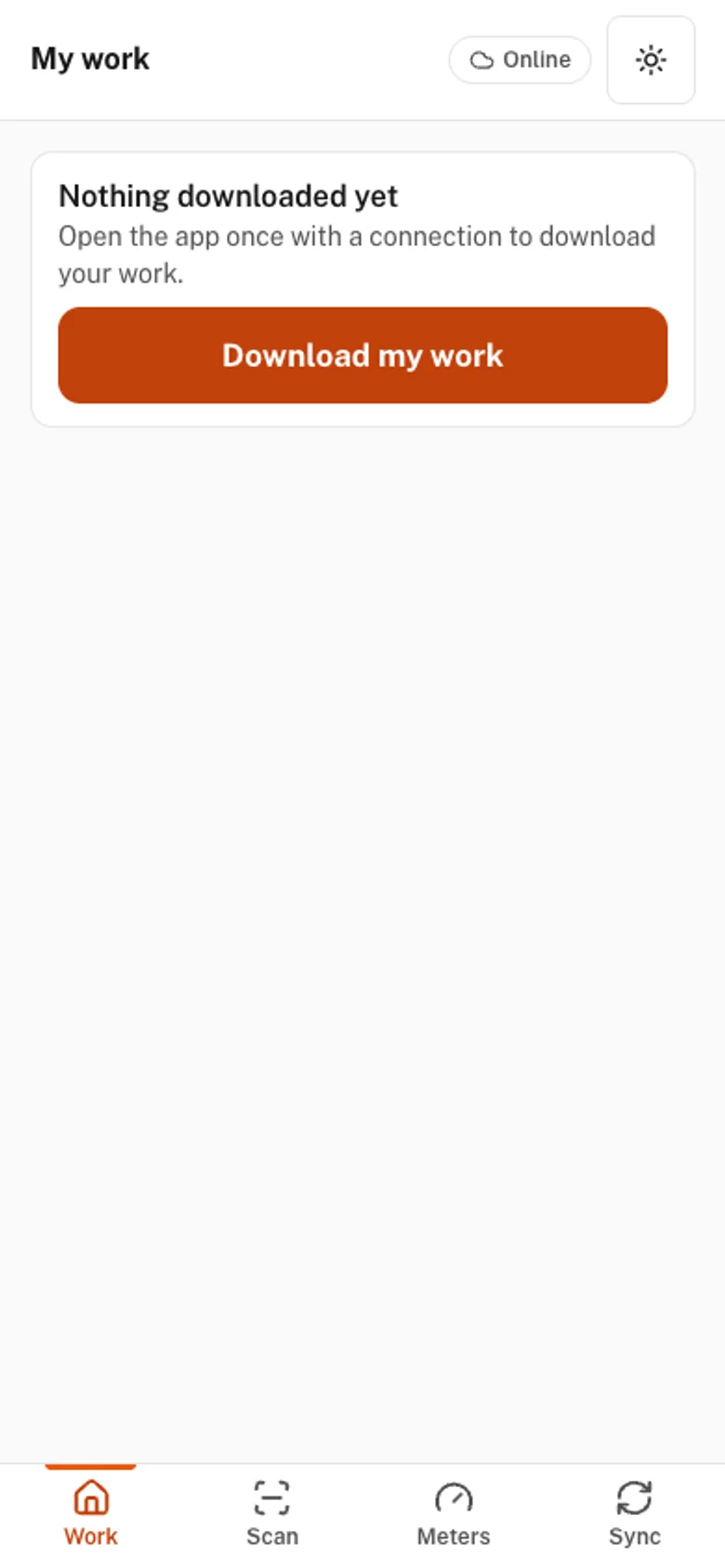
4. Does the phone work without signal?

Plant rooms and basements have no coverage. The Torquely technician app downloads your work, queues what you do, and replays it with idempotency keys, leaving real conflicts for you to settle.
The technician app on a phone

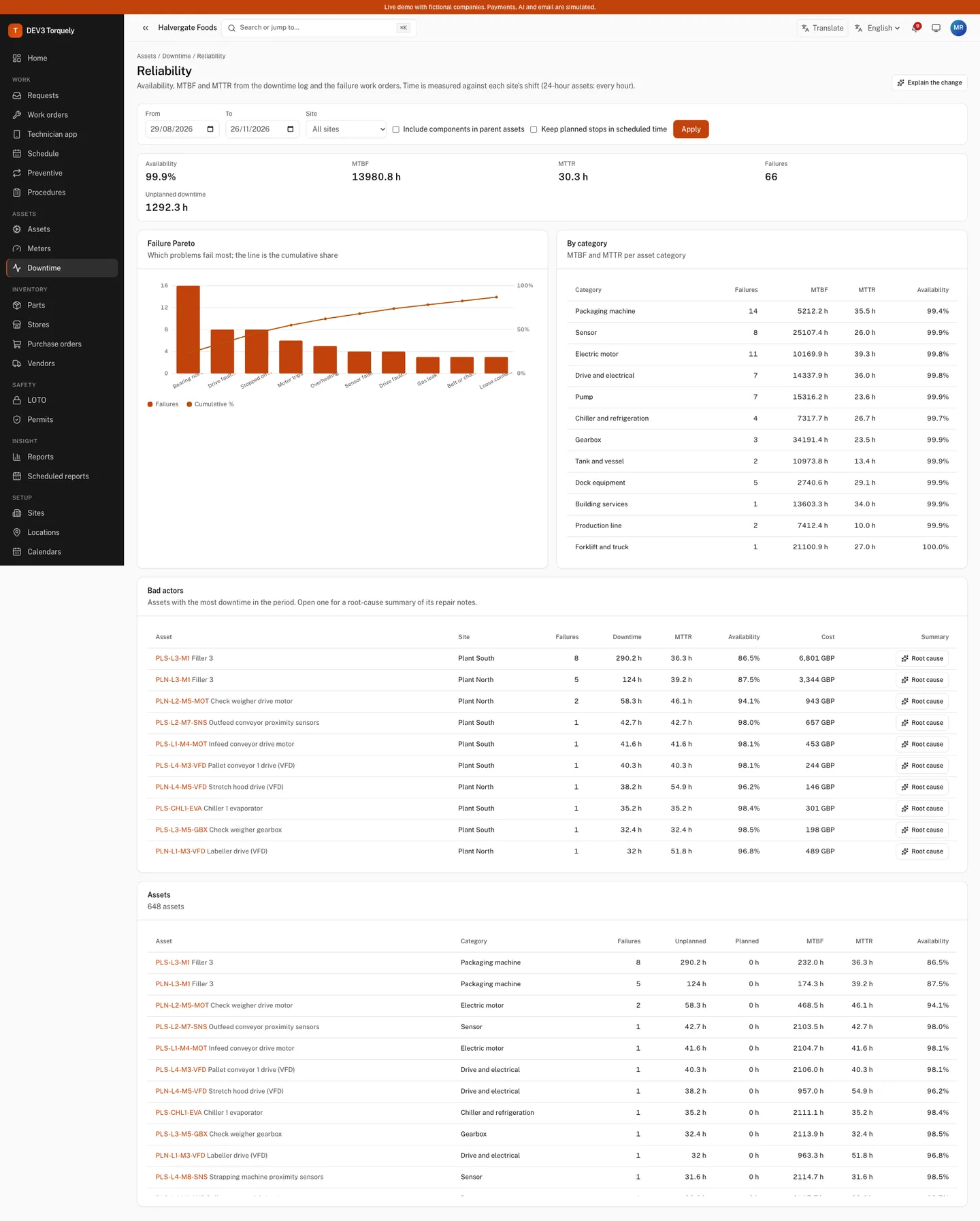
5. Can you trust the reliability numbers?

MTBF and availability are only as good as the downtime log. Torquely merges overlapping stops, respects shift calendars and daylight-saving changes, and shows availability by asset.
Reliability with MTBF, MTTR and availability

6. Are the limits written down?

Torquely has simulated payments in the demo, no live IoT or accounting connectors, and no native app: meters arrive by API or CSV, and the installable app covers technician flows. The AI tools need your own key. Knowing this before you buy beats finding it after.


Frequently asked questions

The complete source code (version 1.0.0) as a download from your account, with the setup and usage guides shown on this page. You can modify the code to suit your product.

Questions about this product (0)

Answers from the DEV3 team and the community.

Ask a question

No questions yet.

Wondering about setup, licensing or customisation? Ask, and the DEV3 team will help.

More from this author

View all

Related in Enterprise SaaS Starters

View all