DEV3 Technologies home

DEV3 Sprintgale – Agile Project & Issue Tracking SaaS (Sprints, Boards, Roadmap, Releases) with Gemini AI Admin Tools

Self-hosted Jira and Linear style project tracker on Next.js 16 and MongoDB: issues with custom workflows, backlog, sprints and reports, roadmap, releases, git links, triage with SLAs, docs and automation. Gemini AI admin tools, setup wizard and demo data included.
by DEV3 TechnologiesVerified AuthorUpdated 26 Nov 2026

Black Friday: up to 30% off

This item is 30% off: $69.30 instead of $99

Ends in
--
Days
--
Hrs
--
Min
--
Sec

Video tour. Pick a section below to browse 39 screenshots in 15 sections.

App & phone tours

Tap play to watch each app. Nothing downloads until you do.

  • Mobile web0:07

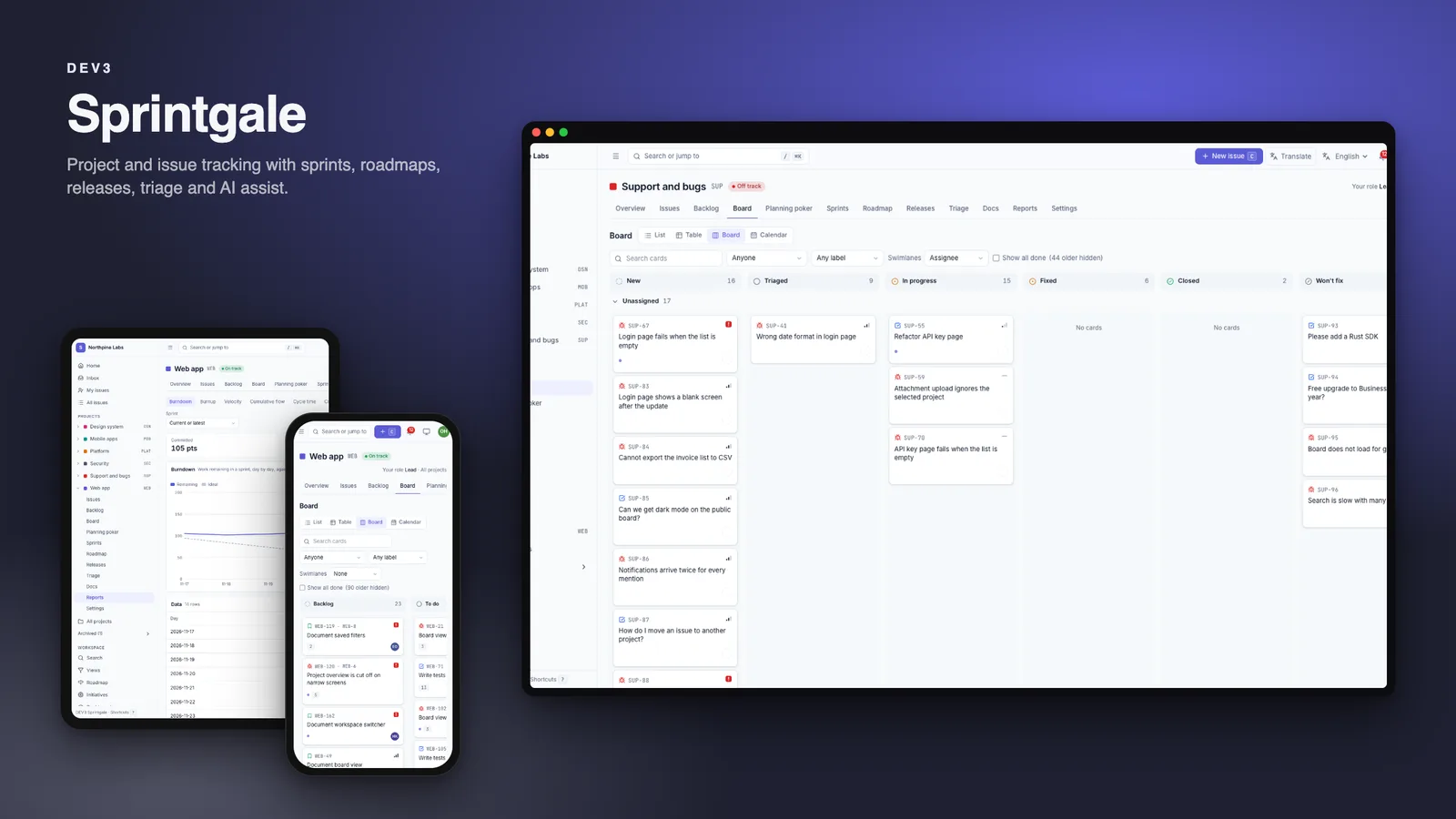
Sprintgale is an agile project and issue tracker you run as the operator, built by DEV3 Technologies on Next.js 16, React 19, TypeScript, Tailwind 4 and MongoDB. Each tenant is one workspace: product and engineering teams plan in a backlog, run sprints, work a board, track bugs through triage and SLAs, plan a roadmap, ship releases and keep docs next to the work. The demo data is fictional: a software company with six projects, plus a second workspace.

Web only (no mobile app source; every page works at 390 px). The look is dense and keyboard-first: slate surfaces, one iris accent, Inter with JetBrains Mono for issue keys, light and dark themes, a command palette and a shortcut map.

Issues, boards and backlog

  • Issues: types per project, custom fields, sub-issues and epics, links (blocks, duplicates, relates, with cycle detection), comments, attachments, history, watchers, clone and move, list, table, board and calendar views, a peek panel, saved views, bulk edit and CSV.
  • Workflows: a per-project editor with transitions, guards, required fields and resolutions; moving a workflow runs a resumable migration job.
  • Backlog: drag ranking, estimates in points or hours, bulk estimate, team capacity and planning poker with moderation.
  • Optimistic concurrency: two people editing one issue get a clear conflict instead of silent overwrites.

Sprints and reports

  • Sprints: start and complete with a carry-over choice, a scope-change ledger, cadence that creates the next sprint, and a sprint goal.
  • Reports: burndown, burnup, velocity, cumulative flow, cycle and lead time, created versus resolved and workload, plus dashboards with saved gadgets.

Roadmap, releases and git

  • Roadmap: an epic timeline with drag, dependency conflicts, milestones and initiatives with health.
  • Releases: versions with a readiness check, a release sweep and a public changelog.
  • Git: signed webhooks from GitHub or GitLab link branches, pull requests and commits to issue keys by key, with replay protection and a built-in simulator.

Triage, docs, automation and search

  • Intake: public forms and a portal, a triage inbox with duplicate hints, and priority-based SLA timers with breach alerts.
  • Docs: a wiki with Markdown, live preview, edit locks, embedded issues and retro boards.
  • Automation: trigger, conditions and actions with a run log and a loop guard.
  • Search: SGQL, a small Jira-style query language with a visual builder, global search and the command palette; worklogs and a timesheet.

AI and the platform

  • Gemini AI actions (21): write an issue from a sentence, suggest a sprint goal, draft release notes, summarise a sprint review, map a CSV import and more. They use your own key; in the demo a labelled sample driver answers.
  • Platform: multi-tenant with Free, Team, Business and Enterprise plans, per-seat billing with seat limits and scheduled downgrades, custom project roles, an inbox with snooze and email digests, branding and white-label accent, Jira and Linear CSV import, zip export, an audit log, a REST API under /api/v1 with keys and webhooks, a setup wizard and a public site in English, Spanish and Arabic.

Safe by design

  • Every tenant query goes through a guard that fails closed. Private projects stay invisible to people who are not members, in lists, search, notifications and email digests.
  • Seat limits, rank ordering, sprint moves, merges and renewals use conditional writes and transactions, so parallel requests cannot overshoot a limit or bill twice. Independent reviews of this logic were done at every stage and their findings fixed.
  • 617 app tests pass, including races and a 403 test for every role; a headless smoke run covers 204 routes. First-load JavaScript stays inside the DEV3 budget.

Good to know

  • Simulated services. Payments, email, git providers and AI run on simulated drivers until you add your own keys.
  • Docs are Markdown with a toolbar and live preview, not a block editor, and edit locks are polled rather than realtime.
  • Issue types and workflows are edited per project; there is no org-level scheme library yet. Custom roles are project roles.
  • AI needs your own key.
  • You need Node.js 20.9+, MongoDB 6+ as a (single-node) replica set and HTTPS.

What you get

The application source with the core under packages/next-core, a setup wizard, demo data, .env.example, scripts (seed, billing renewal), tests, the buyer documentation, START-HERE.txt and the licence. Setup wizard and demo data included.

How it's built

Architecture, stack, key decisions and the quality gates DEV3 Sprintgale passed before release.

The engineering behind Sprintgale: seat limits and per-seat renewals that stay exact under parallel requests, workflow changes applied by a resumable migration, rank ordering on a backlog and git webhooks with replay protection, with the known limits written down.

The problem it solves

An issue tracker looks like a list until two people drag the same card, ten invites race for the last seat, a workflow changes under thousands of issues or a webhook arrives twice. Each must end with one correct state, for many workspaces that share one install and one database.

Architecture and approach

Sprintgale is a Next.js 16 application on MongoDB. Every workspace-owned model passes through a guard that requires a workspace id on each query and throws when a filter has none; a test lists the models so a new one cannot skip it. Backlog order uses fractional ranks written conditionally, issue edits carry a version so a stale save is refused, and sprint start, complete and carry-over run in one transaction with a scope-change ledger. Seat limits take a per-workspace lock row first, so parallel invites admit exactly the free seats, and each per-seat renewal is claimed by one conditional update so a parallel tick bills once. A workflow change starts a migration job that can be resumed after a crash. Git webhooks are signed, de-duplicated by delivery id and cannot move a merged pull request back. Private projects are re-checked at read time, including in search, notifications and email digests.

Quality gates and results

The release passed seven gates (static checks, 617 app tests with parallel-request races and a 403 test for every role, build with a JavaScript budget, seed, a headless smoke run over 204 routes with happy paths, an install from the zip and a secret scan), and independent reviews of each stage whose findings were fixed before release. The known limits are written in the listing: simulated git, payment and mail drivers until you add your own keys, Markdown docs without realtime presence, and per-project workflow editing.

Tech stack

Area Technologies
Application Next.js 16, React 19, REST API
Data MongoDB (replica set), Mongoose
Frontend Tailwind CSS 4, Inter and JetBrains Mono fonts
Quality Vitest, Headless smoke run

Inside the build

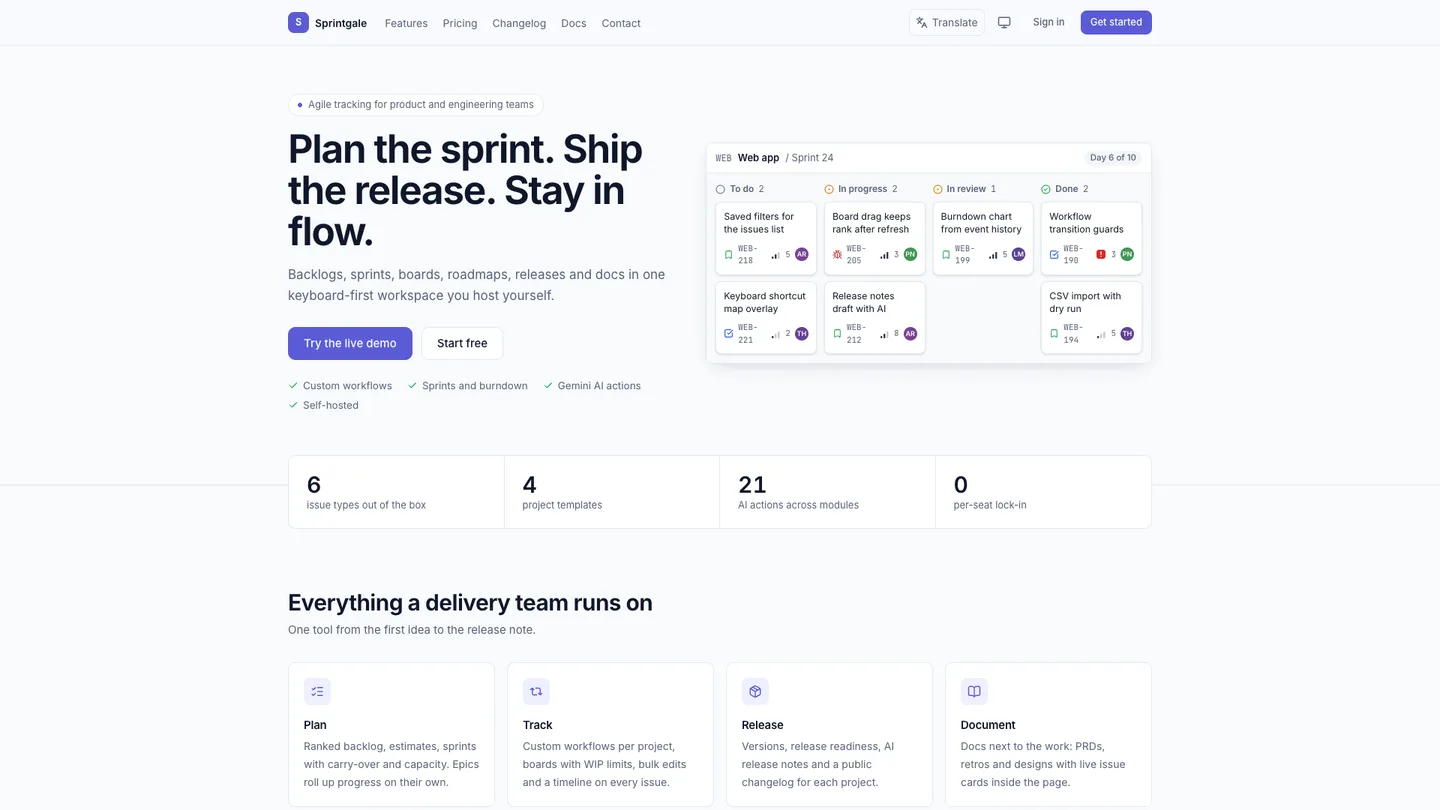
Landing: A live mini board, the keyboard-first pitch and a one-click demo sign-in. Landing — A live mini board, the keyboard-first pitch and a one-click demo sign-in.
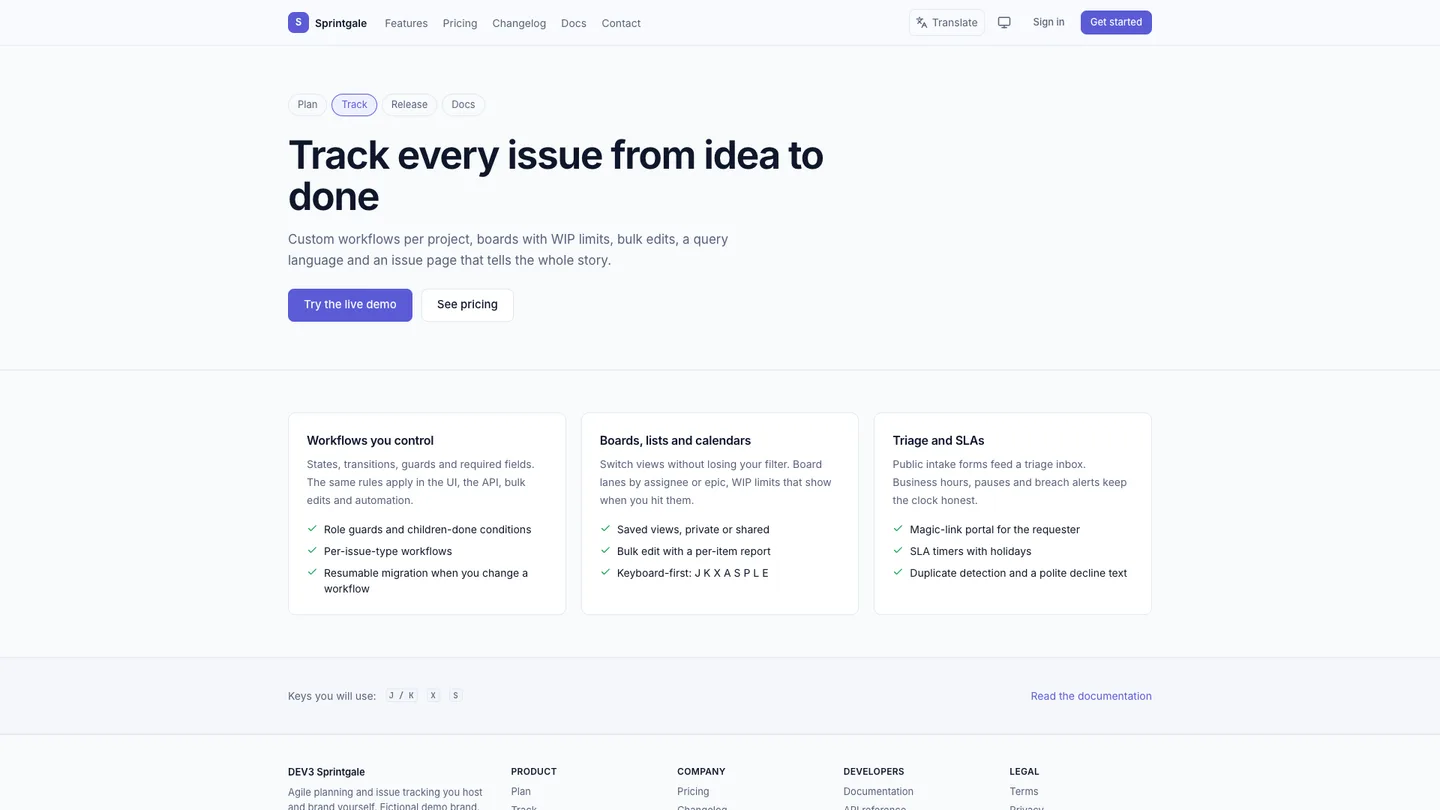
Features: Plan, track, release and document in one workspace, with the keyboard map. Features — Plan, track, release and document in one workspace, with the keyboard map.

Guides & articles

Practical guides and engineering write-ups for DEV3 Sprintgale.

Issue tracking software: 6 things to check before you pick one

Last updated
Issue tracking software: 6 things to check before you pick one: DEV3 Sprintgale

Issue trackers look alike in a feature list until you ask the awkward questions: what happens when two people drag the same card, who can see a private project in search, and what does a sprint report say after scope changed. Here are six things to check, with DEV3 Sprintgale as the worked example.
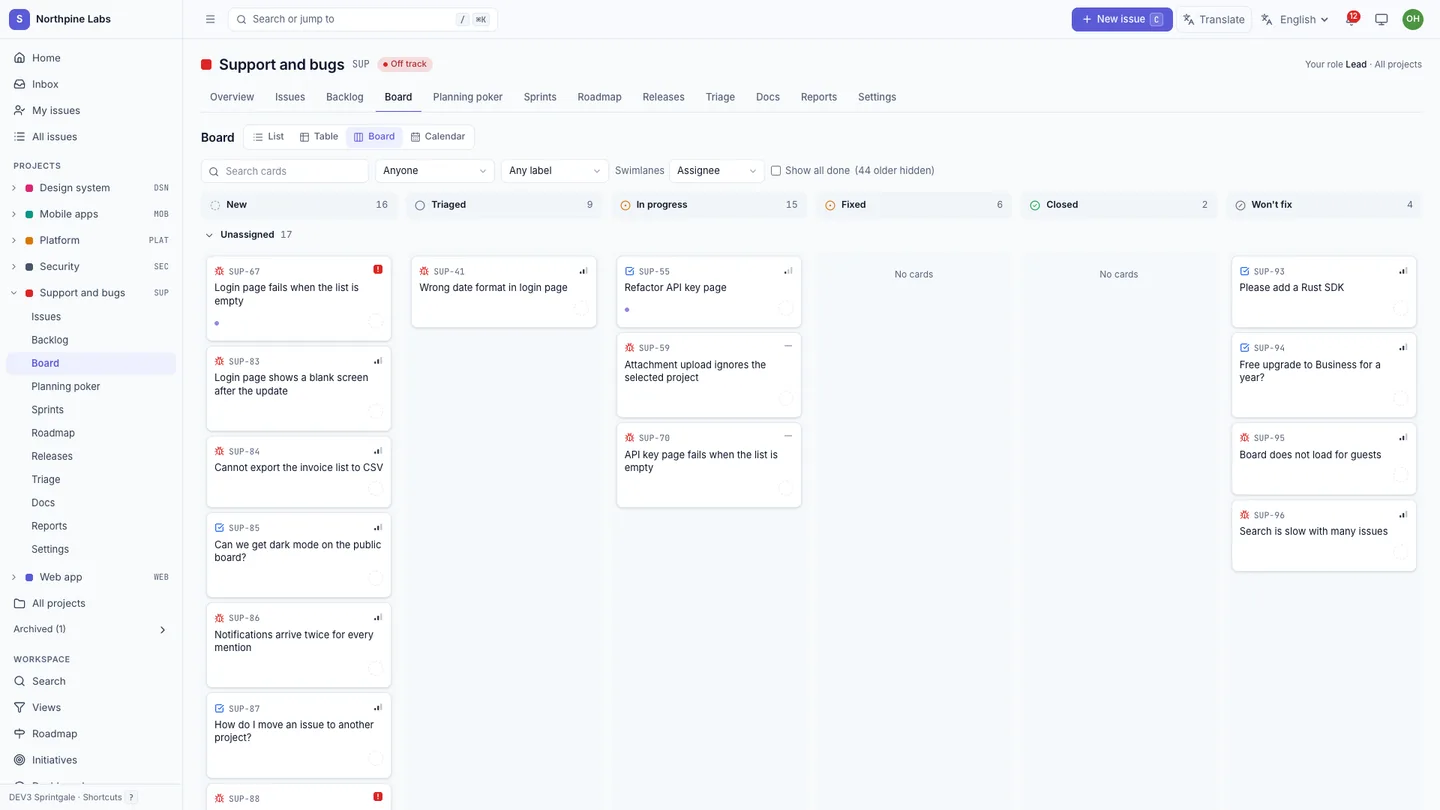
The sprint board with swimlanes and WIP limits

A walk through issues, backlog, board, reports and roadmap

1. Can you shape the workflow?

Teams differ: a bug needs a resolution, a story needs an estimate. Sprintgale has per-project workflows with guards and required fields on a transition, and changing a workflow runs a migration that can be resumed.
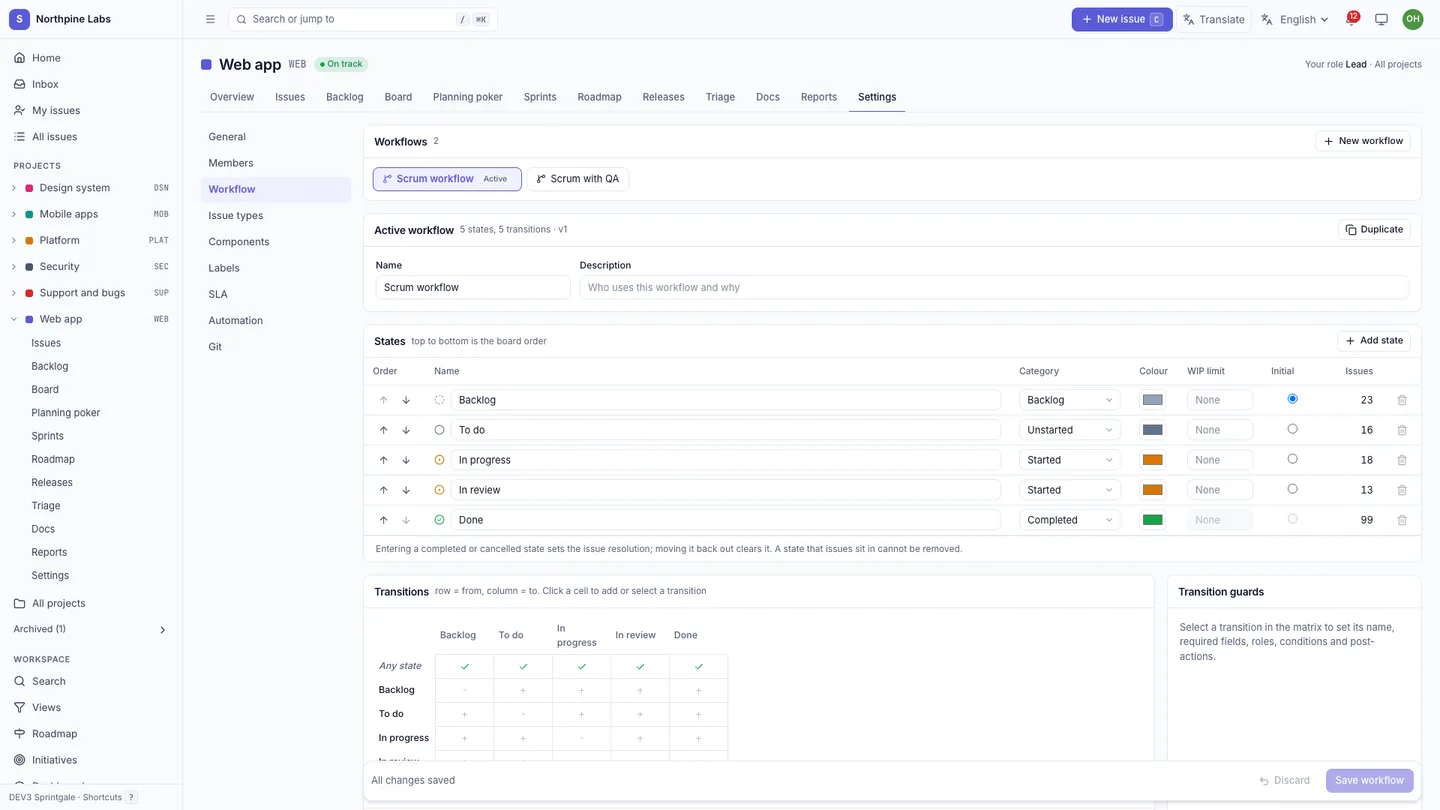
The workflow editor

2. Is the backlog order stable?

Drag ranking must survive two people reordering at once. Sprintgale uses fractional ranks written conditionally, so a stale drop is refused instead of scrambling the list.
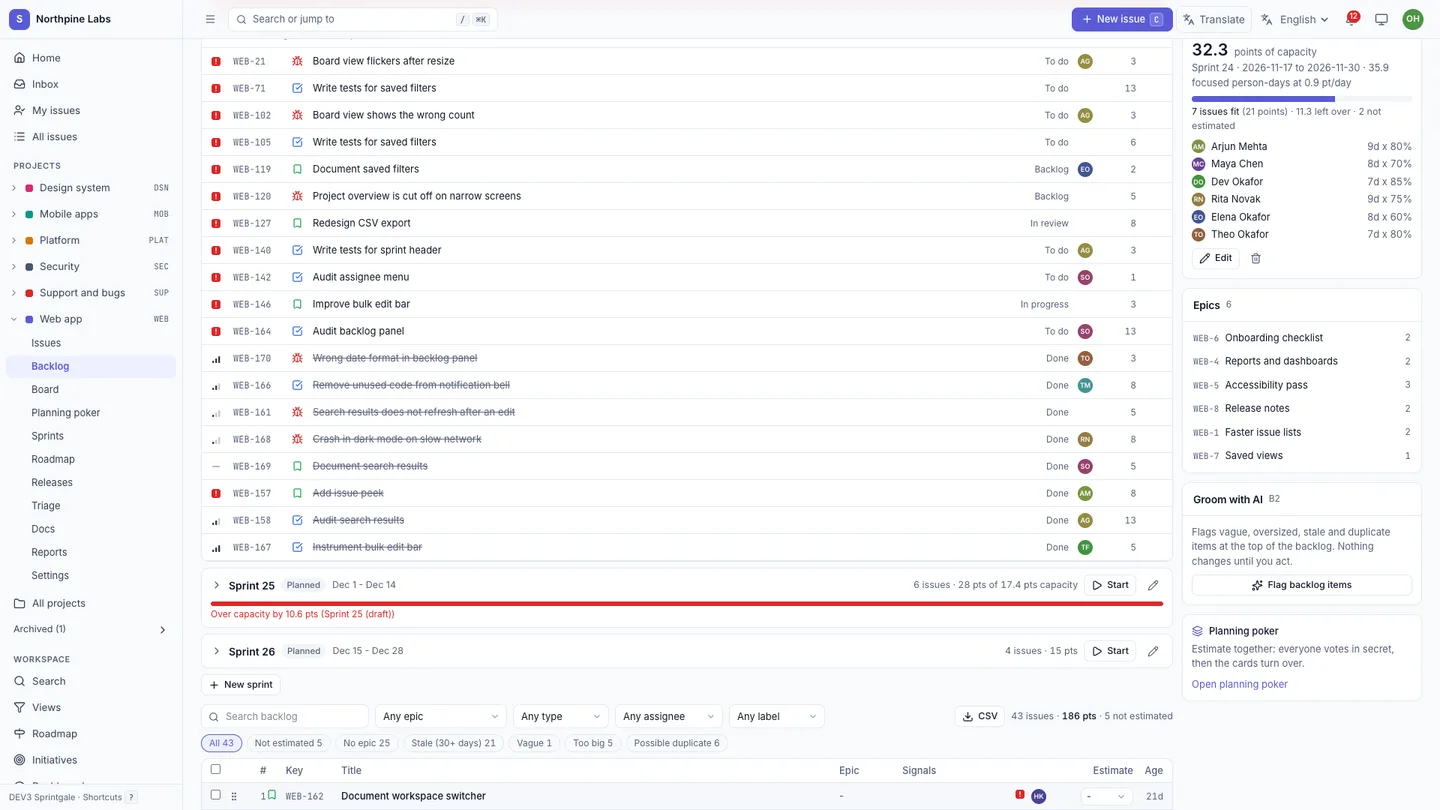
Backlog with estimates and capacity

3. Do the reports match reality?

Burndown after a mid-sprint scope change is the classic lie. Sprintgale keeps a scope-change ledger and draws the ideal line from it; velocity and cumulative flow come from the same history.
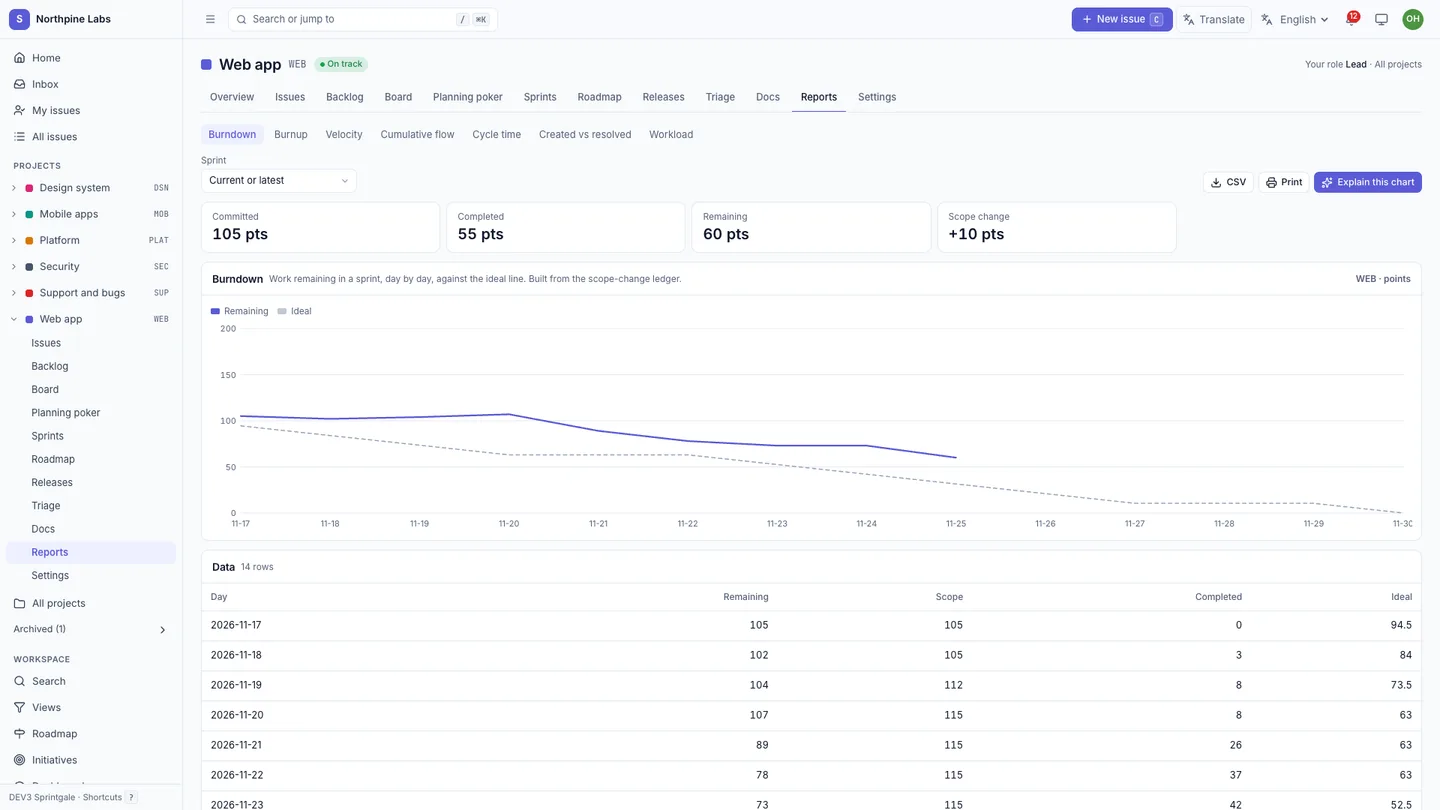
Sprint burndown report

4. Does it connect to git?

Branches, pull requests and commits should link by issue key, and a delivery sent twice must not do anything twice. Sprintgale verifies signatures, de-duplicates deliveries and ships a simulator to try the path.
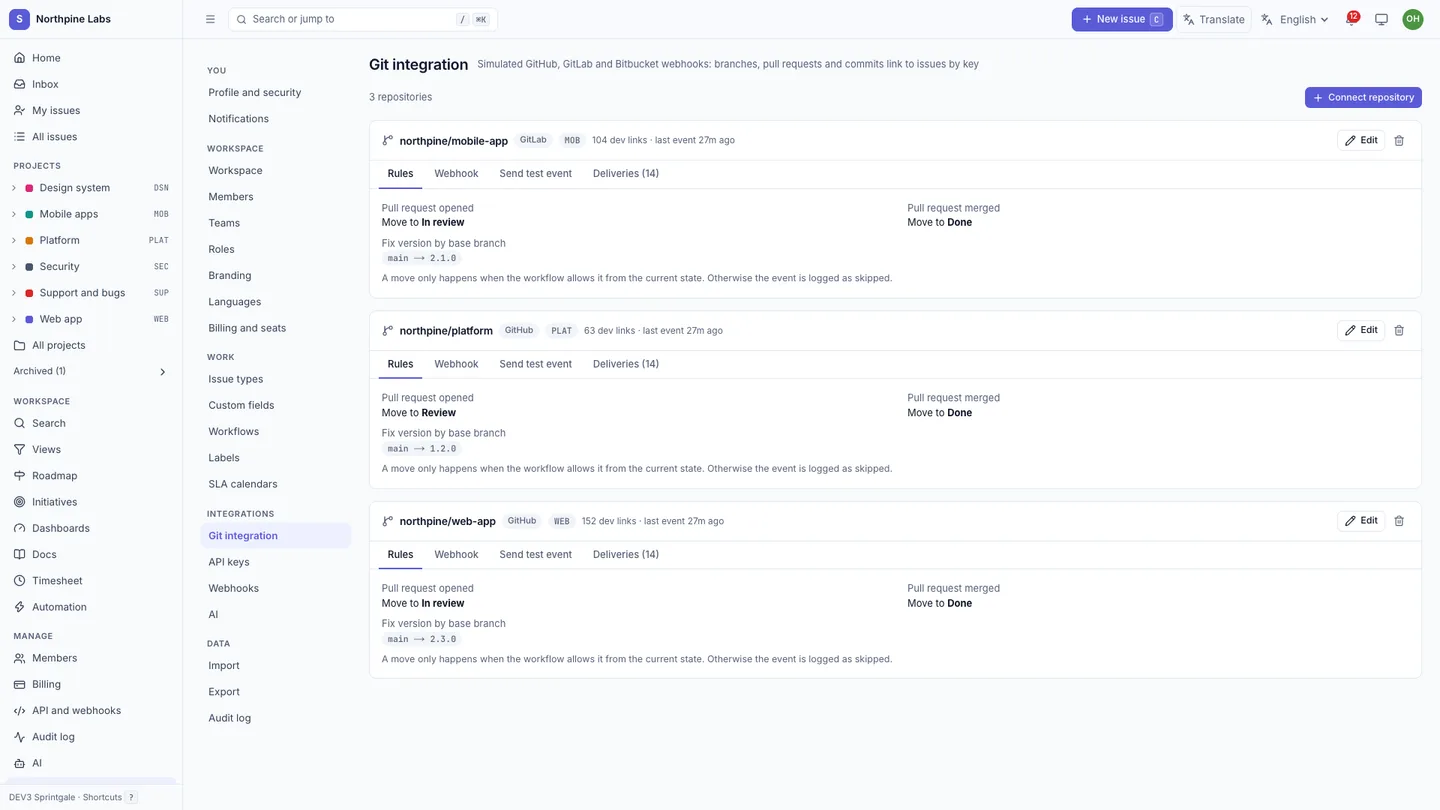
Git links on an issue

5. Can bugs be triaged and timed?

Intake forms, a triage inbox with duplicate hints and priority-based SLA timers keep support work from sitting unseen.
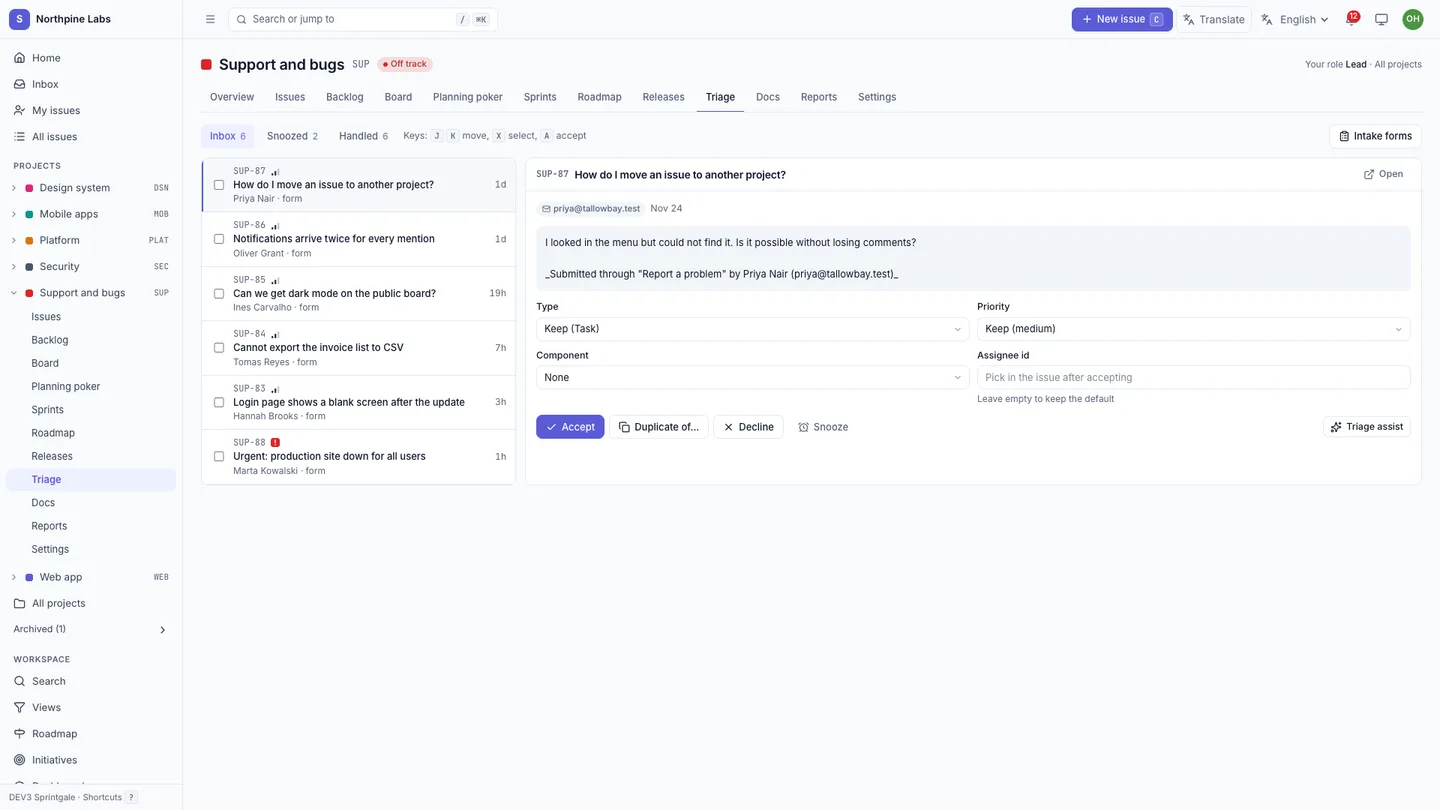
The triage inbox

6. What are the honest limits?

Git providers, mail and AI are simulated until you add keys, docs are Markdown rather than a block editor, and workflows are edited per project. Sprintgale says so in the listing.

If you want to try it, the live demo has a one-click login for every role.

Frequently asked questions

The complete source code (version 1.0.0) as a download from your account, with the setup and usage guides shown on this page. You can modify the code to suit your product.

Questions about this product (0)

Answers from the DEV3 team and the community.

Ask a question

No questions yet.

Wondering about setup, licensing or customisation? Ask, and the DEV3 team will help.

More from this author

View all

Related in Enterprise SaaS Starters

View all