DEV3 Technologies home

DEV3 Joistmark – Construction Project Management SaaS Laravel Script with Budgets, Schedule and Offline Site Diary

A self-hosted construction management script on Laravel 12 and Filament 4 for one contractor: cost-code budgets, a dependency schedule, an offline site diary, change orders, progress claims and a client portal. Web installer and demo data included. Web and installable site-diary PWA; no native apps.
by DEV3 TechnologiesVerified AuthorUpdated 11 Nov 2026

Black Friday: up to 30% off

This item is 30% off: $69.30 instead of $99

Ends in
--
Days
--
Hrs
--
Min
--
Sec

Video tour. Pick a section below to browse 35 screenshots in 3 sections.

App & phone tours

Tap play to watch each app. Nothing downloads until you do.

  • Mobile web0:19

Joistmark runs the project side of a contractor's business on one record: the budget by cost code, the programme, the site diary, the paperwork that changes money (RFIs, submittals, change orders) and the progress claims that get paid. It is built by DEV3 Technologies on Laravel 12 and Filament 4, and it is written for one company that runs several projects at once.

What it does

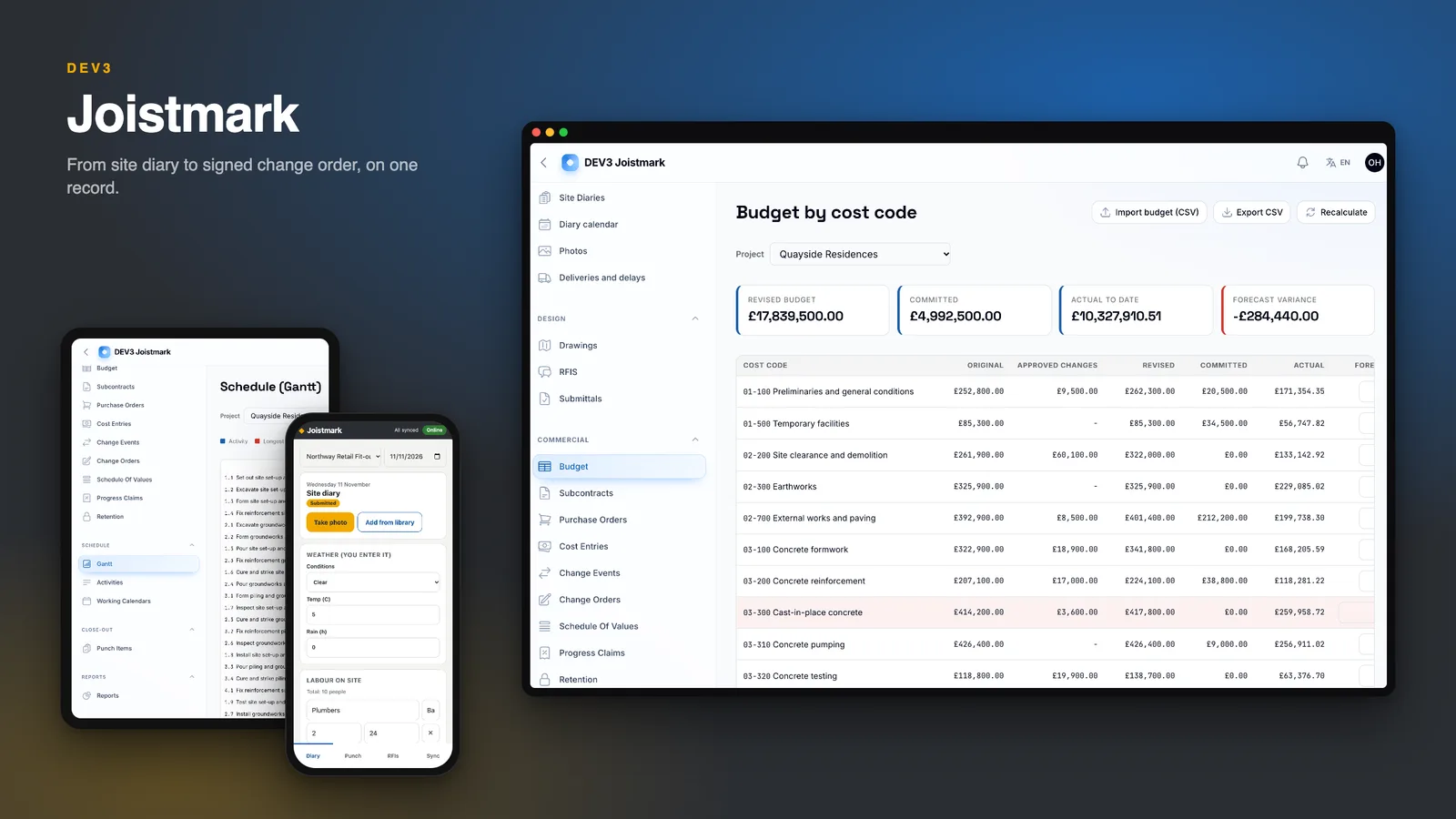
  • Budget by cost code. Cost codes with an original, approved and forecast budget per line. Cost entries (labour, plant, materials, subcontract, other) roll up into the budget grid, and forecast above revised budget is flagged on the dashboard.
  • Schedule. Activities with durations and dependencies, a Gantt view, baseline and slip, and a cycle check that refuses a link which would loop the programme.
  • Site diary, offline. An installable app for the site lead. Entries for weather, labour on site, equipment and photos are kept in the phone's own storage when the signal drops, and sync later. Conflicts are shown to the person who made them, never merged silently.
  • Drawings, RFIs and submittals. A drawings register with versions and pins linked to RFIs, RFIs with due dates and answers, and submittals with review states.
  • Change orders. Each change order has versions and a cost impact. The client signs a version, and a signed version updates the revised budget once.
  • Progress claims and retention. Claims are built from the budget and the percent complete, retention is held and released in a ledger, and a claim certified by the client becomes a payment record.
  • Punch lists, subcontracts and cost entries. Punch items with photos and ready-for-review, subcontract packages with certified lines, and cost entries tied to cost codes.
  • Client portal. A link per client to the progress view, change orders to sign, claims and documents. The client sees only the project they are granted.
  • Subcontractor page. A link per subcontractor to certify their own lines, with a drawn signature and a record of each line.
  • Reports and PDFs. Budget, labour and cost reports, daily diary PDFs and claim PDFs.
  • Roles and API. Owner, project manager, site lead and quality surveyor roles, project-limited access, and a scoped API with keys and webhooks.

Quality checks

The release passed seven gates on the final code: Larastan level 6 with no baseline, Pest tests, a build inside the page budget, migrations and the demo seed on MySQL 8 and SQLite, a headless browser smoke test with the offline diary queue and its later sync, project isolation tests for every panel, and a secret scan.

What you should know before buying

  • One contractor. It is built for one company. It is not a multi-company SaaS for many contractors.
  • Schedule is a dependency list. The programme has a Gantt view and dependencies. It is not a critical-path optimiser, and it does not level resources.
  • No BIM and no drawing markup. Drawings are uploaded as images or PDFs with pins linked to RFIs. There is no model viewer and no markup tools beyond pins. There is no estimating takeoff.
  • No weather service. The site lead enters the weather (conditions, temperature, rain hours) in the diary. Nothing is fetched automatically.
  • Approvals are a record, not a qualified e-signature. A drawn signature is stored with the version it approves, the time and the audit trail. It is not a qualified electronic signature.
  • Payments are recorded or simulated. Claims record payments; a simulated card option is included for small clients. Connect a real gateway yourself.
  • Web and PWA only. The site diary is an installable web app that works offline. There are no native iOS or Android apps.
  • Use MySQL or MariaDB for a live site. A cron entry every minute is required, and a queue worker is advised when you switch the queue to the database.

Included

Source code, the web installer, a buyer guide, demo data for one fictional contractor (Harrowgate Build Co.) with six fictional projects, fixed demo links for the client portal and the subcontractor page, and six months of support.

How it's built

Architecture, stack, key decisions and the quality gates DEV3 Joistmark passed before release.

The engineering behind Joistmark: a site diary that works offline and syncs without silent merges, change orders that update the budget once, and client and subcontractor links that never need an account.

The problem it solves

A contractor's numbers live in too many places: a site lead writes the diary with no signal, a client signs a change order while the scope moves, and a claim is certified twice. Each must end with one consistent budget, one record of who approved what, and access limited to the project a person was granted.

Architecture and approach

Joistmark is a Laravel 12 application with a Filament 4 office panel and hand-built site, portal and subcontractor screens. The site diary is an installable PWA that keeps entries and photos in IndexedDB, retries with back-off and replays each queued entry with an idempotency key. A conflict is shown to the person who made it. Change orders keep every version; a signed version updates the revised budget once, and a voided negative change reverses cleanly. Client and subcontractor links store only a hash of the token, are limited per project, and are served with a strict content security policy. Money is kept in integer minor units, and project isolation is tested for every panel and API route.

Quality gates and results

The release passed seven gates, including the offline diary sync in a headless browser, the Filament panels under each role and the project-isolation tests. The demo runs one contractor with six fictional projects, with cost entries, diaries, RFIs, change orders and claims already in history.

Tech stack

Area Technologies
Application Laravel 12, Filament 4, Blade, REST API
Data MySQL 8, SQLite
Frontend Tailwind CSS 4, Vite, Service worker, IndexedDB
Quality Pest, Larastan level 6, Playwright

Inside the build

Joistmark hero: an empty site, a crane and the diary on a phone over the budget grid. Joistmark hero — an empty site, a crane and the diary on a phone over the budget grid.

Dark mode: the same page in the dark scheme. Dark mode — the same page in the dark scheme.

Guides & articles

Practical guides and engineering write-ups for DEV3 Joistmark.

Construction project management software: 6 things to check before you pick one

Last updated
Construction project management software: 6 things to check before you pick one: DEV3 Joistmark

A contractor does not lose money on the drawings, it loses it between them: the diary entry written a day late, the change order nobody costed, the claim certified against the wrong budget. Here are six things to check before you pick construction project software, with DEV3 Joistmark as the worked example.
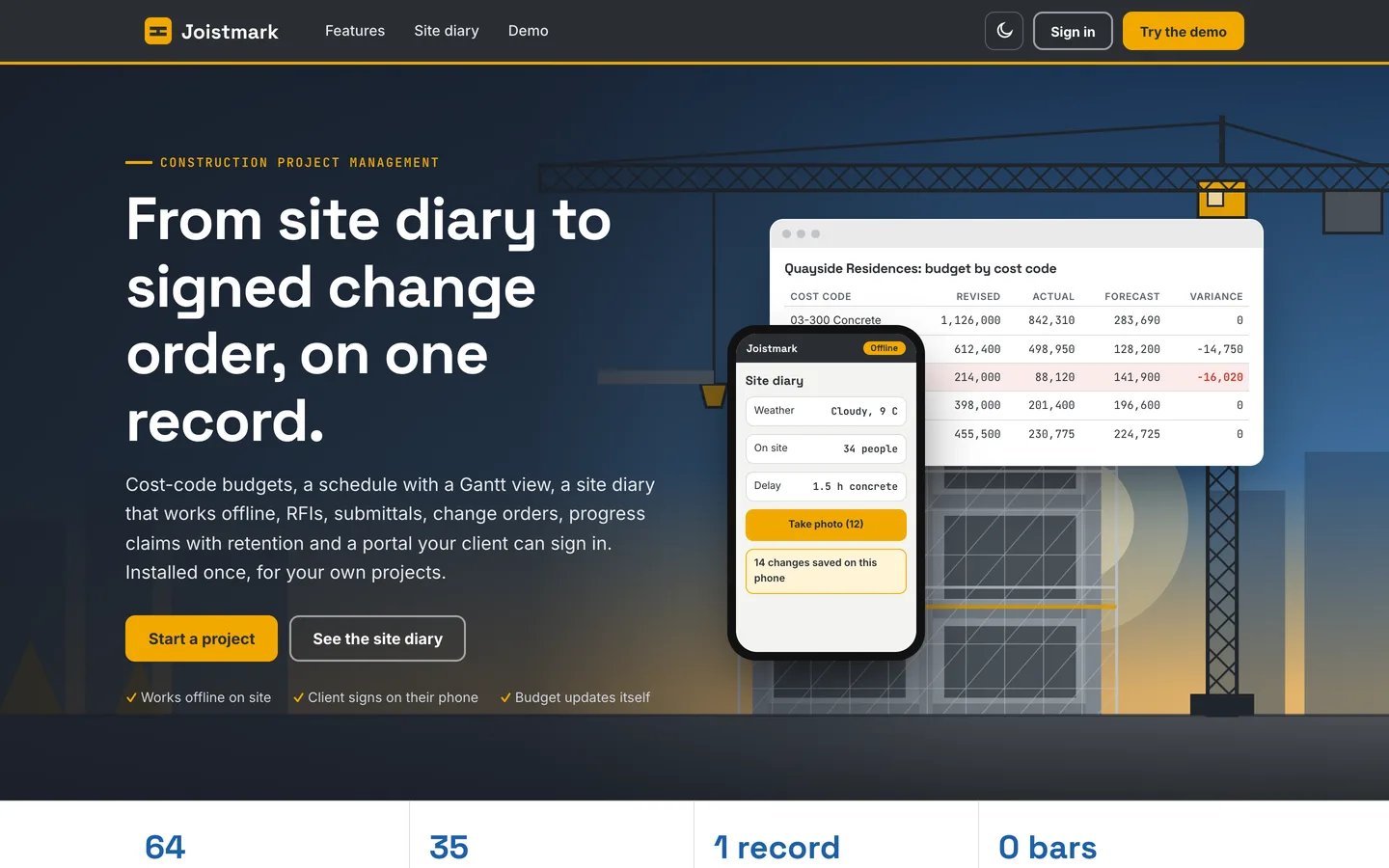
Joistmark home page: a site crane over a budget grid and a diary on a phone

1. Does the budget match the cost codes?

A budget that is one total per project cannot tell you where the money went. Look for cost codes with an original, approved and forecast figure per line, and for cost entries that land on a code when they are booked. In Joistmark, a forecast above the revised budget is flagged on the line and on the dashboard.
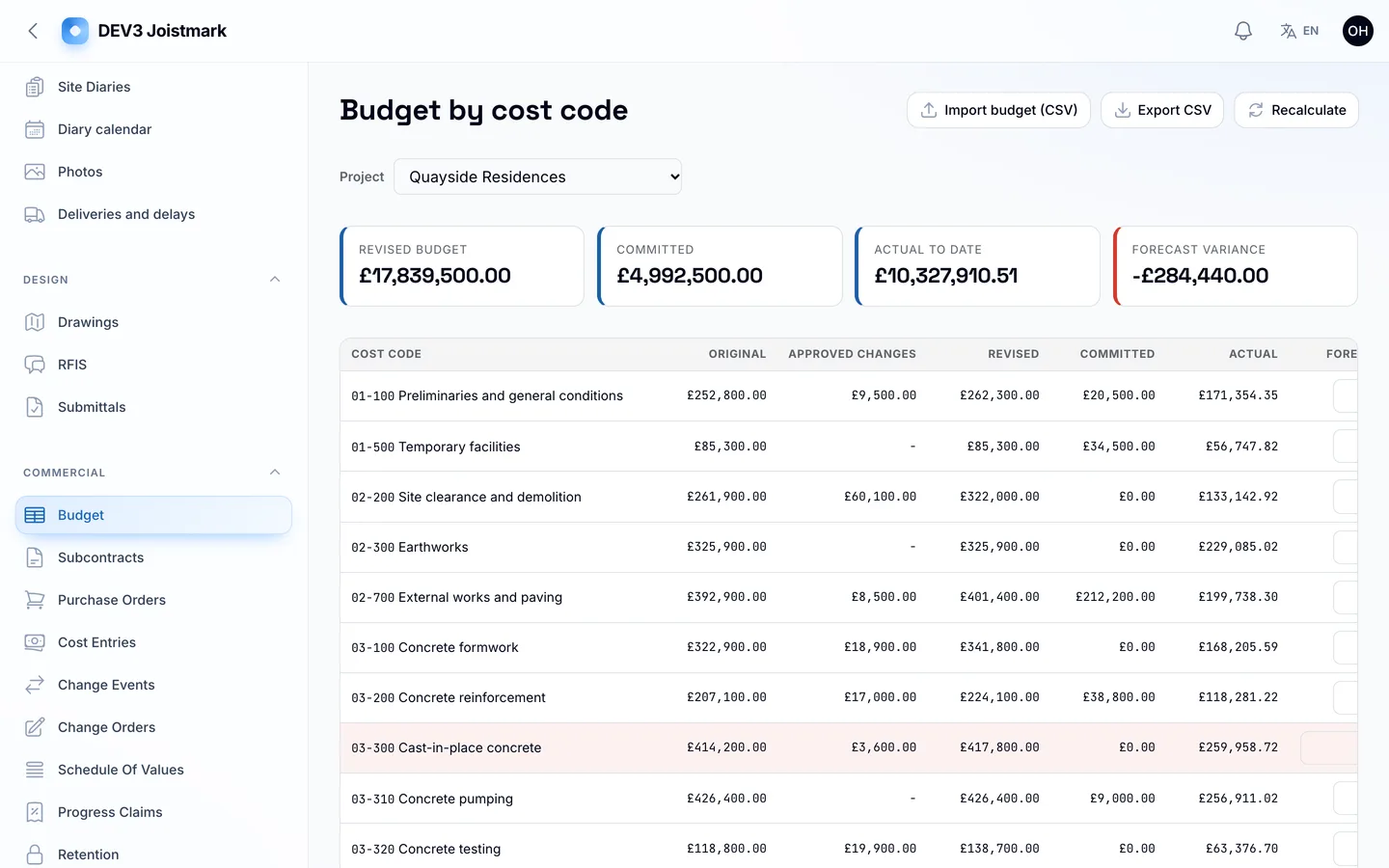
The budget by cost code with forecast above revised budget flagged

2. Does the programme show the real dependencies?

A schedule you cannot link is a list of dates. Check for dependencies, a Gantt view, a baseline to measure slip against, and a check that refuses a loop. Joistmark keeps the schedule as a dependency list with a Gantt view. It is not a critical-path optimiser, so plan your resources elsewhere.
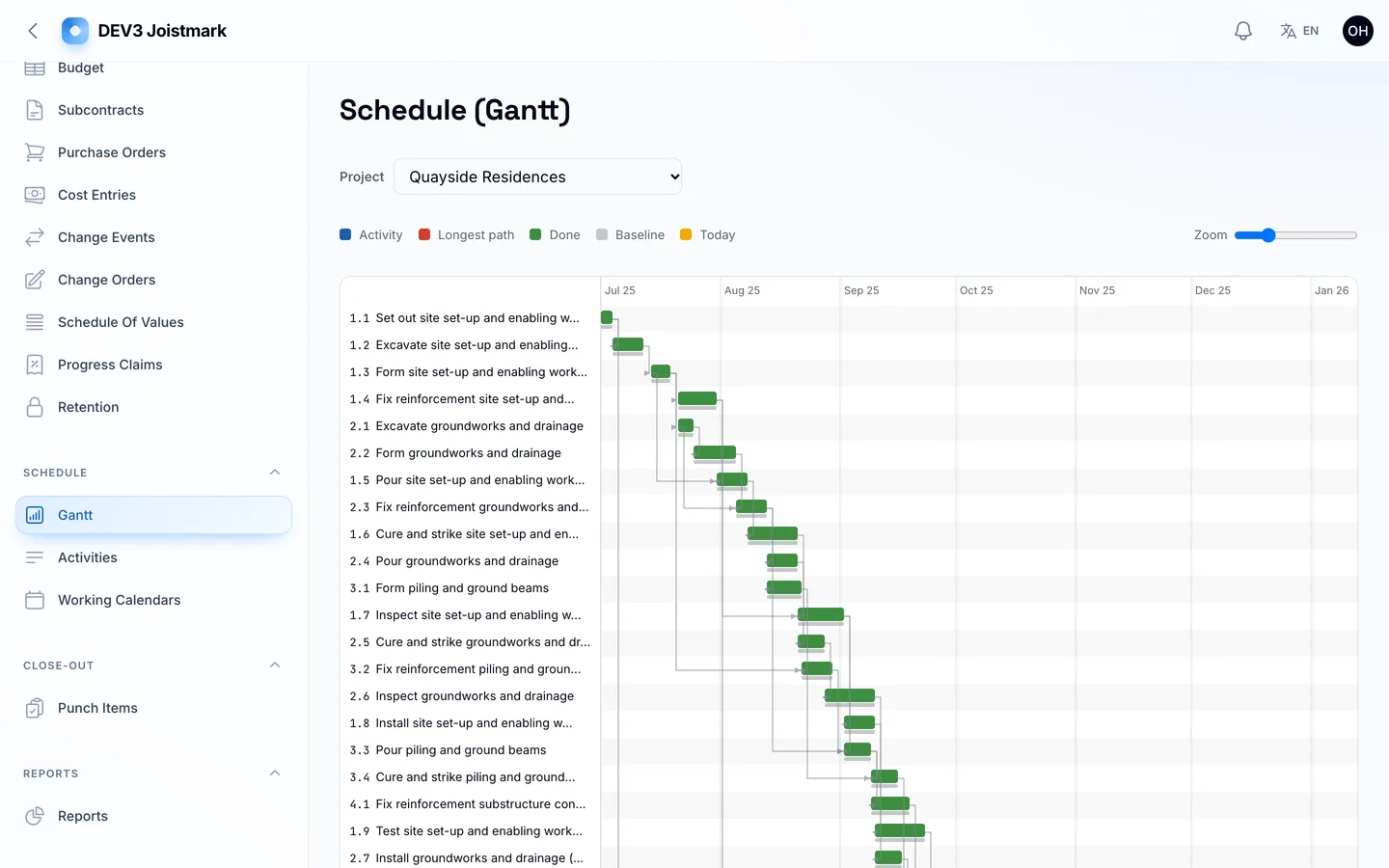
The Gantt view with activities and their links

3. Does the site diary work with no signal?

The site lead should be able to write the diary in a basement or a lift shaft. Look for an installable app that keeps entries and photos on the phone, sends them when the signal returns, and shows a conflict to the person who made it instead of merging it silently. Joistmark's diary is an installable web app with that queue and no native apps.
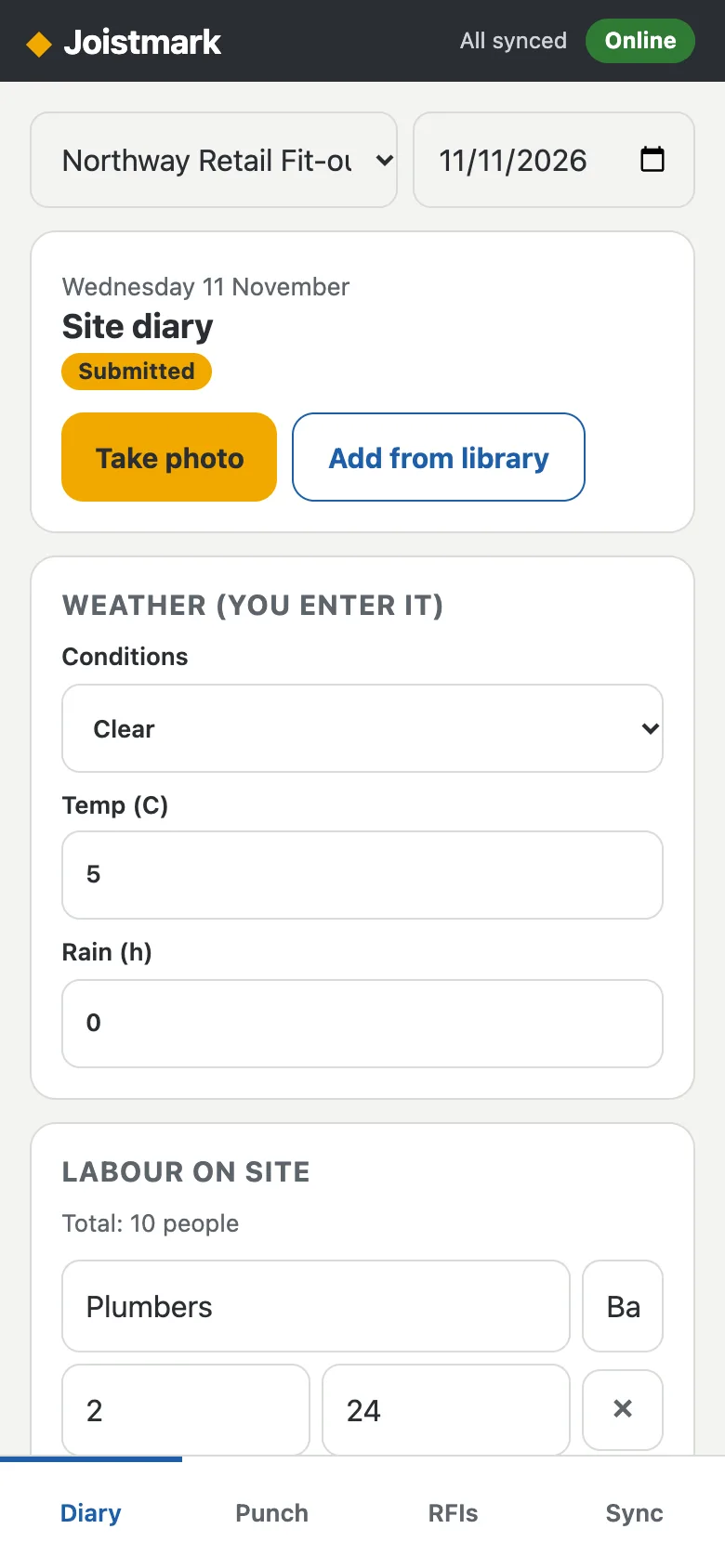
The site diary on a phone with weather and labour entered by the site lead

4. Are change orders signed and priced once?

A change order should keep each version, show its cost, and update the revised budget once when the client signs. Check that a voided change reverses cleanly. In Joistmark the signed version is the one that counts, and the approval is a record with a drawn signature, not a qualified electronic signature.
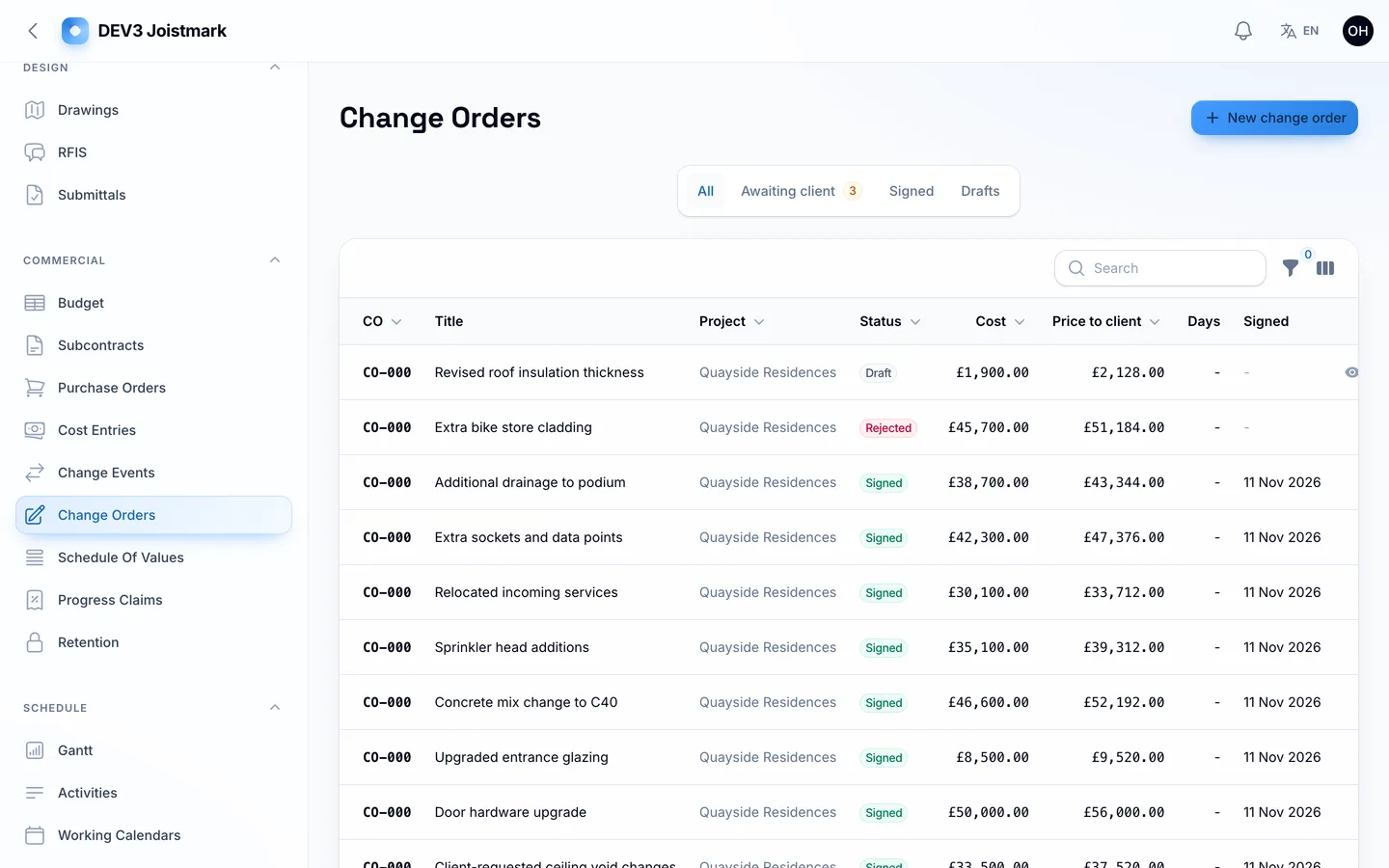
A change order waiting for the client to sign on a phone

5. Do claims and retention follow the budget?

A progress claim should be built from the budget and the percent complete, and retention should be held and released in a ledger you can read. Joistmark builds claims from the budget, keeps retention in its own ledger and records payments against the certified claim.
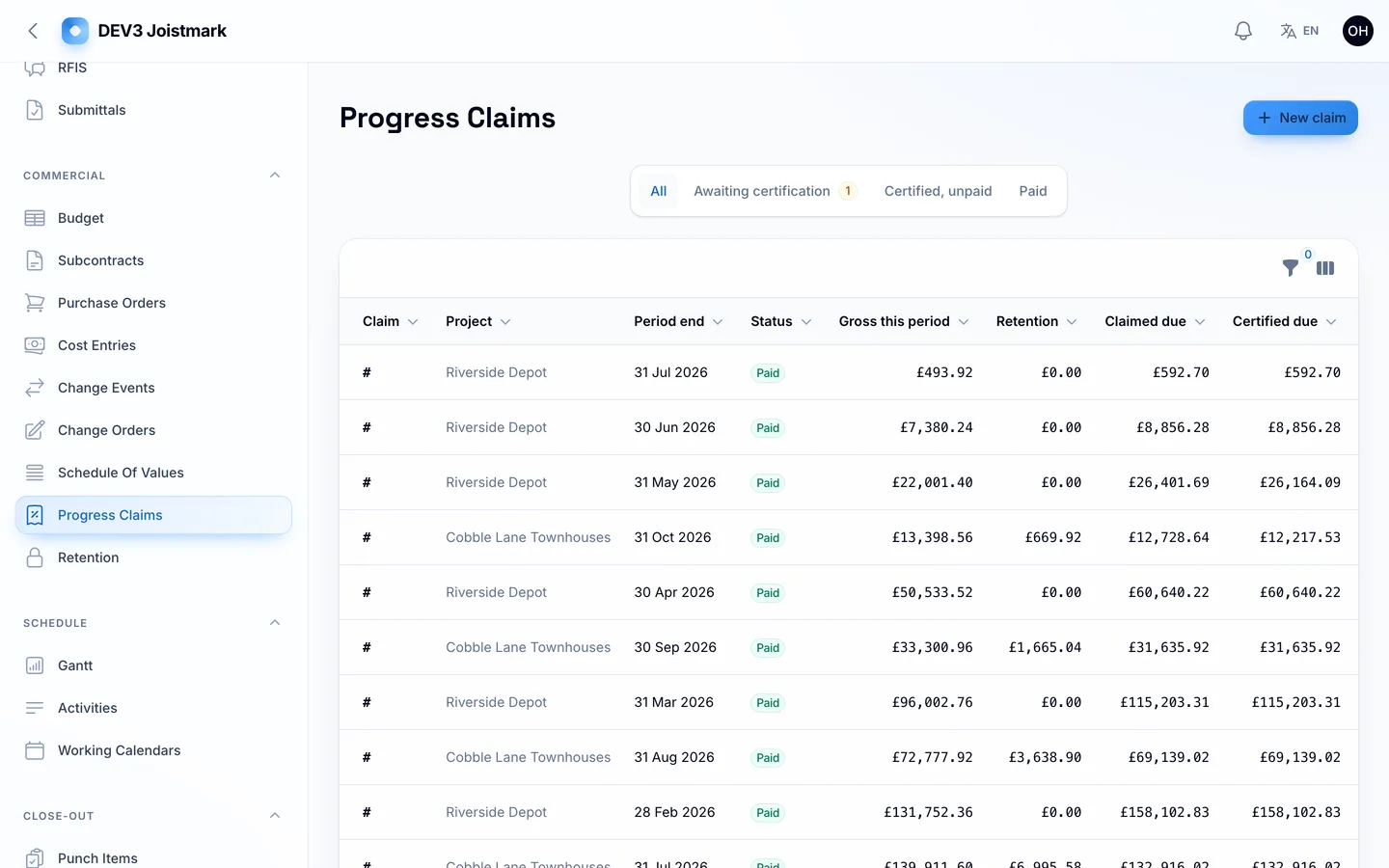
Progress claims with the retention ledger

6. Are the limits honest?

Joistmark is built for one contractor, not a platform for many. It has no weather service (the site lead enters it), no BIM or drawing markup beyond pins, no estimating takeoff, and no native mobile apps. Payments are recorded or simulated until you connect a gateway, and a drawn signature is an approval record, not a qualified e-signature. Say that plainly to your buyers.


Video: The Joistmark tour

Frequently asked questions

The complete source code (version 1.0.1) as a download from your account, with the setup and usage guides shown on this page. You can modify the code to suit your product.

Buying guides: Laravel scripts with Filament panels and a web installer · Next.js or Laravel for a SaaS script?

Questions about this product (0)

Answers from the DEV3 team and the community.

Ask a question

No questions yet.

Wondering about setup, licensing or customisation? Ask, and the DEV3 team will help.

More from this author

View all

Related in Web Scripts & Software

View all