All case studies

DEV3 Technologies · own product

HELIOS: a scroll-driven three.js journey through the solar system

Our own Next.js landing page template that turns scrolling into a flight from the Sun to Neptune: 11 chapters, procedural GLSL planets with no texture downloads, and a calm editorial interface over a live WebGL scene.

Industry
Space & science (immersive 3D template)

Live project preview

DEV3 Technologies · own product — screenshots
Open live demo
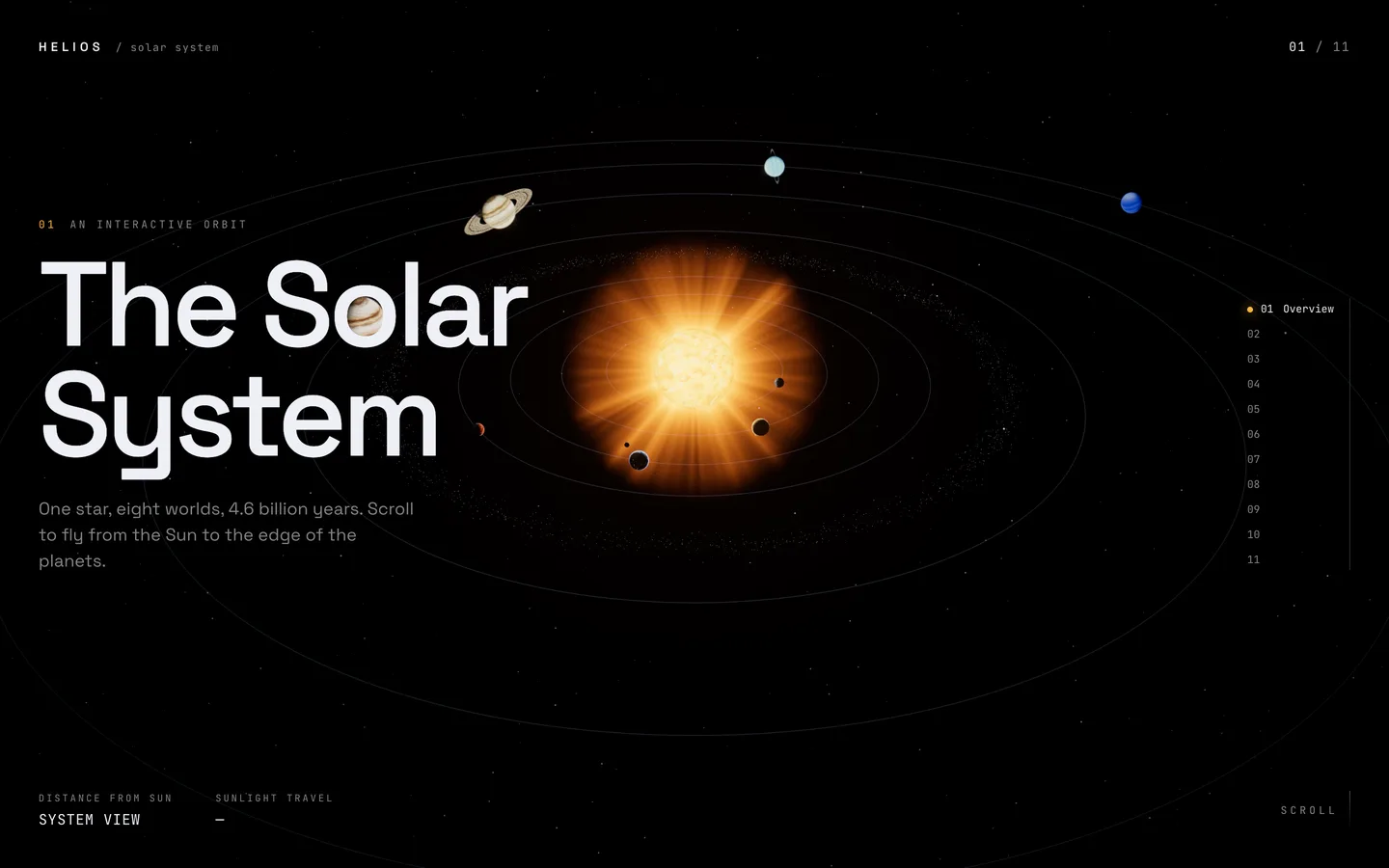
Solar system overview — the hero frames the glowing Sun and every orbit, with a chapter rail and live distance readouts.

Solar system overview — the hero frames the glowing Sun and every orbit, with a chapter rail and live distance readouts.

The challenge

Most 3D landing pages either play a pre-rendered video behind the headline or drop a single spinning model into a hero section. Both lose what makes real-time 3D worth the weight: the visitor's own scroll moving through a space. We wanted a template where the whole page is one continuous journey, where every stop is framed like a photograph with room for copy, and where the scene still loads fast, because large planet textures and models are usually what make these pages heavy. It also had to stay readable on a phone, where a landscape composition simply does not fit.

Our solution

We built HELIOS on Next.js 16 with React Three Fiber 9, three.js, @react-three/postprocessing and Lenis.

Key design decisions

  • Procedural everything. The Sun, planets, clouds, city lights, Saturn's rings and atmospheres are GLSL noise in lib/shaders.ts, so the template downloads no textures or models at all.
  • A mutable journey store. Scroll progress, velocity and pointer live in a plain object read every frame; React subscribes only to the chapter number, so scrolling never re-renders the tree.
  • One camera path. Each chapter adds a camera stop and a look target, joined by centripetal Catmull-Rom curves. Each leg is eased so the camera lingers on a body, and Lenis snaps to the nearest chapter when scrolling stops.
  • Framing for copy. Stops are computed from each body's position and size, offset so the subject sits away from the text; on portrait screens they are rebuilt further back and lower so the copy fits underneath.
  • No first-scroll hitch. The scene compiles every shader up front, and the loader holds at 99% until that has finished.
  • Restrained post-processing. Bloom, ACES tone mapping, grain and vignette, plus chromatic aberration tied to scroll velocity so fast scrolling feels like speed.

Results

HELIOS ships as a complete Next.js template: 11 chapters (overview, the Sun, eight planets and an outro), a seeded starfield with a Milky Way band, an asteroid belt and parallax dust, live distance and sunlight-travel readouts, and a chapter rail with long eased jumps.

It needs no texture, model or image downloads for the scene. We checked it with a capture script that visits every chapter at desktop, tablet and phone sizes and prints the frame rate, and it is published as a static export for the public live demo.

HELIOS is available on the DEV3 marketplace.

Setup guide

Requirements

  • Node.js 20.9 or newer and npm
  • A modern browser with WebGL 2 for previewing
  • No environment variables, API keys, database or CMS are needed

Install and run

  1. Download the ZIP from your DEV3 account and unzip it.

  2. Open a terminal in the unzipped folder and install the dependencies:

    npm install
    
  3. Start the development server:

    npm run dev
    

    Open the address it prints (port 3000 by default; use npm run dev -- -p 4000 for another port) and scroll from the Sun to Neptune.

Production build

npm run build
npm run start

npm run lint runs ESLint with the Next.js config.

Deploy

  • Vercel or any Node host: import the project and keep the default Next.js settings (build command npm run build). No environment variables are required.
  • Static hosting: next.config.ts has a static-export mode that is switched on by the DEMO_EXPORT_BASE variable. Set it to the sub-path you will serve from (for example /helios) and run npx next build; the site is written to out/, which you can upload to any static host or CDN. The build:demo script in package.json is the configuration used for DEV3's hosted demo; remove its NEXT_PUBLIC_DEMO_DOWNLOAD_URL setting so the "Get this template" badge is not shown on your site.

Updates

Download the new version from Account → Downloads on dev3.tech and compare it with your copy. Keep your changes in lib/bodies.ts, app/globals.css and the overlay copy, which is where most customisation lives.

How to use

How the project is organised

  • app/layout.tsx – fonts, page title and description, theme colour
  • app/globals.css – the interface styles and colour variables
  • components/Journey.tsx – Lenis smooth scrolling, chapter snapping and the scroll height
  • components/scene/ – the WebGL scene: Experience.tsx (canvas and post-processing), CameraRig.tsx (camera path), Bodies.tsx (Sun, planets, rings, Moon, orbits) and Particles.tsx (stars, asteroid belt, dust)
  • components/ui/ – the overlay: loader, headlines, stats, chapter rail and distance readouts
  • lib/bodies.ts – the content and look of every chapter
  • lib/shaders.ts – the GLSL for every surface
  • lib/journey.ts – the per-frame state shared between scroll and scene

Edit the copy

  • Chapters: each entry in BODIES in lib/bodies.ts has a name, a kicker (the small line above the headline), a tagline and four stats pairs such as ["Diameter", "12,742 km"].
  • Intro and outro: edit the INTRO and OUTRO objects at the top of components/ui/Overlay.tsx.
  • Page title and description: edit metadata in app/layout.tsx.
  • Brand mark: the "HELIOS" wordmark in the header is in components/ui/Overlay.tsx.

Add, remove or reorder chapters

The chapter list is built from BODIES: an overview, one chapter per body, then the outro. Remove an entry to drop a chapter, or copy one and change its id, orbit, angle and size to add one. The camera path, chapter rail and page height update automatically. Scene positions are artistic, so choose orbits that keep bodies apart.

Change colours

  • Interface: change --bg, --fg, --dim, --faint and --accent at the top of app/globals.css, and themeColor in app/layout.tsx.
  • Scene background: the <color attach="background"> value in components/scene/Experience.tsx.
  • Each body: colors is a three-colour palette (dark, mid, light) fed to the shader, atmosphere sets the glow on the limb, rings adds rings, and seed changes the noise pattern. Change these to recolour a planet without touching GLSL.

Change fonts

The display and mono fonts are loaded with next/font/google in app/layout.tsx (Space Grotesk and JetBrains Mono). Replace the imports with any other Google font, or next/font/local for your own files, and keep the --font-display and --font-mono variable names.

Models and textures

HELIOS uses no 3D model or texture files: every surface is generated in lib/shaders.ts. To show your own object in a chapter, load a GLB with three.js's GLTFLoader (or useLoader from React Three Fiber) inside components/scene/Bodies.tsx and place it at that body's position; the camera rig frames whatever sits at the body's orbit, angle and size.

Tune motion and effects

  • Scroll feel: lerp and wheelMultiplier in the Lenis options, and the snap delay and duration, are in components/Journey.tsx.
  • Camera: distances, side offset and the portrait framing are in buildStops in components/scene/CameraRig.tsx.
  • Post-processing: bloom intensity and threshold, grain opacity, vignette darkness and the chromatic aberration strength are in the Effects component in components/scene/Experience.tsx. Remove an effect by deleting its line.
  • Particles: star, belt and dust counts are the first argument of each makeCloud call in components/scene/Particles.tsx; lower them for weaker devices.
Related case studies