All case studies

DEV3 Technologies · own product

LUMIDENT: a 3D dental clinic template with procedural teeth built in code

Our own Next.js template for dental clinics: a twelve-chapter scroll story where every tooth, gum and bone block is a signed-distance field meshed in the browser, with treatment animations, live opening hours and a booking dialog.

Industry
Healthcare – dental clinics (Next.js template)

Live project preview

DEV3 Technologies · own product — screenshots
Open live demo
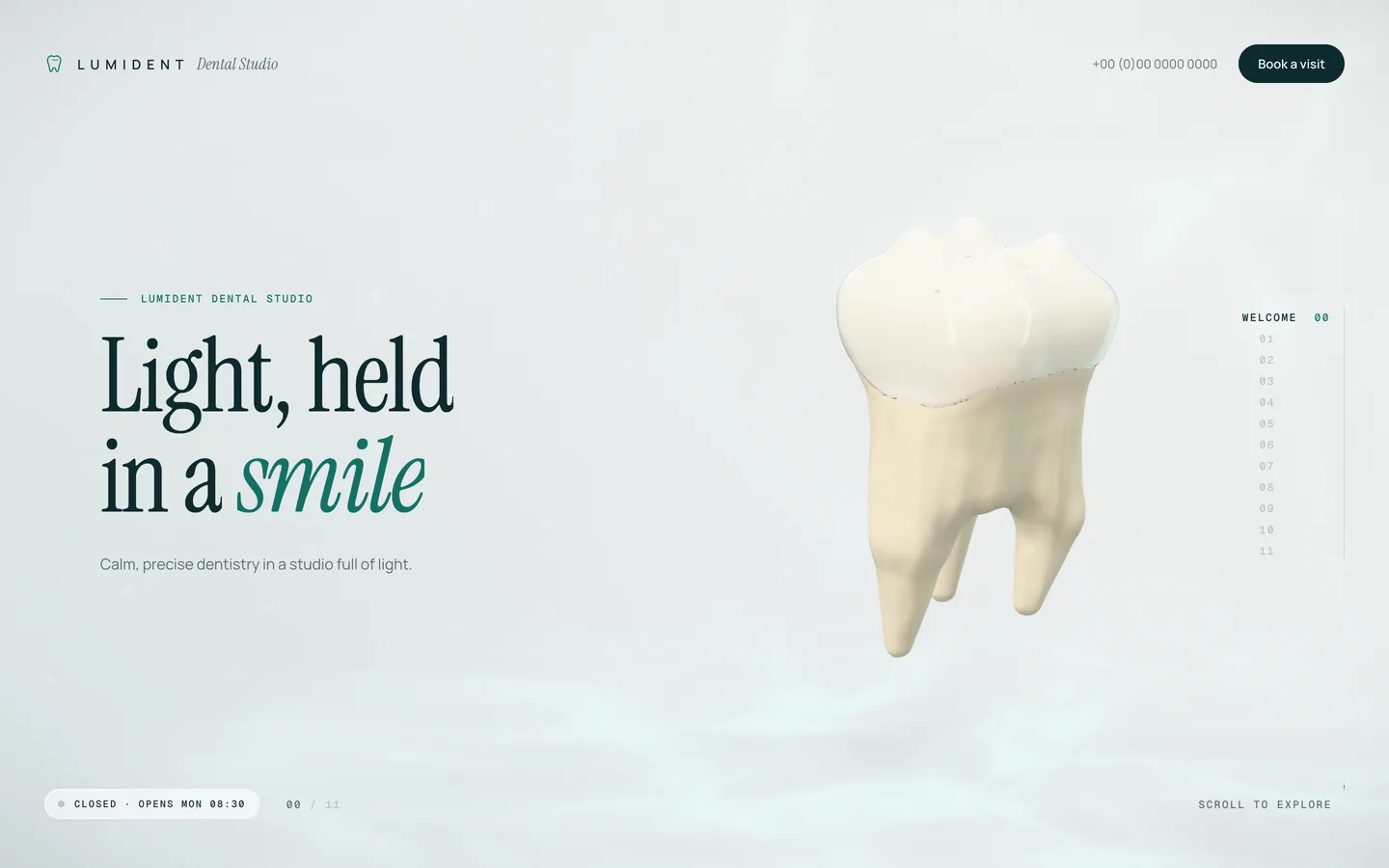
Welcome hero — a softly lit 3D molar floats beside the headline of the fictional LUMIDENT dental studio.

Welcome hero — a softly lit 3D molar floats beside the headline of the fictional LUMIDENT dental studio.

The challenge

Dental clinic websites tend to choose between stock photos of smiling patients and clip-art diagrams of teeth. Neither explains a treatment, and neither looks like a premium studio. 3D could do both, but a dental scene usually means licensed anatomy models, heavy textures and a page that stalls on phones, while health content has to stay calm, readable and free of outcome claims. We wanted a template that shows how an implant, a whitening shade or an aligner actually works, recolours with the clinic's brand, loads with no 3D files at all, and still honours reduced motion.

Our solution

We built LUMIDENT on Next.js 16 with the App Router, React Three Fiber 9, three.js, @react-three/postprocessing and Lenis.

Key design decisions

  • Teeth as distance fields. The molar, incisor, canine and premolar are signed-distance fields with cusps, ridges, fissures and fluted roots. A narrow-band marching-cubes mesher bakes normals, ambient occlusion and a crown/root mask, and the 17 mesh jobs run in a Web Worker pool while the loader shows real progress.
  • Layers you can cut. Separate fields for enamel, dentin, pulp, gum, bone, aligner tray and veneer shells let the anatomy chapter slice the tooth with clipping planes and capped faces, so the solids read as filled.
  • One shader patch. A single onBeforeCompile patch on physical materials adds the dissolve with a mint edge glow, fissure staining, the gum gradient and bone pores, so pieces can enter and leave without extra geometry.
  • One config file. lib/clinic.ts holds clinic details, hours, services, team, sample reviews, booking rules and six colour tokens. The tokens become CSS custom properties that the 3D materials also read.
  • A mutable journey store. Scroll progress lives in a per-frame store and React subscribes only to the chapter index, while a centripetal Catmull-Rom camera path has separate desktop and portrait stops.
  • Honest placeholders. Testimonials are badged as samples, treatment text is general information, and the booking dialog confirms locally, offers an .ics file and sends nothing until a clinic connects its own system.

Results

LUMIDENT ships as a complete Next.js project with twelve chapters, five treatment moments with Replay buttons, an anatomy cut-away with seven callouts, a full-arch fly-over, an intraoral-scan reveal and a booking dialog. It uses no model, texture or image assets for the 3D scene.

Reduced motion disables smooth scrolling, snapping, idle spin and autoplay and shows each treatment's final state. The template is responsive with dedicated portrait camera stops, and a static export powers the public live demo.

LUMIDENT is available on the DEV3 marketplace.

Setup guide

Requirements

  • Node.js 20.9 or newer and npm
  • A modern browser with WebGL 2 for development and testing
  • No environment variables, API keys or database are needed

Install

  1. Download the ZIP from your DEV3 account and unzip it.

  2. Open a terminal in the unzipped folder and install the dependencies:

    npm install
    
  3. Start the development server:

    npm run dev
    

    Open the address it prints and scroll through the twelve chapters.

  4. Optional checks: npm run lint and npx tsc --noEmit.

Build for production

npm run build
npm run start

next build creates an optimised production build and next start serves it.

Deploy to Vercel

  1. Push the folder to a Git repository (GitHub, GitLab or Bitbucket).
  2. In Vercel, choose Add New → Project, import the repository and keep the detected Next.js settings.
  3. Click Deploy. No environment variables are required.

Any other Node.js host that supports Next.js works the same way: run npm run build, then npm run start.

Static export

The template can also be exported as plain HTML, CSS and JavaScript for a static host. next.config.ts switches to output: "export" when DEMO_EXPORT_BASE is set to the sub-path the site will be served from:

DEMO_EXPORT_BASE=/your-path npx next build

The files are written to out/; upload that folder to your host under the same path. To serve the export from the root of a domain instead, edit next.config.ts so the export settings apply without a basePath.

Do not use npm run build:demo for your own site: it is the script for DEV3's hosted demo and adds a "Get this template" badge.

Updates

Download the new version from Account → Downloads on dev3.tech. Keep your edits to lib/clinic.ts, lib/chapters.ts and app/layout.tsx and copy them into the new version.

How to use

Edit the clinic details

Open lib/clinic.ts. It is the one file most clinics need to change, and everything in it is fictional placeholder content:

  • name, fullName, tagline and motto (shown in the loader and footer)
  • phone, email, address and directions
  • timeZone: an IANA zone such as Europe/London, used by the live "open now" indicator
  • hours: opening and closing times per weekday as "HH:MM" strings, or null for closed
  • services: id, name, a short blurb and the typical visit length in minutes. They drive the booking chips, and the five treatment chapters read their title and blurb from the ids implants, whitening, aligners, hygiene and veneers
  • team and testimonials: sample cards and quotes. Publish only genuine reviews, with the patient's consent
  • booking: slot length, number of days shown and lead time

Change the colours

The theme object in lib/clinic.ts holds the colour tokens:

Token Used for
paper / paperDeep page background and the 3D backdrop gradient
ink text
accent highlights, the dissolve glow and the scan line
accentDeep buttons, active states and callout lines
accentSoft soft fills and the caustic tint
gum gum base colour

They are injected as CSS custom properties on <html> and read by the 3D materials, so one edit recolours both the page and the scene.

Change the fonts

The fonts (Instrument Serif for headings, Manrope for text and Geist Mono for labels) are loaded in app/layout.tsx. Swap them for other fonts from the same font loader and keep the CSS variable names.

Edit the chapter copy

lib/chapters.ts holds the kicker, title and tagline for each chapter, the anatomy layer names and the whitening shade ladder. Keep treatment text general and educational: no outcome claims and no prices.

Change the 3D

The scene has no model or texture files. Every tooth, the gum and bone, the aligner tray and the veneers are signed-distance fields in lib/sdf/ that are meshed in a Web Worker pool at load time (lib/meshes.ts).

  • Shapes: edit the tooth fields in lib/sdf/teeth.ts and the arch layout in lib/sdf/arch.ts.
  • Materials and effects: components/scene/materials.ts holds the enamel, dentin, gum and bone materials and the dissolve shader.
  • Treatment moments: components/scene/Molar.tsx, Implant.tsx, Whitening.tsx and Arches.tsx.
  • Camera: components/scene/CameraRig.tsx holds the per-chapter camera stops, with separate desktop and portrait tables.
  • Post-processing: bloom, chromatic aberration, tone mapping, grain and vignette are in components/scene/Experience.tsx.

To use your own model instead, load a GLB with three.js's GLTFLoader inside the relevant scene component and give it the materials from materials.ts.

Connect bookings

components/ui/Booking.tsx confirms the request in the browser and offers an .ics calendar file; nothing is sent. To go live, replace the onSubmit handler with a call to your booking system or a Next.js server action, and keep the "nothing is sent" note until you do.

Reduced motion

Visitors with prefers-reduced-motion get no smooth scrolling, snapping, idle spin or autoplay, and each treatment shows its final state. Test it by turning on reduced motion in your operating system's accessibility settings.

Disclaimer

Replace the fictional clinic, people and reviews with your own, and have the treatment text reviewed before you publish. The template's medical text is general information, not advice.
Related case studies