Web Scripts & Software
DEV3 Photo Slideshow Video Maker — Source Code (React + Tailwind)
from $20$29
Loading…
Design tool
Free, no sign-up. Runs in your browser; nothing is uploaded. Buy the source code: $29 Regular / $69 Extended
Need Photo Slideshow Video Maker as a complete website or app for your brand? We design and build it end to end. Built in about a week, from $99. Send your requirements or SOW; you get a fixed quote and a delivery date.
The photo slideshow video maker stays free to use online. If you want the code to run, edit and ship in your own project, get the full source from the DEV3 Marketplace. Instant download, 6 months of support.
Launch the full site, not just the asset. Buy once, own the source, and try each one live first.
Web Scripts & Software
from $20$29

Enterprise SaaS Starters
from $69$99

Web Scripts & Software
from $69$99

Web Scripts & Software
from $20$29
Web Scripts & Software
from $20$29

Web Scripts & Software
from $20$29

Web Scripts & Software
from $20$29

Web Scripts & Software Mobile app
from $69$99
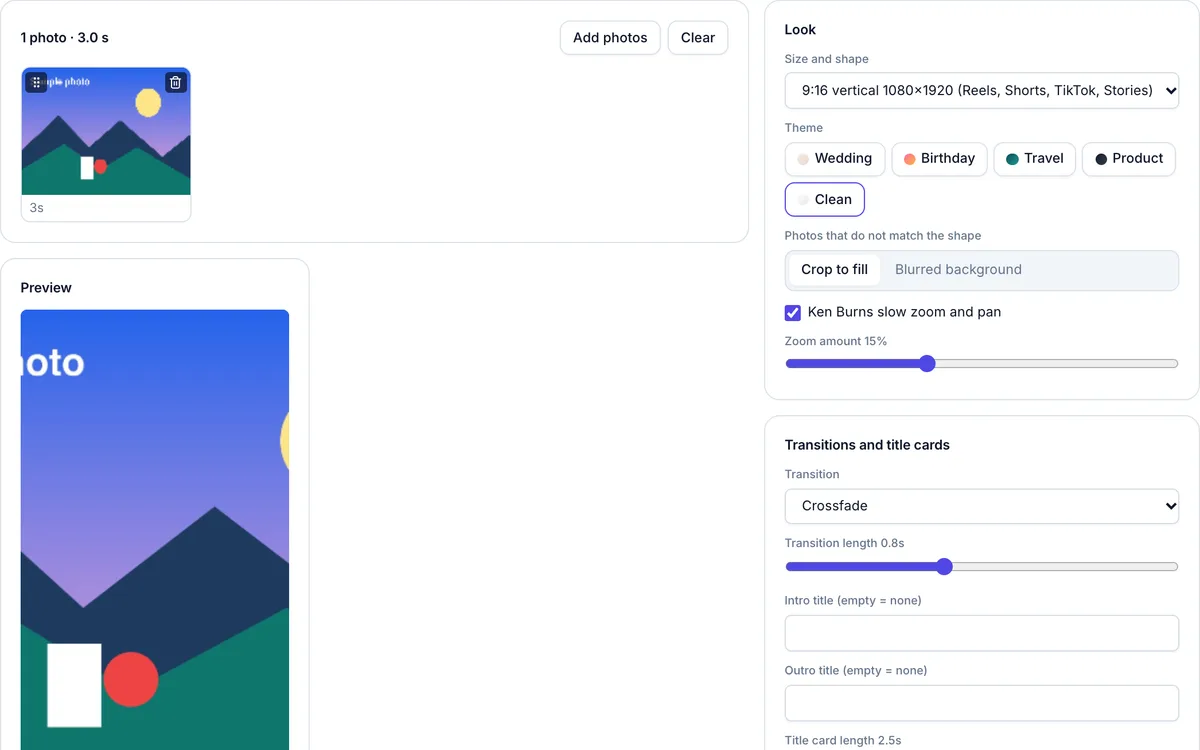
A slideshow is a good way to turn event photos, product shots or travel pictures into a video you can post anywhere. This maker runs entirely in your browser.
A crossfade, slide, zoom or wipe overlaps two slides for the transition length. The overlap is limited to half of the shortest slide so a quick slide is never swallowed. The total length is the sum of all slide times minus the overlaps, which is the number shown above the thumbnails.
Each photo slowly zooms by the amount you choose, drifting toward your focus point. The motion eases in and out so it feels smooth rather than mechanical. Turn it off for product shots that must stay perfectly framed.
Pick Crop to fill to avoid bars, or Blurred background to keep the whole photo sharp over a blurred copy of itself, a common look for mixed portrait and landscape sets.
The video is encoded frame by frame, so a 60 second slideshow renders faster than real time in current browsers. Photos are reduced to 2400 pixels on the long side while editing to save memory. Very large sets on a phone may need fewer photos.
Only add music you have the right to use.
Add your photos, drag them into order, add a track in the Music box and press "Fit photo length to the music" so the slides fill the song exactly. Choose a shape such as 9:16 and press Make the video.
9:16 at 1080 x 1920 suits Reels, Shorts and TikTok. WhatsApp status works well at 720 x 1280 and gives a smaller file. Use 1:1 or 4:5 for feed posts and 16:9 for YouTube.
A slow zoom and drift across a still photo that makes it feel alive. The focus point you click on each photo controls where the zoom heads, so faces stay in frame. Even-numbered slides zoom out for variety.
MP4 export uses WebCodecs, which is in current Chrome, Edge and Safari. Browsers without it, such as Firefox, record the slideshow in real time as WebM instead, which plays in browsers and most players.
Yes. HEIC and HEIF files are converted to JPEG in your browser when you add them, then used like any other picture.
No. Photos, music and the finished video all stay on your device. Rendering uses your own processor, so a very long slideshow takes longer on a slow phone.