DEV3 Technologies home

DEV3 Payquill – HR & Payroll System with GPS Attendance and Employee App (Laravel + Flutter)

A self-hosted HR and payroll system on Laravel 12 and Filament 4: employee records, GPS check-in, leave, configurable pay components, pay runs with a second approver, payslips, claims and loans, plus a Flutter employee app. Web installer and demo data included.
by DEV3 TechnologiesVerified Author(0) 0 sales 4 viewsUpdated 11 Nov 2026

Video tour. Pick a section below to browse 44 screenshots in 10 sections.

App & phone tours

Tap play to watch each app. Nothing downloads until you do.

  • Mobile web0:20

Payquill is an HR and payroll system for one company, built by DEV3 Technologies on Laravel 12 and Filament 4, with a Flutter employee app on the same REST API. You host it yourself. It covers people records, attendance with GPS check-in, leave, pay runs with payslips, claims, loans and exits, and several legal entities can be kept apart inside one install. The package ships the HRM and payroll web panel plus the Flutter employee app source, with a store-publishing guide.

What it does

  • People. Employee records with profile history, org chart, departments, positions, grades, exits with full-and-final settlements, letters from templates and a document vault.
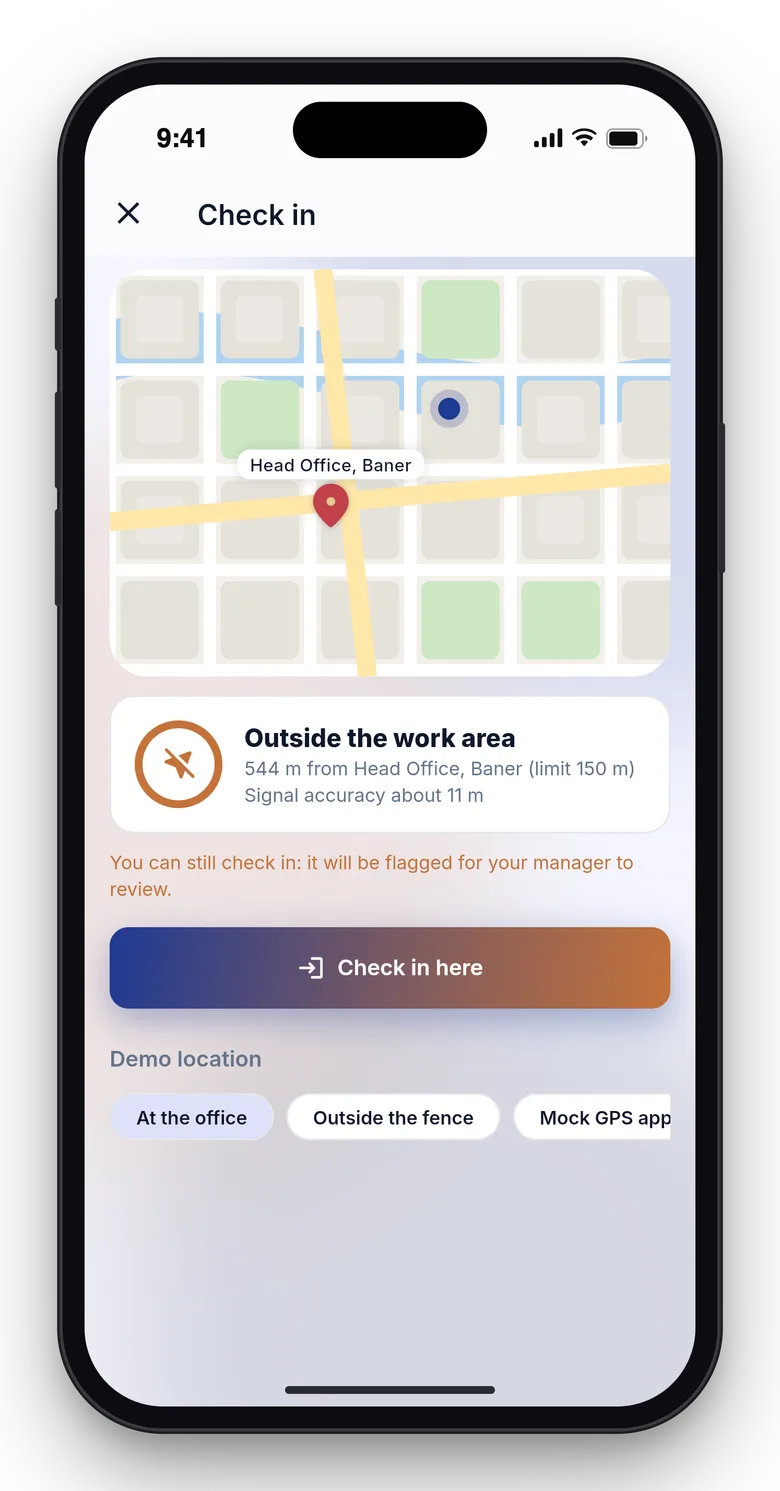
  • Attendance. Today board, punches from the phone app and from approved office networks on the web, sites with a geofence you size on a map, flag or reject punches outside, optional photo, shifts, work patterns, holidays, overtime, time corrections and a monthly register.
  • Leave. Types and policies, balances, year-end carry-forward, a ledger with audited adjustments, and manager approvals.
  • Pay components as formulas. You define earnings, deductions and contributions with a formula editor and a live preview. Tables for slabs and rates are yours to enter. A payslip shows how each line was computed.
  • Pay runs. Draft, calculated, submitted, approved, locked and paid, with pre-checks, variance against last month, hold and release, a second approver, arrears, reversals and period locks.
  • Bank files, journals and reports. Payment files for your bank, accounting journals, a payroll register and ten reports with CSV and print.
  • Claims and loans. Expense claims with approvals, advances and loans with schedules deducted in the pay run.
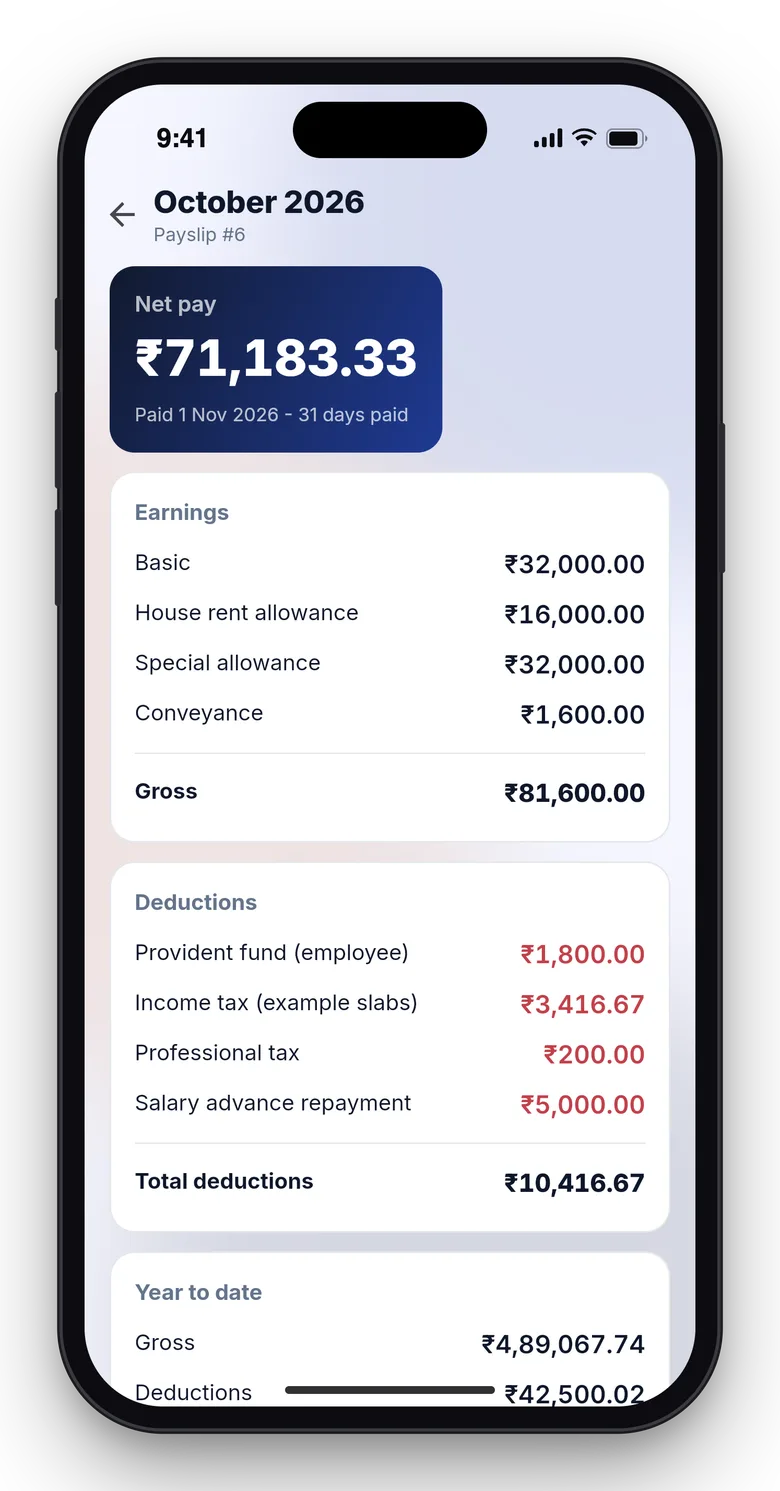
  • Employee self-service. Today and check-in, attendance, leave, payslips with PDF, claims, loans and profile on the web and in the Flutter app. A payslip verification page checks a code against the employer's record without showing salary.
  • Admin. Roles and grants, API keys, webhooks, audit trail and an installer. Demo data has two example companies and twelve months of runs.

Flutter employee app

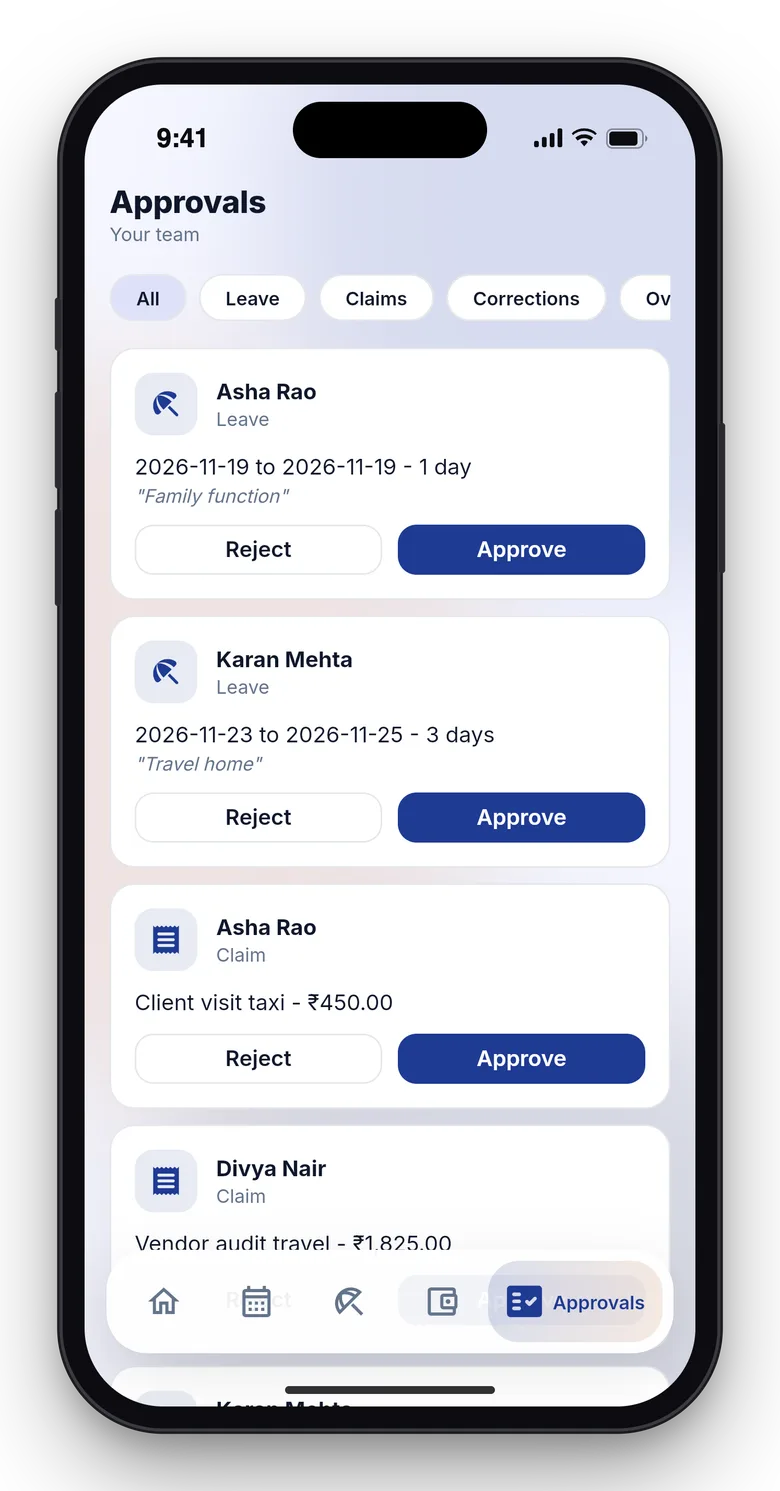
The package includes the Flutter source of the employee app (check-in with GPS and optional photo, attendance, leave, payslips, claims, loans, signing an HR letter with a drawn signature, and for managers approvals and a team-today view). A guide explains how to change the application ID, build and publish it to the stores under your own developer accounts. You do the publishing and the store review yourself.

Quality checks

The release passed seven gates on the final code: Larastan level 6 with no baseline, Pest, a build inside the page budget, migrations and the full demo seed on MySQL 8 and SQLite, a headless smoke test, race checks on MySQL, the installer driven from the zip and a secret scan. Pay-run arithmetic is checked against 107 independently computed vectors.

What you should know before buying

  • Rules are yours to set and verify. Pay components, tax slabs and contributions are configurable rules; the shipped presets are examples, labelled "example, verify locally". Check every figure for your country before paying anyone.
  • No certified statutory filing. There is no e-filing and no government portal submission. CSV and PDF exports feed your accountant or filing tool.
  • No money moves. Bank payments are exported as files; Payquill pays nobody.
  • Attendance limits. Check-in uses the phone's GPS with geofences and an optional photo. GPS can be spoofed on rooted or jailbroken devices: mock locations are flagged, not prevented. There is no support for biometric or face-recognition devices.
  • Scope. One currency per entity, monthly pay frequency in the screens, arrears carry no contribution unless you add a one-off input, and every payroll claim is a non-taxable reimbursement.
  • Use MySQL or MariaDB for a live site. A cron entry every minute is required.

Included

Source code of the web panel and the Flutter employee app, the web installer, a buyer guide, the store-publishing guide, demo data with two fictional companies and six months of support.

How it's built

Architecture, stack, key decisions and the quality gates DEV3 Payquill passed before release.

The engineering behind Payquill: formula pay components with a pure calculator, pay runs with locks and a second approver, bank files that cover every payable person once and GPS punches checked against geofences.

The problem it solves

Payroll looks like a spreadsheet until a revision arrives after a run is approved, a held person is released after the bank file went out, or a settlement is edited after its period locked. Each must end with figures that still add up and an audit trail that says who changed what.

Architecture and approach

Payquill is a Laravel 12 application with a Filament 4 admin panel, web self-service pages and a Flutter employee app (source and a store-publishing guide included) on one REST API, including letter signing and a manager's team-today view. Pay components are formulas evaluated by a pure calculator, so a payslip can show how each line was computed. Pay runs move through a state machine with pre-checks, variance warnings, hold and release, a second approver and period locks that also cover full-and-final settlements. Bank files record whom they pay, so a person released later lands in a supplementary file. Attendance punches are checked against site geofences and flagged, not trusted. payquill:check reconciles the demo data after the seed.

Quality gates and results

The release passed seven gates, including race checks on MySQL and 107 pay-run vectors computed by an independent oracle. The demo holds two fictional companies with twelve months of runs, loans, claims, leave and tens of thousands of attendance days. The package states plainly that rules are configurable, presets are examples to verify locally, and there is no certified statutory filing.

Tech stack

Area Technologies
Application Laravel 12, Filament 4, Blade, REST API
Mobile Flutter, Dart
Data MySQL 8, SQLite
Quality Pest, Larastan level 6, Playwright

Inside the build

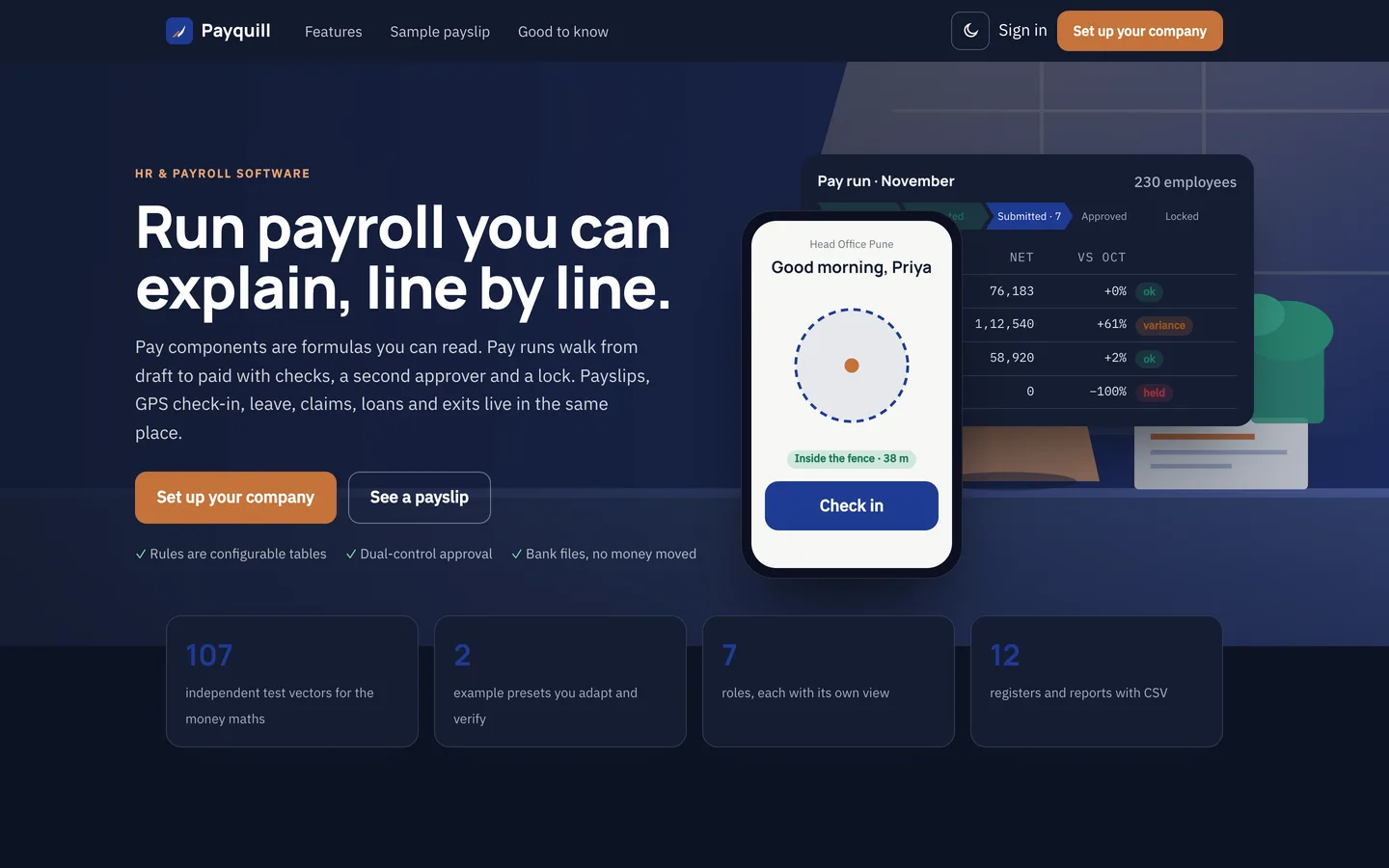
Run payroll you can explain: The hero: an empty desk in morning light, the pay run screen and the phone check-in. Run payroll you can explain — The hero: an empty desk in morning light, the pay run screen and the phone check-in.

Hero in the dark scheme: The same page after the theme switch. Hero in the dark scheme — The same page after the theme switch.

Guides & articles

Practical guides and engineering write-ups for DEV3 Payquill.

HR and payroll software: 7 things to check before you pick one

Last updated
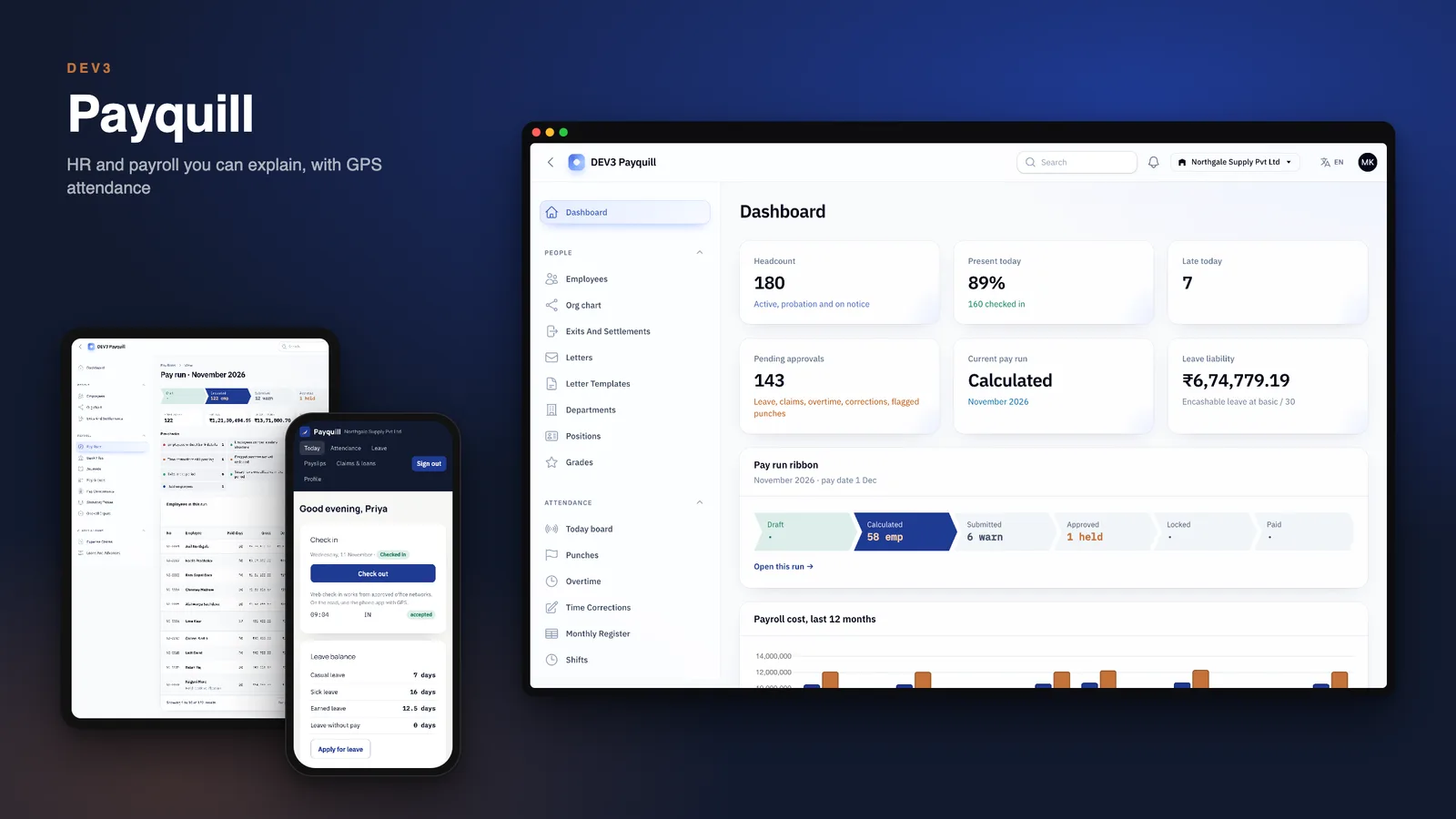
HR and payroll software: 7 things to check before you pick one: DEV3 Payquill

Payroll rarely goes wrong in the arithmetic. It goes wrong in the gaps: the revision nobody saw, the person held and forgotten, the payslip nobody could explain. Here are seven things to check before you pick HR and payroll software, with DEV3 Payquill as the worked example.
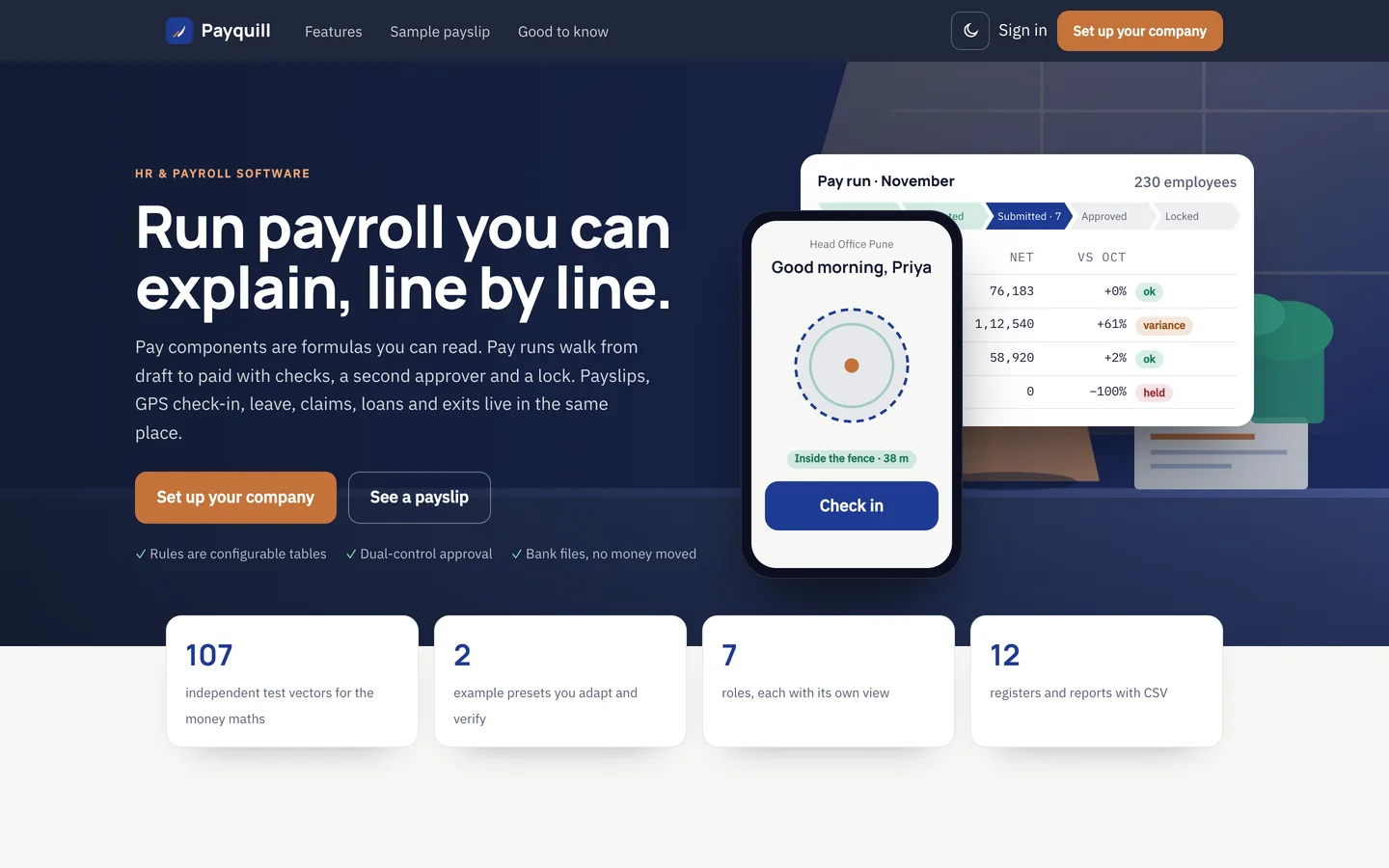
Payquill home page: the pay run ribbon beside a phone check-in card

1. Can you explain every line of a payslip?

Pay components should be rules you can read, not a black box. Payquill stores them as formulas with a live preview, so changing basic pay shows the effect before you save it. The shipped presets are examples labelled "verify locally": you own the rules for your country.
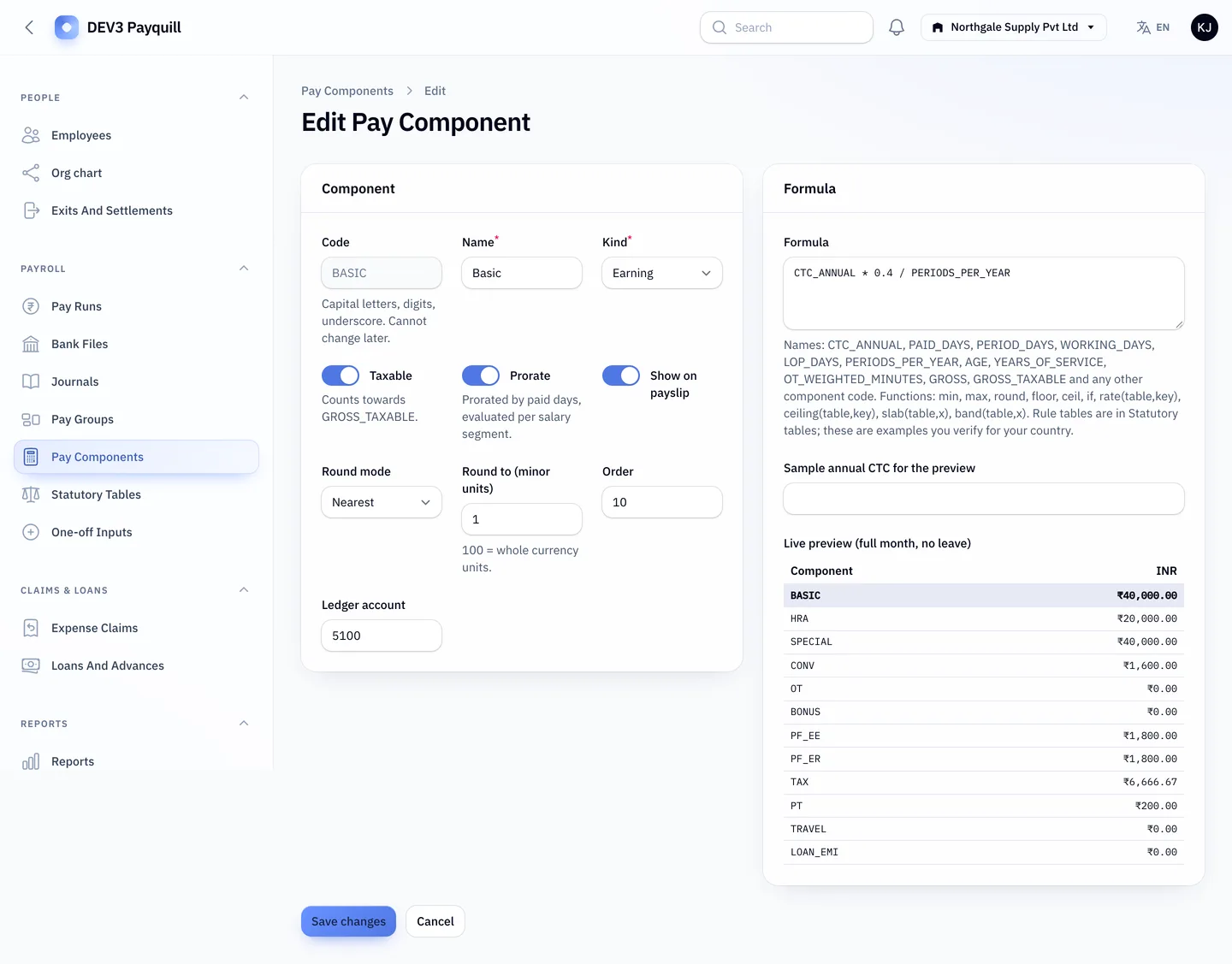
The formula editor with a live preview

2. Does a pay run have a second pair of eyes?

Look for pre-checks, a comparison with last month and a second approver. Payquill flags big swings, blocks a negative net and lets you hold one person without stopping the rest.
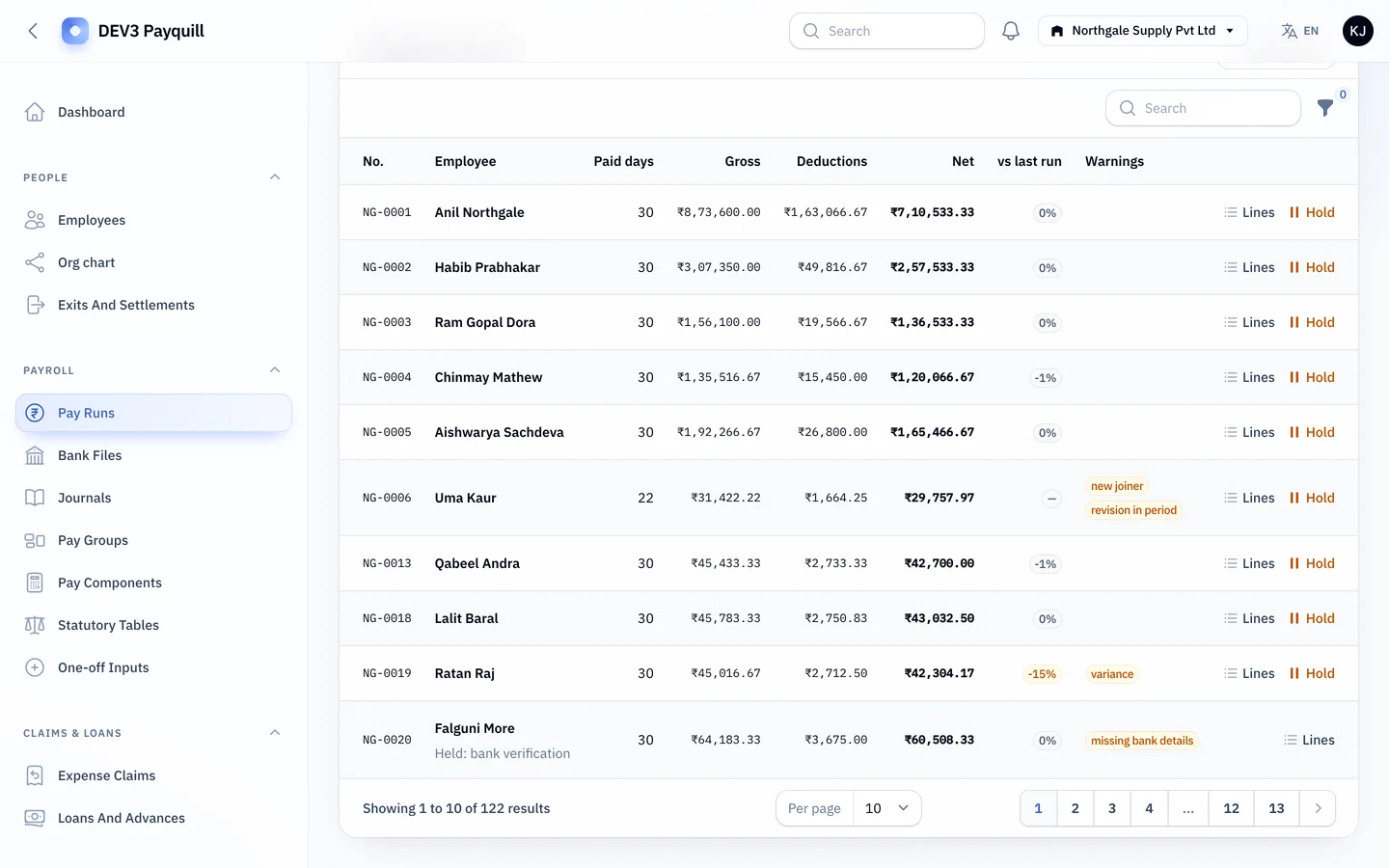
A pay run with checks and variance

3. Do locked periods stay locked?

Once a period is locked, edits and settlements for it should be refused, and a correction should arrive as arrears or a reversal with a trail.
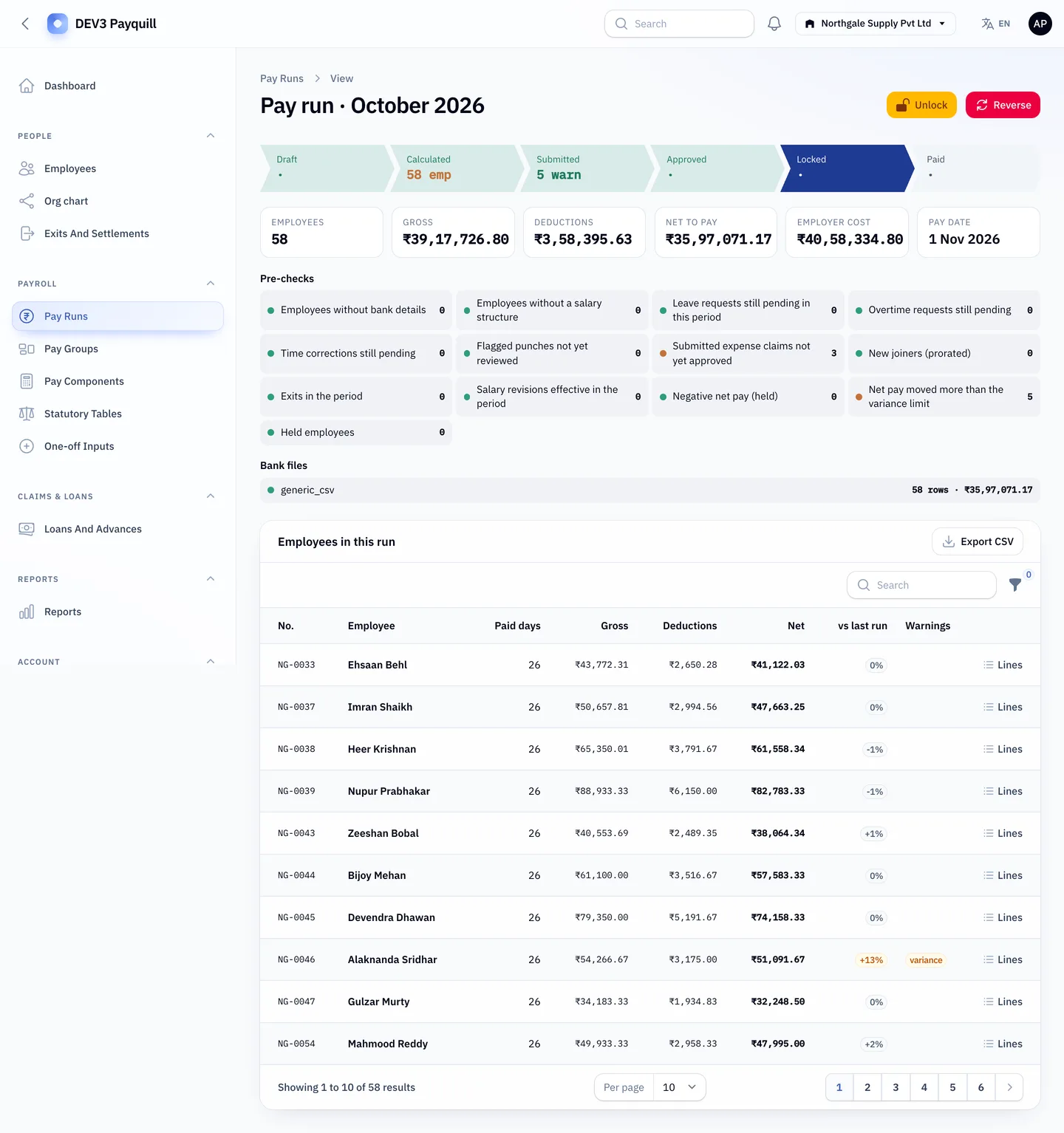
A locked pay run

4. Is attendance more than a time sheet?

Check-in from the phone with GPS, a fence you can size on a map and a place to review flagged punches. Be honest about limits: GPS can be spoofed on rooted devices, so mock locations are flagged, not prevented, and biometric devices are out of scope.
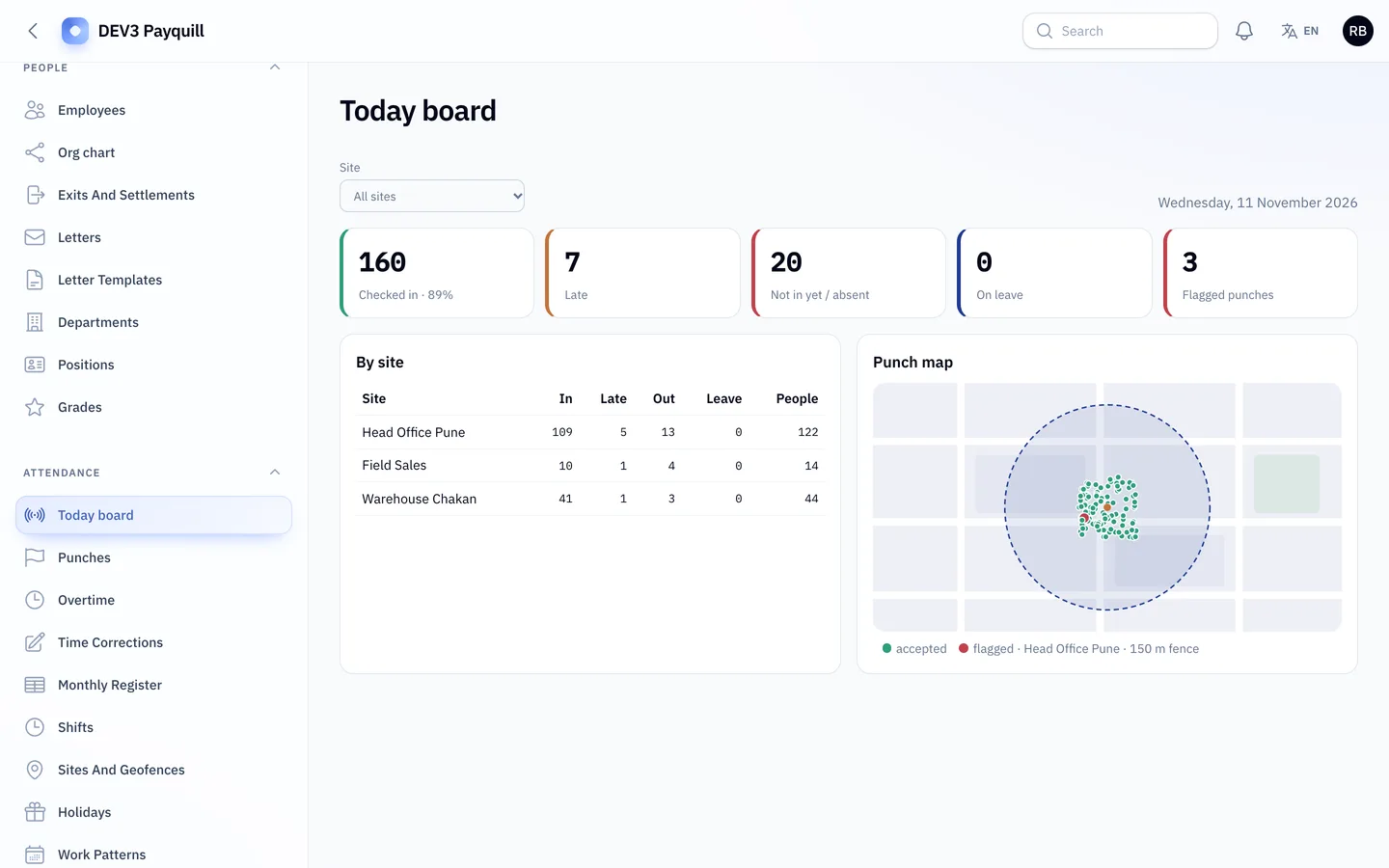
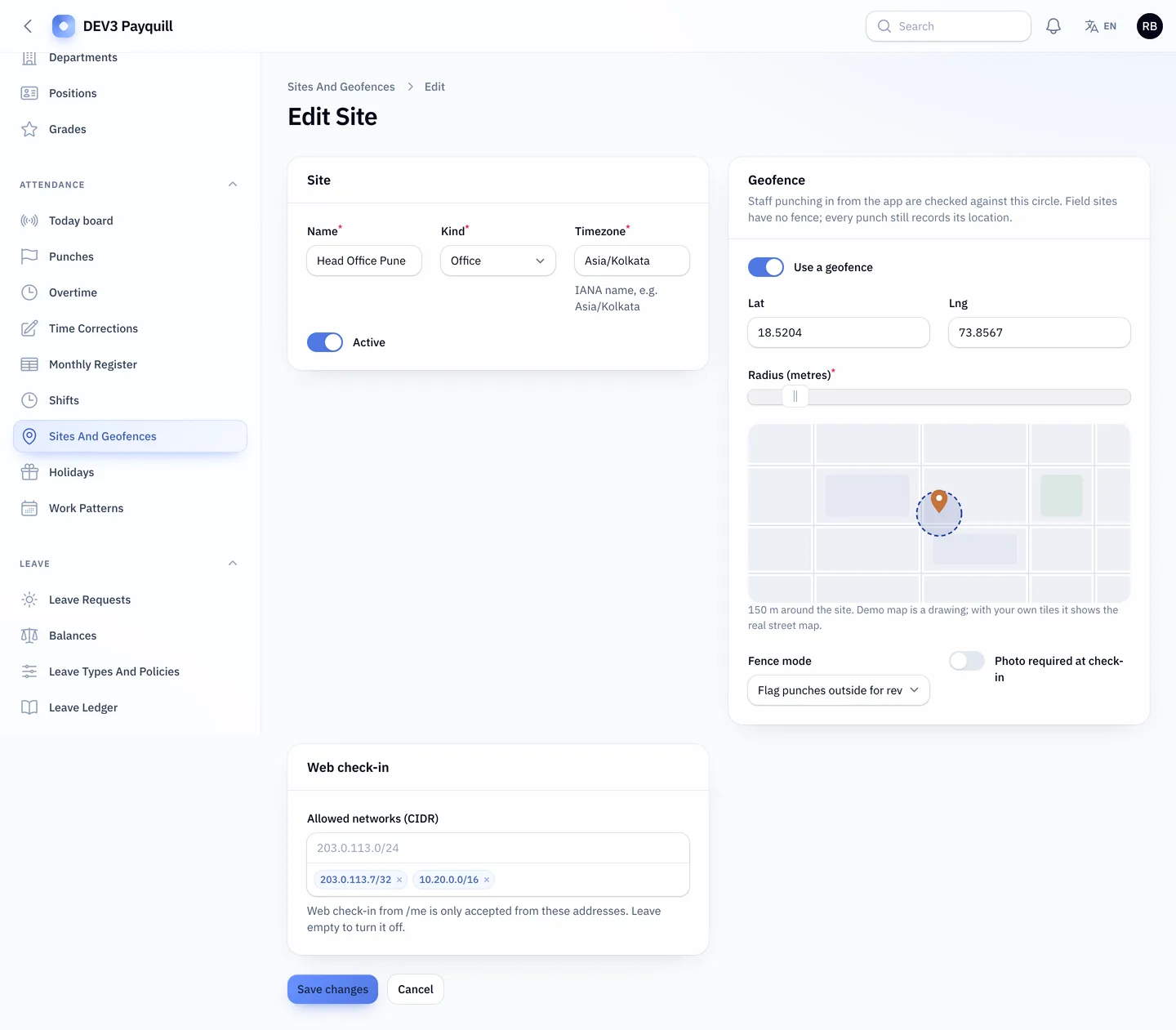
Today board with the punch map

Sites and geofences

5. Can employees see their own payslips?

A payslip with a PDF and a code anyone can check without seeing the salary reduces questions to HR.
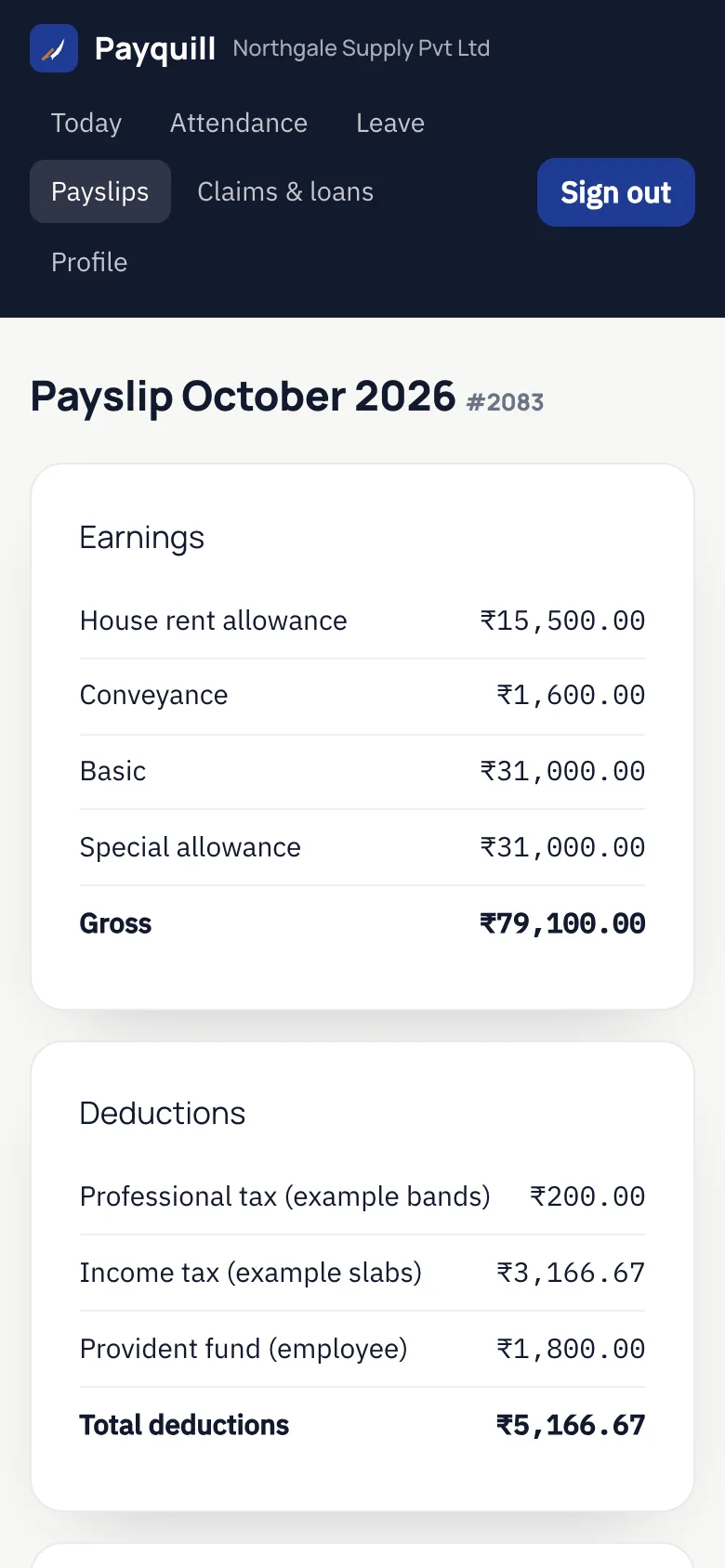
An employee payslip on a phone

6. Is there a phone app, and who publishes it?

Payquill includes the source of a Flutter employee app on the same REST API: check-in with GPS, attendance, leave, payslips, claims, loans, signing an HR letter with a drawn signature, and a manager view with approvals and who is in today. A guide in the package explains how to change the application ID and build and publish it under your own store accounts. You do the publishing and the store review yourself.
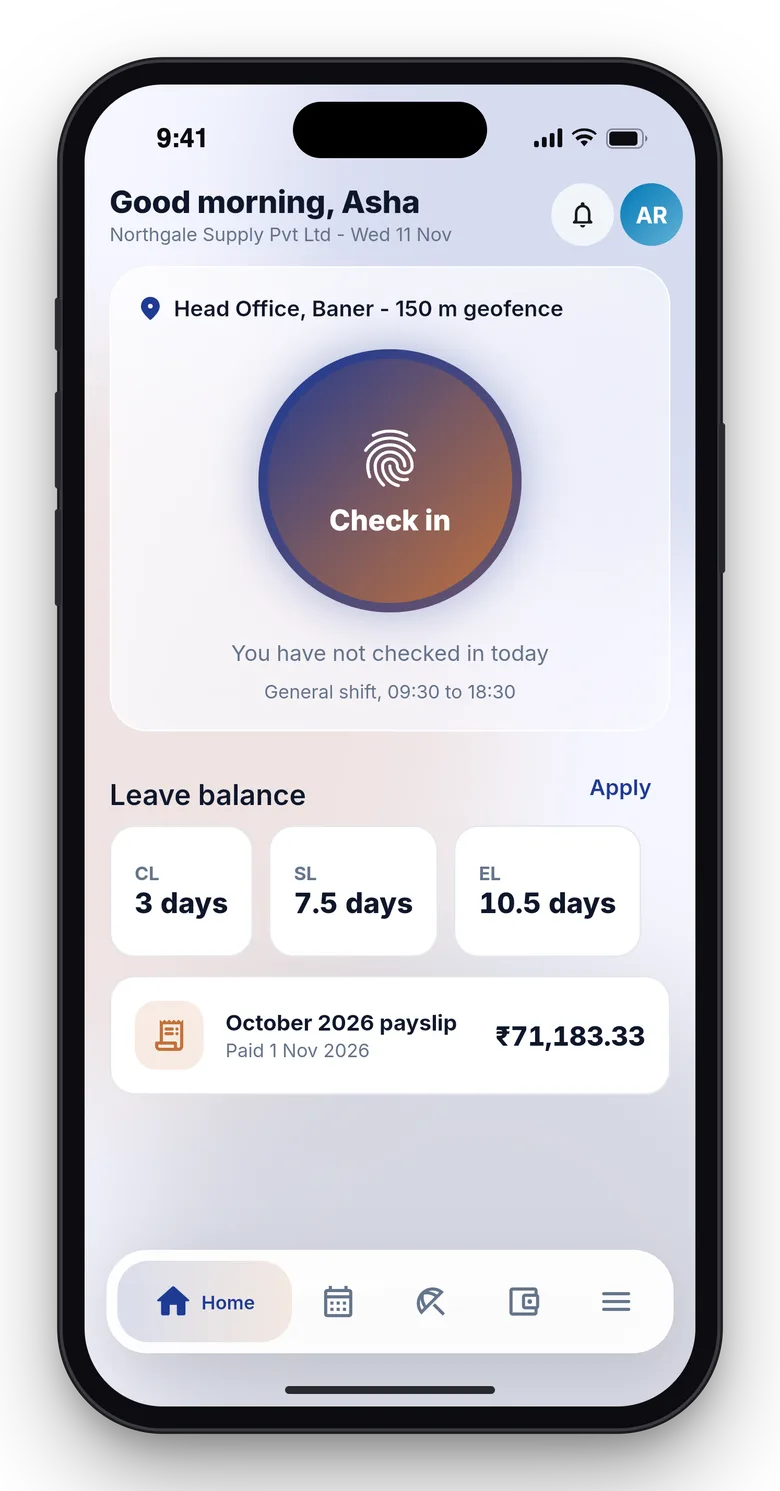
The employee app home

App check-in against the geofence

An app payslip

Manager approvals in the app

7. Are the limits honest?

Payquill ships configurable rules, not certified statutory filing: there is no e-filing or government portal submission, and bank payments are exported as files. It is one company per install (several legal entities kept apart), with a web panel and a Flutter employee app source whose store publishing is your step.

Video: The Payquill tour

Frequently asked questions

The complete source code (version 1.0.1) as a download from your account, with the setup and usage guides shown on this page. You can modify the code to suit your product.

Buying guides: Laravel scripts with Filament panels and a web installer · Next.js or Laravel for a SaaS script?

Questions about this product (0)

Answers from the DEV3 team and the community.

Ask a question

No questions yet.

Wondering about setup, licensing or customisation? Ask, and the DEV3 team will help.

More from this author

View all

Related in Web Scripts & Software

View all