DEV3 Technologies home

DEV3 Crawlbeck – Website Audit & Rank Tracker SaaS Laravel Script with White-Label Reports, Scheduled Re-Crawls

A self-hosted website audit crawler and rank tracker for agencies on Laravel 12 and Filament 4: 60 checks, scheduled re-crawls with diffs, rank tracking via your own provider, white-label reports and client logins. Web installer and demo data included. No mobile apps.
by DEV3 TechnologiesVerified Author(0) 0 sales 0 viewsUpdated 10 Nov 2026

Launch Offer: up to 50% off

This item is 50% off: $24.50 instead of $49

Ends in
--
Days
--
Hrs
--
Min
--
Sec

Video tour. Pick a section below to browse 97 screenshots in 8 sections.

App & phone tours

Tap play to watch each app. Nothing downloads until you do.

  • Mobile web1:10

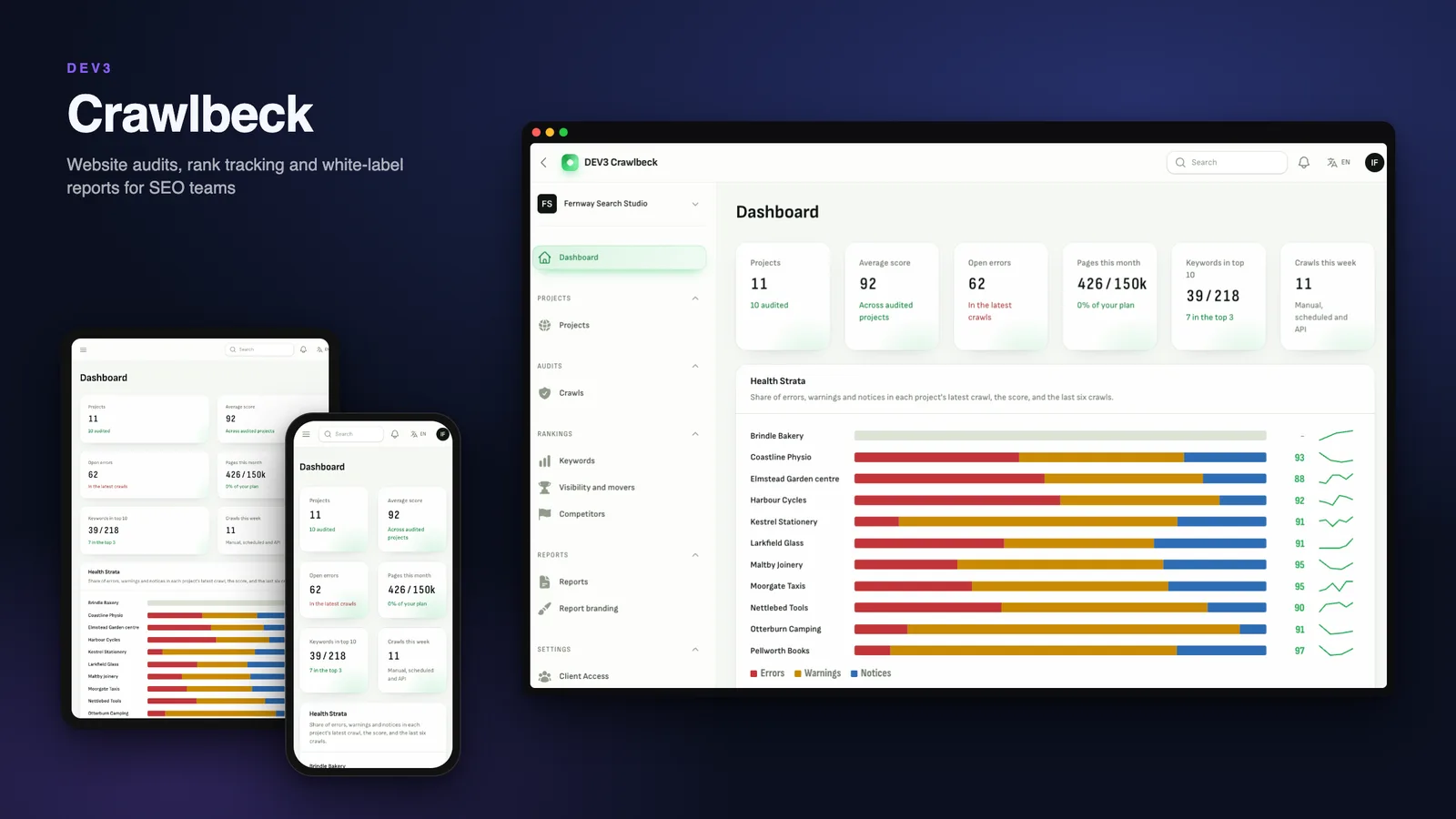
Crawlbeck is a website audit and rank tracking platform you host yourself, built by DEV3 Technologies on Laravel 12 and Filament 4. Each customer is a workspace (an SEO agency, an independent consultant or an in-house team) with its own projects, crawls, keywords and reports. You run it as the operator: plans, the crawl queue, the global blocklist and abuse reports live in a separate panel.

What it does

  • A polite crawler. It reads robots.txt first (RFC 9309), honours Crawl-delay, stops when robots.txt cannot be read, skips session-id and calendar traps and respects hard caps on pages, depth, body size, bytes and wall time. Every request goes through one pinned client that refuses private, loopback, link-local and metadata addresses and re-checks every redirect.
  • 60 checks with guides. Response codes, redirects, indexability, titles and descriptions, headings, content, links, images, structured data, sitemaps and international tags. Findings carry a severity and a weight and roll up into a score per area and overall.
  • Re-crawl and diff. Schedule daily, weekly or monthly. Each crawl is compared with the previous one: fixed and new issues, pages added or lost, status and title changes. Mark an issue ignored or a false positive with a note and the next audit remembers.
  • Page inspector and analysis tabs. Issues explorer, pages, redirects, broken links, duplicates, images, structured data and sitemaps, with headers, chains, headings and links in a side panel.
  • Rank tracking. Keywords with country, city and device, positions, movers, a visibility index and competitor overlay. Rank data comes from a search-results provider you choose and pay for: a Generic HTTP provider maps any JSON API, and nothing is called until you add one. A simulated provider ships for demos.
  • White-label reports. PDF and CSV in the customer's name and colour, share links with a password and an expiry that can be revoked, built for phones. Client viewers sign in and see only their own project.
  • Operator tools. Workspaces with meters, the crawl queue per plan, a global blocklist, trust reports, SERP usage counts, plans, subscriptions, invoices, outbox, audit log and audited view-only support sessions.
  • API and webhooks. Scoped keys, cursors, idempotent crawl creation, OpenAPI and HMAC-signed webhooks.
  • Marketing site and installer. A public site with a searchable check catalogue, pricing, API docs, English and Arabic, an optional "audit one page" teaser, and the web installer with demo data.

Good to know

  • Rank tracking needs your own search-results provider and API key; costs are billed by that provider.
  • The crawler needs outbound internet access from your server.
  • JavaScript is not rendered: pages are audited as served. There is no browser lab speed test and no backlink index.
  • You are the merchant of record for plan billing; payments run through simulated drivers until you add gateway keys.
  • The demo loads fictional agencies and sites served by the app itself; it never crawls a real host.
  • Web only: no mobile apps.

Quality

Pest and Larastan level 6 are green, MySQL race checks cover parallel crawl starts, quotas and rank claims, and an SSRF test set covers private addresses, DNS changes and redirects. Source code is included, with the DEV3 core and SaaS packages.

How it's built

Architecture, stack, key decisions and the quality gates DEV3 Crawlbeck passed before release.

The engineering behind Crawlbeck: a pinned HTTP client for every fetch, a queue-driven crawler with quotas that cannot overshoot, and diffs and reports that stay consistent.

The problem it solves

A crawler that fetches addresses chosen by customers is an SSRF machine unless every request is checked. DNS can change between a check and a connect, redirects can point at a metadata address, a gzip bomb can fill memory, and a workspace can start fifty crawls at once or race the monthly quota.

Architecture and approach

Crawlbeck resolves each host once, requires every answer to be public, pins the checked address for the connection and re-checks every redirect hop. Bodies are read through a capped sink that counts decoded bytes. The crawler is queue driven: URLs enter a frontier with an insert-ignore on a unique key, workers claim rows with SKIP LOCKED, and a single conditional update moves a crawl to finishing exactly once.

Page units are reserved from the monthly quota before each fetch, so four parallel crawls at the edge never overshoot. Scores, issue states and diffs are computed from stored rows, and a reconciliation command proves they agree.

Quality gates and results

The release passed seven gates, including MySQL race groups for parallel starts, quota edges, rank claims and report links. The reconciliation command passes on the demo data: ten workspaces, 46 projects and several hundred audited crawls.

Tech stack

Area Technologies
Application Laravel 12, Filament 4, Blade, REST API
Data MySQL 8, SQLite
Frontend Tailwind CSS 4, Vite
Quality Pest, Larastan level 6, Playwright

Inside the build

Find what is broken first: The home page pins a real score card and a rank chart on a surveyed site map. Find what is broken first — The home page pins a real score card and a rank chart on a surveyed site map.

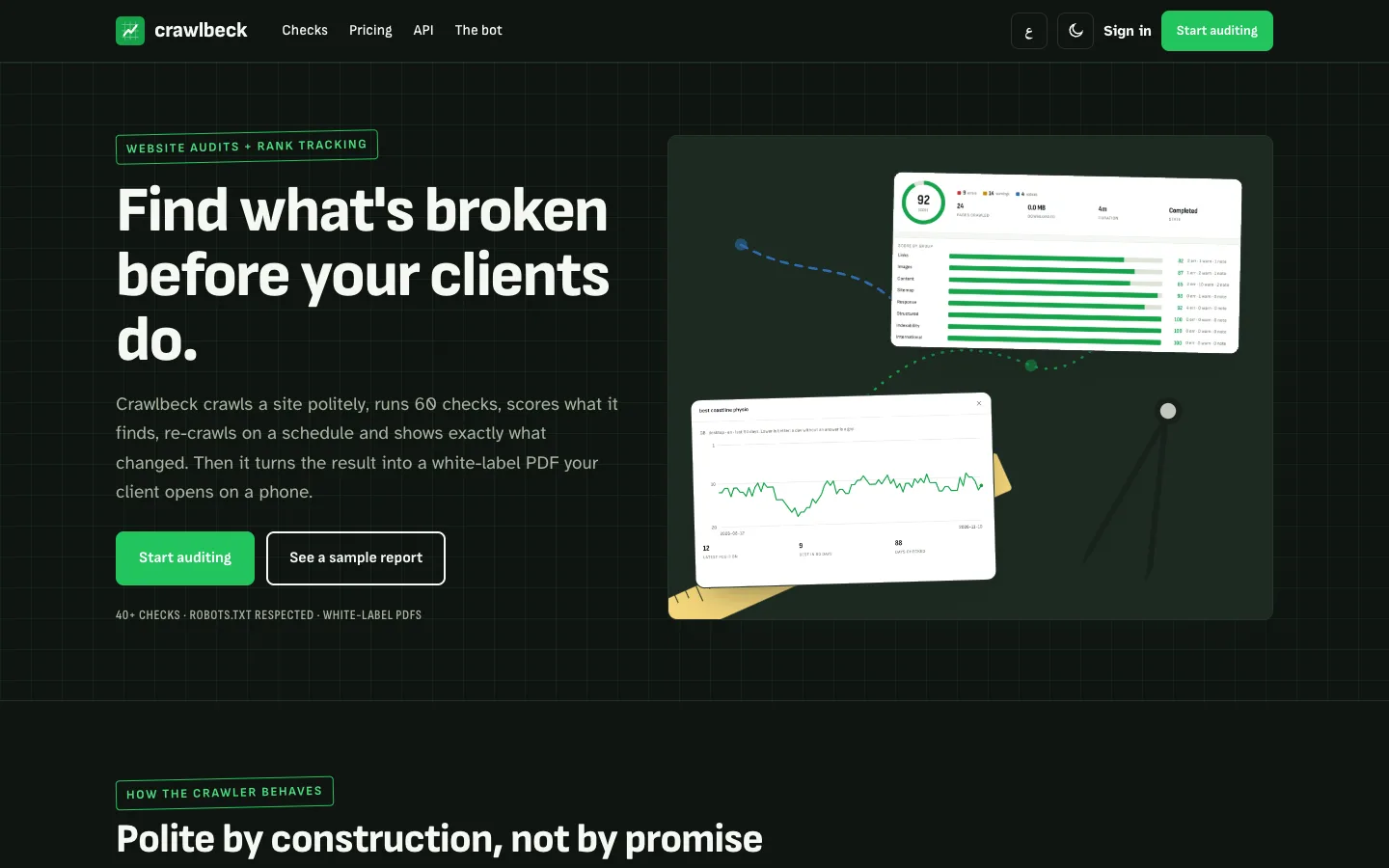
Home in dark mode: The site follows the visitor colour scheme with the same survey green accent. Home in dark mode — The site follows the visitor colour scheme with the same survey green accent.

Guides & articles

Practical guides and engineering write-ups for DEV3 Crawlbeck.

Website audit software: 7 things to check before you pick one

Last updated
Website audit software: 7 things to check before you pick one: DEV3 Crawlbeck

Agencies run audits every week, and the tool decides whether the result can be trusted and handed to a client. Here are seven things to check before you pick software, with DEV3 Crawlbeck as the worked example.
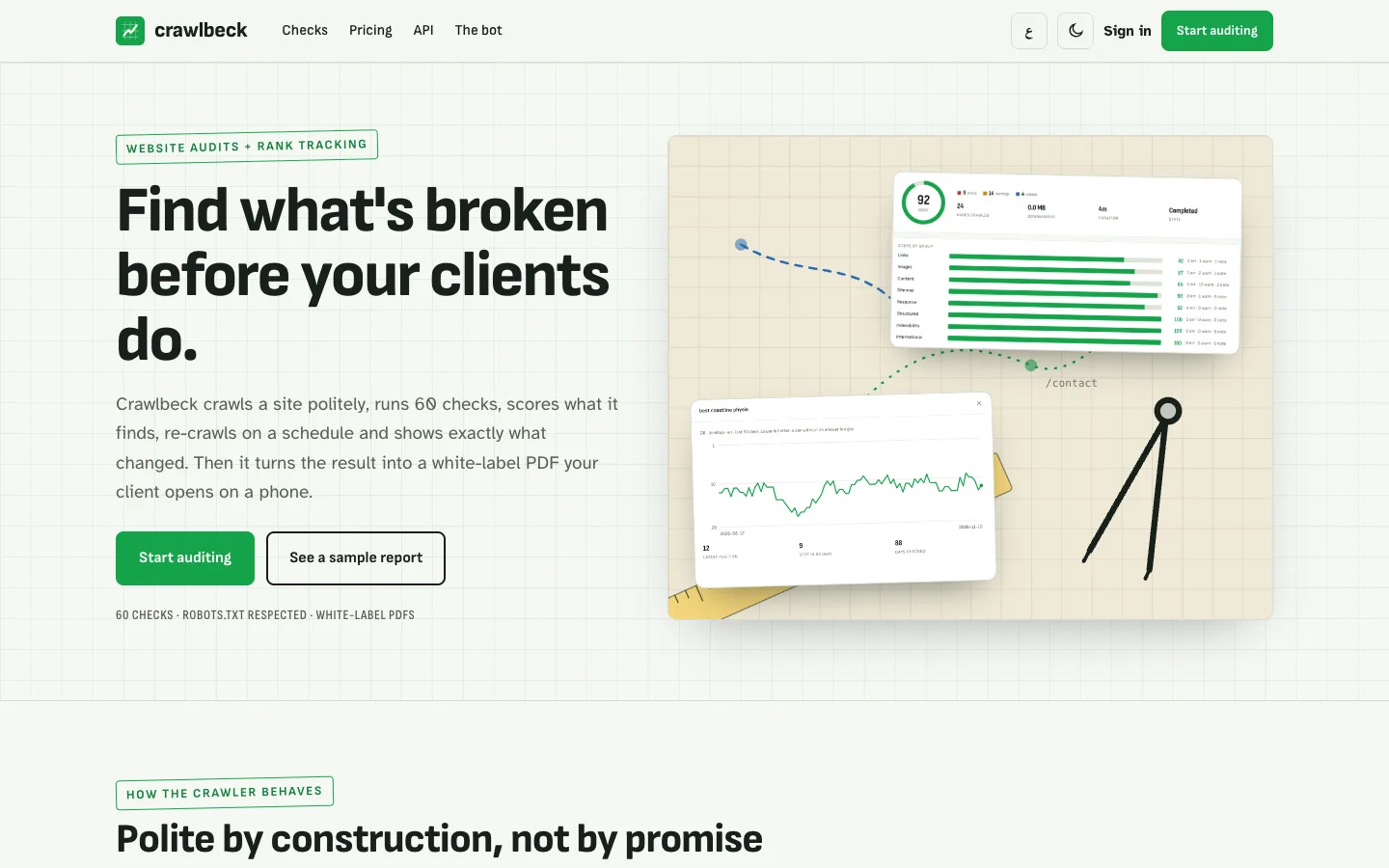
Crawlbeck home page: a score card and a rank chart pinned on a surveyed site map

1. Does the crawler behave?

A crawler that ignores robots.txt, hammers a server or can be pointed at a private address is a liability. Crawlbeck reads robots.txt first, honours Crawl-delay, stops when it cannot read it, refuses private and metadata addresses on every redirect and applies hard caps whatever the plan says.
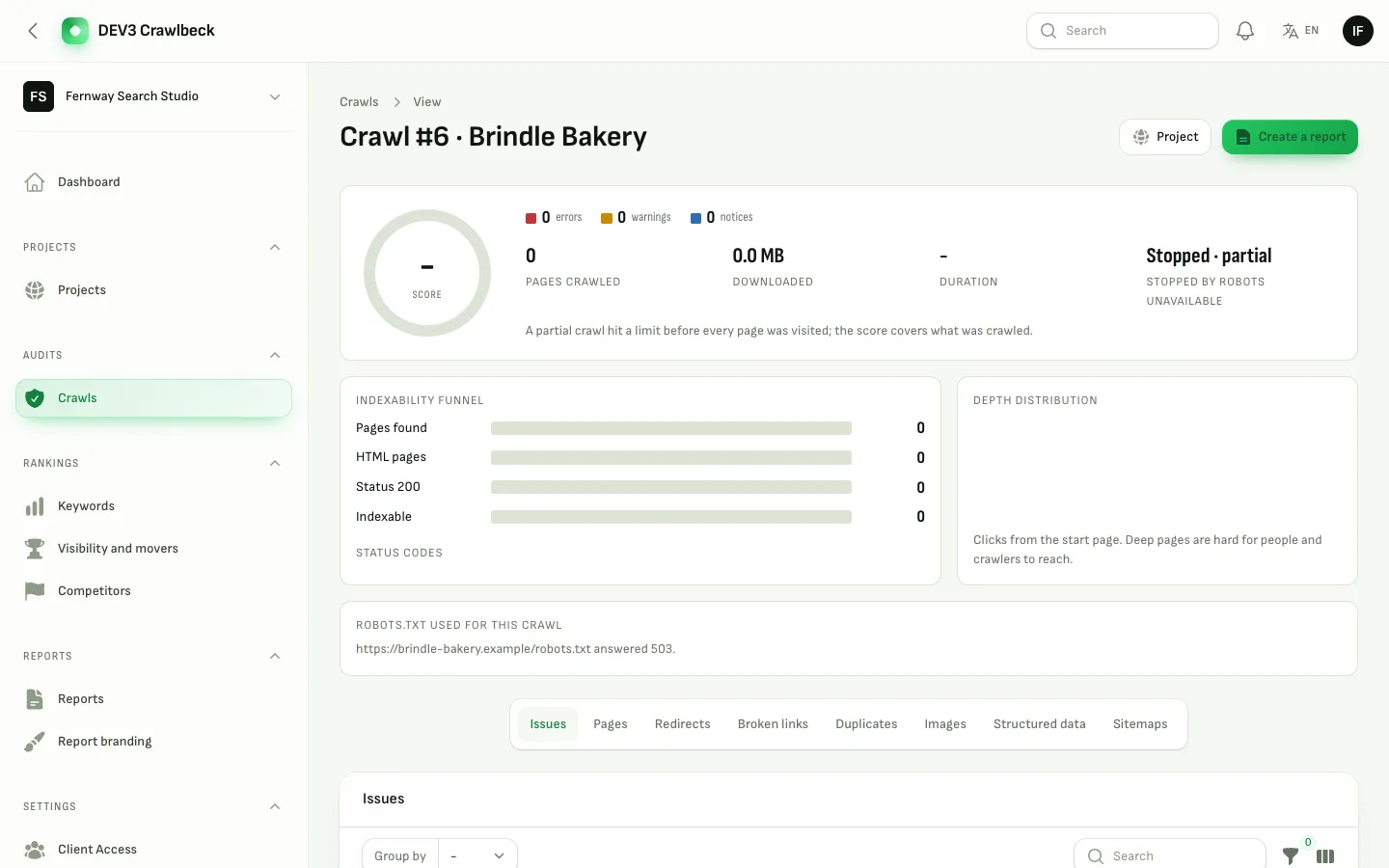
A crawl that stopped safely because robots.txt could not be read

2. Are the checks explained?

A score means little without the reason. Crawlbeck runs 60 checks, each with a severity, a weight and a short guide, and shows a score per area so you can tell a content problem from a server problem.
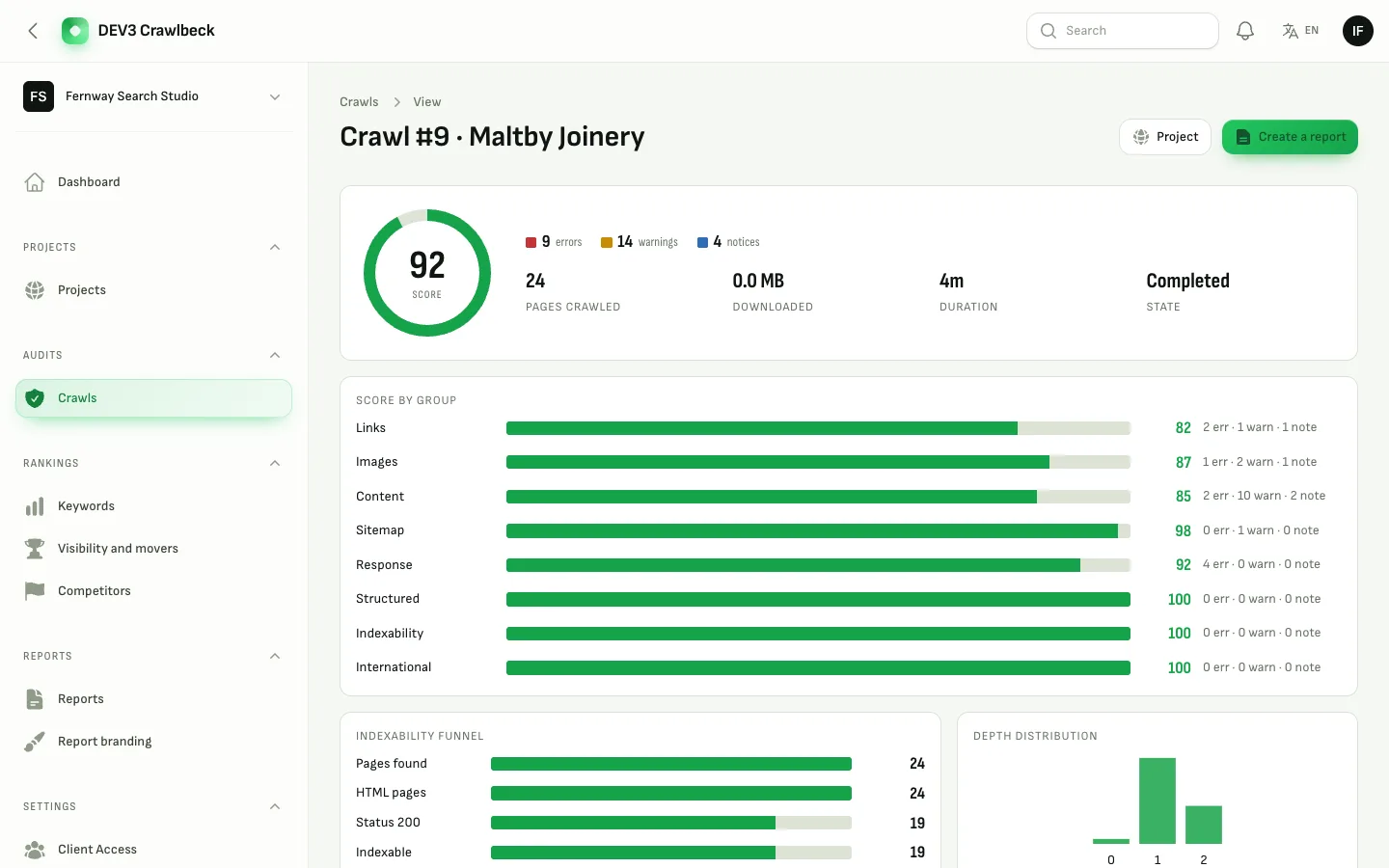
Crawl overview: score dial, severity counts and score by area

3. Can you inspect a single page?

When a client asks "why is this page flagged", you need headers, the redirect chain, headings, links in and out and structured data in one place, and the option to mark an issue as a false positive with a note.
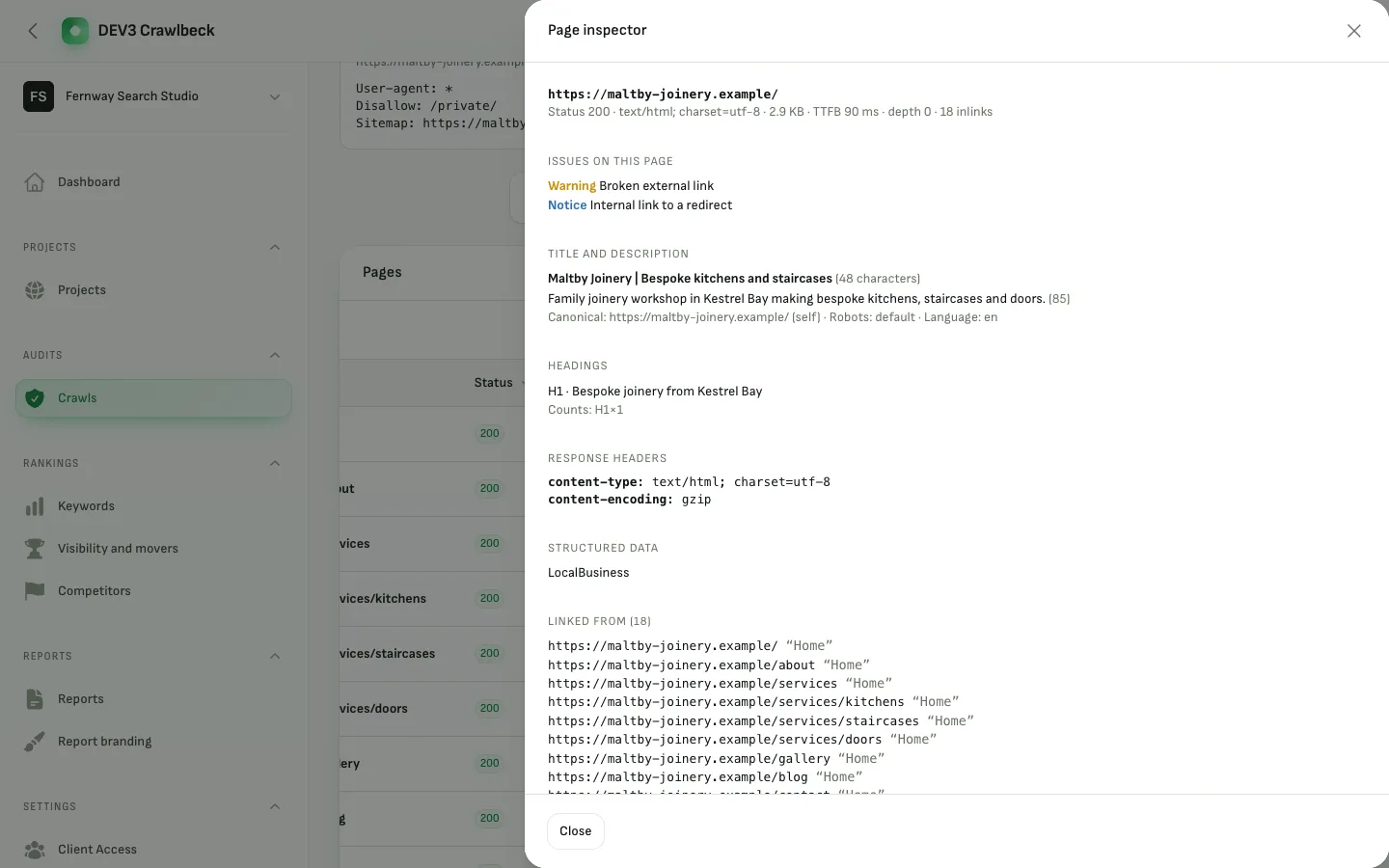
The page inspector open beside the list of crawled pages

4. Does it show what changed?

Weekly audits are only useful if you read the difference. Crawlbeck compares each crawl with the last: fixed issues, new issues, pages lost and score movement.
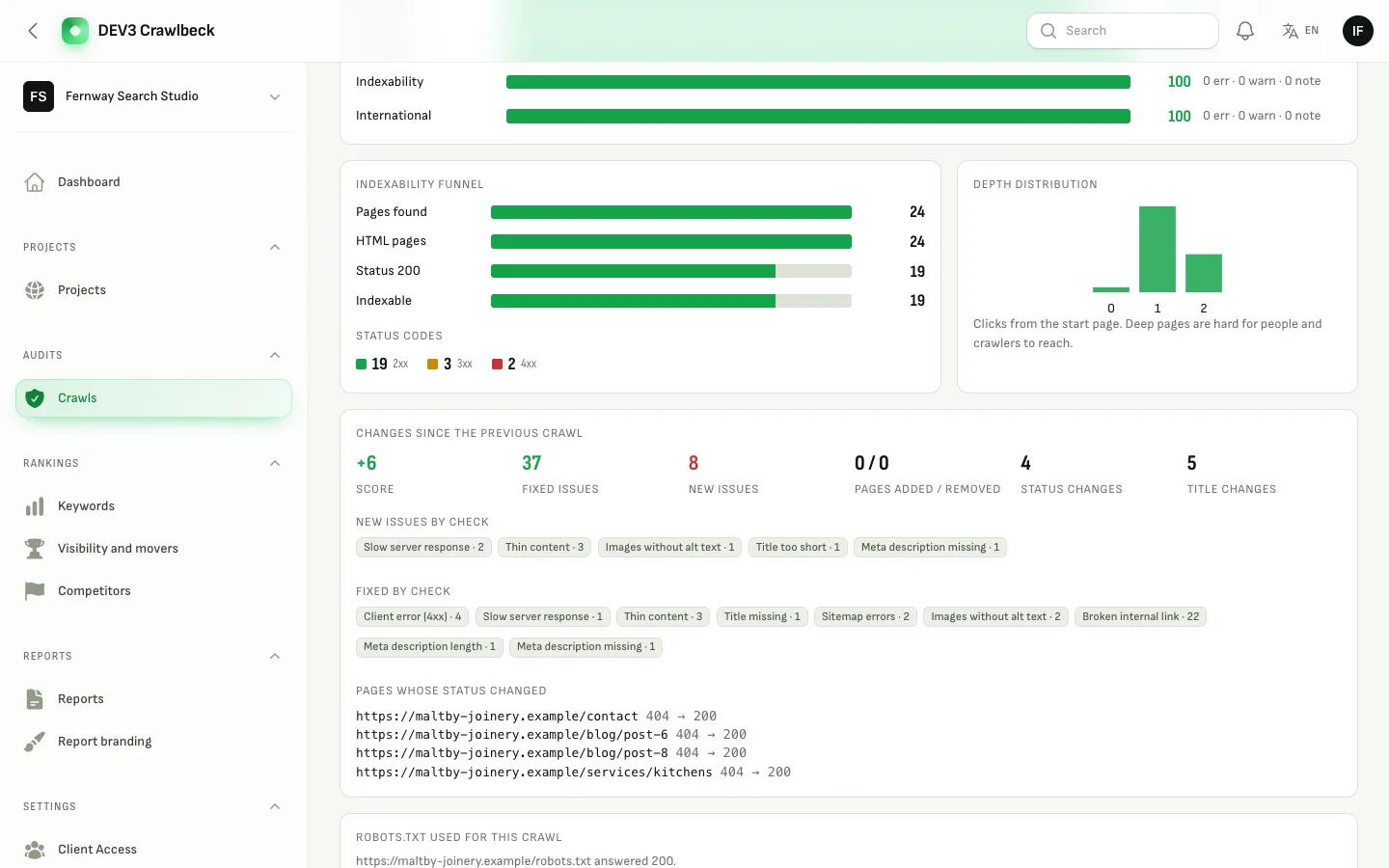
Changes since the previous crawl: fixed and new issues by check

5. Where does rank data come from?

Be wary of any self-hosted tool that claims rank data without a provider. Crawlbeck tracks positions through a search-results API that you choose and pay for, and calls nothing until you add one. Gaps stay gaps instead of turning into zeros.
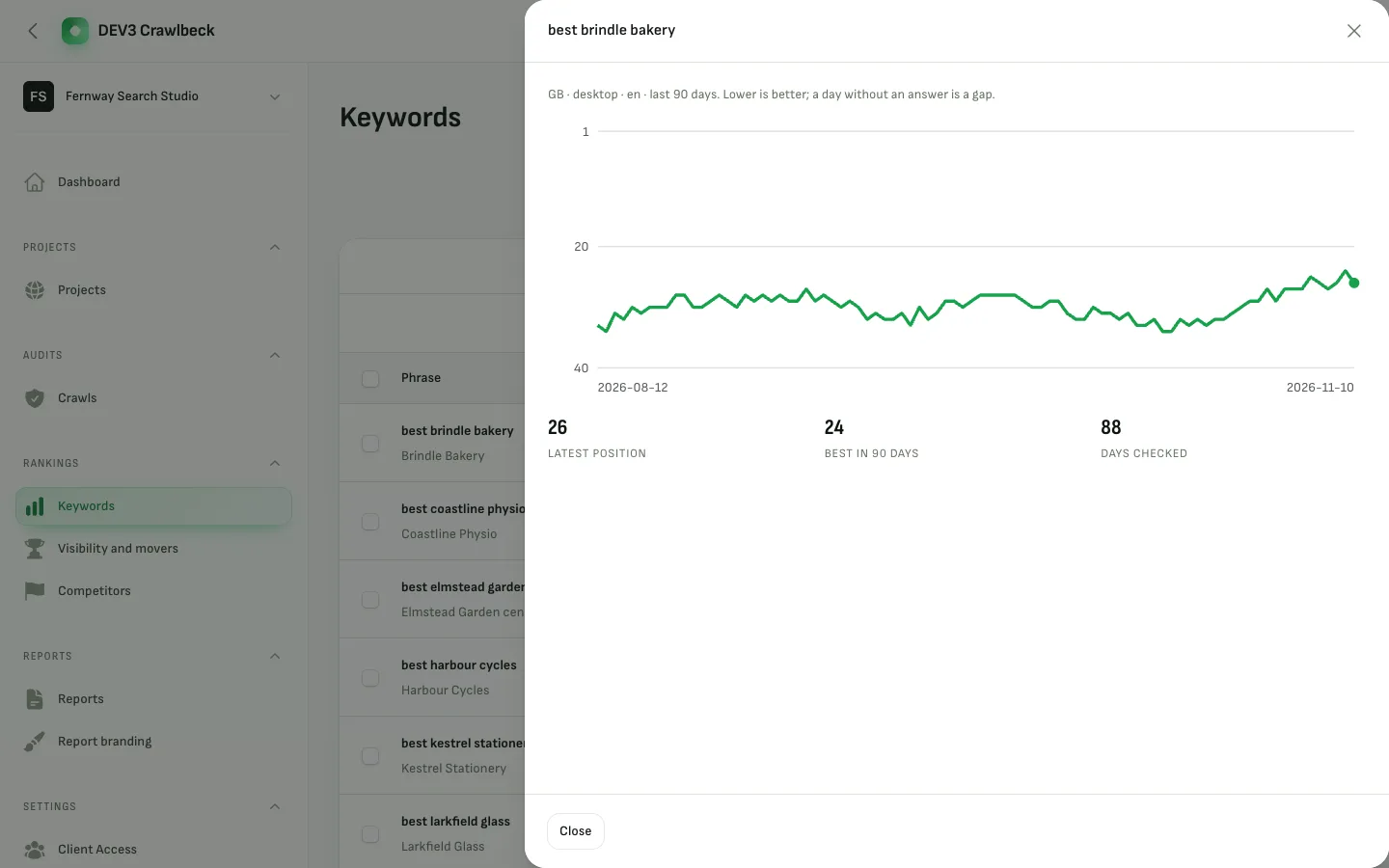
Ninety days of positions for one keyword

6. Can the client read the report?

Most clients open reports on a phone. White-label PDFs and CSVs are a start; a private share link with a password and an expiry, built mobile first, is what gets read.
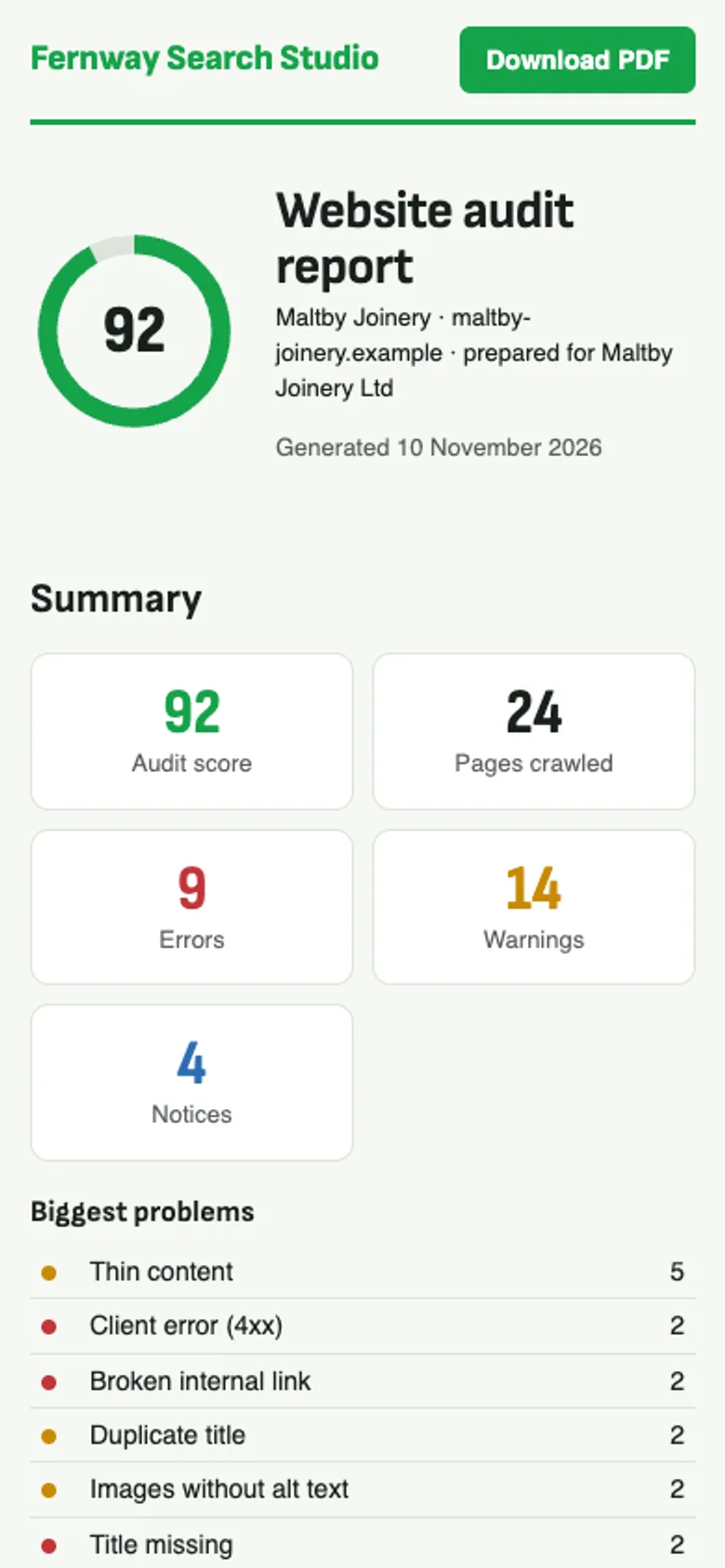
A shared report on a phone with the score dial and the biggest problems

7. Who runs the safety net?

If you sell the platform you need a global blocklist, a place for abuse reports, audited support sessions and a view of the crawl queue.
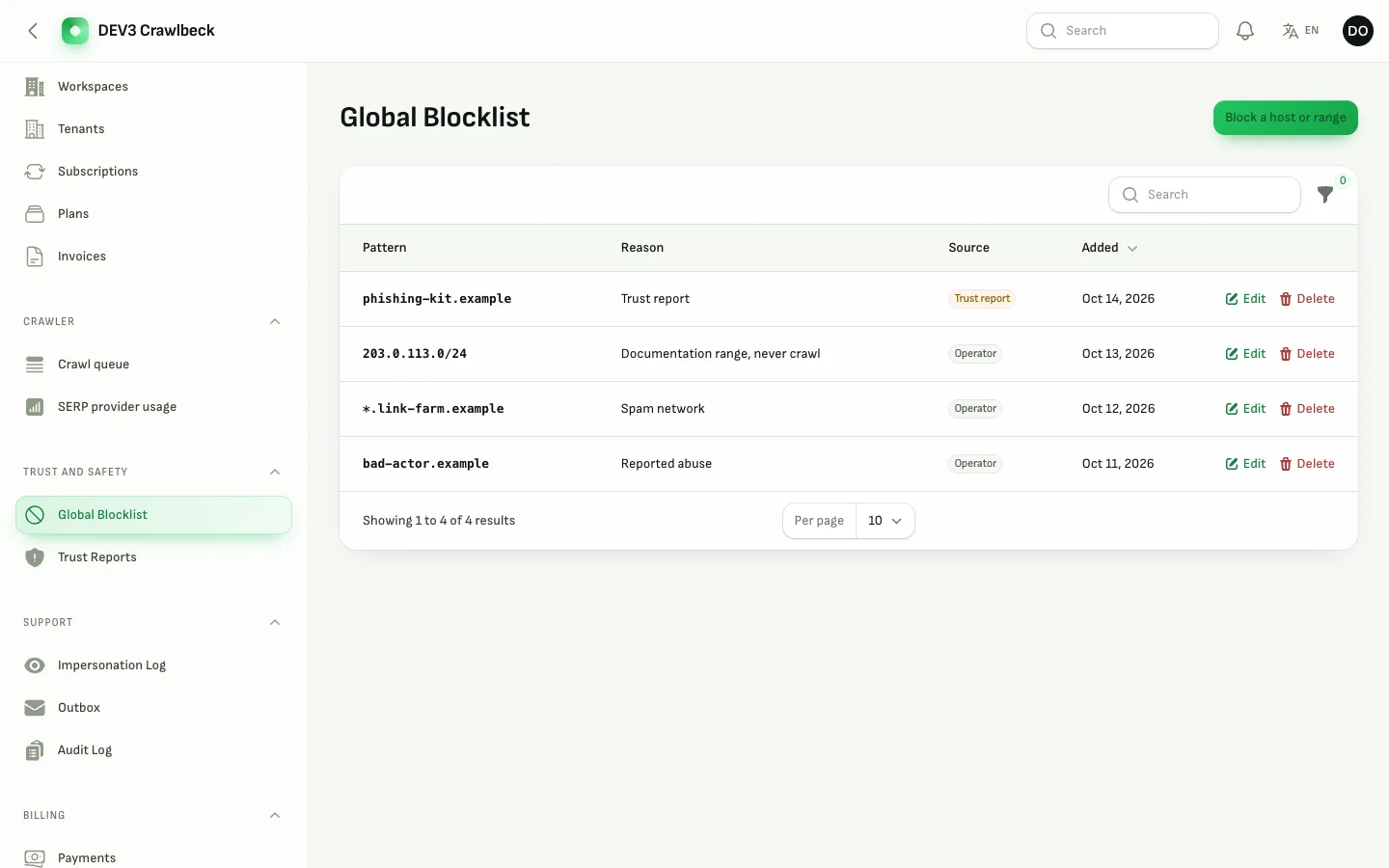
The operator global blocklist

Watch the tour

Video: Crawlbeck desktop tour

If you want to see how it holds together, read how Crawlbeck is built.

Frequently asked questions

The complete source code (version 1.0.0) as a download from your account, with the setup and usage guides shown on this page. You can modify the code to suit your product.

Buying guides: Laravel scripts with Filament panels and a web installer · Next.js or Laravel for a SaaS script?

Questions about this product (0)

Answers from the DEV3 team and the community.

Ask a question

No questions yet.

Wondering about setup, licensing or customisation? Ask, and the DEV3 team will help.

More from this author

View all

Related in Web Scripts & Software

View all