All case studies

DEV3 Technologies · own product

Plan Pro: personal and company finance plus work planning in one multi-currency app

Our own product: a Next.js and MongoDB app where one person runs personal money, company books and work planning side by side, with six currencies, loans and EMIs, net worth, trips, invoices, payroll, forecasts, financial statements, projects, tasks and OKRs.

Industry
Personal & small-business finance

Live project preview

DEV3 Technologies · own product — screenshots
Open live demo
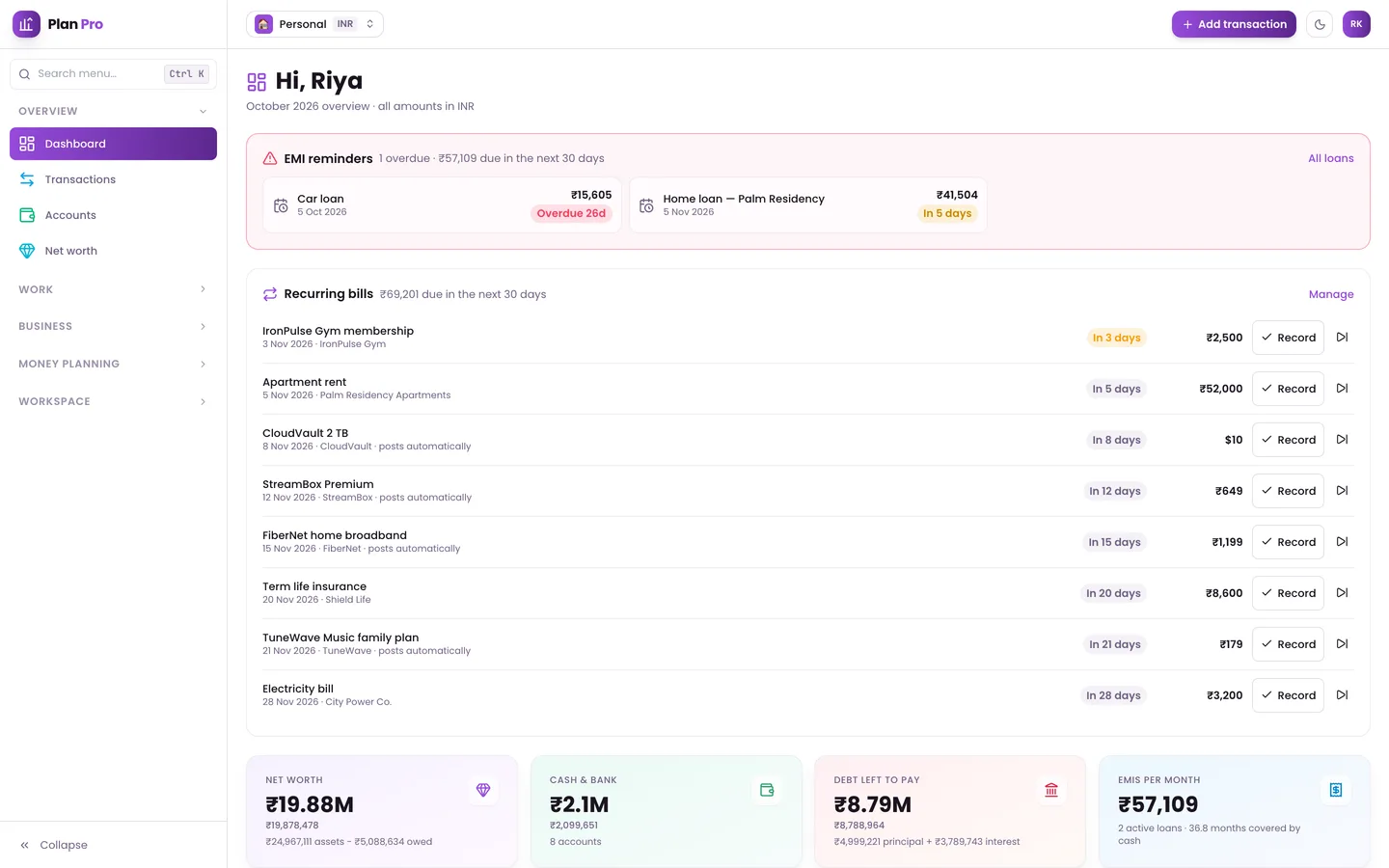
Dashboard — EMI reminders, upcoming recurring bills and net worth at a glance.

Dashboard — EMI reminders, upcoming recurring bills and net worth at a glance.

The challenge

Founders and freelancers often run their household, a company and sometimes a clinic or second business at the same time. Their money lives in a budgeting app, a spreadsheet of loans, an invoicing tool and a bank portal, often in more than one currency, while their work lives in a separate task app. Nothing adds up to one picture of net worth or cash runway, exchange rates change the past every time a report is run, and expenses shared with friends or a team never land cleanly in anyone's books.

Our solution

We built Plan Pro as one Next.js 15 application on MongoDB with workspaces as the unit of everything: books, base currency, categories and members.

Key design decisions

  • Three amounts per transaction. Every transaction stores the original amount, the account amount and the base amount, with the day's exchange rate frozen, so reports never change when rates move later. Rates come from reference rates and are sanity-checked before they are stored.
  • Engines, not spreadsheets. Loans produce full amortisation schedules (reducing balance or flat rate) and post principal and interest to the ledger; the forecast projects 90 days of cash from recurring items, EMIs, invoices and payroll with a Monte Carlo range.
  • Shared costs that reach your books. Trip expenses in any currency split equally, by shares, by percentage or exactly, with settle-up suggestions, and each person's share is posted to their own books.
  • Company operations on the same ledger. Invoices, payroll runs, expense claims and company debt all post to the books, so the profit and loss, balance sheet, cash flow and VAT/GST statements come from one source.
  • Sign-in that a password alone cannot bypass. Passwords and emailed codes are checked by the app's own routes, which issue a single-use two-minute ticket to the session layer, so unverified accounts and two-step sign-in cannot be skipped. Rate limits live in MongoDB and hold across instances.
  • Works offline. A service worker and an IndexedDB queue keep the app usable without a connection and sync changes when it returns.
  • A safe public demo. Read-only mode refuses server actions, mutating API routes and, as a last line of defence, every database write.

Results

Plan Pro ships as a complete, sellable product with a public read-only demo full of fictional data. By the numbers, counted from the source:

  • 6 currencies with frozen per-transaction rates, across unlimited workspaces
  • 5 team roles, from Owner to Viewer
  • 48 pages, 73 API routes and 39 Mongoose models
  • 15 Vitest test files covering money, FX, budgets, periods and sign-in throttling

It deploys as a standard Next.js app with a daily cron, and is available on the DEV3 marketplace.

Setup guide

Requirements

  • Node.js 20.9 or newer and npm
  • MongoDB 5 or newer (a local server or any hosted MongoDB)
  • SMTP for production email. In development, leave SMTP_HOST empty and every email, including sign-in codes, is printed to the server console.
  • Optional: S3- or R2-compatible storage (a local folder is used otherwise), a Google OAuth client, and an AI API key for receipt and statement scanning

Install

  1. Download the ZIP from your DEV3 account and unzip it. Open Documentation/index.html in a browser for the full guide.

  2. Copy the environment template and fill it in:

    cp .env.example .env.local
    

    Set MONGODB_URI and MONGODB_DB, and random values for AUTH_SECRET, OTP_PEPPER and CRON_SECRET. The comments in the file explain the optional email senders, storage, Google sign-in and AI settings.

  3. Install the dependencies and start the app:

    npm install
    npm run dev
    

    Open the address it prints and create your account; the verification code appears in the console until SMTP is set.

  4. Optional demo data: npm run seed:demo wipes and fills one demo database with fictional data for every module. It only accepts database names ending in _demo or _test and makes no network or AI calls.

Production

  • Build and start: npm run build and npm start, or deploy to Vercel. Set NEXT_PUBLIC_APP_URL and AUTH_URL to your public address.
  • Cron: call these routes with Authorization: Bearer <CRON_SECRET>: /api/cron/emails every 5 minutes (email retries) and /api/cron/daily once a day (exchange rates, prices, recurring posts, net-worth snapshots, recurring tasks and overdue invoices). On Vercel, vercel.json already schedules the daily job.
  • Email senders: set the MAIL_FROM_* addresses for sign-in, alerts, reports and billing mail, and MAIL_REPLY_TO.
  • npm run typecheck, npm run lint and npm test check the code.

Updates

Download the new version from Account → Downloads on dev3.tech. Keep your own changes on a branch and merge the new release into it.

How to use

Try the live demo

The live demo is read-only and filled with fictional people, companies and figures. The sign-in page has one-click demo accounts (password Demo@12345):

  • owner@planpro.test – personal books plus a studio and a family clinic workspace
  • admin@planpro.test – the studio admin: members, invoices, payroll and approvals
  • accountant@planpro.test – edits the studio and clinic books, pays claims and payroll
  • member@planpro.test – tasks, projects and expense claims, with money read-only

Set up your books

  1. Create workspaces for each set of books (Personal, Company, Clinic or Other) and pick each one's base currency.
  2. Add accounts (bank, cash, card, wallet, loan) and adjust the categories.
  3. Record transactions by hand, import a bank statement, or scan receipts with AI if you have set a key. Tag GST/VAT and deductible items as you go.
  4. Set budgets per category, monthly or annual, with optional rollover.
  5. Add recurring items such as salary, rent and subscriptions so they post automatically or remind you.
  6. Add loans and assets to get EMI schedules, reminders and a net-worth history.

Switch between workspaces from the selector at the top, or open All workspaces to see everything together.

Run a company

  • Clients & invoices: build invoices in the six-step wizard, send the PDF by email and record full or partial payments.
  • Employees & payroll: set salary structures, run payroll each month and send payslips; salaries post to the books.
  • Expense claims: members submit claims; admins and accountants approve and pay them.
  • Reports: download the profit and loss, balance sheet, cash flow and VAT/GST reports as PDF or CSV, and check the 90-day forecast.
  • Members: invite people to a workspace with the Owner, Admin, Accountant, Member or Viewer role.

Plan the work

  • Projects: switch between cards, list and Gantt timeline; link dependencies and track the budget.
  • Tasks: drag cards across your own stages, add checklists, estimates and timers, and set up recurring templates.
  • Goals & OKRs: set weekly, quarterly, yearly or long-term goals and choose how progress is measured.
  • My Day: plan today's tasks and time blocks, tick off habits and log energy and focus.
Related case studies