All case studies

DEV3 Technologies · own product

GrowthPilot: a multi-tenant CRM that routes every lead in seconds and markets on every channel

Our own product: a Next.js and MongoDB platform that captures leads from Meta, Google, TikTok, LinkedIn, forms and APIs, routes them through lead pools with SLAs, works them in one inbox, and grows the pipeline with campaigns, workflows, social publishing and optional AI.

Industry
Sales & marketing SaaS

Live project preview

DEV3 Technologies · own product — screenshots
Open live demo
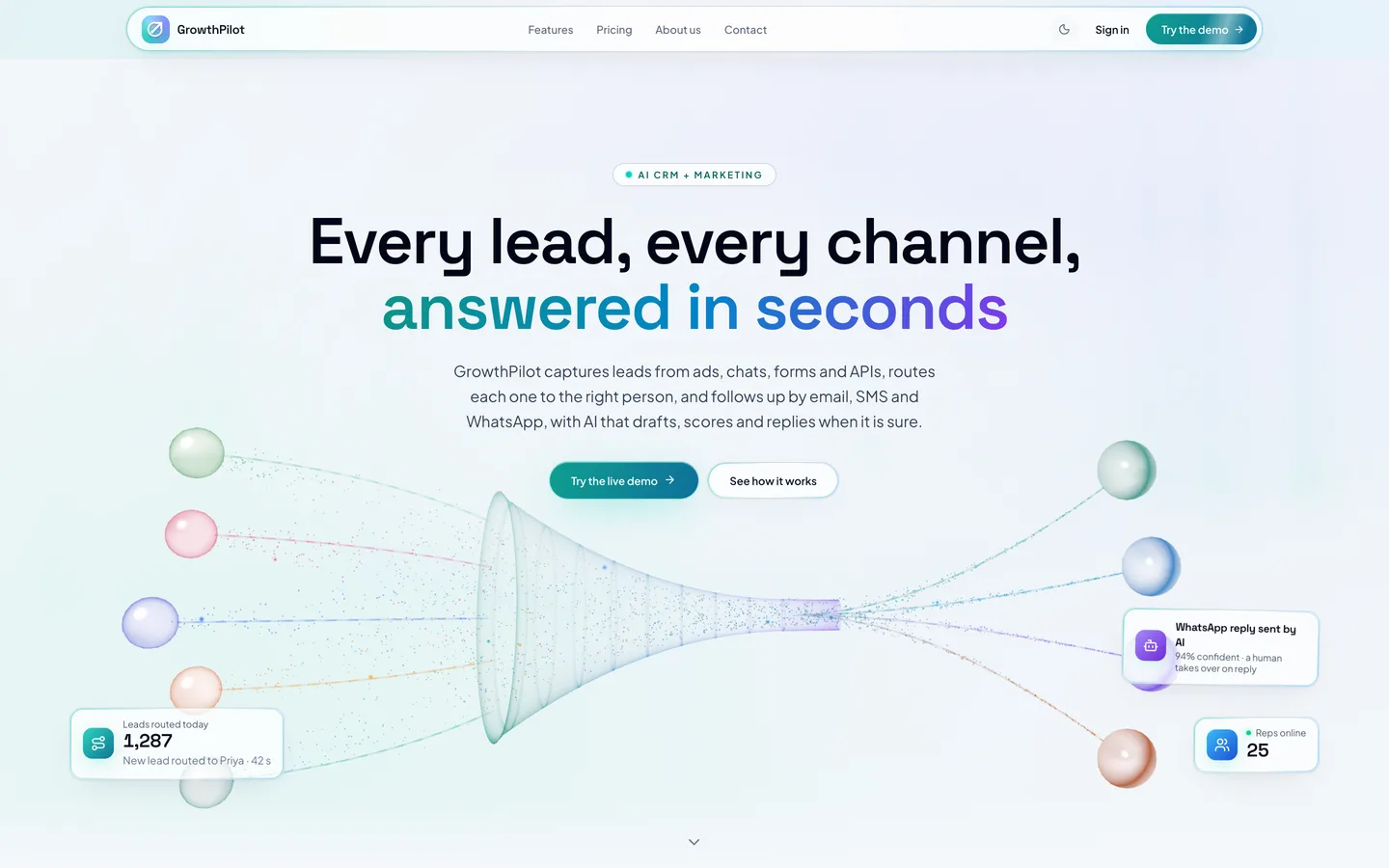
Public website — An animated 3D lead-funnel hero opens the marketing site, editable from the built-in CMS.

Public website — An animated 3D lead-funnel hero opens the marketing site, editable from the built-in CMS.

The challenge

Sales teams lose leads in the gaps between tools. Ads platforms, WhatsApp, website forms and partner APIs each deliver enquiries somewhere different, the same person turns up three times, and nobody knows who should reply or how quickly. Marketing then runs campaigns from yet another tool that does not know which leads were already won. Building one platform for all of it means dozens of channel integrations, rules about consent and messaging windows, fair automatic distribution and scheduled work that keeps running reliably, for many separate organisations on one installation.

Our solution

We built GrowthPilot as a multi-tenant Next.js 15 application on MongoDB, with a worker process (or a per-minute cron on serverless hosting) for everything that runs on a schedule.

Key design decisions

  • One intake for every channel. Meta webhooks, ad lead forms, web forms, the REST API, signed webhooks, API connectors and imports all go through the same ingest step. It de-duplicates contacts across channels, attaches repeat enquiries to the open lead and writes every change to the lead timeline.
  • Routing as configuration. Lead pools choose a strategy (round robin, weighted, load-balanced, skills, language or territory, performance-weighted, or a claim queue) and respect availability, capacity and working hours. First-response SLAs run on business hours and reassign or escalate when they are missed.
  • Scores that feed back. A points ledger rewards fast responses and wins and charges missed SLAs and overdue tasks; nightly snapshots build leaderboards and the performance weights that routing uses.
  • One send path. Every message goes through one queue that checks consent, the suppression list, the WhatsApp 24-hour window, quiet hours and frequency caps before handing it to SMTP, Mailgun, Bird, Twilio, MSG91 or the WhatsApp Cloud API.
  • Schedules that can overlap safely. SLA checks, campaigns, workflows, connectors, social posts and scoring are claimed before they run, so a worker and a cron call never do the same work twice.
  • AI as an optional assistant. Qualification, drafts, writers and segments are suggestions; auto-replies go out only when the model is confident, and with no key every AI control shows a clear connect state while the rest of the product works.
  • Guarded by checks. Every server action goes through a guarded wrapper, and static checks enforce right-to-left-safe classes and client/server import boundaries.

Results

GrowthPilot ships as a complete, sellable product with a public read-only demo of a sample organisation. By the numbers, counted from the source:

  • 6 lead-routing strategies and 6 built-in roles plus custom roles
  • 6 messaging providers across email, SMS and WhatsApp, and 3 social networks for publishing
  • 76 pages, 42 API routes and 63 Mongoose models
  • 213 Vitest tests in 28 files, plus static architecture checks

It deploys with Docker Compose, PM2 or Vercel, and is available on the DEV3 marketplace.

Setup guide

Requirements

  • Node.js 20.9 or newer and npm (or Docker)
  • MongoDB running as a replica set (transactions); hosted MongoDB clusters are replica sets already
  • A worker process, or a call to the cron endpoint every minute on serverless hosting
  • Accounts with the providers you want to use (Meta, Twilio, Mailgun, MSG91, Bird, LinkedIn); optional AI API key and Cloudinary

Install

  1. Download the ZIP from your DEV3 account and unzip it. Open Documentation/index.html in a browser for the full guide.

  2. Copy the environment template and fill it in:

    cp .env.example .env.local
    

    Set MONGODB_URI and MONGODB_DB, and random values for AUTH_SECRET, CRON_SECRET and FIELD_ENCRYPTION_KEY. The file explains the optional email, Meta, LinkedIn, Cloudinary, AI and cache settings.

  3. Install the dependencies (.npmrc sets legacy-peer-deps) and seed the demo organisation (about 280 leads, pools, campaigns and workflows; it never calls a paid API):

    npm install
    npm run seed
    
  4. Start the app with simulated channels, and the worker in a second terminal:

    CHANNELS_SIMULATE=1 npm run dev
    npm run dev:worker
    

    Open the address the app prints and sign in with one of the seeded demo accounts.

Production

  • Docker: docker compose up -d --build starts MongoDB, the app and the worker. Seed with docker compose --profile tools run --rm seed.
  • PM2: npm run build, then pm2 start ecosystem.config.js starts the app and the worker.
  • Vercel: set the environment variables; vercel.json calls /api/cron/tick every minute (a per-minute cron needs Vercel Pro; on Hobby, run the worker elsewhere).
  • Run npm run db:indexes once against a new database.
  • npm run verify runs the typecheck, lint, static checks and tests.

Connect your channels

  • Meta (Lead Ads, WhatsApp, Messenger, Instagram DMs): create a Meta app, point its webhook at https://<your domain>/api/hooks/meta with your META_WEBHOOK_VERIFY_TOKEN, subscribe to messages, leadgen and messaging, then connect the Page in Marketing → Social → Accounts.
  • Twilio, Mailgun, MSG91, Bird: add the account in Integrations → Channels and paste the webhook URL it shows into the provider's console.
  • Websites, Zapier, Make: create a webhook source in Integrations → Sources and sign requests with the shown secret.
  • REST API: create a key in Integrations → API keys and post leads to /api/public/v1/leads.
  • Any other API: set up an API connector with the URL, auth, pagination, field map and schedule.

Updates

Download the new version from Account → Downloads on dev3.tech. Keep your own changes on a branch and merge the new release into it.

How to use

Try the live demo

The live demo is read-only. The sign-in page has one-click accounts for each role (password Demo@1234):

  • admin@acme.test – organization admin: everything, including settings, integrations and roles
  • manager@acme.test – sales manager: lead pools, teams, scoring and every lead
  • lead@acme.test – team lead: the team's leads and scores
  • agent@acme.test – sales agent: own leads, inbox and follow-ups
  • marketer@acme.test – marketer: templates, campaigns, social and automations
  • owner@growthpilot.test – platform super admin: all organisations and the website CMS

Sends and social posts are simulated, and AI panels show how to connect a key.

Set up an organisation (admins)

  1. Teams and roles: invite people, put them in teams and give them a role, or build a custom role with scoped grants.
  2. Pipelines and fields: set your stages, custom fields and lost reasons.
  3. Lead pools: choose a distribution strategy, add members with capacity and working hours, and set the first-response SLA and escalation.
  4. Channels and sources: connect email, SMS and WhatsApp providers, Meta, forms, webhooks, API keys and connectors.
  5. AI (optional): add your key in the settings and switch on the AI features you want.

Work leads (sales)

  • New leads appear in Leads and on the Pipeline board; your SLA clock shows how long you have to respond.
  • Open a lead to see contact details, consent, routing history and the timeline; call, email or WhatsApp from there and log the outcome.
  • Reply to every conversation in the Inbox, using templates and internal notes.
  • Use tasks and reminders for follow-ups, and mark leads won or lost.

Grow (marketing)

  • Design emails in the Email builder and keep SMS and WhatsApp templates.
  • Build Segments from rules, then send Campaigns with A/B tests and read the report.
  • Plan posts in Social with approvals and the calendar.
  • Automate follow-ups with Workflows and auto-reply rules.

Measure

Reports show lead sources, conversion, response times and win rates by channel, campaign and agent, and Team scoring shows the leaderboard.
Related case studies