All case studies

DEV3 Technologies · own product

CryptoAI Pro: an AI market analysis platform for crypto and stocks, on the web and iOS

Our own product: a Next.js and MongoDB platform that streams crypto and stock prices, draws AI levels and zones on candlestick charts, writes structured AI briefings, detects signals and fires alerts, with a native SwiftUI iOS app. Built for analysis and education; it never places trades.

Industry
Fintech & market analytics

Live project preview

DEV3 Technologies · own product — screenshots
Open live demo
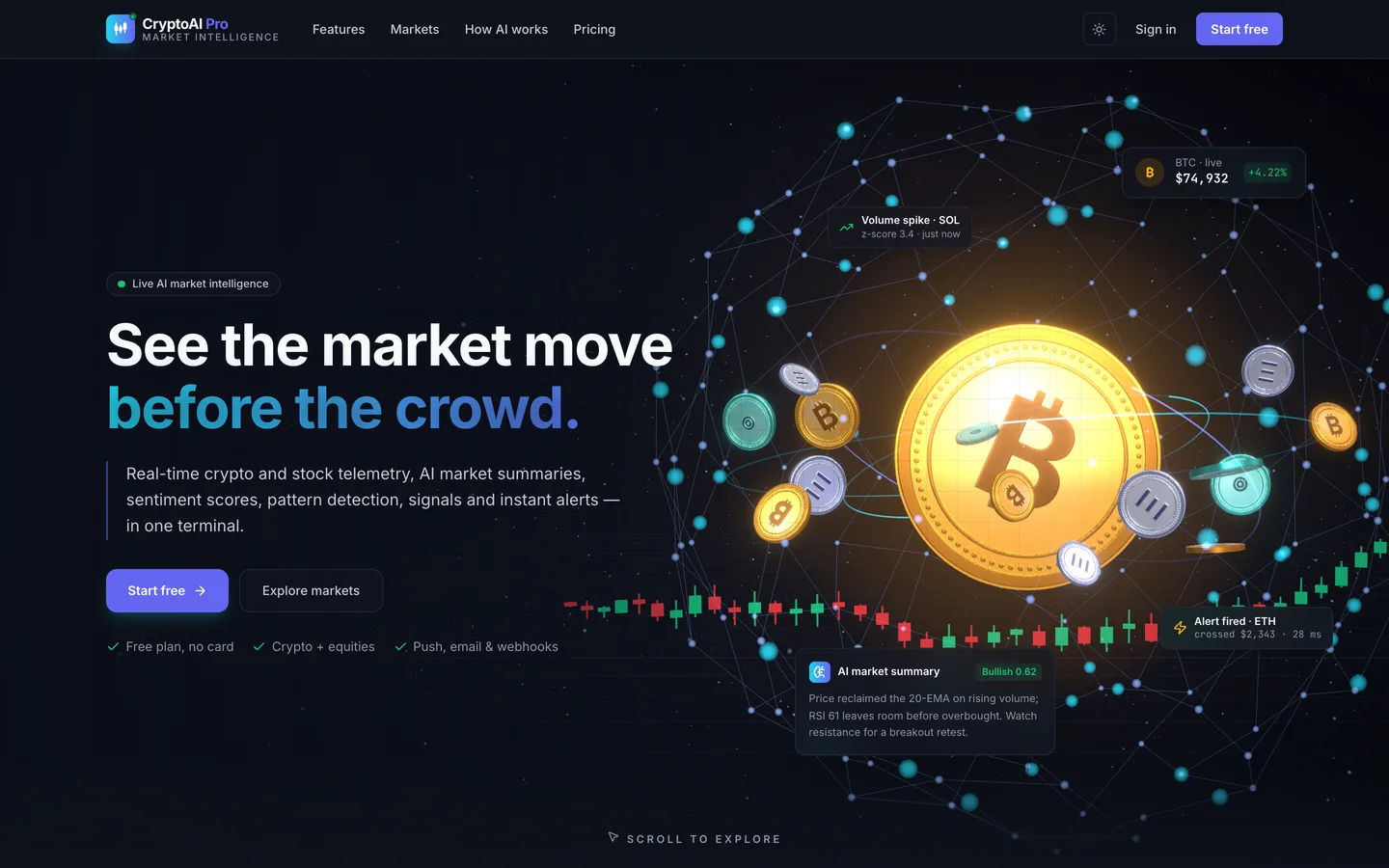
Landing page — A dark trading-terminal homepage with a live ticker tape, market HUD cards and a clear sign-up path.

Landing page — A dark trading-terminal homepage with a live ticker tape, market HUD cards and a clear sign-up path.

The challenge

Retail traders juggle a charting site, a news feed, an alert app and a chat window with an AI model, and none of them share context. Building one product that does all of this is harder than it looks: market data arrives from several providers that fail in different ways, AI analysis is slow and costs money on every call, alerts must fire within moments of a price move, and free and paid users need different refresh rates and quotas. On top of that, it has to be clear that the output is analysis, not advice, and the same rules have to hold in a native mobile app.

Our solution

We built CryptoAI Pro as three processes around one MongoDB replica set: a stateless Next.js 15 web app, a socket.io realtime sidecar and a background worker.

Key design decisions

  • One normalised market bus. Binance, CoinGecko, Finnhub and Yahoo sit behind provider adapters with circuit breakers. The worker rolls 1-minute candles into 5-minute, hourly and daily candles and backfills history, and a deterministic simulator stands in for every provider in development, tests and the public demo.
  • AI as typed, cached output. Versioned system prompts return structured JSON (sentiment, confidence, drivers, risks, levels and outlook) that the chart can draw. Results are cached for longer when an asset is calm and shorter when it is volatile, identical requests are de-duplicated, and watched assets are pre-warmed, so most views never wait for a model.
  • Alerts on every tick. The alert engine subscribes to the market bus and evaluates conditions as prices arrive, with cooldowns, then delivers in-app, by email, web push, iOS push or an HMAC-signed webhook, and logs each delivery.
  • Plans enforced on the server. AI calls per day, watchlist sizes, active alerts, API rate and refresh rate are plan quotas edited in the admin. Premium users get a streaming room per symbol; everyone else polls at their plan's rate.
  • One request pipeline. Every server action and API route passes session, permission, rate limit, validation, audit and revalidation in the same wrapper, and import-boundary checks keep server code out of the client bundle.
  • Clear guardrails. The product never places orders; the risk calculators and backtester work on paper, and the interface labels its output as analysis.

Native iOS app

The package also ships CryptoAI Pro iOS, a SwiftUI app for iPhone and iPad (iOS 26, Swift 6). It uses the web app's own /api/mobile layer, so quotas and Premium features are the server's rules, and it streams ticks through a small native Socket.IO client with no third-party dependency. A Live Activity pins a symbol to the Lock Screen and Dynamic Island, and signed-out visitors get the public site rendered natively from the same copy as the website.

Results

CryptoAI Pro ships as a complete, sellable product with a public read-only demo running on simulated market data. By the numbers, counted from the source:

  • 6 chart indicators and 5 signal detectors, on four candle timeframes
  • 4 alert conditions and 5 delivery channels, including signed webhooks and iOS push
  • 4 paper backtest strategies and 5 risk calculators
  • 57 test files with over 270 integration test cases against a real MongoDB

It runs as web, realtime and worker processes under PM2, or serverless with a cron endpoint, and is available on the DEV3 marketplace.

Setup guide

Requirements

  • Node.js 24 and npm
  • MongoDB running as a replica set (a single-node replica set is fine for development; hosted MongoDB clusters are replica sets already). Change streams and transactions need it.
  • No paid keys are required to start: without an AI key the analyses come from a deterministic mock, and MARKET_DATA=mock runs on the built-in market simulator.
  • For the iOS app: a Mac with Xcode 26 (iOS 26 SDK) and XcodeGen (brew install xcodegen).

Install the web app

  1. Download the ZIP from your DEV3 account and unzip it. Open Documentation/index.html in a browser for the full guide.

  2. Install the dependencies (.npmrc already sets legacy-peer-deps):

    npm install
    
  3. Copy the environment template and fill in the required values:

    cp .env.example .env.local
    

    Set MONGODB_URI and MONGODB_DB, then generate random values for AUTH_SECRET, FIELD_ENCRYPTION_KEY, CRON_SECRET and REALTIME_SECRET. Every other key is optional and explained in the file: the AI key and model, FINNHUB_API_KEY for stock streaming and news, Google sign-in, VAPID keys for web push, Mailgun or SMTP for email, reCAPTCHA, and the APNs keys for iOS push.

  4. Seed demo data (optional). It only writes into a database it created, and calls no paid API:

    npm run seed
    
  5. Start the three processes together (web app, realtime sidecar and worker):

    npm run dev:all
    

    Open the address the web process prints and sign in with one of the seeded demo accounts.

Production

  • Server (recommended): npm ci, npm run build, npm run db:indexes, then run the web app, the realtime sidecar and the worker under PM2 with the included ecosystem.config.js, behind a TLS reverse proxy that forwards /socket.io/ to the sidecar. The deployment guide in Documentation/ covers nginx, scaling and backups.
  • Serverless: the web app also runs on Vercel without the sidecar and worker. Schedule /api/cron/tick with Authorization: Bearer <CRON_SECRET>; clients then poll instead of streaming, and sub-second alerts need the worker.
  • Create your first Super Admin with npm run rbac:bootstrap -- --super-admin=<your email>.
  • npm run verify runs the typecheck, lint, import-boundary checks and the test suite against a test database.

Build the iOS app

  1. Deploy the web app first: the iOS app has no backend of its own and talks to the included /api/mobile layer.
  2. Open iOS-App/Config.xcconfig and set the app name, bundle id, Apple Team ID, brand gradient, URL scheme, Universal Links domain and the server URL for each build type.
  3. Run iOS-App/scripts/make-icons.sh (needs brew install librsvg) to redraw the icon from your brand colours.
  4. In iOS-App/, run xcodegen generate, open CryptoAiPro.xcodeproj, enable the App Group and Push Notifications capabilities and build.
  5. On the server, set NEXT_PUBLIC_REALTIME_URL for live streaming, and APPLE_TEAM_ID, APNS_KEY_ID, APNS_PRIVATE_KEY and IOS_BUNDLE_ID for push.

Updates

Download the new version from Account → Downloads on dev3.tech. Keep your own changes on a branch and merge the new release into it.

How to use

CryptoAI Pro is an analysis and education tool. It never places trades, and nothing it shows is financial advice; say so on your own deployment too (the legal pages are included).

Try the live demo

The live demo is read-only and runs on simulated market data. On the sign-in page, pick a one-click demo account (password Demo@12345):

  • admin@cryptoaipro.test – the admin console, prompt console, model configuration and telemetry
  • premium@cryptoaipro.test – streaming, AI patterns, AI history and the tools, with two watchlists and demo alerts
  • user@cryptoaipro.test – the free plan with polling, quotas and locked Premium features

Changes are refused with a friendly notice in the demo; your own installation saves everything.

Everyday use

  1. Find an asset. Use the search in the header (crypto and stocks) or the public markets board.
  2. Read the chart. Switch timeframes (1m, 5m, 1h, 1d), add indicators, and turn on the AI overlay to draw support, resistance, zones and signal markers.
  3. Read the AI analysis. The panel next to the chart shows sentiment, confidence, drivers, risks, levels and the outlook. Regenerate uses one of your daily AI calls.
  4. Build watchlists. Add assets, record positions, targets and notes, and watch value and P/L on the dashboard heat map.
  5. Set alerts. Choose a price level, a percentage move, a volume spike or an RSI cross, then the channels: in-app, email, push or a signed webhook.
  6. Follow signals. The signals page lists breakouts, divergences, volume spikes, MA crosses and trend changes, filtered by type and timeframe.
  7. Use the tools (Premium). Size positions and measure risk in the calculators, and paper-test strategies in the backtester.

Running the platform (admin)

  • Plans & settings: edit quotas for each plan (AI calls per day, watchlists, assets per list, active alerts, API and refresh rate) and site settings.
  • Users: change roles, grant Premium with an expiry, override AI limits and revoke sessions. Custom roles are built from a permission matrix.
  • Prompts and AI: edit versioned prompts, test them in the playground, roll back, choose the model, and track AI cost by prompt and model.
  • Market: check provider health and manage the asset catalog.
  • Operations: review alert deliveries, background jobs and schedules, telemetry and the audit log.

The iOS app

Install your build on a device, sign in with the same accounts, and use the Markets, Watchlists, Alerts, Insights and Me tabs. On an asset, pin the symbol as a Live Activity to follow it from the Lock Screen, and add the watchlist widget to the Home Screen. Push notifications for fired alerts arrive once the server has its APNs keys.
Related case studies