All case studies

DEV3 Technologies · own product

MERIDIAN: a procedural 3D watch configurator in Next.js and React Three Fiber

Our own Next.js template for a fictional watch maison: an eight-chapter scroll story around one real-time watch built entirely in code, with live local time, an exploded view, a beating calibre, glowing lume and a metal and dial configurator.

Industry
Luxury retail (website template)

Live project preview

DEV3 Technologies · own product — screenshots
Open live demo
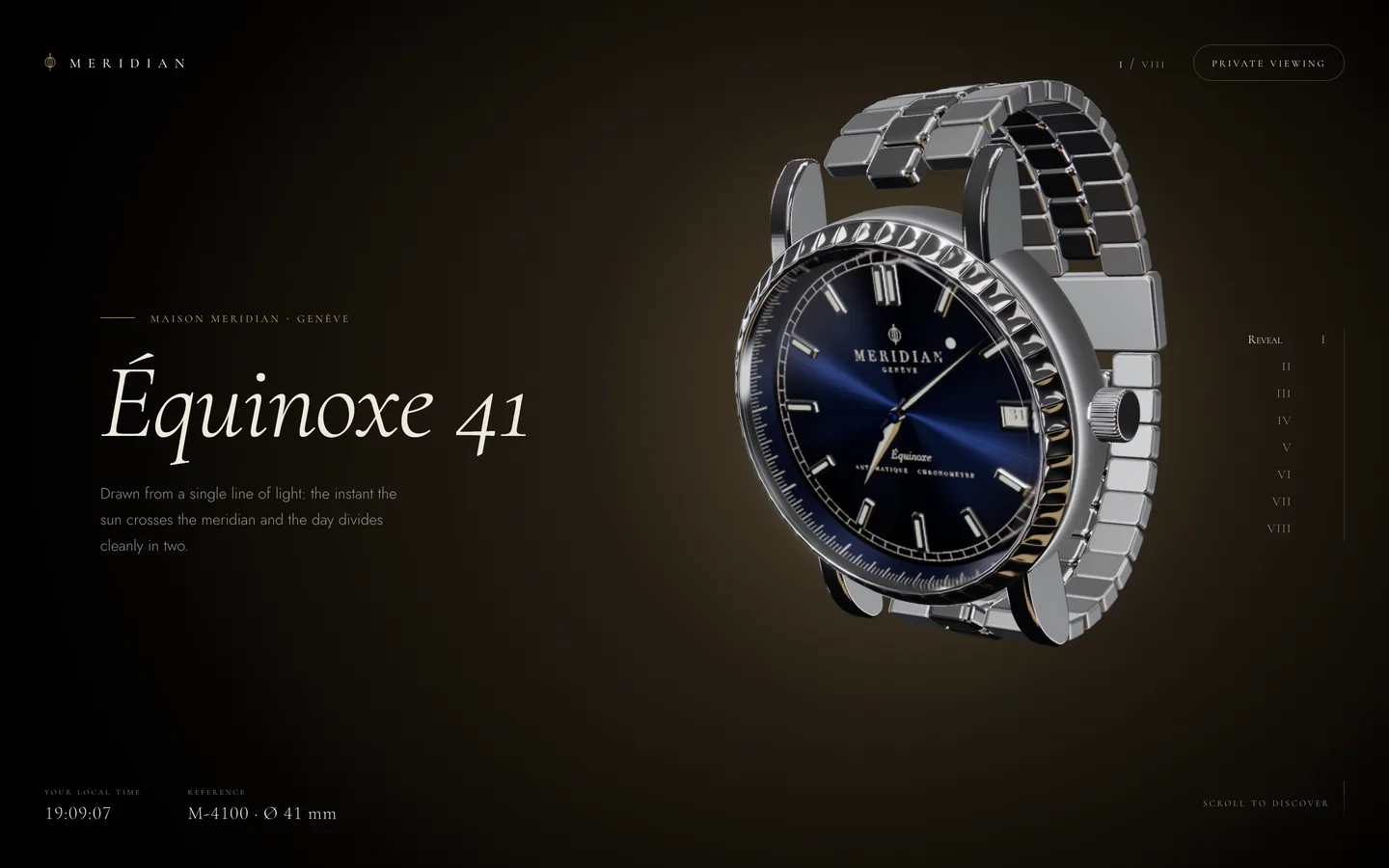
Équinoxe 41 reveal — a real-time 3D wristwatch from the fictional MERIDIAN maison turns in warm studio light.

Équinoxe 41 reveal — a real-time 3D wristwatch from the fictional MERIDIAN maison turns in warm studio light.

The challenge

Luxury product pages usually rely on studio photography or pre-rendered turntables, which look good but cannot react to the visitor. Real-time 3D can, but it often arrives as a heavy model file with licensing questions, plastic-looking materials and a configurator that stutters every time a material changes. We wanted a template that holds up to a watch lover's eye at close range, tells the product's story chapter by chapter, lets the buyer change metal and dial without a frame drop, and still behaves on phones and for visitors who prefer reduced motion.

Our solution

We built MERIDIAN on Next.js 16 and React Three Fiber 9, with three.js r187, postprocessing and Lenis.

Key design decisions

  • No model files. The case middle is a lathe profile, the 48 bezel flutes are displaced along the profile normal, and the crown, lugs, dauphine hands, gears and bracelet links are generated in lib/geometry.ts. Dial print, perlage, Côtes de Genève and the caseback engraving are canvas textures from lib/textures.ts. Nothing needs a third-party licence.
  • Morph, don't swap. The configurator never replaces a material, because that would recompile shaders. morphMaterials() lerps colour and roughness on one shared set of MeshPhysicalMaterials each frame toward the chosen metal and dial.
  • A store outside React. Scroll progress, velocity and per-chapter poses live in a mutable object in lib/journey.ts; samplePose() eases rotation, explode, lume, bracelet and studio intensity with smootherstep. React only hears about chapter and configuration changes through useSyncExternalStore.
  • Photographic light. Softboxes, rim strips and a bounce card are baked once with PMREM into the environment, and the reveal animates environment rotation and intensity. Bloom uses an HDR threshold so only lume and hot glints glow.
  • Live and honest. The hands read the visitor's own clock, and the booking dialog confirms locally with no backend, ready to be wired to a real one.
  • Motion with an off switch. Reduced motion disables smoothing, snap glides, fly-in, parallax, chromatic aberration and text effects; portrait screens get their own camera table.

Results

MERIDIAN ships as a complete Next.js project of about 2,700 lines of TypeScript across the scene, UI and content files, with eight chapters, three metals, four dials and a seven-part exploded view, and no binary assets beyond the favicon.

It passes tsc --noEmit and ESLint, builds as a normal Next.js app or as a static export, and the hosted live demo is that static export. Screenshots and video tours were captured from the running template at desktop, tablet and phone sizes with the included Playwright script.

MERIDIAN is available on the DEV3 marketplace.

Setup guide

Requirements

  • Node.js 20.9 or newer, with npm
  • A WebGL2-capable browser for development and testing
  • No environment variables, API keys or database are needed

Install

  1. Download the ZIP from your DEV3 account and unzip it.
  2. Open a terminal in the unzipped folder and run npm install.
  3. Start the development server with npm run dev, then open the address it prints in your browser. The dev script uses port 3210; change -p 3210 in package.json if that port is taken.
  4. Scroll, or use the arrow keys, Page Up/Down and Space, to move through the eight chapters.

Documentation/index.html (open it in a browser) and README.md describe the architecture in more detail.

Check and build

  • npx tsc --noEmit – type-check the project
  • npm run lint – run ESLint
  • npm run build then npm start – a production build served by Node

Deploy to Vercel

Push the folder to a Git repository and import it in Vercel. The defaults for a Next.js project work as-is: build command npm run build, no environment variables.

Deploy as a static site

MERIDIAN has no server code, so it can be exported to plain HTML, CSS and JavaScript:

  1. Build with the export settings by setting DEMO_EXPORT_BASE to the path the site will live under, for example DEMO_EXPORT_BASE=/watch npm run build. The build:demo script in package.json is an example of this.
  2. Upload the generated out/ folder to any static host or CDN (Netlify, Cloudflare Pages, S3, nginx).

To serve the export from a domain root, edit next.config.ts and remove basePath and assetPrefix from the export branch. NEXT_PUBLIC_DEMO_DOWNLOAD_URL is only used by the hosted demo's badge; leave it unset and the badge does not render.

Updates

Download the new version from Account → Downloads on dev3.tech. Keep your edits to lib/watch.ts, app/globals.css and any components you changed, and merge them into the new files.

How to use

Edit the copy and chapters

All content is in lib/watch.ts:

  • MODEL is the product name shown in the HUD and dialog.
  • CHAPTERS holds each chapter's kicker, title, tagline and optional stats pairs. The stat values live:time and live:zone are replaced with the visitor's local time and time zone.
  • PARTS lists the seven exploded-view callouts in assembly order (name and sub-line).
  • CH maps chapter ids to indexes; keep it in step if you add or remove chapters.

The booking dialog's boutique list and confirmation text are in components/ui/Booking.tsx. The dialog confirms locally and sends nothing: connect its submit handler to your CRM, email service or form endpoint.

Change the configurator options

METALS and DIALS in lib/watch.ts define the swatches. Each metal has a display name, a sub-line, a color, polish and brush roughness values and a swatch colour; each dial has a color, a print colour for the numerals and logo, and a swatch. Add or remove entries and update the MetalId and DialId types. The scene morphs the shared materials toward the selection every frame, so new options need no extra materials.

Tune poses and camera stops

  • POSES in lib/journey.ts sets, per chapter, the watch rotation, explode (0–1), lume (0–1), open (bracelet laid flat) and env (studio light intensity).
  • components/scene/CameraRig.tsx has one camera stop per chapter, in a DESKTOP table and a PORTRAIT table used below an aspect ratio of 0.9.
  • Adding a chapter means one entry in CHAPTERS, POSES and both camera tables.

Swap the watch for your own model

The watch is procedural: geometry in lib/geometry.ts, textures in lib/textures.ts, assembly in components/scene/Watch.tsx and materials in components/scene/materials.ts. To show your own product, load a GLB with three.js's GLTFLoader (or drei's useGLTF if you add it) inside Watch.tsx and assign the shared materials from createMaterials() to its meshes, so the configurator keeps working. Use models you have the rights to and credit them as their licence requires.

Colours and fonts

  • Page colours are CSS variables at the top of app/globals.css: --bg, --fg, --dim, --gold (accent) and --lume (after-dark accent). The 3D background colour is set in components/scene/Experience.tsx.
  • Fonts are loaded with next/font/google in app/layout.tsx: Cormorant Garamond for display, Cormorant SC for small caps and Jost for body text. Replace them with any Google or local font and keep the --font-display, --font-caps and --font-sans variables.

Lighting and effects

  • The studio softboxes and bounce card are in components/scene/Studio.tsx.
  • Bloom, chromatic aberration, tone mapping, grain and vignette are in components/scene/Experience.tsx. Lower the bloom intensity or remove effects for a lighter build; the device pixel ratio is capped at 1.75 there.

Reduced motion and accessibility

Reduced motion is detected in components/Journey.tsx and stored as journey.reducedMotion. Keep that check in any animation you add. Chapters can be reached from the keyboard and the chapter rail, and the configurator swatches are radio buttons with labels.
Related case studies